# 2020q1 Homework2 (fibdrv)
contributed by < `colinyoyo26` >
###### tags: `linux2020`
> [H03: fibdrv](https://hackmd.io/@sysprog/linux2020-fibdrv)
## 測試環境
* 5.3.0-40-generic
* 18.04.1-Ubuntu
* x86_64 GNU/Linux
* gcc version 7.4.0
## Fast Doubling
欲實現以下公式
$$
\begin{split}
F(2k) &= F(k)[2F(k+1) - F(k)] \\
F(2k+1) &= F(k+1)^2+F(k)^2
\end{split}
$$
先寫一個簡單的版本,沒考慮大數運算,因為原本的實作 cppcheck 出現以下報錯所以先更改產生 `mask` 的方式
`[fibdrv.c:40]: (error) Shifting signed 64-bit value by 63 bits is undefined behaviour
`
:::warning
TODO:
釐清是否確實為 UB 並嘗試修正問題
:::
C99 規格書 6.5.7 Bitwiseshift operators
- If the value of the right operand is negative or is ==greater than or equal== to the width of the promoted left operand, the behavior is undefined
- he result of E1 >> E2 is E1 right-shifted E2 bit positions.If E1 has an unsigned typeor if E1 has a signed type and a nonnegative value, the value of the result is the integ ralpart of the quotient of E1 / 2E2. ==If E1 has a signed type and a negative value, the resulting value is implementation-defined==
> 規格書中只有提到右移 signed type with negtive value 為 implementation-defined
C99 規格書 3.4.1 Implementation-defined behavior
- unspecified behavior where each implementation documents how the choice is made
- EXAMPLE
- An example of implementation-defined behavior is the propagation of the high-order bitwhen a signed integer is shifted right
```diff
static long long fib_sequence(long long k)
{
#define BITS sizeof(long long) * 8
if (unlikely(!k))
return 0;
long long fcur = 1, fnext = 1;
/* off is offset of checking bit from MSB */
for (int off = __builtin_clzll(k) + 1; likely(off < BITS); off++) {
long long t1 = fcur * ((fnext << 1) - fcur);
long long t2 = fcur * fcur + fnext * fnext;
- long long mask = (k << off) >> (BITS - 1);
+ long long mask = ((k >> (BITS - 1 - off)) & 1) - 1;
- fcur = (t1 & ~mask) + (t2 & mask);
- fnext = t2 + (t1 & mask);
+ fcur = (t1 & mask) + (t2 & ~mask);
+ fnext = t2 + (t1 & ~mask);
}
return fcur;
#undef BITS
}
```
## copy_to_user
原本的實作中 `read` 直接回傳了結果,但是這樣一來能傳的數就被 `long long` 型態的表示範圍限制住了,且 read 成功,應該要回傳讀進的 byte 數,所以我做了以下更改,用 `copy_to_user` 把計算結果以字串的形式複製到 user space 的 buffer `buf` 中
```diff
static ssize_t fib_read(struct file *file,
char *buf,
size_t size,
loff_t *offset)
{
- return (ssize_t) fib_sequence(*offset);
+ char *fibnum = fib_sequence(*offset);
+ int len = strlen(fibnum);
+ copy_to_user(buf, fibnum, (len + 1) * sizeof(char));
+ kfree(fibnum);
+ return len;
}
```
## Big number
接著我實作了無號大數,會隨著數字大小動態增加儲存空間,測試用 DP 和 fast doubling 計算第一百萬個 fibonacci number 是正確的,目前只能輸出 16 進位數字
可以調整 `client.c` 的 `offset` , `verify.py` 的迴圈次數,並用 `gensol.py` 產生對應的 `expected_hex.txt` 測試看看 (建議先調 10000 測試!)
- [Source Code](https://github.com/colinyoyo26/fibdrv/blob/master/bignum.h)
以下是資料結構,`ptr` 指向實際存放數字的地方,按照 little endian 的方式存放, `size` 是使用中的, `capacity` 是已被分配的空間 (unit is `sizeof(unsigned long long)` bytes)
```cpp
typedef struct bignum {
unsigned long long *ptr;
unsigned int size; //#sizeof(unsigned long long) bytes are used
unsigned int capacity;
} bn;
```
為了配合 16 進位的輸出所以我把 [verify.py](https://github.com/colinyoyo26/fibdrv/blob/master/scripts/verify.py) 也改成 16 進位
```diff
- f0 = int(result_split[-1][9].split('.')[0])
+ f0 = result_split[-1][9].split('.')[0]
...
- if (expect[i[0]] != fib):
+ if (format(expect[i[0]], 'X') != fib):
print('f(%s) fail' % str(i[0]))
print('input: %s' %(fib))
- print('expected: %s' %(expect[i[0]]))
- exit()
+ print('expected: %s' %format(expect[i[0]], 'X'))
+ exit()
```
## Fast Doubling w/ big number
接著用 [big number](https://github.com/colinyoyo26/fibdrv/blob/master/bignum.h) 實作了 fast doubling,其中乘法的實作在更下面
```cpp
static char *fib_sequence(long long k)
{
unsigned long long mask = 1ull << (BITS - 1);
unsigned int off = __builtin_clzll(k) + 1;
mask >>= off;
bn fcur, fnext, t1, t2;
bn fcur_sqrt;
bn_init(&fcur);
bn_init(&fnext);
bn_init(&t1);
bn_init(&t2);
bn_init(&fcur_sqrt);
bn_assign(&fcur, 1);
bn_assign(&fnext, 1);
if (unlikely(k <= 1)) {
bn_assign(&fcur, k);
return bn_hex(&fcur);
}
for (; mask; mask >>= 1) {
bn_sll(&t1, &fnext, 1);
bn_sub(&t1, &t1, &fcur);
bn_mul(&t1, &t1, &fcur);
bn_mul(&fcur_sqrt, &fcur, &fcur);
bn_mul(&t2, &fnext, &fnext);
bn_add(&t2, &t2, &fcur_sqrt);
bn_swap(&fcur, &t1);
bn_swap(&fnext, &t2);
if (k & mask) {
bn_add(&t1, &fcur, &fnext);
bn_swap(&fcur, &fnext);
bn_swap(&fnext, &t1);
}
}
return bn_hex(&fcur);
}
```
目前先用最簡單的二進位直式乘法實作,效能上還有很大的改進空間
```cpp
static inline void bn_mul(bn *result, bn *a, bn *b)
{
if (bn_capacity(result) < bn_size(a) + bn_size(b))
bn_resize(result, bn_size(a) + bn_size(b));
bn tem;
bn_init(&tem);
bn_assign(result, 0);
unsigned long long check_bit = 1;
for (int i = 0; i < bn_size(a); i++, check_bit = 1)
for (int j = 0; j < BITS; j++, check_bit <<= 1)
if (check_bit & a->ptr[i]) {
bn_sll(&tem, b, (i << BITS_TZ) + j);
bn_add(result, result, &tem);
}
kfree(tem.ptr);
}
```
## 從 sysfs 界面讀取執行時間
> The sysfs filesystem is a pseudo-filesystem which provides an interface to kernel data structures
因為用 `printk` 拿到執行時間可能會影響到 user space 測量到的時間,所以我透過 sysfs 界面存取 kernel data structure
在 sysfs 建立子目錄 `/sys/kernel/kobj_ref` ,且在此目錄下建立 file `kt_ns` ,讓 `client` 讀取時計算好 ktime 接者 `cat kt_ns` 拿到其值
以下設定 sysfs 界面
- 先設定好 `attribute`
```cpp
struct kobject *kobj_ref;
...
static struct kobj_attribute ktime_attr = __ATTR(kt_ns, 0664, show, store);
static struct attribute *attrs[] = {
&ktime_attr.attr,
NULL,
};
static struct attribute_group attr_group = {
.attrs = attrs,
};
```
- 用 `kobject_create_and_add` 建立目錄 (一個 kernel object 對應一個目錄),`sysfs_create_group` 在此 knernel object 下建立檔案
```diff
static int __init init_fib_dev(void)
{
...
+ kobj_ref = kobject_create_and_add("kobj_ref", kernel_kobj);
+ if (!kobj_ref)
+ return -ENOMEM;
+ if (sysfs_create_group(kobj_ref, &attr_group))
+ kobject_put(kobj_ref);
...
}
```
- 離開時用 `kobject_put` 減少 reference count (變 0 時會銷毀)
```diff
static void __exit exit_fib_dev(void)
{
mutex_destroy(&fib_mutex);
device_destroy(fib_class, fib_dev);
class_destroy(fib_class);
cdev_del(fib_cdev);
unregister_chrdev_region(fib_dev, 1);
+ kobject_put(kobj_ref);
}
```
- 當 client 讀取 driver 時會執行 `fib_sequence` 並測量時間放在 `kt` ,接著直接 `cat kt_ns` 就能拿到其值了, `store` 這邊我寫成可以直接計算 $n_{th}$ fibonacci number ,方便測試
```cpp
static ktime_t kt;
static long long kt_ns;
static ssize_t show(struct kobject *kobj,
struct kobj_attribute *attr,
char *buf)
{
kt_ns = ktime_to_ns(kt);
return snprintf(buf, 16, "%lld\n", kt_ns);
}
static ssize_t store(struct kobject *kobj,
struct kobj_attribute *attr,
const char *buf,
size_t count)
{
int ret, n_th;
ret = kstrtoint(buf, 10, &n_th);
kt = ktime_get();
kfree(fib_sequence(n_th));
kt = ktime_sub(ktime_get(), kt);
if (ret < 0)
return ret;
return count;
}
```
在 `client.c` 以及 `Makefile` 也作對應的修改
> [client.c diff](https://github.com/colinyoyo26/fibdrv/commit/29606543d8b48e848fb3b42f506dd73e001921c4)
- 在 `client.c` 定義以下函式以獲取 ktime
```cpp
#define KOBJ "/sys/kernel/kobj_ref/kt_ns"
long long get_ktime()
{
int kobj = open(KOBJ, O_RDONLY);
if (!kobj)
return -1;
char buf[32];
int len = pread(kobj, buf, 31, 0);
close(kobj);
if (len < 0)
return -2;
buf[len - 1] = '\0';
return atol(buf);
}
```
- `Makefile` 則是在 `check` target 部份順便執行 plot script
```diff
check: all
$(MAKE) unload
$(MAKE) load
sudo ./client > out
+ @gnuplot scripts/plot.gp
$(MAKE) unload
@diff -u out scripts/expected_hex.txt && $(call pass)
@scripts/verify.py
```
測試:
> 計算第十萬個 fibonacci number 約花 0.39 秒
```shell
$ sudo sh -c "echo 100000 > kt_ns"
$ cat kt_ns
386954030
```
:::warning
對照 [bignum](https://github.com/sysprog21/bignum) 的實作,後者表現比上述快 10 倍,請一併探討原因。
:notes: jserv
:::
## 探討 bignum 實作效能差異
以下紀錄對照老師的 [bignum](https://github.com/sysprog21/bignum) 實作,逐步優化我的 [bignum](https://github.com/colinyoyo26/fibdrv/blob/master/bignum.h) 的過程,以下執行時間都通過 sysfs 得到
### `bn_add`
首先我先用老師的 [bignum](https://github.com/sysprog21/bignum) 實作了 DP 版本的 `fib_sequence` 和我的比較效能 (只用到 `bn_add` 運算),發現連 `bn_add` 的效能也有巨大的差異
先發現 `bn_add` 以下迴圈,原本用很彆扭的判斷式降低了程式效能,改進後計算第十萬個 fibonacci number (DP) 沒開最佳化速度提昇了約 1.5 倍
> 執行時間從 0.346 秒進步到 0.201 秒 (最佳化開 -O2 約花 0.1 秒)
> [ec0c7b0](https://github.com/colinyoyo26/fibdrv/commit/ec0c7b09370abc5f33acb1bd142bfcaa6c274d71)
```diff
for (i = 0; i < bn_size(b); i++) {
unsigned long long a_val = a->ptr[i];
unsigned long long b_val = b->ptr[i];
- result->ptr[i] = a_val + b_val + carry;
- carry = ((a_val + carry > ~b_val) || (a_val > ~carry));
+ carry = (a_val += carry) < carry;
+ carry += (result->ptr[i] = a_val + b_val) < b_val;
}
```
接者在 user space 測量 `k` 為十萬時花在 `bn_add` 的時間,和老師的實作差不多都花約 0.08秒 (一樣用 DP ,最佳化開 `-O2`)
```diff
for (int i = 0; i < k; i++) {
+ long long tem = get_nanotime();
bn_add(&r, &fnext, &fcur);
+ t += get_nanotime() - tem;
```
### `bn_mul`
接著繼續在 user space 作實驗,最佳化開 `-O2` ,測量兩個實作 fast doubling 計算第十萬個 fibonacci 花在乘法的時間,結果如預期乘法是效能瓶頸,接著著手從演算法層面最佳化
> 因為我的乘法效能太差,計算時間反而比 DP 久
- 我的執行時間 0.19 秒, 0.1865 秒花在乘法上
- 老師的執行時間 0.008 秒, 0.004 秒花在乘法上
## 效能分析
接下來視覺化 Fast Doubling w/ big number 的執行時間,發現計算更大的 fibonacci number 時 kernel to user 的時間顯得沒有影響,這是因為花在 `fib_sequence` 的時間遠遠大於 kernel to user space 的 overhead


## 用統計手法去除極端值
假設數據分佈接近常態分佈的情況下,一個標準差到三個標準差之內的資料量約佔 68%, 95%, 99.7%
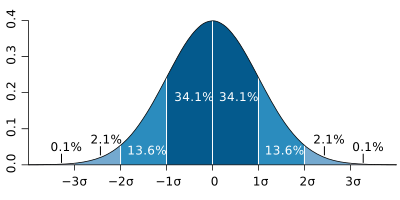
> 圖片來源: [wikipedia](https://zh.wikipedia.org/wiki/%E6%A8%99%E6%BA%96%E5%B7%AE)
### Python script 實作以及結果
> [4ce43c4](https://github.com/colinyoyo26/fibdrv/commit/4ce43c4e7ee0b80c4ce9e6dcd995bbfdf239206c)
`datas` 的資料為計算某個 fibonacci number 的時間,並用此手法去除 95% 區間之外的值
- 其中 `z` 代表某個 sample 距離 mean 幾個標準差
```python
def outlier_filter(datas, threshold = 2):
datas = np.array(datas)
z = np.abs((datas - datas.mean()) / datas.std())
return datas[z < threshold]
```
處理計算每個 fibonacci number 的時間,最後返回處理好資料 (去除 outlier 再取平均)
> 這邊的寫法 locality 會很差,還能改進
```python
def data_processing(data_set, n):
catgories = data_set[0].shape[0]
samples = data_set[0].shape[1]
final = np.zeros((catgories, samples))
for c in range(catgories):
for s in range(samples):
final[c][s] = \
outlier_filter([data_set[i][c][s] for i in range(n)]).mean()
return final
```
以下是分別是計算 $100th$ 和 $1000th$ fibonacci number 的結果,單獨一張圖看起來可能還是波動很大,但對照組放下去就能看出差異
> 這邊我沒設定 affinity 不然曲線能夠更平滑
- 每個數據取樣 50 次,對照組為直接平均
- 第一個 sample 都有時間偏高的現象,推測是 `unlikely` 巨集的影響


從處理過數據的圖中可以更明顯的看出執行時間有週期性波動的趨勢,但我還不知道原因
:::warning
思考過 cache 的影響嗎?
:notes: jserv
:::


:::warning
TODO:
1. 考慮多執行緒
2. <s>用統計手法去除極端值</s>
3. 優化 [bignum](https://github.com/colinyoyo26/fibdrv/blob/master/bignum.h) 乘法效能
4. 考慮 `kzalloc` 等函式失敗情形
5. 嘗試修正 cppcheck 報錯
:::
## Reference
- [sysfs.txt](https://github.com/torvalds/linux/blob/c309b6f24222246c18a8b65d3950e6e755440865/Documentation/translations/zh_CN/filesystems/sysfs.txt)
- [kobject.txt](https://github.com/torvalds/linux/blob/c309b6f24222246c18a8b65d3950e6e755440865/Documentation/kobject.txt)
- Kernel: [kobject.h](https://github.com/torvalds/linux/blob/f678d6da749983791850876e3421e7c48a0a7127/include/linux/kobject.h)
- Kernel: [cdev.h](https://github.com/torvalds/linux/blob/6f0d349d922ba44e4348a17a78ea51b7135965b1/include/linux/cdev.h)
- Kernel: [char_dev.c](https://github.com/torvalds/linux/blob/213356fe986faff3580f2c12c14773f53da32768/fs/char_dev.c)
- Kernel: [kobject_example.c](https://elixir.bootlin.com/linux/v5.3/source/samples/kobject/kobject-example.c)
 Sign in with Wallet
Connect another wallet
Sign in with Wallet
Connect another wallet