<style>
.red {
color: red;
}
.blue {
color: blue;
}
</style>
## Introduction
- Computer architecture (計算機結構)
- 系統的功能性行為
- ex. data types、支援的功能
- Programmer 需要知道的。
- Computer organization (計算機組織)
- 結構間的關係。
- ex. 對外的 interface、clock frequency
- Programmer 可能看不到。
### Classes of Computing Applications
- **Personal Computers** (PC)
- Designed for **use by an individual**
- Usually incorporating a **graphics display**, a **keyboard**, and a **mouse**
- Execute **3rd-party software**
- ex. 桌機、筆電。
- **Servers** 伺服器
- Much **larger computers** usually are **accessed only via a network**
- Used for **running larger programs** for **multiple users** simultaneously
- To carry large **workloads**(工作量)
- ex. 單一大型複雜工作或是很多小工作。
- Usually based on software from another source
- Built from the same basis technology as PCs
- The widest range in cost and capability
- Low-end server: File Storage, simple web server ...
- **Supercomputers**: consist of tens of thousands of processors and many terabytes of memory

- **Embedded computers** 嵌入式系統
- A **computer inside another device**
- Used for **running one predetermined application** or collection of software
- Internet of Things (**IoT**) **物聯網**
- ex: 家電, 汽車, 微電腦, 微控制器
- The widest range of application and performance.
- Integrated with the hardware and delivered as a single system.
- Embedded Applications
- Often have unique application requirements
- Combine a **minimum performance** with stringent **limitations on cost or power**
- Often have lower tolerance for failure
### PostPC era 後個人電腦
- PC $\Rightarrow$ Personal mobile device (**PMD**)
- **Small wireless devices** to connect to the Internet
- **Like PCs**: users can download software (apps) to run on them.
- **Unlike PCs**: keyboard and mouse $\Rightarrow$ touch-sensitive screen or speech input
- Server $\Rightarrow$ **Cloud** computing
- **Cloud computing** (雲端運算)
- **Large collections of servers** that provide services over the Internet
- Some providers rent dynamically varying numbers of **servers as a utility**
- **Warehouse scale computers** (WSC)
- To rely upon **giant datacenters**
- Companies **rent portions of WSCs** and **provide software services** to PMDs
- ***Without*** having to build WSCs of their own
- **Software as a Service** (SaaS) 軟體即服務
- To deliver software and data as a service over the Internet
- Only a **thin program** such as a browser **runs on local** client devices
## Seven Great Ideas in Computer Architecture
### 1. Use abstraction to simplify design
- 抽象化概念簡化硬體設計
- Use abstractions to represent the design at **different levels of representation**
- **Lower-level details are hidden** to offer a simpler model at higher levels
### 2. Make the common case fast
- 常用的 case 要有較好的效能。
- Making the common case fast will tend to **enhance performance better** than optimizing the rare case
- The common case is often simpler and easier to enhance than rare case
### 3. Performance via parallelism
- 平行化提升效能。
- To perform operations in **parallel** to get **more performance**
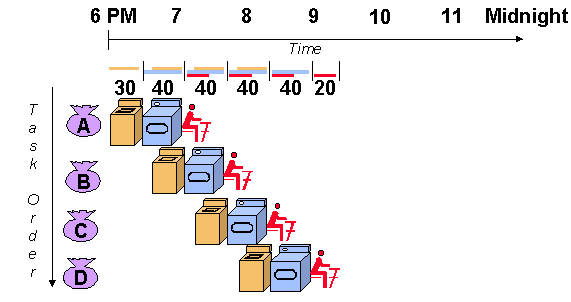
### 4. Performance via pipelining (Chap 4)
- An implementation technique in which multiple **instructions are overlapped in execution**
- 重疊部分 instruction 的執行時間
**Non-pipelining**

**Pipelining**
### 5. Performance via prediction
- 利用預測提高效能。
- 預先執行一些還沒確定要執行的運算
- To **guess and start working** rather than wait until you know for sure
- **Assumptions**
- The recovery from a misprediction is not too expensive
- The prediction is relatively accurate
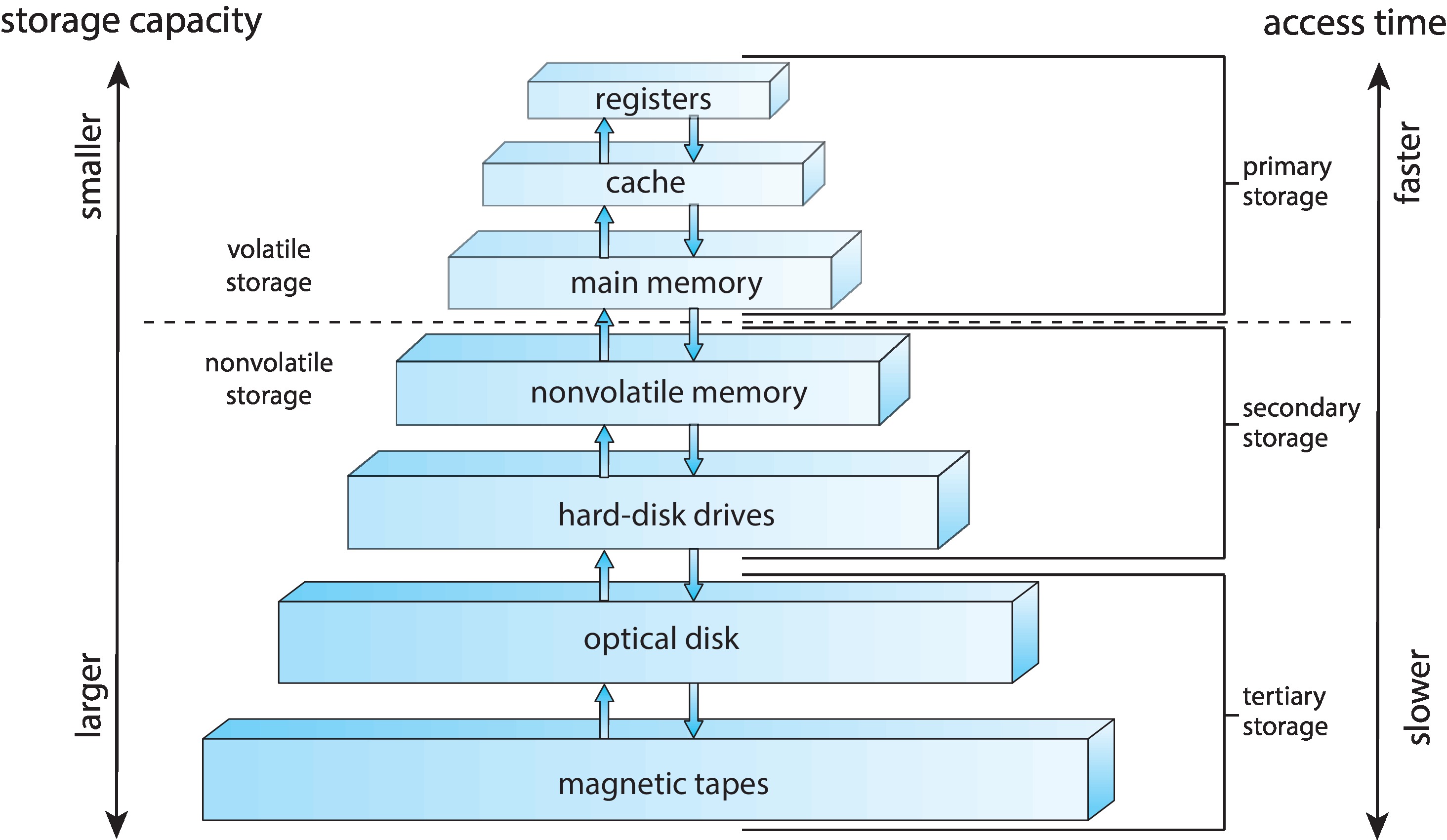
### 6. Hierarchy 階層 of memories
- 善用記憶體階層設計。
- Programmers want memory to be fast, large, and cheap
- Hierarchy of memories
- The fastest, smallest, and most expensive memory per bit at the top
- The slowest, largest, and cheapest per bit at the bottom
- Cache 快取
- Main memory
- Disk
### 7. Dependability via redundancy(冗餘)
- Computers need to be **fast and dependable**
- Since any physical device can fail, we make systems **dependable** by including redundant components
- To **take over** when a **failure occurs**
- To help detect failures
## About Moore’s Law 摩爾定律
- **Transistor density** increased by about 35% per year
\+ **Die size** increased by about 10%~20% per year
- $\Rightarrow$ **Transistor count on a chip** increased by about 40%~50% per year, or **doubling every 18~24 months**
- This prediction was accurate for 50 years, but it is no longer accurate today
> Die: 裸晶,未被封裝的積體電路
## Below Your Program
### A simple view of hardware and software

- **Application software**
- To consists of millions of lines of code
- To **rely on sophisticated (複雜的) software libraries**
- Those libraries **implement complex functions**
- **Systems software**
- **OS**
- Handling **basic input/output** operations
- **Allocating** storage and memory (***resources***)
- Providing for **protected sharing** of the computer among **multiple applications** using it **simultaneously**.
- **Compiler**
- To translate a program written in a **high-level languages into instructions** that the hardware can execute.
- **Hardware**
- Can only execute extremely simple low-level instructions
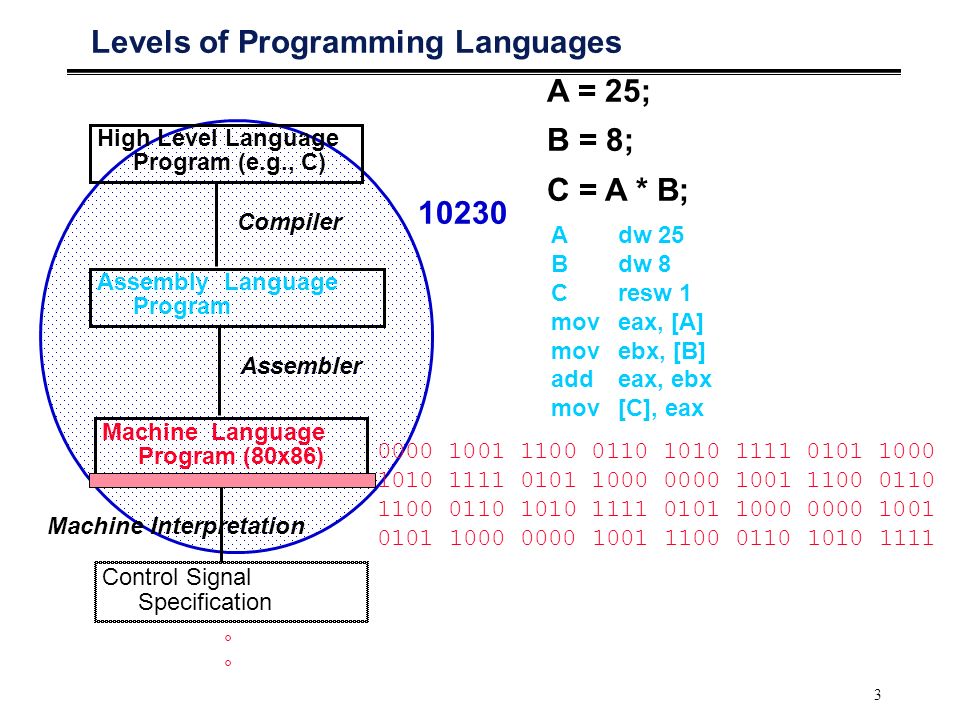
### From a high-level language to the language of hardware
- **High-level programming language**
- Composed of words and algebraic notation
- To provide for **productivity and portability**
- Can be translated by a compiler into assembly language
- **Assembly language**
- A **symbolic** representation of machine instructions
- Can be translated by an **assembler** into the **binary version**
- **Machine language**
- A binary representation of machine instruction
- **Binary digit** (bit)
## Under the Covers
### <font class="red">Five classic components of a computer</font>
- **Processor - CPU** (**datapath** + **control**)
- **Input device**
- **Output device**
- **Memory**

- This organization is independent of hardware technology
### Opening the box
- Integrated circuit (chip)
- Central processor unit (CPU)
- Memory
- **Dynamic** Random Access Memory (DRAM)
- Cache memory
- **Static** Random Access Memory (SRAM)
- Instruction set architecture (ISA)
- Application binary interface (ABI)
### A safe place for data
- Volatile (揮發性) memory vs. Nonvolatile memory
- **Volatile memory**
- 只有在供電時才能儲存資料
- 斷電時資料消失
- ex. SRAM, DRAM
- **Nonvolatile memory**
- hard disk, flash memory, DVD, ...
- Primary memory vs. Secondary memory
- **Primary memory**
- **Main memory** (通常指 DRAM)
- **Secondary memory**
- Storage Device (通常指 disk)
## Communicating with other computers
- Networked computers advantages
- **Communication**
- **Resource sharing**
- Nonlocal access (**remote access**)
- Local area network (**LAN**)
- Designed to carry data within a **geographically confined area**
- Typically within a single building
- Wide area network (**WAN**)
- A network extended over hundreds of kilometers that can span a continent
- Wireless network
- WiFi, Bluetooth...
## Technologies for Building Processors and Memory
- The technologies that have been used over time
- Vacuum tube $\rightarrow$
- transistor $\rightarrow$
- integrated circuit (IC) $\rightarrow$
- very large-scale integrated circuit (VLSI) $\rightarrow$
- ultra large-scale integrated circuit (ULSI)
### The manufacture of a chip
- Terminologies
- Silicon
- Semiconductor
- Silicon crystal ingot
- Wafer
- Die (chip)
- Defect
- Yield
- The cost of an integrated circuit
- 根據經驗法則推出
- Cost per die = Cost per wafer / (Dies per wafer $\times$ Yield)
- Dies per wafer $\approx$ Wafer area / Die area
- $$\rm{Yield = \cfrac{1}{(1 + (Defects\ per\ area\times Die\ area / 2))^2}}$$
## Performance
### Defining performance
What is "one computer has ***better performance*** than another"?
- The ***faster*** computer is the one that gets the job done ***first***.
- The ***faster*** computer is the one that complete the ***most*** jobs.
:::danger
**總結: 電腦的效能是需要定義的。**
:::
#### Response time vs Throughput
- **Response time (*execution time*)**
- 任務從開始到執行完成的時間。
- Including disk access, memory access, I/O activities, operating system overhead, CPU execution time, and so on...
- **Throughput (*bandwidth*)**
- 單位時間完成的工作量。
- 替換更快的處理器可使 response time 與 throughput 提升。
- 增加處理器進行平行處理可使 throughput 提升,若處理的需求量與 throughput 相同,則 response time 也會提升。
---
==(p.29 公式)== 效能是執行時間的倒數
$$
\text{Performance}_x\ =\ \frac{1}{\text{Execution time}_x}
$$
:::info
**Example**:
Computer A runs a program in 10 sec, computer B runs the **same program** in 15 sec. **How much faster is A than B?**
$$
\rm\frac{Performance_A}{Performance_B}\ =\ \frac{Execution\ time_B}{Execution\ time_A}\ =\ \frac{15}{10}\ =\ 1.5
$$
So, **A is 1.5 times faster than B**,
or **B is 1.5 times slower than A**.
:::
### Measuring performance
**Time** is the measure of computer performance:
- Wall-clock time (**response time**, elapsed time)
- **The total time to complete a task**
- 包含 CPU 執行的時間、I/O 的時間、waiting 的時間 ...
- CPU execution time (**CPU time**)
- The time the CPU spends computing for a task(不包含其他等待的時間)
- **User CPU time**: the CPU time spent in a program itself.
- **System CPU time**: the CPU time spent in the operating system performing tasks on behalf of the program.
- E.g., OS 可能封裝了一些操作
- 例如 load A,邏輯上從 RAM 把 data 載入到 register,但實際上 data 可能在硬碟上
- OS 偷偷把 data 從硬碟拉到 RAM 裡面的時間就是 Sys CPU time
- **System performance**: the elapsed time on an unloaded system
- **CPU performance**: user CPU time
Other metrics:
- **Clock cycle** (tick, clock tick, clock period, clock, cycle)
- The time for **one clock period** (ps)
- **Clock rate**
- The **inverse** of the clock period (Hz)
### CPU performance and its factors
- ==**CPU execution time** for a program==
= <font class="blue">**CPU clock cycles for a program $\times$ Clock cycle time**</font>
= <font class="blue">**CPU clock cycles for a program / Clock rate**</font>
- The hardware designer can **improve** performance by
- Reducing the length of the clock cycle
- Reducing the number of clock cycles required for a program
- ***Trade-off*** between above two factors
:::info
**Example**: Improving performance
**Q.**
- A program runs in 10 seconds on computer A, which has a 2 GHz clock.
- We want to build a computer B that will run this program in 6 seconds.
- To increase the clock rate is possible, but will require 1.2 times as many clock cycles as computer A.
- **What clock rate should computer B have?**
**A.**
1.
$$
\begin{split}
\rm{CPU\ Time_A} &= \rm{CPU\ Clock\ Cycles_A} / {Clock\ Rate_A} \\
10 &= \rm{CPU\ Clock\ Cycles_A} / (2 \times 10^9) \\
\rm CPU\ Clock\ &\rm Cycles_A = 20 \times 10^9 Cycles
\end{split}
$$
2.
$$
\begin{split}
\rm{CPU\ Time_B} &= 1.2 \times \rm{CPU\ Clock \ Cycles_A} / {Clock\ Rate_B} \\
6 &= 1.2\times (20 \times 10^9) / \rm{Clock\ Rate_B} \\
&\rm{Clock\ Rate_B} = 4GHz
\end{split}
$$
- ***To run the program in 6 seconds, B must have twice the clock rate of A***.
:::
### Instruction performance
The execution time must depend on the number of instructions in a program:
- **CPU clock cycles required for a program**
= <font class="blue">**Instructions for a program $\times$ Average clock cycles per instruction**</font>
- **Clock cycles per instruction (CPI)**
= <font class="blue">**The <font style="background-color: yellow">average</font> number of clock cycles each instruction takes to execute**</font>
:::info
**Example**: Using the performance equation
**Q.**
- **Computer A and B have the same ISA**
- Computer A: clock cycle time 250 ps, CPI 2.0 for **same** program
- Computer B: clock cycle time 500 ps, CPI 1.2 for the **same** program
- Which computer is faster for this program and by how much?
**A.**
- Assume the program has $I$ instruction
- CPU clock cycles A = $I$ $\times$ 2.0, CPU clock cycles B = $I$ $\times$ 1.2
- CPU timeA = $I$ $\times$ 2.0 $\times$ 250 = 500 $\times$ $I$ ps **faster !**
CPU timeB = $I$ $\times$ 1.2 $\times$ 500 = 600 $\times$ $I$ ps
- ***Computer A is 1.2 times as fast as computer B for this program***
:::
### The classic CPU performance equation
- Instruction count
- The number of instructions executed by the program
- **CPU time**
= <font class="blue">**Instruction count $\times$ CPI $\times$ Clock cycle time**</font>
= <font class="blue">**Instruction count $\times$ CPI / Clock rate**</font>
:::info
**Example**: Comparing code segments
**Q.**
- A compiler designer is trying to decide between two code sequence for a particular computer
- Which code sequence executes the most instructions?
- Which will be faster?
- What is the CPI for each sequence?

**A.**
- The number of executed instructions
- Sequence 1: 2 + 1 + 2 = 5
- Sequence 2: 4 + 1 + 1 = 6 **more !**
- Execution time
- CPU clock cycles~1~ = (2 $\times$ 1) + (1 $\times$ 2) + (2 $\times$ 3) = 10 cycles
- CPU clock cycles~2~ = (4 $\times$ 1) + (1 $\times$ 2) + (1 $\times$ 3) = 9 cycles **faster !**
- CPI
- CPI~1~ = CPU clock cycles~1~ / Instruction count~1~ = 10/5 = 2
- CPI~2~ = CPU clock cycles~2~ / Instruction count~2~ = 9/6 = 1.5
:::
To combine all factors:
$$
\rm{Time = \frac{Seconds}{Program} = \frac{Instructions}{Program}\times\frac{Clock\ cycles}{Instruction}\times\frac{Seconds}{Clock\ cycle}}
$$
- ==The only complete and reliable measure of performance is time==
- Changing the instruction set to lower instruction count
$\Rightarrow$ An organization with a slower clock cycle time or higher CPI
- CPI depends on type of instructions executed
$\Rightarrow$ The fewest number of instructions may not be the fastest
- How to determine the value of factors
- **CPU execution time**
- Running the program
- **Clock cycle time**
- Usually be published for a computer
- **Instruction count**
- Depend on the architecture but not on the exact implementation
- 跟高階語言有關,跟硬體較無關係。
- Using software tools to profile the execution
- Simulator of the architecture
- Hardware counter
- **CPI**
- Depend on a wide variety of design details in the computer
- Detailed simulation of an implementation
- Hardware counter
- To look at the different types of instructions and using their individual clock cycle counts
$$
\text{CPU clock cycle} = \sum_{i=1}^n{CPI_i \times C_i}
$$

- The danger of using only one factor to access performance
- All three components must be considered
- CPI varies by **instruction mix**
- Major factors to affect CPI
- The performance of the **pipeline**
- The performance of the **memory system**
## The Power Wall
### Clock rate vs. Power
- Both **increased rapidly for decades** and then flattened or **dropped off recently**
- The reason they **grew together**
- Clock rate and power are correlated
- The reason for their recent slowing
- 散熱問題
- We have to run into the practical **power limit** for **cooling commodity microprocessors**
### The really critical resource is *energy* in the PostPC era
- Battery life can trump performance in the PMD
- Architects of WSCs try to reduce the costs of powering and cooling 50,000 servers
- The energy metric joules is a better measure than a power rate like watts
- **Watts = Joules/Second**
### In CMOS technology
- The primary source of energy consumption is **dynamic energy**
- Consumed when transistors switch states from 0 to 1 and vice versa
- $\rm{Energy \propto Capacitive\ load \times Voltage^2}$
- The energy of a pulse during the logic transition of $0 \rightarrow 1 \rightarrow 0\rm\ or\ 1 \rightarrow 0 \rightarrow 1$
- $\rm{Energy \propto \frac{1}{2}Capacitive\ load \times Voltage^2}$
- The energy of a single transition
- The power required per transistor
- $\rm{Power \propto Capacitive\ load \times Voltage^2 \times Frequency\ switched}$
- **Frequency switched** is a function of the **clock rate**
- **Capacitive load** per transistor is a function of **fanout** and the technology
- Clock rates grew by a factor of 1000 while power grew by only a factor of 30
- Energy and thus **power can be reduced by lowering the voltage**
- The voltage was reduced about 15% per generation
- Voltages have gone from 5V to 1V in 20 years
:::info
**Relative power**
- **Q**:
- A new processor with 85% capacitive load, voltage is reduced by 15%, and 15% shrink in frequency
- What is the impact on dynamic power?
- **Sol**:

:::
### Problem today
- Further lower the voltage will make the transistors too leaky
- 40% of the power consumption in server chips is due to **leakage**.(不使用也會損耗)
- If transistors started leaking more, the whole process could become unwieldy.
- Power reducing methods
- To attach large devices to increase cooling
- Too expensive for PCs and even servers, not to mention PMDs
- To turn off parts of the chip that are not used in a given clock cycle
- Computer designers slammed into a power wall
### Multicore microprocessor
- The improving rate in response time of programs has slowed down
- Since 2006, microprocessors $\rightarrow$ **multiple processor per chip**
- The benefit is often more on **throughput** than on **response time**
- Terminologies: Processor vs. Microprocessor
- **Processors** = **Cores**
- **Microprocessors** are generally called **multicore microprocessors**
- Ex. quadcore
- For programmers to get significant improvement in response time
- **In the past**
- To **rely on innovations in hardware**, architecture, and compilers to double performance **every 18 months**
- Without having to change a line of code
- **Today**
- To **rewrite programs** to take advantage of multiple processors (將程式平行化)
- To continue to improve performance of their code as the number of cores increases
### It is hard to write explicitly parallel programs
- Programming for performance
- The program need to be **not only correct but also fast**
- To provide a **useful interface** to the people or other programs that invoke it
- **Load balancing**
- **pros**
- To **divide an application**
- That **each processor** has roughly **the same amount to do** at the same time
- **cons**
- The overhead of **scheduling** and coordination
- **Communication** and **synchronization** overhead
## Real Stuff: Benchmarking the Intel Core i7
### SPEC CPU benchmark
- **Workload**
- A set of programs run on a computer.
- Either the actual collection of applications run by a user or constructed from real programs to approximate such a mix.
- Typically specify both the programs and the relative frequencies.
- **Benchmark**
- Programs specifically **chosen to measure performance**.
- To predict the performance of the actual workload.
- To know accurately “which case is common”
- **SPEC** (system performance evaluation corporation) **benchmark**
- Standard sets of benchmarks for modern computer systems
- Funded and supported by a number of **computer vendors**
### SPEC power benchmark
- To report power consumption of servers at different workload levels over a period time
- Divided into 10% increments
- Performance is measured in throughput
- Unit: business operations per second (ssj_ops)
- Summary measurement

## Fallacies(謬論)and Pitfalls(陷阱)
### Fallacies
- Computers at low utilization use little power
- Utilization of servers in Google’s WSC
- Mostly operates at 10%~50% of the load
- At 100% of the load less than 1% of the time
- The specially configured computer in 2020 still uses 33% of the peak power at 10% of the load (the same as in 2012)
- To redesign hardware to achieve energy-proportional computing
- Designing for performance and designing for energy efficiency are unrelated goals
- Energy = power $\times$ time
- Hardware or software optimizations that take less time save energy overall even if the optimization takes a bit more energy when it is used.
### Pitfalls
- 期望電腦某一方面的改進能夠以與成比例的方式改進電腦的效能。
- Expecting the improvement of one aspect of a computer to increase performance by an amount proportional to the size of the improvement.
#### Amdahl's law
A rule stating that the performance enhancement possible with a given improvements is limited by the amount that the improved feature is used.
---
- Using a subset of the performance equation as a performance metric
- Nearly all alternatives to the use of time as the performance metric have led to misleading claims, distorted results, or incorrect interpretations
- MIPS (million instructions per second)

 Sign in with Wallet
Connect another wallet
Sign in with Wallet
Connect another wallet