---
title: Swift Animation Usage Description
tags: 研究, APP 組, iOS, Swift
GA: UA-54884750-6
---
Referance:
- https://developer.apple.com/documentation/foundation/timeinterval
- https://medium.com/@z1235678/7671aa1bca5d
---
Usage:
```s
UIView.animate(withDuration, animations)
UIView.animate(withDuration, animations, completion)
UIView.animate(withDuration, delay, options, completion)
```
---
Parameter:
- withDuration:動畫的執行過程總共多少秒
- animations:指定你想要變更的屬性。程式會自動用初始狀態至結束狀態來建立動畫
- completion:動畫完成時,要做的動作。
- delay:動畫開始之前,要先停幾秒。
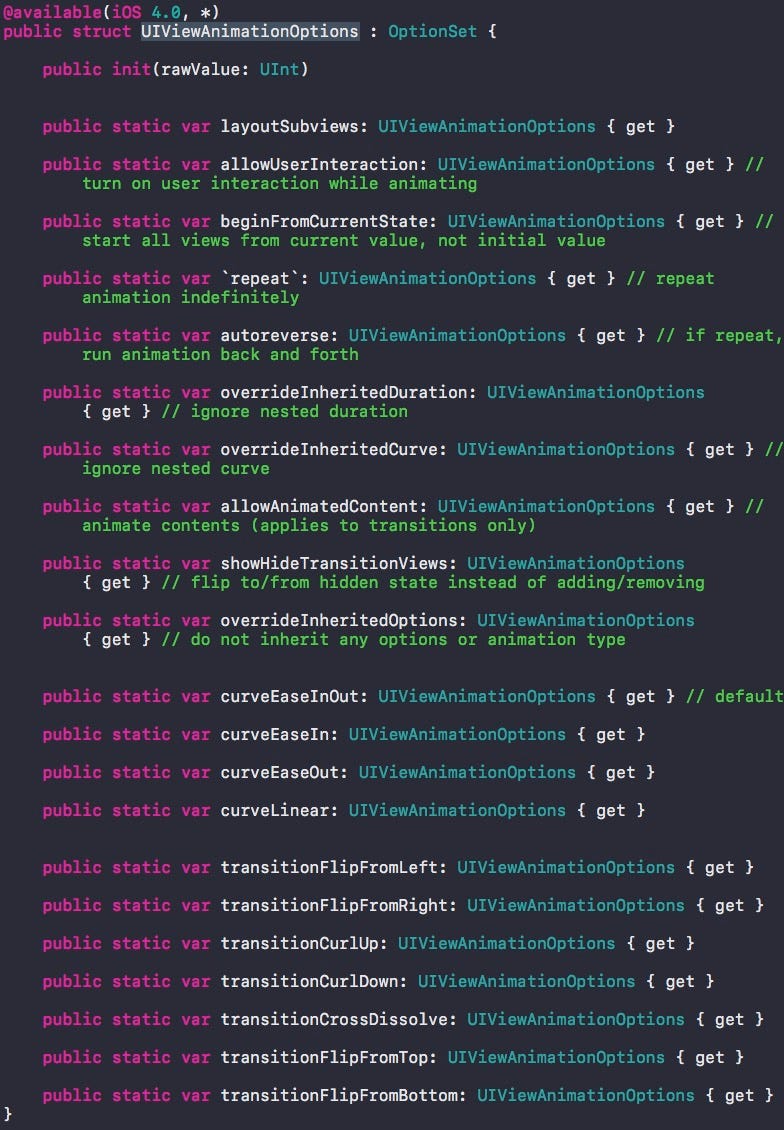
- options:用來指示你要執行動畫的方式。可用參數:
---
---
Example:
```s
public func shakeButton(currect: Bool) {
DispatchQueue.main.async {
let bounds = self.loginButton.bounds;
UIView.animate(withDuration: 2.0, delay: 0.0, usingSpringWithDamping: 0.2, initialSpringVelocity: 10, options: .curveLinear, animations: {
self.loginButton.bounds = CGRect(x: bounds.origin.x - (currect ? 0 : 50), y: bounds.origin.y - (currect ? 50 : 0), width: bounds.size.width + (currect ? 0 : 150), height: bounds.size.height + (currect ? 150 : 0));
}, completion: { finished in self.loginButton.isEnabled = true });
}
}
```
---
可做動畫的屬性:
- 位置、大小
- frame: 改變物件的位置及大小。
- center: 改變物件的位置。如果只是改變x或y,可以用center.x、center.y
- 顏色:
- backgroundColor: 改變背景色。
- alpha: 改變alpha值,可以用來做淡出、淡入的效果。
- 形變:
- transform: 改變物件的大小、旋轉等。
---
Example:
```s
UIView.animate(withDuration: 3) {
self.view8.transform = self.view8.transform.rotated(by: CGFloat(M_PI))
}
```
---
比較不一樣的參數:
- 彈跳:
- usingSpringWithDamping: 彈跳的反作用力,數值越小振動效果越明顯 0.1~1
- initialSpringVelocity: 初始的速度,數值越大一開始移動越快
---
Example:
curveEaseOut (To curve move out something):
```s
UIView.animate(withDuration: 1.0, delay: 0.0, options: .curveEaseOut, animations: {
self.mainStackViewYAlign.constant -= self.view.bounds.height;
self.view.layoutIfNeeded();
}, completion: nil);
```
 Sign in with Wallet
Connect another wallet
Sign in with Wallet
Connect another wallet