# 如何在Google Colab上執行帶有Tikz的LaTex文件
為了要在Google Colab上顯示帶有Tikz的LaTeX Document,首先必須安裝[jupyter-tikz][1]這個套件,按照網頁的說明,依序安裝==Tex Live==及==Poppler==這2個套件即可
**Tex Live**
!sudo apt-get install texlive-latex-base
!sudo apt-get install texlive-latex-extra
!sudo apt-get install texlive-latex-recommended
!sudo apt-get install texlive-fonts-recommended
之後輸入以下指令來確認Tex Live是否安裝成功
pdflatex --version
___
**Poppler**
!sudo apt-get install poppler-utils
安裝Poppler主要是為了裡頭的pdftocairo,可輸入以下指令確認是否安裝成功
pdftocairo -v
___
隨後只要安裝jupyter-tikz,並利用cell magic語法即可載入
!pip install jupyter-tikz
%load_ext jupyter_tikz
我們可以嘗試一個簡單的例子,來試試看它的效果
%%tikz
\begin{tikzpicture}
\draw[help lines] grid (5, 5);
\draw[fill=black!10] (1, 1) rectangle (2, 2);
\draw[fill=black!10] (2, 1) rectangle (3, 2);
\draw[fill=black!10] (3, 1) rectangle (4, 2);
\draw[fill=black!10] (3, 2) rectangle (4, 3);
\draw[fill=black!10] (2, 3) rectangle (3, 4);
\end{tikzpicture}
它的輸出看起應該會是這樣子
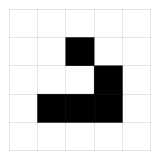
我們還可以搭配其它的參數,來檢視它的輸出,比如使用 **-pt**,來印出整個LaTeX文件
%%tikz -pt
\begin{tikzpicture}
\draw[help lines] grid (5, 5);
\draw[fill=black!10] (1, 1) rectangle (2, 2);
\draw[fill=black!10] (2, 1) rectangle (3, 2);
\draw[fill=black!10] (3, 1) rectangle (4, 2);
\draw[fill=black!10] (3, 2) rectangle (4, 3);
\draw[fill=black!10] (2, 3) rectangle (3, 4);
\end{tikzpicture}
```
\documentclass{standalone}
\usepackage{tikz}
\begin{document}
\begin{tikzpicture}
\draw[help lines] grid (5, 5);
\draw[fill=black!10] (1, 1) rectangle (2, 2);
\draw[fill=black!10] (2, 1) rectangle (3, 2);
\draw[fill=black!10] (3, 1) rectangle (4, 2);
\draw[fill=black!10] (3, 2) rectangle (4, 3);
\draw[fill=black!10] (2, 3) rectangle (3, 4);
\end{tikzpicture}
\end{document}
```
從印出的結果來看,我們可以看到跟原本的略有不同,前後多了幾行文字
> \documentclass{standalone}
> \usepackage{tikz}
> \begin{document}
> ...
>
> \end{document}
正常的LaTex其實是會包含上述文字的,如果以下面這個範例,丟進jupyter-tikz,是會產生錯誤的
%%tikz
\documentclass{standalone}
\usepackage{tikz}
\usetikzlibrary{external}
\tikzexternalize
\begin{document}
\begin{tikzpicture}[x={(0cm,-1cm)},y={(1cm,0cm)},box/.style={rectangle,draw=black,thick,minimum size=1cm,anchor=center}]
\node[box,fill={rgb,255:red,175;green,175;blue,255}] at (0,0) {\shortstack{T0 \\ V0}};
\node[box,fill={rgb,255:red,175;green,175;blue,255}] at (0,-2) {\shortstack{T0 \\ V0}};
\node[box,fill={rgb,255:red,175;green,175;blue,255}] at (-2,0) {\shortstack{T0 \\ V0}};
\node at (0,-3) {\Large{\texttt{0}}};
\node at (-1,-2) {\Large{\texttt{0}}};
\node at (-3,0) {\Large{\texttt{0}}};
\node at (-2,-1) {\Large{\texttt{0}}};
\end{tikzpicture}
\end{document}
它會顯示這樣的錯誤
```
[Loading MPS to PDF converter (version 2006.09.02).]
) (/usr/share/texlive/texmf-dist/tex/latex/epstopdf-pkg/epstopdf-base.sty
(/usr/share/texlive/texmf-dist/tex/latex/latexconfig/epstopdf-sys.cfg))
! LaTeX Error: Can be used only in preamble.
See the LaTeX manual or LaTeX Companion for explanation.
Type H <return> for immediate help.
...
l.4 \documentclass
{standalone}
?
! Emergency stop.
...
l.4 \documentclass
{standalone}
! ==> Fatal error occurred, no output PDF file produced!
Transcript written on 842590dc92bd45443e4af9ae63e4ad56.log.
```
它的錯誤資訊也很明白的告訴你,在前言(preamble)的部分有問題,因為LaTeX的前言,是定義在\begin{document}之前,有些文字定義只能出現在這之前,若違反這項規定,就會印出這些錯誤資訊。此時用前面提到的 **-pt**參數,就會清楚多了
%%tikz -pt
\documentclass{standalone}
\usepackage{tikz}
\usetikzlibrary{external}
\tikzexternalize
\begin{document}
\begin{tikzpicture}[x={(0cm,-1cm)},y={(1cm,0cm)},box/.style={rectangle,draw=black,thick,minimum size=1cm,anchor=center}]
\node[box,fill={rgb,255:red,175;green,175;blue,255}] at (0,0) {\shortstack{T0 \\ V0}};
\node[box,fill={rgb,255:red,175;green,175;blue,255}] at (0,-2) {\shortstack{T0 \\ V0}};
\node[box,fill={rgb,255:red,175;green,175;blue,255}] at (-2,0) {\shortstack{T0 \\ V0}};
\node at (0,-3) {\Large{\texttt{0}}};
\node at (-1,-2) {\Large{\texttt{0}}};
\node at (-3,0) {\Large{\texttt{0}}};
\node at (-2,-1) {\Large{\texttt{0}}};
\end{tikzpicture}
\end{document}
最後印出的資訊
```
\documentclass{standalone}
\usepackage{tikz}
\begin{document}
\documentclass{standalone}
\usepackage{tikz}
\usetikzlibrary{external}
\tikzexternalize
\begin{document}
\begin{tikzpicture}[x={(0cm,-1cm)},y={(1cm,0cm)},box/.style={rectangle,draw=black,thick,minimum size=1cm,anchor=center}]
\node[box,fill={rgb,255:red,175;green,175;blue,255}] at (0,0) {\shortstack{T0 \\ V0}};
\node[box,fill={rgb,255:red,175;green,175;blue,255}] at (0,-2) {\shortstack{T0 \\ V0}};
\node[box,fill={rgb,255:red,175;green,175;blue,255}] at (-2,0) {\shortstack{T0 \\ V0}};
\node at (0,-3) {\Large{\texttt{0}}};
\node at (-1,-2) {\Large{\texttt{0}}};
\node at (-3,0) {\Large{\texttt{0}}};
\node at (-2,-1) {\Large{\texttt{0}}};
\end{tikzpicture}
\end{document}
\end{document}
```
從上面印出的結果來看,可以看到有2行\begin{document},從第一行\begin{document}之後就不算是前言了,夾在2個\begin{document}之間的文字是有問題的,所以把多出來的部分移去即可
%%tikz
\begin{tikzpicture}[x={(0cm,-1cm)},y={(1cm,0cm)},box/.style={rectangle,draw=black,thick,minimum size=1cm,anchor=center}]
\node[box,fill={rgb,255:red,175;green,175;blue,255}] at (0,0) {\shortstack{T0 \\ V0}};
\node[box,fill={rgb,255:red,175;green,175;blue,255}] at (0,-2) {\shortstack{T0 \\ V0}};
\node[box,fill={rgb,255:red,175;green,175;blue,255}] at (-2,0) {\shortstack{T0 \\ V0}};
\node at (0,-3) {\Large{\texttt{0}}};
\node at (-1,-2) {\Large{\texttt{0}}};
\node at (-3,0) {\Large{\texttt{0}}};
\node at (-2,-1) {\Large{\texttt{0}}};
\end{tikzpicture}

參考資料:
1. [jupyter-tikz][1]
2. [Learn LaTeX in 30 minutes](https://www.overleaf.com/learn/latex/Learn_LaTeX_in_30_minutes)
3. [[QST] What are other arguments in TiledMMA and TiledCopy, other than their thread layouts? #1142](https://github.com/NVIDIA/cutlass/discussions/1142)
[1]: https://pypi.org/project/jupyter-tikz/
 Sign in with Wallet
Connect another wallet
Sign in with Wallet
Connect another wallet