APIs help online and app development businesses these days. For improved user experience and backend functionality, APIs enable developers to connect the front end and back end of their program.
Popular tools used by developers to build the backend infrastructure for their applications include Strapi and Firebase. Both platforms have many features and advantages, but they operate differently and have different approaches.
# What is Strapi?
[Strapi](https://strapi.io/) is an open-source headless CMS (Content Management System) that allows developers to create APIs quickly and easily. With Strapi, developers can build custom APIs that fit their specific needs, and it supports a wide range of databases, including MySQL. Strapi also has a user-friendly interface and allows developers to manage content efficiently.
# Features of Strapi
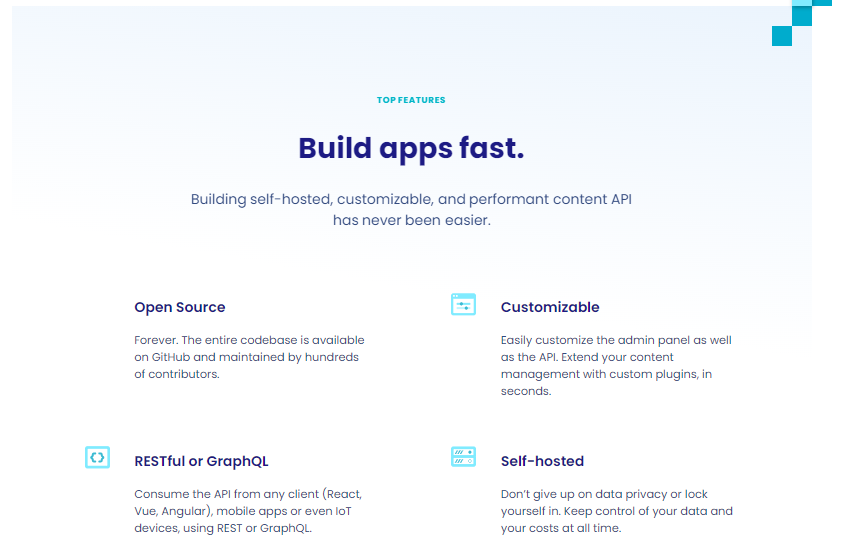
## [Open Source](https://github.com/strapi/strapi)
As an open-source project, Strapi is developed collaboratively by a community of contributors and is licensed under the permissive MIT (*Massachusetts Institute of Technology****)*** license.
Open source is a key feature of Strapi, providing several benefits for developers and organizations. First and foremost, it enables developers to access and customize the source code of Strapi to meet their specific requirements. This means developers can modify, enhance, and extend Strapi to create tailored content management systems that fit their needs.
Being an open-source project, Strapi benefits from the collective expertise and contributions of the community. Developers can contribute code, documentation, and bug reports to improve Strapi, and the community can provide feedback and support to help shape the project's direction. Overall, open source is a core feature of Strapi that enables developers to create powerful and flexible content management systems while benefiting from the community's collective expertise.
## [Customizable content types](https://strapi.io/features/custom-fields)
One of the critical features of Strapi is its ability to create customizable content types. The format of the data that Strapi handles is defined by content types, which can be customized to match the particular requirements of various projects and applications.
Strapi enables developers to build bespoke content kinds using a visual interface instead of scripting. They can establish validation criteria to guarantee that data is entered properly, define fields for each content type, and declare the data type for each field.
## [User management](https://docs.strapi.io/dev-docs/quick-start)
Strapi is an open-source headless (CMS)content management system that allows developers to create and manage API-driven content for various applications. User management is an essential feature in Strapi that enables administrators to manage users and control their access to the CMS.
With user management in Strapi, administrators can create, edit, and delete user accounts and assign roles and permissions to those accounts. Roles and permissions are defined in Strapi's Role-Based Access Control (RBAC) system, which allows administrators to create custom roles and specify the access level for each role. This ensures that users only have access to the content and functionality they need to do their job.
Some of the features available in Strapi's user management system include:
1. **User creation, modification, and deletion**: Administrators can create new user accounts, edit existing ones, and delete them when necessary.
2. **Role-based access control**: Strapi's RBAC system allows administrators to create custom roles and specify the access level for each role.
User management is a crucial feature in Strapi that allows administrators to control user access to the CMS and ensure the security of the content and data stored within it.
## [API-based](https://strapi.io/features/customizable-api)
A flexible and extensible framework for building API-driven apps, Strapi is an open-source headless content management system. One of the main advantages of Strapi is its API-based functionalities.
With a straightforward and user-friendly interface, Strapi makes it simple to construct RESTful APIs. Using the Strapi dashboard or the Strapi SDK, you can define your API endpoints, data models, and relationships. Additionally, you may set up your API to safeguard your data using multiple authentication techniques like JWT or OAuth.
Strapi offers out-of-the-box support for GraphQL APIs in addition to RESTful APIs. With GraphQL, a popular replacement for REST, you may query your data more effectively by just asking for the particular information you require.
## [Plugins and integrations](https://strapi.io/plugin-resources)
Strapi supports plugins and integrations as key features. These plugins and integrations enable developers to extend Strapi's functionality and integrate it with other services quickly.
[Plugins](https://github.com/strapi/strapi-plugin-seo) in Strapi are reusable packages of code that can be installed and configured to add specific features to Strapi's core functionality. For example, there are plugins for adding search functionality, image optimization, and user [authentication](https://strapi.io/blog/a-beginners-guide-to-authentication-and-authorization-in-strapi) to your Strapi application. Developers can create their plugins to share with the community or use plugins created by other developers.
Integrations, on the other hand, allow Strapi to work seamlessly with other services and tools. For example, there are integrations for deploying Strapi on various hosting platforms, integrating with email marketing services, and using Strapi with front-end frameworks like [React](https://strapi.io/integrations/react-cms) and [Vue](https://strapi.io/integrations/vuejs-cms). These integrations can be configured easily through Strapi's admin panel, saving developers time and effort.
Plugins and integrations in Strapi offer a flexible and customizable solution for developers who want to create robustly, tailored CMS solutions for their applications.
## [Cloud](https://strapi.io/cloud)
Strapi Cloud is designed to simplify the process of hosting and managing Strapi projects, making it easy for developers to focus on building and deploying their applications.
With [Strapi Cloud](https://cloud.strapi.io/login), developers can easily deploy their Strapi projects to the cloud, scale their applications as needed, and manage their projects using various tools and features, such as monitoring, backups, and security. Strapi Cloud also provides a range of integrations with other cloud services, such as Amazon Web Services, Google Cloud Platform, and Microsoft Azure, making it easy to integrate Strapi with other cloud-based services.
# Installation
[Install](https://strapi.io/) Strapi by running the command below to create a Strapi project instantly as a quickstart:
```javascript
npx create-strapi-app@latest my-project --quickstart
```
# What is Firebase?
Google bought [Firebase](https://firebase.google.com/), a platform for creating mobile and online applications, in 2014. It offers resources and assistance to developers so they can create and maintain their applications. Real-time databases, cloud storage, authentication, hosting, analytics, and messaging are just a few of the services that Firebase provides.
Firebase makes it easier to create and manage mobile and online applications, freeing developers to concentrate on creating fantastic user experiences.
# Features of Firebase
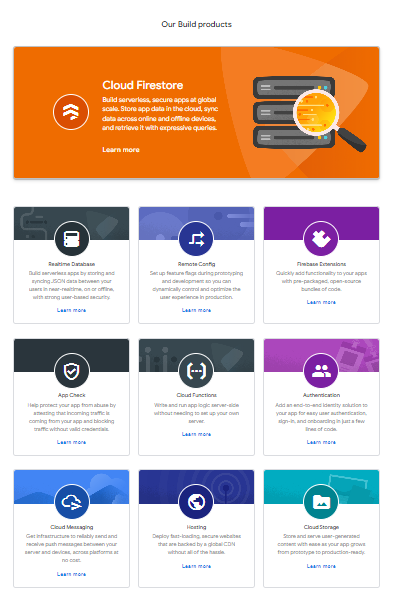
## [Real-time database](https://firebase.google.com/products/realtime-database)
The real-time database service allows developers to store and synchronize data between clients and the cloud, making it ideal for building applications requiring real-time updates. Cloud Storage provides developers with a secure and scalable way to store and retrieve user-generated content such as images, videos, and documents.
## [Cloud messaging](https://firebase.google.com/docs/functions)
Firebase Cloud Messaging (FCM) is a feature of the Firebase platform that allows developers to send push notifications and messages to their users on Android, iOS, and web applications. FCM handles the complexity of sending messages to different platforms and devices so developers can focus on their app's functionality.
To use FCM, developers must integrate the Firebase SDK into their app and configure their project on the Firebase Console. Once configured, developers can send messages to their users using the Firebase Console, Firebase Admin SDK, or FCM APIs.
## [Authentication](https://firebase.google.com/docs/auth)
Firebase Authentication enables developers to integrate user authentication and identity management into their applications using popular identity providers such as Google, Facebook, and Twitter. Firebase Hosting provides developers with a simple and scalable way to deploy their web applications to a global content delivery network (CDN).
## Analytics
Firebase Analytics allows developers to gain insight into user behavior and application engagement, including tracking user events, demographics, and retention. Firebase Cloud Messaging enables developers to send notifications and messages to their users across multiple platforms and devices.
## [Hosting](https://firebase.google.com/docs/hosting)
Firebase Hosting is a feature of the Firebase platform that allows developers to deploy and serve web apps quickly and easily. With Firebase Hosting, developers can deploy web apps, static content, and dynamic content to a global content delivery network (CDN) with just a few clicks.
Firebase Hosting supports multiple deployment options, including deploying directly from the Firebase CLI, integrating with a CI/CD pipeline, and deploying from the Firebase Console. Firebase Hosting also provides automatic SSL encryption for custom domains, making it easy to secure web apps.
# Installation
To [install Firebase](https://firebase.google.com/docs/web/setup), follow these steps:
1. Build a new project on the Firebase website using the project creation form. You'll need to open a Google account if you don't already have one.
2. **Set up Firebase for your platform**: Once you have created your Firebase project, select the platform(s) you want to use Firebase with. You can choose web, Android, iOS, Unity, and C++.
3. **Install the Firebase SDK**: Depending on the platform you chose in Step 2, you must install the corresponding one. Instructions on installing the SDK for your platform are in the Firebase documentation.
Installing Firebase using npm:
```javascript
npm install Firebase
```
4. **Add Firebase to your app**: After installing the Firebase SDK. Depending on the platform you're using, the procedure will change. The Firebase documentation contains instructions on how to add Firebase to your app.
5. After installing Firebase, test your app and incorporate it to ensure everything is running smoothly. To access the data in your app and test its operation, utilize the Firebase console.
# Differences between Strapi and Firebase?
Strapi and Firebase are backend platforms that can be used to build web and mobile applications. Still, they have some differences in features, architecture, and target audiences.
Here are some of the key [differences](https://forum.strapi.io/t/difference-between-strapi-and-firebase/408) between Strapi and Firebase:
## Architecture
Strapi is an open-source, headless CMS (content management system) that provides a RESTful API for accessing and managing content. At the same time, Firebase is a cloud-based platform that offers a suite of services for building and managing mobile and web applications.
## Performance
Strapi and Firebase can both be quick and effective in terms of performance, but there are certain distinctions to take into account.
Strapi's adaptability and capacity to modify the backend to satisfy particular application requirements is one of its benefits. Lowering needless overhead and enhancing the effectiveness of database searches, can aid in speed optimization. However, the hosting environment and database can have a significant impact on Strapi's performance.
Contrarily, Firebase is a fully managed platform that handles a variety of performance-related concerns, including scaling and database optimization. In addition, Firebase offers a real-time database that can be tuned for low-latency data synchronization, which is useful for some applications.
Strapi and Firebase can both be quick and effective in general, but the performance can vary depending on a variety of things, including the particular use case, hosting environment, and database being used. Developers should carefully assess the needs of their applications and select the platform that best satisfies those needs.
## GraphQL
Different strategies for integrating GraphQL into their respective platforms are provided by [Strapi](https://docs.strapi.io/dev-docs/plugins/graphql#customization) and Firebase.
A flexible and adaptable backend solution is offered by Strapi, a headless CMS. It gives you complete control over the GraphQL implementation and the ability to link it with other technologies by enabling you to create your own GraphQL API by specifying your data models and schemas.
On the other hand, Google's [Firebase](https://firebaseopensource.com/projects/sejr/firegraph/) is a complete backend-as-a-service (BaaS) platform. It has capabilities like a real-time database, hosting, authentication, and others. Although Firebase's Cloud Firestore database does support GraphQL, the implementation is more closely connected with Firebase's ecosystem and services, offering a more simplified but less flexible approach compared to Strapi.
In conclusion, Firebase offers a managed, integrated GraphQL implementation within its larger BaaS platform, whereas Strapi offers a self-hosted, configurable GraphQL backend solution. Your particular requirements, preferences, and the degree of control you need over your GraphQL implementation will determine which option you should use.
## Vendor lock-in
*By making it impossible for consumers to transition to a rival without incurring significant expenses or problems, some technology vendors utilize a strategy known as vendor lock-in, also known as proprietary lock-in or customer lock-in, to keep their customers dependent on them for products and services.*
Open-source headless CMS called Strapi allows developers flexibility and control over the information and content of their applications. By allowing you to self-host the CMS and store your data in a database of your choosing, it lessens vendor lock-in.
On the other hand, Google's Firebase platform offers a variety of services for creating online and mobile applications. Firebase links you to Google's infrastructure, leading to a higher level of vendor lock-in, although it provides practical capabilities like real-time databases, authentication, and hosting.
In conclusion, Firebase relies on Google's infrastructure, leading to higher vendor lock-in, whereas Strapi allows you to choose your infrastructure and database, offering more freedom and independence.
## Backend customizability
There are various levels of backend customization available with [Strapi](https://docs.strapi.io/dev-docs/backend-customization) and [Firebase](https://firebase.google.com/docs/build).
An open-source headless CMS with a scalable backend architecture is called [Strapi](https://docs.strapi.io/dev-docs/backend-customization). By using their favorite programming language, it enables developers to establish their own data models, design unique APIs, and implement business logic. Large-scale modification and management of the backend infrastructure are made possible by this flexibility.
The backend-as-a-service platform [Firebase,](https://firebase.google.com/docs/build) on the other hand, provides a selection of pre-built backend services. In comparison to Strapi, Firebase's customization choices are more constrained even though it offers a variety of capabilities like authentication, real-time databases, cloud storage, and hosting. Although they do have some influence over the Firebase services themselves, developers have less control over the underlying infrastructure.
As an open-source CMS that enables developers to define their data models and implement custom logic, Strapi offers higher backend customizability in comparison to Firebase, which offers a practical and feature-rich backend platform but with fewer customization choices.
## Pricing
Strapi is a free and open-source headless CMS that enables the creation and administration of content APIs. You have complete control over the hosting environment and infrastructure costs because it is [self-hosted](https://strapi.io/pricing-self-hosted) and free to use. The usage of third-party hosting providers or the need for additional features from the Strapi ecosystem, such as plugins and themes, may, however, result in extra [charges](https://strapi.io/pricing-cloud).
Firebase, on the other hand, is a Backend-as-a-Service (BaaS) platform provided by Google. It offers various services, including a real-time database, authentication, hosting, and more. [Firebase](https://firebase.google.com/pricing) follows a pricing model based on usage, where you pay for specific resources consumed, such as storage, bandwidth, and API requests. While Firebase has a free tier with limited resources, costs can increase as your usage and requirements grow, particularly for higher traffic and storage needs.
In summary, Strapi provides a free and self-hosted solution, but additional costs may arise depending on your hosting choices and optional add-ons. Firebase offers a range of services with a usage-based pricing model, providing a free tier but potentially increasing costs as your application's needs scale.
# Implementing Firebase Auth into Strapi
Here are the steps on how to implement Firebase Auth into Strapi:
## Step 1
**Create a Firebase project and enable the Authentication service.**
Create a Firebase project in the Firebase console ([https://console.firebase.google.com](https://console.firebase.google.com/)) and click the "Create Project" button. Once your project is created, enable the Authentication service. Enable the Firebase Authentication service and configure the authentication methods you want to use (e.g., email/password, Google, Facebook).
## Step 2
**Install Firebase SDK**
In your Strapi project directory, install the Firebase SDK by running the following command:
```javascript
npm install firebase
```
## Step 3
**Download the Firebase Admin SDK and initialize it in your Strapi application.**
A JavaScript framework called the Firebase Admin SDK enables you to use code to communicate with Firebase services. The SDK is available for download from the Firebase website: https://firebase.google.com/docs/admin/setup.
To initialize the Firebase Admin SDK in your Strapi application, you need to create a file called `bootstrap.js` at the root of your Strapi project. In this file, you need to import the Firebase Admin SDK and initialize it with your Firebase project's credentials.
Below is an example of hope to initialize the Firebase Admin SDK in Strapi:
```javascript
import firebase from "firebase/app";
import "firebase/auth";
firebase.initializeApp({
apiKey: "YOUR_API_KEY",
authDomain: "YOUR_AUTH_DOMAIN",
projectId: "YOUR_PROJECT_ID",
});
```
## Step 4
**Create a new Strapi user model and add the** `**firebaseId**` ``**field.**
Strapi uses a user model to store user information. To integrate Firebase Auth into Strapi, you need to create a new user model and add the `firebaseId`field. The `FirebaseId`field is a unique identifier that is assigned to each user when they sign in with Firebase Auth.
To create a new strapi user model with the `firebseId`field look at the code block below:
```javascript
const user = {
id: { type: "integer", primaryKey: true },
email: { type: "string", unique: true },
password: { type: "string" },
firebaseId: { type: "string" },
};
module.exports = user;
```
## Step 5
**To validate the Firebase ID token, update the Strapi authentication middleware.**
Strapi uses middleware to authenticate users. To verify the Firebase ID token, you need to update the Strapi authentication middleware.
The Strapi authentication middleware is located in the `src/middleware/authentication.js`file. In this file, you need to add the following code to verify the Firebase ID token:
```javascript
const firebase = require("firebase/auth");
module.exports = async (req, res, next) => {
const firebaseIdToken = req.header("Authorization").split(" ")[1];
const firebaseUser = await firebase.auth().verifyIdToken(firebaseIdToken);
if (firebaseUser) {
req.user = firebaseUser;
next();
} else {
res.status(401).send("Unauthorized");
}
};
```
## Step 6
**Update the Strapi login and registration pages to use Firebase Auth.**
Strapi provides default login and registration pages. To use Firebase Auth for these pages, you need to update the `src/pages/login.js` and `src/pages/register.js` files.
In these files, you need to import the Firebase Admin SDK and use it to sign in and register users with Firebase Auth.
The Strapi login page can be updated to use Firebase Auth by following this example:
```javascript
import firebase from "firebase/auth";
module.exports = async (req, res) => {
const email = req.body.email;
const password = req.body.password;
try {
const firebaseUser = await firebase.auth().signInWithEmailAndPassword(email, password);
res.status(200).send({
success: true,
user: firebase
```
Following the steps correctly you will be able to implement your Firebase auth properly.
# How Firebase and Strapi Compared
## Purpose and Functionality
- **Firebase**: Firebase is a comprehensive Backend-as-a-Service (BaaS) platform provided by Google. It offers a range of services for building web and mobile applications, including authentication, real-time database, cloud storage, hosting, cloud functions, and more. Firebase aims to provide an all-in-one solution for developers, offering seamless integration of various backend functionalities.
- **Strapi**: Strapi is a free and open-source headless CMS that facilitates the creation and administration of content APIs. Developers may create their frontend experiences using the technology of their choice because it offers a flexible and adaptable environment for developing APIs and managing content.
## Hosting and Infrastructure
- **Firebase**: Firebase provides fully managed hosting and infrastructure for your applications. It offers static website hosting, which makes it easy to deploy and host frontend assets, along with cloud functions for server-side logic execution.
- **Strapi**: Strapi is self-hosted, meaning you have control over the hosting and infrastructure setup. You can choose where to deploy your Strapi instance, whether on your servers or using cloud providers like AWS, DigitalOcean, or Heroku.
## Authentication and User Management
- **Firebase**: Firebase offers a built-in authentication service that supports various authentication methods, including email/password, social logins (Google, Facebook, etc.), and third-party identity providers like Auth0 or Apple Sign-In. It provides a seamless user management system with features such as user roles, email verification, password reset, and user metadata.
- **Strapi**: Strapi also provides user authentication and management capabilities. It includes a plugin called "users-permissions" that allows you to define user roles and permissions, handle user registration and login, and manage user data. However, compared to Firebase, Strapi's user management features may require more manual configuration and customization.
## Database and Data Storage
- **Firebase**: Firebase offers a real-time NoSQL database called Firebase Realtime Database, which provides synchronization and real-time updates across clients. It also provides Cloud Firestore, a scalable and flexible NoSQL document database. In addition, Firebase offers cloud storage for storing and serving user-generated content such as images, videos, and files.
- **Strapi**: Strapi is database-agnostic, meaning you can choose the database of your preference to store and manage your data. It supports various databases, including popular choices like PostgreSQL, MySQL, and SQLite. Strapi provides a Content-Type Builder that allows you to define data models and manage data through a user-friendly interface.
## Pricing
- **Firebase**: Firebase offers a pricing model based on usage, where you pay for specific resources consumed, such as storage, bandwidth, and API requests. It provides a free tier with limited resources and scalability. Costs can increase as your usage and requirements grow.
- **Strapi**: Strapi is open-source and free to use. However, additional costs may arise depending on your hosting choices, such as cloud infrastructure costs or the usage of third-party services for specific functionalities.
The ideal option for your project will ultimately depend on your unique needs and specifications. Firebase is a wonderful choice if you require a platform that is simple to set up and use and has a variety of pre-built capabilities. Strapi is a good option if you require extensive customization and control over the underlying infrastructure.
Here are some additional considerations when choosing between Firebase and Strapi:
- **Your budget:** Firebase can be more expensive for large projects, while Strapi is free and open-source.
- **Your technical expertise:** Firebase is easier to set up and use than Strapi, which requires more technical expertise.
- **Your specific needs:** If you need a platform with a specific set of features, such as real-time data synchronization or push notifications, then Firebase may be a better choice. If you need a high degree of customization, then Strapi may be a better choice.
## Conclusion
Strapi and Firebase are both potent backend technologies that may be used to create online and mobile applications, to sum up.
Strapi is a headless content management system with a ton of customization and flexibility options. It is appropriate for developers who require a self-hosted or cloud-deployed CMS and who want total control over their data and API. For Strapi, there are numerous plugins and integrations, and a big community exists.
The full-stack platform Firebase, on the other hand, offers a variety of services, such as a real-time database, authentication, cloud functions, hosting, and more. It is owned by Google and has quick connectivity to the Google Cloud Platform. Developers that need a platform with a variety of out-of-the-box services and who want to build and deploy web or mobile apps quickly might consider Firebase.
When deciding between Strapi and Firebase, it is important to consider your specific project requirements, budget, and development expertise. If you need a CMS that provides many customization options, Strapi may be a better choice. If you need a full-stack platform that offers a range of services and allows you to build and deploy applications quickly, Firebase may be a better choice.
 Sign in via Facebook
 Sign in via X(Twitter)
 Sign in via GitHub
 Sign in via Dropbox
 Sign in with Wallet
Connect another wallet
Sign in with Wallet
Connect another wallet