# Seminar - USB4: The New Era of High-Speed Link Integration
#### By 威鋒電子 何盈杰博士 - 20210917
###### tags: `Seminar`, `USB4`, `Thunderbolt`
### USB OTG (On-The-Go)/Data Role Play
- 手機接到電腦,做handshake,電腦當成host,手機當成device
- 手機接到硬碟,做handshake,手機當成host,硬碟當成device
### Power Role Play
Source, Sink or Dual Power Role
誰給電,誰充電
### DisplayPort (DP)
資料傳輸較快,因為Device往螢幕是單向傳輸,是USB雙向傳輸的兩倍
### PCIe vs. USB
PCIe主要是在Mother Board上的資料傳輸,USB是Cable間的資料傳輸
### USB BC (Battery Charging)
### USB Power Delivery (PD) aka. 快充
### USB Electrical Marker (E-Marker)
USB接上後並不會馬上傳輸資料,會先做handshake讀取E-Marker看這條線最大容忍Supply current,如果沒有E-marker會用最低規格傳輸 (USB2.0)。
ex:大創的$39線材就不會有E-marker,Apple原廠的充電線就會有
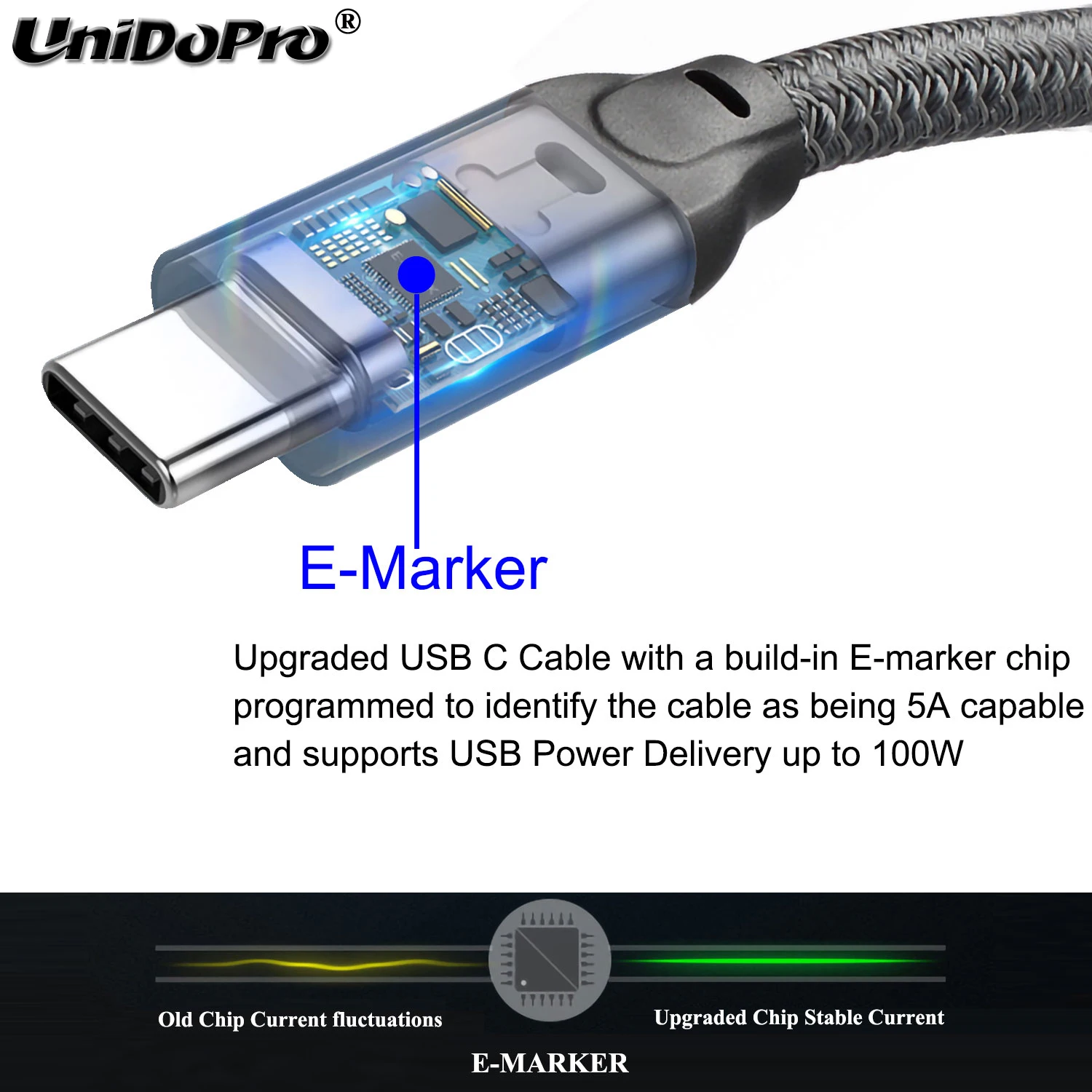
**Note**: now the official lowest version is USB2.0

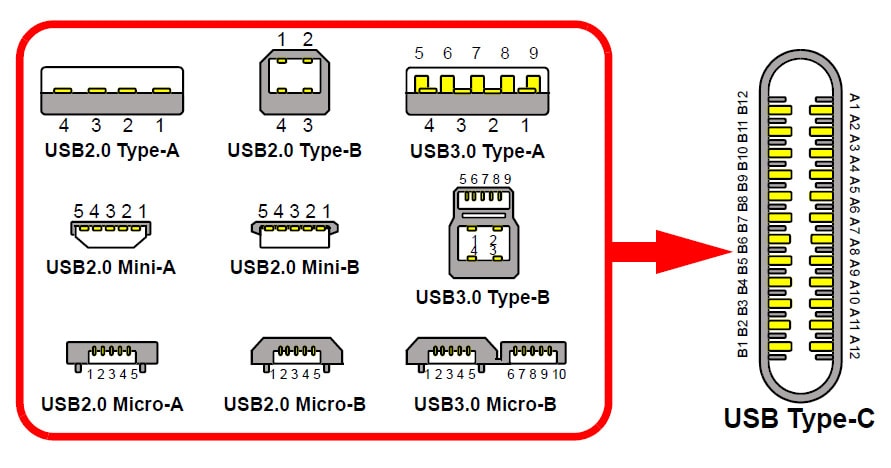
### Permutations of USB - All integrate to USB Type-C
USB Type-C is just the type of **hardware connector**. Not mentioning any interface such as USB 2.0/3.x/4.0 ...
### Thunderbolt
Thunderbolt is a type of hardware **Interface** developed by Intel and Apple that uses the 24 pins **USB type-c connector**
Thunderbolt 最主要的精神就是把4-lane PCIe作成與USB一樣方便的外接介面(Thunderbolt 協議另外的要點是還帶了 DisplayPort 影像訊號,以及架構上使用串接的方式而不是一對多 HUB 的形式,不過這幾個部分的規格不在本文討論的範圍內)。原本需要內建在電腦裡面,或是插在大型電腦 PCIe 插槽上的解決方案,現在可以移到電腦的外部而具有可攜帶性,而且不犧牲與 CPU 直接溝通的效能。特別是自從 Thunderbolt 3 採用與 USB 一樣的 USB-C 端口,而且 Intel 宣布自下一代 CPU 開始要把 Thunderbolt 功能直接加入到 CPU 裡面之後,Thunderbolt 這個介面似乎就要一統天下,消弭過去 20 年來各種專業解決方案如何與 CPU 溝通而遇到的兩難選擇。
- Thunderbolt supports (主要是用在macbook)
- Display
- Power delivery
- PCIe (Peripheral Component Interconnect Express 定義CPU與周邊元件連結的協定)
- ex: For External GPU (eGPU)
- Data
- ...
**Note**:
1. Thunderbolt 3 支援 USB3.1,所以電腦只要是支援 Thunderbolt 3 規格的,連接USB3.1 裝置一樣是可以使用;但是若電腦只支援 USB3.1 規格的,是無法連接 Thunderbolt 3 裝置的
2. Thunderbolt 定義規格比USB3.x/4.0 嚴格,傳輸速度更快、支援功能越多,但是要付授權費所以線才會較貴


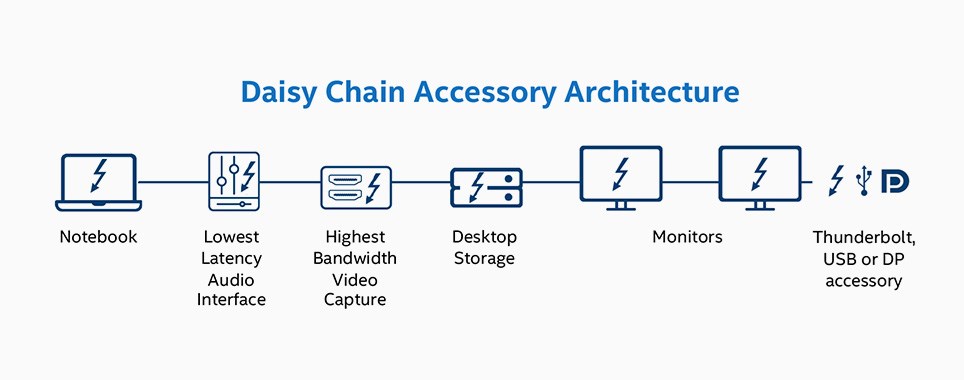
- Daisy chain
Thunderbolt daisy-chaining allows you to connect multiple Thunderbolt port devices (ex: dual 4k display to your computer with only one Thunderbolt port!

#### Different Version of USB and thunderbolt

### The flippable 24-pin USB Type-C connector

### USB4 (On-chip docking)
把所有功能整合到一個晶片,在內部進行轉換,相容PCIe, Thunderbolt, DP ...
### Useful links
Thunderbolt 3 vs. USB-C - What Is The Difference?
https://www.youtube.com/watch?v=ilQTUWKQRMA
Thunderbolt 4 vs USB4 vs Thunderbolt 3 - What's Changed?
https://www.youtube.com/watch?v=cvbgI2YAEeE
電腦介面由 USB 到 Thunderbolt 的改朝換代, 概述外接 PCIe 裝置的多種應用
https://www.akitio.com.tw/information-center/tb-pcie-interface
新的USB4用TypeC接口就變成Thunderbolt了嗎?一次看懂這些讓人一頭霧水的規格!
https://www.youtube.com/watch?v=VnCddObjmDI
 Sign in via Google
 Sign in via Facebook
 Sign in via X(Twitter)
 Sign in via GitHub
 Sign in via Dropbox
 Sign in with Wallet
Connect another wallet
Sign in with Wallet
Connect another wallet