# DetectiveKite
[DetectiveKite](https://github.com/Chendada-8474/DetectiveKite) is a free perch mount camera trap images auto-detection system which is developed base on yolov5s, a light and fast object detection architecture. I believe DetectiveKite can help biologists in Taiwan to accelerate the heavy species labeling works.
## Datasets
### Transfer Learning
- [NABirds Dataset](https://dl.allaboutbirds.org/nabirds)
### Augmentation
- Private data from [Endemic Species Research Institute](https://www.tesri.gov.tw)
- [Landscape Pictures, Kaggle](https://www.kaggle.com/datasets/arnaud58/landscape-pictures)
- Owner: [Arnaud ROUGETET](https://www.kaggle.com/arnaud58)
- [Landscape color and grayscale images, Kaggle](https://www.kaggle.com/datasets/theblackmamba31/landscape-image-colorization)
- Owner: [Black Mamba](https://www.kaggle.com/theblackmamba31)
### Train and Validation
- Private data from [Institute of Wildlife Conservation](http://wildmic.npust.edu.tw/bin/home.php), National Pingtung University of Science and Technology
- Private data from [Department of Biological Resources](https://www.ncyu.edu.tw/biors/), National Chiayi University
- [iNaturalist](https://www.inaturalist.org)
## Install
### Environment
#### Python
yolov5 need python>=3.7.0, DetectiveKite is developed under 3.9.10
#### Others
Please refer to the "FFmpeg 安裝" and "安裝 CUDA、cuDNN" of [SILIC 環境設定 for Window 10 or 11](https://medium.com/@raymond96383/silic-%E7%92%B0%E5%A2%83%E8%A8%AD%E5%AE%9A-for-window10-or-11-f5bb77d4e64f)
### git clone
```
git clone https://github.com/Chendada-8474/DetectiveKite.git
cd DetectiveKite
```
### Packages
```bash
pip install -r requirements.txt
```
### GPU Accelerated Computing
For GPU acceleration, please install the compatible torch package with your device. see [INSTALL PYTORCH](https://pytorch.org). Futhermore, installing [CUDA Toolkit](https://developer.nvidia.com/cuda-toolkit) correctly is also necessary.
### Open in Colab
Colab is an easy way to execute python on browser.
- setting friendly
- free GPU
- easy to share code
<br>
<a href="https://colab.research.google.com/drive/125qZCGMw5hRn6u5hbekUEUs3aViq-H9n?usp=sharing"><img src="https://colab.research.google.com/assets/colab-badge.svg" alt="Open In Colab"></a>
## Documentation
### Detection
#### detect.py
`detect.py` runs source of a folder. use `--source` or `-so` to set path of target folder. The results will be saved to `runs/data/`.
```
python detect.py -so path\ # directory
```
#### Argument Parameter
Trail camera normally fill infrared light at night or in bad light condition when animals are detected and take a black and white photo. Otherwise, it takes color photo in Natural light. Two models are used to detect color and infrared image saperatly. So, please note that some parameter have to be set saperatly.
| argument | abbreviation | parameter | default | require |
| -------- | -------- | -------- | -------- | ------- |
| `--source` | `-so` | path | | True |
| `--batch-size` | `-bs` | batch size, positive integer | | True |
| `--classes-color` | `-cc` | int series | all classes | False |
| `--classes-infrared` | `-ci` | int series | all classes | False |
| `--conf-thres-color` | `-ctc` | float, range 0~1 | 0.25 | False |
| `--conf-thres-infrared` | `-cti` | float, range 0~1 | 0.25 | False |
| `--vedio-interval` | `-vi` | float (second) | 1 | False |
| `--name` | `-na` | results folder name | exp | False |
| `--sp-name` | `-sn` | sci, ch or jp | en | False |
##### Batch Size
Please set this as big as you can.
```
python detect.py -so path\ -bs 24 # Batch Size 24
```
##### Classes
When deteting, you are able to use
`--classes-color` and `--classes-infrared` to spefify classes. Information of classes is in `./model/exp_color/classes_color.csv` and `./model/exp_infrared/classes_infrared.csv`.
```
python detect.py -so path\ # all classes
```
color
```
python detect.py -so path\ -cc 0 # only specify class o
0 15 # specify class 0 and 15
```
infrared
```
python detect.py -so path\ -ci 0 # only specify class o
0 3 # specify class 0 and 3
```
or both
```
python detect.py -so path\ -cc 0 15 -ci 0 3
```
##### Confidence Threshold
Setting the confidence threshold when detecting using `--conf-thres-color` and `conf-thres-infrared`. The results which confidence is below than confidence threshold will not be saved.
```
python detect.py -so path\ -ctc 0.6 -cti 0.75
```
##### Video Interval
Detecting EACH frame of video just for knowing what kind of birds stanted on perch mount is not a efficient way. DetectiveKite detect video in interval to speed up the processing of detection. Set `--video-interval` to adjust the suitable detection interval base on your video length.
```
python detect.py -so path\ -vi 2 # detect video frame only in 2s interval
```
##### Saved Folder Name
After detection, results will be saved to `./runs/data/exp/`. exp is the default folder name. You can change the name via `--name`.
```
python detect.py -so path\ -na project
```
Then, results will be saved to `./runs/data/project/`
##### Species Name
The species name is saved in English common name (default). You can choose in scientific name, Chinese common name, Japanese common or Multiple.
| name | lang code |
| -------- | --------- |
| scientific name | sn |
| Chinese common name | ch |
| Japanese common name | jp |
non for English common name
```
python detect.py -so path\
```
add name
```
python detect.py -so path\ -sn ch # add Chinese common name
sci # add scientific name
jp # add Japanese name
ch sci jp # Multiple is also legal
```
### Draw Bounding Box and Label Name
If you want some thing cool like these:
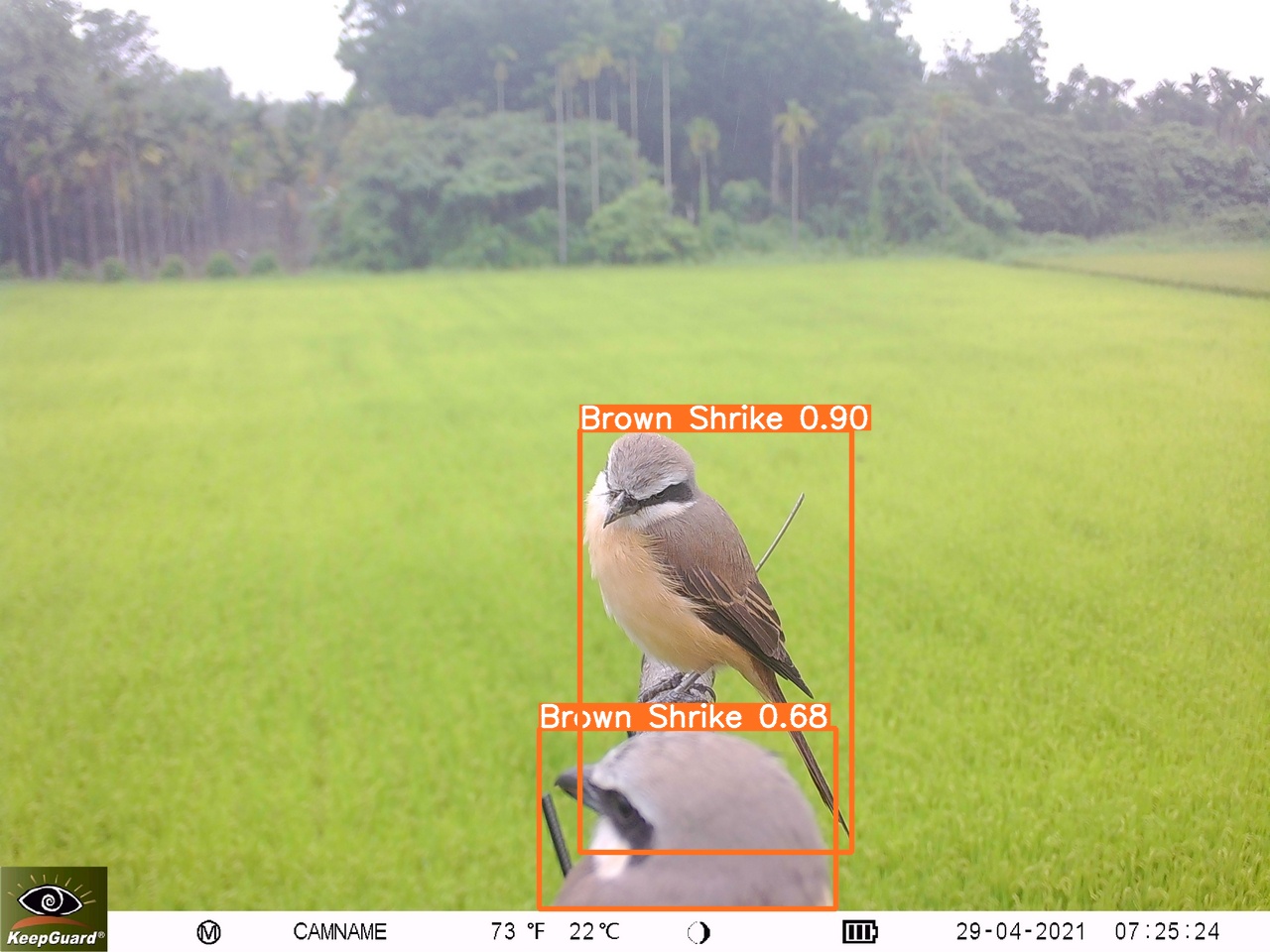
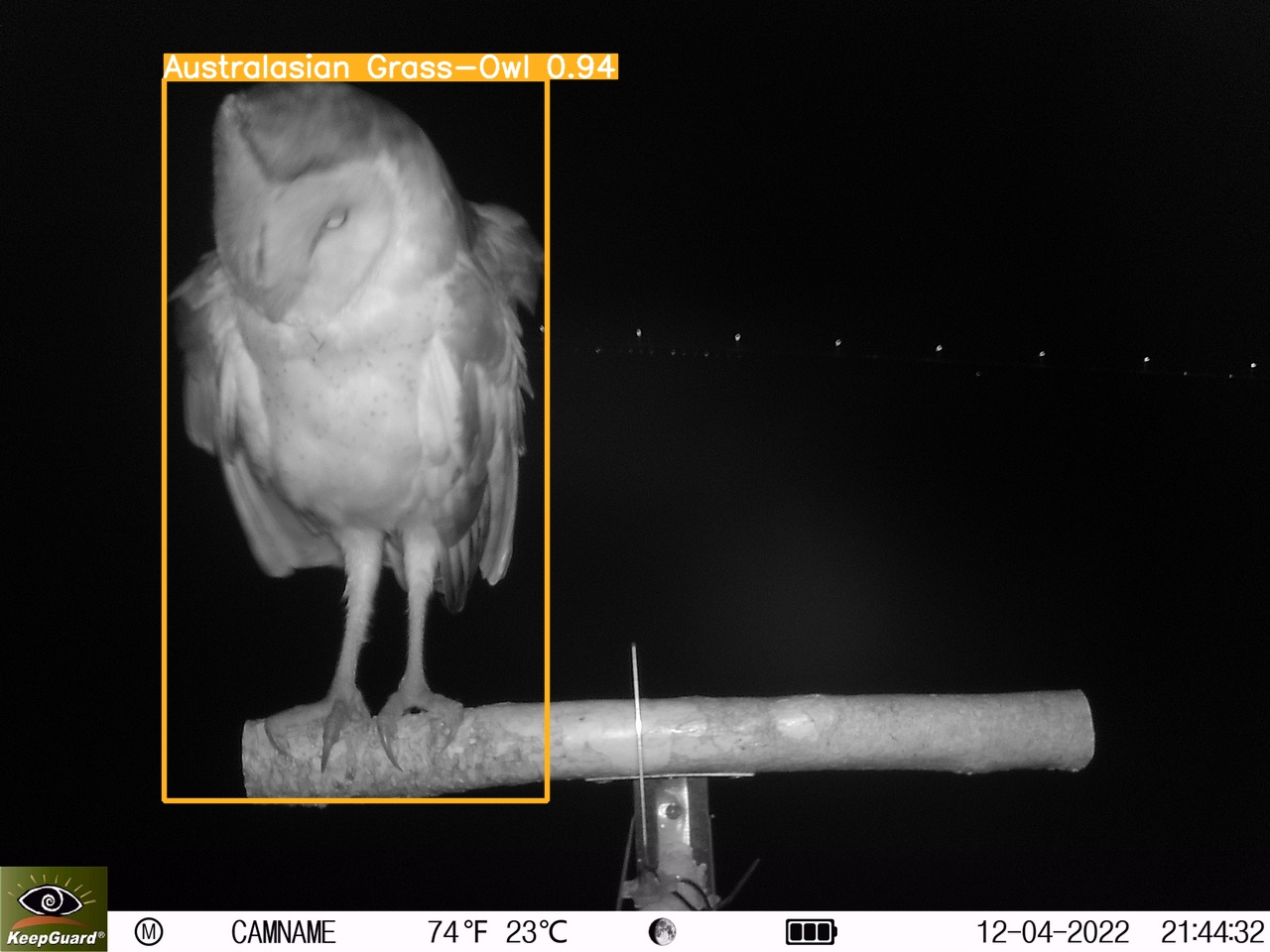
Please use `yolov5 detect` to do it. see [yolov5 package](https://pypi.org/project/yolov5/)
or video
- [Color Video detection Demo](https://youtu.be/92ner2dGfrg)
- [Infrared Video detection Demo](https://youtu.be/jlM8AfVWZj0)
example:
```
yolov5 detect --source ./sample/img019.jpg --weights ./model/exp_color/best.pt # color media
```
```
yolov5 detect --source ./sample/img001.jpg --weights ./model/exp_infrared/best.pt # infrared media
```
## Results
### Results Format
Results are saved as .csv format. Columns: file_name, class, name, num_inds, confidence, media, model.
Information of columns:
| column | data type | description |
| -------- | -------- | -------- |
| file_name | string | file name of image or video |
| class | integer | code of class |
| name | string | name of detected species |
| num_inds | integer | number of individuals detected |
| confidence | float | see [this](https://chih-sheng-huang821.medium.com/深度學習-物件偵測-you-only-look-once-yolo-4fb9cf49453c) |
| datetime | datetime | file create datetime |
| media | string | image or video |
| model | string | detected by color model or infrared model |
| xmin | integer | minimum pixel of bounding box on x axis |
| ymin | integer | minimum pixel of bounding box on y axis |
| xmax | integer | maximum pixel of bounding box on x axis |
| ymax | integer | maximum pixel of bounding box on y axis |
*NOTE:*
*If detected media is video, the confidence is the average of every detected frame.*
*In image, if two or more individuals detected, the xmin and ymin are the smallest values of xmin and ymin. The xmax and ymax are the biggest values of xmax and ymax.*
*In video, the xmin and ymin are the smallest values of xmin and ymin of all frames. The xmax and ymax are the biggest values of xmax and ymax of all frames.*
### Review
`review.py` is a GUI interface results reviewer.
```
python review.py
```

#### Hotkey
| Key | Description type |
| -------- | -------- |
| A | previous media |
| D | next media |
| L | add species |
| C | confirm changes |
| 1 ~ 9 | focus to the species input box of row 1 ~ 9 |
| Ctrl + 1 ~ 9 | delete the species input box of row 1 ~ 9 |
| Ctrl+S | save csv file |
*NOTE:*
*If some video formats are not supported, try installing [K-lite](https://codecguide.com/download_kl.htm).*
## Donation
Althought, this is not a big project, I maintain this project without any financial or funds support. If you think this is great and want to encourage me, donation would be so helpful!
In addition, if you have tons of perch mount images and videos are waited to be labeled, we could cooperate! [contact me!](https://chendada-8474.github.io/)
### 綠界科技
<a href="https://p.ecpay.com.tw/0696F33"><img src="https://www.ecpay.com.tw/Content/images/logo_pay200x55.png"/></a>
<br>
https://p.ecpay.com.tw/0696F33
### PayPal
<!-- PayPal Logo -->
<tr><td align="center"></td></tr><tr><td align="center"><a href="https://paypal.me/tachihchen" title="tachihchen" onclick="javascript:window.open('https://www.paypal.com/tw/webapps/mpp/paypal-popup?locale.x=zh_TW','WIPaypal','toolbar=no, location=no, directories=no, status=no, menubar=no, scrollbars=yes, resizable=yes, width=1060, height=700'); return false;"><img src="https://www.paypalobjects.com/webstatic/en_US/i/buttons/pp-acceptance-medium.png" alt="使用 PayPal 立即購" /></a></td></tr>
<!-- PayPal Logo -->
<br>
https://paypal.me/tachihchen
 Sign in with Wallet
Connect another wallet
Sign in with Wallet
Connect another wallet