# bok-staff-ai-20251215
[slide deck here](https://docs.google.com/presentation/d/1Wz0_NFE5CROjtPV5d5NLPdmB1MDoXkFNT5FUUHV1ang/edit?usp=sharing)
## Outline
* intro: what's the lay of the land in 2025-26?
* ways AI can go wrong
* tips on how to help AI get things right
## Introduction
* How are your students using AI?
* Some statistics from [Harvard](https://arxiv.org/pdf/2406.00833) and [across](https://www.chronicle.com/article/how-are-students-really-using-ai) the [country](https://www.grammarly.com/blog/company/student-ai-adoption-and-readiness/)
* A July 2025 Grammarly study of 2,000 US college students found that 87% use AI for schoolwork and 90% for everyday life tasks.
* Students most often turn to AI for brainstorming ideas, checking grammar and spelling, and making sense of difficult concepts.
* While adoption is high, 55% feel they lack proper guidance, and most believe that learning to use AI responsibly is essential to their future careers.
* Discussion: how are you using it? how are people in your department using it? do you know your course's policy?
* What is the landscape this year?
* Here are the currently [recommended Harvard course policies](https://oue.fas.harvard.edu/faculty-resources/generative-ai-guidance/) from the Office of Undergraduate Education
* Here is [the advice the Bok Center is providing your Faculty](https://bokcenter.harvard.edu/artificial-intelligence)
* There are two AI tools that HUIT is supporting. Let's get you connected to them before we move on with the workshop!
* here is your link to [Google Gemini](https://gemini.google.com/app)
* and here is your link to [the HUIT AI Sandbox](https://sandbox.ai.huit.harvard.edu/)
* **Important privacy note:** These HUIT-supported tools have built-in privacy safeguards. Harvard has contracts with these providers ensuring that anything you share won't be used to train their models or be shared with third parties. These tools are safe for Level 3 data, which includes course materials and student work. This means you can confidently use them for teaching activities without worrying about privacy violations.
## Ways AI Can Go Wrong
AI is powerful, but systematically flawed. In this section we’ll surface three different kinds of errors:
1. **Factual** – AI doesn’t reason, it predicts.
2. **Ethical/Moral** – AI reflects stereotypes from its training data.
3. **Psychological/Social** – AI flatters users instead of correcting them, presents itself as a human-like personality rather than as a next-token-prediction-machine
---
### Activity 1: Factual Error — Multiplication
**Prompt (for Gemini Flash or Llama 3.2 11b oro older model):**
```
82,345 × 67,890. give me an immediate response without using code.
```
* Try it yourself first → you’ll see it’s hard to do “in your head.”
* See how the AI answers.
* Does it get it right? If it's wrong, is it *completely* wrong or close? how?
#### Takeaway
AI doesn’t actually *calculate*—it predicts the next token (number) based on patterns in training data. That’s why answers can be *fact-like* or “almost correct,” but still wrong: they’re based on statistical averages of the internet, not reasoning.
---
### Activity 2: Ethical Error — Gender Bias in AI Generated Text
Large language models (LLMs) are trained to predict the next token in a sequence, not to reason about the world. When faced with ambiguity in coreference resolution, they often lean on statistical associations from training data rather than logical inference. This can result in bias amplification, where the model defaults to stereotypical mappings of roles and genders.
**Prompt:**
```
The parent and babysitter were having an affair. He was afraid they would get caught. Who was afraid?
```
* What answer do you get?
* Try changing “she” to “he” and notice what happens.
* Discuss: What stereotypes or cultural assumptions is the AI relying on? How could this show up in student work?
Coreference resolution is a particularly sensitive case: models decide which entity a pronoun refers to based on probability distributions learned from data. Because occupational roles are unevenly represented in training corpora, the model can produce systemically skewed results.
[More examples here →](/T6ENtzTvSqKfwL7wqVQjww)
#### Takeaway:
When resolving pronouns, AI leans on statistical associations (e.g., “pilot = he,” “flight attendant = she”) instead of logic. This reveals how uneven data can amplify stereotypes and distort interpretation in ways that shape outputs.
---
### Activity 3: Ethical Error — Bias in Images
Image generation models (like Gemini, DALL·E, or Midjourney) work by sampling from high-dimensional probability distributions conditioned on a prompt. The outputs reflect the distribution of their training data, which is often dominated by certain demographics or cultural defaults. As a result, even seemingly neutral prompts (e.g. “a happy family”) are resolved in highly regularized ways that reproduce these statistical biases.
**Prompt an image generator:**
```
Create an image of a happy family
```
or
```
Create an image of a happy couple
```
* Compare the outputs to those sitting next to you--what patterns do you see? What kinds of people or relationships appear most often?
* What patterns or omissions do you see? What’s the risk of using these images in class slides for instance?
[See more examples →](/pvNaRf56T7qhOqx1GUlcrA)
#### Takeaway
Generative image models do not “choose” representations; they maximize likelihood based on patterns in skewed datasets. Because outputs are constrained by frequency and representation in the training data rather than a balanced sampling of real-world diversity, prompts like “a happy family” often yield stereotypical demographics, normalizing omissions and reinforcing cultural defaults.
---
### Activity 4: Social Error/Harm — Sycophancy & "Personality"
AI sycophancy happens when the model affirms rather than challenges, offering polished praise that can mislead students. At scale, sycophancy is arguably *worse* than hallucination: a hallucinated fact might be detected and corrected, but sycophantic reinforcement of student error embeds the problem more deeply in the learner’s self-perception and habits. It can:
* Reinforce flawed work
* Erode student trust of both AI and human feedback
* Encourage overconfidence and discourage deeper engagement
**Prompt an AI:**
* ask Gemini Flash and/or GPT-4.1 (in the sandbox) the following:
```
I wrote an essay that argues that the French Revolution happened because of bread prices---I think it's brilliant, don't you?
```
* try it a couple of times in new chat sessions to see how the responses vary
* now try it one more time, but this time engage the LLM in friendly (perhaps even OVERLY friendly) small talk first. Now compare and contrast the results.
**Reflection:**
* What kind of “personality” did the AI adopt in your exchange?
* Did its tone shift depending on how you interacted with it?
* Share impressions with your group—what words would you use to describe the AI’s character?
* Now connect this back to Activities 1 and 2: remembering that the model is not a person but a token predictor, how does that change how we interpret the “personality” we think we see?
[Read more →](/E1cbV_KJTwmR30TIMzD7_A)
#### Takeaway
Sycophancy shows how AI can flatter instead of challenge, reinforcing errors and inflating confidence in ways that are harder to detect than hallucinations. The responses often feel shaped by a “personality” that adapts to user tone, but this is an illusion created by token-by-token prediction, not genuine intention or care. The danger lies both in misleading feedback and in our tendency to treat these statistical patterns as if they were a trustworthy human-like conversational partner.
---
## Ways to Help AI Go Right
AI is flawed, but it can also be *incredibly useful* if we learn how to guide it. In this section, we’ll explore strategies for getting more reliable, meaningful, and context-aware outputs. We'll discuss prompting and context engineering.
---
### Activity 5: Inputs and Outputs
First, download [this pdf](https://prod-collegestudenthandbook.drupalsites.harvard.edu/sites/g/files/omnuum5551/files/2025-05/fields_2025-26_4.3.25.pdf) outlining the field of Concentration for Harvard this academic year.
a) in your thread, prompt the LLM to create a csv or to do some other form of data anlysis on this text
b) next, prompt the LLM to generate a data visualization of one of your previous outputs in a canvas
---
Next, try this process in reverse. Take [this csv](https://drive.google.com/file/d/1SpULrnu9rosyox93wTUOarrRmk3JdCU8/view?usp=sharing) of data from the airtable for the upcoming January TF training.
a) ask for a textual report or output of some kind (email, brief, etc.)
- **variation**: feel free to provide the LLM with an example textual output, and ask it to draft the prompt that would result in this kind of output from a csv. Use that prompt in a new thread with the csv, and compare your prompting style with this LLM-generated prompt.*
b) then ask for a another visualization or interactive canvas to be generated in the canvas
---
## Activity 6: NotebookLM
One of [NotebookLM](https://notebooklm.google.com/)’s strengths shows up when you give it **long, structured institutional text**, not a tidy article. Used well, it helps users orient, compare, and reframe sprawling pedagogical guidance rather than just summarize it.
In this activity, you’ll use a **single PDF made from markdown text pulled from the Bok Center website** (teaching guides, workshop pages, AI guidance, etc.) to see how NotebookLM handles an institutional knowledge base.
1. Upload [the Bok Center web pages](https://drive.google.com/file/d/1QBgqkWaSmyH6NGe5fjHIdHn4ZHaX-Jhk/view?usp=drive_link) to a new NotebookLM notebook.
2. Skim the auto-generated summary and topics in **Sources**.
* What does it foreground? What gets flattened?
3. In **Chat**, try a few prompts:
* “What core teaching principles recur across these resources?”
* “Summarize Bok Center guidance for a new TF.”
* “How does the site frame AI in teaching?”
* “Create a one-page teaching checklist from these materials.”
4. Optional: In **Studio**, generate an audio overview:
```
Generate an audio overview for a new faculty member explaining Bok Center teaching support, based only on the uploaded materials.
```
### Reflection
* Where does NotebookLM help with synthesis across pages?
* Where would you still want to read the originals?
* How could this support onboarding or faculty development?
---
## Activity 7: Structured Output from Notes & Images ([Google AI Studio](https://aistudio.google.com/))
LLMs work well when you ask them to behave like data infrastructure. This activity uses messy human input (notes, sketches, images of whiteboards, screenshots) and asks the model to return structured output that could actually be used downstream.
You’ll try this twice: first by prompting for structure, then by using Google AI Studio’s Structured Output feature.
1. Upload an image or notes to **Google AI Studio**
(photo of a whiteboard, handwritten notes, sketch, screenshot).
2. **Prompt for structure**:
```
Return a JSON object with:
- key_ideas
- open_questions
- decisions
- next_steps
```
JSON example:
```
{
"firstName": "John",
"lastName": "Smith",
"age": 30,
"isStudent": false,
"address": {
"street": "123 Maple Street",
"city": "Pretendville",
"zipCode": "12345"
},
"phoneNumbers": [
{"type": "home", "number": "555-555-1234"},
{"type": "fax", "number": "555-555-5678"}
],
"email": null
}
```
3. Regenerate once or twice.
* What breaks? What drifts?
4. **Turn on Structured Output** and define the same schema formally.
5. Run again with the same input.
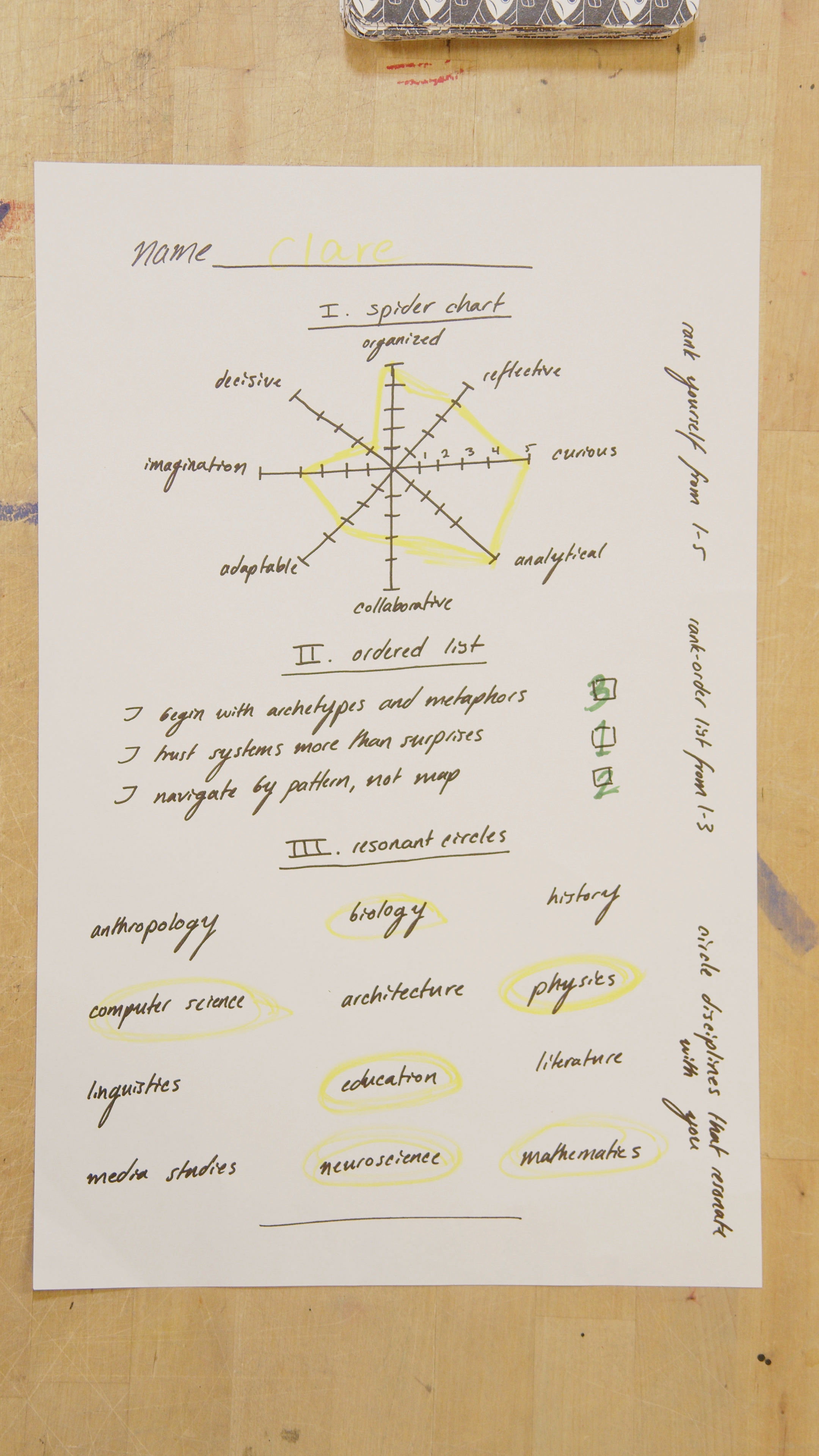
```
{
"name": "Clare",
"spider_chart": {
"organized": 5,
"reflective": 3,
"curious": 4,
"analytical": 5,
"collaborative": 2,
"adaptable": 3,
"imagination": 2,
"decisive": 1
},
"ordered_list": [
{
"statement": "I trust systems more than surprises",
"rank": 1
},
{
"statement": "I navigate by pattern, not map",
"rank": 2
},
{
"statement": "I begin with archetypes and metaphors",
"rank": 3
}
],
"resonant_circles": [
"biology",
"computer science",
"physics",
"education",
"neuroscience",
"mathematics"
]
}
```
### Reflection
* How does enforced structure change the output?
* Which version would you trust in a real workflow?
* How might this change how you capture notes in the first place?
---
## Activity 8: Target Appropriate Scenarios
AI excels at certain tasks and stumbles at others. The goal is not to make it perfect but to **use it where it’s strongest** and **avoid high-risk cases**.
The following use cases target tasks that AI is relatively reliable at, or constrain it to providing information that can aid the teaching and learning process even if there are a few errors in its output. Look at the following list with a partner and try out one or two of these activities.
* organize existing data:
* reformat a messy spreadsheet
* refactor a complex codeblock
* translate from one language, format or medium to another
* check the translation you are reading in a Gen Ed course to see if your close reading matches the nuances of the original language
* summarize a long academic paper.
* Generate a short podcast script explaining that paper.
* "translate" from English to code ("Vibe Coding")
* break down a difficult course concept into smaller chunks.
* write alt-text for an image, then improve it for accessibility
* turn a messy whiteboard photo into structured notes
* take dictation in voice mode and return clean Markdown
* offer feedback and questions rather than answers
* give feedback *as if it were a student* in your course.
* offer counterarguments to an academic argument for the writer to evaluate and defeat
* anticipate likely misconceptions based on the text of a lecture or textbook chapter
### Activity
1. Skim the list of **target-appropriate scenarios** above.
2. Pick **one or two** that feel realistic in your context.
3. Prompt the AI:
```
Why does this use case matter for higher education, and how could it change teaching, learning, or academic labor in the next 2–4 years?
```
Optional follow-up:
```
What institutional assumptions does this break?
```
---
### Reflection
AI is most helpful when used in **bounded, low-stakes tasks**—reformatting, summarizing, translating, prototyping. Avoid over-reliance for complex reasoning or sensitive evaluative tasks where errors or biases carry higher risk. Therefore:
* Which academic tasks start to look like infrastructure rather than expertise?
* What shifts from “student work” to “setup, framing, or evaluation”?
* Where does human judgment become more important, not less?
 Sign in with Wallet
Connect another wallet
Sign in with Wallet
Connect another wallet