# Score Your Podcast Guide
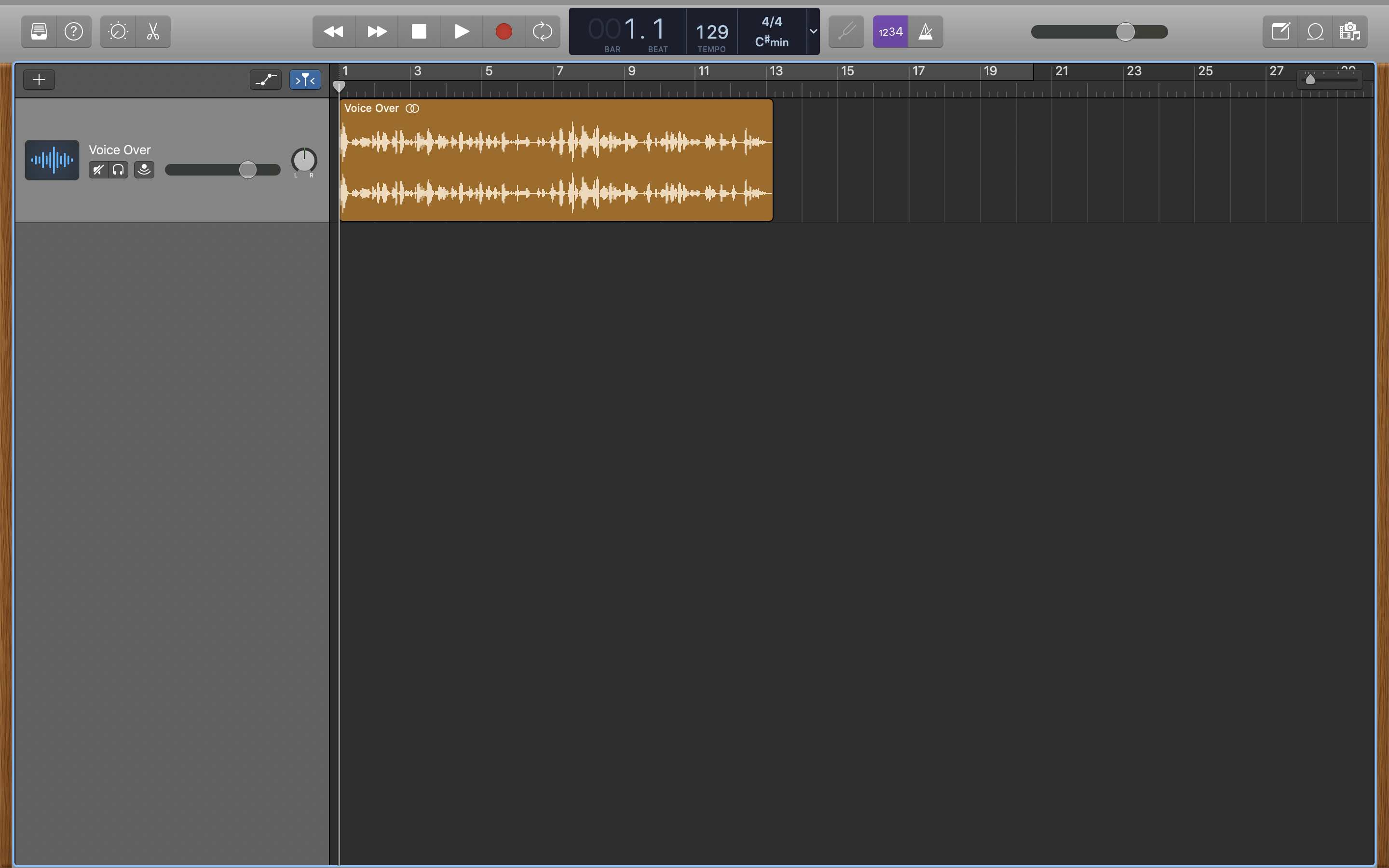
The relationship music has with any form of entertainment is like the relationship chocolate has with peanut butter. They go hand in hand and together, create an immersive experience that is delightful. The role music plays in a podcast is no different. This guide is to help show how to score music to your own podcast to create that attention-grabbing experience inside GarageBand.
*Note: The same basic principles can be applied in other DAWs, such as Logic Pro and Ableton Live.*
### *Apple Loops...*
One of the easiest ways to create a score for a podcast is by using [Apple Loops](https://support.apple.com/guide/garageband/apple-loops-in-garageband-gbnd84045a00/mac). There are tons of them, from electronic drum grooves to acoustic guitar strumming patterns. Thus, it is important to select loops that fit with the overall theme of the podcast. You probably want to avoid adding heavy rock guitars to a podcast that focuses on meditation and human development. Find what fits!
In this example we have a talk about sound design in electronic music production. Thus, our score will be in the electronic music idiom. Check out the voice-over itself below:
<iframe style="border: 0; width: 100%; height: 42px;" src="https://bandcamp.com/EmbeddedPlayer/album=2948362964/size=small/bgcol=333333/linkcol=ffffff/artwork=none/track=3826689190/transparent=true/" seamless><a href="https://danielbermudes.bandcamp.com/album/scoreyourpodcastguide">ScoreYourPodcastGuide by DB</a></iframe>
### 1.) Produce A Music Demo
[Mute](https://support.apple.com/guide/garageband/mute-tracks-gbnd2af6ba87/mac) the track with the voice-over for now. While it seems counterintuitive to leave it out when starting, it helps to focus on creating a rough composition of different Apple Loops together. We will also refine this later.
Open the [Loop Browser](https://support.apple.com/guide/garageband/loop-browser-gbnd96554a5a/10.4.4/mac/11.0) icon on the top right, and [add](https://support.apple.com/guide/garageband/add-apple-loops-to-a-project-gbndc1d3db81/mac) your desired loops onto the Tracks area. Using the search bar can also help in finding loops. As you drag more in, you will begin to see them stack on top of one another. Experiment as well with [extending](https://support.apple.com/guide/garageband/add-apple-loops-to-a-project-gbndc1d3db81/mac) your loops to fit the length of the voice-over.
*Note: While you can drag Apple Loops onto a single track, it is important for every loop to be on their own track. This process will make scoring easier.*
As you try out different loops together, begin to create a sense of cohesion among them. A way to look at this is to avoid having too many *bass* loops and *drum* loops together. This will create clutter and what is often reffered to in music production as "mud". There are ways to clean this out after, but it is much easier to avoid now than later.
For our example, we ended up with something like this:
<iframe style="border: 0; width: 100%; height: 42px;" src="https://bandcamp.com/EmbeddedPlayer/album=2948362964/size=small/bgcol=333333/linkcol=ffffff/artwork=none/track=2503411989/transparent=true/" seamless><a href="https://danielbermudes.bandcamp.com/album/scoreyourpodcastguide">ScoreYourPodcastGuide by DB</a></iframe>
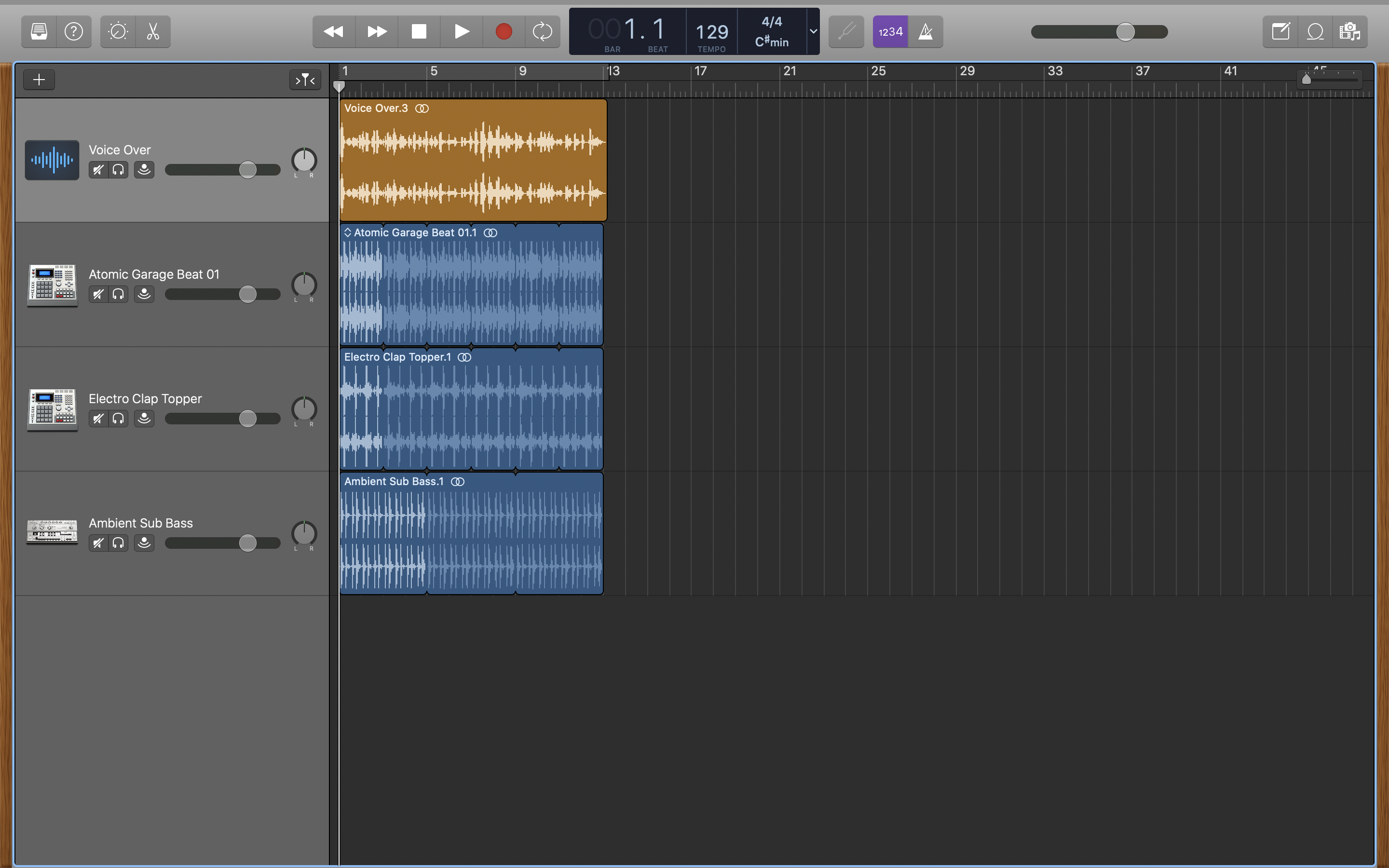
- "Atomic Garage Beat 01" is our main drum beat.
- "Electro Clap Topper" acts as a percussive layer over the main drum beat.
- "Ambient Sub Bass" is our bass groove.
**Tip: Less is more!**
### 2.) Compliment The Voice-Over
This is where things go up a notch. We now have a complete music demo to support our podcast. However, everything repeats. There is no variety or change in the score, and some parts may not sync together as you would like them to. With a little bit of creative thinking, we can tighten things up.
Placement of your Apple Loops in relation to the voice-over is crucial to creating more synchronization. One way to start is by moving loops to different "cue points" in the voice-over. When does your speaker begin to talk? Where do they change subject? Are there closing remarks? Having different loops come in at these different points will make those moments significant and keep the score from being repetitive.
There is no rule to this; it is entirely up to you how you want to organize your score.
For our example, we ended up with something like this:
<iframe style="border: 0; width: 100%; height: 42px;" src="https://bandcamp.com/EmbeddedPlayer/album=2948362964/size=small/bgcol=333333/linkcol=ffffff/artwork=none/track=1285447435/transparent=true/" seamless><a href="https://danielbermudes.bandcamp.com/album/scoreyourpodcastguide">ScoreYourPodcastGuide by DB</a></iframe>
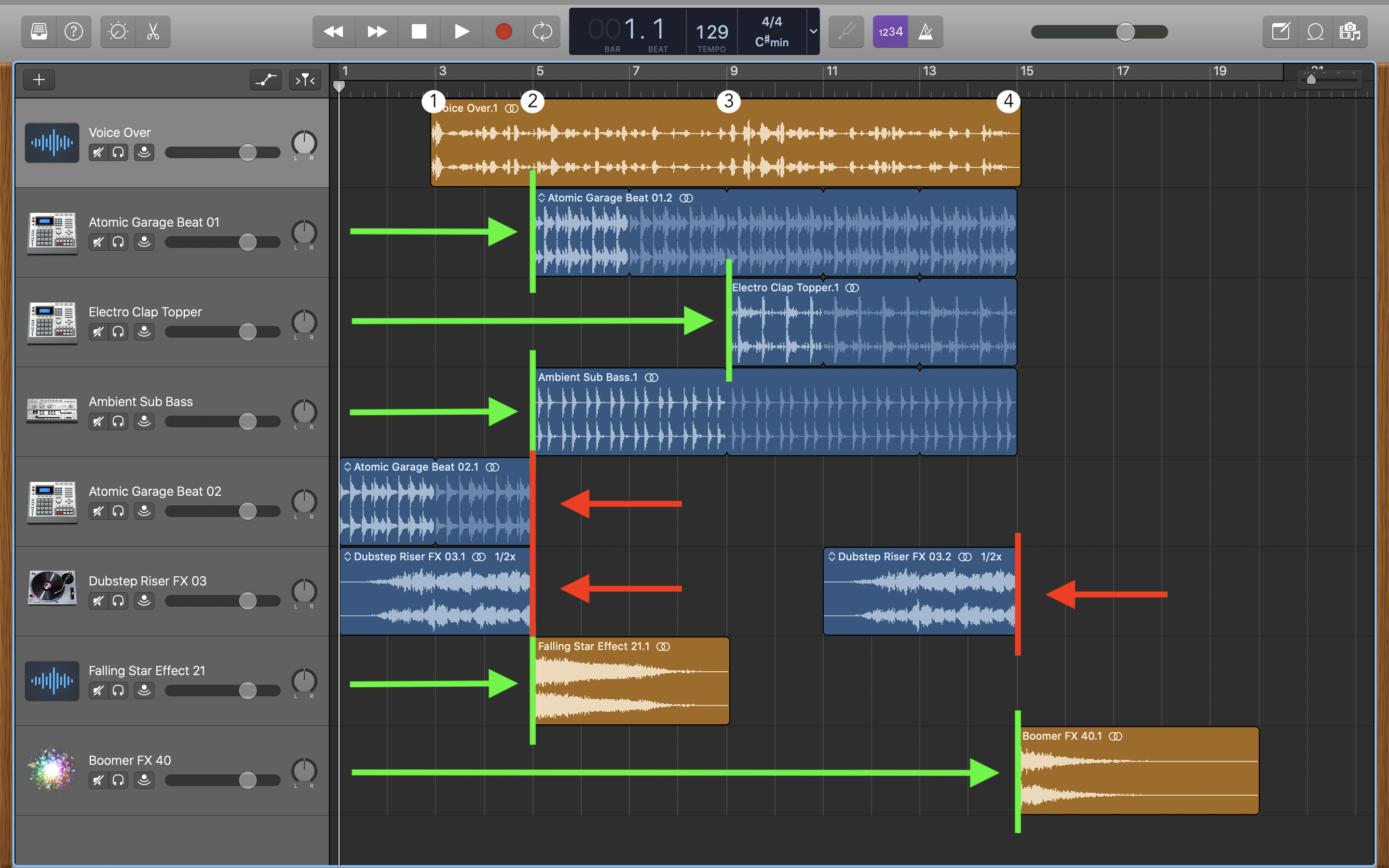
- We decided on four cue points which would serve as good moments.
- Loops with Green lines indicate they serve as starting a musical idea, and loops with Red lines indicate they are in place serving as conclusions.
- We now added the "Dubstep Riser FX 03" to the start of the podcast, shifting the voice-over a bit. Sound effects are great as transitions to help move the music forward.
- The "Boomer FX 40" and "Falling Star Effect 21" serve as solid conclusions in relation to what the speaker is talking about.
- "Electro Clap Topper" shifted to come in later in the voice-over. This helps keep the music interesting and "fresh".
### 3.) Mix Everything Together
As you have probably noticed by now, your voice-over may be really quiet with all of these different sounds layered over it. We can begin the process of mixing and adjusting volume levels for each track for the score to better fit **underneath** the voice-over.
With some simple adjustments, we now have this:
<iframe style="border: 0; width: 100%; height: 42px;" src="https://bandcamp.com/EmbeddedPlayer/album=2948362964/size=small/bgcol=333333/linkcol=ffffff/artwork=none/track=2470889353/transparent=true/" seamless><a href="https://danielbermudes.bandcamp.com/album/scoreyourpodcastguide">ScoreYourPodcastGuide by DB</a></iframe>
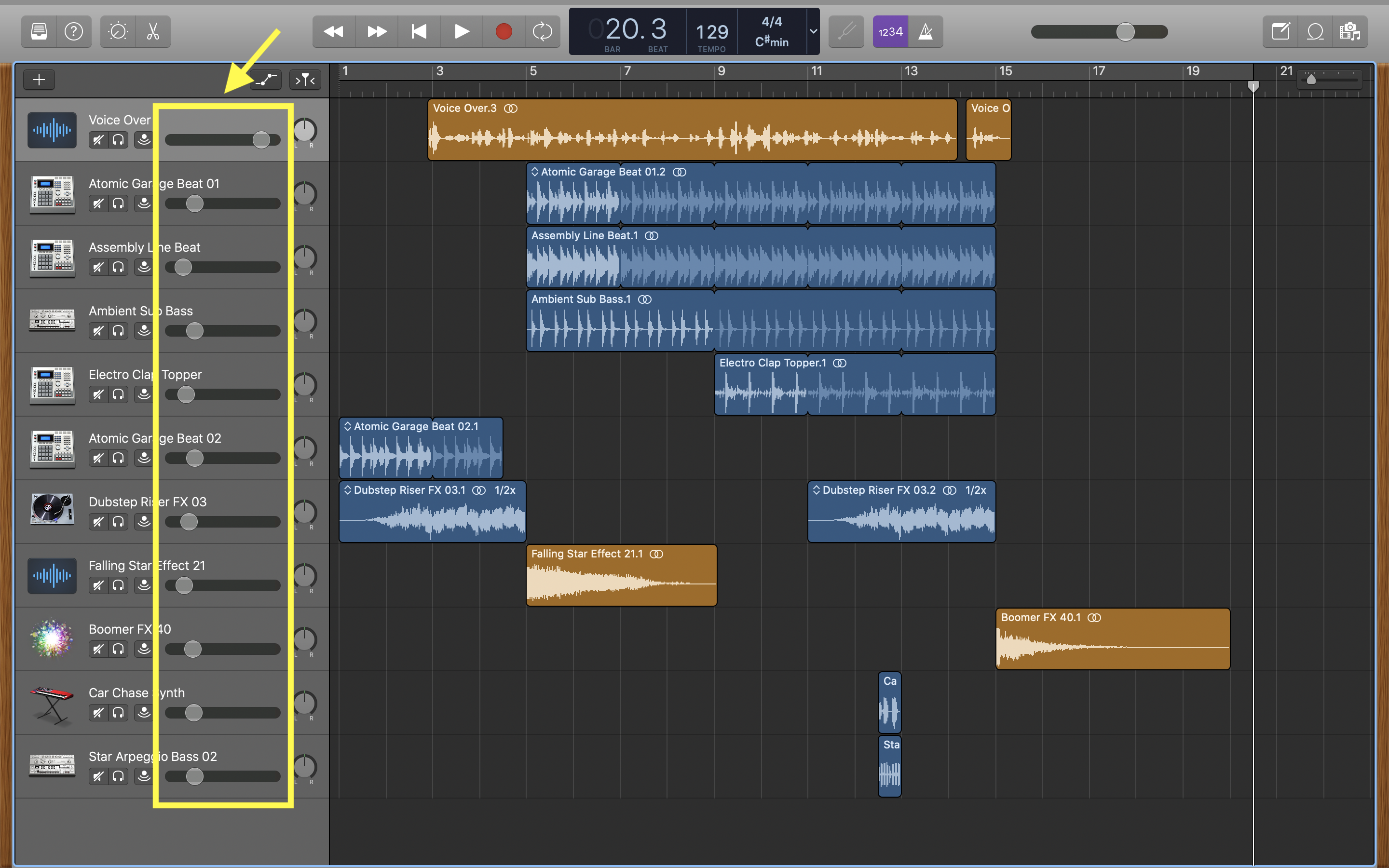
If you listen, you hear that the beginning slowly fades in. This is through [track automation](https://support.apple.com/guide/garageband/show-track-automation-curves-gbnd939b92d8/mac), and is a powerful way to bring in and bring out sounds. Feel free to explore this more in your own score.
- "Car Chase Synth" and "Star Arpeggio Bass 02" were included as musical [stabs](https://en.wikipedia.org/wiki/Stab_(music)); certainly not necessary, though.
- Looking at the "Voice Over" itself, I made a small cut and shifted that new region slightly. This was done to better synchronize the score with the voice-over.
-----------
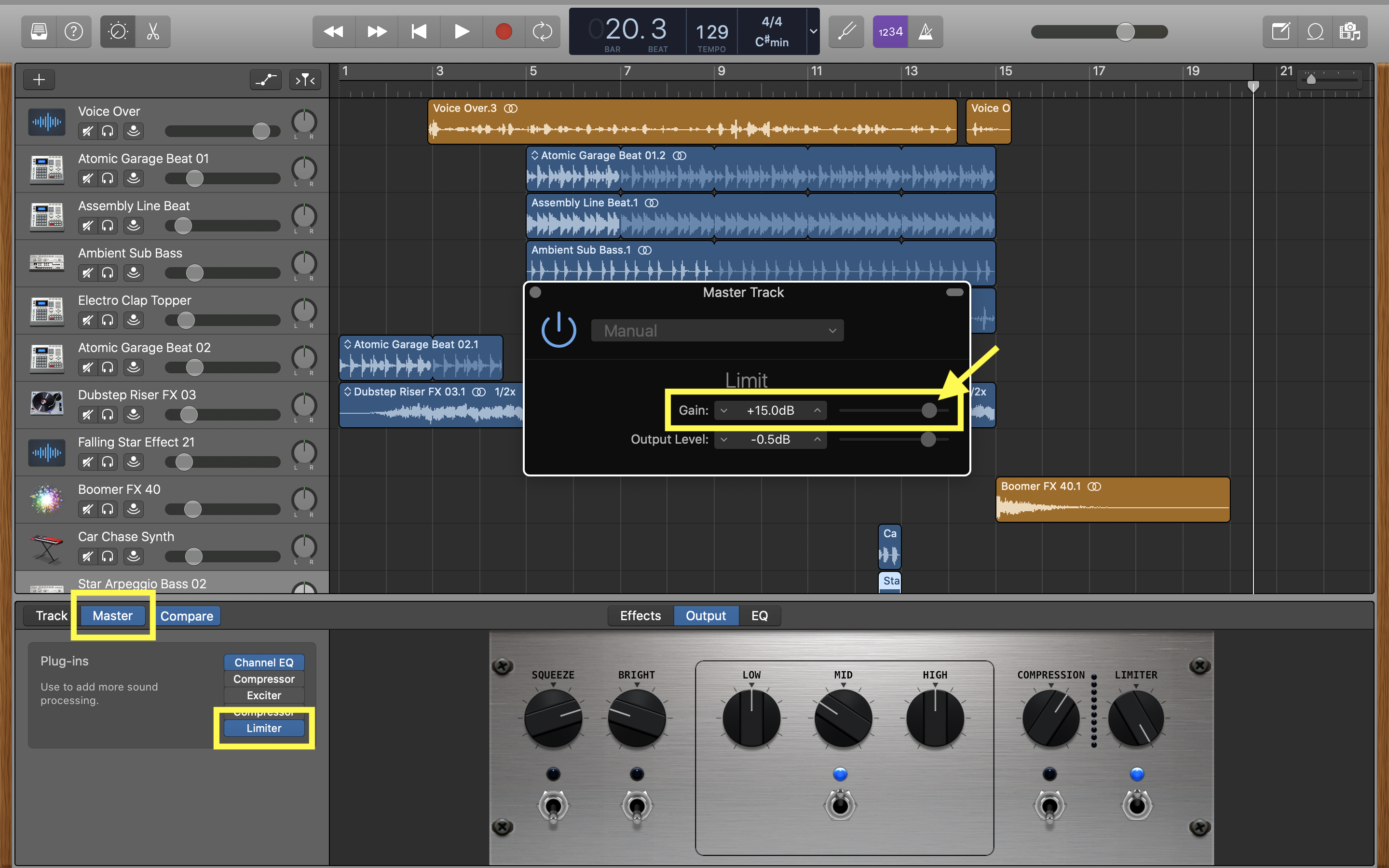
A common issue that can arise is the entire podcast itself may sound quieter than intended. In this case, an easy solution is to add a *Limiter* to the entire podcast. This will allow us to bring everything up in volume. Double-click any track, select 'Master', then turn on and click *Limiter* in the Plug-ins box to open its pop-up window.
Adjust the *Gain* parameter carefully, however, for increasing this drastically can be fatiguing to the ears and cause unwanted distortion! There is also no set rule for how much Gain you should apply; you can trust your ears on this or continue increasing the gain level until distortion is heard.
 Sign in with Wallet
Connect another wallet
Sign in with Wallet
Connect another wallet