<style>
.present {
text-align: left;
}
</style>
---
###### tags: `Week 15` `W15D2`
---
## Redux
- JS framework for managing the frontend state of a web app
- similar to context, but for larger, more sophisticated applications
- https://redux.js.org/
- https://react-redux.js.org/
---
## Review from yesterday...
- Class based components
- React is backward compatible
- no hooks! 🥲
- all methods or this.state, this.props
- lifecycle methods instead of useEffect
---
## Plan for today...
- talk about the pieces of redux (store, state, actions, reducers, oh my!)
- implement usersState in Patchstagram (first slice of state)
- step through implementing postsState along with short practices (second slice)
- Grocery Store long practice
---
## The process...
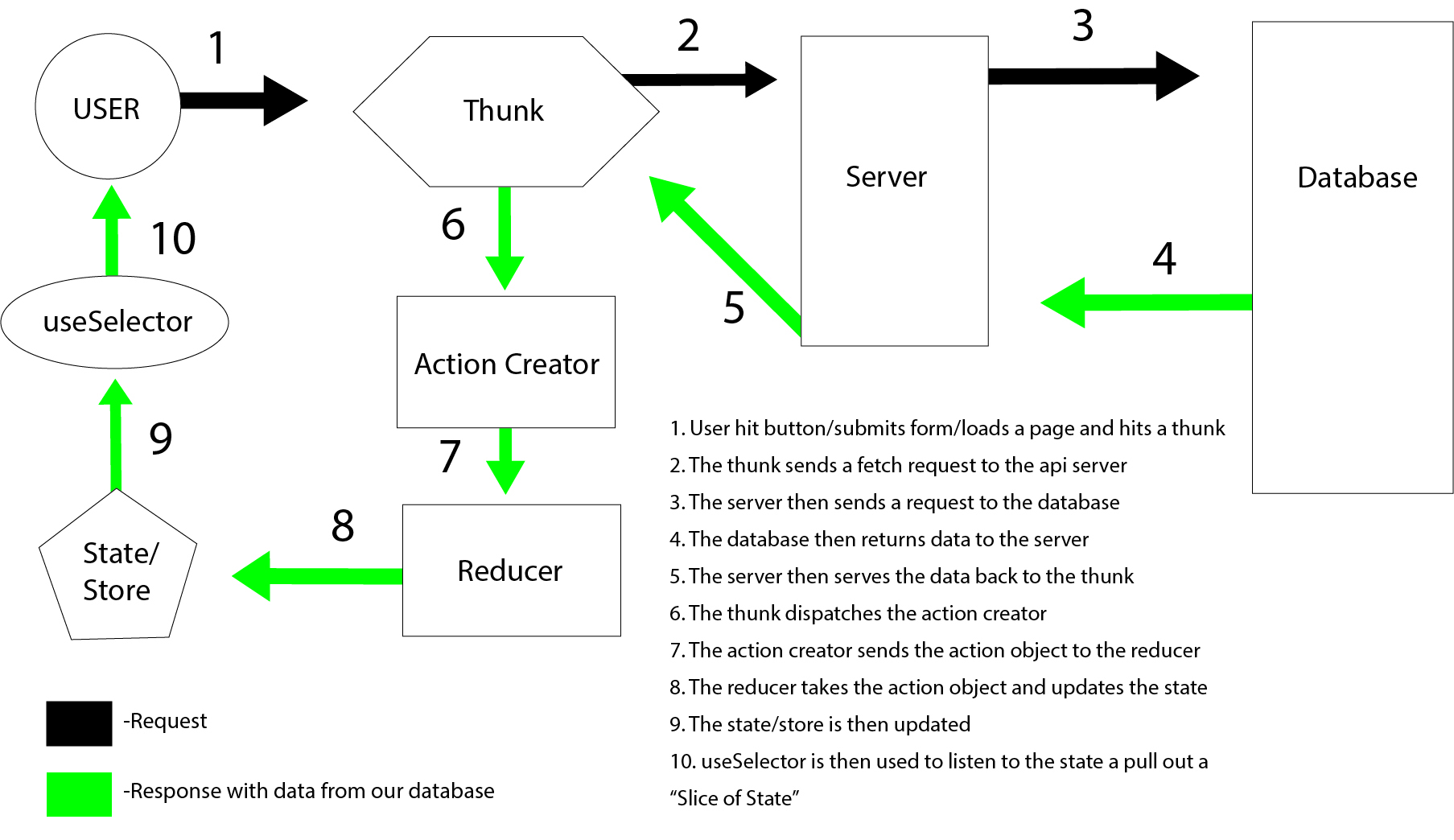
---
## State
- all the information stored by that program at a particular point in time
- prevents us from having to always fetch our data
- similar to what we have used context for (think of the postsContext from last week)
---
## Store
- a single JS object that holds the state of the application
- can have multiple slices as needed with its own actions and reducer
- can provide an initial value for state
```java
const configureStore = (preloadedState) => {
return createStore(rootReducer, preloadedState, enhancer);
};
```
---
## Actions
- a POJO with a type property
- they get dispatched (or sent) to the store in response to user actions or fetch requests
- good idea to make the type a variable that points to a unique string for debugging purposes
- Action Creators: functions that return actions and can take arguements allowing the actions to carry payloads of data
```javascript=
export const loadPosts = (posts) => ({
type: LOAD_POSTS,
posts
});
```
---
## Reducer
- pure function called each time an action is dispatched
- receives an action and the current state as arguments and returns an updated state.
- always return a new state, never mutate state!
```java
const usersReducer = (state = initialState, action) => {
switch(action.type){
case LOAD_USERS:
return {...state, ...action.users}
default:
return state
}
};
```
---
## Middleware / Thunks
- Thunks will be how we handle our calls to our server, they are used to make async API requests
- a Thunks is a general concept in computer science referring to a function whose primary purpose is simply to call another function.
- We will punt these to tomorrow's lecture topic
---
## The process...

---
## Provider
- a wrapper component, providing access to the store to the whole App
- very similar to our provider with context, but takes a store prop instead of value
```jsx
const root = ReactDOM.createRoot(document.getElementById('root'))
root.render(
<Provider store={store}>
<App />
</Provider>,
)
```
---
## React-Redux Hooks
### useDispatch
- used to sent actions to the reducer
- this is how we update our state
```java
const dispatch = useDispatch()
dispatch(addArticle(newArticle))
```
---
## React-Redux Hooks cont
### useSelector
- Allows you to extract data from the Redux store state for use in this component, using a selector function.
- has the useState hook built in to it, so when we provide a new ref in memory, it will trigger rerenders
- need to select the key/attribute you want to listen to for change
```javascript=
const articles = useSelector( state => state.articleState.entries)
```
---
## Lets put it all together for usersState
---
## Practice time!
- pair through first short practice, using params to query the store
- 30 min
- we'll come back and talk about it
---
## Practice time again!
- pair through second short practice, using forms with redux
- 30 min
- we'll come back and talk about it
---
## Long Practice time!
- pair through Grocery Store practice
- ask questions!
- tomorrow AM we have the mock assessment on redux
- tomorrow PM we learn about thunks
{"title":"W15D2 Redux","description":"JS framework for managing the frontend state of a wed app","contributors":"[{\"id\":\"dafd1858-850b-4d12-9d53-a1ac5e891cf8\",\"add\":4797,\"del\":465},{\"id\":\"bbda4bdc-50a5-429e-9073-d74141f277f3\",\"add\":2,\"del\":3}]"}