<style>
.present {
text-align: left;
}
img {
height: 300px;
}
</style>
---
###### tags: `Week 14` `W14D2`
---
## Week 14 Day 2
### How we doing?
- How was homework?
- How are we feeling about React so far?
---
## Week 14 Day 2 Topics
- Vite
- React Basics (review from yesterday's content)
- React Router
---
## Vite!
- Vite is what we will use to build a react front end from scratch
- https://vitejs.dev/
- Vite is only for development!
```terminal
npm create vite@latest <project-name> -- --template react
npm install
npm run dev
```
---
## More Vite Setup - linting
- We want to set up ESlinting for our applications to run automatically
- Lets head to the walkthrough for details (maybe run the below command to start)
```terminal
npm install -D vite-plugin-eslint
```
---
## Lets look at that App.jsx
- its our first component, awwwwwww 🥺
- lets talk about whats going on, then
- lets clear it out and start building our own app!
---
## Strict Mode
```jsx=
ReactDOM.createRoot(document.getElementById('root')).render(
<React.StrictMode>
<App />
</React.StrictMode>,
)
```
- https://react.dev/reference/react/StrictMode
- helps us find bugs in development (makes sure our components are pure functions)
- when a component mounts, it will cause our components to rerender an extra time
- it will also cause our effects to run an extra time on mount as well
---
## Patchstagram, an Instagram Clone

- we will build this front end in pieces together over the next 2 weeks
- many of the practices will have some pieces we can relate to our Patchstagram front end
- some practices we will just directly discuss
---
## Components!
- App.jsx is our first!
- Typically we want a component to have its own file
- Capitalized Function
- Returns 1 JSX elemement (1 parent)
- There will be many many more to come...
```jsx
function Post() {
return (
<div>
<h2> Post content goes here! </h2>
</div>
);
}
export default Post;
```
---
## More on Components
- we need to render/display them somewhere...
- most of the time we will a self closing tag
- its possible to have a component with a closing tag, but not common (usually a wrapper)
```jsx!
import Post from "./components/Post"
function App() {
return (
<>
<Post />
</>
)
}
```
---
## Image Tags
- need to set a src attribute (nothing new i know)
- can import the file into the component
```jsx!
import patchImage from "./assets/cat-image.png"
return (
<img src={ patchImage } alt="cute-cat" />
)
```
- can also reference the image name if in the public folder
```jsx
<img src="./cat-image.png" alt="cute-cat"/>
```
- we would use the above syntax if using an external url as well
- don't forget to set an alt attribute!
---
## CSS... (ewww CSS)
- we do need to know how to add css to our components
- if we want to add a file for CSS
```jsx
import "./App.css"
<img className="main-cat-image" />
```
- generally best to use classes over ids in components
- inline we can use the style attribute, but we need to use double curlies
```jsx
<img style={{"height": "300px"}} src="..." />
```
---
## Breaktime!
### See ya back in 5 min
### When we come back, topics will be...
- props
- lists
- events
- routing
---
## 🙌 Props! 🙌
- we can pass information from a parent to a child component (we can NOT do child to parent)
- we call these props
- they are key value pairs we define on the component where it is called/rendered
- special prop called props.children
- destructing is cool
- spreading works too, but please don't :pray:
---
## Passing Props
- in the parent...
```jsx
function App() {
const postTitle = "Check out that cat napping!"
return (
<>
<Post title={ postTitle } />
</>
)
}
```
- in the child component
```jsx
function Post(props){
return (
<div>
<h3>{ props.title }</h3>
</div>
)
}
```
---
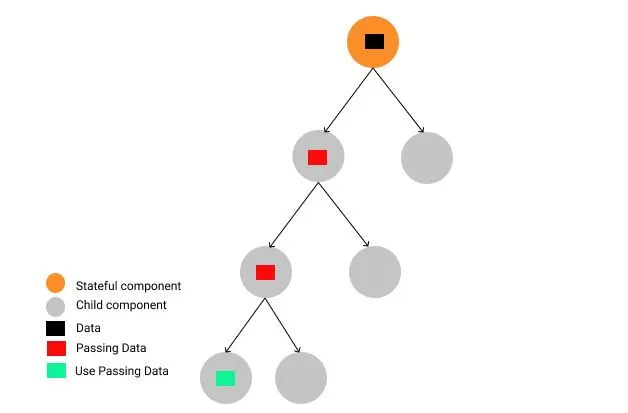
## Prop Threading (or "drilling")
- passing data down multiple levels of components using props
- it's not "bad" but as our apps grow and the levels of the tree grow, it can be very confusing to pass a prop down 5-8 levels
- there is a better way, where we can skip levels called context, but thats a Thursday thing
---
## Wrapper Component
- make use of props.children
- this will be whatever content is between the parents opening and closing tags
```jsx
<PurpleWrapper>
<OtherComponent />
</PurpleWrapper
```
```jsx
function PurpleWrapper(props) {
console.log(props)
return (
<div style={{"color": "purple"}}>
{ props.children }
</div>
);
}
```
---
## Lists
- we can use our best buddy .map to iterate over an array of data
- need to set a key attribute, this help's react with rendering the list
- like with our component returns, there has to be a single parent returned
```jsx
{ someData.map((postData) => (
<Post key={ postData.postNum } data={ postData } />
))
}
```
---
## onClick & handleClick (events)
- we handle our event by attributes on the html tag (onCLick, onChange, onSubmit)
- we do not want to invoke our handleClick in the onClick, we need an anonymous function to do it for us
```jsx
const handleClick = (e) => {
console.log("in handle click", e.target)
alert("One day this will help us make a new post...")
};
<button onClick={ (e) => handleClick(e) }>New Post</button>
```
---
## React Router!
- its our front end navigation
- lets us decide what "page" to render
- the urls are not the same as your servers urls
- potentially the trickiest thing this week, but also the most important
- will need to install a new dependancy, react-router-dom
---
## Router Setup
- we need createBrowserRouter. which will accept an array of objects
- each object could have a path, element, or children
- we build a tree like structure with potential nested arrays of object
- react handles pattern matching and its pretty awesome (it wasn't always)
```jsx
import { createBrowserRouter, RouterProvider } from "react-router-dom"
const router = createBrowserRouter([
{
path: '/',
element: <Landing />
},
{
path: '/posts',
element: <Feed />
}
])
```
---
## Router Provider
- sets up where to render our "routes"
- typically found in our App component
- you can't use routing functioniality outside of it (like below, don't do it!)
```jsx
function App() {
return (
<>
<Link to="/posts" ></Link>
<RouterProvider router={ router } />
</>
)
}
```
---
## Navigation
- we use Link tags or NavLink tags depending on situation (is it a navbar? 😆)
- we do not want to use anchor tags they will cause an entire page rerender
- NavBars add the "active" class to the link when clicked, allowing for some CSS goodness
- both imported from "react-router-dom"
- Links need to be in the context of our <RouterProvider />
```jsx
import { Link, NavLink } from 'react-router-dom'
return (
<>
<Link to="/">Home</Link>
<NavLink to="/posts">Feed</NavLink>
</>
)
```
---
## Outlet & Layout
- how we can make navigation components
- helps us with the context issue from above, we need to have all routing functionality as a child of our <RouterProvider />
- <Outlet /> is imported from "react-router-dom" and is a placeholder for where the Router will render content
- <Layout /> is a convention for the component that handles wrapping other content
---
## Nested Routes
- sometimes our application might require multiple levels of routes
- we can set up children routes on a component
- may need an outlet depending on what you are trying to accomplish
- nested routes HW practice had a great example with Movies & Movie Details...
---
## useParams (our first hook!)
- used for grabbing route parameters
- imported from react-router-dom
- in the router:
```jsx
{
path: "posts/:postId",
element: <PostDetails data={ someData } />
}
```
- in the component:
```jsx
const { postId } = useParams()
```
---
## useNavigate
- yet one more tool from react-router-dom
- typically used with an event (onClick or a form submission)
- need to import it and then invoke it
```jsx
const navigate = useNavigate()
```
- when we want to navigate to a route...
```jsx
navigate(`/posts/${id}`)
```
---
## For the rest of today..
### Art Museum Project
- Great long practice for today!
- Ask questions if you get stuck!
- Start on your HW if you finish early!
- I would prioritze having homeword completed over doing a bonus phase
{"description":"__","title":"React Router & Review","contributors":"[{\"id\":\"dafd1858-850b-4d12-9d53-a1ac5e891cf8\",\"add\":10567,\"del\":1676},{\"id\":\"bbda4bdc-50a5-429e-9073-d74141f277f3\",\"add\":122,\"del\":134}]"}