<style>
.present {
text-align: left;
}
</style>
---
###### tags: `Week 15` `W15D3`
---
## Redux Thunks
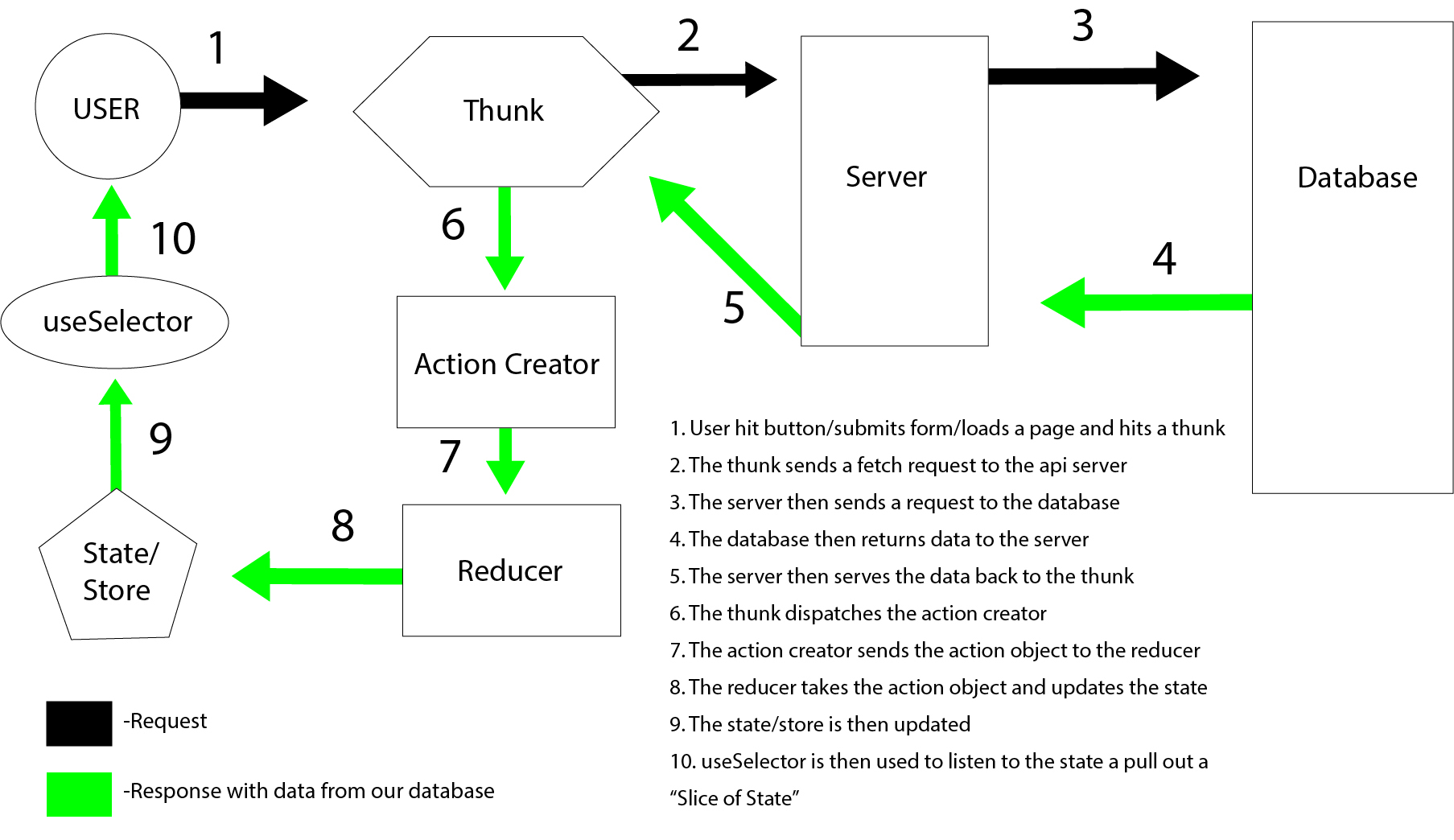
- Thunks are function whose primary purpose is simply to call another function
- these will handle our fetches to the server
- they will ultimately dispatch the action creator if they are successful
---
## Review from yesterday...
- Redux
- store - global state
- slices of state
- provider (just one!)
- actions & action creators
- reducers
- useSelector (like context consumer)
- useDispatch - makes our actions happen!
---
## The process...
---
## Setup for thunks in store
- need to install redux-thunk (typically already in the package.json already in starters)
- import it in to the store
- add it to our middleware (we need it in production too)
```javascript
let enhancer;
if (import.meta.env.MODE !== "production") {
const logger = (await import("redux-logger")).default;
const composeEnhancers =
window.__REDUX_DEVTOOLS_EXTENSION_COMPOSE__ || compose;
enhancer = composeEnhancers(applyMiddleware(thunk, logger));
}
else {
enhancer = applyMiddleware(thunk);
}
```
---
## Proxy
- need to tell react where the server is to make fetches
- we add the following to our vite.config.js after the plugins (this is done for you in projects)
```java
server: {
proxy: {
"/api": "http://localhost:5000"
}
}
```
---
## Friendly Reminder...
- its been a few weeks since we needed/used a server...
- don't forget you need to start your server and your front end now
- this is a development only thing, in production the client lives in the server
---
## Thunks in the reducer
- function that callsanother function
- we need to pass in the dispatch, so that we can dispatch our action from the thunk
- can have a payload (if its a POST/PUT/PATCH)
```javascript!
export const getAllUsers = (payload) => async (dispatch) => {
const response = await fetch('/api/users/all');
if (response.ok) {
const { users } = await response.json();
dispatch(loadUsers(users));
};
```
---
## Thunks - Return vs Dispatching...
- we can do both...
- if we are successful in retreiving or making what we want, it should go to the store & state
- if we got an error, we probably want to return it to the component and display it
- how we do the above is going to be situational based on what we are trying to do, and the components we are working with...
---
## Lets get some thunks in Patchstagram...
- get all users thunk (for our login and form)
- get all posts thunk (cause we need posts)
- create a post thunk (cause we want more posts!)
---
## Practice time!
- pair through the short practice thunk action creator
- pair through the short practice thunk dispatch
- come back for questions
- we will talk about normalizing our state when we come back
---
## Normalizing state
- improves performance!
- objects have constant lookup time, arrays are iterative
- best way would be to send the data already normalized
- use a forEach loop to turn your data from the server into an object
- we can use Object.values to turn it back to an array when needed (for mapping mostly)
- ids as keys is the typical way
---
## Sample state normalizing
```javascript!
case LOAD_POSTS:
const newState = {...state};
action.posts.forEach((post) => (newState.posts[post.id.toString()] = post));
return newState;
```
---
## For the rest of today...
- normalizing state short practice(optional, don't do custom selectors if you do try it)
- pet rating short practice from Thursday (especially if you will be cloning AirBnb, but good to know for all)
## Tomorrow...
- Tomorrow will be another self evaluation practice adding in thunks
- Pokedex practice
- Study Day
## Friday starts "Project Week"
{"title":"Redux Thunks","description":"JS framework for managing the frontend state of a web app","contributors":"[{\"id\":\"dafd1858-850b-4d12-9d53-a1ac5e891cf8\",\"add\":5088,\"del\":1092},{\"id\":\"bbda4bdc-50a5-429e-9073-d74141f277f3\",\"add\":2,\"del\":1}]"}