# Linux輸入子系統Input subsystem學習筆記
Linux系統中有許多輸入設備:鍵盤、滑鼠、觸摸屏幕…等,而若是針對每一個輸入設備撰寫相對應的驅動程序,則應用層就必須知道每個設備節點的名稱,根據不同的設備開啟不同的設備節點,只要其中一個設備修改,就必須修改應用層,對整個系統產生不小的影響。
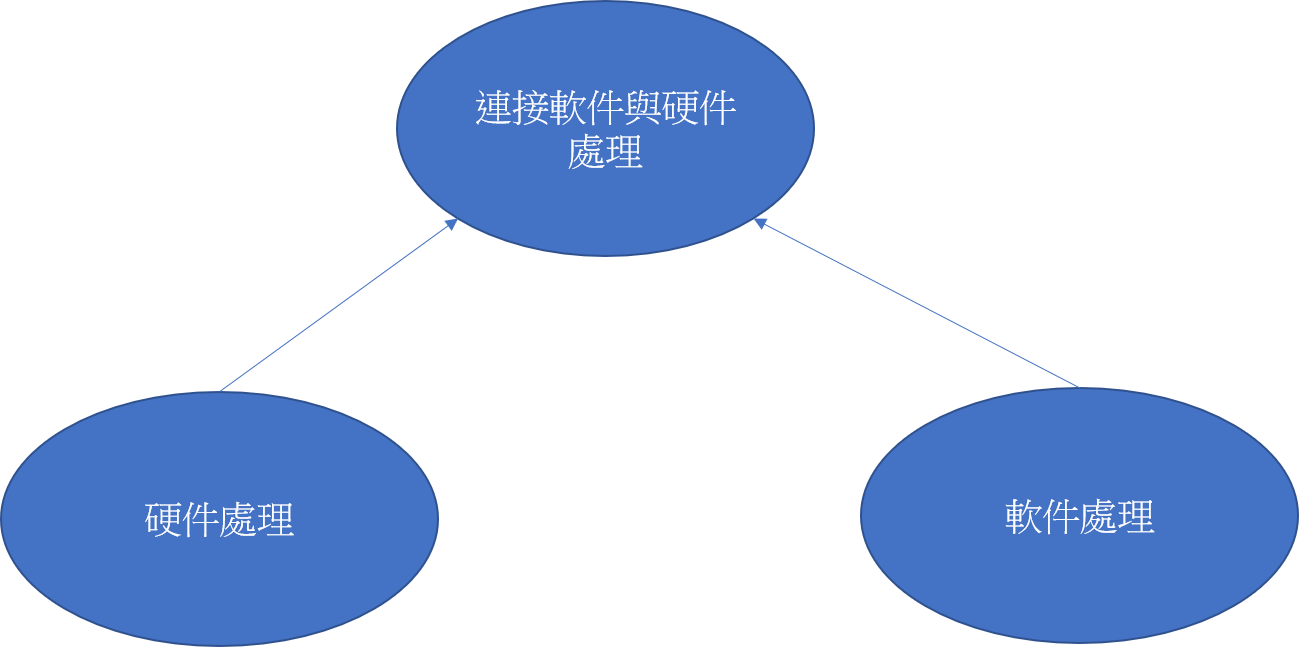
因此Linux系統發展出一套能夠兼容所有輸入設備的系統:輸入子系統(Input subsystem),將所有輸入設備進行統一管理,抽象出三部分:軟件處理、硬件處理、連接軟件與硬件處理。由此框架得知,若新增一輸入設備,程序員只需要根據輸入子系統的框架撰寫硬件處理驅動即可,應用程序仍可以依照輸入子系統定義的API去操作硬件。
# Linux 4.19.x 內核解析
drivers/input/input.c:
## 1. 入口函數:input_init
## 2. 註冊
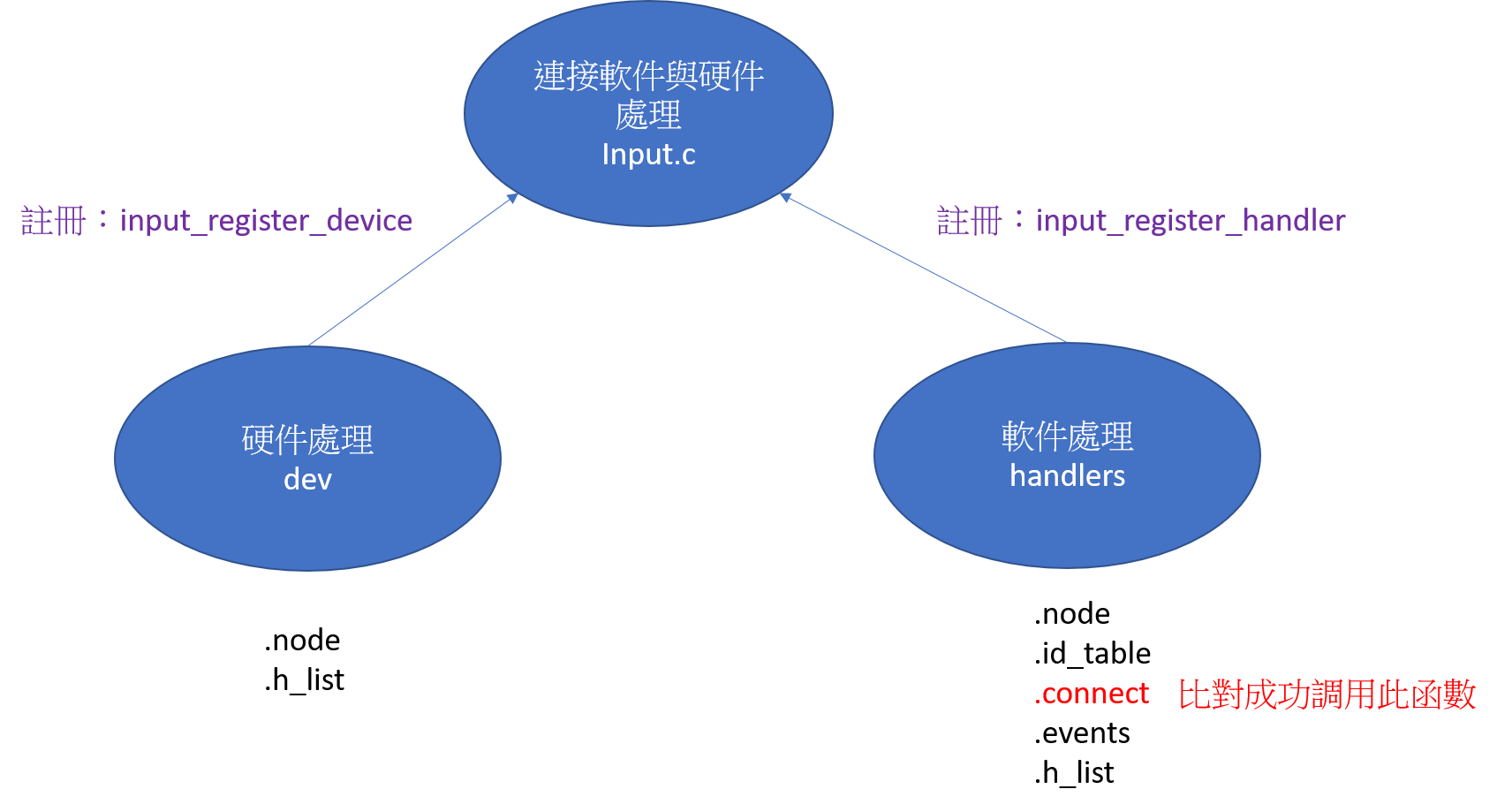
加載evdev.c時入口函數會註冊handler,加載gpio_keys.c入口函數會註冊device
input_register_device
```c=
int input_register_device(struct input_dev *dev)
{
list_add_tail(&dev->node, &input_dev_list); // 放入鏈表
list_for_each_entry(handler, &input_handler_list, node) // 對於每個handler調用input_attach_handler
input_attach_handler(dev, handler);
}
```
input_register_handler
```c=
int input_register_handler(struct input_handler *handler)
{
list_add_tail(&handler->node, &input_handler_list); // 放入鏈表
list_for_each_entry(dev, &input_dev_list, node) // 對於每個dev調用input_attach_handler
input_attach_handler(dev, handler);
}
```
在註冊device或handler時,會將input_dev_list列表中的每個dev與input_handler_list裡handler裡進行兩兩比對,用handler裡的id_table來判斷是否支持此input_dev,若能夠支持,則會調用handler裡的connect函數。
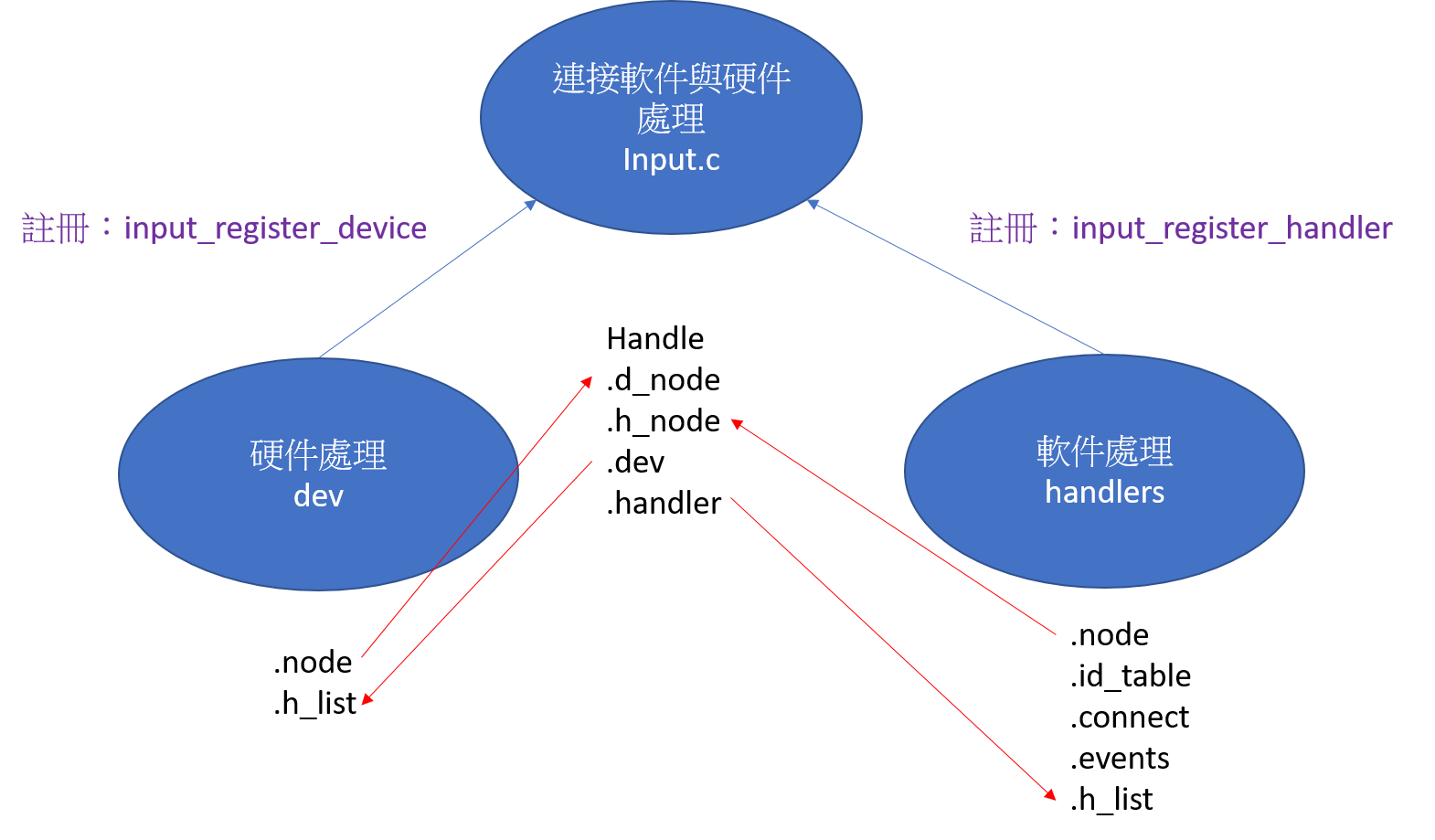
## 3. 配對成功調用connect函數,底下以evdev為例
```c=
static int evdev_connect(struct input_handler *handler, struct input_dev *dev, const struct input_device_id *id)
{
evdev = kzalloc(sizeof(struct evdev), GFP_KERNEL); // 分配一個input_handle
evdev->handle.dev = input_get_device(dev); // input_handle裡的dev指向左邊的dev
evdev->handle.handler = handler; // input_handle裡的handler指向右邊的handler
input_register_handle(&evdev->handle); //註冊handle
}
```
input_register_handle函數
```c=
int input_register_handle(struct input_handle *handle)
{
struct input_handler *handler = handle->handler;
struct input_dev *dev = handle->dev;
list_add_tail_rcu(&handle->d_node, &dev->h_list); // dev的h_list指向handle裡的d_node
list_add_tail_rcu(&handle->h_node, &handler->h_list); // handler的h_list指向handle裡的h_node
cdev_init(&evdev->cdev, &evdev_fops); // 初始化字符設備
}
```
其中evdev_fops的結構如下
```c=
static const struct file_operations evdev_fops = {
.owner = THIS_MODULE,
.read = evdev_read,
.write = evdev_write,
.poll = evdev_poll,
.open = evdev_open,
.release = evdev_release,
.unlocked_ioctl = evdev_ioctl,
#ifdef CONFIG_COMPAT
.compat_ioctl = evdev_ioctl_compat,
#endif
.fasync = evdev_fasync,
.llseek = no_llseek,
};
```
## 4. APP使用read函數
最終會調用evdev_read
```c=
evdev_read
{
//若無數據且選擇非阻塞方式打開,則直接回覆錯誤
if (client->packet_head == client->tail && (file->f_flags & O_NONBLOCK))
return -EAGAIN;
//若無數據且沒有選擇非阻塞方式,則進入休眠
if (!(file->f_flags & O_NONBLOCK)) {
wait_event_interruptible(evdev->wait,
client->packet_head != client->tail ||
!evdev->exist || client->revoked);
}
}
```
## 5. 進入休眠,誰來喚醒?
```c=
evdev_events
evdev_pass_values
wake_up_interruptible(&evdev->wait);
```
## 6. evdev_events被誰調用?
猜測應由硬件input_dev的中斷接收到資料後再調用evdev_events,底下以gpio_keys.c為例
gpio_keys_gpio_isr
```c=
input_report_key(bdata->input, button->code, 1);
input_event(dev, EV_KEY, code, !!value);
```
gpio_keys_irq_isr
```c=
input_event(input, EV_KEY, *bdata->code, 1);
input_sync(input);
```
中斷處理函式為gpio_keys_gpio_isr或是gpio_keys_irq_isr,但皆會呼叫到input_event
```c=
void input_event(struct input_dev *dev, unsigned int type, unsigned int code, int value)
{
input_handle_event(dev, type, code, value);
}
```
進入input_handle_event
```c=
static void input_handle_event(struct input_dev *dev,
unsigned int type, unsigned int code, int value)
{
input_pass_values(dev, dev->vals, dev->num_vals);
}
```
進入input_pass_values
```c=
static void input_pass_values(struct input_dev *dev,
struct input_value *vals, unsigned int count)
{
handle = rcu_dereference(dev->grab);
if (handle) {
count = input_to_handler(handle, vals, count);
}
}
```
進入input_to_handler
```c=
static unsigned int input_to_handler(struct input_handle *handle,
struct input_value *vals, unsigned int count)
{
if (handler->events)
handler->events(handle, vals, count); //由此調用handler的events函數
}
```
# 應用層
架構圖如下

-----
經過上述分析初步瞭解linux輸入子系統的架構,接下來要學習
1. 怎麼寫符合输入子系统框架的驅動程序呢?
2. 應用層要如何使用輸入子系統得到輸入數據呢?
 Sign in via Facebook
 Sign in via X(Twitter)
 Sign in via GitHub
 Sign in via Dropbox
 Sign in with Wallet
Connect another wallet
Sign in with Wallet
Connect another wallet