# Notebook 1 QC doublet and background removal
## Introduction
This notebook provides a comprehensive analysis pipeline for single-cell RNA sequencing (scRNA-seq) data, focusing on doublet identification and background removal. We'll be utilizing various tools and methods such as Scanpy, the scDblFinder package, and CellBender to manage and clean scRNA-seq data, enhancing the quality of the downstream analysis.
### Running the Notebook in Google Colab
To run this notebook on Google Colab, follow these steps:
1. **Upload the Notebook to Colab**:
- Go to [Google Colab](https://colab.research.google.com/).
- Click on **File** > **Upload Notebook** and select the attached notebook file to upload.
2. **Setting up the GPU Runtime**:
- Google Colab provides free access to GPU for faster data processing.
- To enable GPU, go to **Runtime** > **Change runtime type**. Set **Hardware Accelerator** to **GPU** and click **Save**.
- Using a GPU will significantly speed up the heavy computations involved in scRNA-seq data analysis, especially for tasks like clustering, dimensionality reduction, and matrix operations that are computationally intensive.
- Confirm the GPU availability by running the command:
```python
import tensorflow as tf
device_name = tf.test.gpu_device_name()
if device_name != '/device:GPU:0':
raise SystemError('GPU device not found')
print('Found GPU at: {}'.format(device_name))
```
### Introduction to Scanpy and AnnData
#### Scanpy Overview
Scanpy is a popular Python-based toolkit for analyzing single-cell RNA sequencing data. It offers comprehensive functionality for preprocessing, visualization, clustering, and downstream analysis of scRNA-seq data.
To install Scanpy, use the following command:
```python
!pip install scanpy
```
Scanpy is particularly well-suited for large-scale datasets and provides various functions to easily manipulate and visualize data in an efficient way. Some of the key steps that Scanpy supports include normalization, highly variable gene selection, dimensionality reduction (PCA, UMAP, t-SNE), clustering (Louvain, Leiden), and differential expression analysis.
#### AnnData Structure
The core data structure that Scanpy uses is called [AnnData](https://joss.theoj.org/papers/10.21105/joss.04371). It is a highly flexible and efficient data structure that organizes data into multiple slots:
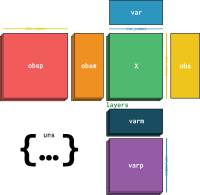
- **.X**: Contains the main expression matrix (observations \( imes\) variables). It can store raw or normalized expression values (e.g., counts or log-transformed values).
- **.obs**: Holds metadata about the cells (e.g., cell type, treatment group). It is a pandas DataFrame-like structure where each row represents a cell.
- **.var**: Contains information about genes (e.g., gene IDs, annotations). This is also a pandas DataFrame-like structure where each row represents a gene.
- **.uns**: Holds unstructured data like settings and parameters. This can be used to store analysis results, such as clustering colors or differential expression test results.
- **.layers**: Stores different versions of the data matrix, such as raw counts or imputed data, allowing you to easily switch between different data representations.
- **.obsm** and **.varm**: Store multidimensional annotations of observations or variables, such as PCA or UMAP coordinates.
The `AnnData` structure is similar to the pandas DataFrame, making it easy to manipulate for scRNA-seq workflows. It also integrates smoothly with other Python data science libraries such as NumPy and SciPy.
### Doublets in Droplet-Based Technologies

*Illustration of Doublet Identification in Droplet-Based Single-Cell Sequencing*
Doublets are artificial artifacts that occur when two or more cells are encapsulated in the same droplet during the cell capture step of droplet-based single-cell sequencing technologies (e.g., 10X Genomics). Doublets can cause issues such as incorrect representation of gene expression profiles, misleading clustering, and spurious biological conclusions, which may ultimately distort the downstream biological analysis.
To address this, we use **[scDblFinder](https://pmc.ncbi.nlm.nih.gov/articles/PMC9204188/)** or similar tools to detect and remove doublets from the dataset. Doublet detection algorithms, like those in scDblFinder, use a combination of simulation and clustering techniques to model doublets and distinguish them from true singlets. The `scDblFinder` package uses the following approach:
1. **Simulated Doublets**: The tool generates artificial doublets by combining expression profiles from randomly selected cells.
2. **Training Classifier**: A classifier is trained to distinguish between real cells and simulated doublets based on their gene expression profiles.
3. **Predicting Doublets**: The classifier is used to predict doublet probabilities for each cell in the dataset.
To install scDblFinder, use the command:
```r
# Install scDblFinder if using R for the analysis
if (!requireNamespace("BiocManager", quietly = TRUE))
install.packages("BiocManager")
BiocManager::install("scDblFinder")
```
In this notebook, we use scDblFinder to identify and mitigate the presence of doublets. For accurate doublet prediction, it is essential to consider sequencing depth, cell type proportions, and other experimental conditions that might influence the occurrence of doublets.
### Background Removal in Single-Cell RNA-Seq

*Removing Background RNA with [CellBender](https://www.nature.com/articles/s41592-023-01943-7)*
Background RNA is a common issue in scRNA-seq data and occurs due to ambient RNA contaminating the cell captures. This ambient RNA can arise from lysed cells or other sources of free-floating RNA, and can significantly impact the interpretation of biological data, leading to false expression levels, incorrect marker identification, and inaccurate clustering and trajectory analysis. Removing this background is an essential step in quality control.
**CellBender** is a powerful tool that uses a deep generative model to remove background RNA from droplet-based single-cell RNA sequencing data. The CellBender workflow involves the following steps:
1. **Model Training**: CellBender uses a variational autoencoder (VAE) to model the distribution of true gene expression and background RNA. It takes the raw count matrix as input, along with barcode classifications (i.e., cell-associated and non-cell-associated).
2. **Posterior Sampling**: The VAE learns the underlying latent distributions for background and true signal, and generates a corrected output by effectively "subtracting" the background component.
3. **Output Cleaned Data**: The output is a corrected count matrix that has removed the estimated ambient RNA contribution, thereby resulting in more accurate downstream analysis.
To install CellBender, use the following command:
```bash
!pip install cellbender
```
### Instructions for Running Analysis Steps
1. **Doublet Removal**: In the notebook, doublets are identified and removed using the scDblFinder package, which is an R package that needs to be run within Colab using the `rpy2` Python interface. To do this, you must first install and load the `rpy2` package and activate the R magic in Colab to enable seamless interaction between R and Python.
1. **Install and Set Up rpy2 in Colab**:
```python
# Install rpy2
!pip install rpy2
# Load rpy2 extension
%load_ext rpy2.ipython
```
2. **Running scDblFinder in R via rpy2**:
- Use the R magic command (`%%R`) to execute R code within a cell.
- Import the AnnData object from Python to R using the `rpy2` interface.
- Instead of directly converting `adata` to a SingleCellExperiment object, we use `rpy2` to run scDblFinder in Colab. Below is the Python code for doing this:
```python
import rpy2.robjects as ro
from rpy2.robjects.packages import importr
from rpy2.robjects import pandas2ri
# Enable automatic conversion from pandas to R
pandas2ri.activate()
# Import necessary R packages
scDblFinder = importr('scDblFinder')
SingleCellExperiment = importr('SingleCellExperiment')
base = importr('base')
# Assuming data_mat is a pandas DataFrame
ro.globalenv['data_mat'] = data_mat
# Set seed and run scDblFinder
ro.r('set.seed(123)')
ro.r('''
sce = scDblFinder(
SingleCellExperiment(
list(counts=data_mat)
)
)
''')
# Get droplet_class from the sce object
droplet_class = ro.r('sce$scDblFinder.class')
```
3. **Data Movement Between R and Python**:
- The `%%R -i adata` command moves the Python `adata` object to R as a SingleCellExperiment object.
- After processing with `scDblFinder`, the `sce` object is converted back to AnnData using `SCE2AnnData()` and imported into Python for further analysis.
- This enables the continuation of downstream analysis in Python, ensuring a seamless transition between R-based doublet removal and Python-based data analysis.
- Ensure that you have set appropriate parameters for expected doublet rates, based on the total number of cells recovered. You may need to tune these parameters if your dataset shows unusual properties (e.g., very high cell recovery).
- After doublet prediction, cells predicted to be doublets are filtered out of the AnnData object using the following commands:
```python
adata.obs["scDblFinder_class"] = droplet_class
adata = adata[adata.obs["scDblFinder_class"] == 'singlet']
print(adata.obs.scDblFinder_class.value_counts())
```
This ensures that subsequent analyses are performed on clean, high-confidence singlets.
2. **Background Removal**: CellBender is used for removing ambient RNA contamination.
- CellBender requires GPU acceleration for efficient model training, especially for large datasets with tens of thousands of cells.
- Run the following command to start the background removal process using CellBender:
```bash
!cellbender remove-background --input raw_feature_bc_matrix.h5 \
--output corrected_counts.h5 --cuda
```
- Ensure that your input file is in the format expected by CellBender (typically an HDF5 file). Adjust hyperparameters like learning rate and epochs based on the convergence behavior and quality of the output.
3. **Data Preprocessing and Analysis with Scanpy**:
- The notebook uses Scanpy for normalization, clustering, and visualization.
- Preprocessing includes normalization of counts per cell, log-transformation, and selection of highly variable genes (HVGs). These steps are crucial for reducing technical variability and highlighting the most informative features in the dataset:
```python
sc.pp.normalize_total(adata, target_sum=1e4)
sc.pp.log1p(adata)
sc.pp.highly_variable_genes(adata, n_top_genes=2000)
adata = adata[:, adata.var['highly_variable']]
```
- **Dimensionality Reduction and Clustering**: Use PCA for linear dimensionality reduction and then apply UMAP for visualization.
```python
sc.tl.pca(adata, svd_solver='arpack')
sc.pp.neighbors(adata, n_neighbors=10, n_pcs=40)
sc.tl.umap(adata)
```
- **Clustering and Marker Identification**: The Leiden algorithm is commonly used to identify cell clusters.
```python
sc.tl.leiden(adata, resolution=0.5)
sc.tl.rank_genes_groups(adata, 'leiden', method='t-test')
```
- Run the cells sequentially to ensure the analysis is performed correctly, starting from quality control through to visualization.
## Summary
By following the above steps, you will be able to analyze your single-cell RNA sequencing data in Google Colab using GPU acceleration. Tools like Scanpy, scDblFinder, and CellBender will assist in producing a high-quality, artifact-free dataset that is ready for meaningful biological interpretation. These technical approaches ensure that your scRNA-seq data are as clean and reliable as possible, laying the foundation for robust downstream analysis and discovery.
 Sign in with Wallet
Connect another wallet
Sign in with Wallet
Connect another wallet