---
tags: ironhack, lecture,
---
<style>
.markdown-body img[src$=".png"] {background-color:transparent;}
.alert-info.lecture,
.alert-success.lecture,
.alert-warning.lecture,
.alert-danger.lecture {
box-shadow:0 0 0 .5em rgba(64, 96, 85, 0.4); margin-top:20px;margin-bottom:20px;
position:relative;
ddisplay:none;
}
.alert-info.lecture:before,
.alert-success.lecture:before,
.alert-warning.lecture:before,
.alert-danger.lecture:before {
content:"👨🏫\A"; white-space:pre-line;
display:block;margin-bottom:.5em;
/*position:absolute; right:0; top:0;
margin:3px;margin-right:7px;*/
}
b {
--color:yellow;
font-weight:500;
background:var(--color); box-shadow:0 0 0 .35em var(--color),0 0 0 .35em;
}
.skip {
opacity:.4;
}
</style>

# JS | Object Oriented Intro - Part 2 - class and inheritance
## Learning Goals
After this lesson you will be able to:
- Create `class` and know how to use it
- Understand what the `constructor` and `new` do
- Understand the concepts of
- **inheritance**,
- **abstraction**,
- **polymorphism** and
- **encapsulation**
## Introduction
:::info lecture
Continuons notre Monopoly...

:::
In this lesson, we will continue our previous example, the Monopoly game, but we will introduce a new syntax with the **`class`** keyword.

## First example of a `class` in JavaScript
:::info lecture
Notre code comporte encore beaucoup de code "répété"... Par exemple : nous avons défini les même propriétés (clefs) à chacun de nos `player`s avec différentes valeurs.
:::
Let's see: we learned the way not to repeat the same code as much as we used at the beginning (the first version of our *Monopoly* game) but still there's a quite a lot repetitive code and we see a pattern here: all our objects have the same properties (keys) with different values.
:::info lecture
Nous voudrions bien pouvoir définir <b>une sorte de "template" de player</b>, ou chq joueur en étant issu, porterait les même propriétés que les autres joueurs...
:::
:question: The question now is: *is there a way to create just one object and be able to reuse it **as a blueprint** for all the others (doesn't matter how many of them)?*
And this is where our real OOP journey starts: the answer is **absolutely yes** :exclamation:
---
This is where the **`class`** comes to a play.
:::info lecture
Ce "template" s'appelle une `class` et nous allons pouvoir le définir à l'intérieur :
```javascript
class Player {
...
}
```
:::
:::info lecture
Par convention, on nommera nos classes avec une MAJUSCULE
:::
To create a `class` all we need is a `class` keyword followed by an `identifier` (a name we gave to the class) and a block of code in between the curly `{}` braces.
Let's refactor our previous code by introducing a class `Player`. This class will let us create as many objects as we need and it's going to be so much faster!
:::info lecture
Regardons ce que ça donne une fois notre programme entièrement ré-écrit avec des classes :
:::
```javascript
// Example of a VERY simple Monopoly game simulation
let squares = [100,-10,0,0,-40,-10,-10,5,0,-10,-50,-10,0,0,-50,-10]
// Creation of the class
class Player {
// The constructor is the method triggered with the `new` keyword
constructor(name, color) {
this.name = name;
this.color = color;
this.position = 0;
this.cash = 1000;
}
// Method move
move() {
let dice = 1+Math.floor(6*Math.random());
this.position = (this.position + dice) % squares.length;
this.cash += squares[this.position];
if (this.cash < 0) {
console.log(`Game over for ${this.name}.`);
}
}
// Method displayInfo
displayInfo() {
console.log(`${this.name} is at position ${this.position} and has ${this.cash}€`);
}
}
// --- Initialisation of players ---
let player1 = new Player('Joaquim', 'red');
let player2 = new Player('Maxence', 'blue');
let player3 = new Player('Mostafa', 'black');
// --- Turn 1 ---
player1.move();
player2.move();
player3.move();
// --- Turn 2 ---
player1.move();
player2.move();
player3.move();
player1.displayInfo();
player2.displayInfo();
player3.displayInfo();
```
**Whaaaaat? That's it?** 🤯
**The code is now much cleaner and shorter!** 🥳
:::info lecture
Beaucoup plus simple :)
:::
### `constructor` and `new`
:::info lecture
Afin de créer un player issu de notre `class Player`, nous allons utiliser l'opérateur <b>`new`</b> :
```javascript
var player1 = new Player();
```
La fonction qui sera alors appelée ici est en réalité la méthode <b>`contructor()`</b> de la classe `Player` :
```javascript
class Player {
constructor() {
// appelé à chaque fois que `new Player()`
}
...
}
```
On peut également lui passer des <b>paramètres</b> à la création d'un nouveau player:
```javascript
class Player {
constructor(name, age) {
// appelé à chaque fois que `new Player()`
}
...
}
var player1 = new Player('Joaquim', 36)
```
Dans chaque méthode et notamment `constructor`, <b>`this`</b> fera référence au nouveau player en question (l'instance) :
```javascript
class Player {
constructor(name, age) {
// executée 1 seule fois à la création du player, avec `new`
this.name = name;
this.age = age;
}
...
}
var player1 = new Player('Joaquim', 36)
```
NB : `this` vaudra (dans le futur) le nouvel objet
:::
:::info
The **`constructor`** method is a special method for **creating and initializing an object created with a class**. There can only be one special method with the name “constructor” in a class.
:::
:::success
All objects created using the constructor will have the same structure.
:::
Let's understand the following line:
```javascript
let player1 = new Player('Joaquim', 'red');
```
The keyword **`new`** execute the `constructor` of the invoqued class, which is the class `Player` in our case. It also adds the methods to the object. **In the constructor, `this` refers to the new object created**. Therefore, the previous line is the same as:
:::info lecture
Au final, c'est comme si :
```javascript
let player1 = new Player('Joaquim', 'red');
```
faisait :
:::
```javascript
// Code of the constructor
let player1 = {}
player1.name = 'Joaquim'
player1.color = 'red'
player1.position = 0
player1.cash = 1000
// Link of the methods
player1.move = function() {/* ... */}
player1.displayInfo = function() {/* ... */}
```
:::info lecture
☝️ mais avec `move` et `displayInfo` partagées entre toutes les instances.
:::
As you can see, we called *class* player three times using the `new` keyword and we created three new objects (player Joaquim, player Maxence and player Mostafa) which all have the same structure - the same attributes with different values and the same methods (which are personalized as well).
:::info lecture
<span style="font-size:500%">🏋🏼♀️</span>
1. Ecrire une classe `Voiture` disposant:
- des propriétés :
- `vitessemax`
- `couleur`
- des méthodes:
- `roule` affichant en console par ex: `"je suis rouge et je roule à 200 km/h"`
2. A l'aide de cette classe, créer une ferrari et une smart et faites les rouler dans la console :)
:::
To conclude:
:::success
The constructor is a method which is used to create the **instance objects**.
:::
## Inheritance with `extends`
:::info lecture

:::
:::info lecture
On peut faire hériter une classe d'une autre grâce à l'opérateur `extends`
Par ex, faire une class `Cat` héritant d'une classe `Animal` :
```javascript
class Cat extends Animal {
...
}
```
La classe `Cat` héritera alors de toutes les propriétés et méthodes de `Animal` et pourra au besoin rajouter/modifier certaines.
:::
So, we saw that it is possible to make multiple instances based on the same *class*. But is it possible to create something like a *master class* to *separate* all the repetitive attributes and methods and then just **extend** the class with that (master) class? Again, the answer is yes.
:::info
Using the keyword **`extends`** we can add one more layer of *abstraction* (we will explain this in a bit) and make even cleaner and shorter code.
:::
In JavaScript, we can create a new class that will have all the attributes and methods of another class (and probably some of their own), and for that we will use the keyword **`extends`**.
This is known as <b>**inheritance**</b>.
:::success
Inheritance is a feature of object-oriented programming that allows <b>code reusability</b> when a class includes property (attribute or method) of another class.
:::
:::info lecture
Développons notre exemple d'Animal de Chat... Avec d'abord, notre classe de base `Animal` :
:::
```javascript=
class Animal {
constructor(name, mainColor, sound){
this.name = name;
this.mainColor = mainColor;
this.sound = sound;
}
scream(intensity) {
console.log(`${this.sound} ${'!'.repeat(intensity)}`);
}
}
```
:::info lecture
Créons maintenant une sous-classe `Cat` héritant d'`Animal` :
- L13 : ici on redéfinit un `constructor` car nous voulons rajouter une propriété `nbOfLegs` propres à nos chats.
- L14 : au lieu de ré-écrire
```javascript
this.name = name;
this.mainColor = mainColor;
this.sound = sound;
```
on appelle le constructeur de Animal avec les paramètres, grâce à <b>`super()`</b>
NB : On peut également ne pas ré-écrire le `constructor` si rien à ajouter.
:::
```javascript=12
class Cat extends Animal {
constructor(name, mainColor, sound, nbOfLegs) {
super(name, mainColor, sound);
this.nbOfLegs = nbOfLegs; // <== a new attribute, just for cats
}
}
```
:::info lecture
Instancions maintenant un nouveau chat avec notre classe :
- il dispose bien de toutes les propriétés d'un animal
- mais aussi de la propriété propre `nbOfLegs`
- il dispose également de la méthode `scream` héritée de `Animal` : nous n'avons pas eu à la ré-écrire !
:::
```javascript=19
const garfield = new Cat('Garfield','orange', 'Meow', 4);
console.log(garfield);
// {
// name: 'Garfield',
// mainColor: 'orange',
// sound: 'Meow',
// nbOfLegs: 4
// }
garfield.scream(2); // <== Meow !!
garfield.scream(5); // <== Meow !!!!!
```
<div class="skip">
```javascript=30
// 2nd example:
class Chameleon extends Animal {
// Override of the default constructor
constructor(name){
super(name,'green','...');
}
// Add a new method 'changeColor()'
changeColor(newColor) {
this.mainColor = newColor
}
}
const pascal = new Chameleon('Pascal')
pascal.changeColor('red');
console.log(pascal);
// {
// name: 'Pascal',
// mainColor: 'red', <== notice the difference
// sound: '...'
// }
```
</div>
This is the output of the 1st `console.log`.
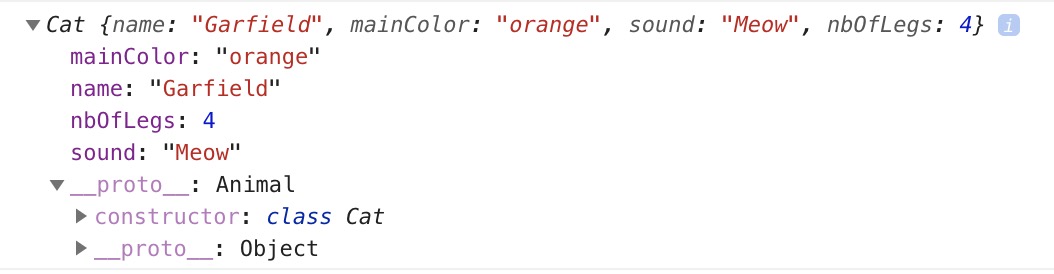
As you can see, the methods are not directly saved inside the object but inside `__proto__`. If you want to understand more this behavior, you can take a look at [prototypal inheritance](https://developer.mozilla.org/en-US/docs/Web/JavaScript/Inheritance_and_the_prototype_chain).
## Exercise
:::info lecture
<span style="font-size:500%">🏋🏼♀️</span>
:::
Create a class `Rectangle` with:
- A property `width`
- A property `height`
- A method `constructor(width,height)`
- A method `calculatePerimeter()`
- A method `calculateArea()`
Create a class `Square` that extends `Rectangle` add with:
- A property `side` (equals to the `width` and `height`)
- A method `constructor(side)`
```javascript
class Rectangle {
// TODO
}
class Square extends Rectangle {
// TODO
}
let r1 = new Rectangle(6,7)
console.log('Perimeter of r1 =', r1.calculatePerimeter()) // 26
console.log('Area of r1 =', r1.calculateArea()) // 42
var s1 = new Square(5)
console.log('Perimeter of s1 =', s1.calculatePerimeter()) // 20
console.log('Area of s1 =', s1.calculateArea()) // 25
var s2 = new Square(10)
console.log('Perimeter of s2 =', s2.calculatePerimeter()) // 40
console.log('Area of s2 =', s2.calculateArea()) // 100
```
You can edit this example [here](https://repl.it/@MaxenceBouret/exercise-class).
<div class="skip">
:::info
*Potential interview questions*:
When talking about OOP, never miss to mention and explain:
- **class** (*covered earlier*)
- **new** and **constructor** (*covered earlier*)
- **inheritance** (*covered earlier*)
- **abstraction** - means showing just what's necessary to the outside world and hiding all that is unnecessary-to-be-known. Imagine a car engine - you know it works right, because your car is moving, but how it works, you really don't have to know 🚘
- **polymorphism** - means inheriting the method from the parent class but changing its functionality. ex. If you have a class *Person* and this class has a method *move()*. If you extend class Child with class Person most likely the child will crawl when you invoke *move()* method. However, if you extend class *Grownup* with class *Person*, they will walk when *move()* is called. (overly simplified example but just to help you understand.)
- **encapsulation** means grouping the data and the methods that manipulate this data together. The goal is to keep them safe from interference and misuse. We have to aim to hide internal implementation and to organize our code as if it is a black box: it should do the job but the rest of the application should not know how they do it. (this is very much connected with *abstraction*.)
:::
</div>
## Summary
- A class is a tool to create objects faster
- To create a class, we have to write `class MyClassName { some code here }`
- To inherit from a class, we have to write `class ChildClass extends ParentClass`
## Extra resources
- [MDN Class](https://developer.mozilla.org/en-US/docs/Web/JavaScript/Reference/Classes)
- [Classes (ES6) Sample](https://googlechrome.github.io/samples/classes-es6/)
- [ES6 features](http://es6-features.org/#Constants)
- [Better JavaScript with ES6, Pt. II: A Deep Dive into Classes](https://scotch.io/tutorials/better-javascript-with-es6-pt-ii-a-deep-dive-into-classes)
- [OOP Concepts “In Simple English”](https://medium.com/@yannmjl/object-oriented-programming-concepts-in-simple-english-3db22065d7d0)
 Sign in with Wallet
Connect another wallet
Sign in with Wallet
Connect another wallet