---
tags: ironhack, lecture
---
<style>
.alert-info.lecture,
.alert-success.lecture,
.alert-warning.lecture,
.alert-danger.lecture {
box-shadow:0 0 0 .5em rgba(64, 96, 85, 0.4);
position:relative;
ddisplay:none;
}
.alert-info.lecture:before,
.alert-success.lecture:before,
.alert-warning.lecture:before,
.alert-danger.lecture:before {
content:"👨🏫\A"; white-space:pre-line;
display:block;margin-bottom:.5em;
/*position:absolute; right:0; top:0;
margin:3px;margin-right:7px;*/
}
</style>

# React | Building the Rest API
## Learning Goals
In this lesson, we will:
- Recap our knowledge in building RESTful APIs (main accent on `model` and `routes`)
## REST overview
:::info lecture
Nous allons nous reservir d'Express pour implémenter un serveur d'API, une API dite RESTful...
:::
**RE**presentational **S**tate **T**ransfer is an architecture which describes how network resources are accessed.
The main features are:
- State and functionality are divided into distributed resources
- Every resource is uniquely addressable using a uniform and minimal set of commands (typically using HTTP verbs GET, POST, PUT, or DELETE over the internet)
- The protocol is client/server and stateless
This architecture makes the interaction between a client and a server easier with a well-defined API. Resources are manipulated using HTTP methods like POST, GET, PUT, and DELETE.
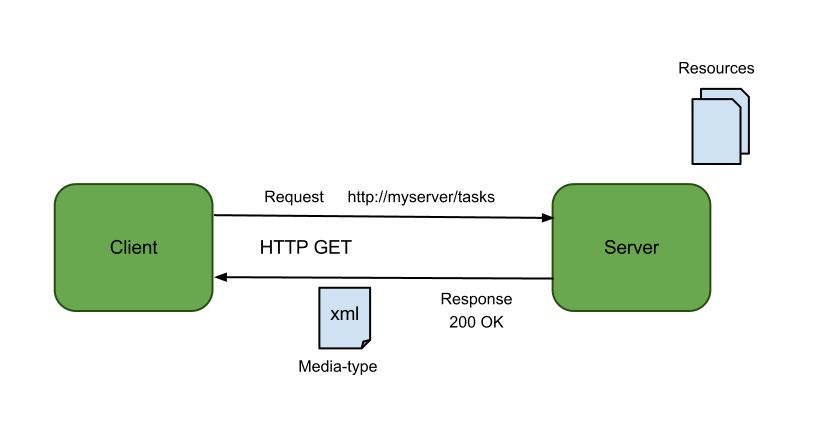
Resources are organized like a filesystem and we can navigate into it by adding parameters to the URL, while using different verbs for our HTTP requests.
All REST APIs would have routes structure along these lines, following the same pattern:
:::warning lecture
Il s'agit purement de **conventions** pour les développeurs :
- nom des ressources au **pluriel**, ex : `/projects` ou `/tasks`
- Respet de **verbes HTTP** prédéfinis pour certaines actions du CRUD, ex : `POST` pour créer ou `PUT` pour màj. (rien d'obligatoire mais pratique car utilisation riche de la sémantique HTTP diminue le nombre de routes de l'API)
:::
|URL | HTTP verb | Request body | Action |
|-----|----------|-----------|--------|
| `/api/projects` | GET | (empty) | Returns all projects |
| `/api/projects` | POST | JSON | Creates a new project |
| `/api/projects/:id` | GET | (empty) | Returns the single project |
| `/api/projects/:id` | PUT | JSON | Edits the projects |
| `/api/projects/:id` | DELETE | (empty) | Deletes the projects |
:::info lecture
- INDEX -- `GET /projects`
- CREATE -- `POST /projects`
- SHOW -- `GET /projects/1234`
- UPDATE -- `PUT /projects/1234`
- DESTROY -- `DELETE /projects/1234`
:::
:::info lecture
Les grandes catégories d'erreurs :
| code | categorie | description |
| -------- | -------- |-|
| `2XX` | Success ||
| `3XX` | Redirection | |
| `4XX` | Client errors | |
| `5XX` | Server errors | |
cf. https://en.wikipedia.org/wiki/List_of_HTTP_status_codes
:::
:::info lecture
Par convention, on utilisera certains status-code HTTP pour certaines actions.
Si ✅Ok (`<400`) :
- INDEX : `200 Ok`
- CREATE : `201 Created`
- SHOW : `200 Ok`
- UPDATE : `200 Ok` ou `204 No Content`
- DESTROY : `204 No Content`
mais aussi : `302 Found` ou `301 Moved Permanently` pour une redirection de page.
---
Si ❌Nok, (>=400) :
- `401 Unauthorized` -- Pas autorisé (ex: on doit se loggin)
- `403 Forbidden` -- Requête ok, mais on a pas le droit (ex: on est pas le propriétaire de la ressource)
- `404 Not Found` -- non trouvé
- `409 Conflict` -- déjà existant (ex: user/email)
- `410 Gone` -- ressource supprimée
- `400 Bad Request` ou `422 Unprocessable Entity` dans le cas de non-validation / requête non-valide
- 500 dans tous les autres cas
:::
## Build the API: The Project Management App
We will be building the backend for our **Project Management** app, and we will have all these previously listed routes plus some more, but let's start from the beginning. **We've prepared a starter code for you on this GitHub repository** - [project-management-server](https://github.com/ironhack-labs/react-day4-server-starter).
:::info lecture
Récupérons le projet de départ et clonons-le dans `~/code/project-management-server/`:
```shell
cd ~/code
git clone https://github.com/ironhack-labs/react-day4-server-starter.git project-management-server
cd react-day4-server-starter
code .
```
NB : `rm package-lock.json && npm install` is to bypass the `event-stream@3.3.6` issue.
:::
Clone it and let's see what is already pre-built in there for us: `user` model is there as well as `configs/passport.js` file. **Both files are commented out**, and let's keep them that way until we start dealing with users.
:::warning lecture
Notons que les fichiers `models/user-model.js` et `configs/passport.js` sont tout commentés 🙈.
:::
<!-- :::info
The packages that you will have to install when you incorporate users into the app are: `passport-local`, `passport`, `bcryptjs` and `express-session`. Also note that config file is required in `app.js`.
::: -->
Side note: We've decided to use the word `server` in the name of the app to stay more descriptive, so that our frontend can eventually have *client* naming.
:::warning
:bulb: `.env` file is not there since the app was cloned. Originally, *.env* is listed in `.gitignore`, so now we have to create a new **.env** file in the root and add `PORT` to it:
```bash
PORT=3000
```
:::
:::danger lecture
N'oublions pas de créer notre fichier `.env` à la racine (puisque ce dernier n'était pas commité) :
```shell
echo "PORT=3000" > .env
```
:::
Great, now we have the app so let's start from the beginning. In the following section we'll see how to structure our database and define the routes to access the resources.
### Setup
#### Dependencies
:::info lecture
N'oublions pas d'installer nos dépendances :
```shell
$ rm package-lock.json && npm install
```
:::
Since we cloned the repository, we got all the dependencies needed for now. Don't forget, after cloning, you have to run **`npm install`** or **`npm i`** inside the folder. To start the app, use **`npm run dev`** command from within the project folder.
Don't install `authentication` (user) related npm packages yet! Patience is a virtue. 🏆
:::success lecture
Vérifions que tout est en place :
```
npm run dev
```
et que l'on accède bien à [localhost:3000](http://localhost:3000) 🙌
:::
### Define the model
Our app is already connected to the database and we can see that when we run the app in our terminal:
*`Connected to Mongo! Database name: "project-management-server"`*.
:::info lecture
Remarquons que le nom de notre DB est `project-management-server`:
```
Connected to Mongo! Database name: "project-management-server"
```
:::
So let's start! We are creating a `project` management app so let's define schema for our `projects`.
Let's add a `project-model.js` file into the `models` folder:
:::info lecture
Créons notre modèle de **projets** :
```shell
$ touch models/project-model.js
```
:::
```js
// models/project-model.js
const mongoose = require('mongoose');
const Schema = mongoose.Schema;
const projectSchema = new Schema({
title: String,
description: String,
tasks: [{type: Schema.Types.ObjectId, ref: 'Task'}],
// owner will be added later on
});
const Project = mongoose.model('Project', projectSchema);
module.exports = Project;
```
Our projects will have a `title` and `description` both as type *String* and `tasks` of type `ObjectId` referencing the `Task` model. Later we will add the `owner` property. Mongo will automatically add an auto-generated unique `id` field, so we don't need to specify it.
Our projects will have some tasks, so let's see what we can do with its data structure. Inside `models` folder, create new file `task-model.js`. Tasks will have following properties:
:::info lecture
Créons notre modèle de **tâches** :
```shell
$ touch models/task-model.js
```
:::
```js
// models/task-model.js
const mongoose = require('mongoose');
const Schema = mongoose.Schema;
const taskSchema = new Schema({
title: String,
description: String,
project: {type: Schema.Types.ObjectId, ref: 'Project'}
});
const Task = mongoose.model('Task', taskSchema);
module.exports = Task;
```
Great! Data structures are defined, so let's proceed to defining the routes.
### Define the routes
Adopting the REST architecture, we will provide the following routes in our API:
:::info lecture
Voici notre plan pour nos routes, **toutes namespacées derrière le préfixe `/api`**.
:::
#### Project routes
|URL | HTTP verb | Request body | Action |
|-----|----------|-----------|--------|
| `/api/projects` | GET | (empty) | Returns all the projects |
| `/api/projects` | POST | JSON | Adds a new project |
| `/api/projects/:id` | GET | (empty) | Returns the specified project |
| `/api/projects/:id` | PUT | JSON | Edits the specified project |
| `/api/projects/:id` | DELETE | (empty) | Deletes the specified project |
#### Task routes
|URL | HTTP verb | Request body | Action |
|-----|----------|-----------|--------|
| `/api/tasks` | POST | JSON | Adds a new task |
| `/api/tasks/:id` | GET | (empty) | Returns the specified task |
| `/api/tasks/:id` | PUT | JSON | Edits the specified task |
| `/api/tasks/:id` | DELETE | (empty) | Deletes the specified task |
Let's go and create two files inside the `routes` folder: `project-routes.js` and `task-routes.js`.
:::info lecture
Créons maintenant nos **routes** :
```shell
$ touch routes/{project-routes,task-routes}.js
```
:::
We've already showed you all the routes for both projects and tasks, so let's start inputting them in these files.
#### GET and POST
The first thing we will do is to enable our users to add some projects in the database so we will start with POST route for creating a project. In the `project-routes.js` file add the following code for the mentioned route:
:::info lecture
`routes/project-routes.js` : la route de création d'un projet (`CREATE`)
:::
```js
// routes/project-routes.js
const express = require('express');
const mongoose = require('mongoose');
const router = express.Router();
const Project = require('../models/project-model');
const Task = require('../models/task-model'); // <== !!!
// POST route => to create a new project
router.post('/projects', (req, res, next)=>{
Project.create({
title: req.body.title,
description: req.body.description,
tasks: []
})
.then(response => {
res.json(response);
})
.catch(err => {
res.json(err);
})
});
module.exports = router;
```
:::warning lecture
Remarquons que l'on utiliser plus `res.render` comme dans le module 2, mais seulement `res.json`.
:::
Here we used `create()` method and we passed the body parameters in the request to create a new project and save it into the database.
Now, let's go into `app.js` and toward the end of the file, require the newly created `project-routes.js` file. Don't forget to add the `api` prefix to them (this step is not mandatory but it will help us in the long run).
:::warning lecture
N'oublions pas de monter notre router au router principale de l'`app` (avec le préfix `/api`) :
:::
```js
// app.js
...
// ROUTES MIDDLEWARE STARTS HERE:
app.use('/api', require('./routes/project-routes'));
...
```
---
You can go ahead and use [Postman](https://www.getpostman.com/) to test this route out.
:::info lecture
Essayons de **CRÉER un projet** avec Postman : en générant une requête `POST /api/projects`
:::

---
We'll now move to defining the first GET route for the collection of projects:
:::info lecture
Toujours dans `routes/project-routes.js`, la route `GET /projects` (`INDEX`)
:::
```js
// routes/project-routes.js
...
// GET route => to get all the projects
router.get('/projects', (req, res, next) => {
Project.find().populate('tasks')
.then(allTheProjects => {
res.json(allTheProjects);
})
.catch(err => {
res.json(err);
})
});
```
Let's break it down:
1. We get a `Project` mongoose reference to operate on the `projects` collection
2. In the `GET` we use the `find()` method without parameters to retrieve all the projects
3. We use a JavaScript promise to get the response from our database, and we retrieve it as a JSON object
4. `catch()` deals with errors
:::info lecture
Expliquons la route GET, notamment les erreurs.
:::
Also you should test out the functionality of this route using [Postman](https://www.getpostman.com/).
:::info lecture
N'oublions pas de tester la route `GET /api/projects` dans Postman
:::
#### Complete the API
Now that we validated our first two routes, let's complete the REST API:
:::info lecture
Finisson le travail :
- SHOW
- UPDATE
- DELETE
:::
```js
// routes/project-routes.js
...
// GET route => to get a specific project/detailed view
router.get('/projects/:id', (req, res, next)=>{
if(!mongoose.Types.ObjectId.isValid(req.params.id)) {
res.status(400).json({ message: 'Specified id is not valid' });
return;
}
// our projects have array of tasks' ids and
// we can use .populate() method to get the whole task objects
// ^
// |
// |
Project.findById(req.params.id).populate('tasks')
.then(response => {
res.status(200).json(response);
})
.catch(err => {
res.json(err);
})
})
// PUT route => to update a specific project
router.put('/projects/:id', (req, res, next)=>{
if(!mongoose.Types.ObjectId.isValid(req.params.id)) {
res.status(400).json({ message: 'Specified id is not valid' });
return;
}
Project.findByIdAndUpdate(req.params.id, req.body)
.then(() => {
res.json({ message: `Project with ${req.params.id} is updated successfully.` });
})
.catch(err => {
res.json(err);
})
})
// DELETE route => to delete a specific project
router.delete('/projects/:id', (req, res, next)=>{
if(!mongoose.Types.ObjectId.isValid(req.params.id)) {
res.status(400).json({ message: 'Specified id is not valid' });
return;
}
Project.findByIdAndRemove(req.params.id)
.then(() => {
res.json({ message: `Project with ${req.params.id} is removed successfully.` });
})
.catch( err => {
res.json(err);
})
})
module.exports = router;
```
Nothing fancy here, we have just used 3 built-in Mongoose methods to achieve what we needed:
- `findById()` to get the specified project,
- `findByIdAndUpdate()` to update the specified project and
- `findByIdAndRemove()` to delete the specified project.
:::info lecture
Notons l'utilisation de :
- `findById()` pour le SHOW:
- `findByIdAndUpdate` pour l'UPDATE
- `findByIdAndRemove` pour le DELETE
:::
Let's test `project-routes` in `Postman`.
:::info lecture
Testons tout cela dans Postman :
- SHOW :

- UPDATE :

- DESTROY :

:::
---
At the very beginning, we created two files inside `routes` folder. One was *project-routes.js*, which we filled with routes, and now we will do the same for `task-routes.js
:::info lecture
Maintenant les routes pour les tâches:
:::
```js
// routes/task-routes.js
const express = require('express');
const mongoose = require('mongoose');
const Task = require('../models/task-model');
const Project = require('../models/project-model');
const router = express.Router();
// GET route => to retrieve a specific task
router.get('/projects/:projectId/tasks/:taskId', (req, res, next) => {
Task.findById(req.params.taskId)
.then(theTask =>{
res.json(theTask);
})
.catch( err =>{
res.json(err);
})
});
// POST route => to create a new task
router.post('/tasks', (req, res, next)=>{
Task.create({
title: req.body.title,
description: req.body.description,
project: req.body.projectID
})
.then(response => {
Project.findByIdAndUpdate(req.body.projectID, { $push:{ tasks: response._id } }, {new: true})
.then(theResponse => {
res.json(theResponse);
})
.catch(err => {
res.json(err);
})
})
.catch(err => {
res.json(err);
})
})
// PUT route => to update a specific task
router.put('/tasks/:id', (req, res, next)=>{
if(!mongoose.Types.ObjectId.isValid(req.params.id)) {
res.status(400).json({ message: 'Specified id is not valid' });
return;
}
Task.findByIdAndUpdate(req.params.id, req.body)
.then(() => {
res.json({ message: `Task with ${req.params.id} is updated successfully.` });
})
.catch(err => {
res.json(err);
})
})
// DELETE route => to delete a specific task
router.delete('/tasks/:id', (req, res, next)=>{
if(!mongoose.Types.ObjectId.isValid(req.params.id)) {
res.status(400).json({ message: 'Specified id is not valid' });
return;
}
Task.findByIdAndRemove(req.params.id)
.then(() => {
res.json({ message: `Task with ${req.params.id} is removed successfully.` });
})
.catch(err => {
res.json(err);
})
})
module.exports = router;
```
:::info lecture
N'oublions pas de le "monter" au routing principal :
:::
Also make sure you require these routes in `app.js`:
```js
// app.js
...
// ROUTES MIDDLEWARE STARTS HERE:
...
app.use('/api', require('./routes/task-routes'));
```
Test all the routes through `Postman`. When you make sure that everything works properly, proceed to the next step so we can finalize our backend (at least for now :sunny: ).
:::info lecture
Testons encore dans Postman :
- CREATE `POST /api/tasks`

- SHOW `GET /api/projects/:projectID/tasks/:taskid`

- UPDATE `PUT /api/tasks/:taskid`

- DESTROY `DELETE /api/tasks/:taskid`

:::
:::info lecture
<span style="font-size:300%;">🙌</span>
:::
## Enable CORS requests
We know we will use this API for requests coming from a different application. For development, we will use the react server, which runs on the same port as our API - and that is `3000` so let's now change our API's port to `5000` instead of `3000`. Go to `.env` file and change port to `5000`.
:::info lecture
Nous allons avoir besoin du port 3000 pour développer notre application React (hot-reload). Changeons donc le port de notre app Express en 5000 dans `.env` :
```
PORT=5000
```
:::
By default, the browsers will block communication between apps for security reasons, so we need to configure our server in order to allow them.
Luckily there's a [node module](https://github.com/expressjs/cors) that can help us - [CORS](https://developer.mozilla.org/en-US/docs/Web/HTTP/Access_control_CORS)
Install it with:
:::info lecture
Par défaut, une page web ne peut faire de requête AJAX que vers la même origine (`localhost:3000`).
---
Cependant, un mécanisme existe permettant de lever cette limitation et doit être implémenter côté serveur :
:::
```bash
$ npm install cors
```
And in `app.js`, import it at the beginning with all the other imports and use it toward the end of the file, just before `the routes`, where you see: *// ADD CORS SETTINGS HERE TO ALLOW CROSS-ORIGIN INTERACTION*:
```javascript
// app.js
...
const cors = require('cors');
app.use(cors({
credentials: true,
origin: ['http://localhost:3000'] // <== this will be the URL of our React app (it will be running on port 3000)
}));
// ROUTES MIDDLEWARE STARTS HERE:
...
```
`credentials` will come to play when we introduce `users` and `origin` points to the **allowed url-s**, in our case that is React's server that is running on port 3000. As you can see, *origin* is the array so that gives us opportunity to add as many URLs as we need.
## Summary
In this lesson, we have recap our knowledge on how to define models for our application using Mongoose, how to build a REST API to provide access to the resources, and how to test our APIs using Postman.
## Extra Resources
- [REpresentational State Transfer](https://en.wikipedia.org/wiki/Representational_state_transfer) - Wikipedia
- [Express generator](http://expressjs.com/en/starter/generator.html) - Express
- [CORS](https://developer.mozilla.org/en-US/docs/Web/HTTP/Access_control_CORS) - Mozilla Developer Network
 Sign in with Wallet
Connect another wallet
Sign in with Wallet
Connect another wallet