---
tags: ironhack, lecture,
---
<style>
.markdown-body img[src$=".png"] {background-color:transparent;}
.alert-info.lecture,
.alert-success.lecture,
.alert-warning.lecture,
.alert-danger.lecture {
box-shadow:0 0 0 .5em rgba(64, 96, 85, 0.4); margin-top:20px;margin-bottom:20px;
position:relative;
ddisplay:none;
}
.alert-info.lecture:before,
.alert-success.lecture:before,
.alert-warning.lecture:before,
.alert-danger.lecture:before {
content:"👨🏫\A"; white-space:pre-line;
display:block;margin-bottom:.5em;
/*position:absolute; right:0; top:0;
margin:3px;margin-right:7px;*/
}
b {
--color:yellow;
font-weight:500;
background:var(--color); box-shadow:0 0 0 .35em var(--color),0 0 0 .35em;
}
.skip {
opacity:.4;
}
</style>

# How the Internet works
## Learning Goals
After this lesson you will be able to:
- understand the difference between the Internet and the Web,
- understand on a very high level what are protocols and which ones are the most important for us,
- how does request-response cycle works,
- explain what is needed to reach a specific server.
## Quick history of the Web
The Web is a wonderful place. It connects people from across the globe, keeps us updated with our friends and family, and creates revolutions never before seen in our lifetime.
Ideas for the World Wide Web date back to as early as 1946 when [Murray Leinster](https://en.wikipedia.org/wiki/Murray_Leinster) wrote a [short story](https://en.wikipedia.org/wiki/A_Logic_Named_Joe) which described how computers (that he referred to as 'Logics') lived in every home and each one had access to a central device where they could retrieve information from. Although the story does have several differences to the way the Web works today, it does capture the idea of a vast information network available to everyone in their homes.
To understand [the history of the World Wide Web](https://www.whoishostingthis.com/resources/history-of-web/) it's important to understand the differences between [the World Wide Web](https://en.wikipedia.org/wiki/World_Wide_Web) and [The Internet](https://en.wikipedia.org/wiki/Internet). Many people refer to them as the same thing, but in fact, although the end result is the common perception of most everyday users, they are very different.
:::info
For the curious ones: You can read here more on [the history of the World Wide Web](https://www.whoishostingthis.com/resources/history-of-web/).
:::
## What is the difference between the Internet and the Web?
:::info
The Internet is a big collection of computers and cables.
:::
:::info lecture
Internet est un réseau géant d'ordinateurs de toutes sortes connectés les uns aux autres.
:::
:::info lecture
Afin de communiquer les uns avec les autres, ces ordinateurs utilisent différents protocoles : POP3/SMTP pour échanger des mails par ex.
:::
The Internet is an "**interconnection of computer networks**". It is a massive hardware combination of millions of personal, business, and governmental computers, all connected like roads and highways. Upon the Internet reside a series of languages that allow information to travel between computers. These are known as **protocols**. For instance, some common protocols for transferring emails are [IMAP](https://whatis.techtarget.com/definition/IMAP-Internet-Message-Access-Protocol), [POP3](https://whatis.techtarget.com/definition/POP3-Post-Office-Protocol-3) and [SMTP](https://whatis.techtarget.com/definition/SMTP-Simple-Mail-Transfer-Protocol). Just as email is a layer on the Internet, the World Wide Web is another layer which uses different protocols.
The Internet started in the 1960's under the original name "ARPAnet". ARPAnet was originally an experiment in how the US military could maintain communications in case of a possible nuclear strike. With time, ARPAnet became a civilian experiment, connecting university mainframe computers for academic purposes.
**No single person owns the Internet!**
:::info lecture
Internet (le réseau) n'appartient donc pas à une unique personne.
:::
No single government has authority over its operations. Some technical rules and hardware/software standards enforce how people plug into the Internet, but for the most part, the Internet is a free and open broadcast medium of hardware networking.
:::info
The Web is a big collection of HTML pages on the Internet.
:::
:::info lecture
Le web, est une collection de pages hébergées sur le réseau internet.
:::
:::info lecture
On utilise un navigateur web pour "surfer" d'une page à une autre, grâce aux liens hyper-texte.
:::
The World Wide Web, or "Web" for short, is a massive collection of digital pages. The Web is viewed by using free software called web browsers. "Born" in 1989, the Web is based on HyperText Transfer Protocol, the language which allows you and me to "jump" (hyperlink) to any other public web page. There are over 65 billion public web pages on the Web today.
### What allows the Web to work?
:::info lecture
**HTML est le format** dans lequel les informations/ressources sont échangées.
:::
:::info lecture
**HTTP est le mode de communication** des machines pour échanger ces pages.
:::
When talking about the Web, we have to have a basic understanding of certain terms:
- [HTML (Hypertext markup language)](https://www.theserverside.com/definition/HTML-Hypertext-Markup-Language) - the language we use to create web pages;
- [HTTP (Hypertext Transfer Protocol )](https://whatis.techtarget.com/definition/HTTP-Hypertext-Transfer-Protocol) - although other protocols are being used, such as [FTP(File Transfer Protocol)](https://searchnetworking.techtarget.com/definition/File-Transfer-Protocol-FTP), this is the most commonly used protocol. It was developed specifically for the World Wide Web and favored for its simplicity and speed. This protocol requests the 'HTML' document from the server and serves it to the browser. **HTTP** is how computers on the Internet communicate. The technical details aren't important right now, but in short: clients (including your browser) use the rules of HTTP to *send requests* to servers and servers *respond using those rules* as well. You can imagine this communication as a dialogue between client and server.
:::success
To summarize: a **protocol** is simply a set of rules for communication, in this case, for communication between client and server computers.
:::
This is pretty easy to explain since we humans have protocols with rules to communicate with one another as well. If we don't follow the protocol, the communication will not go smoothly.
If I greet you with a "Hello", your natural assumption is to respond in English. You respond with "Hey, how are you?".
If I greet you with "Hello", and you respond with "Hola, ¿cómo estás?" the protocol is broken. We aren't communicating with the same rules, and we may not be able to understand each other.
```
<protocol>://<machine>/<location>
```
:::
- [URLs (Uniform Resource Locator)](https://searchnetworking.techtarget.com/definition/URL) - the last part of the puzzle required to allow the Web to work is a URL. This is the address that indicates where any given document lives on the Web. It can be defined as ```<protocol>://<node>/<location>```
Let's take a look at this short video on [how the Internet works](https://www.youtube.com/watch?v=7_LPdttKXPc).
<iframe width="560" height="315" src="https://www.youtube.com/embed/7_LPdttKXPc" frameborder="0" allow="accelerometer; autoplay; encrypted-media; gyroscope; picture-in-picture" allowfullscreen></iframe>
## Server, Client, Request, HTTP?
### Elements of a URL
```
http://www.example.org/hello/world/foo.html?foo=bar&baz=bat#footer
\___/ \_____________/ \__________________/ \_____________/ \____/
protocol host/domain name path querystring hash/fragment
```
:::info lecture
Voici l'anatomie d'une URL :
:::
Element | About
------|--------
protocol | the most popular application protocol used on the world wide web is HTTP. Other familiar types of application protocols include FTP, SSH, HTTPS
host/domain name | the host or domain name is looked up in DNS to find the IP address of the host - the server that's providing the resource
path | web servers can organize resources into what is effectively files in directories; the path indicates to the server which files from which directory the client wants
querystring | the client can pass parameters to the server through the querystring (in a GET request method); the server can then use these to customise the response - such as values to filter a search result
hash/fragment | the URI fragment is generally used by the client to identify some portion of the content in the response; interestingly, a broken hash will not break the whole link - it isn't the case for the previous elements
<br>
### HTTP Basics
:::info lecture
Une machine du réseau internet est appelé **un server**.
:::
:::info lecture
Le navigateur est appelé **le client**. Plusieurs clients peuvent interroger un même serveur.
:::
HTTP allows for communication between a variety of hosts and clients and supports a mixture of network configurations.
:::info lecture
**HTTP est le protocol** de communication entre le client et le serveur.
:::
> To make this possible, it assumes very little about a particular system and does not keep state between different message exchanges.
Communication between a host and a client occurs via a request/response pair. The client initiates an HTTP request message, which is serviced through an HTTP response message in return.
:::info lecture
Voici un ex d'échange (une page web) entre un client et un serveur :
:::
An HTTP "conversation" is (conceptually) like this:
> **Client** _calls ironhack.com_
> **Client** - Hi
> **Server** - Hi
> **Client** - Can you get me `index.html`? (_this is the request_)
> **Server** _thinks_
> **Server** - Okay! Here it is.
> **Server** _sends the `index.html` file_ (_this is the response_)
> **Server** _hangs up_
All that is just to get the HTML. To get an image or the CSS file, there has to be a completely new conversation. In these conversations, if your browser doesn't say "Hi", none of this works. That's part of the HTTP protocol.
:::info lecture
Le client demande maintenant la feuille de style :
:::
> **Client** _calls ironhack.com_
> **Client** - Hi
> **Server** - Hi
> **Client** - Can you get me `style.css`? (_this is the request_)
> **Server** _thinks_
> **Server** - Okay! Here it is.
> **Server** _sends the `style.css` file_ (_this is the response_)
> **Server** _hangs up_
>
<br>
### Client and server communication
In general, a service is an abstraction of computer resources, and a client does not have to be concerned with how the server performs while fulfilling the request and delivering the response. The client only has to understand the response based on the well-known application protocol, i.e., the content and the formatting of the data for the requested service.
:::info lecture
On parle alors d'architecture client/serveur échangeant des requetes/réponses :
:::
Clients and servers exchange messages in a **request-response** messaging pattern:
1. The client sends a request
2. The server returns a response

<div class="skip">
To communicate, computers must have a common language, and they have to follow the rules. The reason for this is so that both the client and the server know what to expect. The language and rules of communication are defined in a **communications protocol** called Internet protocol [(IP) suite](https://whatis.techtarget.com/definition/Internet-Protocol-suite-IP-suite).
All client-server protocols operate in the **application layer**. The application-layer protocol defines the basic patterns of the dialogue.
A server may receive requests from many different clients in a very short period of time. Because the computer can perform a limited number of tasks at any moment, it relies on a scheduling system to prioritize incoming requests from clients in order to accommodate them all in turn.
To prevent abuse and maximize uptime, the server's software limits how a client can use the server's resources. Even so, a server is not immune from abuse. A denial of service attack exploits a server's obligation to process requests by bombarding it with requests incessantly. This inhibits the server's ability to respond to legitimate requests.
#### Example
When a bank customer accesses online banking services with a web browser (the client), the client initiates a request to the bank's web server. The customer's login credentials may be stored in a database, and the webserver accesses the database server as a client.
An application server interprets the returned data by applying the bank's business logic and provides the output to the webserver. Finally, the webserver returns the result to the client web browser for display.
In each step of this sequence of client-server message exchanges, a computer processes a request and returns data. This is the request-response messaging pattern. When all the requests are met, the sequence is complete, and the web browser presents the data to the customer.
</div>
## Request <---> Response and then?
:::info lecture
Une fois la réponse reçue par le navigateur (le client) c'est lui qui en fait l'interprétation : comme par ex, mettre en forme la page
:::
Once the request <--> response cycle has been executed, the web browser is in charge of interpreting the data received and show it to the user.
The primary function of a browser is to present the web resource you choose, by requesting it from the server and displaying it in the browser window. The resource is usually an HTML document, but may also be a PDF, image, or some other type of content. The location of the resource is specified by the user using a [URI (Uniform Resource Identifier)](https://whatis.techtarget.com/definition/URI-Uniform-Resource-Identifier).
The way the browser interprets and displays HTML files is specified in the HTML and CSS specifications. These specifications are maintained by the [W3C (World Wide Web Consortium)](https://whatis.techtarget.com/definition/W3C-World-Wide-Web-Consortium) organization, which is the standards organization for the Web.
For years browsers conformed to only a part of the specifications and developed their own extensions. That caused severe compatibility issues for web authors. Today most of the browsers more or less conform to the specifications.
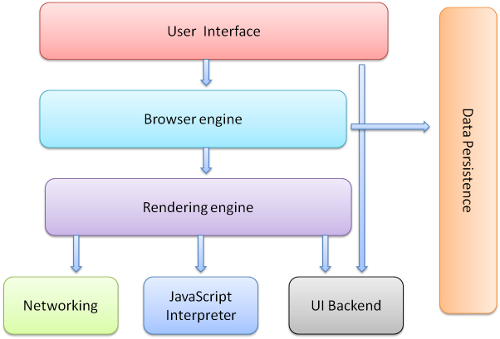
Browser user interfaces have a lot in common with each other. Among the standard user-interface elements are:
- Address bar for inserting a URI
- Back and forward buttons
- Bookmarking options
- Refresh and stop buttons for refreshing or stopping the loading of current documents
- A home button that takes you to your home page
The browser's main components are (1.1):
* The user interface: this includes the address bar, back/forward button, bookmarking menu, etc. Every part of the browser display except the window where you see the requested page.
* The browser engine: marshals actions between the UI and the rendering engine.
* The rendering engine: responsible for displaying the requested content. For example, if the requested content is HTML, the rendering engine parses HTML and CSS and displays the parsed content on the screen.
* Networking: for network calls such as HTTP requests, using different implementations for different platforms behind a platform-independent interface.
* UI backend: used for drawing basic widgets like combo boxes and windows. This backend exposes a generic interface that is not platform-specific. Underneath it uses operating system user interface methods.
* JavaScript interpreter. Used to parse and execute JavaScript code.
* Data storage. This is a persistence layer. The browser may need to save all sorts of data locally, such as cookies.
## HTTP Verbs
URLs reveal the identity of the particular host with which we want to communicate, but the action that should be performed on the host is specified via [HTTP request methods](https://www.tutorialspoint.com/http/http_requests.htm). Of course, there are several actions that a client would like the host to perform. HTTP has formalized on a few that capture the essentials that are universally applicable for all kinds of applications.
These request verbs are:
- **GET**: fetch an existing resource. The URL contains all the necessary information the server needs to locate and return the resource.
- **POST**: create a new resource. POST requests usually carry a payload that specifies the data for the new resource.
- **PUT**: update an existing resource. The payload may contain the updated data for the resource.
- **DELETE**: delete an existing resource.
The above four verbs are the most popular, and most tools and frameworks explicitly expose these request verbs. PUT and DELETE are sometimes considered specialized versions of the POST verb, and they may be packaged as POST requests with the payload containing the exact action: create, update or delete. You will work with each of these very soon and understand much better what we are referring to at this moment.
### How to reach a specific server
All computers on the Internet have a unique numeric address composed of 4 bytes of data, separated by periods. You may recognize this format: 172.16.254.1.
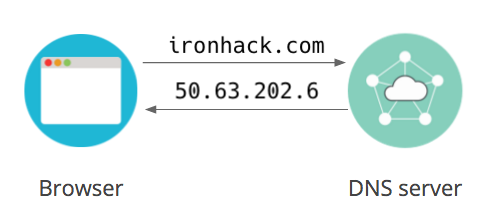
The [Domain Name Systems (DNS)](https://searchnetworking.techtarget.com/definition/domain-name-system) is the phonebook of the Internet. Humans access information online through domain names, like ``nytimes.com`` or ``espn.com``. Web browsers interact through IP addresses. DNS translates domain names to IP addresses so browsers can load Internet resources.
An Internet Protocol [(IP) address](https://searchwindevelopment.techtarget.com/definition/IP-address) consists of four numbers between 0 and 255 separated by dots. For example, this is one of Google's IP addresses: `66.102.1.102`. If you knew the IP address of your favorite Websites, you could paste that into your browser's location bar, and it would work. The problem is that the average Internet user visits dozens of different websites every day. Just like with real addresses, **it's difficult to remember IP addresses**. That is where DNS comes in!
### IP Addresses to domains
The process of finding the IP address is achieved by searching the DNS until a match on the domain name is found. This process is also known as DNS lookup, NSLOOKUP, or (erroneously) IP lookup.
The process of finding the hostname (or domain name) from an IP address involves sending a message to the IP address and requesting the computer located at that IP address to return its name. Usually, this will be the same as the domain name. However, many computers host many domains so that the hostname may be one of the domain names hosted, or it could be something different.
To make comparison to the real world, it's like how we use street addresses for finding a house as they are much easier to remember and to read then using the latitude and longitude coordinates, right?
There are some particular IP addresses. For example, 127.0.0.1 is always the IP address of every computer. No matter which computer you use, it will always have an IP address of 127.0.0.1 and a name of 'localhost'. Also, a computer can have more than one IP address. To be able to connect to other computers, it will have an IP address that is known to these other computers.
### Hostname or Domain Name
There is often confusion about what is a hostname and what is a domain name.
A *domain name* is the name that is purchased from a registrar. It will be something like ``hcidata.com`` or ``hcidata.co.uk``.
A [hostname](https://www.computerhope.com/jargon/h/hostname.htm) is the unique name of a machine. When the host operating system is set up, it is given a name. This name may reflect the prime use of the machine. For example, a host machine that converts hostnames to IP addresses using DNS may be called ``dns.hcidata.com`` and a host machine that is a web server may be called ``www.hcidata.com``.
## Summary
In this lesson, we have learned a bit about how the Internet is connected to the Web and the difference between the two.
We have also learned how the client receives information from a server via the Internet, as well as the process that is taken to retrieve the requested information.
You don't need to know the history of the Internet and the Web to work with it, but knowing how they work is a step in better understanding how to work with them.
## Extra Resources
- [Submarine Cable Map Website](https://www.submarinecablemap.com/)
- [Full history of the Internet](https://www.internetsociety.org/internet/history-internet/?gclid=Cj0KCQjwho7rBRDxARIsAJ5nhFq6OJrXgn-tSJBV_VMJhMfkrHFXPy0PXolZRZz0Z_Y8Vjt6K4WuUb0aAjS4EALw_wcB)
- [How does the Internet work](https://web.stanford.edu/class/msande91si/www-spr04/readings/week1/InternetWhitepaper.htm) - More detailed
 Sign in with Wallet
Connect another wallet
Sign in with Wallet
Connect another wallet