---
tags: ironhack, lecture,
---
<style>
.markdown-body img[src$=".png"] {background-color:transparent;}
.alert-info.lecture,
.alert-success.lecture,
.alert-warning.lecture,
.alert-danger.lecture {
box-shadow:0 0 0 .5em rgba(64, 96, 85, 0.4); margin-top:20px;margin-bottom:20px;
position:relative;
ddisplay:none;
}
.alert-info.lecture:before,
.alert-success.lecture:before,
.alert-warning.lecture:before,
.alert-danger.lecture:before {
content:"👨🏫\A"; white-space:pre-line;
display:block;margin-bottom:.5em;
/*position:absolute; right:0; top:0;
margin:3px;margin-right:7px;*/
}
b {
--color:yellow;
font-weight:500;
background:var(--color); box-shadow:0 0 0 .35em var(--color),0 0 0 .35em;
}
.skip {
opacity:.4;
}
</style>

# JS | Arrays - Map, Reduce & Filter
## Learning Goals
After this lesson you will be able to:
- Understand advanced array methods such as `filter`, `reduce`, and `map`
- Distinguish between `forEach` and `map` and when to use each of them
- Know how `reduce` and `filter` works
- Implement `filter`, `map` and `reduce` in real examples
## Introduction
We've seen some basic array methods up until this point. One of them is `forEach` - although we use it very often, sometimes we want to do more than iterate through the array.
:::info
One thing to keep in mind about most of the functions we'll cover in this lesson is that **we can easily use `forEach`** to get **the same results** but we will end up with **longer/less readable and less efficient code**.
:::
That's why let's introduce these new concepts.
:::info
To start, keep in mind that `.map()`, `.filter()` and `.reduce()` methods **DON'T modify the original array, that is - they don't mutate the original array but rather create a new array**.
:::
Now let's see what that actually means.
## .map()

[.map()](https://developer.mozilla.org/en/docs/Web/JavaScript/Reference/Global_Objects/Array/map) is very similar to `forEach`, except for one **important** distinction:
:::success
- the `.forEach()` method doesn’t actually return anything (<b>it just returns `undefined`</b>). It simply calls a provided function on each element in your array. Eventually if you want to make some changes in the array you're iterating over, you'll end up changing the array itself (the original array will be mutated).
- the `.map()` method will also call a provided function on every element in the array. The difference is that `.map()` utilizes return values and actually <b>returns a new array</b> of the same size.
:::
In short, we use .map() to *transform* each element into something else.
:::danger
`forEach` **DOES NOT WORK**
```javascript
const array = [1, 2, 3];
const newArray = array.forEach(function(number){
return number * 2;
})
console.log(newArray); // <== undefined
```
:::
:::success
`map`
- ES5 (good old `function`):
```javascript
const array = [1, 2, 3];
var newArray = array.map(function (number){
return number * 2;
})
console.log(newArray); // [ 2, 4, 6 ]
```
👉 The `newArray`:
- has the same number of elements as the original array: it's actually <b>a copy 🐑</b>
- BUT where each new element is mapped by the callback function to its <b>copied `value`*2</b>
- ES6 `one-line arrow function`:
```javascript
const array = [1, 2, 3];
const newArray = array.map(number => number * 2);
console.log(newArray); // [ 2, 4, 6 ]
```
:::
:::success
`forEach`(equivalence)
```javascript
const array = [1, 2, 3];
const newArray = []; // we have to create a newArray
array.forEach(function(numcopy){
numcopy *= 2; // double the passed copy (it's a copy)
newArray.push(numcopy); // and push it to the newArray
});
console.log(newArray); // <== [ 2, 4, 6 ]
```
NB : the real difference is <b>we have to create the `newArray` ourselves</b> (because `forEach` does not return anything other than `undefined`)
:::
:::warning
🙏 Ok, `.map` create a new array for me.
☝️ But on the contrary <b>with `.map`, you have to `return` a value</b> out, or else your new array will be filled with a bunch of `undefined`s:
```javascript
const newArray = [1,2,3].map(function (el) {
el * 2; // 🤷♀️ Oops, I missed `return` (#britney #diditagain)
});
console.log(newArray); // [undefined, undefined, undefined]
```
:::
### <b>More</b> Examples
```javascript
const foods = ["pizza", "sandwiches", "ice cream"];
// ES5:
var capsFoods = foods.map(function(food){
return food.toUpperCase();
});
console.log(capsFoods);
// [ 'PIZZA', 'SANDWICHES', 'ICE CREAM' ]
// ES6:
const capsFoods = foods.map(food => food.toUpperCase());
console.log(capsFoods);
// [ 'PIZZA', 'SANDWICHES', 'ICE CREAM' ]
```
### Exercise
:::info lecture
<span style="font-size:500%">🏋🏾♀️</span>
```javascript
['M','B','M','A','B','S','L','M','P']
```
:::
Given an array of cities, return an array with the first letter of each city's name capitalized. You can use ES5 or ES6 syntax, whichever you feel more comfortable with at this point.
**Starter Code**
```javascript
// array of cities:
var cities = ["miami", "barcelona", "madrid", "amsterdam", "berlin", "sao paulo", "lisbon", "mexico city", "paris"];
```
### More practice
:::info lecture
<span style="font-size:500%">🏋🏾♀️</span>
```javascript
[
{name: 'Tony Parker', finalGrade: 85},
...
]
```
:::
Imagine you are a Math teacher and you have to grade our students based on their performance on two projects (40% of final grade) and their final exam (60% of final grade). We got the info for each student in an object that looks like this:
```javascript
{
name: "Student Name",
firstProject: 80,
secondProject: 75,
finalExam: 90
}
```
So the whole class is represented as an array of objects (each object contains the data about that student), and we need to get a *new* array of objects, but this time the objects will contain only student´s name, and their final grade. Let´s do it.
Here is the data:
```javascript
const students = [
{
name: "Tony Parker",
firstProject: 80,
secondProject: 75,
finalExam: 90
},
{
name: "Marc Barchini",
firstProject: 84,
secondProject: 65,
finalExam: 65
},
{
name: "Claudia Lopez",
firstProject: 45,
secondProject: 95,
finalExam: 99
},
{
name: "Alvaro Briattore",
firstProject: 82,
secondProject: 92,
finalExam: 70
},
{
name: "Isabel Ortega",
firstProject: 90,
secondProject: 32,
finalExam: 85
},
{
name: "Francisco Martinez",
firstProject: 90,
secondProject: 55,
finalExam: 78
},
{
name: "Jorge Carrillo",
firstProject: 83,
secondProject: 77,
finalExam: 90
},
{
name: "Miguel López",
firstProject: 80,
secondProject: 75,
finalExam: 75
},
{
name: "Carolina Perez",
firstProject: 85,
secondProject: 72,
finalExam: 67
},
{
name: "Ruben Pardo",
firstProject: 89,
secondProject: 72,
finalExam: 65
}
]
```
Go ahead to [Repl.it](repl.it) and practice `.map()` method. Try to solve it by yourself first, and then look at our solution.
```javascript
const finalGrades = students.map(theStudent => {
const projectsAvg = (theStudent.firstProject + theStudent.secondProject)/2;
const finalGrade = theStudent.finalExam * 0.6 + projectsAvg * 0.4;
return {
name: theStudent.name,
finalGrade: Math.round(finalGrade)
}
})
console.log(finalGrades);
// [
// { name: 'Tony Parker', finalGrade: 85 },
// { name: 'Marc Barchini', finalGrade: 69 },
// { name: 'Claudia Lopez', finalGrade: 87 },
// { name: 'Alvaro Briattore', finalGrade: 77 },
// { name: 'Isabel Ortega', finalGrade: 75 },
// { name: 'Francisco Martinez', finalGrade: 76 },
// { name: 'Jorge Carrillo', finalGrade: 86 },
// { name: 'Miguel López', finalGrade: 76 },
// { name: 'Carolina Perez', finalGrade: 72 },
// { name: 'Ruben Pardo', finalGrade: 71 }
// ]
```
## .reduce()
:::success
[.reduce()](https://developer.mozilla.org/en-US/docs/Web/JavaScript/Reference/Global_Objects/Array/Reduce) is a method that <b>**turns a list of values into one value**</b>.
:::
A reduction in cooking is when you take many ingredients and cook them down until they become one delicious dish.
:::info lecture

:::
For instance, when you cook tomato sauce, you use carrots, celery, onion, garlic, and tomatoes. Eventually, after hours of cooking, they become a delicious tomato sauce.
### Syntax
Let's take a look at <b>`.reduce()` syntax</b> in JavaScript:
```javascript
array.reduce(function (accumulator, currentValue) {
return accumulator + currentValue;
});
```
:::success
:bulb: Keep in mind that `accumulator` and `currentValue` are <b>placeholders</b>, can be anything
:::
How does this work?
:::info
- **accumulator** is an accumulated value of each call. In the first round, it's assumed it's the first value from the array unless we state differently (which we will see how).
- **currentValue** is the current element in each iteration that will be added to the accumulator.
:::
In ES6, the syntax goes to:
```javascript
array.reduce((accumulator, currentValue) => accumulator + currentValue)
```
NB : Reduce can accept two additional parameters, so if you want to learn more about that you can check it [here](https://developer.mozilla.org/en-US/docs/Web/JavaScript/Reference/Global_Objects/Array/reduce#Description).
### Examples
#### Sum
Let's see how all this looks through <b>some examples</b>. In the first one, we are accumulating the sum of numbers from an array.
```javascript
const numbers = [2, 4, 6, 8];
var total = numbers.reduce(function(accumulator, currentValue){
console.log("accumulator is: ", accumulator, "and current value is: ", currentValue);
return accumulator + currentValue;
});
console.log("total is: ", total);
// accumulator is: 2 and current value is: 4
// accumulator is: 6 and current value is: 6
// accumulator is: 12 and current value is: 8
// total is: 20
```
The execution of the `.reduce()` example above, step by step would be:
| call | accumulator | currentValue | return |
|------|-------------|--------------|--------|
| first | <b>2</b> | <b>4</b> | 6
| second | 6 | 6 | 12
| third | 12 | 8 | <b>20</b>
#### sum with `initialValue`
:::info lecture
Commençons à 23
:::
Let's see how we can add the sum we get as a reduced value from some array to already existing value. Assume you're given the following array and you have to reduce it and add that number to `23` (numberYouGet + 23).
```javascript
const numbers = [12, 9, 1, 8];
const total = numbers.reduce((accumulator, currentValue) => {
console.log("accumulator is: ", accumulator, "and current value is: ", currentValue);
return accumulator + currentValue;
}, 23); // <= notice the 23!!!
console.log("total is: ", total);
// accumulator is: 23 and current value is: 12
// accumulator is: 35 and current value is: 9
// accumulator is: 44 and current value is: 1
// accumulator is: 45 and current value is: 8
// total is: 53
```
:::success
So we see that the initial value of the accumulator is no longer the first element from the array (which is 12), but instead that is `23`. Here we see that we can pass the second argument to reduce, and that value will become the initial value.
:::
| call | accumulator | currentValue | return |
|------|-------------|--------------|--------|
| first | <b>23</b> | <b>12</b> | 35
| second | 35 | 9 | 44
| third | 44 | 1 | 45
| fourth | 45 | 8 | <b>53</b>
#### product
One more example: Calculate **product** of all elements in the following array.
```javascript
const numbers = [2, 4, 6, 8];
const total = numbers.reduce((accumulator, current) => accumulator * current);
console.log(total); // <== 384
```
#### concat
`.reduce()` works for iterating over arrays, <b>regardless of the data type</b> that's inside the arrays. We saw examples with numbers, and here is one with the strings:
```javascript
const words = ["This", "is", "one", "big", "string"];
// ES5:
var bigString = words.reduce(function(sum, word){
return sum + word;
});
// ES6:
const bigString = words.reduce((sum, word) => sum + word);
console.log(bigString); // <== Thisisonebigstring
```
:::info lecture
On peut donc également utiliser `reduce` pour réduire une liste de mots en une chaîne.
:::
#### Objects
Sometimes we need to reduce while we're using objects. This process can get a bit tricky, but our way out is going to be setting an **initialValue**.
:::success
**Correct**
```javascript
const people = [
{ name: "Candice", age: 25 },
{ name: "Tammy", age: 30 },
{ name: "Allen", age: 49 },
{ name: "Nettie", age: 21 },
{ name: "Stuart", age: 17 }
];
const ages = people.reduce(function(sum, person){
return sum + person.age;
}, 0); // 👈 initialValue to 0
console.log(ages); // <== 142
```
:::
Instead of starting with the first two objects, we start with the number 0. Our iteration table looks like the following:
| call | accumulator | currentValue | return |
|------|-------------|--------------|--------|
| first | <b>0</b> | <b>25</b> | 25
| second | 25 | 30 | 55
| third | 55 | 49 | 104
| fourth | 104 | 21 | 125
| fifth | 125 | 17 | <b>142</b>
<div class="skip">
#### **Using `forEach` to total**
```javascript
var numbers = [1, 2, 3, 4];
var total = 0;
numbers.forEach(function(number){
total += number;
})
console.log(total);
// 10
```
</div>
### Exercises
#### Avg calories
:::info lecture
<span style="font-size:500%">🏋🏾♀️</span>
Moyenne de 278 calories
:::
Given a menu of foods and their calories, calculate the **average** number of calories for the entire list. Starter code:
```javascript
const menu = [
{ name: "Carrots", calories: 150 },
{ name: "Steak", calories: 350 },
{ name: "Broccoli", calories: 120 },
{ name: "Chicken", calories: 250 },
{ name: "Pizza", calories: 520 }
];
// your code:
console.log(averageCalories); // 278
```
#### amazon
:::info lecture
<span style="font-size:500%">🏋🏾♀️</span>
Note moyenne des commentaires: 3.2
:::
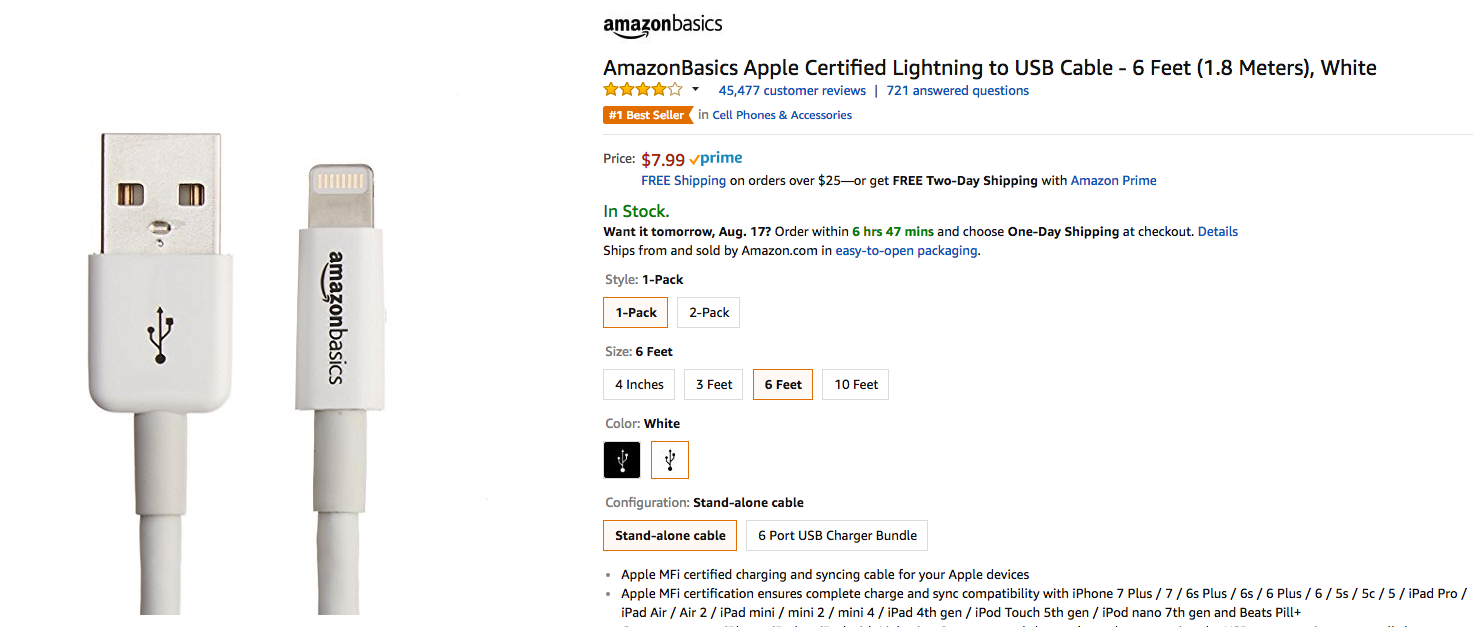
We are developing our super e-commerce website; each product has some user comments and rating stored in an array called "Reviews". Each review is an object, so we have the following structure:
```javascript
const product = {
name: "AmazonBasics Apple Certified Lightning to USB Cable",
price: 7.99,
manufacter: "Amazon",
reviews:
[
{ user: "Pavel Nedved",
comments: "It was really usefull, strongly recommended",
rate: 4
},
{ user: "Alvaro Trezeguet",
comments: "It lasted 2 days",
rate: 1
},
{ user: "David Recoba",
comments: "Awesome",
rate: 5
},
{ user: "Jose Romero",
comments: "Good value for money",
rate: 4
},
{ user: "Antonio Cano",
comments: "It broked really fast",
rate: 2
},
]
}
```
We have to show the product on our website, but we do not want to show all the reviews in a first view, <b>we only need the average rate</b> so that other customers can see in a fast way every product rate.
In this case, reduce can help to get the average fast. Go ahead an try to write the code, and then check our solution:
```javascript
const totalReviews = product.reviews.reduce(function (acc, review) {
return acc + review.rate;
}, 0); // starts acc to 0
const averageRate = totalReviews/product.reviews.length;
console.log(`averageRate rate: ${averageRate}`); // <== averageRate rate: 3.2
```
## .filter()
:::success
The `.filter()` method iterates through an array and creates a <b>new array with all elements that pass the condition</b> we set.
:::
Looking into ES5 syntax, we see that `.filter()` takes in a callback function. If that callback function returns <b>`true`, then the item will be in</b> the new array. If it returns `false`, then that item will not be in the new array.
```javascript
var numbers = [1, 2, 3, 4, 5, 6];
var evenNumbers = numbers.filter(function(number){
return number % 2 === 0;
});
console.log(evenNumbers); // <== [ 2, 4, 6 ]
```
The same but in ES6 syntax would be:
```javascript
const numbers = [1, 2, 3, 4, 5, 6];
const evenNumbers = numbers.filter(number => number % 2 === 0);
console.log(evenNumbers); // <== [ 2, 4, 6 ]
```
### Exercises
#### 🥃 drinking age
:::info lecture
<span style="font-size:500%">🏋🏾♀️</span>
Ont le droit de boire.
:::
Given the following array, filter the ones who are eligible to go to bars in the USA. :laughing:
```javascript
var people = [
{ name: "Candice", age: 25 },
{ name: "Tammy", age: 30 },
{ name: "Allen", age: 20 },
{ name: "Nettie", age: 21 },
{ name: "Stuart", age: 17 },
{ name: "Bill", age: 19 }
];
// your code...
console.log(ofDrinkingAge);
// [
// { name: 'Candice', age: 25 },
// { name: 'Tammy', age: 30 },
// { name: 'Nettie', age: 21 }
// ]
```
#### 🛀 Swimming pool
:::info lecture
<span style="font-size:500%">🏋🏾♀️</span>
Avec piscine
:::

We are working for Airbnb as developers, and we need to add a filter feature when someone is looking for a home. Imagine somebody starts their search for places in Barcelona, so we bring all the rooms available there.
But it´s summer, and the customers who are searching for rooms want the place to have a pool. Our incredible platform will include a filter feature, so we have to work on it.
Giving the following arrays of objects, let's filter just the one with a pool.
```javascript
const places = [
{
title: "Awesome Suite 20' away from la Rambla",
price: 200,
type: "Private Room",
pool: true,
garage: false
},
{
title: "Private apartment",
price: 190,
type: "Entire Place",
pool: true,
garage: true
},
{
title: "Apartment with awesome views",
price: 400,
type: "Entire Place",
pool: false,
garage: false
},
{
title: "Apartment in la Rambla",
price: 150,
type: "Private Room",
pool: false,
garage: true
},
{
title: "Comfortable place in Barcelona´s center",
price: 390,
type: "Entire place",
pool: true,
garage: true
},
{
title: "Room near Sagrada Familia",
price: 170,
type: "Private Room",
pool: false,
garage: false
},
{
title: "Great house next to Camp Nou",
price: 140,
type: "Entire place",
pool: true,
garage: true
},
{
title: "New apartment with 2 beds",
price: 2000,
type: "Entire place",
pool: false,
garage: true
},
{
title: "Awesome Suite",
price: 230,
type: "Private Room",
pool: false,
garage: false
},
{
title: "Apartment 10' from la Rambla",
price: 930,
type: "Entire place",
pool: true,
garage: true
}
]
```
So, go ahead, try to write the code to filter the places and only get the ones with pool available. You can check ours after giving a shot.
```javascript
// your code...
console.log(poolFilter);
// [
// { title: 'Awesome Suite 20\' away from la Rambla',
// price: 200,
// type: 'Private Room',
// pool: true,
// garage: false },
// { title: 'Private apartment',
// price: 190,
// type: 'Entire Place',
// pool: true,
// garage: true },
// { title: 'Comfortable place in Barcelona´s center',
// price: 390,
// type: 'Entire place',
// pool: true,
// garage: true },
// { title: 'Great house next to Camp Nou',
// price: 140,
// type: 'Entire place',
// pool: true,
// garage: true },
// { title: 'Apartment 10\' from la Rambla',
// price: 930,
// type: 'Entire place',
// pool: true,
// garage: true }
// ]
```
#### odd numbers
:::info lecture
<span style="font-size:500%">🏋🏾♀️</span>
Nombres impairs
:::
Given an array of numbers, filter out the ones that are *not* even, and are greater than 42.
```javascript
const numbers = [1, 60, 112, 123, 100, 99, 73, 45];
// your code...
console.log(result);
// [ 123, 99, 73, 45 ]
```
## Summary
In this lesson, we learned how to iterate over arrays, and perform different tasks such as mapping, reducing or filtering.
Manipulating arrays to get the data we want is one of the most common tasks in programming so don't hesitate to spend some extra time on these topics since knowing them will make you better developer for sure.
**Keep in mind that these methods don't mutate the original array**.
## Extra Resources
- [MDN forEach](https://developer.mozilla.org/en-US/docs/Web/JavaScript/Reference/Global_Objects/Array/forEach)
- [MDN Map](https://developer.mozilla.org/en-US/docs/Web/JavaScript/Reference/Global_Objects/Array/map)
- [MDN Reduce](https://developer.mozilla.org/en-US/docs/Web/JavaScript/Reference/Global_Objects/Array/Reduce)
- [MDN Filter](https://developer.mozilla.org/en-US/docs/Web/JavaScript/Reference/Global_Objects/Array/filter)
- [Dan Martensen - Map, Reduce and Filter](https://danmartensen.svbtle.com/javascripts-map-reduce-and-filter)
 Sign in with Wallet
Connect another wallet
Sign in with Wallet
Connect another wallet