---
tags: ironhack, lecture,
---
<style>
.markdown-body img[src$=".png"] {background-color:transparent;}
div.lecture,
.alert-info.lecture,
.alert-success.lecture,
.alert-warning.lecture,
.alert-danger.lecture {
box-shadow:0 0 0 .5em rgba(64, 96, 85, 0.4); margin-top:20px;margin-bottom:20px;
position:relative;
ddisplay:none;
}
div.lecture:not([class*="alert-"]) {
padding:1em;
background:#d9edf7;
}
div.lecture:before,
.alert-info.lecture:before,
.alert-success.lecture:before,
.alert-warning.lecture:before,
.alert-danger.lecture:before {
content:"👨🏫\A"; white-space:pre-line;
display:block;margin-bottom:.5em;
/*position:absolute; right:0; top:0;
margin:3px;margin-right:7px;*/
}
b {
--color:yellow;
font-weight:500;
background:var(--color); box-shadow:0 0 0 .35em var(--color),0 0 0 .35em;
}
.skip {
opacity:.4;
}
</style>

# React | Intro
## Learning Goals
After this lesson, you will:
- Understand what JavaScript frameworks (and libraries) are and why we need them.
- Understand what a Single-Page Application (SPA) is.
- Render our first `Hello World` using React
- Learn about the features of React
- Create our first React app from scratch
<div class="lecture">
Dans le module 2, nous avons codé des applis Node.js.
Ces applications (dites serveurs) répondaient à des requêtes HTTP et y répondaient (la plupart du temps) par des pages HTML :

Par exemple :
```sh
GET http://localhost:3000/
<!DOCTYPE html>
<html>
<head>
<meta charset="utf-8">
<title>Météo Paris</title>
</head>
<body>
<p>Il fait beau ☀️ à Paris en ce moment.</p>
</body>
</html>
```
Les utilisateurs en ont l'habitude, il faut la plupart du temps **"rafraichir la page"** pour avoir des données à jour :

```sh
GET http://localhost:3000/
<!DOCTYPE html>
<html>
<head>
<meta charset="utf-8">
<title>Météo Paris</title>
</head>
<body>
<p>Il fait moche 🌧 à Paris en ce moment.</p>
</body>
</html>
```
Depuis ses origines, le web fonctionne ainsi, les utilisateurs :
- tapent une adresse dans l'URL de leur navigateur:

- cliquent sur des liens
- soumettent des formulaires
ce qui a pour effet de recharger les pages.
:::info
Google indexe d'ailleurs tous ces liens.
:::
---
En 1998, Microsoft crée l'AJAX et permet **au sein d'une meme page de faire une autre requete HTTP**, en Javascript (XMLHttpRequest ou xhr).
 
La technologie est reprise par l'ensemble des navigateurs et les développeurs s'en apparent pour enrichir les pages :

Les requetes beaucoup plus légères sont plus rapides et apportent à l'expérience utilisateur un sentiment de grande responsivité.
Les développeurs vont pousser dans le sens de toujours plus d'AJAX, pour aboutir à des sites sans rafraichissement de page (sauf le 1er).


---
**Les SPAs sont nées !!**
- Développement des librairies MVC coté client (Backbone, Angular, Vue, React)
- Le Javascript regagne en popularité
:::success
Dans la réalité, et même si l'on parle de Single Page Application, on est plus souvent **dans un entre-deux**...
:::
Architecture
---
| Frontend | Backend |
| -------- | -------- |
👉
PROs/CONs
---
### Pros
Rapidité, allègement du serveur (davantage de code est déporté au client)
Possibilité d'application hybrides
### Cons
SEO (Voir l'exemple de amazon)
Coût maintenabilité
</div>
## Client-Server Architecture
:::info lecture
La bonne vieille méthode des sites AVEC rafraichissements de pages :
:::
So far we have built applications where HTML pages were provided by the server. In other words, for every URL request made by the browser, the server responded back with an HTML document.
This approach is good when creating basic websites, but every time the user clicks a link or needs to view or send data, the whole page is refreshed, resulting in a slow user interaction.

:::info lecture
Chaque clic sur un lien, soumission de formulaire donne lieu à un rafraichissement TOTAL de la page.
:::
---
Recently, a different, better approach has gained popularity.
:::info lecture
Dans une SPA, c'est maintenant le client qui va s'occuper du rendu des pages (sauf le tout premier).
:::
:::info lecture
Le backend lui s'occupera de retourner les données JSON demandées par le client en AJAX.
:::
Applications now have two parts:
* **Backend (a.k.a. server side)** that doesn't render HTML anymore but instead provides APIs for a client application.
* **Frontend (a.k.a. client side)** that provides a user interface, handles user input and communicates with the backend through APIs.

**Frontend:**
* Client-Side
* Usually visible to users as an interactive interface
The main challenge a front-end developer faces is the *continuous transformation* of the site. They ensure that the same site is displayed correctly in different browsers, operating systems and devices.

**Backend:**
* Not visible
* Can interact directly with front-end or it can be mediated by another program
* Comprised of server(s) and database(s)
A "backend" application or program indirectly serves and supports frontend services, usually by being closer to the required resource or having the capability to communicate with the required resource. Typically, the backend of the application will handle the retrieval of information from the database (or other storage location), and will also handle the transmission of that information to the frontend so that the frontend interface may display that information in some way (although sometimes the transmission of this info is handled by yet another intermediate program).
### Single Page Applications (SPA)
This client-server architecture is often how single-page applications are designed. **A [SPA](https://en.wikipedia.org/wiki/Single-page_application)** (single page application) is **a web application where most of a user's interactions occur on a single page.**
This page will contain all the views that we need for our entire application, loading data from the back-end (Node API).
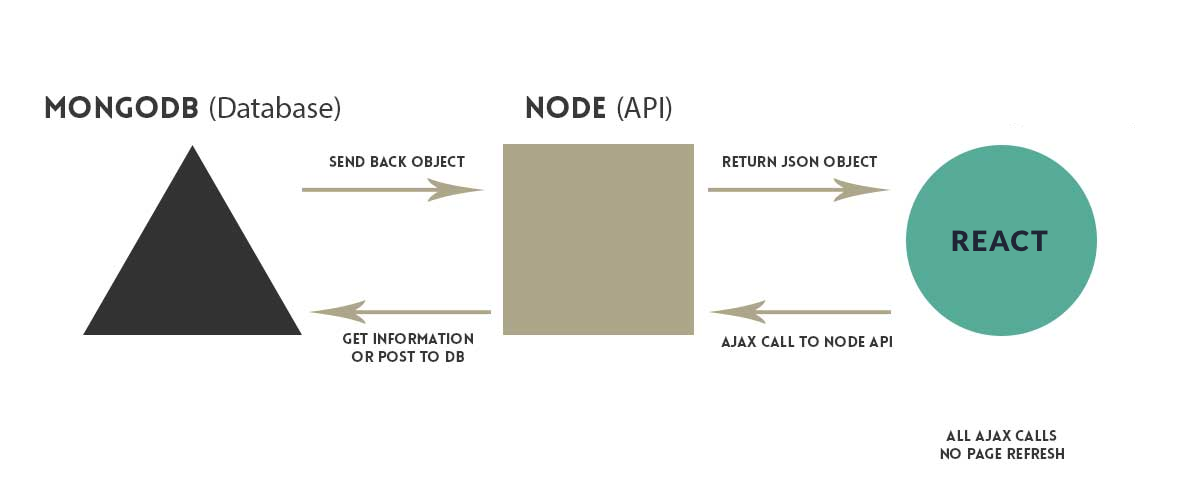
:::info lecture
Montrer comment nous allons pouvoir rendre du JSON (plutôt) que du HTML avec express:
```javascript
app.get('/user', (req, res, next) => {
User.findById(req.user.id)
.then(user => {
res.json(user); // respond with JSON datas
})
.catch(next)
;
});
```
:::
The most notable difference between a regular website and a SPA is the reduced number of page refreshes, as we can load multiple views into it.
Some examples of SPAs include Facebook, Gmail, and Twitter.
Our React application will have just one HTML page, usually called index.html. The framework will then dynamically load pieces of HTML code (templates), in response to user navigation.
## What is a Framework?
**A software framework is:**
> A universal, reusable software environment to facilitate development of software applications, products and solutions.
It may include:
- Support programs,
- Compilers,
- Code libraries,
- Toolsets,
- APIs (Application Programming Interfaces).
A **JavaScript framework** is a web application framework written in JavaScript.
Why should we care about a JavaScript framework?
* It describes the structure of the application.
* It gives the developer a way to organize the code to make an app more flexible and scalable.
You may know some other frameworks, like [Express](expressjs.com), a Node.js micro-framework. In this module we will learn how to create client side of the app using a framework for the frontend: React. There are still a lot of divided opinions on the question is React `library` or it is a `framework`. Well, React takes the best of both and it isn't easy to draw the line and decide in favor of one or the other. We already mentioned some of the key features of frameworks, so let's list some of the main ones of libraries:
- set of functions/methods/events that developers can use in order to achieve wanted behavior of the app,
- one library can be combined with multiple other libraries, while that's not the case with frameworks - it's almost impossible to have two frameworks combined on the same app,
- using a library gives more freedom to developers but that also means more responsibility for design of the whole system and app flow and it carries more risk as well.
## Introduction to React
Official definition of [React](https://reactjs.org/) is that it is an open-source **JavaScript library** which is used for building user interfaces specifically for Single Page Applications (SPA). It’s used for handling view layer for web and mobile apps.
**React** also allows us to create reusable UI components. It was first created by [Jordan Walke](https://www.reactiflux.com/transcripts/jordan-walke/), a software engineer working for Facebook. React first deployed on [Facebook’s](https://facebook.com) newsfeed in 2011 and on [Instagram.com](https://instagram.com) in 2012.
One of the key features of React is that allows developers to create large web applications which can change data, without reloading the page. **The main purpose of React is to be fast, scalable, and simple.** It works only on user interfaces in the application.
### React Features
Let's take a closer look at some essential features of React:
- **Declarative**. React makes it painless to create interactive UIs. Design simple views for each state in your application, and React will efficiently update and render just the right components when your data changes. Declarative views make your code more predictable and easier to debug.
- **Component-Based**. Build encapsulated components that manage their state, then compose them to make complex UIs. Since component logic is written in JavaScript instead of templates, you can easily pass rich data through your app and keep state out of the DOM.
- **JSX**. In React, instead of using regular JavaScript for templating, it uses [JSX](https://jsx.github.io/). JSX is a statically-typed, object-oriented programming language designed to run on modern web browsers. Basically is simple JavaScript which allows HTML quoting and uses these HTML tag syntax to render subcomponents. HTML syntax is processed into JavaScript calls of React Framework. Don't worry; we will take a further look into this later! :wink:
:::info
:bulb: We can also write in pure old JavaScript!
:::
- **React Native**. React has native libraries which were announced by **Facebook** in 2015, which provide the React architecture to native applications like [iOS](https://www.apple.com/es/ios/ios-11/) and[Android](https://www.android.com/).
- **Single-Way data flow**. In React, a set of immutable values are passed to the component's renderer as properties in its HTML tags. Components cannot directly modify any properties but can pass a call back function with the help of which we can do modifications. This complete process can be summarized as “properties flow down; actions flow up”.
## Hello World
:::info lecture
Créons notre première application/page en React !
:::
Let's start with something simple for our first React app. Create a new HTML file and copy/paste the following code:
```html=
<!DOCTYPE html>
<html>
<head>
<meta charset="UTF-8" />
<title>Hello World Ironhackers</title>
</head>
<body>
<div id="root"></div>
<script src="https://unpkg.com/react@16/umd/react.development.js"></script>
<script src="https://unpkg.com/react-dom@16/umd/react-dom.development.js"></script>
<script>
ReactDOM.render(
React.createElement("h1", null, "Hello React Ironhackers!"),
document.getElementById('root')
);
</script>
</body>
</html>
```
:::info
This page is a great way to try React, but it's not suitable for production. It slowly compiles JSX with Babel in the browser and uses a large development build of React.
:::
Now open the file on your browser, and you are ready! That's your first React App! :muscle:
This is not the best way to create a React App, so let's continue our journey to take this to another level!
## A real React App from scratch!
:::info lecture
Pourquoi allons-nous repasser en environnement Node ?
- dépendances NPM (plutôt) que balises `<script>`
- require/import entre des fichiers
- bundle JS => compilation (tooling environnement Node.js)
- babel + JSX (cf. cours prochain)
:::
### Setup the Environment
:::info lecture
Setup...
:::
First, we need to create a basic structure, so go ahead and clone [Intro to React](https://github.com/ironhack-labs/react-module-day1-start), the project in which we will keep working through today's learning units.
```bash
$ git clone https://github.com/ironhack-labs/react-module-day1-start
$ cd react-module-day1-start
$ npm install
```
To properly start off, we'll do `npm install`. Next step is to create three directories: *dist*, *public*, and *src*.
While inside of `react-module-day1-start` folder:
```bash
$ mkdir dist public src
```
:::info lecture
- `src`: notre code source
- `public`: les fichiers accessibles depuis l'extérieur
- `dist`: les fichier résultant de la compilation
:::
Our `public` directory will handle all the static files, and of course will contain the `index.html` file. **React** will use `index.html` to render the app.
Go ahead and create an `index.html` file inside the `public` folder, and copy/paste the following code:
:::info lecture
Notre fichier `public/index.html`:
:::
```html
<!DOCTYPE html>
<html>
<head>
<meta charset="UTF-8" />
<meta name="viewport" content="width=device-width, initial-scale=1, shrink-to-fit=no">
<title>Ironhackers Reacting</title>
</head>
<body>
<div id="root"></div>
<script src="../dist/bundle.js"></script>
</body>
</html>
```
:::info lecture
1 seule balise `script` ici puisque tout bundlé à l'intérieur.
:::
Notice the `<div id="root"></div>` which is the root for our React app. We also add a a `<script src="../dist/bundle.js"></script>` that references our built React app.
### React
Our package.json already has some dev-dependencies, but we need two more packages so let's install `react` and `react-dom`.
```bash
$ npm install --save react@16.3.2 react-dom@16.3.2
```
Now we need to tell our app where to hook into the DOM of our `index.html` file. Create a file called `index.js` in your `src` directory and paste the following code:
:::info lecture
Ce fichier "monte" notre application React dans le DOM (au niveau de la `div#root`) :
:::
```javascript
// src/index.js
import React from "react";
import ReactDOM from "react-dom";
import App from "./App.js";
ReactDOM.render(
<App />,
document.getElementById("root")
);
```
:::info lecture
`ReactDOM.render` fait le rendu de notre `App`.
:::
`ReactDOM.render` is the function that tells React what to render and where to render it — In this case, we’re rendering a component called `App` (which we’ll create soon), and it’s being rendered at the DOM element with the ID `root`.
Now, let's create another file in `src` called `App.js`. This file is just a React component.
:::info lecture
Notre `App` consiste en un rendu simple HTML :
:::
```javascript
// src/App.js
import React, { Component } from "react";
import "./App.css";
class App extends Component {
render() {
return (
<div className="App">
<h1> Hello Ironhackers! </h1>
</div>
);
}
}
export default App;
```
:::info
Webpack also processes `CSS` (and we require it in our component). Let’s add a simple stylesheet `App.css` to the `src` directory.
:::
```css
.App {
margin: 1rem;
font-family: Arial, Helvetica, sans-serif;
}
```
We are done! To see the result of our work, let's run following command:
```bash
$ npm run webpack
```
Now we have a full React App working! :wink:
Note that every time you make any change that needs to affect DOM, you need to rebundle using the same command (`npm run webpack`).
## React Dev Tools
:::info lecture
Présentation de
:::
The React Devtools extension for [Chrome](https://chrome.google.com/webstore/detail/react-developer-tools/fmkadmapgofadopljbjfkapdkoienihi?hl=en) and [Firefox](https://addons.mozilla.org/en-US/firefox/addon/react-devtools/) lets you inspect a React component tree in your browser devtools.
It lets you inspect the props and state of any of the components in your tree.
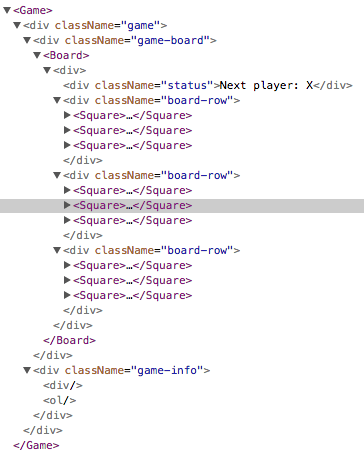
After installing it, you can right-click any element on the page, click “Inspect” to open the developer tools, and the React tab will appear as the last tab to the right.
## Summary
We have created our first React app, and we did it from scratch. If you understand what we just did, all the following will be more straightforward. Remember React is pure JavaScript, so you should feel pretty comfortable using it! Now, let's move forward! :muscle:
## Extra Resources
- [React Hello World Example](https://reactjs.org/docs/hello-world.html)
 Sign in with Wallet
Connect another wallet
Sign in with Wallet
Connect another wallet