---
tags: ironhack, lecture,
---
<style>
.markdown-body img[src$=".png"] {background-color:transparent;}
.alert-info.lecture,
.alert-success.lecture,
.alert-warning.lecture,
.alert-danger.lecture {
box-shadow:0 0 0 .5em rgba(64, 96, 85, 0.4); margin-top:20px;margin-bottom:20px;
position:relative;
ddisplay:none;
}
.alert-info.lecture:before,
.alert-success.lecture:before,
.alert-warning.lecture:before,
.alert-danger.lecture:before {
content:"👨🏫\A"; white-space:pre-line;
display:block;margin-bottom:.5em;
/*position:absolute; right:0; top:0;
margin:3px;margin-right:7px;*/
}
b {
--color:yellow;
font-weight:500;
background:var(--color); box-shadow:0 0 0 .35em var(--color),0 0 0 .35em;
}
.skip {
opacity:.4;
}
</style>

# Mongoose&Express | Documents Relationships
## Learning Goals
After this lesson, you will be able to:
- Understand how to implement model relations using Express&Mongoose
## Introduction
:::info lecture
Poursuivons sur notre ex `library-project`...
:::
We have seen how we can list, read, create and update documents while using Express with Mongoose, so we are ready to make great web applications. In the following learning unit, we are going to learn how we can integrate a crucial concept we learned from MongoDB, documents relationships.
To move faster, let's keep using our `library-project`.
## The Author
:::info lecture

- Nous voulons maintenant rajouter d'autres infos liées à l'`author` : `name`, `lastName`, `nationality`, `birthday`...
- De plus nous voudrions qu'un livre puisse avoir plusieurs auteurs...
:::
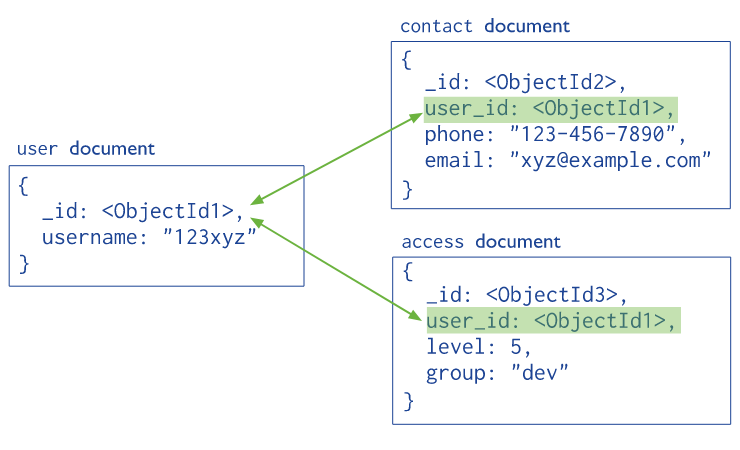
Having only the `name` and `lastName` of the author on the `Book` model is really few information so that we will create an `Author` model separate from the `Book` one. In the **Author** model we will add the `name`, `lastName`, `nationality`, `birthday` and a `pictureUrl`, this way we can display the full info about the author of the book.
Is also true that a book could have more than one author, so the `author` field of the `Book` model will be an array of `Author` ids.
### Reference vs. Embedded
<!--  -->
[](https://docs.google.com/drawings/d/1cfP1SQKnNiEL1AUBdPOWotMId4-uCyeP6PrVMQT7dWo/edit?folder=0AAQNm5fx5y30Uk9PVA)
**Why we decided to reference the authors instead of embedded the `object` them into the `Book` model?**
:::info lecture
Pourquoi par reference plutôt qu'embed ?
---
Dans le cas d'un auteur embed, si nous voulions mettre a jour un auteur il nous faudrait mettre à jour l'ensemble de ses livres... Alors qu'en reference, nous n'avons qu'à le modifier une fois.
:::
Imagine we want to update the `pictureUrl` of a specific author? If we have them embedded in the `Book` model, we need to search through every book where this author shows up and update the field. But if we are referencing them, we just need to update the `author` once.
### Author Model
Let's start creating our `Author` model. Inside our `models` folder add a `author.js` file and copy/paste the following code:
:::info lecture
Créons notre nouveau modèle `Author` :
:::
```javascript
// models/author.js
const mongoose = require("mongoose");
const Schema = mongoose.Schema;
const authorSchema = new Schema({
name: String,
lastName: String,
nationality: String,
birthday: Date,
pictureUrl: String
});
const Author = mongoose.model("Author", authorSchema);
module.exports = Author;
```
We also need to update our `Book` model, replacing the type of data we are assigning to the `author` field. Instead of `String`, now we will have an `Array` of `ObjectID` pointing to the `User` model. So we will have the following:
:::info lecture
Mettons à jour notre modèle `Book` afin de tirer maintenant parti de `Author` : L9
:::
```javascript=
// models/book.js
const mongoose = require("mongoose");
const Schema = mongoose.Schema;
const bookSchema = new Schema({
title: String,
description: String,
author: [ { type : Schema.Types.ObjectId, ref: 'Author' } ], // 👈
rating: Number
}, {
timestamps: {
createdAt: "createdAt",
updatedAt: "updatedAt"
}
});
const Book = mongoose.model("Book", bookSchema);
module.exports = Book;
```
### Creating new Authors
We should add a form to create new authors. Same way we did for books, we need to create a `author-add.hbs` file to display the form, and a `/authors/add` route wiht `GET` and `POST` method. Let's do it:
:::info lecture
Notre formulaire d'ajout d'un auteur :
:::
```htmlmixed
{{! views/author-add.hbs }}
<form action="/authors/add" method="POST">
<label for="">Name:</label>
<input type="text" name="name">
<label for="">Last Name:</label>
<input type="text" name="lastName">
<label for="">Nationality:</label>
<input type="text" name="nationality">
<label for="">Birthday:</label>
<input type="date" name="birthday">
<label for="">Picture Url</label>
<input type="text" name="pictureUrl">
<button>ADD</button>
</form>
```
And our routes:
:::info lecture
Et nos 2 routes d'affichage/traitement du formulaire :
:::
```javascript
// routes/index.js
...
const Author = require('../models/author.js');
...
router.get('/authors/add', (req, res, next) => {
res.render("author-add");
});
router.post('/authors/add', (req, res, next) => {
const { name, lastName, nationality, birthday, pictureUrl } = req.body;
const newAuthor = new Author({ name, lastName, nationality, birthday, pictureUrl})
newAuthor.save()
.then((book) => {
res.redirect('/books')
})
.catch((error) => {
next(err);
})
;
});
```
:::info lecture
Testons l'ajout d'un auteur : http://localhost:3000/authors/add

:::
#### Updating the `Seeds.js`
Perfect! We are already master doing this! Now let's introduce some new stuff! :wink: First we need to change our `seeds.js` file where we add the first books. Every time we create a **book**, first we need to create the `author` and then add the `_id` to the `author` array. Let's do it!
:::info lecture
Mettons à jour notre `seeds.js` afin d'inclure des auteurs en base :
- on doit d'abord crée les auteurs
- pour pouvoir ensuite créer les livres avec les IDs des auteurs
:::
```javascript=
const mongoose = require('mongoose');
const Book = require('../models/book');
const Author = require('../models/author');
Book.collection.drop();
Author.collection.drop();
const dbtitle = 'library-project';
mongoose.connect(`mongodb://localhost/${dbtitle}`);
const data = [
{
title: "The Hunger Games",
description: "Lorem ipsum dolor sit amet, consectetur adipiscing elit, sed do eiusmod tempor incididunt ut labore et dolore magna aliqua. Ut enim ad minim veniam, quis nostrud exercitation ullamco laboris nisi ut aliquip ex ea commodo consequat. Duis aute irure dolor in reprehenderit in voluptate velit esse cillum dolore eu fugiat nulla pariatur. Excepteur sint occaecat cupidatat non proident, sunt in culpa qui officia deserunt mollit anim id est laborum.",
author: { "name": "Suzanne",
"lastName": "Collins",
"nationality": "American",
"birthday": new Date(1962,07,11),
"pictureUrl": "https://www.thefamouspeople.com/profiles/images/suzanne-collins-3.jpg"
},
rating: 10
},
{
title: "Harry Potter",
description: "Lorem ipsum dolor sit amet, consectetur adipiscing elit, sed do eiusmod tempor incididunt ut labore et dolore magna aliqua. Ut enim ad minim veniam, quis nostrud exercitation ullamco laboris nisi ut aliquip ex ea commodo consequat. Duis aute irure dolor in reprehenderit in voluptate velit esse cillum dolore eu fugiat nulla pariatur. Excepteur sint occaecat cupidatat non proident, sunt in culpa qui officia deserunt mollit anim id est laborum.",
author: { "name": "Joanne",
"lastName": "Rowling",
"nationality": "English",
"birthday": new Date(1965,06,31),
"pictureUrl": "https://www.biography.com/.image/t_share/MTE4MDAzNDE3OTI3MDI2MTkw/jk-rowling_editedjpg.jpg"
},
rating: 9
},
{
title: "To Kill a Mockingbird",
description: "Lorem ipsum dolor sit amet, consectetur adipiscing elit, sed do eiusmod tempor incididunt ut labore et dolore magna aliqua. Ut enim ad minim veniam, quis nostrud exercitation ullamco laboris nisi ut aliquip ex ea commodo consequat. Duis aute irure dolor in reprehenderit in voluptate velit esse cillum dolore eu fugiat nulla pariatur. Excepteur sint occaecat cupidatat non proident, sunt in culpa qui officia deserunt mollit anim id est laborum.",
author: { "name": "Harper",
"lastName": "Lee",
"nationality": "American",
"birthday": new Date(1926,03,28),
"pictureUrl": "https://cdn.cnn.com/cnnnext/dam/assets/150710115858-harper-lee-c1-exlarge-169.jpg"
},
rating: 8
},
{
title: "Pride and Prejudice",
description: "Lorem ipsum dolor sit amet, consectetur adipiscing elit, sed do eiusmod tempor incididunt ut labore et dolore magna aliqua. Ut enim ad minim veniam, quis nostrud exercitation ullamco laboris nisi ut aliquip ex ea commodo consequat. Duis aute irure dolor in reprehenderit in voluptate velit esse cillum dolore eu fugiat nulla pariatur. Excepteur sint occaecat cupidatat non proident, sunt in culpa qui officia deserunt mollit anim id est laborum.",
author: { "name": "Jane",
"lastName": "Austen",
"nationality": "English",
"birthday": new Date(1817,11,16),
"pictureUrl": "https://www.biography.com/.image/t_share/MTE1ODA0OTcxNTQ2ODcxMzA5/jane-austen-9192819-1-402.jpg"
},
rating: 9
},
{
title: "Twilight",
description: "Lorem ipsum dolor sit amet, consectetur adipiscing elit, sed do eiusmod tempor incididunt ut labore et dolore magna aliqua. Ut enim ad minim veniam, quis nostrud exercitation ullamco laboris nisi ut aliquip ex ea commodo consequat. Duis aute irure dolor in reprehenderit in voluptate velit esse cillum dolore eu fugiat nulla pariatur. Excepteur sint occaecat cupidatat non proident, sunt in culpa qui officia deserunt mollit anim id est laborum.",
author: { "name": "Sthephenie",
"lastName": "Meyer",
"nationality": "American",
"birthday": new Date(1973,11,24),
"pictureUrl": "https://upload.wikimedia.org/wikipedia/commons/thumb/6/63/Stephenie_Meyer_by_Gage_Skidmore.jpg/1200px-Stephenie_Meyer_by_Gage_Skidmore.jpg"
},
rating: 10
},
{
title: "The Book Thief",
description: "Lorem ipsum dolor sit amet, consectetur adipiscing elit, sed do eiusmod tempor incididunt ut labore et dolore magna aliqua. Ut enim ad minim veniam, quis nostrud exercitation ullamco laboris nisi ut aliquip ex ea commodo consequat. Duis aute irure dolor in reprehenderit in voluptate velit esse cillum dolore eu fugiat nulla pariatur. Excepteur sint occaecat cupidatat non proident, sunt in culpa qui officia deserunt mollit anim id est laborum.",
author: { "name": "Markus",
"lastName": "Zusak",
"nationality": "Australian",
"birthday": new Date(1975,05,23),
"pictureUrl": "https://images.penguinrandomhouse.com/author/59222"
},
rating: 7
},
{
title: "The Chronicles of Narnia",
description: "Lorem ipsum dolor sit amet, consectetur adipiscing elit, sed do eiusmod tempor incididunt ut labore et dolore magna aliqua. Ut enim ad minim veniam, quis nostrud exercitation ullamco laboris nisi ut aliquip ex ea commodo consequat. Duis aute irure dolor in reprehenderit in voluptate velit esse cillum dolore eu fugiat nulla pariatur. Excepteur sint occaecat cupidatat non proident, sunt in culpa qui officia deserunt mollit anim id est laborum.",
author: { "name": "Suzanne",
"lastName": "Lewis",
"nationality": "British",
"birthday": new Date(1898,10,29),
"pictureUrl": "https://media1.britannica.com/eb-media/24/82724-004-C01DBECB.jpg"
},
rating: 8
},
{
title: "Animal Farm",
description: "Lorem ipsum dolor sit amet, consectetur adipiscing elit, sed do eiusmod tempor incididunt ut labore et dolore magna aliqua. Ut enim ad minim veniam, quis nostrud exercitation ullamco laboris nisi ut aliquip ex ea commodo consequat. Duis aute irure dolor in reprehenderit in voluptate velit esse cillum dolore eu fugiat nulla pariatur. Excepteur sint occaecat cupidatat non proident, sunt in culpa qui officia deserunt mollit anim id est laborum.",
author: { "name": "George",
"lastName": "Orwell",
"nationality": "Indian",
"birthday": new Date(1903,05,25),
"pictureUrl": "https://www.biography.com/.image/t_share/MTIwNjA4NjMzOTMzNjI4OTQw/george-orwell-9429833-1-4022.jpg"
},
rating: 9
},
{
title: "Gone with the Wind ",
description: "Lorem ipsum dolor sit amet, consectetur adipiscing elit, sed do eiusmod tempor incididunt ut labore et dolore magna aliqua. Ut enim ad minim veniam, quis nostrud exercitation ullamco laboris nisi ut aliquip ex ea commodo consequat. Duis aute irure dolor in reprehenderit in voluptate velit esse cillum dolore eu fugiat nulla pariatur. Excepteur sint occaecat cupidatat non proident, sunt in culpa qui officia deserunt mollit anim id est laborum.",
author: { "name": "Margaret",
"lastName": "Mitchell",
"nationality": "American",
"birthday": new Date(1900,10,08),
"pictureUrl": "https://media1.britannica.com/eb-media/13/153113-004-8474546E.jpg"
},
rating: 10
},
{
title: "The Fault in Our Stars ",
description: "Lorem ipsum dolor sit amet, consectetur adipiscing elit, sed do eiusmod tempor incididunt ut labore et dolore magna aliqua. Ut enim ad minim veniam, quis nostrud exercitation ullamco laboris nisi ut aliquip ex ea commodo consequat. Duis aute irure dolor in reprehenderit in voluptate velit esse cillum dolore eu fugiat nulla pariatur. Excepteur sint occaecat cupidatat non proident, sunt in culpa qui officia deserunt mollit anim id est laborum.",
author: { "name": "John",
"lastName": "Green",
"nationality": "American",
"birthday": new Date(1977,07,24),
"pictureUrl": "https://i.guim.co.uk/img/media/8a5dc5e279a570fdba282c88d4a2a363a38bc2e4/0_96_4768_2860/master/4768.jpg?w=300&q=55&auto=format&usm=12&fit=max&s=33c90ed86c41e7d9e2a4297936a2e504"
},
rating: 8
}
]
//
// 1. Create authors (before)
//
// extract an array of authors from data
const authors = data.map(book => book.author);
Author.create(authors).then(authors => {
console.log(`${authors.length} authors created.`);
//
// 2. create books (after with author's id)
//
const authorsIds = authors.map(author => author.id);
const books = data.map((book, i) => {
book.author = authorsIds[i]; // update with author id
return book;
});
Book.create(books).then(books => {
console.log(`${books.length} books created.`);
mongoose.connection.close();
}).catch(err => console.error(err));
}).catch(err => console.error(err));
```
If we run `node bin/seeds.js`, the database should now show two different collections, one for the `authors` and the other for `books`, and inside every `book` element, the `author` should be an `ObjectId`. :muscle:
:::info
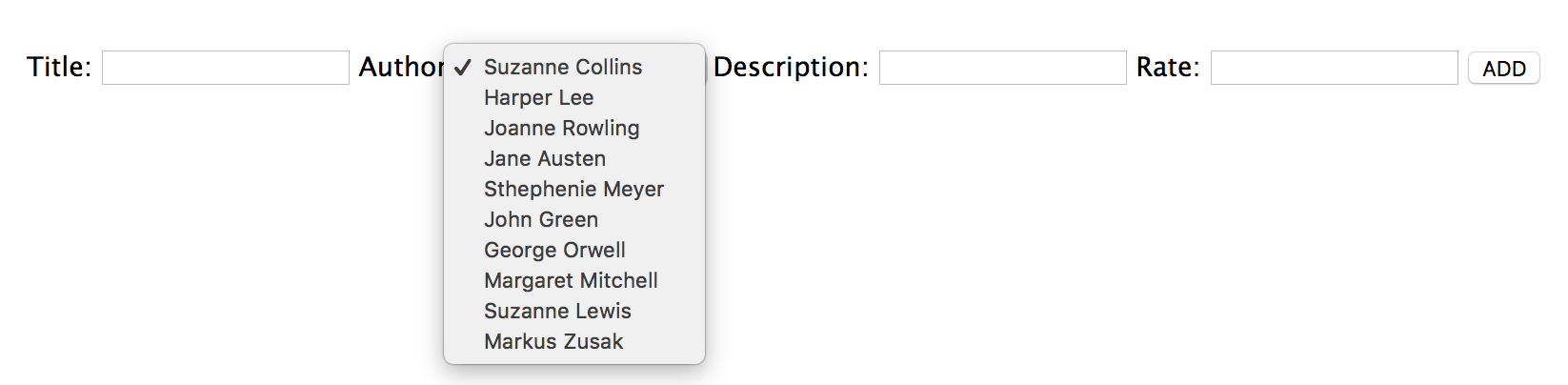
We should update the forms where we can create or update books, but since in this learning unit we are focusing on **relations** between models, we are going to skip that. In any case, go ahead and try to do it! You should display a `select` input where you show the options of authors the user can choose! :wink:
:::
### Populating the Author
:::info lecture
Si nous retournons sur le détail d'un livre : à la place de l'auteur, **nous voyons maintenant son ID**.
:::
We have a problem now! Every time we click on a book to check the details, instead of the `author` info, we see the `_id`, because that is what we are storing in our database.

We should populate the `author` field on our `/book/:id` before sending the data to the view.
:::info
**Population** is the process of automatically replacing the specified paths in the document with document(s) from other collection(s). We may populate a single document, multiple documents, plain object, multiple plain objects, or all objects returned from a query.
We already see this, but just for refresh the brain! :wink:
:::
:::info lecture
`.populate` après `.find()` :
:::
```javascript
// routes/index.js
router.get('/book/:id', (req, res, next) => {
let bookId = req.params.id;
if (!/^[0-9a-fA-F]{24}$/.test(bookId)) {
return res.status(404).render('not-found');
}
Book.findOne({'_id': bookId})
.populate('author') // 👈 populate the author field
.then(book => {
if (!book) {
return res.status(404).render('not-found');
}
res.render("book-detail", { book })
})
.catch(next)
});
```
Cool huh?! Now we have the full `author` array with all the info about each **author**.
## Books Reviews
We practice relations using reference with the **authors** now let's try to use the embedded strategies for **reviews**. Almost every application brings user reviews, and it's a great feature to add to the projects.
The review will have two fields: `user` and `comments`. Since we are going to embed the reviews into the `Book` model, we don't need to create a new one; we just need to add a new field to our `Book` model, so let's do it:
```javascript
// models/book.js
const mongoose = require("mongoose");
const Schema = mongoose.Schema;
const bookSchema = new Schema({
title: String,
description: String,
author: [ { type : Schema.Types.ObjectId, ref: 'Author' } ],
rating: Number,
reviews: [
{
user: String,
comments: String
}
]
}, {
timestamps: {
createdAt: "createdAt",
updatedAt: "updatedAt"
}
});
const Book = mongoose.model("Book", bookSchema);
module.exports = Book;
```
### Create Reviews
When we display the details of a book, on the `book-detail.hbs` file we should create a form to allow users to add reviews about that book. Let's do it:
```htmlmixed
{{! views/book-detail.hbs }}
...
<p>Add a review</p>
<form action="/reviews/add?book_id={{book._id}}" method="post">
<label for="">User:</label>
<input type="text" name="user">
<label for="">Comments:</label>
<textarea type="text" name="comments"></textarea>
<button>ADD</button>
</form>
```
And let's create a `POST` method to the `/reviews/add` route, where we will get all the info from the `req.body` and **update** the `reviews` field of the **book** pushing the new review into the array.
```javascript
// routes/index.js
router.post('/reviews/add', (req, res, next) => {
const { user, comments } = req.body;
Book.update({ _id: req.query.book_id }, { $push: { reviews: { user, comments }}})
.then(book => {
res.redirect('/books');
})
.catch((err) => {
next(err);
})
;
});
```
### Print the reviews
Finally, we have to print all the reviews. One of the advantages of embedding documents is that we don't need to do another query before rendering the `book-detail.hbs` view. We are already passing the `book` data, so we just need to loop over the `reviews` array and print each of them.
```html
{{! views/book-detail.hbs }}
...
<h2>Reviews</h2>
{{#each book.reviews}}
<div class="review-item">
<p>{{this.comments}}</p>
<span>{{this.user}}</span>
</div>
{{/each}}
```
And some `css` to style our application:
```css
/* public/stylesheets/style.scss */
.review-item {
border-bottom: 1px solid grey;
margin: 10px 0;
padding-bottom: 10px;
}
.review-item p {
margin-bottom: 0;
}
.review-item span {
font-size: 10px;
color: grey;
}
```
:::info
Discussion!
After creating the `review`, we are going back to `/books`, where are all listed. Which approach will you use if you want to stay on the `/book/:id` route and display the **reviews** in real time after the user **SEND** it?
:::
## Summary
We finish our `library-project` working with documents and models relations. We did both, embedded and reference relationships, and learned how to implement them in our projects.
 Sign in with Wallet
Connect another wallet
Sign in with Wallet
Connect another wallet