---
tags: ironhack, lecture,
---
<style>
.markdown-body img[src$=".png"] {background-color:transparent;}
.alert-info.lecture,
.alert-success.lecture,
.alert-warning.lecture,
.alert-danger.lecture {
box-shadow:0 0 0 .5em rgba(64, 96, 85, 0.4); margin-top:20px;margin-bottom:20px;
position:relative;
ddisplay:none;
}
.alert-info.lecture:before,
.alert-success.lecture:before,
.alert-warning.lecture:before,
.alert-danger.lecture:before {
content:"👨🏫\A"; white-space:pre-line;
display:block;margin-bottom:.5em;
/*position:absolute; right:0; top:0;
margin:3px;margin-right:7px;*/
}
b {
--color:yellow;
font-weight:500;
background:var(--color); box-shadow:0 0 0 .35em var(--color),0 0 0 .35em;
}
.skip {
opacity:.4;
}
</style>

# ES6 Promises
## Learning Goals
After this lesson you will be able to:
- Understand what **ES6 Promises** are
- Learn how to implement **ES6 Promises**
- Understand the different use cases where we can implement **Promises**
## Promises
:::info lecture
Une promesse est une action qui se déroulera dans le temps. Une promesse pourra être réalisée ou non.
Par ex, tu me prêtes de l'argent : je te fais la promesse de te rembourser.
:::
A `Promise` is an object representing the eventual **completion or failure** of an **asynchronous operation**. Essentially, a promise is a returned object to which you attach callbacks, instead of passing callbacks into a function.
`Promises` give us a way to handle **asynchronous processing** in a more **synchronous fashion**. They represent a value that we can handle at some point in the future. And, better than callbacks here, Promises give us guarantees about that future value, specifically:
- No other registered handlers of that value can change it (the `Promise` is immutable)
- We are guaranteed to receive the value, regardless of when we register a handler for it, even if it's already resolved (in contrast to events, which can incur race conditions).
## Creating Promises
The standard way to create a `Promise` is by using the `new Promise` **constructor** which accepts a handler that is given two functions as parameters.
The first handler (typically named **`resolve`**) is a function to call with the future value when it's ready; and the second handler (typically named **`reject`**) is a function to call to reject the `Promise` if it can't resolve the future value.
:::info lecture
En voici la syntaxe :
- L1 : constructor `new Promise(…)`
- L1 : fonction en paramètre, avec 2 arguments `resolve` et `reject`
- L4, la promesse est tenue
- L6, la promesse n'est pas tenue
:::
```javascript=
const loan = new Promise(function(resolve, reject) {
// an action that takes time...
setTimeout(function () {
if (/* honest */) {
resolve(/* value */); // fulfilled successfully
} else {
reject(/* reason */) // rejected
}
}, 10000)
});
```
:::info lecture
Avant qu'une promesse ne soit tenue ou rompue, elle sera dans l'état `Pending`.
:::
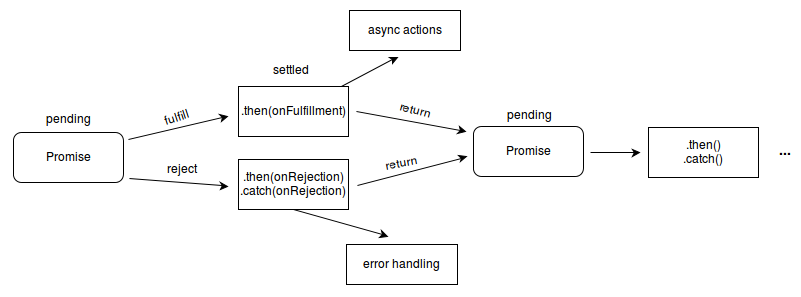
In this way, a `Promise` itself has one of the following three states:
- **Pending**. Until a Promise is fulfilled it is in pending state
- **Fulfilled**. When the first handler (typically `resolve`) is called the `Promise` is considered fulfilled with the value passed to that handler.
- **Rejected**. If the second handler (typically `reject`) is called, the Promise is considered rejected with the value passed to that handler.
:::info lecture
Une promesse ne pourra etre tenue ou rompue qu'une seule fois.
:::
**A `Promise` can only be "settled" (meaning it has been fulfilled or rejected) once.**
You can also create an immediately resolved `Promise` by using the **`Promise.resolve()`** method.
:::info lecture
On peut d'ailleurs créer une promesse déjà tenue :
:::
```javascript=
const ironhack = Promise.resolve(42);
```
:::info lecture
On verra plus tard que cela pourra servir à chaîner avec une autre promesse (cf. `.then`)...
:::
## Consuming Promises
:::info lecture
Une fois réalisée (tenue ou rompue), nous allons vouloir réalisée des actions en fonction.
:::
Once we have a `Promise`, it can be passed around as a **value**. The `Promise` is a stand-in for a future value, and so it can be returned from a `function`, passed as a `parameter` and used in any other way a standard value would be used.
**To consume the `Promise`** - *meaning we want to process the `Promises` value once fulfilled* - we attach a `handler` to the `Promise` using it's `.then()` method. This method takes a `function` that will be passed the `resolved` value of the `Promise` once it is **fulfilled**.
:::info lecture
`.then` va nous permettre de réaliser une action si la promesse a été tenue :
```javascript
loan.then(function (value) {
console.log('ouiiii, le pret a été remboursé', value);
})
```
NB: `value` vaut alors la valeur passée lors du `resolve(value)` précédent
:::
```javascript=
const p = new Promise((resolve, reject) => resolve("Ironhack"));
p.then((val) => console.log(val)); // Ironhack
```
:::info lecture
En vrai, `.then` accepte également un 2e paramètre: la fonction en cas d'échec, mais nous préfèrerons utiliser `.catch` pour cela...
skip
:::
A **Promise's `.then()`** method actually takes **two possible parameters**.
- The first is the function to be called when the `Promise` is **fulfilled**.
- The second is a function to be called if the `Promise` is **rejected**.
```javascript=
p.then((val) => console.log("fulfilled:", val),
(err) => console.log("rejected: ", err));
```
:eyes: You can omit either handler in a `.then()`, so sending a `null` as the first handler and providing the second is the same as the standard `Promise.catch()`, which takes a single handler to be called when a **promise is rejected**.
The following are equivalent:
```javascript=
p.then((val) => console.log("fulfilled:", val))
.catch((err) => console.log("rejected:", err));
p.then((val) => console.log("fulfilled:", val))
.then(null, (err) => console.log("rejected:", err));
```
And, as shown above `.then()` calls can be chained. If a handler returns a value in the a `.then()` call it is automatically wrapped in a `Promise` when returned and then properly unwrapped to pass the value to further chained `.then()` calls.
## Dealing with errors
:::info lecture
`.catch` va lui nous permettre de réaliser une action si la promesse a été rompue :
```javascript
loan.then(function (value) {
console.log('ouiiii, le pret a été remboursé', value);
}).catch(function (reason) {
console.log('hmmm!', reason)
});
```
NB: `reason` vaut alors la valeur passée lors du `reject(value)` précédent.
:::
You should use **`.catch()`** for *handling errors*, rather than `.then(null, function)`. Using **`.catch()`** is more explicit and idiomatic, and when chaining you can have a single `.catch()` at the end of the chain to handle **any rejection or thrown exceptions** from either the original promise or any of it's handlers.
:::info lecture
Pour rejeter une promesse, il est également possible de `throw`er une erreur (au lieu d'utiliser `reject`) :
```javascript
const loan = new Promise(function(resolve, reject) {
// an action that takes time...
setTimeout(function () {
if (/* honest */) {
resolve(/* value */); // fulfilled successfully
} else {
throw new Error('🤥') // rejected
}
}, 10000);
});
```
:::
Throwing an exception in a `Promise` will automatically **reject** that `Promise` as well. This is the same for `.then()` handlers and their **results** and **return** values as well. A thrown error is wrapped in a `Promise` and treated as a rejection.
### Example
```javascript=
const p1 = new Promise((resolve, reject) => {
if (true)
throw new Error("rejected!");
else
resolve(4);
});
p1.then((val) => val + 2)
.then((val) => console.log("got", val))
.catch((err) => console.log("error: ", err.message));
// => error: rejected!
```
## Promises All
There will be sometime we will need to wait more than one `Promise` to complete to continue our program, no worries, you can use `Promise.all()`:wink:
:::info lecture
Il peut être utile d'attendre plusieurs promesses en même temps. <b>`Promise.all()` retourne une promesse de toutes les promesses</b> passées en tableau :
```javascript=
function hasard(resolve, reject) {
setTimeout(function () {
if (Math.random() > .5) {
resolve('lucky boy');
} else {
reject('not your day')
}
}, 2000);
}
const p1 = new Promise(hasard);
const p2 = new Promise(hasard);
const p3 = new Promise(hasard);
Promise.all([p1, p2, p3]).then(function (values) {
// p1, p2 et p3 sont maintenant résolues
}).catch(function (reason) {
// l'une d'elle vient d'échouer
})
```
NB :
- L13 : `values` est un tableau des différentes `resolve(value)` de chaque promesse
- L15 : `reason` vaut la valeur passée par `reject()` L5
:::
The **`Promise.all()`** method returns a single `Promise` that **resolves when all of the promises in the iterable argument have resolved** or when the iterable argument contains no promises. It **rejects with the reason of the first promise that rejects.** This method can be useful for aggregating the results of multiple promises.
**Fulfillment**
- If an empty iterable is passed, then this method returns (synchronously) an already resolved promise.
- If all of the passed-in promises fulfill, or are not promises, the promise returned by `Promise.all` is fulfilled asynchronously.
- In all cases, the **returned promise is fulfilled with an array containing all the values of the iterable passed as argument (also non-promise values).**
**Rejection**
If any of the passed-in promises **reject**, `Promise.all` asynchronously rejects with the value of the **promise that rejected**, whether or not the other promises have resolved.
```javascript=
const p1 = Promise.resolve(3);
const p2 = 1337;
const p3 = new Promise((resolve, reject) => {
setTimeout(resolve, 100, 'foo');
});
Promise.all([p1, p2, p3]).then(values => {
console.log(values); // [3, 1337, "foo"]
});
```
### Promises Visualization
```javascript=
Promise.all([
new Promise(resolve => setTimeout(resolve, 1500)),
new Promise(resolve => setTimeout(resolve, 900)),
new Promise(resolve => setTimeout(resolve, 2200))
])
.then(results => results.length.b.c)
.then(c => console.info(c))
.catch(err => console.error(err))
```
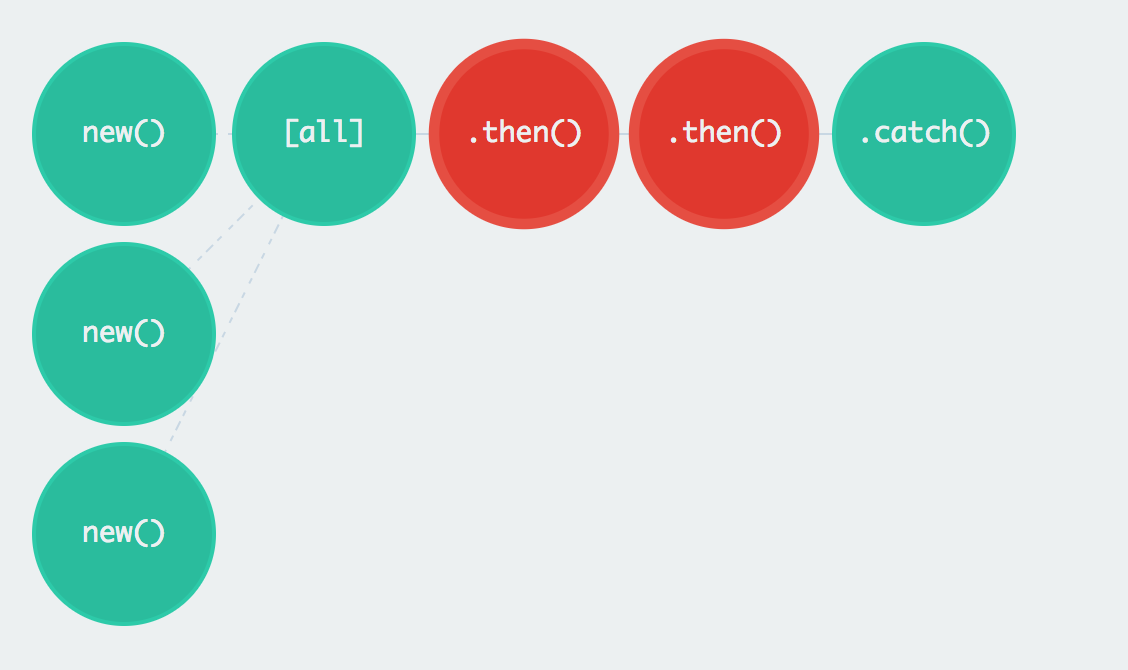
Let's see in a more graphically way how the promises work, check out this [Promises Visualization](https://bevacqua.github.io/promisees/#) web, where we can see how each of the promises are been resolved after each of the `setTimeout`.
Go ahead and play around with the different methods of `Promise`! :muscle:
## Summary
We just learn a super powerfull tool for dealing with asynchrnous code. `Promises` give us the ability to write asynchronous code in a synchronous fashion, with flat indentation and a single exception channel.
`Promises` give us guarantees of no race conditions and immutability of the future value represented by the `Promise` (unlike callbacks and events).
## Extra Resources
- [Promises for Dummies](https://scotch.io/tutorials/javascript-promises-for-dummies)
 Sign in with Wallet
Connect another wallet
Sign in with Wallet
Connect another wallet