---
tags: ironhack, lecture,
---
<style>
.markdown-body img[src$=".png"] {background-color:transparent;}
.alert-info.lecture,
.alert-success.lecture,
.alert-warning.lecture,
.alert-danger.lecture {
box-shadow:0 0 0 .5em rgba(64, 96, 85, 0.4); margin-top:20px;margin-bottom:20px;
position:relative;
ddisplay:none;
}
.alert-info.lecture:before,
.alert-success.lecture:before,
.alert-warning.lecture:before,
.alert-danger.lecture:before {
content:"👨🏫\A"; white-space:pre-line;
display:block;margin-bottom:.5em;
/*position:absolute; right:0; top:0;
margin:3px;margin-right:7px;*/
}
b {
--color:yellow;
font-weight:500;
background:var(--color); box-shadow:0 0 0 .35em var(--color),0 0 0 .35em;
}
.skip {
opacity:.4;
}
</style>

# JS | Arrays & Objects
## Learning Goals
After this lesson you will be able to:
- Understand the term `data structure`
- Understand how / why data structures are often `nested`
- Access values from deeply nested structures
## What is a `Data Structure` (Recap)
A data structure is *a particular <b>way of organizing data</b>.*
:::info lecture
**Pour résumer**, nous avons maintenant à notre disposition :
- les tableaux `[]` pour stocker des listes de "choses"
- les objets `{}` pour stocker toutes sortes d'informations dans une même "single-unit
:::
:heavy_check_mark: *The better we can organize our data, the better we can represent people, places, objects, items; the world around us, in code.*
:::info lecture
Les tableaux:
:::
For instance, an array of strings would be a good structure to organize a list of students.
```javascript
const students = [
"Bob",
"Susy",
"Ted",
"Sarah",
"Bill"
];
```
The *data* is *structured* in the format of a list. To retrieve a particular item, we need to reference the index of the array.
```javascript
console.log(students[0]);
// Bob
```
:::info lecture
Les objets :
:::
`Objects` are another way of structuring our data. They are good for *labeling* data and building more complex structures.
```javascript
const bob = { name: "Bob", age: 17 };
const susy = { name: "Susy", age: 18 };
const ted = { name: "Ted", age: 18 };
const sarah = { name: "Sarah", age: 20 };
const bill = { name: "Bill", age: 19 };
```
We can access specific `values` by referencing `keys`.
```javascript
console.log(bob.name); // <== Bob
console.log(susy.age); // <== 18
```
Occasionally, we're going to have very complex data that needs to be structured differently.
## Nested Data Structures
Let's take the student example through a few iterations.
### Objects in Arrays
:::info lecture
Nous allons pouvoir mixer les 2 👹
:::
In reality, a better solution for the list of students would be an **array of objects**. Each student is an object and a collection of them forms the array of students.
:::info lecture
<span style="font-size:300%">😲</span>
Un tableau d'objets (essayons dans codepen) :
:::
```javascript
const students = [
{ name: "Bob", age: 17 },
{ name: "Susy", age: 18 },
{ name: "Ted", age: 18 },
{ name: "Sarah", age: 20 },
{ name: "Bill", age: 19 }
];
```
`students[<index>]` is going to be a student object! <b>Let's grab Sarah's name</b>.
```javascript
console.log(students[3].name); // <== Sarah
```
##### Adding To Arrays
:::info lecture
Puisque `students` est un tableau, utilisons la méthode `.push()` pour lui ajouter un nouvel étudiant :
:::
As previously discussed, we can use the `.push()` method to add things to arrays. This applies also to adding objects to arrays.
```javascript
students.push({ name: "Steve", age: 25 });
const bob = { name: "Bob", age: 21 };
students.push(bob);
```
:pencil: **Time to <b>practice</b>**
In the *students* array above:
- Get the value of the first student's name
- Get the age of the student named Sarah
### Arrays in Arrays
:::info lecture
On va aussi pouvoir "hybrider" des tableaux ensemble. Et créer un tableau de tableaux...
:::
#### A Simple Example
:::info
Sometimes we need to have such a data structure to nest an array inside of an array. <b>This is called a `two-dimensional array`</b>.
:::
Let's take a look at a simple example.
```javascript
const twoD = [
["Bob", "Susy", "Ted"],
["Lilly", "Sarah", "Bill"],
["Thomas", "Barry", "Alex"]
]
```
:::success
In this structure, to reference an element, is to reference *an entire array*.
:::
:::info lecture
Le montrer dans codepen :
:::
```javascript
console.log(twoD[1]); // <== [ 'Lilly', 'Sarah', 'Bill' ]
console.log(twoD[1][0]); // <== 'Lilly'
console.log(twoD[0][0]); // <== 'Bob'
console.log(twoD[0][3]); // <== undefined
console.log(twoD[3][0]); // TypeError: Cannot read property '0' of undefined
```
---
:::info lecture
Un autre ex d'un échiquier:
```javascript
let echiquier = [
[0,0,0,0,0,0,0,0],
[0,0,0,0,0,0,0,0],
[0,0,0,0,0,0,0,0],
[0,0,0,0,0,0,0,0],
[0,0,0,0,0,0,0,0],
[0,0,0,0,0,0,0,0],
[0,0,0,0,0,0,0,0],
[0,0,0,0,0,0,0,0],
]
```
:::
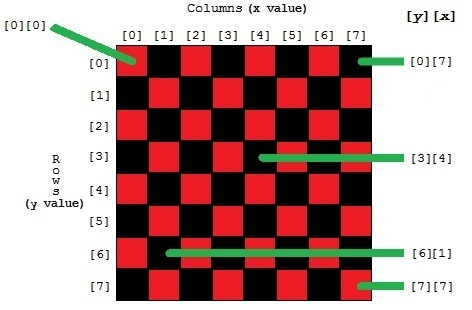
:::info lecture
BONUS
- Problème :
```javascript
function neighboorLeft(i,j) {
return echiquier[i-1][j];
}
neighboorLeft(0,4); // TypeError: Cannot read property '4' of undefined
```
- Astuce :
```javascript
function neighboorLeft(i,j) {
return (echiquier[i-1] || [])[j]; //
}
neighboorLeft(0,4); // `undefined` c'est OK
```
:::
#### A More Complex Example
Let's expand the student example to represent more than one classroom. This would be a list of lists containing students, or an **`array of arrays containing objects`**.
```javascript
// Names generated by faker: https://github.com/marak/Faker.js/
const classes = [
[
{ firstName: 'Tomas', lastName: 'Bechtelar', age: 22 },
{ firstName: 'Nico', lastName: 'Schamberger', age: 26 },
{ firstName: 'Ashleigh', lastName: 'Kutch', age: 29 },
{ firstName: 'Lulu', lastName: 'Considine', age: 20 },
{ firstName: 'Garland', lastName: 'Waelchi', age: 21 }
],
[
{ firstName: 'Charlie', lastName: 'Rolfson', age: 23 },
{ firstName: 'Austin', lastName: 'Schowalter', age: 26 },
{ firstName: 'Emie', lastName: 'Franecki', age: 29 },
{ firstName: 'Okey', lastName: 'Runte', age: 18 },
{ firstName: 'Jameson', lastName: 'Jakubowski', age: 22 }
],
[
{ firstName: 'Antwan', lastName: 'Marquardt', age: 22 },
{ firstName: 'Eugenia', lastName: 'Nienow', age: 23 },
{ firstName: 'Keely', lastName: 'Hagenes', age: 29 },
{ firstName: 'Jazmin', lastName: 'Aufderhar', age: 29 },
{ firstName: 'Stanley', lastName: 'Hand', age: 22 }
],
[
{ firstName: 'Vincent', lastName: 'Langworth', age: 20 },
{ firstName: 'Mervin', lastName: 'Blick', age: 28 },
{ firstName: 'Damien', lastName: 'Rohan', age: 28 },
{ firstName: 'Fabian', lastName: 'Kautzer', age: 22 },
{ firstName: 'Lilliana', lastName: 'Lesch', age: 26 }
],
[
{ firstName: 'Antonette', lastName: 'Stokes', age: 25 },
{ firstName: 'Alexandrine', lastName: 'DuBuque', age: 22 },
{ firstName: 'Braeden', lastName: 'Walker', age: 26 },
{ firstName: 'Derick', lastName: 'Weber', age: 22 },
{ firstName: 'Robert', lastName: 'Beatty', age: 30 }
]
];
```
**Examples**
:::info lecture
Sans forcément le faire, mais expliquer comment "arriver" à `"Ashleigh"` à partir de cette structure :
:::
```javascript
console.log(classes[0]);
// [ { firstName: 'Tomas', lastName: 'Bechtelar', age: 22 },
// { firstName: 'Nico', lastName: 'Schamberger', age: 26 },
// { firstName: 'Ashleigh', lastName: 'Kutch', age: 29 },
// { firstName: 'Lulu', lastName: 'Considine', age: 20 },
// { firstName: 'Garland', lastName: 'Waelchi', age: 21 }
// ]
console.log(classes[0][2]);
// { firstName: 'Ashleigh', lastName: 'Kutch', age: 29 }
console.log(classes[0][2].firstName);
// 'Ashleigh'
```
:pencil: **Time to <b>practice</b>**
From the array of `classes`:
- Retrieve the second "classroom" of students
- Retrieve the first name "Antonette"
- Retrieve the age 18
- Retrieve the last name "Beatty"
### Objects inside of Objects
:::info lecture
Enfin, on va pouvoir "hybrider" des objets ensemble, et faire des objects d'objets...
:::
Objects inside of objects can be tricky to deal with. Let's create a `classRoom` object, which will have a `teacher` in it.
```javascript
const classRoom = {
teacher: { firstName: 'Greg', lastName: 'Dach', age: 38 }
};
```
Remember, when we're accessing a value inside of the `teacher` object, we have to go through the `classRoom` object first.
:::info lecture
On peut "echaîner" la `dot notation` pour "rentrer" en profondeur dans notre objet imbriqué :
:::
```javascript
console.log(classRoom.teacher.firstName); // <== 'Greg'
console.log(classRoom.teacher.age); // <== 38
```
We <b>can go as many levels deep</b> as we want:
```javascript
const classRoom = {
teacher: {
firstName: 'Greg',
lastName: 'Dach',
age: 38,
address: {
street: "3085 Kelton Knolls",
city: "Aldaside",
state: "Maryland"
}
}
};
```
To get the *city* from the `address` object which is nested in the `teacher` object which is nested in the `classRoom` object:
:::success lecture
On peut d'ailleurs aller aussi loin en profondeur que l'on veut:
:::
```javascript
console.log(classroom.teacher.address.city); // <== "Aldaside"
```
:::info lecture
Et bien sûr, on aurait également pu se servir de la `brackets notation` également :
```javascript
console.log(classroom["teacher"]["address"]["city"]); // <== "Aldaside"
```
NB : L'avantage de la `brackets notation` est que l'on pourra utiliser des variables...
:::
:pencil: **Time to practice**
Get back the teacher's age from the `classRoom` object.
:::info lecture
Sans forcément le faire, mais expliquer chacun des `console.log` :
:::
### Beyond
Let's represent the entire school system with `nested objects`. Let's start at the very bottom, and work our way up.
#### Classroom
A classroom has a teacher and a few students.
```javascript
const classRoom = {
teacher: { firstName: 'Marcelino', lastName: 'Padberg', age: 25 },
students: [
{ firstName: 'Aliyah', lastName: 'Schulist', age: 18 },
{ firstName: 'Cleveland', lastName: 'Towne', age: 28 },
{ firstName: 'Jan', lastName: 'Quitzon', age: 18 },
{ firstName: 'Alaina', lastName: 'Runolfsdottir', age: 18 },
{ firstName: 'Gerhard', lastName: 'Bergstrom', age: 23 }
]
};
console.log(classRoom.students[2].firstName); // <== 'Jan'
console.log(classRoom.teacher.age); // <== 25
```
#### School
A school has a name, and many classrooms:
```javascript
const school = {
name: "Fake School 1",
classRooms: [
{
teacher: { firstName: 'Marcelino', lastName: 'Padberg', age: 25 },
students: [
{ firstName: 'Aliyah', lastName: 'Schulist', age: 18 },
{ firstName: 'Cleveland', lastName: 'Towne', age: 28 },
{ firstName: 'Jan', lastName: 'Quitzon', age: 18 },
{ firstName: 'Alaina', lastName: 'Runolfsdottir', age: 18 },
{ firstName: 'Gerhard', lastName: 'Bergstrom', age: 23 }
]
},
{
teacher: { firstName: 'Edwardo', lastName: 'Schowalter', age: 28 },
students: [
{ firstName: 'Manley', lastName: 'Doyle', age: 18 },
{ firstName: 'Maximilian', lastName: 'Gleichner', age: 19 },
{ firstName: 'Sid', lastName: 'Rohan', age: 30 },
{ firstName: 'Catalina', lastName: 'Hilpert', age: 27 },
{ firstName: 'Gerald', lastName: 'O\'Keefe', age: 26 }
]
}
]
}
console.log(school.name); // <== "Fake School 1"
console.log(school.classRooms[1].students[4].firstName); // <== Gerald
```
#### School System
A school system has many schools in it and is the final result.
```javascript
const schoolSystem = {
schools: [
{
name: "Fake School 1",
classRooms: [
{
teacher: { firstName: 'Marcelino', lastName: 'Padberg', age: 25 },
students: [
{ firstName: 'Aliyah', lastName: 'Schulist', age: 18 },
{ firstName: 'Cleveland', lastName: 'Towne', age: 28 },
{ firstName: 'Jan', lastName: 'Quitzon', age: 18 },
{ firstName: 'Alaina', lastName: 'Runolfsdottir', age: 18 },
{ firstName: 'Gerhard', lastName: 'Bergstrom', age: 23 }
]
},
{
teacher: { firstName: 'Edwardo', lastName: 'Schowalter', age: 28 },
students: [
{ firstName: 'Manley', lastName: 'Doyle', age: 18 },
{ firstName: 'Maximilian', lastName: 'Gleichner', age: 19 },
{ firstName: 'Sid', lastName: 'Rohan', age: 30 },
{ firstName: 'Catalina', lastName: 'Hilpert', age: 27 },
{ firstName: 'Gerald', lastName: 'O\'Keefe', age: 26 }
]
}
]
},
{
name: "Fake School 2",
classRooms: [
{
teacher: { firstName: 'Lucas', lastName: 'Schroeder', age: 29 },
students: [
{ firstName: 'Giuseppe', lastName: 'Hegmann', age: 24 },
{ firstName: 'Jennyfer', lastName: 'Hane', age: 19 },
{ firstName: 'Mikayla', lastName: 'Braun', age: 23 },
{ firstName: 'Rickie', lastName: 'White', age: 22 },
{ firstName: 'Rose', lastName: 'Collins', age: 30 }
]
},
{
teacher: { firstName: 'Green', lastName: 'Sauer', age: 25 },
students: [
{ firstName: 'Melany', lastName: 'Welch', age: 25 },
{ firstName: 'Paxton', lastName: 'Corkery', age: 22 },
{ firstName: 'Nellie', lastName: 'Hauck', age: 26 },
{ firstName: 'Eunice', lastName: 'Hirthe', age: 26 },
{ firstName: 'Aylin', lastName: 'Barrows', age: 26 }
]
}
]
},
{
name: "Fake School 3",
classRooms: [
{
teacher: { firstName: 'Nikko', lastName: 'Crist', age: 42 },
students: [
{ firstName: 'Christop', lastName: 'Hahn', age: 26 },
{ firstName: 'Newell', lastName: 'Kemmer', age: 27 },
{ firstName: 'Katheryn', lastName: 'Heller', age: 26 },
{ firstName: 'Saul', lastName: 'Heathcote', age: 20 },
{ firstName: 'Maudie', lastName: 'Haley', age: 30 }
]
},
{
teacher: { firstName: 'Nathanael', lastName: 'Hansson', age: 50 },
students: [
{ firstName: 'Jensen', lastName: 'Reichel', age: 21 },
{ firstName: 'Lois', lastName: 'Kulas', age: 28 },
{ firstName: 'Caterina', lastName: 'Wolff', age: 28 },
{ firstName: 'Dahlia', lastName: 'Collier', age: 24 },
{ firstName: 'Linwood', lastName: 'Langosh', age: 26 }
]
}
]
}
]
};
console.log(schoolSystem.schools[1].name); // <== Fake School 2
console.log(schoolSystem.schools[1]);
//{ name: 'Fake School 2',
// classRooms:
// [
// { teacher: [Object], students: [Array] },
// { teacher: [Object], students: [Array] }
// ]
// }
console.log(schoolSystem.schools[1].classRooms[0]);
// {
// teacher: { firstName: 'Lucas', lastName: 'Schroeder', age: 29 },
// students: [
// { firstName: 'Giuseppe', lastName: 'Hegmann', age: 24 },
// { firstName: 'Jennyfer', lastName: 'Hane', age: 19 },
// { firstName: 'Mikayla', lastName: 'Braun', age: 23 },
// { firstName: 'Rickie', lastName: 'White', age: 22 },
// { firstName: 'Rose', lastName: 'Collins', age: 30 }
// ]
// }
console.log(schoolSystem.schools[1].classRooms[0].students[1]);
// <== { firstName: 'Jennyfer', lastName: 'Hane', age: 19 }
console.log(schoolSystem.schools[1].classRooms[0].students[1].firstName); // <== Jennyfer
```
:pencil: **Time to <b>practice</b>**
:::info lecture
A partir du dernier `schoolSystem` :
:::
- Add a student with the name of Lucille D. Lozano to Fake School 2, in the first classroom.
- Retrieve the "Fake School 3" object
- Retrieve the teacher with the first name of "Nathanael"
- Retrieve the student with the first name of "Saul"
## Real World Applications
#### <b>Databases</b>
Data Structures, specifically arrays and hashes in JavaScript, are incredibly important. Later on when we get to databases, most of our database objects are going to be in the form of nested objects and arrays.
#### Web <b>APIs</b>
When we're trying to get information in the future from APIs (web services that give us back information), it's going to be formatted much like our JavaScript objects.
For instance, let's take a look at the [PunkAPI](https://api.punkapi.com/v2/beers/random), that brings us a random beer, with its ingredients and other information.
In the link above, PunkAPI gives us a random beer from its database. You can notice that the element that the API send us is a nested object with a lot of info.
## Summary
In this lesson, we learned about all different varieties of JavaScript structures and how to access the data inside of them. We covered arrays in arrays, objects in arrays, and many different combinations of the two.
We also took a look at how all that might look in the real world applications.
All in all, data structures in programming are **SUPER** important. There are dozens of other structures in different languages, but in JavaScript the array and object are core.
Data Structures let us represent the world around us more effectively, and you will be a more efficient programmer if you develop the skill to structure well information needed to develop your apps successfully.
## Extra Resources
- [Back to Basics: JavaScript Objects](https://www.sitepoint.com/back-to-basics-javascript-object-syntax/)
- [MDN Array](https://developer.mozilla.org/en-US/docs/Web/JavaScript/Reference/Global_Objects/Array)
- [MDN Object](https://developer.mozilla.org/en-US/docs/Web/JavaScript/Reference/Global_Objects/Object)
 Sign in via Facebook
 Sign in via X(Twitter)
 Sign in via GitHub
 Sign in via Dropbox
 Sign in with Wallet
Connect another wallet
Sign in with Wallet
Connect another wallet