# AZURE DP203: Day 4
AZURE DP203 課程介紹與上課心得: Day 4 (Full eng. version)
# Labs Overviews:
## Module : Support Hybrid Transactional Analytical Processing (HTAP) with Azure Synapse Link
* Design hybrid transactional and analytical processing using Azure Synapse Analytics
* Configure Azure Synapse Link with Azure Cosmos DB
* Query Azure Cosmos DB with Apache Spark for Azure Synapse Analytics
* Query Azure Cosmos DB with SQL serverless for Azure Synapse Analytics
## Module : Real-time stream processing with Stream Analytics
* Enable reliable messaging for Big Data application
* Work with data streams by using Azure Stream Analytics
* Ingest data streams with Azure Stream Analytics
## Module :Create a stream processing solution with Event Hubs and Azure Databricks
* Process streaming data with Azure Databrick structured streaming
# Course Overviews:
### Access Skillpipe:
If you join DP203 SYSTEX course, you can claim DP203 E-book from the "Skillpipe", the details will be sent to your E-mail.
To access Skillpipe, please click on the following link: www.skillpipe.com
If you are new to Skillpipe, please set up your Skillpipe account here: https://www.skillpipe.com/#/account/registration
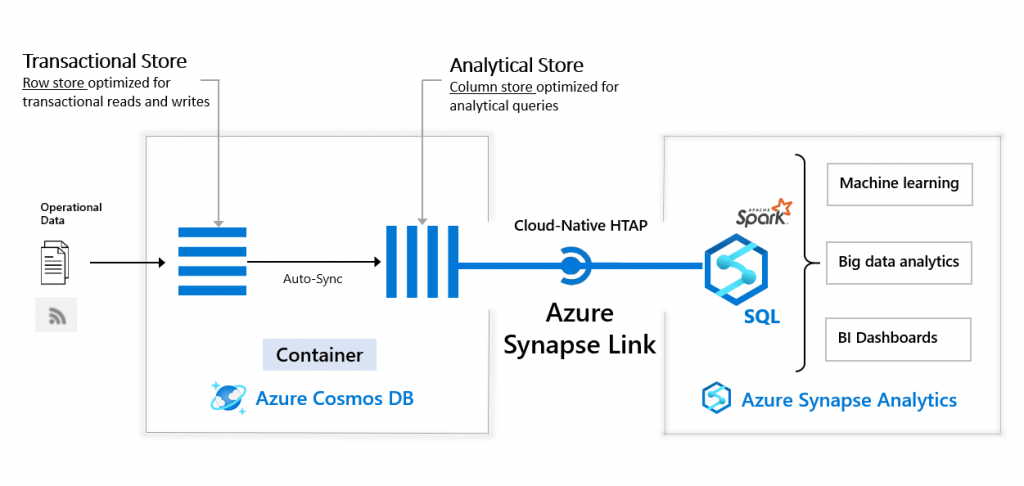
### Design hybrid transactional and analytical processing using Azure Synapse Analytics
More reference: https://k21academy.com/microsoft-azure/data-engineer/azure-synapse-link-hybrid-transactional-analytical-processing/
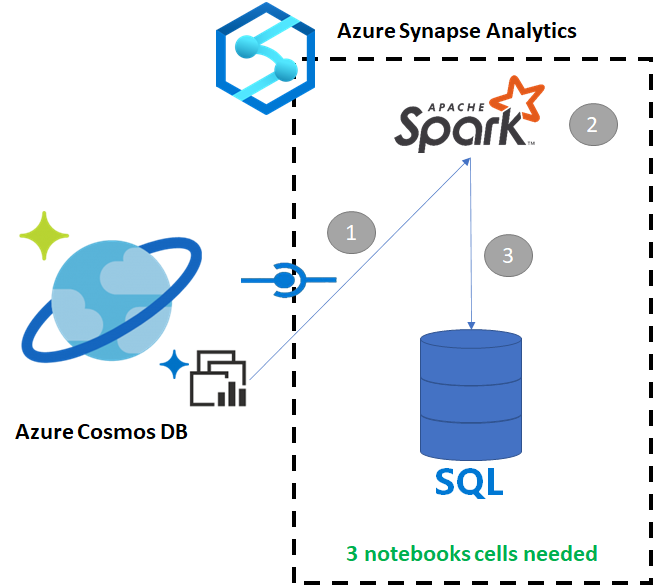
### Query Azure Cosmos DB with Apache Spark for Azure Synapse Analytics
* Step 1. Load the data in Spark
* Step 2. Create a based DataFrame
* Step 3. Flatten JSON data
* Step 4. Create the final DataFrame
More reference: https://learn.microsoft.com/en-us/azure/synapse-analytics/synapse-link/how-to-copy-to-sql-pool
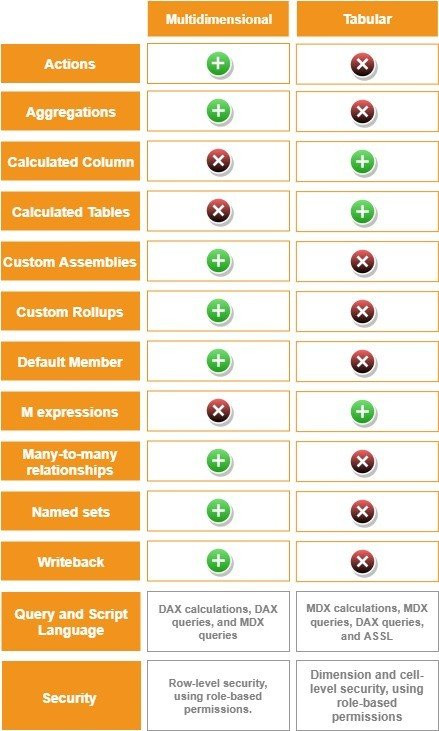
### Multi Dimensional Model vs. Tabular Model
More reference: https://learn.microsoft.com/en-us/analysis-services/comparing-tabular-and-multidimensional-solutions-ssas?view=asallproducts-allversions
### What is Power Pivot (in memory)
More reference: https://support.microsoft.com/zh-tw/office/power-pivot-%E6%A6%82%E8%A7%80%E8%88%87%E5%AD%B8%E7%BF%92-f9001958-7901-4caa-ad80-028a6d2432ed
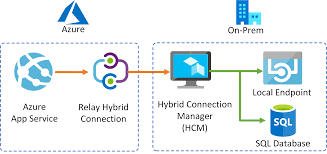
### What is Hybrid Connection?
More reference: https://learn.microsoft.com/en-us/azure/app-service/app-service-hybrid-connections
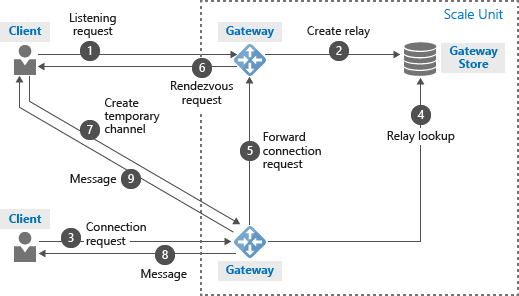
### What is Azure Relay?
More reference: https://learn.microsoft.com/en-us/azure/azure-relay/relay-what-is-it
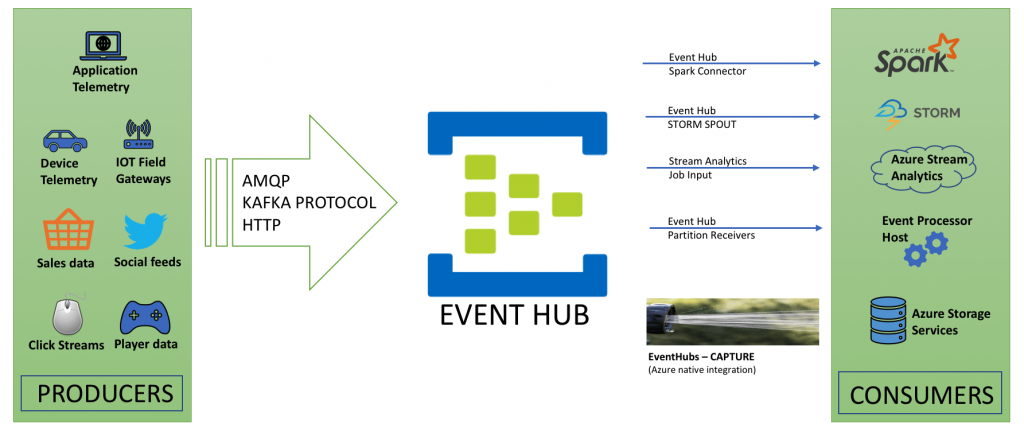
### Azure Event Hubs:
Azure Event Hubs is a highly scalable publish-subscribe service that can ingest millions of event per second and stream them into multiple applications
more reference: https://learn.microsoft.com/en-us/azure/event-hubs/event-hubs-about
### Configure applications to use Event Hubs
**Mobile APP** --- Receive ---> **API** -----Sent---> **Event Hub (Queues streaming data)**
* Quickstart: Create an event hub using Azure portal: https://learn.microsoft.com/en-us/azure/event-hubs/event-hubs-create
### What are data streams?
* Data Stream : In the context of analytics, data streams are event data generated by sensors or other sources that can be analyzed by another technology.
* Data Stream processing approach: There are two approaches. Reference data is streaming data that can be collected over time and persisted in storage as static data. In contrast, streaming data have relatively low storage requirements. And run computations in sliding windows.
* Data stream are used to:
* Analyza data
* Understand systems
* Trigger actions
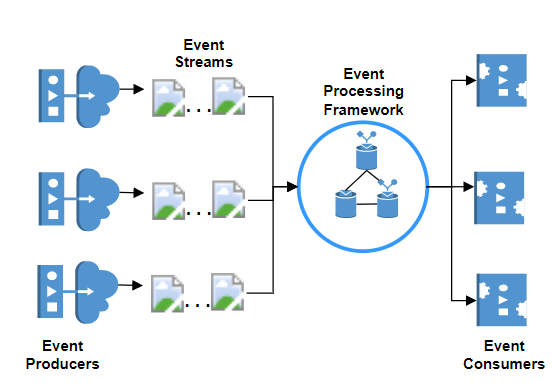
### Event processing:
The process of consuming data streams, analyzing them, and deriving actionable insights out of them is called Event Processing and has three distinct components.
* Event Producer
* Event processor
* Event consumer
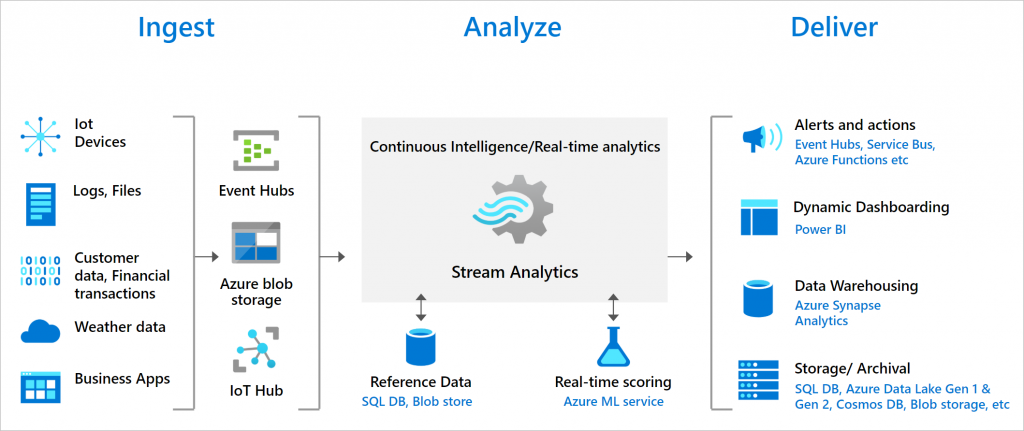
### Processing events with Azure Stream Analytics
Microsoft Azure Stream Analytics is an event processing engine. It enables the consumption and analysis of high volumes of streaming data in real time.
* Source: Sensor, Systems, Application
* Ingestion: Event Hubs , IOT Hubs, Azure a Blob Store
* Analytical engine: Stream Analytics Query, Language, .NET SDK
* Destination: Azure Data Lake, Cosmos DB, Blob Store, SQL Database, Power BI
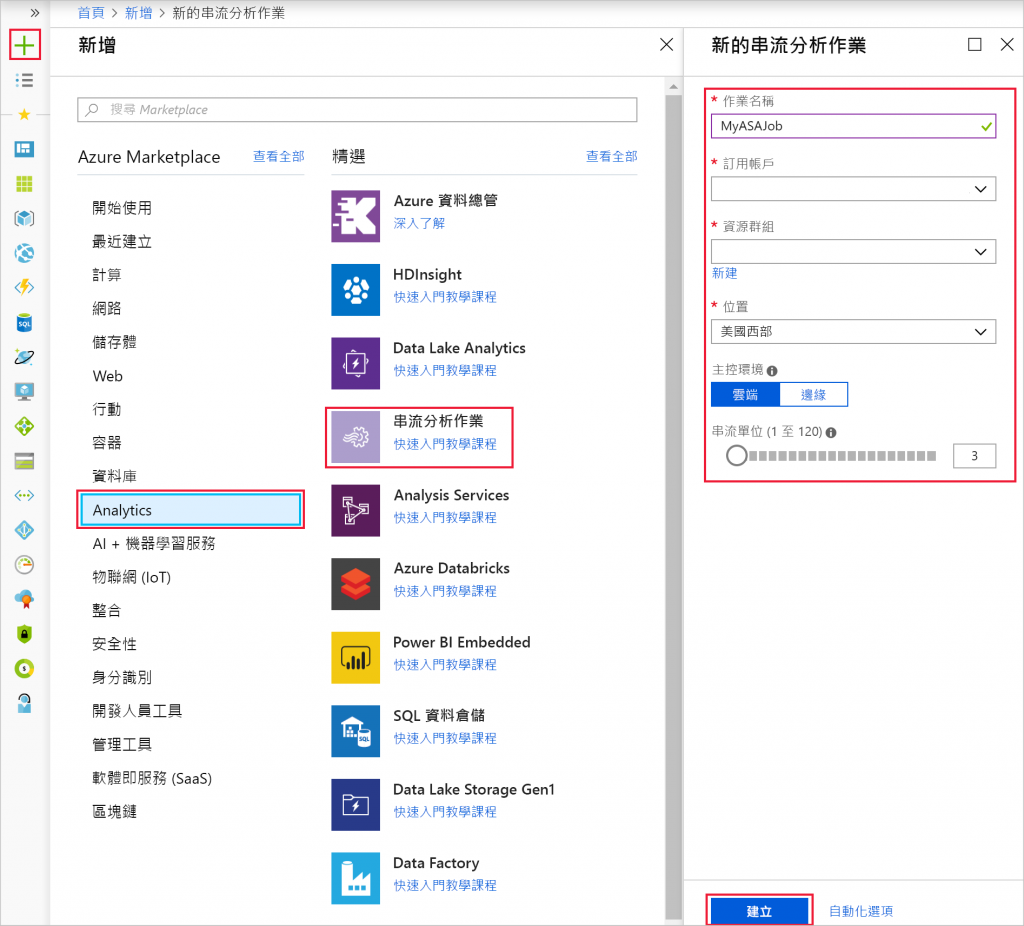
### Create streamAnalytics Service
* Job name
* Subscription
* Resource group
* Location
### Using Windows function with Azure Stream Analytics
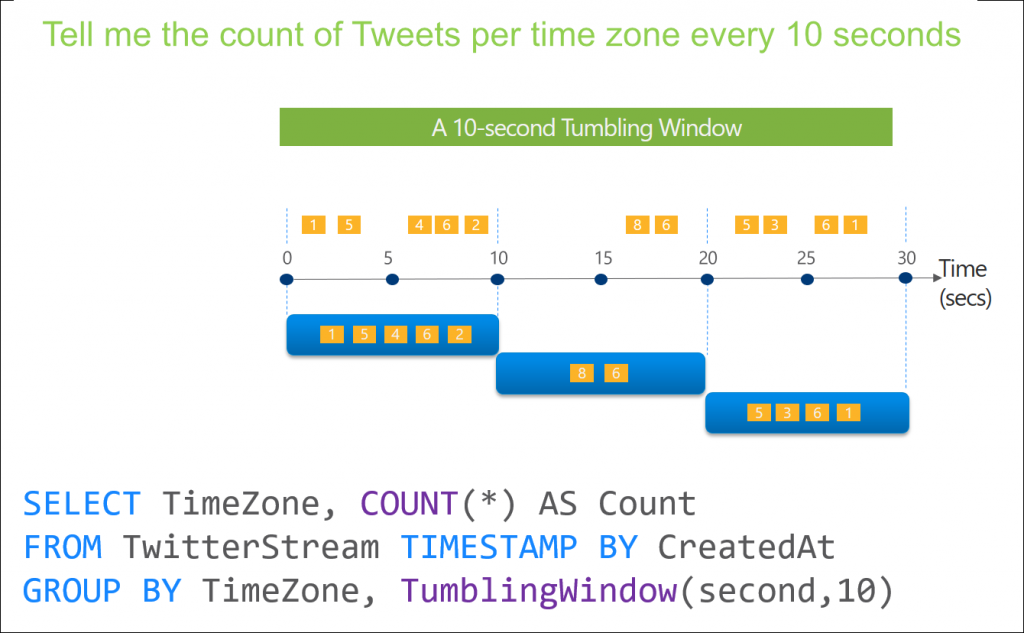
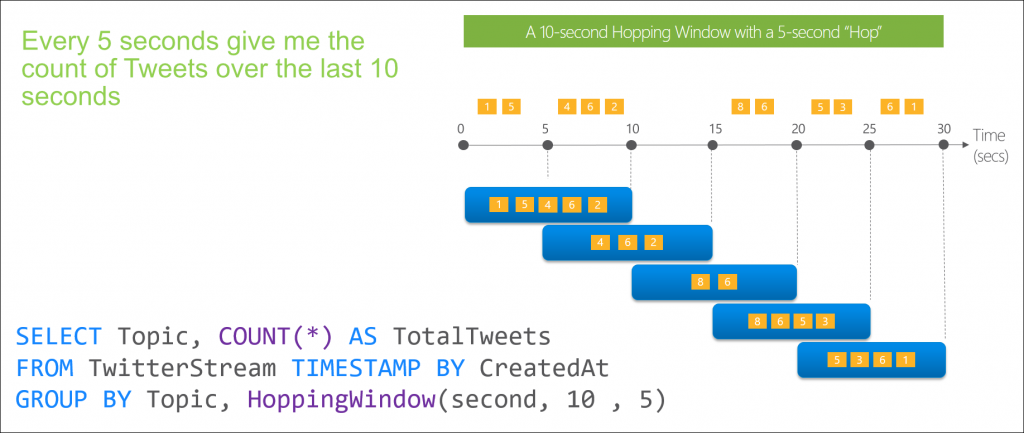
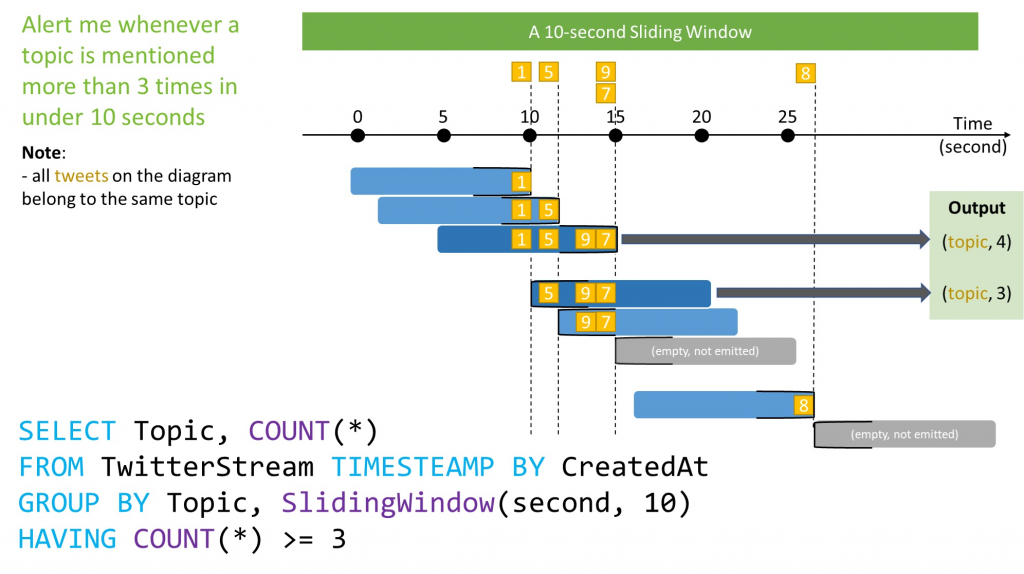
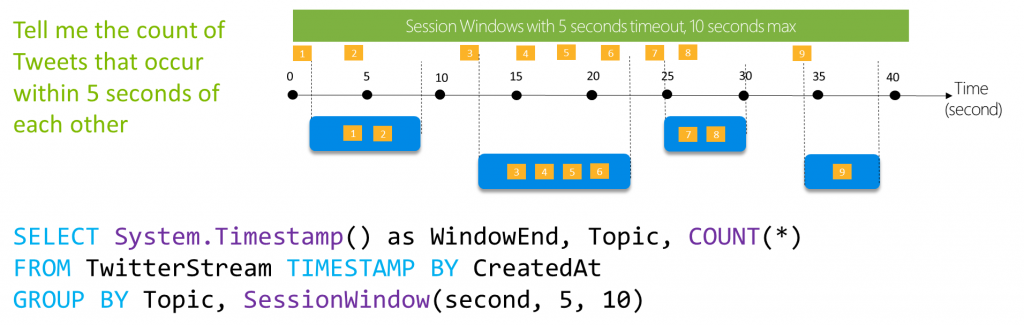
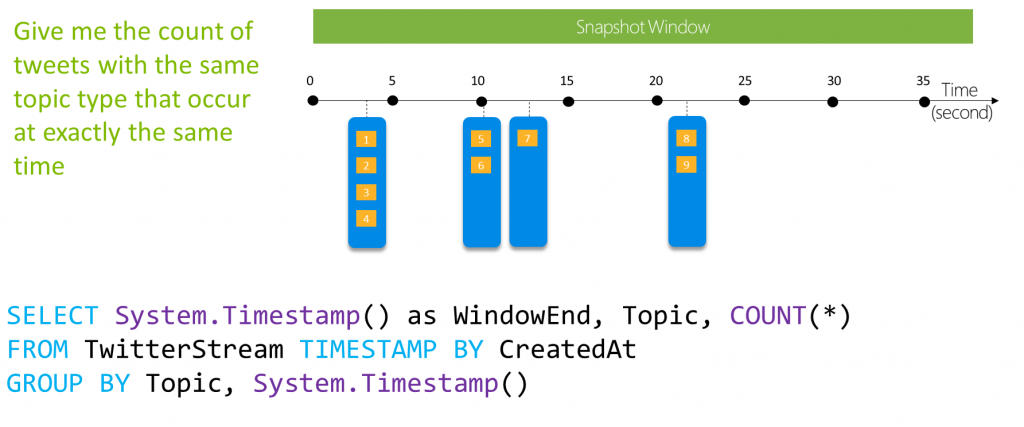
There are five kinds of temporal windows to choose from: Tumbling, Hopping, Sliding, Session, and Snapshot windows. You use the window functions in the GROUP BY clause of the query syntax in your Stream Analytics jobs. You can also aggregate events over multiple windows using the Windows() function.
#### Tumbling
#### Hopping
##### Sliding
##### Session Windows
##### Snapshot windows
* **More reference**: [Introduction to Stream Analytics windowing functions ](https://learn.microsoft.com/en-us/azure/stream-analytics/stream-analytics-window-functions)
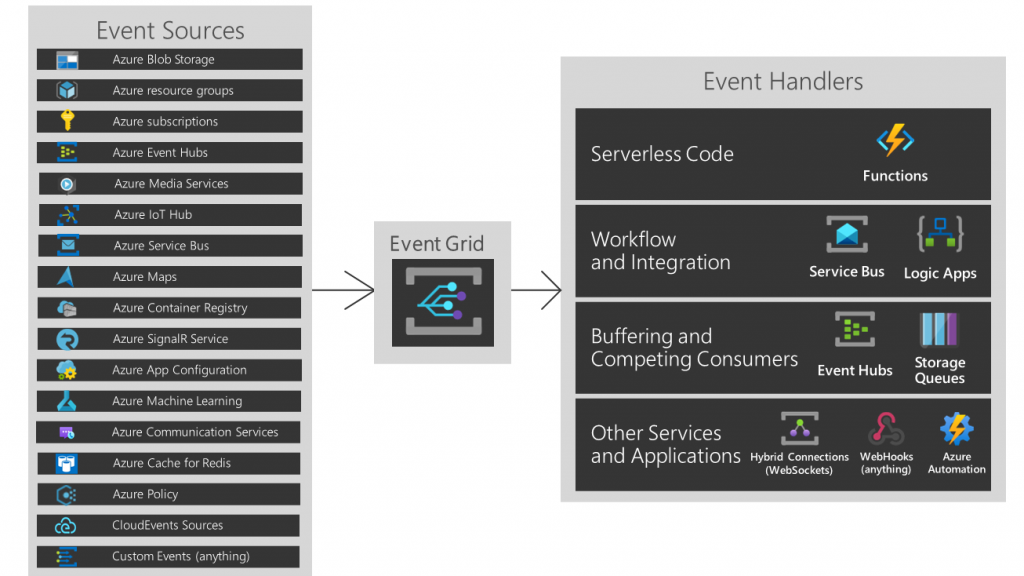
#### What is Event Grid?
More reference: https://learn.microsoft.com/en-us/azure/event-grid/overview
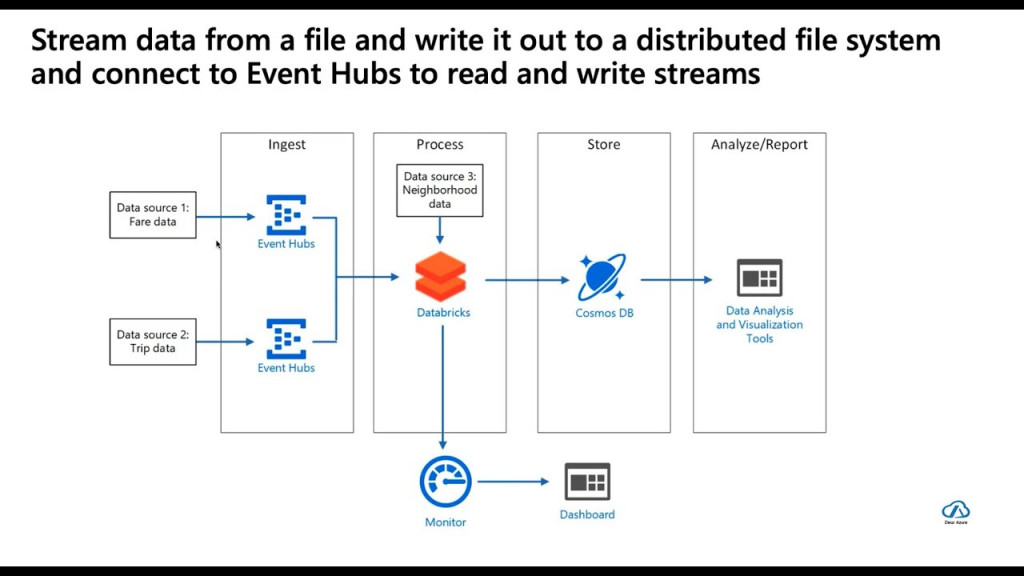
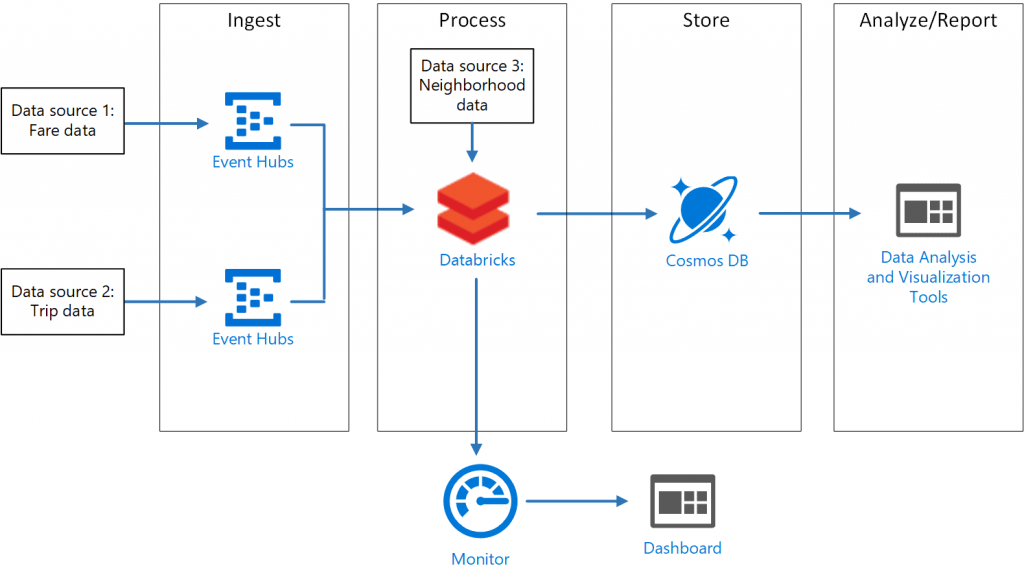
#### Stream data from a file and write it out to a distributed file system and connect to Event Hubs to read and write streams
### Some how I found a "[Azure Developer College](https://azuredevcollege.com/trainingdays/#training-days)": have many great articles and challenge to practice ~ So if you want to know more about Azure, here is the one!
 Sign in with Wallet
Connect another wallet
Sign in with Wallet
Connect another wallet