# ThingsPro Agent Functional Specification
ThingsPro Agent Version: V2.1.0
------
ThingsPro Agent is a <font color='blue'><b>module</b></font> running on Azure IoT Edge, which bridge couple important functions between ThingsPro Edge and Azure IoT Edge seamless. This document describes the detail technical specification those you shall know, when deal with ThingsPro Agent.
------
Table of Content
[TOC]
## Install Module ThingsPro Agent on ThingsPro Edge
- [Create iotedge device](https://docs.microsoft.com/zh-tw/azure/iot-edge/how-to-register-device)
- Setup ThingsPro Agent (Add module from Azure Portal)
* docker image:
* `moxa2019/thingspro-agent:2.1.1-amd64`
* `moxa2019/thingspro-agent:2.1.1-armhf`
* Container Create Option
```
{
"HostConfig": {
"Binds": [
"/var/thingspro/apps/cloud/data/setting/:/var/thingspro/cloudsetting/",
"/run/:/host/run/",
"/var/thingspro/data/:/var/thingspro/data/"
]
}
}
```
- Setup ThingsPro Edge
* [network](https://thingspro-edge.moxa.online/v1.1.0/device/device.html#tag/ethernets/paths/~1device~1ethernets~1{id}/patch)
* [time](https://thingspro-edge.moxa.online/v1.1.0/device/device.html#tag/time/paths/~1device~1time/patch)
* (optional)[enable ssh](https://thingspro-edge.moxa.online/v1.1.0/core/core.html#tag/systems/paths/~1system~1sshserver/put)
- Setup Azure Iotedge
* [iotedge](https://thingspro-edge.moxa.online/v1.1.0/iotedge/iotedge.html#tag/iotedge/paths/~1azure-iotedge/patch)
## Direct Method
ThingsPro Agent offered below 6 direct methods. You can invoke them when device is on-line.
| No | Method Name | Description |
| ---- | ------------------------------ | ------------------------------------------------------------ |
| 1 | thingspro-api-v1 | An universal direct method, allow to invoke almost all Restful API of ThingsPro Edge. |
| 2 | system-reboot | A direct method to restart Moxa's device. |
| 3 | message-policy-get | To retrieve D2C message policy applied on device. |
| 4 | message-policy-put | To update D2C message policy on device. |
| 5 | thingspro-applications-control | To control application run time on device. |
| 6 | thingspro-software-upgrade | To perform software upgrade over the air. |
#### 1. ThingsPro Agent Universal Method
An universal direct method, to invoke almost all Restful API on ThingsPro Edge device. You can get ThingsPro Edge Restful API document at <a hrer=' https://thingspro-edge.moxa.online/ '>here</a>.
- Method Name:
```
thingspro-api-v1
```
- Request Payload: (Example to set SSH configuration)
```
{
"path":"/system/sshserver",
"method":"PUT",
"headers":[],
"requestBody": {"enable": true, "port": 22}
}
```
| No | Name | Description |
| ---- | ----------- | ---------------------------------------------- |
| 1 | path | ThingsPro Edge Restful API endpoint. |
| 2 | method | The method which associated with API endpoint. |
| 3 | headers | It shall always be application/json. |
| 4 | requestBody | The post data which required by API endpoint. |
- Response:
``` json
{
"status":200,
"payload":{"data":{"enable":true,"port":22}}
}
```
- Example screen shot
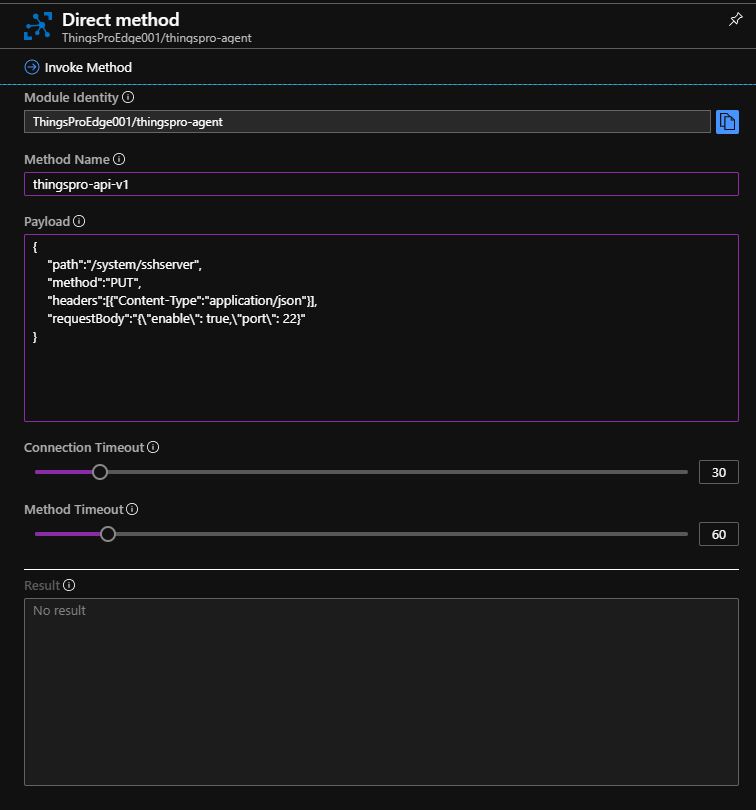
<font color='red'><b>Note : Please change below time out parameters to prevent any exception.</b></font>
- Connection Timeout with 30 seconds
- Method Timeout with 60 seconds.
#### 2. Restart Device
This command will trigger device to reboot immediately.
- Method Name:
```
system-reboot
```
- Request Payload:
```
{}
```
- Response:
``` json
{
"status": 200,
"payload": {
"data": "rebooting"
}
}
```
#### 3. Get D2C Message Policy
This direct method retrieves telemetry (D2C) message policy applied on device.
- Method Name:
```
message-policy-get
```
- Request Payload:
```
{}
```
- Response:
``` json
{
"status": 200,
"payload": {
"data": {
"groups": [
{
"id": 1,
"enable": false,
"format": "",
"outputTopic": "sample",
"pollingInterval": 2,
"properties": [
{ "key": "messageType", "value": "deviceMonitor" }
],
"sendOutThreshold": { "size": 4096, "time": 5 },
"tags": {
"system": { "status": ["cpuUsage", "memoryUsage"] }
}
}
]
}
}
}
```
| No | Name | Description |
| ---- | ---------------- | ------------------------------------------------------------ |
| 1 | groups | Message group, you can define multiple messages by demand |
| 2 | id | The identity of this message |
| 3 | enable | Enable or disable this message policy |
| 4 | format | A jq script for you to transform default payload to custom payload |
| 5 | outputTopic | The output topic which requires by Azure IoT Edge. This helps user manage message route in Azure IoT Edge. |
| 6 | pollingInterval | Define what interval to poll tag data back. For example:<br /> - value 10 : Every 10 second<br /> - value 0 : when the data be push into tag (almost real time) |
| 7 | properties | Application properties of the message. This allows cloud applications to access certain messages without deserializing JSON payload. |
| 8 | sendOutThreshold | Define conditions to send out message to Azure EdgeHub by either or on:<br /> - message size<br /> - time (value 0 : almost real time) |
| 9 | tags | The tag data you would like to send out on message.<br />You can retrieve all available tags defined by ThingsPro Edge Restful API. |
#### 4. Update D2C Message Policy
This direct method allow you to apply telemetry (D2C) message policy on device.
- Method Name:
```
message-policy-put
```
- Request Payload:
``` json
{
"groups": [
{
"enable": true,
"outputTopic": "sample",
"format": "",
"properties": [
{ "key": "messageType", "value": "deviceMonitor" }
],
"tags": {
"system": { "status": ["cpuUsage", "memoryUsage"] }
},
"pollingInterval": 2,
"sendOutThreshold": { "size": 4096, "time": 5 }
}
]
}
```
##### 4.1 Custom Payload
D2C message policy allow you to transform default payload to your desired payload schema via jq filter. You can access jq web site (https://stedolan.github.io/jq/manual/) for detail information.
ThingsPro Edge Web GUI offered a friendly interface allow you to apply jq filter and test the transform result, here are some example screen shots :
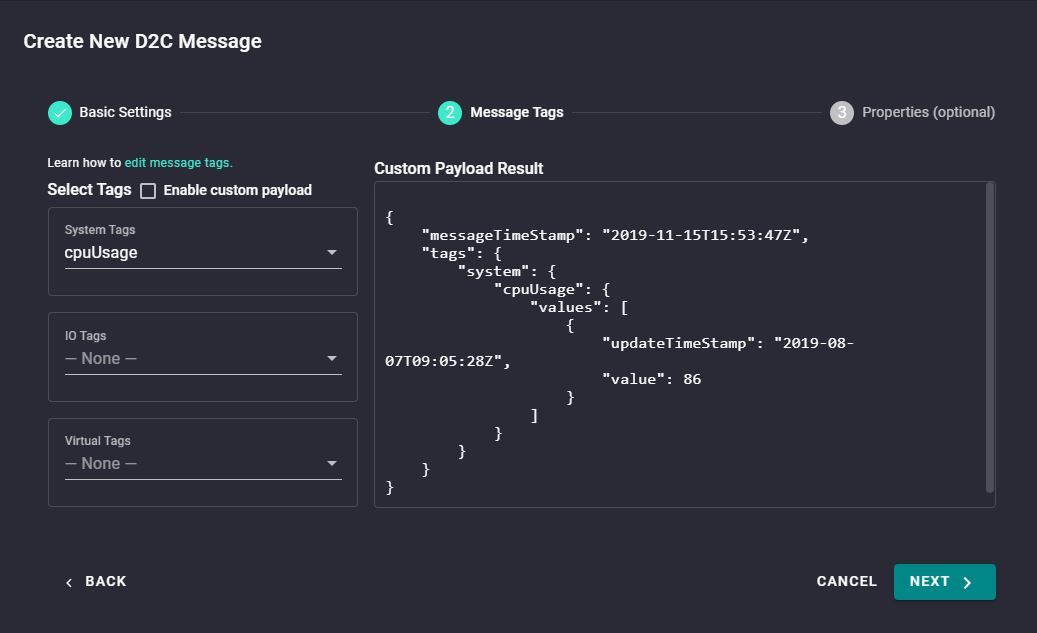
- Default D2C message schema
You can select tags via left hand-side tag selector, and, the default result show on right hand-side area.
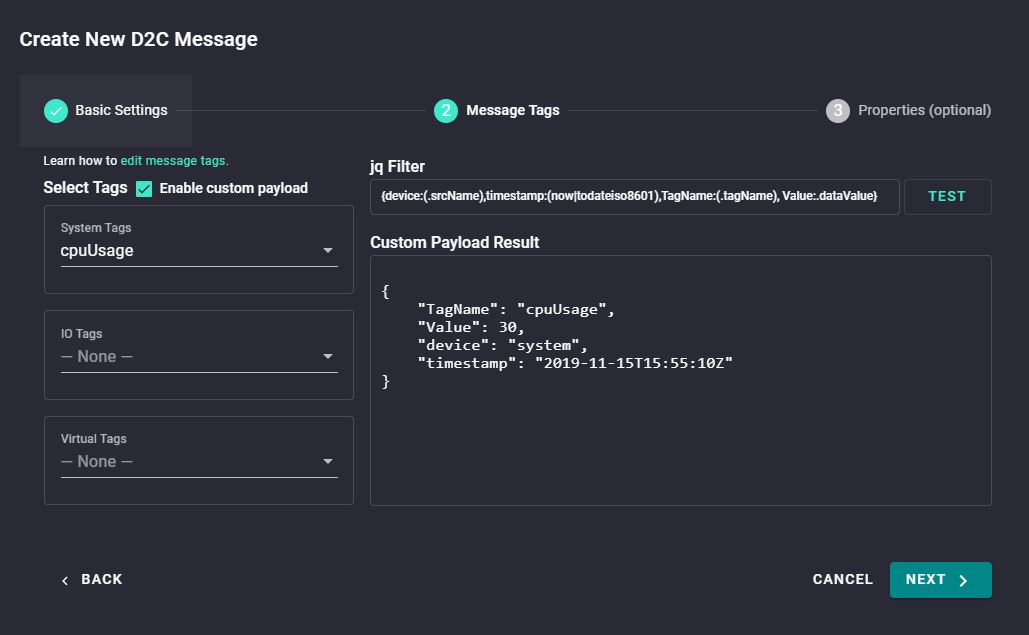
- Custom payload after execute transform
The custom payload will display after you enable custom payload, and input jq Filter.
- ThingsPro Agent offers below variables for you to print out on your payload:
| No | Variable | Description |
| ---- | -------------------------- | --------------------------------------------- |
| 1 | env.IOTEDGE_DEVICEID | Print IoT Edge Device ID |
| 2 | env.IOTEDGE_MODULEID | Print IoT Edge Module ID |
| 3 | env.IOTEDGE_IOTHUBHOSTNAME | Print IoT Hub Host Name |
| 4 | .srcName | Print source name of tag data |
| 5 | .tagName | Print tag name |
| 6 | .dataValue | Print tag value |
| 7 | .ts | Print time stamp of tag value be collected |
| 8 | .dataUnit | Print data unit of tag value, example: % |
| 9 | .dataType | Print data type of tag value, example: int64. |
P.S. If you would like to put above variable value as key of JSON element, please use parentheses, such as:
```
(.tagName)=.dataValue
```
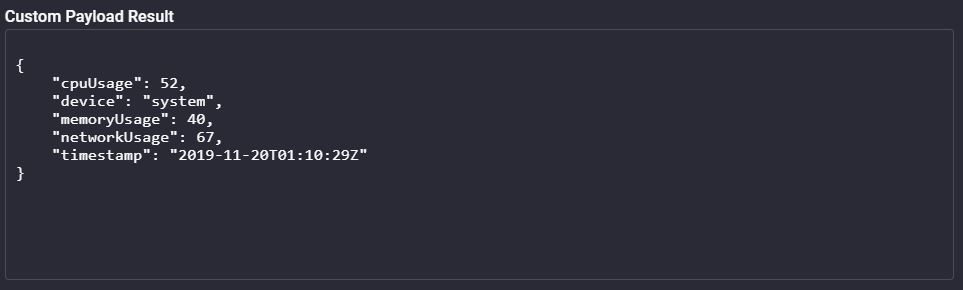
- Custom payload example 1:
jq Filter:
```
{device:(.srcName),timestamp:(now|todateiso8601),(.tagName):.dataValue}
```
- Custom payload example 2:
jq Filter :
```
{device:(.srcName),timestamp:(now|todateiso8601),tag: [{TagName:(.tagName), Value:.dataValue}]}
```
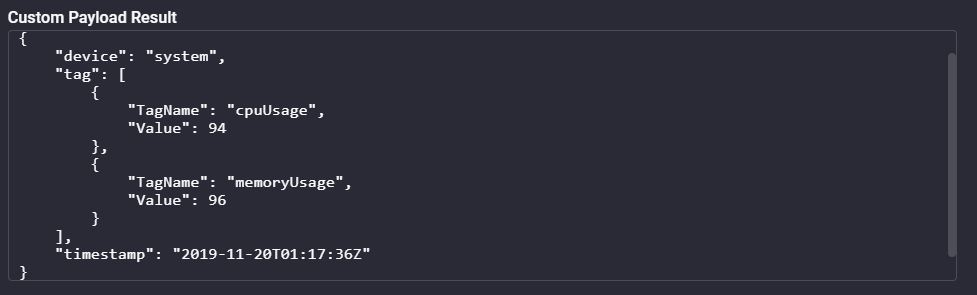
- After confirmed jq Filter, you can add "format" element into D2C Message Policy to enable custom payload.
```
{
"groups": [
{
"enable": true,
"outputTopic": "sample",
"format": "",
"properties": [
{ "key": "messageType", "value": "deviceMonitor" }
],
"tags": {
"system": {
"status": ["cpuUsage", "memoryUsage"]
}
},
"pollingInterval": 2,
"sendOutThreshold": { "size": 4096, "time": 5 },
"format": "{device:(.srcName),timestamp:(now|todateiso8601),TagName:(.tagName), Value:.dataValue}"
}
]
}
```
#### 5. Control Application runtime
This direct method offers you a quick way to start/stop/restart applications which running on ThingsPro Edge.
- Method Name:
```
thingspro-applications-control
```
- Request Payload:
```
{
"appName": "modbusmaster-tcp",
"command": "stop"
}
```
| No | Name | Description |
| ---- | ------- | ------------------------------------------------------------ |
| 1 | appName | The name of applications running and managed by ThingsPro Edge. You can get application list by ThingsPro Restful API. |
| 2 | command | Support commands:<br /> - start<br /> - stop<br /> - restart |
- Response:
```
{
"status": 200,
"payload": {
"data": ""
}
}
```
#### 6. Software Upgrade
This direct method allow you to download upgrade software over the air.
- Method Name:
```
thingspro-software-upgrade
```
- Example to trigger download and installation at one upgrade job
- Request Payload:
```
{
"downloadURL": "http://xxx/edge/87/doc_0.1.0-87_armhf.yaml",
"runInstallation": true
}
```
| No | Name | Description |
| ---- | --------------- | ------------------------------------------------------------ |
| 1 | downloadURL | The URL point to upgrade software location. |
| 2 | runInstallation | value **true** : The installation task will auto start after download task completed. |
- Response:
```
{
"status": 200,
"payload": {
"data": {
"id": 1
}
}
}
```
- Example to trigger a download software only upgrade job
- Request Payload:
```
{
"downloadURL": "http://xxx/edge/87/doc_0.1.0-87_armhf.yaml",
"runInstallation": false
}
```
| No | Name | Description |
| ---- | --------------- | ------------------------------------------------------------ |
| 1 | downloadURL | The URL point to upgrade software location. |
| 2 | runInstallation | value <font color='blue'><b>false</b></font> : The installation task doesn't start by default. You can invoke next direct method to launch it. |
- Response:
```
{
"status": 200,
"payload": {
"data": {
"id": 2
}
}
}
```
- Example to trigger an installation for a upgrade job id
- Request Payload:
```
{
"id": 2,
"runInstallation": true
}
```
| No | Name | Description |
| ---- | --------------- | ------------------------------------------------------------ |
| 1 | runInstallation | Value shall always be <font color='blue'><b>true</b></font> at this case. |
| 2 | id | The Id returned from previous direct method. |
- Response
```
{
"status": 200,
"payload": {
"data": {
"id": 3
}
}
}
```
<font color='red'><b>Note: </b></font>
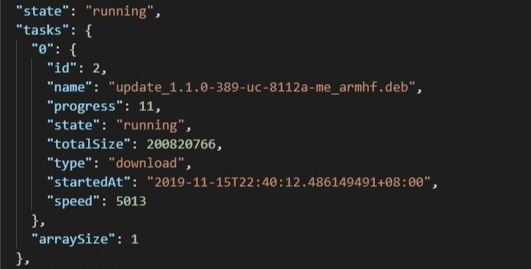
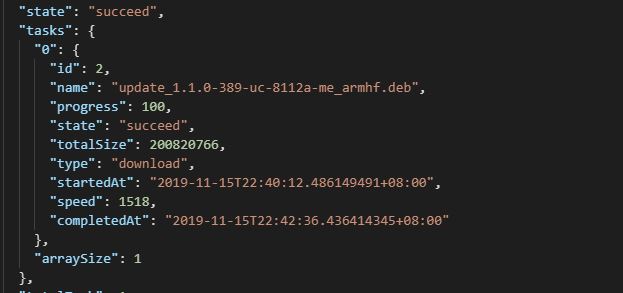
1. <font color='red'><b>ThingsPro agent will send back upgrade progress and status via reported properties.</b></font>
- Report download progress
- Download success
2. <font color='red'><b>ThingsPro Edge allow only one active software upgrade job once.</b></font>
## Module Twin - Reported Properties
Thingspro Agent exposes device's up to date configurations by reported properties when it connected. The reported properties be categorize by below.
#### Sections of Reported Properties
| No | Section | Description |
| ---- | ------------- | ------------------------------------------------------------ |
| 1 | applications | List all installed applications on ThingsPro Edge. |
| 2 | httpserver | Display HTTP Server setting, and status. |
| 3 | sshserver | Display SSH Server setting, and status. |
| 4 | discovery | Show discovery service status: enable / disable. |
| 5 | serialconsole | Show serial console status: enable / disable. |
| 6 | wan | Display network interface which connect to WAN. |
| 7 | route | List routing priority for each network interface. |
| 8 | dhcpservers | List DHCP Server status and configuration. |
| 9 | serials | List serial port configuration. |
| 10 | time | Display system time zone and NTP setting. |
| 11 | ethernets | List Ethernet interface status and configuration. |
| 12 | general | List device general properties, such as CPU type, Firmware version, ThingsPro Edge version and etc. |
| 13 | gps | Display GPS setting. |
| 14 | installations | Display OTA upgrade progress and result. |
| 15 | wifi | Display wifi setting. |
| 16 | cellulars | List cellular interface status and configuration. |
#### Sample of Reported Properties
```
{
"applications": {
"list": {
"0": {
"description": "MOXA Modbus TCP Client (Master)",
"desiredState": "ready",
"displayName": "Modbus TCP Client (Master)",
"hardwares": {
"arraySize": 0
},
"health": "good",
"icon": "/app-icons/modbusmaster-tcp.png",
"id": "modbusmaster-tcp",
"name": "modbusmaster-tcp",
"state": "ready",
"version": "3.14.0-278"
},
"arraySize": 1
}
},
"httpserver": {
"certFileName": "default.crt",
"httpEnable": true,
"httpPort": 80,
"httpsEnable": true,
"httpsPort": 8443,
"keyFileName": "default.key"
},
"sshserver": {
"enable": true,
"port": 22
},
"discovery": {
"enable": true
},
"serialconsole": {
"enable": true
},
"wan": {
"displayName": "LAN1",
"dns": {
"0": "10.128.8.5",
"arraySize": 1
},
"gateway": "10.144.51.254",
"ip": "10.144.48.128",
"name": "eth0",
"netmask": "255.255.252.0",
"type": "wan"
},
"route": {
"priorityList": {
"0": "Cellular1",
"1": "LAN1",
"arraySize": 2
},
"type": "route"
},
"dhcpservers": {
"0": {
"available": false,
"displayName": "LAN1",
"domainName": "",
"domainNameServers": {
"0": "8.8.8.8",
"1": "8.8.4.4",
"arraySize": 2
},
"enable": false,
"endIp": "192.168.3.250",
"id": 1,
"leaseTime": 3600,
"name": "eth0",
"netmask": "255.255.255.0",
"startIp": "192.168.3.200",
"status": false,
"type": "dhcpservers"
},
"arraySize": 1
},
"serials": {
"0": {
"baudRate": 9600,
"dataBits": 8,
"device": "/dev/ttyM0",
"displayName": "PORT 1",
"flowControl": "none",
"id": 1,
"mode": "rs232",
"parity": "none",
"stopBits": 1,
"type": "serials"
},
"arraySize": 1
},
"time": {
"ntp": {
"enable": false,
"interval": 7200,
"server": "pool.ntp.org"
},
"timezone": "Asia/Taipei",
"type": "time"
},
"general": {
"cpu": "ARMv7 Processor rev 2 (v7l)",
"description": "",
"deviceType": "gateway",
"firmwareVersion": "3.0",
"hostName": "Moxa",
"lastBootTime": "2019-11-13T11:42:51Z",
"lastRebootTime": "",
"memorySize": 524333056,
"modelName": "UC-8112-LX",
"serialNumber": "TAIAB1021075",
"thingsproVersion": "1.1.0-348",
"type": "general"
},
"ethernets": {
"0": {
"broadcast": "10.144.51.255",
"displayName": "LAN1",
"dns": {
"0": "10.128.8.5",
"arraySize": 1
},
"enable": true,
"enableDhcp": false,
"gateway": "10.144.51.254",
"id": 1,
"ip": "10.144.48.128",
"mac": "00:90:e8:77:06:61",
"name": "eth0",
"netmask": "255.255.252.0",
"status": "connected",
"subnet": "10.144.48.0",
"type": "ethernets",
"wan": true
},
"arraySize": 1
},
"gps": {
"interface": "",
"location": {
"lat": 14,
"lng": 15
},
"mode": "manual",
"type": "gps"
},
"installations": {
"completedTask": 0,
"id": 3,
"isDeleted": false,
"jobID": 3,
"lastState": "",
"owner": "admin",
"parameter": {
"download": false,
"install": true,
"jobID": 2
},
"state": "created"
},
"wifi": {
"0": {
"ap": {
"band": "band24",
"broadcastSsid": true,
"channel": 6,
"region": "TW",
"security": {
"mode": "wpa2",
"password": "",
"encryption": "aes"
},
"ssid": "moxa-sample-ap"
},
"enable": true,
"id": 1,
"type": "wifi",
"name": "wlan0",
"mode": "ap"
},
"arraySize": 1
},
"cellulars": {
"0": {
"autoDetect": false,
"available": true,
"capabilities": {
"sim": 1
},
"currentProfileId": 0,
"displayName": "Cellular1",
"enable": false,
"iccid": "",
"id": 1,
"imei": "",
"imsi": "",
"keepalive": {
"enable": false,
"intervalSec": 120,
"targetHost": "8.8.8.8"
},
"mac": "02:01:02:18:00:0b",
"module": "u-blox TOBY-L2 series",
"name": "usb0",
"operatorName": "",
"pinRetryRemain": 0,
"profileTimeout": 140,
"profiles": {
"0": {
"id": 1,
"init": {
"0": "sim:1",
"arraySize": 1
},
"name": "SIM1",
"pdpContext": {
"apn": "internet",
"auth": {
"password": "",
"protocol": "none",
"username": ""
},
"id": 1,
"static": true,
"type": "ipv4"
},
"pinCode": "0000"
},
"arraySize": 1
},
"rat": "",
"status": "disconnected",
"type": "cellulars",
"wan": true
},
"arraySize": 1
}
}
```
## Module Twin - Desired Properties
ThingsPro Agent allow you to re-configure device and turn on/off services via Desired Properties. In current version, ThingsPro Agent allow below sections to be update via Desired Properties.
#### Sections of Desired Properties
| No | Section | Description |
| ---- | ------------- | ------------------------------------------------------------ |
| 1 | httpserver | To enable/disable and change HTTP(s) port. |
| 2 | sshserver | To enable/disable and change SSH port. |
| 3 | discovery | To enable/disable device discovery service. |
| 4 | serialconsole | To enable/disable serial console port. |
| 5 | dhcpservers | To setup DHCP Server configuration. |
| 6 | serials | To setup serial port configuration. |
| 7 | time | To setup time zone, and enable/disable and setup NTP server. |
| 8 | ethernets | To setup Ethernet configuration. |
| 9 | general | To update host name and device description. |
| 10 | gps | To switch GPS mode to auto or manual. |
| 11 | wifi | To setup Wi-Fi AP configuration. |
| 12 | cellulars | To setup cellulars configuration. |
<font color='red'><b>Note:</b></font>
There are two keys that is commonly used in the desired properties:
- **id**:
A device may own multiple interfaces of same kind resource, **id** specifies which interface is to be configured. <font><b>id</b></font> starts from <font color='blue'><b>0</b></font>.
- **arraySize**:
Azure device twin currently does not support array, so an array is encoded to a object containing children objects and an **arraySize** key. This value should match the number of children objects, else the remaining objects will be discarded.
#### 1. HTTP(s) Server
- Update HTTP(s) Server configuration
```
{
"desired": {
"httpserver": {
"httpEnable": true,
"httpPort": 80,
"httpsEnable": true,
"httpsPort": 8443
}
}
}
```
#### 2. SSH Server
- Update SSH Server configuration
```
{
"desired": {
"sshserver": {
"enable": true,
"port": 22
}
}
}
```
#### 3. Discovery Service
- Update Discovery Service status
```
{
"desired": {
"discovery": {
"enable": true
}
}
}
```
#### 4. Serial Console Port
- Enable / Disable Serial Console Port
```
{
"desired": {
"serialconsole": {
"enable": true
}
}
}
```
#### 5. DHCP Server
- Update DHCP Server
```
{
"desired": {
"dhcpservers": {
"0": {
"id": 1,
"enable": true,
"startIp": "192.168.3.100",
"endIp": "192.168.3.200",
"netmask": "255.255.255.0",
"domainNameServers": {
"0": "8.8.8.8",
"arraySize": 1
},
"domainName": "example.com",
"leaseTime": 2592000
},
"arraySize": 1
}
}
}
```
#### 6. Serial Port
- Update Serial Port to rs232
```
{
"desired": {
"serials": {
"0": {
"id": 1,
"mode": "rs232",
"displayName": "PORT 1",
"baudRate": 115200,
"parity": "none",
"dataBits": 8,
"stopBits": 1,
"flowControl": "software"
},
"arraySize": 1
}
}
}
```
| No | Name | Available Values |
| ---- | ----------- | ------------------------------------------------------------ |
| 1 | mode | rs232, rs422, rs4852w, rs4854w |
| 2 | baudRate | 300, 600, 1200, 1800, 2400, 4800, 9600, 19200, 38400, 57600, 115200, 230400, 460800, 921600 |
| 3 | parity | none, even, space, mark |
| 4 | dataBits | 5,6,7,8 |
| 5 | stopBits | 1,2,1.5 |
| 6 | flowControl | none, hardware, software |
#### 7. Time Service
- Update NTP Settings
```
{
"desired": {
"time": {
"ntp": {
"enable": true,
"interval": 6000,
"server": "tock.stdtime.gov.tw"
}
}
}
}
```
- Update Time zone
```
{
"desired": {
"time": {
"timezone": "Asia/Taipei"
}
}
}
```
引用Timezone list can be found at https://en.wikipedia.org/wiki/List_of_tz_database_time_zones
#### 8. Ethernet
- Update an Ethernet Interface to Dynamic IP
```
{
"desired": {
"ethernets": {
"0": {
"id": 1,
"enable": true,
"enableDhcp": true,
"wan": true
},
"arraySize": 1
}
}
}
```
- Update an Ethernet Interface to Static IP
```
{
"desired": {
"ethernets": {
"0": {
"id": 1,
"dns": {
"0": "1.2.3.4",
"arraySize": 1
},
"enable": true,
"enableDhcp": false,
"gateway": "1.2.3.5",
"ip": "1.2.3.6",
"netmask": "255.255.255.0",
"wan": true
},
"arraySize": 1
}
}
}
```
#### 9. General
- Update device host name
```
{
"desired": {
"general": {
"hostName": "MyHost"
}
}
}
```
- Update device description
```
{
"desired": {
"general": {
"description": "MyDevice"
}
}
}
```
#### 10. GPS
- Update GPS lat, lng by manual mode
```
{
"desired": {
"gps":{
"mode": "manual",
"location": {
"lat": 11,
"lng": 12
}
}
}
}
```
- Update GPS by auto mode
```
{
"desired": {
"gps":{
"mode": "auto",
"interface": "/dev/ttyUSB0"
}
}
}
```
#### 11. Wi-Fi
- Enable / Disable Wi-Fi AP mode
```
{
"desired": {
"wifi": {
"0": {
"ap": {
"band": "band24",
"broadcastSsid": true,
"channel": 6,
"region": "TW",
"security": {
"mode": "wpa2",
"password": "",
"encryption": "aes"
},
"ssid": "moxa-sample-ap"
},
"enable": true,
"id": 1,
"type": "wifi",
"name": "wlan0",
"mode": "ap"
},
"arraySize": 1
}
}
}
```
#### 12. Cellulars
- Update cellular pin code
```
{
"desired": {
"cellulars": {
"0": {
"autoDetect": false,
"available": true,
"capabilities": {
"sim": 1
},
"currentProfileId": 0,
"displayName": "Cellular1",
"enable": false,
"iccid": "",
"id": 1,
"imei": "358503060483337",
"imsi": "",
"keepalive": {
"enable": false,
"intervalSec": 120,
"targetHost": "8.8.8.8"
},
"mac": "02:01:02:18:00:0b",
"module": "u-blox TOBY-L2 series",
"name": "usb0",
"operatorName": "",
"pinRetryRemain": 0,
"profileTimeout": 140,
"profiles": {
"0": {
"id": 1,
"init": {
"0": "sim:1",
"arraySize": 1
},
"name": "SIM1",
"pdpContext": {
"apn": "internet",
"auth": {
"password": "",
"protocol": "none",
"username": ""
},
"id": 1,
"static": true,
"type": "ipv4"
},
"pinCode": "0000"
},
"arraySize": 1
},
"rat": "",
"signal": {
"csq": 0,
"ecio": 0,
"indicator": "",
"level": 0,
"rat": "",
"rscp": 0,
"rsrp": 0,
"rsrq": 0,
"rssi": 0,
"rxqual": 0
},
"status": "disconnected",
"type": "cellulars",
"wan": true
},
"arraySize": 1
}
}
}
```
 Sign in with Wallet
Connect another wallet
Sign in with Wallet
Connect another wallet