# 14章
他のユーザーをフォロー(およびフォロー解除)できるソーシャルな仕組みの追加。
フォローしているユーザーの投稿をステータスフィードに表示する機能を追加。
Webインターフェースの例としてAjaxを使ってみる。
## Relationshipモデル
has_many(1対多)ではなく、has_many throughというものを使っていく。
## データモデルの問題 (および解決策)
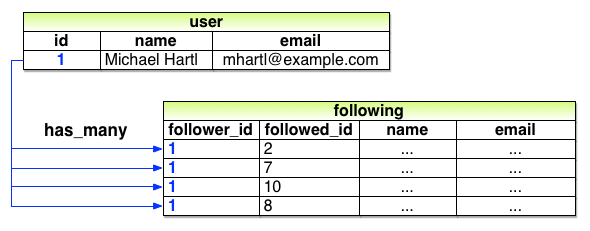
このように実装してしまうと、ユーザー名を変更するたびに、usersテーブルのそのレコードだけでなく、followingテーブルとfollowersテーブルの両方について、そのユーザーを含むすべての行を更新しなければならなくなる。
この解決法として、userテーブル同士を関連付けるactive_relationshipsテーブルを作成していく。
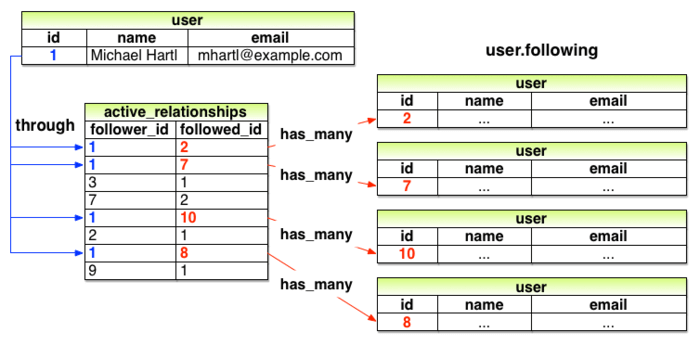
このようにすれば、能動的関係(フォローしている)も受動的関係(フォローされている)も、最終的にはデータベースの同じテーブルを使うことができる。「relationships」というテーブル名にする。
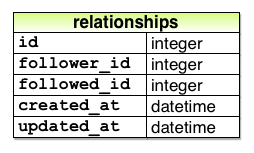
このマイグレーションを生成する。
```bash
rails generate model Relationship follower_id:integer followed_id:integer
```
また、follower_idとfollowed_idで頻繁に検索することになるので、検索、データの取得がしやすいようにそれぞれのカラムにインデックスを加える。また、復号インデックスとユニークオプションを使うことで一意性を保ち、あるユーザーが同じユーザーを2回以上フォローすることを防ぐ。
relationshipsテーブルにインデックスを追加する
**db/migrate/[timestamp]_create_relationships.rb**
```ruby
class CreateRelationships < ActiveRecord::Migration[5.0]
def change
create_table :relationships do |t|
t.integer :follower_id
t.integer :followed_id
t.timestamps
end
********************************************************************************
add_index :relationships, :follower_id
add_index :relationships, :followed_id
add_index :relationships, [:follower_id, :followed_id], unique: true
********************************************************************************
end
end
```
そしてデータベースのマイグレーション
```bash
rails db:migrate
```
## 演習
1.図 14.7のid=1のユーザーに対してuser.following.map(&:id)を実行すると、結果はどのようになるでしょうか? 想像してみてください。ヒント: 4.3.2で紹介したmap(&:method_name)のパターンを思い出してください。例えばuser.following.map(&:id)の場合、idの配列を返します。
A.
id=1のユーザのフォローした人が配列の形で出力される。[2,7,8,10]
2.図 14.7を参考にして、id=2のユーザーに対してuser.followingを実行すると、結果はどのようになるでしょうか? また、同じユーザーに対してuser.following.map(&:id)を実行すると、結果はどのようになるでしょうか? 想像してみてください。
A.
user.following
[user_id:1, name:Michael Hartl, email:mhartl@example.com]
全てのカラムが表示される。
user.following.map(&:id)
[1]
idのみ。
## User/Relationshipの関連付け
今回は、一つのモデルに能動的関係(active_relationship)と受動的関係(passive_relationship)を使い分ける必要がある。
そのため、Railsに探して欲しいモデルのクラス名を明示的に伝える必要がある。
また、Railsはデフォルトでは外部キーの名前を<class>_idといったパターンとして理解するため、外部キーも明示的に伝える必要がある。
能動的関係に対して1対多(has_many)の関連付けを実装する
**app/models/user.rb**
```ruby
class User < ApplicationRecord
has_many :microposts, dependent: :destroy
****************************************************************
has_many :active_relationships, class_name: "Relationship",
foreign_key: "follower_id",
dependent: :destroy
****************************************************************
.
.
.
end
```
また、ユーザが削除されたらリレーションシップも同時に削除されるように、dependent: :destroyも追加。
リレーションシップ/フォロワーに対してbelongs_toの関連付けを追加する
**app/models/relationship.rb**
```ruby
class Relationship < ApplicationRecord
belongs_to :follower, class_name: "User"
belongs_to :followed, class_name: "User"
end
```
これにより、以下のメソッドが使えるようになる。
|メソッド|用途|
|:--|:--|
| *active_relationship.follower* |フォロワーを返します|
| *active_relationship.followed* |フォローしているユーザーを返します|
| *user.active_relationships.create(followed_id: other_user.id)* |userと紐付けて能動的関係を作成/登録する|
| *user.active_relationships.create!(followed_id: other_user.id)* |userを紐付けて能動的関係を作成/登録する (失敗時にエラーを出力)|
| *user.active_relationships.build(followed_id: other_user.id)* |userと紐付けた新しいRelationshipオブジェクトを返す|
## 演習
1.コンソールを開き、表 14.1のcreateメソッドを使ってActiveRelationshipを作ってみましょう。データベース上に2人以上のユーザーを用意し、最初のユーザーが2人目のユーザーをフォローしている状態を作ってみてください
A.
```bash
irb(main):001:0> user = User.first
User Load (0.0ms) SELECT "users".* FROM "users" ORDER BY "users"."id" ASC LIMIT ? [["LIMIT", 1]]
=> #<User id: 1, name: "Example User", email: "example@railstutorial.org", created_at: "2020-04-21 05:25:57", updated_at: "2020-04-21 05:25:57", password_digest: "$2a$10$4u9zsv5kWZIrjQ0UQMGGhelJ2NyTdup0vkQvfe4hwS/...", remember_digest: nil, admin: true, activation_digest: "$2a$10$5qeWWRmDiGgqZtey/LyHtO73r/kPlSs45ps980AXCDj...", activated: true, activated_at: "2020-04-21 05:25:56", reset_digest: nil, reset_sent_at: nil>
irb(main):002:0> other_user = User.second
User Load (0.0ms) SELECT "users".* FROM "users" ORDER BY "users"."id" ASC LIMIT ? OFFSET ? [["LIMIT", 1], ["OFFSET", 1]]
=> #<User id: 2, name: "Carmine McDermott", email: "example-1@railstutorial.org", created_at: "2020-04-21 05:25:58", updated_at: "2020-04-21 05:25:58", password_digest: "$2a$10$9I6XPf9btCaSvMjuDvtjCe6BP08GqjFXN2lWIcIx2az...", remember_digest: nil, admin: false, activation_digest: "$2a$10$iqd9.bQGmjdrfqGhVpItAOIk9a3oh.NYUJGTXoyey9l...", activated: true, activated_at: "2020-04-21 05:25:58", reset_digest: nil, reset_sent_at: nil>
irb(main):003:0> user.active_relationships.create(followed_id: other_user.id)
(1.0ms) begin transaction
User Load (0.0ms) SELECT "users".* FROM "users" WHERE "users"."id" = ? LIMIT ? [["id", 1], ["LIMIT", 1]]
User Load (0.0ms) SELECT "users".* FROM "users" WHERE "users"."id" = ? LIMIT ? [["id", 2], ["LIMIT", 1]]
SQL (2.0ms) INSERT INTO "relationships" ("follower_id", "followed_id", "created_at", "updated_at") VALUES (?, ?, ?, ?) [["follower_id", 1], ["followed_id", 2], ["created_at", "2020-04-24 22:53:32.830523"],
["updated_at", "2020-04-24 22:53:32.830523"]]
(12.0ms) commit transaction
=> #<Relationship id: 1, follower_id: 1, followed_id: 2, created_at: "2020-04-24 22:53:32", updated_at: "2020-04-24 22:53:32">
```
2.先ほどの演習を終えたら、active_relationship.followedの値とactive_relationship.followerの値を確認し、それぞれの値が正しいことを確認してみましょう。
A.
```bash
=> #<Relationship id: 1, follower_id: 1, followed_id: 2, created_at: "2020-04-24 22:53:32", updated_at: "2020-04-24 22:53:32">
```
user1がフォローして、user2がフォローされているのが分かる。
## Relationshipのバリデーション
ここで、Relationモデルのテストとバリデーションを追加する。また、生成されたRelationship用のfixtureでは、マイグレーションで制約させた一意性を満たすことができていないので、ファイルを空にする。
Relationshipモデルのバリデーションをテストする
**test/models/relationship_test.rb**
```ruby
require 'test_helper'
class RelationshipTest < ActiveSupport::TestCase
def setup
@relationship = Relationship.new(follower_id: users(:michael).id,
followed_id: users(:archer).id)
end
test "should be valid" do
assert @relationship.valid?
end
test "should require a follower_id" do
@relationship.follower_id = nil
assert_not @relationship.valid?
end
test "should require a followed_id" do
@relationship.followed_id = nil
assert_not @relationship.valid?
end
end
```
Relationshipモデルに対してバリデーションを追加する
**app/models/relationship.rb**
```ruby
class Relationship < ApplicationRecord
belongs_to :follower, class_name: "User"
belongs_to :followed, class_name: "User"
***********************************************
validates :follower_id, presence: true
validates :followed_id, presence: true
***********************************************
end
```
Relationship用のfixtureを空にする green
**test/fixtures/relationships.yml**
```bash
# 空にする
```
## 演習
1.リスト 14.5のバリデーションをコメントアウトしても、テストが成功したままになっていることを確認してみましょう。(以前のRailsのバージョンでは、このバリデーションが必須でしたが、Rails 5から必須ではなくなりました。今回はフォロー機能の実装を優先しますが、この手のバリデーションが省略されている可能性があることを頭の片隅で覚えておくと良いでしょう。)
A.
テストが成功することを確認できた。
## フォローしているユーザー
今回は「フォローする」「フォローされる」といった「多対多」の場合、has_many throughという関連付けで行われる。
また、micopostと同じように実装するならば、
```ruby
has_many :followeds, through: :active_relationships
```
になり、「followeds」というシンボル名を見て、これを「followed」という単数形に変え、relationshipsテーブルのfollowed_idを使って対象のユーザーを取得する。このまま設定すると、user.followedsとなり、英語としては不適切になってしまう。user.followingという名前を使うには:sourceというパラメータを使い、「following配列の元はfollowed idの集合である」ということを明示的にRailsに記す。
Userモデルにfollowingの関連付けを追加する
**app/models/user.rb**
```ruby
class User < ApplicationRecord
has_many :microposts, dependent: :destroy
has_many :active_relationships, class_name: "Relationship",
foreign_key: "follower_id",
dependent: :destroy
************************************************************************
has_many :following, through: :active_relationships, source: :followed
************************************************************************
.
.
.
end
```
次に、followingで取得した集合をより簡単に取り扱うために、followやunfollow、following?といったメソッドを追加する。このようなメソッドはテストから先に書いていく。
“following” 関連のメソッドをテストする red
**test/models/user_test.rb**
```ruby
require 'test_helper'
class UserTest < ActiveSupport::TestCase
.
.
.
test "should follow and unfollow a user" do
michael = users(:michael)
archer = users(:archer)
assert_not michael.following?(archer)
michael.follow(archer)
assert michael.following?(archer)
michael.unfollow(archer)
assert_not michael.following?(archer)
end
end
```
ここでは、following?メソッドであるユーザーをまだフォローしていないことを確認、followメソッドを使ってそのユーザーをフォロー、 following?メソッドを使ってフォロー中になったことを確認、 最後にunfollowメソッドでフォロー解除できたことを確認、といった具合でテストしている。
次に、followingによる関連付けを使ってfollow、unfollow、following?メソッドを実装していく。
"following" 関連のメソッド green
**app/models/user.rb**
```ruby
class User < ApplicationRecord
.
.
.
def feed
.
.
.
end
************************************************************************
# ユーザーをフォローする
def follow(other_user)
following << other_user
end
# ユーザーをフォロー解除する
def unfollow(other_user)
active_relationships.find_by(followed_id: other_user.id).destroy
end
# 現在のユーザーがフォローしてたらtrueを返す
def following?(other_user)
following.include?(other_user)
end
************************************************************************
private
.
.
.
end
```
これで、テストが通るようになる。
## 演習
1.コンソールを開き、リスト 14.9のコードを順々に実行してみましょう。
A.
```bash
irb(main):008:0> user = User.first
User Load (0.0ms) SELECT "users".* FROM "users" ORDER BY "users"."id" ASC LIMIT ? [["LIMIT", 1]]
=> #<User id: 1, name: "Example User", email: "example@railstutorial.org", created_at: "2020-04-21 05:25:57", updated_at: "2020-04-21 05:25:57", password_digest: "$2a$10$4u9zsv5kWZIrjQ0UQMGGhelJ2NyTdup0vkQvfe4hwS/...", remember_digest: nil, admin: true, activation_digest: "$2a$10$5qeWWRmDiGgqZtey/LyHtO73r/kPlSs45ps980AXCDj...", activated: true, activated_at: "2020-04-21 05:25:56", reset_digest: nil, reset_sent_at: nil>
irb(main):009:0> darren = User.third
User Load (0.0ms) SELECT "users".* FROM "users" ORDER BY "users"."id" ASC LIMIT ? OFFSET ? [["LIMIT", 1], ["OFFSET", 2]]
=> #<User id: 3, name: "Darren Fay", email: "example-2@railstutorial.org", created_at: "2020-04-21 05:25:58", updated_at: "2020-04-21 05:25:58", password_digest: "$2a$10$/80sYWJbX4csrCswUUxxW.29qY.1dy0CbmkSjkAHdhW...", remember_digest: nil, admin: false, activation_digest: "$2a$10$oNjEUy/fB7Ee6ZXvxx0WOu6YE0lIW0Umg0vkJlXxj8M...", activated: true, activated_at: "2020-04-21 05:25:58", reset_digest: nil, reset_sent_at: nil>
irb(main):010:0> user.following?(darren)
User Exists (0.0ms) SELECT 1 AS one FROM "users" INNER JOIN "relationships" ON "users"."id" = "relationships"."followed_id" WHERE "relationships"."follower_id" = ? AND "users"."id" = ? LIMIT ? [["follower_id", 1], ["id", 3], ["LIMIT", 1]]
=> false
irb(main):011:0> user.follow(darren)
(0.0ms) begin transaction
User Load (0.0ms) SELECT "users".* FROM "users" WHERE "users"."id" = ? LIMIT ? [["id", 1], ["LIMIT", 1]]
SQL (5.0ms) INSERT INTO "relationships" ("follower_id", "followed_id", "created_at", "updated_at") VALUES (?, ?, ?, ?) [["follower_id", 1], ["followed_id", 3], ["created_at", "2020-04-29 19:40:22.156449"],
["updated_at", "2020-04-29 19:40:22.156449"]]
(5.0ms) commit transaction
User Load (1.0ms) SELECT "users".* FROM "users" INNER JOIN "relationships" ON "users"."id" = "relationships"."followed_id" WHERE "relationships"."follower_id" = ? LIMIT ? [["follower_id", 1], ["LIMIT", 11]]
=> #<ActiveRecord::Associations::CollectionProxy [#<User id: 2, name: "Carmine McDermott", email: "example-1@railstutorial.org", created_at: "2020-04-21 05:25:58", updated_at: "2020-04-21 05:25:58", password_digest: "$2a$10$9I6XPf9btCaSvMjuDvtjCe6BP08GqjFXN2lWIcIx2az...", remember_digest: nil, admin: false, activation_digest: "$2a$10$iqd9.bQGmjdrfqGhVpItAOIk9a3oh.NYUJGTXoyey9l...", activated: true, activated_at: "2020-04-21 05:25:58", reset_digest: nil, reset_sent_at: nil>, #<User id: 3, name: "Darren Fay", email: "example-2@railstutorial.org", created_at: "2020-04-21 05:25:58", updated_at: "2020-04-21 05:25:58", password_digest: "$2a$10$/80sYWJbX4csrCswUUxxW.29qY.1dy0CbmkSjkAHdhW...", remember_digest: nil, admin: false, activation_digest: "$2a$10$oNjEUy/fB7Ee6ZXvxx0WOu6YE0lIW0Umg0vkJlXxj8M...", activated: true, activated_at: "2020-04-21 05:25:58", reset_digest: nil, reset_sent_at: nil>]>
irb(main):012:0> user.unfollow(darren)
Relationship Load (0.0ms) SELECT "relationships".* FROM "relationships" WHERE "relationships"."follower_id" = ? AND "relationships"."followed_id" = ? LIMIT ? [["follower_id", 1], ["followed_id", 3], ["LIMIT", 1]]
(1.0ms) begin transaction
SQL (5.2ms) DELETE FROM "relationships" WHERE "relationships"."id" = ? [["id", 2]]
(5.0ms) commit transaction
=> #<Relationship id: 2, follower_id: 1, followed_id: 3, created_at: "2020-04-29 19:40:22", updated_at: "2020-04-29 19:40:22">
irb(main):013:0> user.following?(darren)
User Exists (2.0ms) SELECT 1 AS one FROM "users" INNER JOIN "relationships" ON "users"."id" = "relationships"."followed_id" WHERE "relationships"."follower_id" = ? AND "users"."id" = ? LIMIT ? [["follower_id", 1], ["id", 3], ["LIMIT", 1]]
=> false
```
2.先ほどの演習の各コマンド実行時の結果を見返してみて、実際にはどんなSQLが出力されたのか確認してみましょう。
A.
```bash
SQL (5.0ms) INSERT INTO "relationships" ("follower_id", "followed_id", "created_at", "updated_at") VALUES (?, ?, ?, ?) [["follower_id", 1], ["followed_id", 3], ["created_at", "2020-04-29 19:40:22.156449"],
["updated_at", "2020-04-29 19:40:22.156449"]]
SQL (5.2ms) DELETE FROM "relationships" WHERE "relationships"."id" = ? [["id", 2]]
```
## フォロワー
フォロワーを出力するメソッドを作成する。フォローと同じように、active_relationshipsのテーブルを使って、follower_idとfollowed_idを入れ替えれば作成できる。
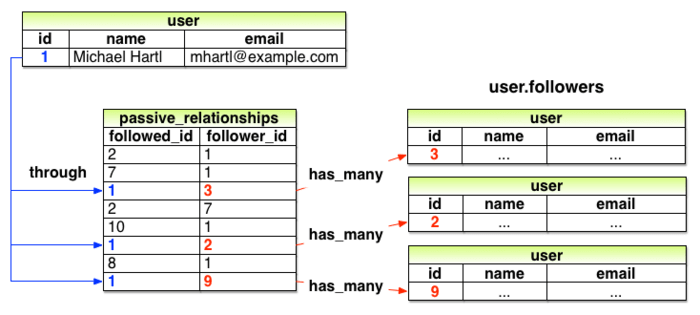
受動的関係を使ってuser.followersを実装する
**app/models/user.rb**
```ruby
class User < ApplicationRecord
has_many :microposts, dependent: :destroy
has_many :active_relationships, class_name: "Relationship",
foreign_key: "follower_id",
dependent: :destroy
*********************************************************************
has_many :passive_relationships, class_name: "Relationship",
foreign_key: "followed_id",
dependent: :destroy
*********************************************************************
has_many :following, through: :active_relationships, source: :followed
*********************************************************************************
has_many :followers, through: :passive_relationships, source: :follower
*********************************************************************************
.
.
.
end
```
次に、followers.include?メソッドを使って先ほどのデータモデルをテストする。
followersに対するテスト green
**test/models/user_test.rb**
```ruby
require 'test_helper'
class UserTest < ActiveSupport::TestCase
.
.
.
test "should follow and unfollow a user" do
michael = users(:michael)
archer = users(:archer)
assert_not michael.following?(archer)
michael.follow(archer)
assert michael.following?(archer)
***************************************************
assert archer.followers.include?(michael)
***************************************************
michael.unfollow(archer)
assert_not michael.following?(archer)
end
end
```
これでフォロワー機能を実装できた。
## 演習
1.コンソールを開き、何人かのユーザーが最初のユーザーをフォローしている状況を作ってみてください。最初のユーザーをuserとすると、user.followers.map(&:id)の値はどのようになっているでしょうか?
A.
```bash
irb(main):004:0> u1 = User.first
User Load (1.0ms) SELECT "users".* FROM "users" ORDER BY "users"."id" ASC LIMIT ? [["LIMIT", 1]]
=> #<User id: 1, name: "Example User", email: "example@railstutorial.org", created_at: "2020-04-21 05:25:57", updated_at: "2020-04-21 05:25:57", password_digest: "$2a$10$4u9zsv5kWZIrjQ0UQMGGhelJ2NyTdup0vkQvfe4hwS/...", remember_digest: nil, admin: true, activation_digest: "$2a$10$5qeWWRmDiGgqZtey/LyHtO73r/kPlSs45ps980AXCDj...", activated: true, activated_at: "2020-04-21 05:25:56", reset_digest: nil, reset_sent_at: nil>
irb(main):005:0> u2 = User.second
User Load (1.0ms) SELECT "users".* FROM "users" ORDER BY "users"."id" ASC LIMIT ? OFFSET ? [["LIMIT", 1], ["OFFSET", 1]]
=> #<User id: 2, name: "Carmine McDermott", email: "example-1@railstutorial.org", created_at: "2020-04-21 05:25:58", updated_at: "2020-04-21 05:25:58", password_digest: "$2a$10$9I6XPf9btCaSvMjuDvtjCe6BP08GqjFXN2lWIcIx2az...", remember_digest: nil, admin: false, activation_digest: "$2a$10$iqd9.bQGmjdrfqGhVpItAOIk9a3oh.NYUJGTXoyey9l...", activated: true, activated_at: "2020-04-21 05:25:58", reset_digest: nil, reset_sent_at: nil>
irb(main):006:0> u3 = User.third
User Load (0.0ms) SELECT "users".* FROM "users" ORDER BY "users"."id" ASC LIMIT ? OFFSET ? [["LIMIT", 1], ["OFFSET", 2]]
=> #<User id: 3, name: "Darren Fay", email: "example-2@railstutorial.org", created_at: "2020-04-21 05:25:58", updated_at: "2020-04-21 05:25:58", password_digest: "$2a$10$/80sYWJbX4csrCswUUxxW.29qY.1dy0CbmkSjkAHdhW...", remember_digest: nil, admin: false, activation_digest: "$2a$10$oNjEUy/fB7Ee6ZXvxx0WOu6YE0lIW0Umg0vkJlXxj8M...", activated: true, activated_at: "2020-04-21 05:25:58", reset_digest: nil, reset_sent_at: nil>
irb(main):007:0> ul = User.last
User Load (1.0ms) SELECT "users".* FROM "users" ORDER BY "users"."id" DESC LIMIT ? [["LIMIT", 1]]
=> #<User id: 100, name: "Annalise Littel III", email: "example-99@railstutorial.org", created_at: "2020-04-21 05:26:13", updated_at: "2020-04-21 05:26:13", password_digest: "$2a$10$n9qMolexiFLI5Le2owZac.Veu.5P0v9crnPC3djxalI...", remember_digest: nil, admin: false, activation_digest: "$2a$10$C4XDZoHqXBqgo5cosQ87lu7AW7UiN3z0PDM0nWKU/Bc...", activated: true, activated_at: "2020-04-21 05:26:13", reset_digest: nil, reset_sent_at: nil>
irb(main):008:0> u2.follow(u1)
(1.0ms) begin transaction
User Load (0.0ms) SELECT "users".* FROM "users" WHERE "users"."id" = ? LIMIT ? [["id", 2], ["LIMIT", 1]]
SQL (3.0ms) INSERT INTO "relationships" ("follower_id", "followed_id", "created_at", "updated_at") VALUES (?, ?, ?, ?) [["follower_id", 2], ["followed_id", 1], ["created_at", "2020-04-29 20:10:16.243594"],
["updated_at", "2020-04-29 20:10:16.243594"]]
(5.8ms) commit transaction
User Load (1.0ms) SELECT "users".* FROM "users" INNER JOIN "relationships" ON "users"."id" = "relationships"."followed_id" WHERE "relationships"."follower_id" = ? LIMIT ? [["follower_id", 2], ["LIMIT", 11]]
=> #<ActiveRecord::Associations::CollectionProxy [#<User id: 1, name: "Example User", email: "example@railstutorial.org", created_at: "2020-04-21 05:25:57", updated_at: "2020-04-21 05:25:57", password_digest: "$2a$10$4u9zsv5kWZIrjQ0UQMGGhelJ2NyTdup0vkQvfe4hwS/...", remember_digest: nil, admin: true, activation_digest: "$2a$10$5qeWWRmDiGgqZtey/LyHtO73r/kPlSs45ps980AXCDj...", activated: true, activated_at: "2020-04-21
05:25:56", reset_digest: nil, reset_sent_at: nil>]>
irb(main):009:0> u3.follow(u1)
(0.0ms) begin transaction
User Load (0.0ms) SELECT "users".* FROM "users" WHERE "users"."id" = ? LIMIT ? [["id", 3], ["LIMIT", 1]]
SQL (5.0ms) INSERT INTO "relationships" ("follower_id", "followed_id", "created_at", "updated_at") VALUES (?, ?, ?, ?) [["follower_id", 3], ["followed_id", 1], ["created_at", "2020-04-29 20:10:30.931569"],
["updated_at", "2020-04-29 20:10:30.931569"]]
(12.0ms) commit transaction
User Load (0.0ms) SELECT "users".* FROM "users" INNER JOIN "relationships" ON "users"."id" = "relationships"."followed_id" WHERE "relationships"."follower_id" = ? LIMIT ? [["follower_id", 3], ["LIMIT", 11]]
=> #<ActiveRecord::Associations::CollectionProxy [#<User id: 1, name: "Example User", email: "example@railstutorial.org", created_at: "2020-04-21 05:25:57", updated_at: "2020-04-21 05:25:57", password_digest: "$2a$10$4u9zsv5kWZIrjQ0UQMGGhelJ2NyTdup0vkQvfe4hwS/...", remember_digest: nil, admin: true, activation_digest: "$2a$10$5qeWWRmDiGgqZtey/LyHtO73r/kPlSs45ps980AXCDj...", activated: true, activated_at: "2020-04-21
05:25:56", reset_digest: nil, reset_sent_at: nil>]>
irb(main):010:0> ul.follow(u1)
(0.0ms) begin transaction
User Load (0.0ms) SELECT "users".* FROM "users" WHERE "users"."id" = ? LIMIT ? [["id", 100], ["LIMIT", 1]]
SQL (4.5ms) INSERT INTO "relationships" ("follower_id", "followed_id", "created_at", "updated_at") VALUES (?, ?, ?, ?) [["follower_id", 100], ["followed_id", 1], ["created_at", "2020-04-29 20:10:43.531730"], ["updated_at", "2020-04-29 20:10:43.531730"]]
(6.0ms) commit transaction
User Load (0.0ms) SELECT "users".* FROM "users" INNER JOIN "relationships" ON "users"."id" = "relationships"."followed_id" WHERE "relationships"."follower_id" = ? LIMIT ? [["follower_id", 100], ["LIMIT", 11]]
=> #<ActiveRecord::Associations::CollectionProxy [#<User id: 1, name: "Example User", email: "example@railstutorial.org", created_at: "2020-04-21 05:25:57", updated_at: "2020-04-21 05:25:57", password_digest: "$2a$10$4u9zsv5kWZIrjQ0UQMGGhelJ2NyTdup0vkQvfe4hwS/...", remember_digest: nil, admin: true, activation_digest: "$2a$10$5qeWWRmDiGgqZtey/LyHtO73r/kPlSs45ps980AXCDj...", activated: true, activated_at: "2020-04-21
05:25:56", reset_digest: nil, reset_sent_at: nil>]>
irb(main):011:0> u1.followers.map(&:id)
User Load (0.0ms) SELECT "users".* FROM "users" INNER JOIN "relationships" ON "users"."id" = "relationships"."follower_id" WHERE "relationships"."followed_id" = ? [["followed_id", 1]]
=> [2, 3, 100]
```
2.上の演習が終わったら、user.followers.countの実行結果が、先ほどフォローさせたユーザー数と一致していることを確認してみましょう。
A.
```bash
irb(main):012:0> u1.followers.count
(1.0ms) SELECT COUNT(*) FROM "users" INNER JOIN "relationships" ON "users"."id" = "relationships"."follower_id" WHERE "relationships"."followed_id" = ? [["followed_id", 1]]
=> 3
```
3.user.followers.countを実行した結果、出力されるSQL文はどのような内容になっているでしょうか? また、user.followers.to_a.countの実行結果と違っている箇所はありますか? ヒント: もしuserに100万人のフォロワーがいた場合、どのような違いがあるでしょうか? 考えてみてください。
A.
```bash
SELECT COUNT(*) FROM "users" INNER JOIN "relationships" ON "users"."id" = "relationships"."follower_id" WHERE "relationships"."followed_id" = ? [["followed_id", 1]]
irb(main):013:0> u1.followers.to_a.count
=> 3
```
出力に違いはない。
## [Follow] のWebインターフェイス
フォロー/フォロー解除の基本的なインターフェイスを実装する。また、フォローしているユーザーと、フォロワーにそれぞれ表示用のページを作成する。
## フォローのサンプルデータ
先にリレーションシップのデータ、つまりフォロー、フォロワーの関係をseedsで作る。最初のユーザーにユーザー3からユーザー51までをフォローさせ、それから逆にユーザー4からユーザー41に最初のユーザーをフォローさせる。
サンプルデータにfollowing/followerの関係性を追加する
**db/seeds.rb**
```bash
# ユーザー
User.create!(name: "Example User",
email: "example@railstutorial.org",
password: "foobar",
password_confirmation: "foobar",
admin: true,
activated: true,
activated_at: Time.zone.now)
99.times do |n|
name = Faker::Name.name
email = "example-#{n+1}@railstutorial.org"
password = "password"
User.create!(name: name,
email: email,
password: password,
password_confirmation: password,
activated: true,
activated_at: Time.zone.now)
end
# マイクロポスト
users = User.order(:created_at).take(6)
50.times do
content = Faker::Lorem.sentence(5)
users.each { |user| user.microposts.create!(content: content) }
end
*******************************************************
# リレーションシップ
users = User.all
user = users.first
following = users[2..50]
followers = users[3..40]
following.each { |followed| user.follow(followed) }
followers.each { |follower| follower.follow(user) }
*******************************************************
```
そして、seedsの更新
```bash
rm db/development.sqlite3
bin/rails db:create db:migrate
rails db:seed
```
## 演習
1.コンソールを開き、User.first.followers.countの結果がリスト 14.14で期待している結果と合致していることを確認してみましょう
A.
```bash
irb(main):001:0> User.first.followers.count
User Load (1.0ms) SELECT "users".* FROM "users" ORDER BY "users"."id" ASC LIMIT ? [["LIMIT", 1]]
(0.0ms) SELECT COUNT(*) FROM "users" INNER JOIN "relationships" ON "users"."id" = "relationships"."follower_id" WHERE "relationships"."followed_id" = ? [["followed_id", 1]]
=> 38
```
2.先ほどの演習と同様に、User.first.following.countの結果も合致していることを確認してみましょう。
A.
```bash
irb(main):002:0> User.first.following.count
User Load (0.0ms) SELECT "users".* FROM "users" ORDER BY "users"."id" ASC LIMIT ? [["LIMIT", 1]]
(1.0ms) SELECT COUNT(*) FROM "users" INNER JOIN "relationships" ON "users"."id" = "relationships"."followed_id" WHERE "relationships"."follower_id" = ? [["follower_id", 1]]
=> 49
```
## 統計と [Follow] フォーム
リレーションシップができたので、最初に、プロフィールページとHomeページに、フォローしているユーザーとフォロワーの統計情報を表示する。次に、フォロー用とフォロー解除用のフォームを作成。それから、フォローしているユーザーの一覧("following")とフォロワーの一覧("followers")を表示する専用のページを作成。
Usersコントローラにfollowingアクションとfollowersアクションを追加する
**config/routes.rb**
```ruby
Rails.application.routes.draw do
root 'static_pages#home'
get '/help', to: 'static_pages#help'
get '/about', to: 'static_pages#about'
get '/contact', to: 'static_pages#contact'
get '/signup', to: 'users#new'
get '/login', to: 'sessions#new'
post '/login', to: 'sessions#create'
delete '/logout', to: 'sessions#destroy'
************************************************
resources :users do
member do
get :following, :followers
end
end
************************************************
resources :account_activations, only: [:edit]
resources :password_resets, only: [:new, :create, :edit, :update]
resources :microposts, only: [:create, :destroy]
end
```
memberメソッドを使うと **/users/1/following や /users/1/followersユーザーid** といったidが含まれているURLを扱えるようになる。
|HTTPリクエスト|URL|アクション|名前付きルート|
|:--|:--|:--|:--|
|GET|/users/1/following| **following** |following_user_path(1)|
|GET|/users/1/followers| **followers** |followers_user_path(1)|
これで統計情報のパーシャルを実装する準備が整った。
フォロワーの統計情報を表示するパーシャル
**app/views/shared/_stats.html.erb**
```html
<% @user ||= current_user %>
<div class="stats">
<a href="<%= following_user_path(@user) %>">
<strong id="following" class="stat">
<%= @user.following.count %>
</strong>
following
</a>
<a href="<%= followers_user_path(@user) %>">
<strong id="followers" class="stat">
<%= @user.followers.count %>
</strong>
followers
</a>
</div>
```
```html
<% @user ||= current_user %>
```
では、@userがnilでない場合は何もせず、nilの場合には@userにcurrent_userを代入するコード。
```html
@user.followers.count
```
と
```html
@user.following.count
```
Railsは高速化のためにデータベース内で合計を計算している。
Homeページにフォロワーの統計情報を追加する
**app/views/static_pages/home.html.erb**
```ruby
<% if logged_in? %>
<div class="row">
<aside class="col-md-4">
<section class="user_info">
<%= render 'shared/user_info' %>
</section>
************************************************
<section class="stats">
<%= render 'shared/stats' %>
</section>
************************************************
<section class="micropost_form">
<%= render 'shared/micropost_form' %>
</section>
</aside>
<div class="col-md-8">
<h3>Micropost Feed</h3>
<%= render 'shared/feed' %>
</div>
</div>
<% else %>
.
.
.
<% end %>
```
次に、統計情報にスタイルを与える。
Homeページのサイドバー用のSCSS
**app/assets/stylesheets/custom.scss**
```css
.
.
.
/* sidebar */
.
.
.
.gravatar {
float: left;
margin-right: 10px;
}
.gravatar_edit {
margin-top: 15px;
}
****************************************************
.stats {
overflow: auto;
margin-top: 0;
padding: 0;
a {
float: left;
padding: 0 10px;
border-left: 1px solid $gray-lighter;
color: gray;
&:first-child {
padding-left: 0;
border: 0;
}
&:hover {
text-decoration: none;
color: blue;
}
}
strong {
display: block;
}
}
.user_avatars {
overflow: auto;
margin-top: 10px;
.gravatar {
margin: 1px 1px;
}
a {
padding: 0;
}
}
.users.follow {
padding: 0;
}
****************************************************
/* forms */
.
.
.
```
また、 [Follow] / [Unfollow] ボタン用のパーシャルも作成する。
フォロー/フォロー解除フォームのパーシャル
**app/views/users/_follow_form.html.erb**
```html
<% unless current_user?(@user) %>
<div id="follow_form">
<% if current_user.following?(@user) %>
<%= render 'unfollow' %>
<% else %>
<%= render 'follow' %>
<% end %>
</div>
<% end %>
```
followとunfollowのパーシャルに作業を振っているだけ。
また、フォローの実装にあたり、Relationshipsリソース用の新しいルーティングを作成する。
Relationshipリソース用のルーティングを追加する
**config/routes.rb**
```ruby
Rails.application.routes.draw do
root 'static_pages#home'
get 'help' => 'static_pages#help'
get 'about' => 'static_pages#about'
get 'contact' => 'static_pages#contact'
get 'signup' => 'users#new'
get 'login' => 'sessions#new'
post 'login' => 'sessions#create'
delete 'logout' => 'sessions#destroy'
resources :users do
member do
get :following, :followers
end
end
resources :account_activations, only: [:edit]
resources :password_resets, only: [:new, :create, :edit, :update]
resources :microposts, only: [:create, :destroy]
***************************************************************************
resources :relationships, only: [:create, :destroy]
***************************************************************************
end
```
次に、フォロー/フォロー解除用のパーシャルを作成する。
ユーザーをフォローするフォーム
**app/views/users/_follow.html.erb**
```html
<%= form_for(current_user.active_relationships.build) do |f| %>
<div><%= hidden_field_tag :followed_id, @user.id %></div>
<%= f.submit "Follow", class: "btn btn-primary" %>
<% end %>
```
ユーザーをフォロー解除するフォーム
**app/views/users/_unfollow.html.erb**
```html
<%= form_for(current_user.active_relationships.find_by(followed_id: @user.id),
html: { method: :delete }) do |f| %>
<%= f.submit "Unfollow", class: "btn" %>
<% end %>
```
2つのフォームでは、いずれもform_forを使ってRelationshipモデルオブジェクトを操作している。前者はPOSTリクエストをRelationshipsコントローラに送信してリレーションシップをcreate(作成)し、後者はDELETEリクエストを送信してリレーションシップをdestroy(削除)している。
また、フォローする際には、followed_idをコントローラに送信する必要があるため、その情報をブラウザ上に表示させないために、hidden_field_tagメソッドを使う。
最後に、プロフィール画面に作成したパーシャルを追加する。
プロフィールページにフォロー用フォームとフォロワーの統計情報を追加する
**app/views/users/show.html.erb**
```html
<% provide(:title, @user.name) %>
<div class="row">
<aside class="col-md-4">
<section class="user_info">
<h1>
<%= gravatar_for @user %>
<%= @user.name %>
</h1>
</section>
***************************************
<section class="stats">
<%= render 'shared/stats' %>
</section>
***************************************
</aside>
<div class="col-md-8">
**********************************************
<%= render 'follow_form' if logged_in? %>
**********************************************
<% if @user.microposts.any? %>
<h3>Microposts (<%= @user.microposts.count %>)</h3>
<ol class="microposts">
<%= render @microposts %>
</ol>
<%= will_paginate @microposts %>
<% end %>
</div>
</div>
```
アクションはできないものの、表示される。
## 演習
1.ブラウザから /users/2 にアクセスし、フォローボタンが表示されていることを確認してみましょう。同様に、/users/5 では [Unfollow] ボタンが表示されているはずです。さて、/users/1 にアクセスすると、どのような結果が表示されるでしょうか?
A.
確認できた。/users/1では、follow/unfollowが表示されない。
2.ブラウザからHomeページとプロフィールページを表示してみて、統計情報が正しく表示されているか確認してみましょう。
A.
確認できた。
3.Homeページに表示されている統計情報に対してテストを書いてみましょう。ヒント: リスト 13.28で示したテストに追加してみてください。同様にして、プロフィールページにもテストを追加してみましょう。
A.
**test/integration/site_layout_test.rb**
```ruby
test "count relationships" do
log_in_as(@user)
get root_path
assert_match @user.active_relationships.count.to_s, response.body
assert_match @user.passive_relationships.count.to_s, response.body
end
```
**test/integration/users_profile_test.rb**
```ruby
test "profile display" do
get user_path(@user)
assert_template 'users/show'
assert_select 'title', full_title(@user.name)
assert_select 'h1', text: @user.name
assert_select 'h1>img.gravatar'
assert_match @user.microposts.count.to_s, response.body
assert_select 'div.pagination', count: 1
@user.microposts.paginate(page: 1).each do |micropost|
assert_match micropost.content, response.body
end
***************************************************************************
assert_match @user.active_relationships.count.to_s, response.body
assert_match @user.passive_relationships.count.to_s, response.body
***************************************************************************
end
```
## [Following] と [Followers] ページ
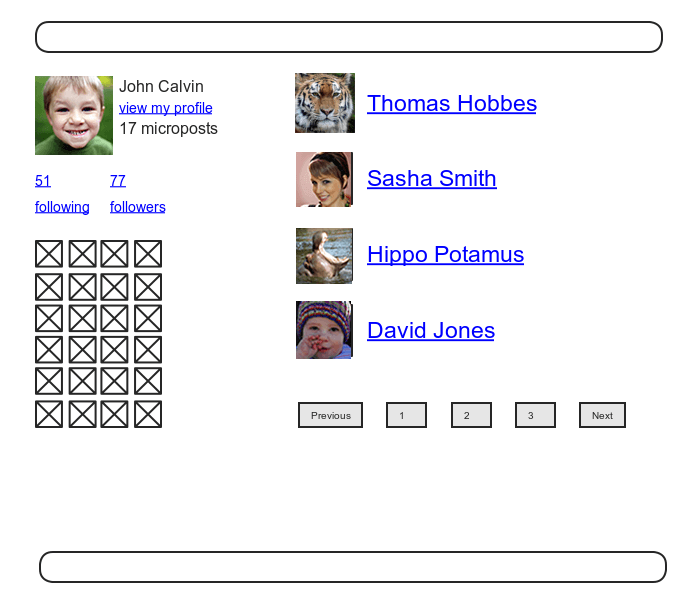
フォローしているユーザー用ページのモックアップ
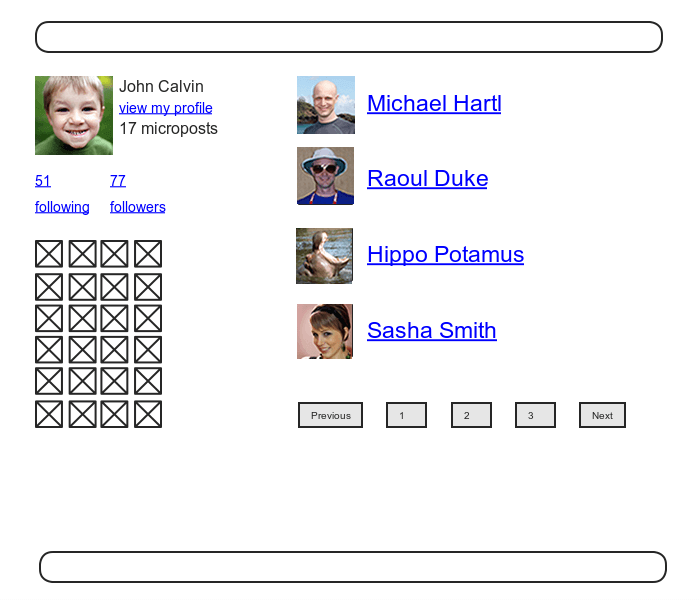
ユーザーのフォロワー用ページのモックアップ
まずは、フォローしているユーザーのリンクとフォロワーのリンクを動くようにする。また、どちらのページでもユーザーのログインを要求するようにする。テストから書いていく。
フォロー/フォロワーページの認可をテストする red
**test/controllers/users_controller_test.rb**
```ruby
require 'test_helper'
class UsersControllerTest < ActionDispatch::IntegrationTest
def setup
@user = users(:michael)
@other_user = users(:archer)
end
.
.
.
test "should redirect following when not logged in" do
get following_user_path(@user)
assert_redirected_to login_url
end
test "should redirect followers when not logged in" do
get followers_user_path(@user)
assert_redirected_to login_url
end
end
```
実装するにあたり、ルーティングで定義したアクションをUserコントローラに追加する必要がある。
followingアクションとfollowersアクション red
**app/controllers/users_controller.rb**
```ruby
class UsersController < ApplicationController
before_action :logged_in_user, only: [:index, :edit, :update, :destroy,
***************************************************************************
:following, :followers]
***************************************************************************
.
.
.
***************************************************************************
def following
@title = "Following"
@user = User.find(params[:id])
@users = @user.following.paginate(page: params[:page])
render 'show_follow'
end
def followers
@title = "Followers"
@user = User.find(params[:id])
@users = @user.followers.paginate(page: params[:page])
render 'show_follow'
end
***************************************************************************
private
.
.
.
end
```
Railsは慣習に従って、アクションに対応するビューを暗黙的に呼び出す。今回はいずれのアクションも、renderを明示的に呼び出し、show_followという同じビューを出力するようにする。
フォローしているユーザーとフォロワーの両方を表示するshow_followビュー green
**app/views/users/show_follow.html.erb**
```html
<% provide(:title, @title) %>
<div class="row">
<aside class="col-md-4">
<section class="user_info">
<%= gravatar_for @user %>
<h1><%= @user.name %></h1>
<span><%= link_to "view my profile", @user %></span>
<span><b>Microposts:</b> <%= @user.microposts.count %></span>
</section>
<section class="stats">
<%= render 'shared/stats' %>
<% if @users.any? %>
<div class="user_avatars">
<% @users.each do |user| %>
<%= link_to gravatar_for(user, size: 30), user %>
<% end %>
</div>
<% end %>
</section>
</aside>
<div class="col-md-8">
<h3><%= @title %></h3>
<% if @users.any? %>
<ul class="users follow">
<%= render @users %>
</ul>
<%= will_paginate %>
<% end %>
</div>
</div>
```
次に、show_followの描画結果を確認するため、統合テストを書いていく。HTML構造を網羅的にチェックするテストは壊れやすく、生産性を逆に落としかねないため、 **正しい数が表示されているかどうかと、正しいURLが表示されているかどうか** の2つのテストを書きます。
```bash
rails generate integration_test following
```
統合テストを書く前にRelationship用のfixtureにテストデータを追加する。
following/followerをテストするためのリレーションシップ用fixture
**test/fixtures/relationships.yml**
```bash
one:
follower: michael
followed: lana
two:
follower: michael
followed: malory
three:
follower: lana
followed: michael
four:
follower: archer
followed: michael
```
前半の2つでMichaelがLanaとMaloryをフォローし、後半の2つでLanaとArcherがMichaelをフォローしている。これを基にassert_matchメソッドで数が正しいかテスト。さらに、正しいURLかどうかをテストするコードも加える。
following/followerページのテスト green
**test/integration/following_test.rb**
```ruby
require 'test_helper'
class FollowingTest < ActionDispatch::IntegrationTest
def setup
@user = users(:michael)
log_in_as(@user)
end
test "following page" do
get following_user_path(@user)
assert_not @user.following.empty?
assert_match @user.following.count.to_s, response.body
@user.following.each do |user|
assert_select "a[href=?]", user_path(user)
end
end
test "followers page" do
get followers_user_path(@user)
assert_not @user.followers.empty?
assert_match @user.followers.count.to_s, response.body
@user.followers.each do |user|
assert_select "a[href=?]", user_path(user)
end
end
end
```
## 演習
1.ブラウザから /users/1/followers と /users/1/following を開き、それぞれが適切に表示されていることを確認してみましょう。サイドバーにある画像は、リンクとしてうまく機能しているでしょうか?
A,
確認できた。
2.リスト 14.29のassert_selectに関連するコードをコメントアウトしてみて、テストが正しく red に変わることを確認してみましょう。
A.
確認できた。
## [Follow] ボタン (基本編)
フォローとフォロー解除はそれぞれリレーションシップの作成と削除に対応しているため、Relationshipsのコントローラを生成。
```bash
rails generate controller Relationships
```
最初にテストから書いていき、セキュリティモデルを確立していく。まず、コントローラのアクションにアクセスするとき、ログイン済みのユーザーであるかどうかをチェック。もしログインしていなければログインページにリダイレクトされ、Relationshipのカウントが変わらないようにする。
リレーションシップの基本的なアクセス制御に対するテスト red
**test/controllers/relationships_controller_test.rb**
```ruby
require 'test_helper'
class RelationshipsControllerTest < ActionDispatch::IntegrationTest
test "create should require logged-in user" do
assert_no_difference 'Relationship.count' do
post relationships_path
end
assert_redirected_to login_url
end
test "destroy should require logged-in user" do
assert_no_difference 'Relationship.count' do
delete relationship_path(relationships(:one))
end
assert_redirected_to login_url
end
end
```
次にテストをパスさせるために、logged_in_userフィルターをRelationshipsコントローラのアクションに対して追加。
リレーションシップのアクセス制御 green
**app/controllers/relationships_controller.rb**
```ruby
class RelationshipsController < ApplicationController
before_action :logged_in_user
def create
end
def destroy
end
end
```
[Follow] / [Unfollow] ボタンを動作させるためには、送信されたパラメータを使って、followed_idに対応するユーザーを見つけてくる必要がある。そのあとに、followメソッド、unfollowメソッドを使う。
Relationshipsコントローラ
**app/controllers/relationships_controller.rb**
```ruby
class RelationshipsController < ApplicationController
before_action :logged_in_user
def create
user = User.find(params[:followed_id])
current_user.follow(user)
redirect_to user
end
def destroy
user = Relationship.find(params[:id]).followed
current_user.unfollow(user)
redirect_to user
end
end
```
## 演習
1.ブラウザ上から /users/2 を開き、[Follow] と [Unfollow] を実行してみましょう。うまく機能しているでしょうか?
A.
うまく機能する。
2.先ほどの演習を終えたら、Railsサーバーのログを見てみましょう。フォロー/フォロー解除が実行されると、それぞれどのテンプレートが描画されているでしょうか?
A.
users/2
## [Follow] ボタン (Ajax編)
Ajaxを使えば、Webページからサーバーに「非同期」で、ページを移動することなくリクエストを送信することができる。WebフォームにAjaxを採用するのは今や当たり前になりつつあるので、RailsでもAjaxを簡単に実装できるようになっている。
```bash
form_for
```
を次のように置き換える。
```bash
form_for ..., remote: true
```
これだけで、Railsは自動的にAjaxを使うようになる。
Ajaxを使ったフォローフォーム
**app/views/users/_follow.html.erb**
```html
<%= form_for(current_user.active_relationships.build, remote: true) do |f| %>
<div><%= hidden_field_tag :followed_id, @user.id %></div>
<%= f.submit "Follow", class: "btn btn-primary" %>
<% end %>
```
フォームの変更に伴い、これに対応するRelationshipsコントローラを改造して、Ajaxリクエストに応答できるようにする。リクエストの種類によって応答を場合分けするときは、respond_toメソッドというメソッドを使う。
RelationshipsコントローラでAjaxリクエストに対応する
**app/controllers/relationships_controller.rb**
```ruby
class RelationshipsController < ApplicationController
before_action :logged_in_user
def create
@user = User.find(params[:followed_id])
current_user.follow(@user)
******************************************
respond_to do |format|
format.html { redirect_to @user }
format.js
end
******************************************
end
def destroy
@user = Relationship.find(params[:id]).followed
current_user.unfollow(@user)
******************************************
respond_to do |format|
format.html { redirect_to @user }
format.js
end
******************************************
end
end
```
今度はブラウザ側でJavaScriptが無効になっていた場合(Ajaxリクエストが送れない場合)でもうまく動くようにする。
JavaScriptが無効になっていたときのための設定
**config/application.rb**
```bash
require File.expand_path('../boot', __FILE__)
.
.
.
module SampleApp
class Application < Rails::Application
.
.
.
**************************************************************************
# 認証トークンをremoteフォームに埋め込む
config.action_view.embed_authenticity_token_in_remote_forms = true
**************************************************************************
end
end
```
Ajaxリクエストを受信した場合は、Railsが自動的にアクションと同じ名前を持つJavaScript用の埋め込みRuby(.js.erb)ファイル(create.js.erbやdestroy.js.erbなど)を呼び出す。これらのファイルではJavaScriptと埋め込みRuby (ERb) をミックスして現在のページに対するアクションを実行する。最後に、埋め込みRuby(.js.erb)ファイルをつくっていく。
JS-ERbファイルの内部では、DOM (Document Object Model) を使ってページを操作するため、RailsがjQuery JavaScriptヘルパーを自動的に提供する。これによりjQueryライブラリの膨大なDOM操作用メソッドが使えるようになる。ただし、今回使うのは2つのメソッド。
```bash
$("#follow_form")
```
上記のコードのようにドル記号 ($) とCSS idを使って、DOM要素(follow_form)にアクセスする。jQueryの文法はCSSの記法から影響を受けており、#シンボルを使ってCSSのidを指定する。また、jQueryはCSSと同様、ドット.を使ってCSSクラスを操作する。
次にhtmlメソッド。これを使うことによって、数の中で指定された要素の内側にあるHTMLを更新できる。
例えばフォロー用フォーム全体を"foobar"という文字列で置き換えたい場合は、次のようなコードになる。
```bash
$("#follow_form").html("foobar")
```
create.js.erbファイルでは、フォロー用のフォームをunfollowパーシャルで更新し、フォロワーのカウントを更新するのにERbを使っている。
このコードでは、escape_javascriptメソッドを使っている。このメソッドは、JavaScriptファイル内にHTMLを挿入するときに実行結果をエスケープする。
JavaScriptと埋め込みRubyを使ってフォローの関係性を作成する
**app/views/relationships/create.js.erb**
```bash
$("#follow_form").html("<%= escape_javascript(render('users/unfollow')) %>");
$("#followers").html('<%= @user.followers.count %>');
```
destroy.js.erbファイルの方も同様。
Ruby JavaScript (RJS) を使ってフォローの関係性を削除する
**app/views/relationships/destroy.js.erb**
```bash
$("#follow_form").html("<%= escape_javascript(render('users/follow')) %>");
$("#followers").html('<%= @user.followers.count %>');
```
これらのコードにより、プロフィールページを更新させずにフォローとフォロー解除ができる。
## 演習
1.ブラウザから /users/2 にアクセスし、うまく動いているかどうか確認してみましょう。
A.
確認できた。
2.先ほどの演習で確認が終わったら、Railsサーバーのログを閲覧し、フォロー/フォロー解除を実行した直後のテンプレートがどうなっているか確認してみましょう
A.
create.js.erb
destroy.js.erb
## フォローをテストする
/relationshipsに対してPOSTリクエストを送り、フォローされたユーザーが1人増えたことをチェックする。また、Ajaxのテストでは、オプションで、xhr :trueを使う。
**テスト**
```ruby
assert_difference '@user.following.count', 1 do
post relationships_path, params: { followed_id: @other.id }
end
```
**Ajax用テスト**
```ruby
assert_difference '@user.following.count', 1 do
post relationships_path, params: { followed_id: @other.id }, xhr: true
end
```
xhr (XmlHttpRequest) というオプションをtrueに設定すると、Ajaxでリクエストを発行するようになる。それにより、respond_toは、JavaScriptに対応した行が実行されるようになる。
また、ユーザーをフォロー解除するときも構造はほとんど同じで、postメソッドをdeleteメソッドに置き換えてテストする。
ユーザーのidとリレーションシップのidを使ってDELETEリクエストを送信し、フォローしている数が1つ減ることを確認するテスト。
**テスト**
```ruby
assert_difference '@user.following.count', -1 do
delete relationship_path(relationship)
end
```
**Ajax用テスト**
```ruby
assert_difference '@user.following.count', -1 do
delete relationship_path(relationship), xhr: true
end
```
まとめると以下のようになる。
[Follow] / [Unfollow] ボタンをテストする green
**test/integration/following_test.rb**
```ruby
require 'test_helper'
class FollowingTest < ActionDispatch::IntegrationTest
def setup
@user = users(:michael)
@other = users(:archer)
log_in_as(@user)
end
.
.
.
test "should follow a user the standard way" do
assert_difference '@user.following.count', 1 do
post relationships_path, params: { followed_id: @other.id }
end
end
test "should follow a user with Ajax" do
assert_difference '@user.following.count', 1 do
post relationships_path, xhr: true, params: { followed_id: @other.id }
end
end
test "should unfollow a user the standard way" do
@user.follow(@other)
relationship = @user.active_relationships.find_by(followed_id: @other.id)
assert_difference '@user.following.count', -1 do
delete relationship_path(relationship)
end
end
test "should unfollow a user with Ajax" do
@user.follow(@other)
relationship = @user.active_relationships.find_by(followed_id: @other.id)
assert_difference '@user.following.count', -1 do
delete relationship_path(relationship), xhr: true
end
end
end
```
## 演習
1.リスト 14.36のrespond_toブロック内の各行を順にコメントアウトしていき、テストが正しくエラーを検知できるかどうか確認してみましょう。実際、どのテストケースが落ちたでしょうか?
A.
**create**
・format.html { redirect_to @user }をコメントアウト
ERROR["test_should_follow_a_user_the_standard_way", FollowingTest, 6.766597100067884]
・format.jsをコメントアウト
エラーが出ない
・format.html { redirect_to @user }とformat.jsをコメントアウト
ERROR["test_should_follow_a_user_the_standard_way", FollowingTest, 6.388599100057036] ERROR["test_should_follow_a_user_with_Ajax", FollowingTest, 5.07359499996528]
**destory**
・format.html { redirect_to @user }をコメントアウト
ERROR["test_should_follow_a_user_the_standard_way", FollowingTest, 6.766597100067884]
・format.jsをコメントアウト
エラーが出ない
・format.html { redirect_to @user }とformat.jsをコメントアウト
ERROR["test_should_follow_a_user_the_standard_way", FollowingTest, 6.388599100057036] ERROR["test_should_follow_a_user_with_Ajax", FollowingTest, 5.07359499996528]
2.リスト 14.40のxhr: trueがある行のうち、片方のみを削除するとどういった結果になるでしょうか? このとき発生する問題の原因と、なぜ先ほどの演習で確認したテストがこの問題を検知できたのか考えてみてください。
A.
ユーザのフォロー数に違いが出てしまうためエラーが出る。
## ステータスフィード
現在のユーザーにフォローされているユーザーのマイクロポストの配列を作成し、現在のユーザー自身のマイクロポストと合わせて表示する。
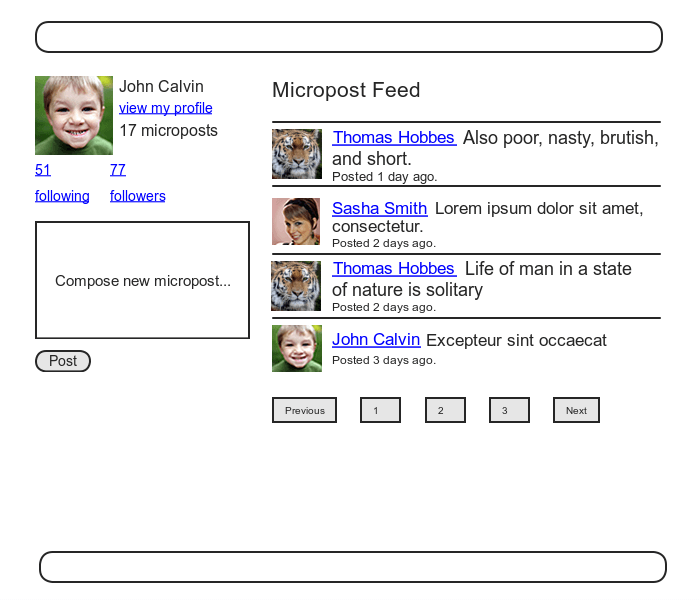
## 動機と計画
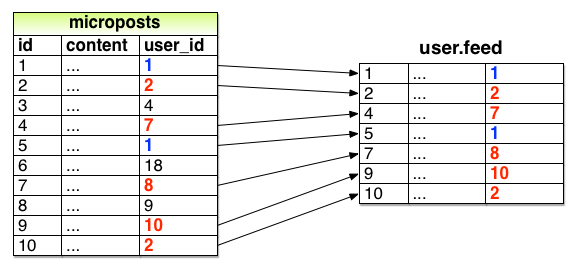
id 1のユーザーがid 2、7、8、10をフォローしているときのフィード
図のように、現在のユーザーによってフォローされているユーザーに対応するユーザーidを持つマイクロポストを取り出し、同時に現在のユーザー自身のマイクロポストも一緒に取り出す。
先にテストから書いていく。
テストでは、フィードに必要な3つの条件を満たす。
・フォローしているユーザーのマイクロポストがフィードに含まれていること。
・自分自身のマイクロポストもフィードに含まれていること。
・フォローしていないユーザーのマイクロポストがフィードに含まれていないこと。
まずはMichaelがLanaをフォローしていて、Archerをフォローしていないという状況を作る。この状況のMichaelのフィードでは、Lanaと自分自身の投稿が見えていて、Archerの投稿は見えないことになる。
ステータスフィードのテスト red
**test/models/user_test.rb**
```ruby
require 'test_helper'
class UserTest < ActiveSupport::TestCase
.
.
.
test "feed should have the right posts" do
michael = users(:michael)
archer = users(:archer)
lana = users(:lana)
# フォローしているユーザーの投稿を確認
lana.microposts.each do |post_following|
assert michael.feed.include?(post_following)
end
# 自分自身の投稿を確認
michael.microposts.each do |post_self|
assert michael.feed.include?(post_self)
end
# フォローしていないユーザーの投稿を確認
archer.microposts.each do |post_unfollowed|
assert_not michael.feed.include?(post_unfollowed)
end
end
end
```
テストは上記のようになる。
## 演習
1.マイクロポストのidが正しく並んでいると仮定して (すなわち若いidの投稿ほど古くなる前提で)、図 14.22のデータセットでuser.feed.map(&:id)を実行すると、どのような結果が表示されるでしょうか? 考えてみてください。ヒント: 13.1.4で実装したdefault_scopeを思い出してください。
A.
[1,2,7,8,10]昇順で並ぶ。
## フィードを初めて実装する
micropostsテーブルから、
あるユーザーがフォローしているユーザーに対応するidを持つマイクロポストを全て選択する必要がある。これを行う方法の1つは、Rubyのmapメソッドを使う。このメソッドはすべての「列挙可能」なオブジェクト
(配列やハッシュなど、要素の集合で構成されたあらゆるオブジェクト)で使える。
```ruby
$ rails console
>> [1,2,3,4].map { |i| i.to_s }
=> ["1","2","3","4"]
```
配列の各要素に対応する。また、今回の場合、アンバサンド(&)と、メソッドに対応するシンボルを使った短縮表記が使える。
```ruby
>> [1,2,3,4].map(&:to_s)
=> ["1","2","3","4"]
```
こうすることで変数を使わずに済む。
また、joinメソッドを使うと、引数と連結して、文字列を作ることができる。
```ruby
>> [1,2,3,4].map(&:to_s).join(', ')
=> "1,2,3,4"
```
この方法で、user.followingにある各要素のidを呼び出し、フォローしているユーザーのidを配列として扱う。
```ruby
>> User.first.following.map(&:id)
User Load (0.9ms) SELECT "users".* FROM "users" ORDER BY "users"."id" ASC LIMIT ? [["LIMIT", 1]]
User Load (1.0ms) SELECT "users".* FROM "users" INNER JOIN "relationships" ON "users"."id" = "relationships"."followed_id" WHERE "relationships"."follower_id" = ? [["follower_id", 1]]
=> [3, 4, 5, 6, 7, 8, 9, 10, 11, 12, 13, 14, 15, 16, 17, 18, 19, 20, 21, 22, 23, 24, 25, 26, 27, 28, 29, 30, 31, 32, 33, 34, 35, 36, 37, 38, 39, 40, 41, 42, 43, 44, 45, 46, 47, 48, 49, 50, 51]
```
Active Recordでは次のようなメソッドも用意されている。
```ruby
>> User.first.following.ids
User Load (0.1ms) SELECT "users".* FROM "users" ORDER BY "users"."id" ASC LIMIT ? [["LIMIT", 1]]
(0.5ms) SELECT "users"."id" FROM "users" INNER JOIN "relationships" ON "users"."id" = "relationships"."followed_id" WHERE "relationships"."follower_id" = ? [["follower_id", 1]]
=> [3, 4, 5, 6, 7, 8, 9, 10, 11, 12, 13, 14, 15, 16, 17, 18, 19, 20, 21, 22, 23, 24, 25, 26, 27, 28, 29, 30, 31, 32, 33, 34, 35, 36, 37, 38, 39, 40, 41, 42, 43, 44, 45, 46, 47, 48, 49, 50, 51]
```
関連付けの名前の末尾に_idsを付け足すだけで済む。
最終的に、
```ruby
Micropost.where("user_id IN (?) OR user_id = ?", following_ids, id)
```
このようにすれば、フォローしているユーザと自分のidのマイクロポストを取り出すことができる。
とりあえず動くフィードの実装 green
**app/models/user.rb**
```ruby
class User < ApplicationRecord
.
.
.
# パスワード再設定の期限が切れている場合はtrueを返す
def password_reset_expired?
reset_sent_at < 2.hours.ago
end
****************************************************************************
# ユーザーのステータスフィードを返す
def feed
Micropost.where("user_id IN (?) OR user_id = ?", following_ids, id)
end
****************************************************************************
# ユーザーをフォローする
def follow(other_user)
following << other_user
end
.
.
.
end
```
これでテストがGREENになる。
## 演習
1.リスト 14.44において、現在のユーザー自身の投稿を含めないようにするにはどうすれば良いでしょうか? また、そのような変更を加えると、リスト 14.42のどのテストが失敗するでしょうか?
A.
```ruby
# ユーザーのステータスフィードを返す
def feed
Micropost.where("user_id IN (?), following_ids)
end
```
このようにする。
FAIL["test_feed_should_have_the_right_posts", UserTest, 7.634535700082779]
FAIL["test_micropost_interface", MicropostsInterfaceTest, 8.991062400164083]
テストが失敗する。
2.リスト 14.44において、フォローしているユーザーの投稿を含めないようにするにはどうすれば良いでしょうか? また、そのような変更を加えると、リスト 14.42のどのテストが失敗するでしょうか?
A.
```ruby
# ユーザーのステータスフィードを返す
def feed
Micropost.where("user_id = ?", id)
end
```
このようにする。
FAIL["test_feed_should_have_the_right_posts", UserTest, 6.579696299973875]
テストが失敗する。
3.リスト 14.44において、フォローしていないユーザーの投稿を含めるためにはどうすれば良いでしょうか? また、そのような変更を加えると、リスト 14.42のどのテストが失敗するでしょうか? ヒント: 自分自身とフォローしているユーザー、そしてそれ以外という集合は、いったいどういった集合を表すのか考えてみてください。
A.
```ruby
# ユーザーのステータスフィードを渡す
def feed
Micropost.all
end
```
このようにする。
FAIL["test_feed_should_have_the_right_posts", UserTest, 8.052281599957496]
テストが失敗する。
## サブセレクト
フォローしているユーザーが5,000人程度になるとWebサービス全体が遅くなる可能性がある。フォローしているユーザー数に応じてスケールできるように、ステータスフィードを改善していく。
フィードをリファクタリングすることから始める。
whereメソッド内の変数に、キーと値のペアを使う green
**app/models/user.rb**
```ruby
class User < ApplicationRecord
.
.
.
# ユーザーのステータスフィードを返す
def feed
Micropost.where("user_id IN (:following_ids) OR user_id = :user_id",
following_ids: following_ids, user_id: id)
end
.
.
.
end
```
疑問符を使った文法も便利ですが、同じ変数を複数の場所に挿入したい場合は、後者の置き換え後の文法を使う方がより便利。
また、
```ruby
following_ids
```
は、
```ruby
following_ids = "SELECT followed_id FROM relationships
WHERE follower_id = :user_id"
```
と置き換えることができる。「ユーザー1がフォローしているユーザーすべてを選択する」というSQLを既存のSQLに内包させる形になり、結果としてSQLは次のようになる。
```ruby
SELECT * FROM microposts
WHERE user_id IN (SELECT followed_id FROM relationships
WHERE follower_id = 1)
OR user_id = 1
```
このサブセレクトはデータベース内に保存するので、より効率的にデータを取得することができる。
フィードの最終的な実装 green
**app/models/user.rb**
```ruby
class User < ApplicationRecord
.
.
.
# ユーザーのステータスフィードを返す
def feed
following_ids = "SELECT followed_id FROM relationships
WHERE follower_id = :user_id"
Micropost.where("user_id IN (#{following_ids})
OR user_id = :user_id", user_id: id)
end
.
.
.
end
```
最後に今まで通りデプロイする。
```bash
$ rails test
$ git add -A
$ git commit -m "Add user following"
$ git checkout master
$ git merge following-users
$ git push
$ git push heroku
$ heroku pg:reset DATABASE
$ heroku run rails db:migrate
$ heroku run rails db:seed
```
## 演習
1.Homeページで表示される1ページ目のフィードに対して、統合テストを書いてみましょう。リスト 14.49はそのテンプレートです。
A.
```ruby
test "feed on Home page" do
get root_path
@user.feed.paginate(page: 1).each do |micropost|
assert_match CGI.escapeHTML(micropost.content), response.body
end
end
```
2.リスト 14.49のコードでは、期待されるHTMLをCGI.escapeHTMLメソッドでエスケープしています (このメソッドは11.2.3で扱ったCGI.escapeと同じ用途です)。このコードでは、なぜHTMLをエスケープさせる必要があったのでしょうか? 考えてみてください。ヒント: 試しにエスケープ処理を外して、得られるHTMLの内容を注意深く調べてください。マイクロポストの内容が何かおかしいはずです。また、ターミナルの検索機能 (Cmd-FもしくはCtrl-F) を使って「sorry」を探すと原因の究明に役立つはずです。
A.
I'm sorry.など、エスケープしないことによって、文字コード状態で比較してしまう。
 Sign in with Wallet
Connect another wallet
Sign in with Wallet
Connect another wallet