# IQKwyboard 研究
[Toc]
## 前言
IQKeyboard是一款iOS平台上的第三方鍵盤庫,提供了一些方便的功能來處理鍵盤的顯示和隱藏。它可以幫助開發者更輕鬆地管理鍵盤的彈出和收起,處理鍵盤遮擋輸入框的問題,以及自定義鍵盤的外觀和行為。IQKeyboard還提供了一些其他功能,如自動調整UIScrollView的contentInset來適應鍵盤的高度,以及自定義輸入框的placeholder顏色等。通過使用IQKeyboard,開發者可以更加方便地處理鍵盤相關的操作,提高用戶體驗。
## 官方實作架構
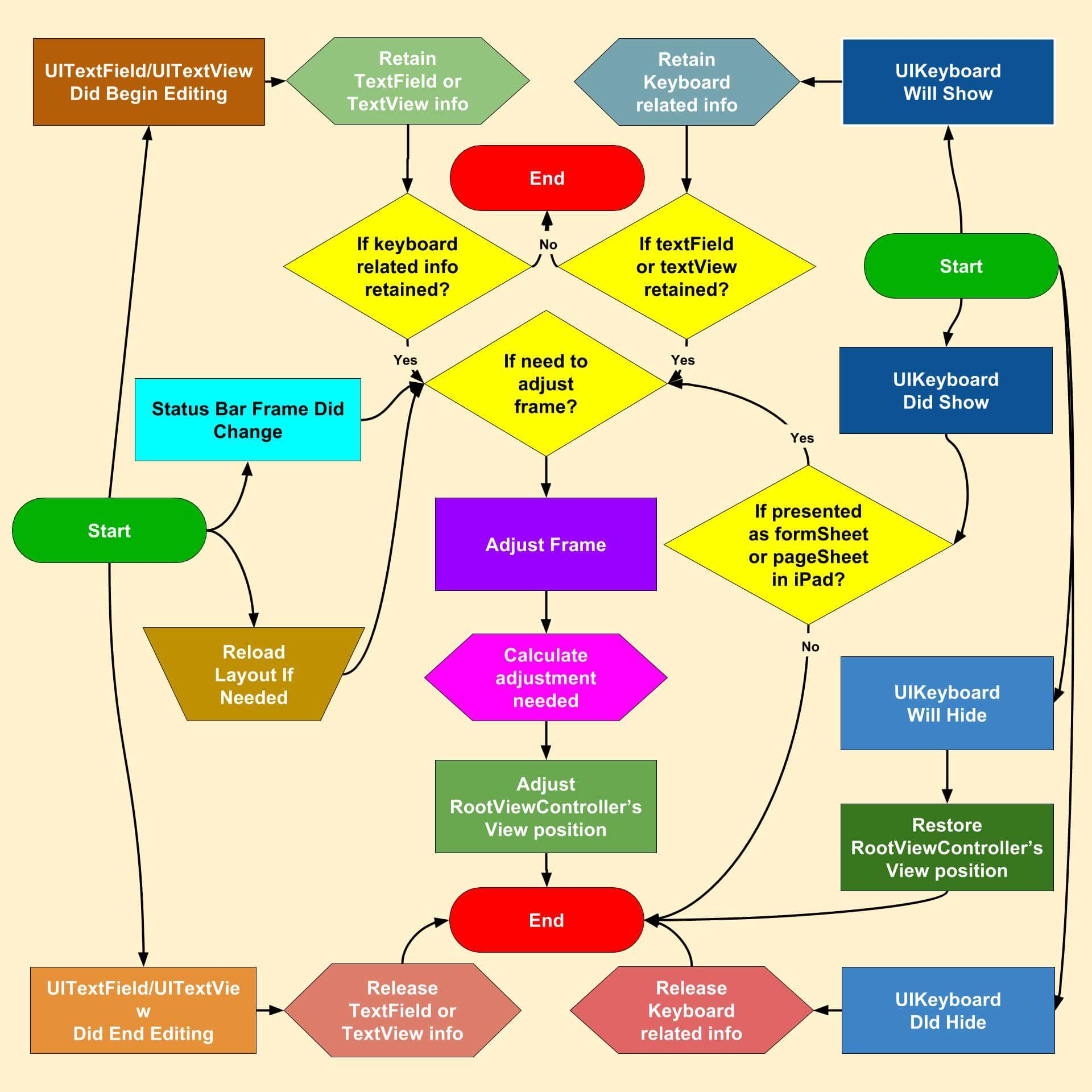
## 程式運行架構梳理
### 初始化
依照 Github 描述,使用此套件只需在 App 初始化時運行以下方法即可:
``` swift
func application(
_ application: UIApplication,
didFinishLaunchingWithOptions launchOptions: [UIApplication.LaunchOptionsKey: Any]?
) -> Bool {
IQKeyboardManager.shared.enable = true
return true
}
```
但令人好奇的是,這是如何實現的呢?
其實此時 IQKeyboardManager 實體進行了一系列參數初始化與事件註冊行為:
``` swift
@objc public var enable: Bool = false {
didSet {
// If not enable, enable it.
if enable, !oldValue {
// If keyboard is currently showing.
if activeConfiguration.keyboardInfo.keyboardShowing {
adjustPosition()
} else {
restorePosition()
}
showLog("Enabled")
} else if !enable, oldValue { // If not disable, disable it.
restorePosition()
showLog("Disabled")
}
}
}
```
依據此流程,正常情況下會先判斷第 7 行的鍵盤是否正在顯示的邏輯,依序逐一確認其屬性與初始化參數
這邊首先會碰觸到的物件是 `activeConfiguration`,型態是 `IQActiveConfiguration`
``` swift
@objc public final class IQKeyboardManager: NSObject {
internal var activeConfiguration: IQActiveConfiguration = .init()
}
```
#### IQActiveConfiguration 持有參數與定位
**持有變數**
``` swift
// 註冊並監聽與 Keyboard 相關 Notification 通知
private let keyboardListener: IQKeyboardListener = IQKeyboardListener()
// 註冊並監聽與 Textfield 相關 Notification 通知
private let textFieldViewListener: IQTextFieldViewListener = IQTextFieldViewListener()
// 持有外部的監聽閉包(closure),並於異動時逐一推送
private var changeObservers: [AnyHashable: ConfigurationCompletion] = [:]
// 持有當前 kayboard 狀態,分為 hide, show, change(show->show)
private var lastEvent: Event = .hide
// 持有並儲存當前互動中的 UIViewController 與相關數據
var rootControllerConfiguration: IQRootControllerConfiguration?
```
以上為 `IQActiveConfiguration` 所持有的數據,由此可知其定位為最底層的事件呼叫者,大部分時候其不會被替換且只有一個實體,由 IQKayboardManager 所持有。
**事件監聽**
看完其持有的實體,接著確認它是如何監聽系統的事件。
在 `IQActiveConfiguration` 初始化當下即對系統事件進行了監聽,這邊以 keyboard 事件為例:
#### IQKeyboardListener 事件監聽
`IQKeyboardListener` 監聽的鍵盤從顯示、變化到隱藏的所有系統通知,並在切換時向外推送
``` swift
private(set) var keyboardInfo: IQKeyboardInfo {
didSet {
if keyboardInfo != oldValue {
sendEvent()
}
}
}
public init() {
keyboardInfo = IQKeyboardInfo(notification: nil, name: .didHide)
// Registering for keyboard notification.
NotificationCenter.default.addObserver(self, selector: #selector(self.keyboardWillShow(_:)),
name: UIResponder.keyboardWillShowNotification, object: nil)
NotificationCenter.default.addObserver(self, selector: #selector(self.keyboardDidShow(_:)),
name: UIResponder.keyboardDidShowNotification, object: nil)
NotificationCenter.default.addObserver(self, selector: #selector(self.keyboardWillHide(_:)),
name: UIResponder.keyboardWillHideNotification, object: nil)
NotificationCenter.default.addObserver(self, selector: #selector(self.keyboardDidHide(_:)),
name: UIResponder.keyboardDidHideNotification, object: nil)
NotificationCenter.default.addObserver(self, selector: #selector(self.keyboardWillChangeFrame(_:)),
name: UIResponder.keyboardWillChangeFrameNotification, object: nil)
NotificationCenter.default.addObserver(self, selector: #selector(self.keyboardDidChangeFrame(_:)),
name: UIResponder.keyboardDidChangeFrameNotification, object: nil)
}
typealias SizeCompletion = (_ name: IQKeyboardInfo.Name, _ size: CGSize) -> Void
func registerSizeChange(identifier: AnyHashable, changeHandler: @escaping SizeCompletion) {
sizeObservers[identifier] = changeHandler
}
private func sendEvent() {
let size: CGSize = keyboardInfo.frame.size
for block in sizeObservers.values {
block(keyboardInfo.name, size)
}
}
```
其中上列的 `IQKeyboardInfo.Name` 參數如下:
``` swift
public struct IQKeyboardInfo: Equatable {
nonisolated public static func == (lhs: Self, rhs: Self) -> Bool {
lhs.frame.equalTo(rhs.frame)
}
@objc public enum Name: Int {
case willShow
case didShow
case willHide
case didHide
case willChangeFrame
case didChangeFrame
}
...
}
```
已經知道 `IQKeyboardListener` 負責監聽並且傳出所有事件,`IQActiveConfiguration` 就可以在初始化時對其進行監聽,其實作如下:
#### IQActiveConfiguration 事件註冊
``` swift
extension IQActiveConfiguration {
// 向 IQKeyboardListener 註冊,監聽異動事件
private func addKeyboardListener() {
keyboardListener.registerSizeChange(identifier: "IQActiveConfiguration", changeHandler: { [self] name, _ in
// 若 keyboard 顯示中,通知當前 rootVC 更新狀態
if let info = textFieldViewInfo, keyboardInfo.keyboardShowing {
if let rootControllerConfiguration = rootControllerConfiguration {
let beginIsPortrait: Bool = rootControllerConfiguration.beginOrientation.isPortrait
let currentIsPortrait: Bool = rootControllerConfiguration.currentOrientation.isPortrait
if beginIsPortrait != currentIsPortrait {
updateRootController(info: info)
}
} else {
updateRootController(info: info)
}
}
// 依據 lastEvent 狀態,將新的 lastEvent 狀態推送所有註冊事件的實體
self.sendEvent()
// 如果鍵盤完全隱藏,通知 rootVC 還原初始狀態
if name == .didHide {
updateRootController(info: nil)
}
})
}
}
```
#### IQTextFieldViewListener 事件監聽
`IQTextFieldViewListener` 也是如法炮製,這邊進列出它所監聽的事件:
``` swift
public init() {
// Registering for keyboard notification.
NotificationCenter.default.addObserver(self, selector: #selector(self.didBeginEditing(_:)),
name: UITextField.textDidBeginEditingNotification, object: nil)
NotificationCenter.default.addObserver(self, selector: #selector(self.didEndEditing(_:)),
name: UITextField.textDidEndEditingNotification, object: nil)
NotificationCenter.default.addObserver(self, selector: #selector(self.didBeginEditing(_:)),
name: UITextView.textDidBeginEditingNotification, object: nil)
NotificationCenter.default.addObserver(self, selector: #selector(self.didEndEditing(_:)),
name: UITextView.textDidEndEditingNotification, object: nil)
}
```
#### IQKeyboardInfo frame 參數
最後回頭確認 `activeConfiguration.keyboardInfo.keyboardShowing` 這段程式中 `keyboardShowing` 的判斷依據與數據來源:
``` swift
public struct IQKeyboardInfo: Equatable {
public var keyboardShowing: Bool {
frame.height > 0
}
// 當收到 keyboard 事件時生成,解析通知物件並取得鍵盤大小
public init(notification: Notification?, name: Name) {
...
if let info: [AnyHashable: Any] = notification?.userInfo {
...
// Getting UIKeyboardSize.
if var kbFrame: CGRect = info[UIResponder.keyboardFrameEndUserInfoKey] as? CGRect {
...
frame = kbFrame
} else {
frame = CGRect(x: 0, y: screenBounds.height, width: screenBounds.width, height: 0)
}
} else {
...
frame = CGRect(x: 0, y: screenBounds.height, width: screenBounds.width, height: 0)
}
...
}
}
```
### 事件觸發順序
無論是 textField 開始編輯或 keyboard 顯示、隱藏事件觸發,最終都會觸發 `updateRootController(info: info)` 方法。
>其中 info 的型態為 `IQTextFieldViewInfo`,其持有 textField(抹除為 UIView)與事件類型(開始、結束編輯)。
>
>`IQTextFieldViewInfo` 閉需通過 `Notification` 進行初始化。
`updateRootController(info: info)` 做了以下幾件行為:
1. 嘗試通過 `IQTextFieldViewInfo` 中的 `UIView` 獲取其 `UIViewController`(依靠 Responder chain)
2. 如果獲取不到,且當前已持有編輯中的 `UIViewController`,通知變化並要求恢復狀態
3. 如果獲取成功,生成負責紀錄狀態的 `IQRootControllerConfiguration`
4. 如果 `window` 變動、手機方向變動時,替換 `IQRootControllerConfiguration`
5. 如果 `UIViewController` 實體沒變,通知其變化發生
6. 更新並持有 `IQRootControllerConfiguration`
這邊需關注的是,`IQRootControllerConfiguration`生成時紀錄的參數:
```swift
internal struct IQRootControllerConfiguration {
init(rootController: UIViewController) {
self.rootController = rootController
// 原始 view origin, safeAreaInsets 供恢復之用
beginOrigin = rootController.view.frame.origin
beginSafeAreaInsets = rootController.view.safeAreaInsets
// 取得當前 UIViewController 顯示方向
let interfaceOrientation: UIInterfaceOrientation
if let scene = rootController.view.window?.windowScene {
interfaceOrientation = scene.interfaceOrientation
} else {
interfaceOrientation = .unknown
}
beginOrientation = interfaceOrientation
}
}
```
至此所有閉要物件與事件都已初始化完畢,接下來問題便是:
>1. 什麼時機下需要調整`rootViewController.view.origin`?
>
>2. 要如何計算出要調整的 offset?
### 計算偏移量
詳見 `adjustPosition()`,to be continue.
---
Referentce: [Github](https://github.com/hackiftekhar/IQKeyboardManager)
 Sign in via Google
 Sign in via Facebook
 Sign in via X(Twitter)
 Sign in via GitHub
 Sign in via Dropbox
 Sign in with Wallet
Connect another wallet
Sign in with Wallet
Connect another wallet