# Deeplinking
The Jolocom SmartWallet allows the initiation of interaction flows in two ways:
1. By scanning a JWT Request encoded in a QR code with the SmartWallet’s scanner;
2. By opening a DeepLink directly or scanning the QR encoded DeepLink with the built-in camera. (The SmartWallet’s scanner also supports scanning DeepLink QR Codes)
This document will describe how DeepLinks should be used with the SmartWallet app.
## Structure
The SmartWallet DeepLinks use the “https://jolocom.app.link” domain with two paths:
1. “/interact“ for SSI interactions:
* Authentication
* Authorization
* Credential Request
* Credential Issuance
2. “/eid“ for eID interactions;
3. "/mdl" for mDL interactions;
Furthermore, the respective request tokens (and other options) are appended as query parameters, as follows.
> We will consider in the future migrating our Deeplinks to the http://jolocom.com domain.
### token
The *token* parameter should contain the SSI Request JWT and should only be used with the /interact path. Furthermore, the JWT should be base64 encoded.
i.e. `https://jolocom.app.link/interact?token=eyJ0eXAiOiJKV1QiLCJhbGciOiJFUzI1NksifQ…`
### tcTokenUrl
The *tcTokenUrl* parameter should contain the eID request URL and should only be used with the /eid path. Furthermore, it must be URL-encoded. The eID Workflow itself can be seen in *Annex 1*.
e.g. `https://jolocom.app.link/eid?tcTokenUrl=https%3A%2F%2Ftest.governikus-eid.de%2FAutent-DemoApplication%2FRequestServlet%3Fprovider%3Ddemo_epa_20%26redirect%3Dtrue%27`
### mdoc
The *mdoc* parameter should contain the mDL request and should only be used with the /mdl path.
e.g. `https://jolocom.app.link/mdl?mdoc=iso23220-3-sed:g3NvcmcuaXNvLjIzMjIwLT…`
### redirectUrl *(optional)*
The (service) *redirectUrl* parameter should include an HTTPS URL or a DeepLink to another application, which would be called after the interaction was finished. Furthermore, the content of *redirectUrl* must be URL-encoded.
e.g. `https://jolocom.app.link/interact?redirectUrl=https://example.com/eid&token=eyJ0eXAiOiJKV1QiLCJhbGciOiJFUzI1NksifQ…`
Additionally, for the *eID* flow, the SmartWallet will attach the url received from the AusweisApp2 SDK after the flow has ended (which includes the OIDC Authentication Response code) as a (eID) *callbackUrl* query parameter.
e.g. (eID) *callbackUrl* with OIDC Authentication Response code: `https://example.server.de/client/authcode?code=[...]&state=[...]`
e.g. (service) *redirectUrl* with (eID) *callbackUrl* attached:
`https://example.com/client?callbackUrl=https://example.server.de/client/authcode?code=[...]&state=[...]`
> The query parameters from the examples are not encoded for the purpose of demonstration
### postRedirect *(optional)*
> Not yet implemented in any builds
> Currently only used for eID interactions.
> The Deeplink must include the *redirectUrl* query parameter. Otherwise *postRedirect* will be ignored.
The *postRedirect* query parameter should include a boolean value. The value will inform the SmartWallet whether to send a POST request to the (service) *redirectUrl* or fallback to the default behavior - redirecting. If `true`, the SmartWallet will send a POST request with the payload as seen below. The payload includes the (eID) *callbackUrl*, which the service application can use to request the eID data. Otherwise, the query parameter defaults to `false`. This could be used for e.g. notifying a web application that the eID data exchange has finished. Finally, the SmartWallet will no longer use the *redirectUrl* for redirecting the user outside the application.
e.g. deeplink
`https://jolocom.app.link/interact?redirectUrl=[...]&postRedirect=true`
e.g. response body:
```json
{
"callbackUrl": "https://example.server.de/client/authcode?code=[...]&state=[...]"
}
```
## Flow
We are using the http://branch.io service for providing the Deeplinking functionality. As a result, all of our Deeplinks make use of the *App Link* feature on Android (which internally uses Digital Asset Links) and the *Universal Link* feature on iOS. Both solutions were designed to prevent the hijacking of the links by building an association with the corresponding website, allowing the OS to open the Deeplink exclusively with the authentic app [1]. As such, this establishes trust that the app was approved by the website to automatically open links for that domain. Furthermore, both platforms exhibit a similar behavior when opening Deeplinks, as seen in Annex 2.
## References
1. Liu, Fang, et al. "Measuring the insecurity of mobile deep links of android." 26th {USENIX} Security Symposium ({USENIX} Security 17). 2017.
## Annex
1. eID Workflow 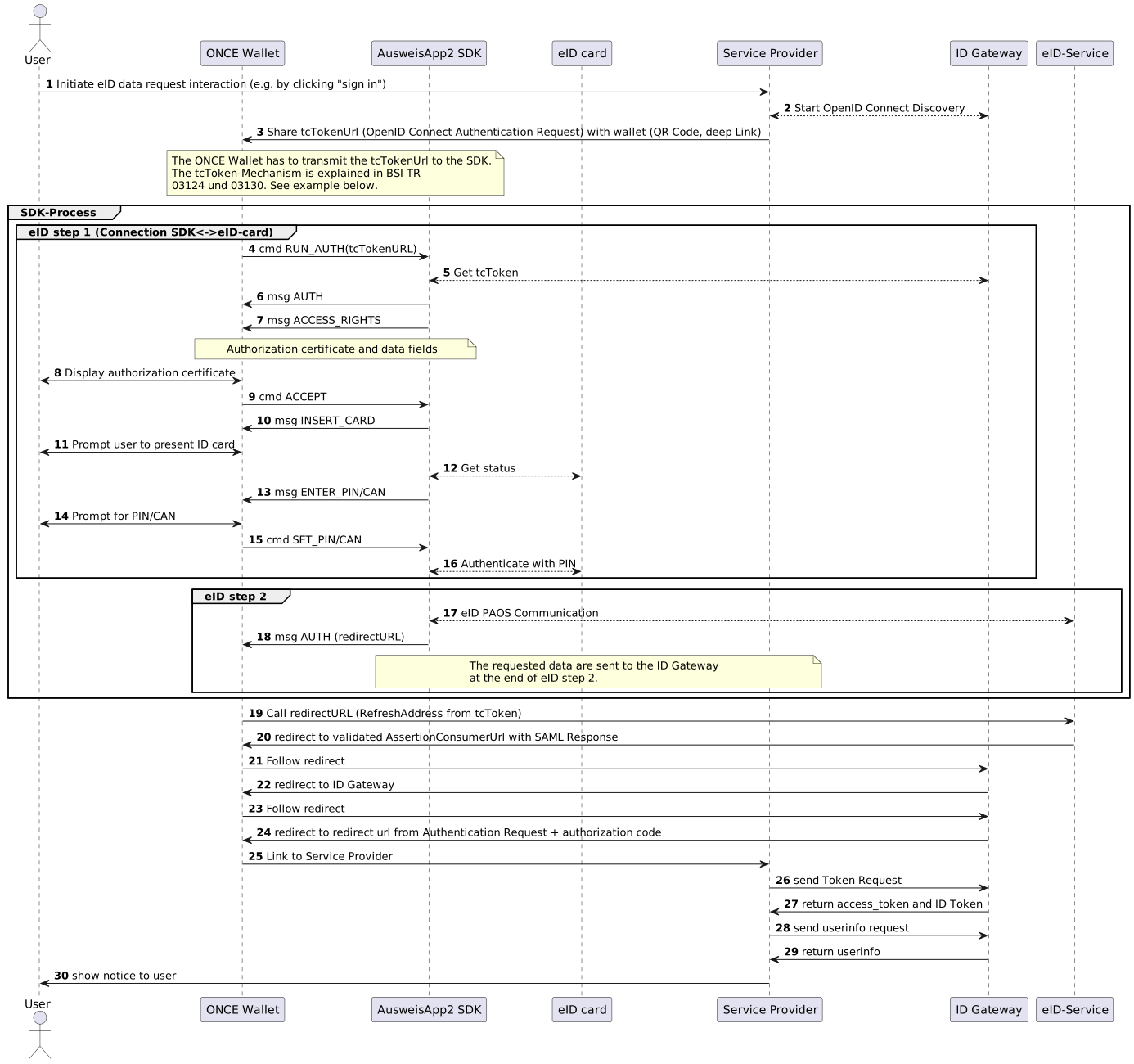
[for more detailed see here](https://hackmd.io/PH9dmn-rSx2aYNSy2hZYgQ?view#eID-Interaction-diagram-generic-service)
2. Opening a Deeplink 
 Sign in with Wallet
Connect another wallet
Sign in with Wallet
Connect another wallet