###### tags: `LBRY`
# FFMPEG (If your video is loading slowly)
<iframe id="lbry-iframe" width="560" height="315" src="https://odysee.com/$/embed/ffmpeg/4b3f43007dfdcd1a210f0603ab5d1d748bde9cec?r=8nDbf2BHkEvDhjCxK69Kuh6oZTw3bBa1" allowfullscreen></iframe>
Odysee and mainly LBRY works with lots of file formats, and sometimes you want to upload a big or heavy video and start loading slowly.
LBRY app offers an extra option that you can enable to get a better loading and streaming
Odysee also has an experimental transcoding feature, but it's not available for most channels for now...
# Step by step
## 1) Download FFmpeg
### For windows
[](https://www.gyan.dev/ffmpeg/builds/)
### For Mac
[](https://evermeet.cx/ffmpeg/)
## 2) Extract the folder somewhere safe on your machine

## 3) Go to Advanced Settings

## 4) Find Automatic Settings

## 5) Click in Browse, select the Bin folder and save

---
## What is FFPMEG really used for?
FFmpeg is a open source library/tool that can **decode** and **encode** any video format to one another. It supports almost all audio/video codecs (**h264, h265, vp8, vp9, aac, opus, etc.**) and file formats (**mp4, flv, mkv, ts, webm, mp3 etc.**). Moreover it supports again all streaming protocols (**http, rtmp, rtsp, hls, etc.**).
## What can you do with FMMPEG?
- To convert one video format to another format
- Encode, decode, mux, demux, transcode, filter, etc various multimedia files.
- To convert video file to audio file
- To create a slideshow video from multiple images
- Display input and output and also records input from the webcam.
---
> If you can't do it, because you are on a old as fuck computer you can use handbrake to manually transconde your videos
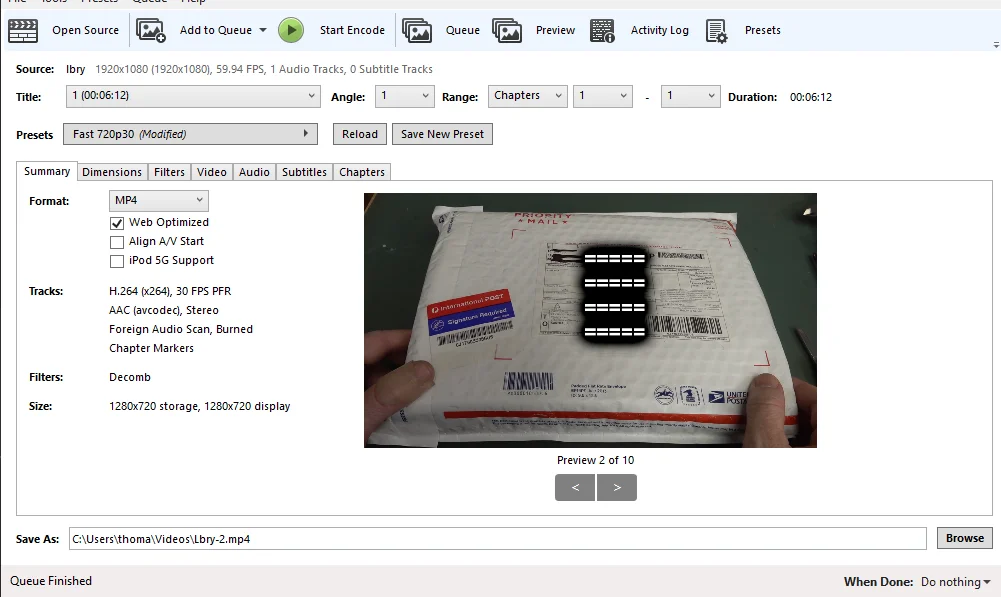
If you're using HandBrank, We recommended the following settings:
- Preset of Fast 720P30.
- Enable Web optimized.
- Disable Align A/V Start.
- Save as .mp4 extension
[Handbrake Download](https://handbrake.fr/downloads.php)
---
**Ref**: https://lbry.com/faq/video-publishing-guide
 Sign in with Wallet
Connect another wallet
Sign in with Wallet
Connect another wallet