# 程設組教學二
程設組 le37
---
## Outline
- HTTP
- express
- sqlite
- JWT
- CORS
- 一些資源
---
# HTTP
----
## HTTP method
- GET
取得資料,通常沒有Body,額外資訊在 URL 的 query string 上(這也是為什麼 query string 也稱為 Get parameter)
- POST
對此資源更新資料,要更新的資料放在 Body 裡,尤其是登入之類的表單。
- DELETE
刪除資料
----
## HTTP Status Code
用來表達現在的狀態(Host 給 Client)
- 2xx 表達成功 [200 OK](https://http.cat/200)
- 3xx 重新導向
302 Found (像是登入後把你導到其他頁面)
- 4xx Client 端的問題 404 Not Found [418](https://http.cat/418)
- 5xx Server 端的問題 500 Internal server error
----
## RESTful API
不是一套標準,而是一種風格
- 將每一個 http request 視為一個 “動詞+名詞” 的指令
- 動詞的部分由 http Method 來提供,在需要更多自定義動詞的情況下需要自己訂一套固定的表達法,在 URL裡
- 名詞的部分為 URL,URL 內只應該表達一個“東西”
- 因此每一個請求都是對某個“物件”做某個“操作”
----
this=> GET /player?id=123
this=> GET /player/123
this=> DELETE /player/123
not => GET /get_player/123
not => GET /del_player?id=123
---
# Express
----
### 先把前端移到資料夾
```bash=
.
├── .git
└── frontend
| ...
```
----
### 然後初始化
```bash=
npm install -g express-generator
express --no-view backend
cd backend
npm i body-parser cors express jsonwebtoken sha256 sqlite3 nodemon
```
----
### nodemon
hot reload 讓開發更容易
package.json
```json=
"scripts": {
"start": "node ./bin/www"
},
```
改成
```json=
"scripts": {
"start": "node ./bin/www"
"dev": "nodemon ./bin/www"
},
```
----
### Run
```bash=
npm run start #no hot reload
```
```bash=
npm run dev # with nodemon hot reload
```
http://127.0.0.1:3000/
----
## git commit time
```bash=
cd ..
git add .
git commit -m "backend init"
```
----
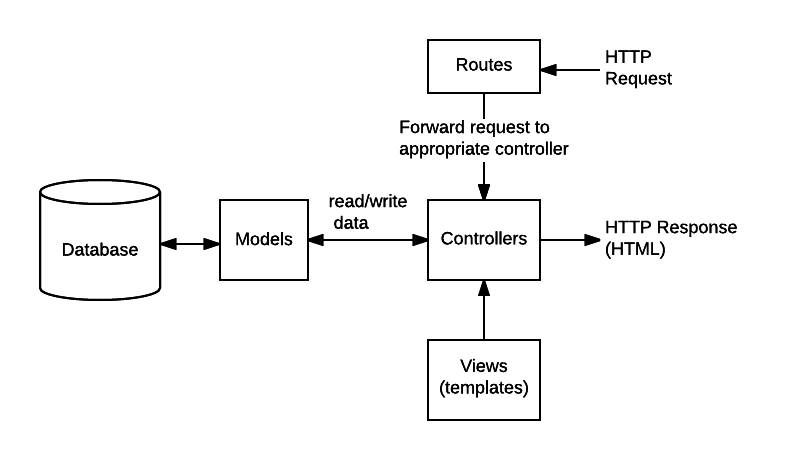
### 官方架構
----
### route && controller 寫在一起
```node=
// backend/route/indes.js
// http://127.0.0.1:3000/get/ncufresh/?year=23
router.get('/get/:message/',function(req,res,next){
res.send(req.params.message+req.query.year);
});
// curl -X POST http://127.0.0.1:3000/post --data message=hello
router.post('/post',function(req,res,next){
res.send(req.body.message);
});
```
----
### req
| | |
|-|-|
?year=23 | req.query.year='23';
/hello/ (/:message/) | req.params.message='hello';
|\-\-data message=hello | req.body.message='hello';
----
### res
| | |
|-|-|
res.send()|Sends the HTTP response.
res.status()|Sets the HTTP status for the response.
res.redirect()|Redirects to the URL derived from the specified path
res.local|暫存東西,middleware很常用
combo
```node=
res.status(404).send('Sorry, we cannot find that!')
```
----
## git commit && push time
----
### next ?
一個route可以放很多很多middleware
```node
router.get('/hello',isAuth,isStudent,isGood,toDrink);
```
這時候就midlleware可以呼叫下一個
```
const aMiddleware=function (req, res, next) {
res.locals.user = req.user
res.locals.authenticated = !req.user.anonymous
next()
}
```
----
### 之後的檔案結構
(開發會用這樣的結構)
```bash
去年大致的後端結構
.
├── Dockerfile
├── app.js
├── bin
│ └── www
├── package.json
├── routes (放路由頁面)
│ ├── achievement.route.js
│ ├── auth.js
│ ├── blog.js
│ ├── calendar.js
│ ├── event.js
│ ├── health.js
│ ├── qna.js
│ ├── relations.js
│ └── user.js
├── controller (放控制db的檔案)
│ ├── achievements.controller.js
│ ├── blog.js
│ ├── event.js
│ ├── health.js
│ ├── qna.js
│ ├── user.js
│ └── userRelations.js
├── middleware (route會call的的function)
│ ├── blog.js
│ ├── event.middleware.js
│ ├── qna.js
│ ├── user.js
│ └── userRelations.js
├── db (連mysql sqlite的地方)
│ ├── connection.js
│ ├── oauth.js
│ └── redis.js
├── lib
│ └── achievement.js
```
不過寒假作業沒有規定
---
# sqlite
----
## 連結資料庫
```node=
const sqlite3 = require('sqlite3');
const db = new sqlite3.Database('./sqlite3.db');
```
----
## sqlite browser
加 db table
----
## Create
```mysql=
INSERT INTO 資料表名稱 (欄位1, 欄位2, ...)
VALUES
(資料1-1, 資料1-2, ...),
(資料2-1, 資料2-2, ...),
...
(資料n-1, 資料n-2, ...);
```
----
## Read
```mysql=
SELECT
欄位選擇
FROM
資料表名稱
WHERE
搜尋條件
LIMIT
限制選取數量;
```
----
## Update
```mysql=
UPDATE 資料表名稱
SET
欄位名稱1 = 運算式1,
欄位名稱2 = 運算式2,
...
WHERE
搜尋條件;
```
----
## Delete
```mysql=
DELETE FROM 資料表名稱
WHERE 搜尋條件;
```
----
## How to query (?
----
### query string
```node=
let badquery = "SELECT username AS username FROM Users WHERE username='"+req.body.username+"' AND password='"+req.body.password+"'";
```
```node=
let goodquery = "SELECT username AS username FROM Users WHERE username='?' AND password='?'";
```
----
### query function
```node=
db.each(goodquery, req.body.username,req.body.password, function (err, row) {
console.log('Welcome '+row.username);
});
```
```node=
db.run(goodquery, [req.body.username,req.body.password]);
```
---
# JWT
----
[token格式].[內容].[數位簽章]
存在cookie,數位簽章保證內容不被使用這竄改
```jwt=
eyJhbGciOiJIUzI1NiIsInR5cCI6IkpXVCJ9.eyLml6nlrokiOiLkvaDkvobop6NiYXNlNjTmrZAifQ.RN4NNX6nUV6aftzvISGfgZec0GYQqNkrOIFVzswrDn8
```
----
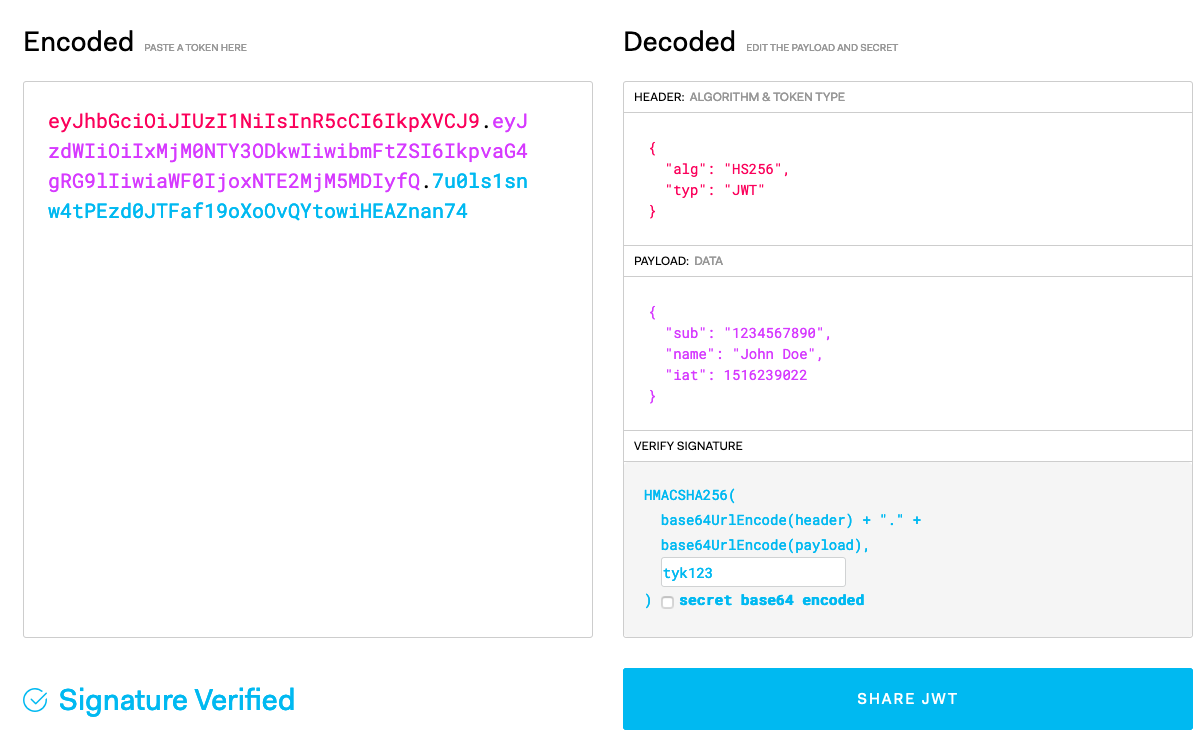
所以不能放機密資訊
----
## 怎摸用?
```node=
const jwt = require('jsonwebtoken');
const jwt_secret = 'AVerySafeSecret';
```
```node=
let token = jwt.sign({ username: 'user' }, jwt_secret);
```
```node=
jwt.verify(token, jwt_secret,(err,payload) => {
if(err){
// 沒過
}else{
// 過了
}
});
```
---
# CORS
----

----
## 怎摸辦
加header, npm 有好用的 middleware
```node=
const cors = require('cors');
// 在 localhost 開發可以這樣
const corsConfig = {
credentials: true,
origin: true,
};
app.use(cors(corsConfig))
```
---
## 一些資源
[先人的智慧](https://hackmd.io/NXWlm_49S-KnUaCZEhbJgg)
---
\新年快樂/
{"metaMigratedAt":"2023-06-17T18:00:57.102Z","metaMigratedFrom":"YAML","title":"程設組教學二","breaks":true,"contributors":"[{\"id\":\"4e7d552c-1d2c-4274-8663-26c42f580b45\",\"add\":6946,\"del\":1364}]"}