# Vue Router
## References
+ 🔗 [**Vue Router**](https://router.vuejs.org/zh/introduction.html)
+ 🔗 [**Kuro Hsu - Vue Router**](https://book.vue.tw/CH4/4-1-vue-router-intro.html)
+ 🔗 [**導航守衛**](https://ithelp.ithome.com.tw/articles/10276947)
+ 🔗 [**GitHub Pages 如何支持 History Mode**](https://powerfulyang.com/post/82)
## Note
### Router
```js
// /src/router/index.js
import { createRouter, createWebHashHistory } from 'vue-router';
import HomeView from '../views/HomeView.vue';
// 路由表
const routes = [
{
path: '/', // 🔥 路由:/
name: 'home',
component: HomeView,
},
{
path: '/about', // 🔥 路由:/about
name: 'about',
component: () => import('../views/AboutView.vue'), // ✅ lazy loading
},
{
path: '/products', // 🔥 路由:/products
name: 'products',
component: () => import('../views/Products.vue'),
},
];
const router = createRouter({
history: createWebHashHistory(),
routes,
});
export default router;
```
### Tag
+ `<router-view>`
> 當前頁面下,切換路由時,元件要放哪裡
```html
<!-- src/App.vue -->
<template>
<nav>
<router-link to="/">Home</router-link> |
<router-link to="/about">About</router-link>
</nav>
<router-view/> <!-- ✅ Here! -->
</template>
```
+ `<router-link>`
> 路由切換
```html
<!-- src/App.vue -->
<template>
<nav>
<router-link to="/">Home</router-link> |
<router-link to="/about">About</router-link> |
<router-link :to="{ name: 'products' }">About</router-link>
<!-- ✅ 路由表的 name 也可以拿來作為 to 的判定 -->
</nav>
<router-view/>
</template>
```
### Redirect
```js
// 路由表
const routes = [
{
path: '/home',
name: 'home',
redirect: '/',
},
];
```
```js
// 路由表
const routes = [
{
path: '/app',
name: 'app',
redirect: { name: 'appPage' }, // 也可以用 name 指定
},
];
```
### Alias
> 當使用者透過 `/home` 瀏覽網站時,雖然看到的跟 `/` 一樣的畫面,\
> 但 URL 仍保持在 `/home` 下,不會被強制轉到 `/` (不會重導向)。
```js
// 路由表
const routes = [
{
path: '/',
name: 'HomePage',
alias: '/home',
},
];
```
### Nested Routes
> 寫在 `children`
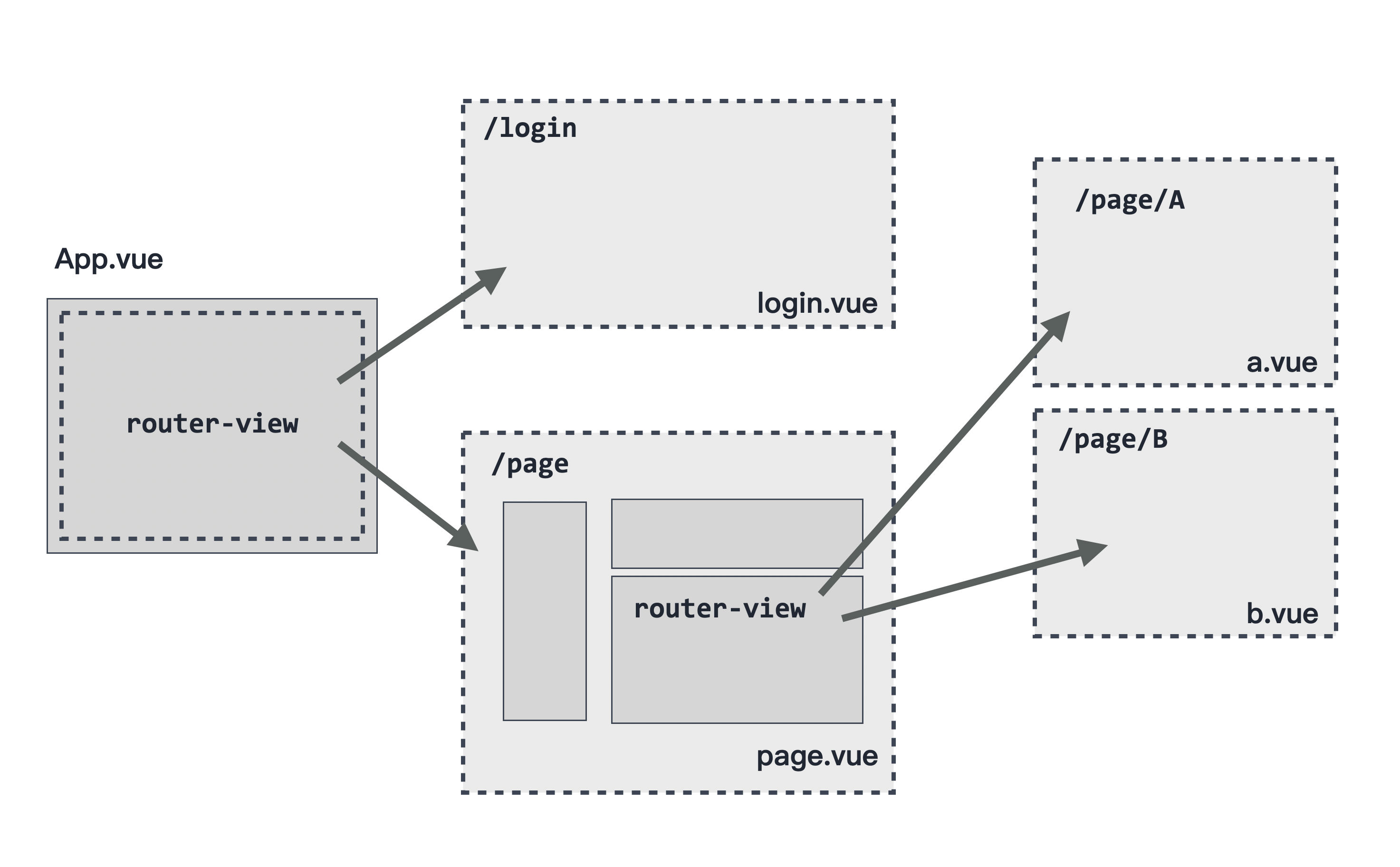
```js
// 路由表
const routes = [
{
path: '/',
name: 'home',
component: HomeView,
},
{
path: '/about',
name: 'about',
component: () => import('../views/AboutView.vue'),
},
{
path: '/products', // 🔥 路由:/products
name: 'products',
component: () => import('../views/Products.vue'),
children: [ // ✅ Here!
{
path: 'a', // 🔥 路由:/products/a
component: () => import('../views/ComponentA.vue'),
},
{
path: 'b', // 🔥 路由:/products/b
component: () => import('../views/ComponentB.vue'),
},
],
},
];
```
### Named Views
> `component` 使用物件指定
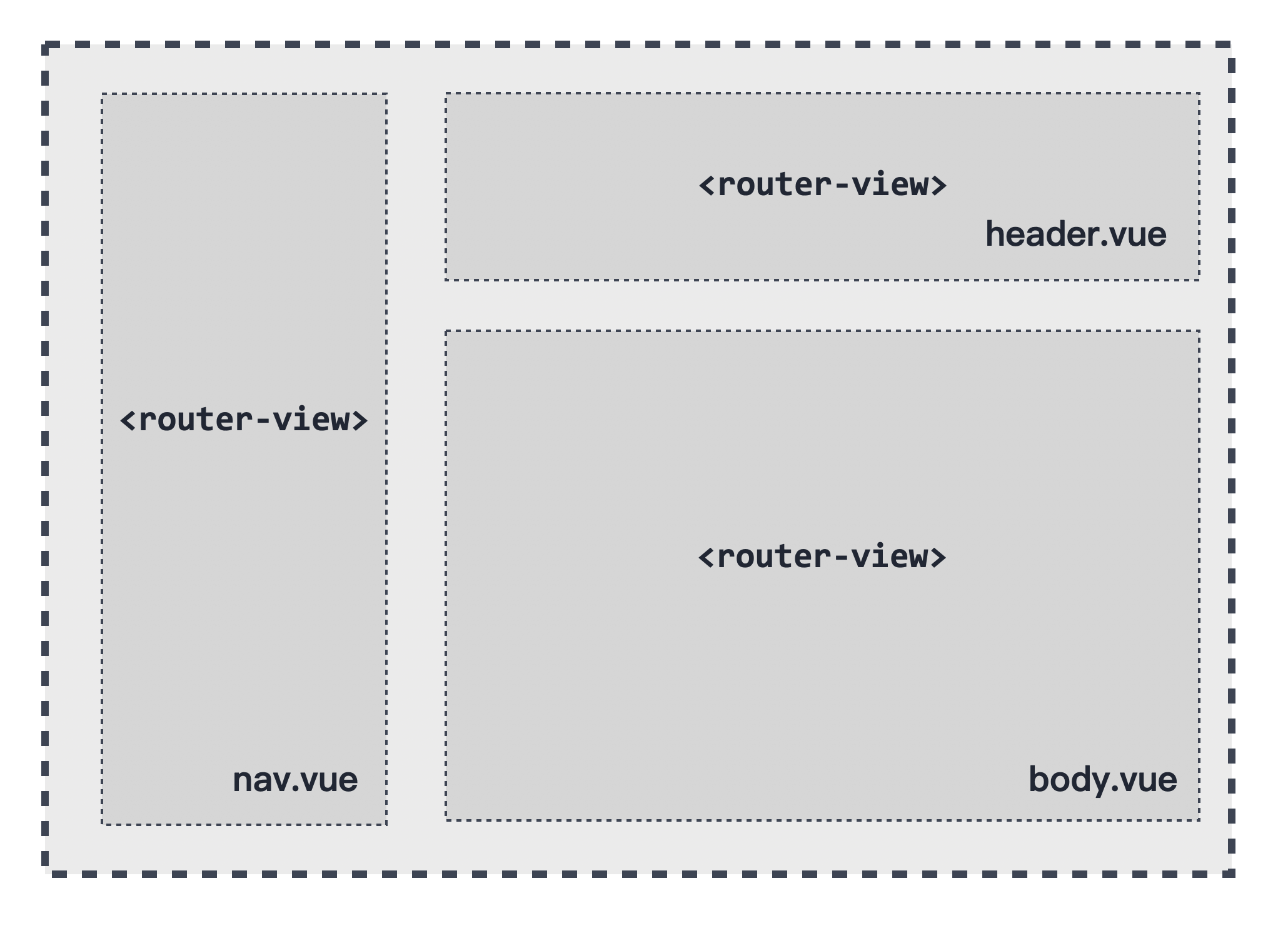
```html
<!-- src/views/NamedView.vue -->
<template>
<router-view name="left"/> <!-- ✅ Here! -->
<router-view name="right"/> <!-- ✅ Here! -->
</template>
```
```js
// 路由表
const routes = [
{
path: '/',
name: 'home',
component: HomeView,
},
{
path: '/about',
name: 'about',
component: () => import('../views/AboutView.vue'),
},
{
path: '/products', // 🔥 路由:/products
name: 'products',
component: () => import('../views/Products.vue'),
children: [
{
path: 'a', // 🔥 路由:/products/a
component: () => import('../views/ComponentA.vue'),
},
{
path: 'b', // 🔥 路由:/products/b
component: () => import('../views/ComponentB.vue'),
},
{
path: 'namedview', // 🔥 路由:/products/namedview
component: () => import('../views/NamedView.vue'),
children: [ // ✅ Here!
{
path: 'cd', // 🔥 路由:/products/namedview/cd
component: { // ✅ 改成物件寫法
left: () => import('../views/ComponentC.vue'),
right: () => import('../views/ComponentD.vue'),
}
},
],
},
],
}
];
```
### Dynamic Routes
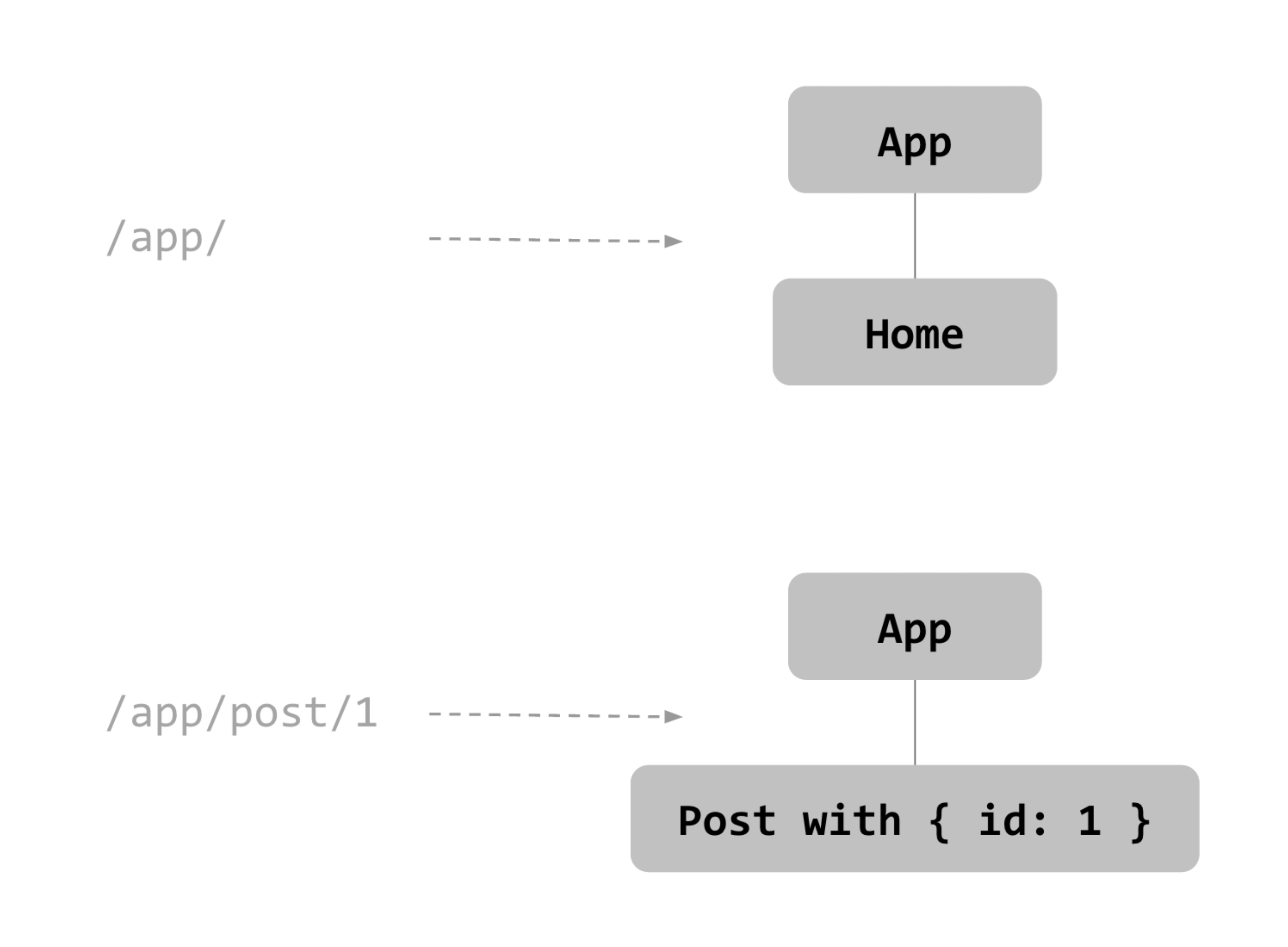
+ `$route` (tight coupling)
```js
// 路由表
const routes = [
{
path: '/dynamic/:id', // 🔥 路由:/dynamic/123
name: 'dynamic',
component: () => import('../views/DynamicRouter.vue'),
},
];
```
```js
// src/views/DynamicRouter.vue
<script lang="js">
import axios from 'axios';
export default {
created() {
const seed = this.$route.params.id; // ✅ Here! (123)
axios.get(`https://randomuser.me/api/?seed=${seed}`).then((res) => {
console.log(res);
});
},
};
</script>
```
+ `props` (loose coupling)
```js
// 路由表
const routes = [
{
path: '/dynamic/:id', // 🔥 路由:/dynamic/123
name: 'dynamic',
component: () => import('../views/DynamicRouter.vue'),
props: (route) => { // ✅ Here!
return {
id: route.params.id, // 此 route 同之前的 this.$route
}
}
},
];
```
```js
// src/views/DynamicRouter.vue
<script lang="js">
import axios from 'axios';
export default {
props: ['id'], // ✅ Here!
created() {
const seed = this.id; // ✅ Here! (123)
axios.get(`https://randomuser.me/api/?seed=${seed}`).then((res) => {
console.log(res);
});
},
};
</script>
```
+ `this.$router.addRoute()` : 動態新增路由
> 原本可能導向 NotFound,但我們可以動態新增
```js
this.$router.addRoute({
path: '/hohohehe',
name: 'hohohehe',
component: () => import('./views/HohoHehe.vue')
})
```
+ `this.$router.getRoutes()` : 獲取所有 routes
+ `this.$router.hasRoute('newRouter')` : 檢查 routes 是否存在
+ 匹配語法
|🚨 <span class="caution">CAUTION</span>|
|:---|
|不管你匹配什麼,綁定時都是字串!|
|🚨 <span class="caution">CAUTION</span>|
|:---|
|Vue 對路由匹配有自己的一套優先序,不是按照路由表內順序去匹配的。<br />比如有明確匹配的 `/home` 比任意匹配的 `/:pathMatch(.*)` 優先度更高。<br />詳參 [Path Ranker]。|
+ 多個動態路由

+ 限定匹配 (regex)
+ `{ path: '/:orderId(\\d+)' }` : 限定匹配數字
> 如:`/123`, `/45`
+ `{ path: '/:imgSize(\\d+)*' }` : 限定匹配數字,可多組 (以 `/` 分隔)
> 如:`/123/45` (此時綁定的 imgSize 為<mark>陣列</mark> ['123', '45'])
+ `{ path: '/:pathMatch(.*)' }` : 匹配任意字串
> 如:`/world/123` (此時綁定的 pathMatch 為字串 'world/123')
+ `{ path: '/:pathMatch(.*)*' }` : 匹配任意字串,可多組 (以 `/` 分隔)
> 如:`/hello/123` (此時綁定的 pathMatch 為<mark>陣列</mark> ['hello', '123'])
+ 結尾 slash
+ `{ path: '/users/:id', sensitive: true }` : 匹配結尾沒有 `/` 的
+ `{ path: '/users/:id', strict: true }` : 匹配結尾有 `/` 的
### History
+ `this.$router.push()` : 同 `history.pushState()` (前往路由並 push 進歷史紀錄)
```js
this.$router.push('/about')
```
+ `this.$router.replace()` : 同 `history.replaceState()` (前往路由並取代 top 紀錄)
+ `this.$router.go()` : 同 `history.go()` (在歷史紀錄間遊走)
### Hash Mode vs HTML5 Mode
註:HTML5 Mode 好像不能 addRoute (動態新增路由)
[...](https://medium.com/%E6%8B%89%E6%8B%89%E7%9A%84%E7%A8%8B%E5%BC%8F%E7%AD%86%E8%A8%98/vue-router-hash-history-mode-d02175eb0d7c)
### Navigation Guards
|🔮 <span class="important">IMPORTANT</span>|切換路由時依序進行|
|:---|---|
|`beforeRouteLeave()` | 離開前路由 (元件)|
|`beforeEach()` | 開始進入新路由之前 (全域)|
|`beforeEnter()` | 開始進入新路由之前 (路由)|
|`beforeRouteEnter()` | 路由尚未進入該元件時 (元件)|
|`beforeResolve()` | 路由與所搭配的元件已被解析 (全域)|
|`afterEach()` | 當路由跳轉結束後 (全域)|
|`beforeCreate()` | 元件實體建立前 (Vue Hook)|
|`created()` | 元件實體已建立 (Vue Hook)|
|`beforeMount()` | 元件實體掛載前 (Vue Hook)|
|`mounted()` | 元件實體掛載完成 (Vue Hook)|
|`beforeRouteEnter()` | 內的 next() 回呼函式|
|`beforeRouteUpdate()` | 當路由更新時 (僅限同屬個元件的情況,也可能完全不會發生)|
+ `beforeEach` (全域)
> 每次進入任何一個路由前,都會作呼叫。\
> 使用情景:身分驗證。
```js
// 路由表
const routes = [...];
const router = createRouter({
history: createWebHashHistory(),
routes
})
router.beforeEach((to, from) => { // ✅ Here!
// to: 從哪個路由來
// from: 要去哪個路由
})
```
+ `beforeResolve` (全域)
> 跟 `beforeEach()` | 一樣,在進入路由前呼叫。\
> 但它會在 `beforeEach()` | 後,並且在所有路由、元件的導航守衛都執行完,\
> 最後才會呼叫並執行。\
> 使用情景:呼叫 API,取得遠端資料。
```js
// 路由表
const routes = [...];
const router = createRouter({
history: createWebHashHistory(),
routes
})
router.beforeResolve((to, from, next) => { // ✅ Here!
// to: 從哪個路由來
// from: 要去哪個路由
// next: 控制導航結果
})
```
+ 不呼叫 next : 導航掛起,頁面不加載也不報錯。
+ `next()` : 允許導航。
+ `next(false)` : 取消導航,保持在目前頁面。
+ `next('path')` : 重定向到指定路徑或路由。
+ `afterEach` (全域)
> 在路由跳轉結束後觸發
```js
// 路由表
const routes = [...];
const router = createRouter({
history: createWebHashHistory(),
routes
})
router.afterEach((to, from, failure) => { // ✅ Here!
// to: 從哪個路由來
// from: 要去哪個路由
// failure: 路由跳轉是否失敗
})
```
### Router Options
+ `linkActiveClass` : router-link 樣式
> 讓使用者知道自己目前在哪個路由。
> router-link 最後會變成 `<a>`,
> 這個功能的作用就是在當前路由對應的 `<a>` 元素加上 class。
```js
const router = createRouter({
history: createWebHashHistory(),
routes,
linkActiveClass: 'active',
});
```

+ `ScrollBehavior`
> [Vue : Scroll Behavior]
```js
const router = createRouter({
history: createWebHashHistory(),
routes,
linkActiveClass: 'active',
scrollBehavior(to, from, savedPosition) {
return {
top: 500, // ✅ Here! (每次刷新頁面時,固定滾動到 500 的位置)
};
},
});
```
[Path Ranker]: https://paths.esm.dev/?p=AAMeJSyAwR4UbFDAFxAcAGAIJXMAAA..
[Vue : Scroll Behavior]: https://router.vuejs.org/zh/guide/advanced/scroll-behavior
 Sign in via Google
 Sign in via Facebook
 Sign in via X(Twitter)
 Sign in via GitHub
 Sign in via Dropbox
 Sign in with Wallet
Connect another wallet
Sign in with Wallet
Connect another wallet