# langchain
[](https://hackmd.io/@RogelioKG/langchain)
## References
### AI Agent
+ 📘 [**RogelioKG - AI Agent**](https://rogeliokg.notion.site/AI-Agent-2abfe0809ab68094b06cfe6caa6f7aeb)
### Langchain
+ 🔗 [**Docs - LangChain**](https://docs.langchain.com/)
+ 🔗 [**Docs - LangChain (Chat Models)**](https://docs.langchain.com/oss/python/integrations/chat)
+ 🔗 [**Docs - LangChain (References)**](https://reference.langchain.com/python/langchain/)
+ 🔗 [**GitHub - LangChain**](https://github.com/langchain-ai/langchain)
+ 🔗 [**GitHub - LangGraph**](https://github.com/langchain-ai/langgraph)
+ 🔗 [**MyApollo - LCEL 篇**](https://myapollo.com.tw/blog/langchain-expression-language/)
+ 🔗 [**LangChain 框架介紹:打造 AI Agent 智慧助理**](https://www.mropengate.com/2025/05/langchain-ai-agent.html)
+ 🔗 [**LangChain 1.0 速通指南(一)—— LangChain 1.0 核心升级**](https://zhuanlan.zhihu.com/p/1968427472388335014)
+ 🔗 [**LangChain 1.0 速通指南(二)—— LangChain 1.0 create_agent api 基础知识**](https://zhuanlan.zhihu.com/p/1969383902624842213)
+ 🔗 [**LangChain 1.0 速通指南(三)—— LangChain 1.0 create_agent api 高阶功能**](https://zhuanlan.zhihu.com/p/1970460972620679090)
+ 🔗 [**iT 邦 - 用 LangGraph 從零開始實現 Agentic AI System 系列**](https://ithelp.ithome.com.tw/m/users/20161074/ironman/7469)
+ 🔗 [**iT 邦 - 從讀書筆記到可落地 AI:LangChain、LangSmith 與 Agent 工具 30 講**](https://ithelp.ithome.com.tw/users/20178568/ironman/8540)
+ 🔗 [**YWC 科技筆記 - LangGraph: LangChain Agent 的殺手鐧 - Part 1**](https://ywctech.net/ml-ai/langchain-langgraph-agent-part1/)
+ 🔗 [**YWC 科技筆記 - LangGraph: LangChain Agent 的殺手鐧 - Part 2**](https://ywctech.net/ml-ai/langchain-langgraph-agent-part2/)
+ 🔗 [**知乎 - LangChain v1.0 中间件详解**](https://zhuanlan.zhihu.com/p/1968379651857552511)
+ 🔗 [**叡揚資訊 - GPT API 圖片輸入:Base64 vs URL,Token 成本差多大?**](https://www.gss.com.tw/blog/gpt-image-token-calculation-url-vs-base64)
## Agent
### what is agent?
+ 允許模型能夠「<mark>推理 → 選擇工具 → 使用工具 → 再推理 → 產生最終答案</mark>」
+ <mark>ReAct</mark> (Reasoning + Acting)
```mermaid
graph TD
QUERY([input])
LLM{model}
TOOL(tools)
ANSWER([output])
QUERY --> LLM
LLM -- action --> TOOL
TOOL -- observation --> LLM
LLM -- finish --> ANSWER
```
## Model
+ **static model**:整個 agent 流程,都使用同一個模型
+ **instance-based static model**:使用 provider SDK 初始化模型
+ **dynamic model**:每次 invoke 時,動態決定使用哪個模型
## Tool
+ 定義工具:`@tool`
+ 錯誤處理:`@wrap_tool_call`
+ 限制輸入 Schema 工具:`@tool(args_schema=BaseModel)`
> 告訴 LLM 若要使用此工具,必須產生符合這個 Schema 的 JSON
+ 注意
+ <mark>工具不能作為 instance method</mark>
## Message
+ 種類
+ `SystemMessage`
+ `HumanMessage`
+ `AIMessage`
+ `ToolMessage`
+ 也可以寫成 dict 形式
## Middleware
+ 種類
+ `@before_model`:模型呼叫前
+ `@after_model`:模型呼叫後
+ `@wrap_model_call`:包裝模型呼叫
+ `@wrap_tool_call`:包裝工具呼叫
+ `@dynamic_prompt`:動態提示詞
## Memory
### short-term memory
+ 參考:[langgraph - short-term memory](#short-term-memory26)
+ 自訂
```py
from langchain.agents import create_agent, AgentState
from langgraph.checkpoint.memory import InMemorySaver
# ✅ 繼承 AgentState
class CustomAgentState(AgentState):
user_id: str
preferences: dict
agent = create_agent(
"gpt-5",
[get_user_info],
state_schema=CustomAgentState,
checkpointer=InMemorySaver(), # ✅
)
# Custom state can be passed in invoke
result = agent.invoke(
{
"messages": [{"role": "user", "content": "Hello"}],
"user_id": "user_123",
"preferences": {"theme": "dark"}
},
{"configurable": {"thread_id": "1"}})
```
+ 處理長對話
+ **Delete messages**:用 `RemoveMessage` / `REMOVE_ALL_MESSAGES` 從 state 裡移除訊息
+ **Summarize messages**:用 `SummarizationMiddleware` 把舊訊息總結成摘要
+ 從各種地方「讀 / 寫」短期記憶
+ tool 參數加入 `runtime: ToolRuntime`
+ 可以讀 `runtime.state[...]` 取得短期記憶
+ 可以回傳 `Command(update={...})` 來客製化更新短期記憶
> 例如寫入 `user_name`、新增 `ToolMessage`
### long-term memory
+ 參考:[langgraph - long-term memory](#long-term-memory28)
## Streaming
+ 參考:[langgraph - Streaming](#Streaming34)
+ 範例
```py
for chunk in agent.stream(messages, stream_mode="updates"):
for step, data in chunk.items():
...
```
## Structured Output
+ 策略
+ `ToolStrategy`:provider llm 不提供結構化輸出 API 時
> 捏造一個限制輸入 Schema 工具:`@tool(args_schema=BaseModel)` \
> 去強制要求 LLM 調用這工具,它就被迫生成 BaseModel 規格的輸出
+ `ProviderStrategy`:provider llm 提供結構化輸出 API 時
+ 說明
> 實務上你可以裸奔給定 `BaseModel` ,langchain 會自動幫你判斷策略
```py
agent = create_agent(
model="gpt-5",
tools=tools,
response_format=ToolStrategy(ProductReview)
)
```
# langgraph
## Runnable
+ 說明
+ 只要一個元件遵守 Runnable Protocol,就能被視為 LCEL 的一份子
+ Runnable 家族很酷,它們能<mark>用 `|` 串接成 pipeline,這就是 LCEL</mark>
```py
retriever | prompt | llm | parser
```
+ 核心方法
+ invoke (支援單一輸入、單一輸出)
+ batch (支援多個輸入、多個輸出)
+ stream (支援有部分結果就輸出的模式)
+ ainvoke (async 版本的 invoke)
+ abatch (async 版本的 batch)
+ astream (async 版本的 stream)
## [Graph API](https://docs.langchain.com/oss/python/langgraph/graph-api)
### graph - basic info
+ 三要素
+ state:狀態
+ nodes:節點
+ edges:有向邊
### state - schema
+ 說明
+ `StateGraph` 採用 Builder Pattern
+ 一步一步把 graph 建造出來後再 compile 成實例
+ 狀態
+ 類別
+ `TypedDict` (簡單)
+ `dataclass` (支援 default value)
+ `Pydantic BaseModel` (支援 verification)
+ 種類
+ `state_schema`:公有狀態 (整個 graph 中共享的<mark>變動資料</mark>)
+ `context_schema`:上下文狀態 (整個 graph 中共享的<mark>基本設定</mark>)
+ `input_schema`:輸入狀態 (若未給定,預設為 `state_schema`)
+ `output_schema`:輸出狀態 (若未給定,預設為 `state_schema`)
+ 範例
|☢️ <span class="warning">WARNING</span> : BUG|
|:---|
| 工作流不一定得是 DAG,所以有可能設計出 cycle,此時條件若未規範好,就會造成無限迴圈 |
| solution:在 `graph.invoke()` 裡加上 `config={"recursion_limit": n}` (每個節點最多處理 n 次任務),超過將引發 `GraphRecursionError` |
```mermaid
---
config:
flowchart:
curve: linear
---
graph TD;
__start__([<p>__start__</p>]):::first
node_1(node_1)
node_2(node_2)
node_3(node_3)
__end__([<p>__end__</p>]):::last
__start__ --> node_1;
node_1 --> node_2;
node_2 --> node_3;
node_3 --> __end__;
classDef default fill:#f2f0ff,line-height:1.2
classDef first fill-opacity:0
classDef last fill:#bfb6fc
```
```py
from typing import TypedDict
from langgraph.graph import END, START, StateGraph
from langgraph.runtime import Runtime
# 公有 state
class PublicState(TypedDict, total=False):
foo: str
user_input: str
graph_output: str
# 上下文 State
class ContextState(TypedDict):
llm_provider: str
# 輸入 State
class InputState(TypedDict):
user_input: str
# 輸出 State
class OutputState(TypedDict):
graph_output: str
# 私有 state
class PrivateState(TypedDict):
bar: str
def node_1(state: InputState) -> PublicState:
# assert state == {"user_input": "My"}
return {"foo": state["user_input"] + " name"}
def node_2(state: PublicState) -> PrivateState:
# assert state == {'foo': 'My name', 'user_input': 'My'}
return {"bar": state["foo"] + " is"} # type: ignore
def node_3(state: PrivateState, runtime: Runtime[ContextState]) -> OutputState:
# assert state == {'bar': 'My name is'}
# assert runtime.context == {'llm_provider': 'openai'}
return {"graph_output": state["bar"] + " Lance"}
if __name__ == "__main__":
# StateGraph 採用 Builder Pattern
builder = StateGraph(PublicState, ContextState, input_schema=InputState, output_schema=OutputState)
builder.add_node("node_1", node_1)
builder.add_node("node_2", node_2)
builder.add_node("node_3", node_3)
builder.add_edge(START, "node_1")
builder.add_edge("node_1", "node_2")
builder.add_edge("node_2", "node_3")
builder.add_edge("node_3", END)
# 最後使用 compile() 產生一個 CompiledStateGraph 實例
graph = builder.compile()
# 輸入一定符合 input_schema,但輸出無法保證是 output_schema
input_state: InputState = {"user_input": "My"}
output_state = graph.invoke(
input_state,
context={"llm_provider": "openai"},
)
# assert output_state == {'graph_output': 'My name is Lance'}
```
### state - reducer
+ 說明
+ <mark>產出結果的聚合策略</mark>
+ node 完成工作時,產出成果的每個 key 不一定只能用 overwrite 策略聚合到 state 中
+ 也能選用 add、mul 等策略聚合到 state 中
+ 作用時間:node 完成工作,並回傳成果時
+ 範例
|☢️ <span class="warning">WARNING</span> : BUG|
|:---|
| 【輸入狀態】竟然要先跟【公有狀態】的預設值先 reduce 一次,超級奇怪!<br>而且 builtins number types (`int`, `float` ...) 預設值誤被一律當作 0,錯上加錯 🤧! |
| workaround:在【輸入狀態】使用 `Overwrite` 套個聖盾術跳過第一次的 reduce 直接覆寫 |
```mermaid
---
config:
flowchart:
curve: linear
---
graph TD;
__start__([<p>__start__</p>]):::first
add_items(add_items)
add_more_items(add_more_items)
finalize(finalize)
__end__([<p>__end__</p>]):::last
__start__ --> add_items;
add_items --> add_more_items;
add_more_items --> finalize;
finalize --> __end__;
classDef default fill:#f2f0ff,line-height:1.2
classDef first fill-opacity:0
classDef last fill:#bfb6fc
```
```py
import operator
from typing import Annotated
from langgraph.graph import END, START, StateGraph
from langgraph.types import Overwrite
from typing_extensions import TypedDict
class OrderState(TypedDict, total=False):
total_price: float # reducer: 覆蓋 (預設)
item_count: Annotated[int, operator.add] # reducer: 累加
discount_multiplier: Annotated[float, operator.mul] # reducer: 累乘
def add_items(state: OrderState) -> OrderState:
# assert state == {'total_price': 0, 'item_count': 0, 'discount_multiplier': 1.0}
return {
"item_count": 2,
"total_price": 200,
"discount_multiplier": 0.9,
}
def add_more_items(state: OrderState) -> OrderState:
# assert state == {'total_price': 200, 'item_count': 2, 'discount_multiplier': 0.9}
return {
"item_count": 1,
"discount_multiplier": 0.95,
}
def finalize(state: OrderState) -> OrderState:
# assert state == {'total_price': 200, 'item_count': 3, 'discount_multiplier': 0.855}
return {"total_price": state["total_price"] * state["discount_multiplier"]} # type: ignore
if __name__ == "__main__":
builder = StateGraph(OrderState)
builder.add_node("add_items", add_items)
builder.add_node("add_more_items", add_more_items)
builder.add_node("finalize", finalize)
builder.add_edge(START, "add_items")
builder.add_edge("add_items", "add_more_items")
builder.add_edge("add_more_items", "finalize")
builder.add_edge("finalize", END)
graph = builder.compile()
input_state: OrderState = {
"item_count": 0,
"discount_multiplier": Overwrite(1.0), # type: ignore
"total_price": 0,
}
output_state = graph.invoke(input_state)
# assert output_state == {'total_price': 171.0, 'item_count': 3, 'discount_multiplier': 0.855}
```
+ 範例:parallel
|☢️ <span class="warning">WARNING</span> : 多路合併 (fan-in) |
|:---|
| 假如 node B、C、D 接下來都流向同一 node,<br>當它們並行工作時,若產出結果的 key 採用 overwrite 策略,<br>則僅能有一個 node 寫入。<br>否則顯然是 race condition,<mark>將產生 `InvalidUpdateError `</mark>。 |
| solution:指定好 [reducer](#state---reducer),不要用 overwrite 策略 |
```mermaid
---
config:
flowchart:
curve: linear
---
graph TD;
__start__([<p>__start__</p>]):::first
A(A)
B(B)
C(C)
D(D)
__end__([<p>__end__</p>]):::last
A --> B;
A --> C;
A --> D;
__start__ --> A;
B --> __end__;
C --> __end__;
D --> __end__;
classDef default fill:#f2f0ff,line-height:1.2
classDef first fill-opacity:0
classDef last fill:#bfb6fc
```
```py
import asyncio
import operator
from typing import Annotated, TypedDict
from langgraph.graph import END, START, StateGraph
class MyState(TypedDict):
log: Annotated[list[str], operator.add]
async def node_a(state: MyState):
print("A started")
await asyncio.sleep(1)
print("A done")
return {"log": ["A"]}
async def node_b(state: MyState):
print("B started")
await asyncio.sleep(3)
print("B done")
return {"log": ["B"]}
async def node_c(state: MyState):
print("C started")
await asyncio.sleep(2)
print("C done")
return {"log": ["C"]}
async def node_d(state: MyState):
print("D started")
await asyncio.sleep(1)
print("D done")
return {"log": ["D"]}
builder = StateGraph(MyState)
builder.add_node("A", node_a)
builder.add_node("B", node_b)
builder.add_node("C", node_c)
builder.add_node("D", node_d)
builder.add_edge(START, "A")
builder.add_edge("A", "B")
builder.add_edge("A", "C")
builder.add_edge("A", "D")
builder.add_edge("B", END)
builder.add_edge("C", END)
builder.add_edge("D", END)
graph = builder.compile()
async def main():
result = await graph.ainvoke({"log": []})
print("\n=== FINAL RESULT ===")
print(result)
# {'log': ['A', 'B', 'C', 'D']}
asyncio.run(main())
```
### edge - conditional edge
+ 說明
+ <mark>條件式路由</mark> (一個 node 接下來可流向多個 node 時,選擇要走哪邊)
+ 範例
```mermaid
---
config:
flowchart:
curve: linear
---
graph TD
__start__([__start__])
judge([judge])
pass_node([pass_node])
fail_node([fail_node])
__end__([__end__])
__start__ --> judge
judge -->|score >= 60| pass_node
judge -->|score < 60| fail_node
pass_node --> __end__
fail_node --> __end__
classDef default fill:#f2f0ff,line-height:1.2
classDef first fill-opacity:0
classDef last fill:#bfb6fc
class __start__ first
class __end__ last
```
```py
import random
from langgraph.graph import END, START, StateGraph
from typing_extensions import TypedDict
class StudentState(TypedDict, total=False):
name: str
score: int
result: str
if __name__ == "__main__":
builder = StateGraph(StudentState)
builder.add_node("judge", lambda state: {"score": random.randint(0, 100)})
builder.add_node("pass_node", lambda state: {"result": "pass"})
builder.add_node("fail_node", lambda state: {"result": "fail"})
builder.add_edge(START, "judge")
builder.add_conditional_edges("judge", lambda state: "pass_node" if state["score"] >= 60 else "fail_node")
builder.add_edge("pass_node", END)
builder.add_edge("fail_node", END)
graph = builder.compile()
output_state = graph.invoke({"name": "RogelioKG"})
```
### node - send
+ 說明
+ 常用於 <mark>multiple edges</mark> (同一下游 node 允許多種 state 平行執行)
+ 範例
```mermaid
---
config:
flowchart:
curve: linear
---
graph TD
__start__([__start__])
generate_topics([generate_topics])
generate_joke([generate_joke])
best_joke([best_joke])
__end__([__end__])
__start__ --> generate_topics
%% Fan-out: subjects = ["lions", "elephants", "penguins"]
generate_topics -->|Send ...| generate_joke
generate_topics -->|Send ...| generate_joke
generate_topics -->|Send ...| generate_joke
generate_joke --> best_joke
generate_joke --> best_joke
generate_joke --> best_joke
best_joke --> __end__
classDef default fill:#f2f0ff,line-height:1.2
classDef first fill-opacity:0
classDef last fill:#bfb6fc
class __start__ first
class __end__ last
```
```py
import operator
from typing import Annotated, TypedDict
from langgraph.graph import END, START, StateGraph
from langgraph.types import Send
class OverallState(TypedDict, total=False):
topic: str
subjects: list[str]
jokes: Annotated[list[str], operator.add]
best_selected_joke: str
class PrivateState(TypedDict):
subject: str
def generate_topics(state: OverallState) -> OverallState:
return {"subjects": ["lions", "elephants", "penguins"]}
def continue_to_jokes(state: OverallState) -> list[Send]:
return [Send("generate_joke", {"subject": s}) for s in state["subjects"]] # type: ignore
def generate_joke(state: PrivateState) -> OverallState:
joke_map = {
"lions": "Why don't lions like fast food? Because they can't catch it!",
"elephants": "Why don't elephants use computers? They're afraid of the mouse!",
"penguins": "Why don't penguins like talking to strangers at parties? Because they find it hard to break the ice.",
}
subject = state["subject"]
return {"jokes": [joke_map[subject]]}
def best_joke(state: OverallState) -> OverallState:
return {"best_selected_joke": "penguins"}
if __name__ == "__main__":
builder = StateGraph(OverallState)
builder.add_node("generate_topics", generate_topics)
builder.add_node("generate_joke", generate_joke)
builder.add_node("best_joke", best_joke)
builder.add_edge(START, "generate_topics")
builder.add_conditional_edges("generate_topics", continue_to_jokes)
builder.add_edge("generate_joke", "best_joke")
builder.add_edge("best_joke", END)
graph = builder.compile()
initial_state: OverallState = {"topic": "animals"}
for step in graph.stream(initial_state):
print(step)
```
### node - command
+ 說明
+ <mark>在條件路由的同時,改變公有狀態</mark>
+ 範例
```mermaid
---
config:
flowchart:
curve: linear
---
graph TD;
__start__([<p>__start__</p>]):::first
init_order(init_order)
risk_check(risk_check)
charge_order(charge_order)
reject_order(reject_order)
__end__([<p>__end__</p>]):::last
__start__ --> init_order;
init_order --> risk_check;
risk_check -.-> charge_order;
risk_check -.-> reject_order;
charge_order --> __end__;
reject_order --> __end__;
classDef default fill:#f2f0ff,line-height:1.2
classDef first fill-opacity:0
classDef last fill:#bfb6fc
```
```py
import operator
from typing import Annotated, Literal, TypedDict
from langgraph.graph import END, START, StateGraph
from langgraph.types import Command
class OrderState(TypedDict):
user_id: str
amount: float
risk_score: float
status: str
logs: Annotated[list[str], operator.add]
def init_order(state: OrderState) -> dict:
return {
"status": "received",
"logs": [f"收到訂單,金額 = {state['amount']:.2f}"],
}
def risk_check(
state: OrderState,
) -> Command[Literal["charge_order", "reject_order"]]:
amount = state["amount"]
if amount >= 1000:
risk_score = 0.9
status = "rejected_high_risk"
goto = "reject_order"
log_msg = f"風險審核:金額 {amount:.2f},判定為高風險(risk={risk_score}),將拒絕此訂單。"
else:
risk_score = 0.1
status = "approved"
goto = "charge_order"
log_msg = f"風險審核:金額 {amount:.2f},判定為低風險(risk={risk_score}),准許進入扣款。"
return Command(
update={
"risk_score": risk_score,
"status": status,
"logs": [log_msg],
},
goto=goto,
)
def charge_order(state: OrderState) -> dict:
amount = state["amount"]
log_msg = f"扣款成功:已向使用者 {state['user_id']} 收費 {amount:.2f} 元。"
return {
"status": "charged",
"logs": [log_msg],
}
def reject_order(state: OrderState) -> dict:
log_msg = f"訂單已被拒絕,最終狀態 = {state['status']}。"
return {
"logs": [log_msg],
}
if __name__ == "__main__":
builder = StateGraph(OrderState)
builder.add_node("init_order", init_order)
builder.add_node("risk_check", risk_check)
builder.add_node("charge_order", charge_order)
builder.add_node("reject_order", reject_order)
builder.add_edge(START, "init_order")
builder.add_edge("init_order", "risk_check")
builder.add_edge("charge_order", END)
builder.add_edge("reject_order", END)
graph = builder.compile()
low_amount_state: OrderState = {
"user_id": "user_1",
"amount": 199.0,
"risk_score": 0.0,
"status": "",
"logs": [],
}
result_low = graph.invoke(low_amount_state)
print(result_low)
high_amount_state: OrderState = {
"user_id": "user_2",
"amount": 2000.0,
"risk_score": 0.0,
"status": "",
"logs": [],
}
result_high = graph.invoke(high_amount_state)
print(result_high)
```
### graph - subgraph
+ 範例:寫法一
> 引用 global 的 subgraph,直接內嵌進 parent graph 的 node 流程裡
```py
def call_subgraph(state: State):
subgraph_output = subgraph.invoke({"bar": state["foo"]})
return {"foo": subgraph_output["bar"]}
```
+ 範例:寫法二
> 將 subgraph 視作一個 parent graph 的 node
```py
builder.add_node("node_1", subgraph)
```
### grpah - detailed info
+ 附圖
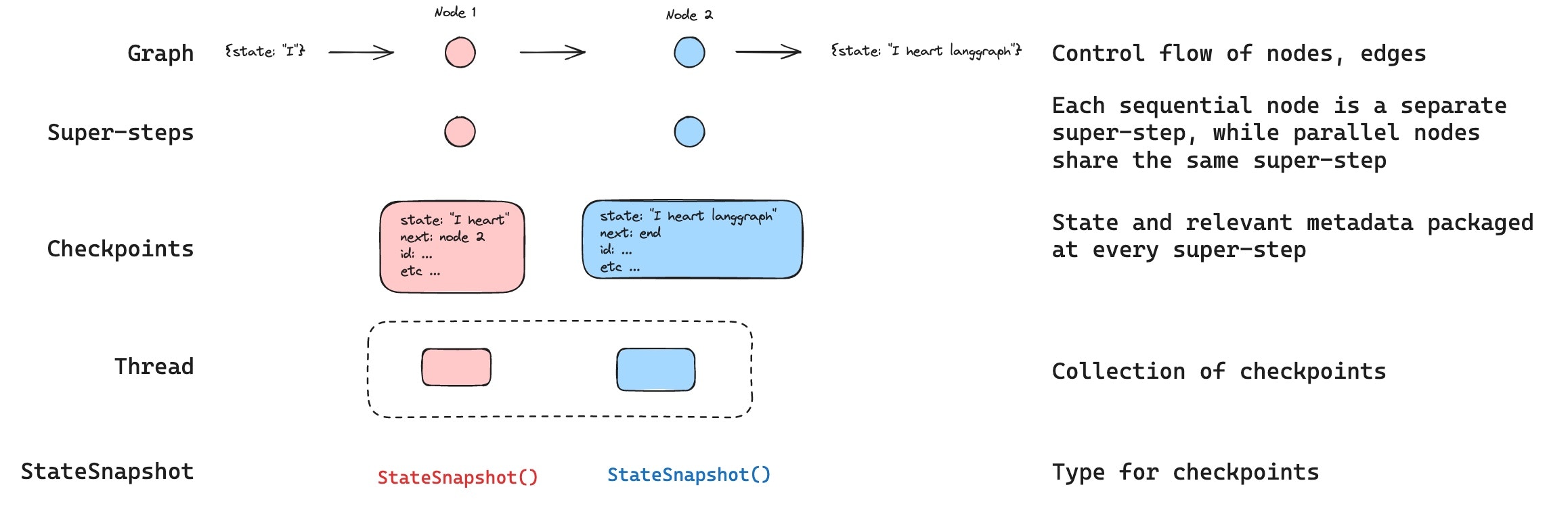
+ 說明
+ graph:工作流圖
+ super-step:大步驟
+ 當 super-step N 的每個 node 都完成後,才向前推進至 super-step N+1
+ checkpoint:檢查點
+ 在每個 super-step 結束時,產生檢查點,以 `StateSnapshot` 結構表示
+ 若 super-step N 發生部分 node 失敗
+ 已成功的 node 寫入 pending writes
+ retry 時只重新跑失敗 node
+ langchain -> 每次 agent step 完成後的記憶狀態
+ thread:一次完整工作流的所有檢查點
+ langchain -> 一段 conversation 生命週期
```py
agent.invoke(..., {"configurable": {"thread_id": "123"}})
```
### graph - BSP
+ 說明
> Langgraph 的平行計算模型採用的是 [Bulk Synchronous Parallel](https://en.wikipedia.org/wiki/Bulk_synchronous_parallel) (BSP),\
> 在此基礎上,一個 graph 平行計算會被分成多個 super-step,\
> 當 super-step N 的每個 node 都完成後,才向前推進至 super-step N+1。
> 如下範例:
>
> + super-step 0: A
> + super-step 1: B
> + super-step 2: C, F
> + super-step 3: D, G, I
> + super-step 4: K, H, J
> + super-step 5: L
> + super-step 6: E
>
> 假設<mark>F 阻塞,即便 C 已經完成工作,它還是會老實等 F 完成</mark>。\
> 之所以要設立這種限制,是為了<mark>讓 graph 平行計算是 deterministic</mark>,\
> 一旦 deterministic,<mark>我們就有十足信心 rollback 而後 replay</mark>。
+ 範例
|☢️ <span class="warning">WARNING</span> : 多路合併 (fan-in) |
|:---|
| Langgraph 若使用同步寫法,會<mark>自動採用 multithreading</mark> |
```mermaid
---
config:
flowchart:
curve: linear
---
graph LR;
__start__([<p>__start__</p>]):::first
A(A)
B(B)
C(C)
D(D)
K(K)
E(E)
F(F)
G(G)
H(H)
I(I)
J(J)
L(L)
__end__([<p>__end__</p>]):::last
A --> B;
B --> C;
B --> F;
C --> D;
D --> K;
F --> G;
F --> I;
G --> H;
G --> J;
H --> E;
I --> J;
J --> L;
K --> E;
L --> E;
__start__ --> A;
E --> __end__;
classDef default fill:#f2f0ff,line-height:1.2
classDef first fill-opacity:0
classDef last fill:#bfb6fc
```
```py
import asyncio
import operator
import time
from typing import Annotated
from langgraph.checkpoint.memory import InMemorySaver
from langgraph.graph import END, START, StateGraph
from typing_extensions import TypedDict
class State(TypedDict):
log: Annotated[list[str], operator.add]
def now() -> str:
# return f"{time.time():.3f}"
return ""
def make_node(name: str, delay: float):
async def _node(state: State) -> dict:
print(f"[{now()}] {name} START (sleep {delay}s)")
await asyncio.sleep(delay)
print(f"[{now()}] {name} END")
return {"log": [name]}
_node.__name__ = f"node_{name}"
return _node
def create_workflow():
delays = {
"A": 0.4,
"B": 0.5,
"C": 0.2,
"D": 0.3,
"K": 0.7,
"E": 0.2,
"F": 10.0, # 故意設很慢 → 用來觀察 BSP barrier
"G": 0.5,
"H": 0.4,
"I": 0.8,
"J": 0.3,
"L": 0.2,
}
builder = StateGraph(State)
for name, d in delays.items():
builder.add_node(name, make_node(name, d))
builder.add_edge(START, "A")
builder.add_edge("A", "B")
builder.add_edge("B", "C")
builder.add_edge("C", "D")
builder.add_edge("D", "K")
builder.add_edge("K", "E")
builder.add_edge("B", "F")
builder.add_edge("F", "G")
builder.add_edge("G", "H")
builder.add_edge("H", "E")
builder.add_edge("F", "I")
builder.add_edge("I", "J")
builder.add_edge("G", "J")
builder.add_edge("J", "L")
builder.add_edge("L", "E")
builder.add_edge("E", END)
graph = builder.compile()
return graph
async def main():
graph = create_workflow()
print(graph.get_graph().draw_mermaid())
result = await graph.ainvoke({"log": []})
print(result)
if __name__ == "__main__":
asyncio.run(main())
```
## [Functional API](https://docs.langchain.com/oss/python/langgraph/functional-api)
## Persistence
### replay
+ 說明
+ <mark>Moody Blue!</mark>

+ 若需要先變更 state 再重播
+ 請先獲取新 config
```py
new_config = graph.update_state(replay_config, values=new_state)
```
+ 再拿去 invoke
```py
graph.invoke(None, new_config)
```
+ 若不需要變更 state 直接重播
+ 直接 invoke
```py
graph.invoke(None, replay_config)
```
+ 範例
```py
from langchain_core.runnables.config import RunnableConfig
from langgraph.checkpoint.memory import InMemorySaver
from langgraph.graph import END, START, StateGraph
from typing_extensions import TypedDict
class State(TypedDict):
base: int
user_input: int
def node_a(state: State):
print(state)
print("run A")
return {"base": state["base"] + 1}
def node_b(state: State):
print(state)
print("run B")
return {"base": state["base"] + 10}
def node_c(state: State):
print(state)
print("run C (divide)")
return {"base": state["base"] / state["user_input"]}
def create_workflow():
builder = StateGraph(State)
builder.add_node("A", node_a)
builder.add_node("B", node_b)
builder.add_node("C", node_c)
builder.add_edge(START, "A")
builder.add_edge("A", "B")
builder.add_edge("B", "C")
builder.add_edge("C", END)
cp = InMemorySaver()
graph = builder.compile(checkpointer=cp)
return graph
if __name__ == "__main__":
graph = create_workflow()
config: RunnableConfig = {"configurable": {"thread_id": "t1"}}
print("\n===== FIRST RUN =====")
# ⚠️ 第一次我們故意除以 0,讓它出錯
try:
graph.invoke({"base": 1, "user_input": 0}, config)
except Exception as e:
print("Graph stopped due to error:", e)
history = list(graph.get_state_history(config))
print("\n===== CHECKPOINT HISTORY =====")
last_good_snapshot = None
for h in history:
cid = h.config["configurable"]["checkpoint_id"] # type: ignore
step = h.metadata["step"] # type: ignore
err = [t.error for t in h.tasks]
print(f"checkpoint={cid}, step={step}, error={err}")
if not any(err):
last_good_snapshot = h
break
assert last_good_snapshot is not None
replay_config = last_good_snapshot.config
print("\n===== SECOND RUN =====")
# ✅ 會 branch 出一個新的 checkpoint,再從這裡開始執行
new_config = graph.update_state(replay_config, values={"user_input": 5})
result = graph.invoke(None, new_config)
print("\n===== FINAL RESULT =====")
print(result)
```
### short-term memory
+ 說明
+ 短期記憶 <mark>(checkpointer - 同 thread 共享)</mark>
+ 範例
```py
from langgraph.checkpoint.memory import InMemorySaver
from langgraph.graph import StateGraph
checkpointer = InMemorySaver()
builder = StateGraph(...)
graph = builder.compile(checkpointer=checkpointer)
graph.invoke(
{"messages": [{"role": "user", "content": "hi! i am Bob"}]},
{"configurable": {"thread_id": "1"}},
)
```
+ 持久化
```py
from langgraph.checkpoint.postgres import PostgresSaver
DB_URI = "postgresql://postgres:postgres@localhost:5442/postgres?sslmode=disable"
with PostgresSaver.from_conn_string(DB_URI) as checkpointer:
builder = StateGraph(...)
graph = builder.compile(checkpointer=checkpointer)
```
### long-term memory
+ 說明
+ 長期記憶 <mark>(store - 跨 thread 共享)</mark>
+ 範例
```py
# 1. 建立 Store
from langgraph.store.memory import InMemoryStore
store = InMemoryStore()
```
```py
# 2. 指定 namespace(通常用 user_id)
namespace = ("1", "memories")
```
```py
# 3. 寫入記憶
store.put(namespace, "id-1", {"food": "pizza"})
store.put(namespace, "id-2", {"color": "blue"})
```
```py
# 4. 搜尋記憶
memories = store.search(namespace)
```
```py
# 5. 設定語義搜尋
store = InMemoryStore(
index={
"embed": init_embeddings("openai:text-embedding-3-small"),
"dims": 1536,
"fields": ["$"]
}
)
store.search(namespace, query="what food does the user like?") # ✅ 使用自然語言!
```
+ 持久化
```py
from langgraph.store.postgres import PostgresStore
DB_URI = "postgresql://postgres:postgres@localhost:5442/postgres?sslmode=disable"
with PostgresStore.from_conn_string(DB_URI) as store:
builder = StateGraph(...)
graph = builder.compile(store=store)
```
+ 測試
```py
import uuid
from typing import Any, Literal, cast
from dotenv import load_dotenv
from langchain.chat_models import init_chat_model
from langchain_core.messages import AIMessage, HumanMessage, SystemMessage
from langchain_core.runnables import RunnableConfig
from langgraph.graph import START, MessagesState, StateGraph
from langgraph.store.base import BaseStore
from langgraph.store.memory import InMemoryStore
load_dotenv()
store = InMemoryStore() # ✅ 長期記憶
base_model = init_chat_model("gpt-4o-mini")
chat_model = base_model.bind(temperature=0.7)
extract_model = base_model.bind(max_tokens=64, temperature=0)
memory_intent_model = base_model.bind(max_tokens=256, temperature=0)
type Intent = Literal["store", "normal"]
def classify_memory_intent(user_msg: str) -> Intent:
prompt = f"""
你是一個 memory-intent classifier。
將使用者訊息分類為以下兩類之一:
1. store → 使用者要求你記住某件事
3. normal → 其他聊天訊息
僅回答以下兩個字之一:store / normal
使用者訊息:
{user_msg}
"""
ai_response = cast(str, memory_intent_model.invoke(prompt).content).strip().lower()
return "store" if ai_response.startswith("store") else "normal"
def extract_memory(user_msg: str) -> dict[str, Any]:
prompt = f"""
請從使用者訊息中抽取「要記住的資訊」,統一輸出格式如下:
{{
"key": "記憶主旨",
"value": "具體內容"
}}
使用者訊息:
{user_msg}
"""
content = cast(str, extract_model.invoke(prompt).content)
try:
import json
return json.loads(content)
except Exception:
return {"key": str(uuid.uuid4()), "value": content}
def chat_node(state: MessagesState, config: RunnableConfig, *, store: BaseStore):
user_id = config["configurable"]["user_id"] # type: ignore
namespace = ("users", user_id) # 使用 user id 當作記憶 namespace
user_msg = cast(str, state["messages"][-1].content)
match classify_memory_intent(user_msg):
case "store":
mem = extract_memory(user_msg)
store.put(namespace, mem["key"], mem["value"])
return {"messages": [AIMessage(content=f"我已經記住了!\n記錄內容:{mem}")]}
case "normal":
items = store.search(namespace, query="*", limit=40) # 聊天帶著一些記憶上路
memories = "\n".join(str(i.value) for i in items)
response = chat_model.invoke(
[
SystemMessage(
f"你是一個擁有長期記憶能力的助手,請你根據記住的內容,以文字回覆他。\n=== 記憶 ===\n{memories}"
)
]
+ state["messages"]
)
return {"messages": [response]}
def create_workflow():
builder = StateGraph(MessagesState)
builder.add_node(chat_node)
builder.add_edge(START, "chat_node")
graph = builder.compile(store=store)
return graph
if __name__ == "__main__":
graph = create_workflow()
cfg: RunnableConfig = {"configurable": {"thread_id": "t1", "user_id": "u1"}}
tests = [
"嗨!你可以幫我安排一個健身計畫嗎?我接下來會詳細說明有哪些注意事項。",
"記住:我的健身目標是增肌,尤其是上半身。",
"記住:我左肩有舊傷,不能做過頭推舉。",
"記住:我偏好使用啞鈴、不喜歡器械。",
"記住:我每週四天可訓練:二、四、六、日。",
"下次訓練,我想做過頭推舉,你覺得可以嗎?請依我的限制與偏好給予建議。",
"今天是禮拜五,請依我的限制與偏好,安排今天的訓練內容。",
]
for t in tests:
result = graph.invoke({"messages": [HumanMessage(t)]}, cfg)
print("👤:", t)
print("🤖:", result["messages"][-1].content)
print("-" * 40)
# 👤: 嗨!你可以幫我安排一個健身計畫嗎?我接下來會詳細說明有哪些注意事項。
# 🤖: 嗨!當然可以,請告訴我你的注意事項和任何具體的目標或需求,我會根據這些資訊來幫你安排一個健身計畫。
# ----------------------------------------
# 👤: 記住:我的健身目標是增肌,尤其是上半身。
# 🤖: 我已經記住了!
# 記錄內容:{'key': '健身目標', 'value': '增肌,尤其是上半身'}
# ----------------------------------------
# 👤: 記住:我左肩有舊傷,不能做過頭推舉。
# 🤖: 我已經記住了!
# 記錄內容:{'key': '左肩舊傷', 'value': '不能做過頭推舉'}
# ----------------------------------------
# 👤: 記住:我偏好使用啞鈴、不喜歡器械。
# 🤖: 我已經記住了!
# 記錄內容:{'key': '健身器材偏好', 'value': '偏好使用啞鈴,不喜歡器械'}
# ----------------------------------------
# 👤: 記住:我每週四天可訓練:二、四、六、日。
# 🤖: 我已經記住了!
# 記錄內容:{'key': '訓練日', 'value': '每週四天可訓練:二、四、六、日'}
# ----------------------------------------
# 👤: 下次訓練,我想做過頭推舉,你覺得可以嗎?請依我的限制與偏好給予建議。
# 🤖: 根據你的限制,過頭推舉是不建議的。如果你想增肌上半身,可以考慮使用啞鈴進行其他上半身的訓練,例如啞鈴肩推、啞鈴臥推或啞鈴划船等。這些動作可以幫助你達到增肌的目標,同時避免做過頭推舉的風險。你可以根據每週的訓練計劃,安排這些動作在二、四、六或日的訓練中。
# ----------------------------------------
# 增肌,尤其是上半身
# 不能做過頭推舉
# 偏好使用啞鈴,不喜歡器械
# 每週四天可訓練:二、四、六、日
# 👤: 今天是禮拜五,請依我的限制與偏好,安排今天的訓練內容。
# 🤖: 今天是禮拜五,根據你的訓練安排,這是休息日。建議你可以利用這一天進行輕鬆的活動,如伸展、瑜伽或輕鬆散步,來促進恢復。明天(星期六)可以繼續進行增肌訓練,特別注意上半身的訓練。如果你需要,我可以幫你計劃明天的訓練內容!
```
### library
+ 提供 checkpoint 持久化的函式庫
+ `langgraph-checkpoint`:In-memory (builtins)
+ `langgraph-checkpoint-sqlite`:SQLite (3rd lib)
+ `langgraph-checkpoint-postgres`:Postgres (3rd lib)
+ `langgraph-checkpoint-redis`:Redis (3rd lib)
## Durable Execution
### task
+ 說明
+ <mark>將 non-deterministic 的操作包成 task,以便在 replay 時,能夠重用 task 結果</mark>
+ 範例
```py
import random
import uuid
from typing import TypedDict
from langchain_core.runnables.config import RunnableConfig
from langgraph.checkpoint.memory import InMemorySaver
from langgraph.func import task
from langgraph.graph import END, START, StateGraph
from langgraph.types import CachePolicy
FLAG = 0
class State(TypedDict):
value: int
@task(cache_policy=CachePolicy(key_func=lambda x: str(x)))
def random_task(x: int) -> int:
r = random.randint(1, 1000000)
print(f"[RUN random_task] x={x}, random={r}")
return r
def node_main(state: State) -> State:
fut = random_task(state["value"])
result = fut.result()
print(f"node_main finished task: result={result}")
global FLAG
if FLAG == 0:
FLAG += 1
raise Exception("Bruh!")
else:
return {"value": result}
def node_end(state: State):
print("Reached END")
return {}
def create_workflow():
builder = StateGraph(State)
builder.add_node("main", node_main)
builder.add_node("end", node_end)
builder.add_edge(START, "main")
builder.add_edge("main", "end")
builder.add_edge("end", END)
graph = builder.compile(
checkpointer=InMemorySaver(),
)
return graph
if __name__ == "__main__":
graph = create_workflow()
thread_id = uuid.uuid4()
config: RunnableConfig = {
"configurable": {"thread_id": thread_id},
}
print("========== RUN #1 ==========")
try:
graph.invoke({"value": 42}, config=config)
except BaseException as e:
print(f"[INTERRUPTED]: {e}")
print("\n========== RUN #2 (replay) ==========")
out = graph.invoke(None, config=config)
print("Result:", out)
# ========== RUN #1 ==========
# [RUN random_task] x=42, random=873769
# node_main finished task: result=873769
# [INTERRUPTED]: Bruh!
# ========== RUN #2 (replay) ==========
# node_main finished task: result=873769
# Reached END
# Result: {'value': 873769}
```
### modes
+ 種類
+ `exit`:一次工作流完成時,才儲存所有 checkpoints
+ `async`:每個 super-step 都會寫入 checkpoint,採用「異步」寫入 (✅ 預設)
+ `sync`:每個 super-step 都會寫入 checkpoint,採用「同步」寫入
+ 範例
```py
graph.invoke(
...,
durability="sync"
)
```
### cache
```py
import random
import uuid
from typing import TypedDict
from langchain_core.runnables.config import RunnableConfig
from langgraph.cache.memory import InMemoryCache
from langgraph.checkpoint.memory import InMemorySaver
from langgraph.func import task
from langgraph.graph import END, START, StateGraph
from langgraph.types import CachePolicy
# cache key: 以輸入數字當 key
@task(cache_policy=CachePolicy(key_func=lambda x: str(x)))
def random_task(x: int) -> int:
r = random.randint(1, 10)
print(f"[RUN random_task] x={x}, random={r}")
return r
class State(TypedDict):
value: int
def node_main(state: State):
fut = random_task(state["value"])
result = fut.result()
return {"value": result}
def create_workflow():
builder = StateGraph(State)
builder.add_node("main", node_main)
builder.add_edge(START, "main")
builder.add_edge("main", END)
# ✅ 只要這裡多給定一個 cache option
graph = builder.compile(checkpointer=InMemorySaver(), cache=InMemoryCache())
return graph
if __name__ == "__main__":
graph = create_workflow()
thread_id = uuid.uuid4()
config: RunnableConfig = {"configurable": {"thread_id": thread_id}}
print("---- RUN #1 ----")
out1 = graph.invoke({"value": 42}, config=config)
print("Result:", out1) # Result: {'value': 9}
print("\n---- RUN #2 (cache) ----")
out2 = graph.invoke({"value": 42}, config=config)
print("Result:", out2) # Result: {'value': 9}
```
## Streaming
### chat model interface
+ 說明
+ <mark>一個統一的聊天模型介面</mark>,也是一種 [Runnable](#Runnable)
+ 無論是各家大廠的 LLM 模型,還是自己開發的 LLM 模型,都可以以這套介面接入 langchain 生態
+ 範例
```py
import asyncio
import time
from collections.abc import AsyncIterator, Iterator
from typing import Any
from langchain_core.language_models.chat_models import BaseChatModel
from langchain_core.messages import (
AIMessage,
AIMessageChunk,
BaseMessage,
)
from langchain_core.outputs import (
ChatGeneration,
ChatGenerationChunk,
ChatResult,
)
# ✅ invoke 的 input 可以傳入 str | list[str]
# ✅ str 會被包裝成 Message,因此 messages 標註為 list[BaseMessage]
class DummyChatModel(BaseChatModel):
@property
def _llm_type(self) -> str:
return "dummy"
@property
def _identifying_params(self) -> dict[str, Any]:
return {}
def _generate(
self,
messages: list[BaseMessage],
stop: list[str] | None = None,
**kwargs: Any,
) -> ChatResult:
"""同步一次生成"""
last_content = " ".join(str(message.content) for message in messages)
full_text = f"[echo] {last_content}"
ai_msg = AIMessage(content=full_text)
gen = ChatGeneration(message=ai_msg)
return ChatResult(generations=[gen])
async def _agenerate(
self,
messages: list[BaseMessage],
stop: list[str] | None = None,
**kwargs: Any,
) -> ChatResult:
"""異步一次生成"""
last_content = " ".join(str(message.content) for message in messages)
full_text = f"[echo] {last_content}"
ai_msg = AIMessage(content=full_text)
gen = ChatGeneration(message=ai_msg)
return ChatResult(generations=[gen])
def _stream(
self,
messages: list[BaseMessage],
stop: list[str] | None = None,
**kwargs: Any,
) -> Iterator[ChatGenerationChunk]:
"""同步串流生成"""
last_content = " ".join(str(message.content) for message in messages)
full_text = f"[echo] {last_content}"
for token in full_text.split():
chunk = AIMessageChunk(content=token + "~")
yield ChatGenerationChunk(message=chunk)
time.sleep(1) # 模擬 token 產出延遲
async def _astream(
self,
messages: list[BaseMessage],
stop: list[str] | None = None,
**kwargs: Any,
) -> AsyncIterator[ChatGenerationChunk]:
"""異步串流生成"""
last_content = " ".join(str(message.content) for message in messages)
full_text = f"[echo] {last_content}"
for token in full_text.split():
chunk = AIMessageChunk(content=token + "~")
yield ChatGenerationChunk(message=chunk)
await asyncio.sleep(1) # 模擬 token 產出延遲
if __name__ == "__main__":
import asyncio
model = DummyChatModel()
print("=== sync invoke ===")
print(model.invoke(["Hello sync", "Hello world!"]).content)
# === sync invoke ===
# [echo] Hello sync Hello world!
print("\n=== sync stream ===")
for chunk in model.stream("Hello sync streaming"):
print("→", chunk.content)
# === async astream ===
# → [echo]~
# → Hello~
# → async~
# → streaming~
# →
async def test_async():
print("\n=== async ainvoke ===")
resp = await model.ainvoke("Hello async")
print(resp.content)
# === async astream ===
# → [echo]~
# → Hello~
# → async~
# → streaming~
# →
print("\n=== async astream ===")
async for chunk in model.astream("Hello async streaming"):
print("→", chunk.content)
# === async astream ===
# → [echo]~
# → Hello~
# → async~
# → streaming~
# →
asyncio.run(test_async())
```
### modes
+ 種類
+ `updates`:<mark>每個 node 的 state 更新片段</mark>
```py
{'refine_topic': {'topic': 'ice cream and cats'}}
{'generate_joke': {'joke': 'This is a joke about ice cream and cats'}}
```
+ `values`:<mark>每次 super-step 的 state 更新片段</mark>
```py
{'topic': 'ice cream and cats', 'joke': ''}
{'topic': 'ice cream and cats', 'joke': 'This is a joke...'}
```
+ `messages`:<mark>chuck 流</mark>
> 每個 chuck 都有對應的 metadata,可以檢查是哪個 node 送出的 chunk 流)
+ `custom`:你想主動通知的內容
+ `debug`:超詳細 debug 資訊
+ 範例
```py
from dataclasses import dataclass
from typing import Any, cast
from langchain_core.messages import AIMessageChunk
from langgraph.graph import START, StateGraph
from langgraph.graph.state import CompiledStateGraph
from core.model import DummyChatModel
MODEL = DummyChatModel()
@dataclass
class MyState:
query: str
reply: str = ""
def call_model(state: MyState):
resp = MODEL.invoke(state.query)
return {"reply": resp.content}
def test_updates(graph: CompiledStateGraph):
for chunk in graph.stream(
MyState(query="Hello World and Goodbye"),
stream_mode="updates",
):
print(chunk)
# {'call_model': {'reply': '[echo] Hello World and Goodbye'}}
def test_values(graph: CompiledStateGraph):
for chunk in graph.stream(
MyState(query="Hello World and Goodbye"),
stream_mode="values",
):
print(chunk)
# {'query': 'Hello World and Goodbye', 'reply': ''}
# {'query': 'Hello World and Goodbye', 'reply': '[echo] Hello World and Goodbye'}
def test_messages(graph: CompiledStateGraph):
for chunk, metadata in graph.stream(
MyState(query="Hello World and Goodbye"),
stream_mode="messages",
):
chunk = cast(AIMessageChunk, chunk)
metadata = cast(dict[str, Any], metadata)
print(chunk.content)
# [echo]~
# Hello~
# World~
# and~
# Goodbye~
if __name__ == "__main__":
graph = StateGraph(MyState).add_node("call_model", call_model).add_edge(START, "call_model").compile()
test_messages(graph)
```
## Interrupts
### patterns
+ Approve or Reject(人工批准)
+ 範例
```py
from typing import Literal
from langchain_core.runnables.config import RunnableConfig
from langgraph.checkpoint.memory import InMemorySaver
from langgraph.graph import END, START, StateGraph
from langgraph.types import Command, interrupt
from typing_extensions import TypedDict
class State(TypedDict):
status: str
def approval_node(state: State) -> Command[Literal["ok", "cancel"]]:
approved = interrupt("Do you approve this?")
return Command(goto="ok" if approved else "cancel")
def ok_node(state: State) -> State:
return {"status": "approved"}
def cancel_node(state: State) -> State:
return {"status": "rejected"}
def create_workflow():
builder = StateGraph(State)
builder.add_node("approval", approval_node)
builder.add_node("ok", ok_node)
builder.add_node("cancel", cancel_node)
builder.add_edge(START, "approval")
builder.add_edge("ok", END)
builder.add_edge("cancel", END)
graph = builder.compile(checkpointer=InMemorySaver())
return graph
if __name__ == "__main__":
graph = create_workflow()
config: RunnableConfig = {"configurable": {"thread_id": "t1"}}
initial = graph.invoke({"status": "pending"}, config=config)
interrupt_message = initial["__interrupt__"]
decision = {
"y": True,
"n": False,
}.get(input(f"{interrupt_message[0].value} ").lower(), False)
final = graph.invoke(Command(resume=decision), config=config)
print(final)
```
+ Review and Edit State(人工批改)
+ 範例
```py
from langchain_core.runnables.config import RunnableConfig
from langgraph.checkpoint.memory import MemorySaver
from langgraph.graph import END, START, StateGraph
from langgraph.types import Command, interrupt
from typing_extensions import TypedDict
class ReviewState(TypedDict):
generated_text: str
def review_node(state: ReviewState):
edited_content = interrupt(
{
"instruction": "Review and edit this content",
"content": state["generated_text"],
}
)
return {"generated_text": edited_content}
def create_workflow():
builder = StateGraph(ReviewState)
builder.add_node("review", review_node)
builder.add_edge(START, "review")
builder.add_edge("review", END)
graph = builder.compile(checkpointer=MemorySaver())
return graph
if __name__ == "__main__":
graph = create_workflow()
config: RunnableConfig = {"configurable": {"thread_id": "review-demo-1"}}
initial = graph.invoke({"generated_text": "Ths is teh frst vershon."}, config=config)
print("Interrupt from node:")
print(initial["__interrupt__"])
edited_text = "This is the first version."
final_state = graph.invoke(Command(resume=edited_text), config=config)
print("\nFinal state after human edit:")
print(final_state)
```
+ Interrupts in tools (調用工具前中斷)
+ 範例
```py
from langchain.tools import tool
from langgraph.types import interrupt
@tool
def send_email(to: str, subject: str, body: str):
"""Send an email to a recipient."""
# Pause before sending; payload surfaces in result["__interrupt__"]
response = interrupt({
"action": "send_email",
"to": to,
"subject": subject,
"body": body,
"message": "Approve sending this email?"
})
if response.get("action") == "approve":
# Resume value can override inputs before executing
final_to = response.get("to", to)
final_subject = response.get("subject", subject)
final_body = response.get("body", body)
return f"Email sent to {final_to} with subject '{final_subject}'"
return "Email cancelled by user"
```
+ Validating human input(驗證輸入)
+ 範例
```py
from langgraph.types import interrupt
def get_age_node(state: State):
prompt = "What is your age?"
while True:
answer = interrupt(prompt) # payload surfaces in result["__interrupt__"]
# Validate the input
if isinstance(answer, int) and answer > 0:
# Valid input - continue
break
else:
# Invalid input - ask again with a more specific prompt
prompt = f"'{answer}' is not a valid age. Please enter a positive number."
return {"age": answer}
```
### pitfalls
+ Do not wrap interrupt calls in try/except
> 因為 `interrupt()` 是透過丟出 `InternalInterruptException` 來暫停 graph,若你用 try/except 把它包起來,就會把這個例外吃掉。
```py
def node(state):
try:
answer = interrupt("What is your name?") # ❌
except Exception:
print("Error!")
```
+ Do not reorder interrupt calls within a node
> 每一次 resume,LangGraph 會根據「interrupt 出現的順序」取用 resume 值。如果 interrupt 的「順序改變」或「有時候執行、有時候不執行」,resume 就會與 interrupt 位置 mismatch。
```py
def node(state):
name = interrupt("What is your name?")
if state.get("needs_age"):
age = interrupt("What is your age?") # ❌
city = interrupt("What is your city?")
```
+ Do not pass complex values to interrupt
> interrupt payload 必須是 JSON 可序列化的資料(因為會寫入 checkpointer)。
```py
def node(state):
response = interrupt({
"question": "Enter data",
"validator": lambda x: True # ❌
})
```
+ Side effects before interrupt must be idempotent
> <mark>因為 resume 時,LangGraph 會重新執行整個 node,不是從 interrupt 那一行續跑</mark>。因此任何 interrupt 之前的動作會被重複執行。
如果不是 idempotent → 會造成副作用被執行兩次以上。
```
def node(state):
db.insert_log("pending_approval") # ❌
approved = interrupt("Approve?")
...
```
## Semantic Search
### 1. [document loaders](https://docs.langchain.com/oss/python/integrations/document_loaders)
+ 說明
+ 載入各種檔案 (Webpage、PDF、Cloud)
+ 範例
```py
...
```
### 2. [text splitters](https://docs.langchain.com/oss/python/integrations/splitters)
+ 套件:`langchain-text-splitters`
+ 說明
+ LLM 有 context window 上限
+ <mark>大檔案需要在送入 LLM 前,分割成合理大小的 chunks</mark>
+ 輸入:未分割的多個 Documents
+ 輸出:分割完成的多個 Documents
+ 核心目標
+ 將文件切成 chunks
+ 保留語意連貫度
+ 讓 chunk 適合模型的 context 限制
+ 提升檢索、RAG、摘要的效果
+ 分割策略
+ text structure-based(文本結構式分割)[✅ 最常用]
> `RecursiveCharacterTextSplitter`\
> 利用文本的自然階層:段落 → 句子 → 單字\
> 先試著保持較大的結構 (paragraph)\
> 如果太大 (超過 chunck size),就降到更小的層級 (sentence)\
> 再不行,就降到更細 (word or character)
```py
text_splitter = RecursiveCharacterTextSplitter(
chunk_size=50,
chunk_overlap=20,
add_start_index=True,
)
all_splits = text_splitter.split_documents(docs)
```
+ length-based(長度式分割)
> `CharacterTextSplitter`\
> 依據文字數量分割:\
> Token-based → 保證符合模型 token 限制\
> Character-based → 對多語言較穩定(中文字佔一個字元但可能是多 token)
+ document structure-based(文件結構式分割)
> 利用文件的既有結構去切,能保留語意組織:\
> Markdown:用 #, ##, ### (`MarkdownHeaderTextSplitter`)\
> HTML:用 HTML tag (`HTMLHeaderTextSplitter`)\
> JSON:每個 object / array item (`RecursiveJsonSplitter`)\
> code:函式、class、block (`RecursiveCharacterTextSplitter.from_language`)
+ 範例
```py
...
```
### 3. [vector store](https://docs.langchain.com/oss/python/integrations/vectorstores/pgvectorstore)
+ 說明
+ <mark>我愛 PostgreSQL</mark>
+ 範例
```py
import asyncio
import sys
from typing import Any
from langchain_core.embeddings import Embeddings
from langchain_core.vectorstores import VectorStore
from langchain_openai import OpenAIEmbeddings
from langchain_postgres import PGEngine, PGVectorStore
def create_embedding_model(model_name: str = "text-embedding-3-small"):
return OpenAIEmbeddings(model=model_name)
def get_vector_size(embedding: Embeddings) -> int:
return len(embedding.embed_query("hello"))
def create_pg_engine(url: str) -> PGEngine:
return PGEngine.from_connection_string(url=url)
async def init_vector_table(pg_engine: PGEngine, table_name: str, vector_size: int):
try:
await pg_engine.ainit_vectorstore_table(
table_name=table_name,
vector_size=vector_size,
)
except Exception:
pass # table 已存在則略過
async def create_vector_store(
pg_engine: PGEngine,
table_name: str,
embedding: Embeddings,
):
return await PGVectorStore.create(
engine=pg_engine,
table_name=table_name,
embedding_service=embedding,
)
async def insert_texts(
vector_store: VectorStore,
texts: list[str],
metadatas: list[dict[str, Any]],
):
return await vector_store.aadd_texts(texts=texts, metadatas=metadatas)
async def search_similar(
vector_store: VectorStore,
query: str,
k: int = 3,
):
# similarity_search 可以指定 filter (✅ 應該是從 metadata 找,待驗證)
return await vector_store.asimilarity_search(query=query, k=k)
async def main():
# 詞嵌入模型初始化
embedding = create_embedding_model()
vector_size = get_vector_size(embedding)
# Postgres 資料庫
pg_engine = create_pg_engine("postgresql+psycopg://postgres:postgres123@localhost:5432/langchain")
await init_vector_table(pg_engine, "test_vectors", vector_size)
vector_store = await create_vector_store(pg_engine, "test_vectors", embedding)
print("PGVectorStore ready!")
# 將 chunk 嵌入成 vector
texts = [
"高雄今天會下雨嗎?",
"什麼是 LangGraph 的 interrupt?",
"pgvector 是 PostgreSQL 的向量擴充套件。",
]
metadatas = [{"id": i} for i in range(len(texts))]
await insert_texts(vector_store, texts, metadatas)
# 查詢
results = await search_similar(vector_store, "LangChain 很有趣", k=1)
print("查詢結果:")
for doc in results:
print("-", doc.page_content, doc.metadata)
# 什麼是 LangGraph 的 interrupt?
if __name__ == "__main__":
if sys.platform == "win32":
asyncio.set_event_loop_policy(asyncio.WindowsSelectorEventLoopPolicy())
asyncio.run(main())
```
```bash
# docker 配置
docker run -d \
--name pgvector \
-e POSTGRES_PASSWORD=postgres123 \
-e POSTGRES_USER=postgres \
-e POSTGRES_DB=langchain \
-p 5432:5432 \
pgvector/pgvector:pg18
```
### 4. retriever
+ 說明
+ <mark>把 vector store 包裝成 Runnable 的 adaptor</mark>
+ 範例
```py
from typing import List
from langchain_core.documents import Document
from langchain_core.runnables import chain
@chain
def retriever(query: str) -> List[Document]:
return vector_store.similarity_search(query, k=1)
retriever.batch(
[
"How many distribution centers does Nike have in the US?",
"When was Nike incorporated?",
],
)
```
```py
retriever = vector_store.as_retriever(
search_type="similarity",
search_kwargs={"k": 1},
)
retriever.batch(
[
"How many distribution centers does Nike have in the US?",
"When was Nike incorporated?",
],
)
```
## Config
### [langgraph.json](https://docs.langchain.com/oss/python/langgraph/application-structure)
```py
...
```
## Bug
```py
import operator
from dataclasses import dataclass, field
from typing import Annotated
from langgraph.graph import END, START, StateGraph
from langgraph.types import Overwrite
def my_mul(a, b):
return a * b
def my_add(a, b):
return a + b
def unveil(a, b):
print(a, b)
pass
@dataclass
class MetaInfo:
notes: list[str]
version: int
@dataclass
class OrderState:
total_price: float = 0 # 覆蓋(預設)
item_count: Annotated[int, my_add] = 0 # 累加
discount_multiplier: Annotated[float, my_mul] = 1.0 # 累乘
meta: Annotated[MetaInfo, unveil] = field(default_factory=lambda: MetaInfo(notes=[], version=888))
def add_items(state: OrderState) -> OrderState:
return OrderState(
total_price=200,
item_count=2,
discount_multiplier=0.9,
)
def add_more_items(state: OrderState) -> OrderState:
return OrderState(
total_price=10,
item_count=1,
discount_multiplier=0.8,
)
def finalize(state: OrderState) -> OrderState:
return OrderState(
total_price=state.total_price * state.discount_multiplier,
item_count=0,
discount_multiplier=1.0,
)
if __name__ == "__main__":
builder = StateGraph(OrderState)
builder.add_node("add_items", add_items)
builder.add_node("add_more_items", add_more_items)
builder.add_node("finalize", finalize)
builder.add_edge(START, "add_items")
builder.add_edge("add_items", "add_more_items")
builder.add_edge("add_more_items", "finalize")
builder.add_edge("finalize", END)
graph = builder.compile()
input_state = OrderState(
total_price=0,
item_count=5,
discount_multiplier=2.0,
meta=MetaInfo(notes=["Hello"], version=2),
)
output = graph.invoke(input_state)
print(output)
```
 Sign in with Wallet
Connect another wallet
Sign in with Wallet
Connect another wallet