# Node architecture
---
## What is the event loop?
---
Node.js is a single-threaded application, but it can support concurrency via the concept of event and callbacks. Every API of Node.js is asynchronous and being single-threaded, they use async function calls to maintain concurrency.
<img src="https://miro.medium.com/max/700/1*FA9NGxNB6-v1oI2qGEtlRQ.png" width="600">
---
Node uses observer pattern. Node thread keeps an event loop and whenever a task gets completed, it fires the corresponding event which signals the event-listener function to execute.
---

---
### Event-Driven Programming
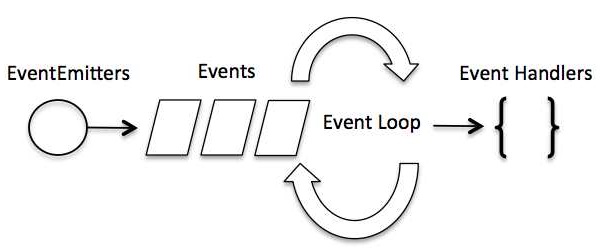
Node.js uses events heavily and it is also one of the reasons why Node.js is pretty fast compared to other similar technologies. As soon as Node starts its server, it simply initiates its variables, declares functions and then simply waits for the event to occur.
---
In an event-driven application, there is generally a main loop that listens for events, and then triggers a callback function when one of those events is detected.
---
Although events look quite similar to callbacks, the difference lies in the fact that callback functions are called when an asynchronous function returns its result, whereas event handling works on the observer pattern. The functions that listen to events act as Observers. Whenever an event gets fired, its listener function starts executing.
---
Node.js has multiple in-built events available through events module and EventEmitter class which are used to bind events and event-listeners as follows −
```
// Import events module
var events = require('events');
// Create an eventEmitter object
var eventEmitter = new events.EventEmitter();
// Bind event and event handler as follows
eventEmitter.on('eventName', eventHandler);
// Fire an event
eventEmitter.emit('eventName');
```
---

---
Michael
---
JavaScript is a 'Single Threaded' coding language.This means it has one call stack and one memory heap. It executes code in order and must finish executing a piece of code before moving onto the next.
---
On a deeper level, this also means there is one single "thread" that executes _everything_ on the page
---

---

---

---
The 'Event _Queue_' is like a to-do list of actions to be performed.
The 'Event _Loop_' is the single thread checking the queue and doing those actions until there's nothing left to do.
---

---

---
How the Event Loop handles Promises and setTimeout
---

---

---

---
- Main task
- MicroTask
- Task Queue
---
## Why should we prefer asynchronous code? What would happen if we had slow blocking code in our request handlers?
<img style="float: right;" src="https://media.giphy.com/media/2L1KmLRW5HOY9NRxqM/giphy.gif" width="300">
Mariya
---
<img style="float: right;" src="https://media.giphy.com/media/sAIkDl62pTDswX2NHT/giphy.gif" width="540">
- ### Blocking
- ### Non-Blocking
---
- When javascript execution in Node.js process has to wait until a non-javascript operation completes is called blocking. In general if we execute in Synchronous manner i.e one after another, we unnecessarily stop the execution of those code which is not depended on the one you are executing.
Non-Javascript execution refers to mainly Input/Output operations (communication between two processing systems). So, in the nutshell, I/O operations are blocking.
---
- Non-Blocking is the opposite of the blocking i.e. javascript execution do not wait until the non-javascript operation completes.
JavaScript is asynchronous in nature and so is Node. Asynchronous programming is a design pattern which ensures the non-blocking code execution.
---
### When writing asynchronous code we make that code non-blocking and the single threaded Javascript run with efficiency.
### This improves the system efficiency and throughput.
---
``` javascript
function doTask1(){
// do something here
}
function doTask2(){
// do something else here
}
// perform some task
doTask1()
doTask2()
```
###### In this example code doTask1() function executes first and after it returns then doTask2() function executes.
###### __This is not a blocking code in javascript__ even if doTask1 takes a long time before returning.
---
```javascript
function doTask1(){
const users = getAllUsers()
// do something with users here
}
function doTask2(){
const services = getAllServices()
// do something with services here
}
// perform some task
doTask1()
doTask2()
```
###### In this example, doTask1 internally calls getAllUser which makes the database connection and fetch the list of users.
###### Also, doTask2 internally calls getAllServices which makes an HTTP request to get the list of available services of some 3rd party through their API.
###### Here doTask2 will be __blocked__ till doTask1 returns because a single thread can execute only one thing at a time.
---
<img style="float: right;" src="https://media.giphy.com/media/fUqfaPVjiAQcfticZH/giphy.gif" width="540">
Now, do you want to know how Node.js converts this blocking calls into a non-blocking execution?
---
Node.js uses the __event loop__ and __callback__ mechanism to lift off I/O operations from the javascript's thread to the system's __kernel__.
Since most modern kernels are multi-threaded, they can handle multiple operations executing in the background concurrenlty. When one of these operations completes, the kernel notifies Node.js and then the appropriate callback is eventually executed.
https://www.ssla.co.uk/operating-system-kernel/
---
We can make the blocking code into non-blocking in Node.js using callbacks.
```javascript
function doTask1() {
const users = getAllUsers((err, data) => {
// do something with users here
})
}
function doTask2() {
const services = getAllServices((err, data) => {
// do something with services here
})
}
// perform some task
doTask1()
doTask2()
```
###### Here, getAllUsers and getAllServices now take callbacks.
###### These callbacks are then used by the Node.js and called when the Kernel is finished with the I/O operations.
---
If an error is thrown then it will have to be caught, else the process will crash.
In asynschronous version author is responsible for choosing the way of error handlling. We should always choose non-blocking version over the blocking varient of the function.
---
We know that callback function is called at the completion of a given task.
Node.js has some convention for this callback function:

---
1. ##### The callback is passed as the __last__ parameter to any function.
2. ##### The callback gets called __after__ the function is done with all of its operations.
3. ##### If there is an error, the first parameter is passed an __Error object__ with all the details. If there is no error then the first parameter is set to __null__ and rest being the return value.
```javascript
var isTrue = function(value, callback) {
if (value === true) {
callback(null, "Value was true.");
}
else {
callback(new Error("Value is not true!"));
}
}
```
---
That's why we should always prefer asynchronous code, because using a non-blocking approach gives superior performance over the synchronous scenario, and gives you more flexibility in structuring your code.
---
## How does Node use callbacks to manage asynchronous code?
Sevda
---
### Callbacks

---
<!-- You can't know when a user is going to click a button. So, you define an event handler for the click event. This event handler accepts a function, which will be called when the event is triggered:

This is the so-called callback. -->
Callbacks are great for simple cases!
However every callback adds a level of nesting, and when you have lots of callbacks, the code starts to be complicated very quickly:
<img src="https://i.imgur.com/WlJHRIy.png" alt="drawing" width="500"/>
---
:sparkles: **How do we solve this complication?**
---
Instead of the callback-hell, we can use promises to refactor our code, as we have already learned:
<img src="https://i.imgur.com/UbjACwD.png" alt="drawing" width="500"/>
---
### Let's take it a step further!
---
Rewrite it to use the ==_async_== and ==_await_== keywords:
---
The async/await keywords provide an alternative syntax when working with promises.
They allow you to structure your code in a way that is almost synchronous looking, saving us the ~~.then~~ chaining as well as ~~callbacks~~:
---

---
<img src="https://i.imgur.com/P3CFSzh.png" alt="drawing" width="400"/>
We define a function with the async keyword to tell JavaScript that it’s an asynchronous function that returns a promise.
Instead of having the result of a promise available in the then() method, the result is returned as a value using await keyword like in any other function.
---

---
[Node.js - Event Loop](https://www.tutorialspoint.com/nodejs/nodejs_event_loop.htm)
{"metaMigratedAt":"2023-06-15T22:44:06.830Z","metaMigratedFrom":"Content","title":"Node architecture","breaks":true,"contributors":"[{\"id\":\"7bfddbf1-39cc-46b1-8474-80064974de82\",\"add\":2145,\"del\":89},{\"id\":\"542fc42e-6a66-41fd-b72f-cf17ca2fb561\",\"add\":211,\"del\":125},{\"id\":\"44104ba4-c46e-4af8-85be-4db9698884e9\",\"add\":6149,\"del\":1206},{\"id\":\"7a5548f0-da55-4d05-a75d-a38212f27c1c\",\"add\":3755,\"del\":2073},{\"id\":null,\"add\":1051,\"del\":178}]"}