# 【GPT 翻譯】PLATiNA :: LAB 更新內容整理
文章更新:2024/05/01
<font color="#ff9900">這個顏色的是譯文</font>,<font color="#33cccc">我本身的補充則會用這個顏色</font>
------
# 【2025/04/16】Update Notice 更新通知
https://store.steampowered.com/news/app/3430470/view/512955189680932119
Thank you for your continued support of ‘PLATiNA :: LAB’.
We would like to inform you of the latest updates that will be applied after the service maintenance on Wed, April 16th.
<font color="#ff9900">感謝您一直以來對「PLATiNA :: LAB」的支持。
我們在此通知您,以下是將於 4 月 16 日(星期三)維護後應用的最新更新內容。</font>
## Update Details 更新內容
* (Settings) You can now manually set a key binding for [PITCH Notes] in the “KEYBINDINGS” tab.
<font color="#ff9900">【設定】現在可以在「鍵位設定」標籤頁中,手動設定【PITCH Notes】的快捷鍵。</font>
<font color="#33cccc">不用再綁定一定要 Enter 鍵才能觸發,爽度有但位置真的微妙</font>
* (Settings) You can now adjust the [Audio Delay Calibration] option in the “GAMEPLAY” tab in 1ms increments.
<font color="#ff9900">【設定】現在可以在「遊戲玩法」標籤頁中,以 1 毫秒(ms)為單位調整【音訊延遲校準】選項。</font>
<font color="#33cccc">更新前的機能是以 10ms 為單位調整,現在可以更細微講究</font>
* (Settings) The default settings for some options in the “GRAPHICS” tab have been changed.
<font color="#ff9900">【設定】「圖像」標籤頁中的部分預設設定已更改:</font>
* [V-Sync] : OFF
<font color="#ff9900">【垂直同步】:關閉</font>
* [Framerate Limit] : “Unlimted” (Before) → “144” (After)
<font color="#ff9900">【幀率限制】:由「無限制」改為「144」</font>
* (Settings) Fixed an issue where the ‘Duplicate Key Warning’ would not appear during key binding if the in-game language was set to Japanese.
<font color="#ff9900">【設定】修復了一個問題:當遊戲語言設為日文時,在綁定快捷鍵時不會顯示「按鍵重複警告」的錯誤。</font>
* (Single Play) Corrected the detailed artist credits for the songs “하이틴” and “ミライトコネクト” displayed on the [BOOTH] screen.
<font color="#ff9900">(單人模式)修正了歌曲《하이틴》和《ミライトコネクト》在【BOOTH】畫面中顯示的詳細藝術家資訊。</font>
* (Single Play) Updated the category label for the song “일상탈출” from ‘Entertain’ to ‘PLATiNA’.
<font color="#ff9900">(單人模式)將歌曲《일상탈출》的分類標籤從「Entertain」更改為「PLATiNA」。</font>
* (Single Play) An original background animation has been added to the song “하이틴”.
<font color="#ff9900">(單人模式)為歌曲《하이틴》新增了原創 BGA。</font>
* (Research Notes) Revised the content of certain missions included in notes “#0-1 Booting Up Part A” and “#0-2 Booting Up Part B”.
<font color="#ff9900">【研究筆記】調整了「#0-1 Booting Up Part A」和「#0-2 Booting Up Part B」筆記中的某些任務內容。</font>
<font color="#33cccc">研究筆記的解鎖任務會給兩個目標條件,其中一個達標就算完成
現在解鎖難度大幅簡化,前期高評價好拿、後期轉去拼打歌次數
只要 5 次左右就能達標,可惜更新前已經通通解完了 (</font>
> After the update, the progress of some missions may be displayed incorrectly, such as “4/3” upon first login. However, after playing the game at least once, the progress will be correctly updated.
> <font color="#ff9900">更新後,首次登入時可能會看到進度異常顯示,例如「4/3」,但遊玩一次遊戲後會正常更新進度。</font>
>
> In cases where the mission progress method undergoes significant changes, the progress status of the mission will be reset. However, the completion status of the unlock elements in the Research Note will not be reset.
> <font color="#ff9900">若任務的進度條件變化較大,該任務的進度會被重置,但研究筆記中已解鎖項目的完成狀態不會被重置。</font>
>
> The original design of the missions was to allow players to unlock content by progressing through the full tracklist of the game. However, this ultimately led to an excessive burden for completing individual missions, resulting in a negative gameplay experience. Therefore, we have improved the overall direction of the missions to allow for a more comfortable unlocking process compared to before. The unlocking experience is something we hold in high regard, and we will continue to make every effort to ensure that you have an enjoyable experience in the future.
> <font color="#ff9900">原本的任務設計需玩家完整遊玩曲目清單才能解鎖內容,但這樣反而造成完成單一任務的負擔,影響了遊戲體驗。為了改善,我們調整了整體任務方向,使解鎖過程更輕鬆。我們非常重視解鎖體驗,未來也將持續努力帶來更愉快的遊玩感受。</font>
* (P.A.T.C.H.) Fixed an issue where the UI would display incorrectly when switching to a LINES mode tab with no registered songs in the “P.A.T.C.H. Target Song Info.” screen.
<font color="#ff9900">【P.A.T.C.H.】修正了在「P.A.T.C.H. 目標歌曲資訊」畫面中切換到沒有註冊歌曲的LINES模式時,UI顯示錯誤的問題。</font>
* (P.A.T.C.H.) Fixed an issue where the font of the “P.A.T.C.H. Total Points” number displayed at the top right of the mode select and song select screens (within ‘Single Play’ mode) did not match.
<font color="#ff9900">【P.A.T.C.H.】修正了「單人模式」中模式選擇與歌曲選擇畫面右上角顯示的「P.A.T.C.H. 總分」字體不一致的問題。</font>
* Fixed a typo in the UI when the in-game language was set to Japanese.
<font color="#ff9900">修正了一個日文語言下的UI錯字:</font>
* “パタン” (Before) → “パターン” (After)
<font color="#ff9900">「パタン」(原)→「パターン」(修正後)</font>
* Updated the number of PITCH Notes in the 4LINES PLUS(+13) pattern of “MEGALOVANIA (Camellia REMIX)”.
<font color="#ff9900">更新了「MEGALOVANIA (Camellia REMIX)」在 4LINES PLUS(+13) 譜面中的PITCH音符數量。</font>
> This change was made to fix an issue where certain missions in the Research Notes could not be completed as intended. This was done without affecting the intrinsic difficulty of the patterns or the fairness of ranking inclusion. Therefore, existing personal records for the affected patterns will not be reset.
> <font color="#ff9900">此變更是為了解決某些研究筆記任務無法正確完成的問題,並不會影響譜面本身的難度或排行榜公平性,因此受影響譜面的原有個人紀錄不會被重置。</font>
>
> We fully understand that modifying patterns during live service is a highly sensitive matter that can significantly affect player experience. We will handle such changes with utmost care to minimize the likelihood of similar cases occurring in the future. We sincerely ask for your understanding.
> <font color="#ff9900">我們理解在營運期間修改譜面是一件非常敏感的事情,會嚴重影響玩家體驗。我們會非常謹慎處理這類變更,盡可能避免類似情況再次發生,感謝您的理解。</font>
* Adjusted the judgment interval and related effects applied when holding long notes in certain patterns.
<font color="#ff9900">調整了部分譜面中長按音符的判定區間與相關效果。</font>
Following this update, we are planning to provide a subsequent update in the near future, which will include changes such as addition of circular notes and fixes for ASIO-related issues. We kindly ask for your continued interest and support.
<font color="#ff9900">在這次更新之後,我們計劃在不久的將來提供後續更新,內容將包括新增環形音符以及修復與 ASIO 相關的問題。我們誠摯地邀請您持續關注並支持我們。</font>
We will continue to do our best to provide an even better gaming experience.
Thank you.
<font color="#ff9900">我們將持續努力,為您帶來更優質的遊戲體驗。
謝謝您!</font>
------
# 【2025/04/24】Update Notice 更新通知
https://store.steampowered.com/news/app/3430470/view/528718979655532618

Thank you for your continued support of ‘PLATiNA :: LAB’.
We would like to inform you of the latest updates that will be applied on Thu, April 24th.
<font color="#ff9900">感謝您一直以來對「PLATiNA :: LAB」的支持。
我們將於 4 月 24 日(週四)進行以下更新,特此通知您。</font>
## Update Details 更新內容
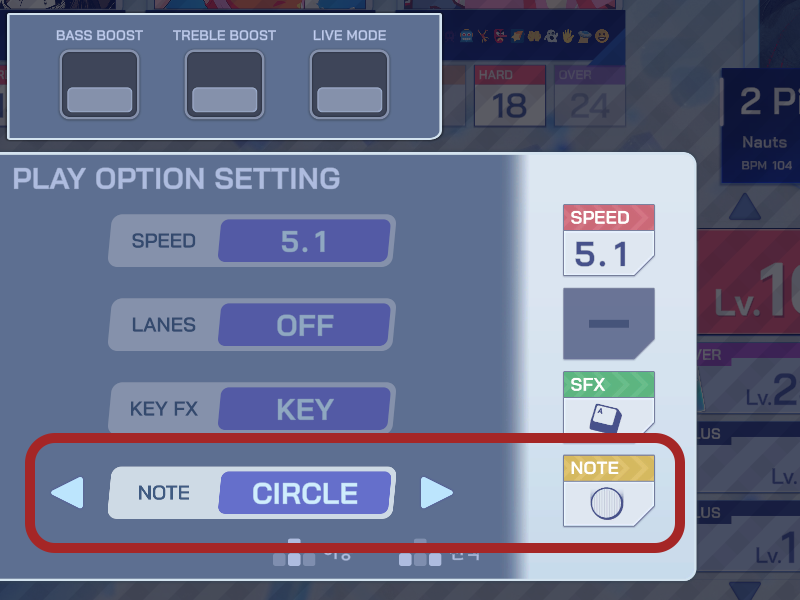
* (Single Play) A new feature to customize the "Note Skin" has been added. Following this update, players can choose between two default skins available for selection:
<font color="#ff9900">(單人遊玩)新增「Note Skin」自訂功能。此次更新後,玩家可以在兩款預設外觀中選擇一種使用:</font>
* 'BAR' (Bar Design <font color="#ff9900">條狀設計</font>)
* 'CIRCLE' (Circular Design <font color="#ff9900">圓形設計</font>)
<font color="#33cccc">新增第二種 Notes 造型</font>
* (Single Play) Improved the functionality so that background animation (BGA) brightness settings adjusted via the [PageUp] and [PageDown] keys during gameplay are now consistently applied across all songs.
<font color="#ff9900">(單人遊玩) 優化了 BGA 亮度調整功能,現在在遊玩時透過 [PageUp] 和 [PageDown] 鍵所調整的亮度設定將會一致套用至所有歌曲中。</font>
<font color="#33cccc">BGA 亮度調整優化</font>
* (Single Play) Fixed an issue where frame drops occurred during background animation (BGA) playback when playing certain songs in specific environments.
<font color="#ff9900">(單人遊玩)修正了在特定環境中遊玩某些歌曲時,BGA 播放時出現畫面掉幀的問題。</font>
* (Single Play) Fixed an issue where the judgment count on the result screen was incorrectly displayed such as ‘12345’.
<font color="#ff9900">(單人遊玩)修正了結算畫面中評價次數顯示異常(例如顯示為「12345」)的問題。</font>
* (Single Play) Corrected the information display for certain songs.
<font color="#ff9900">修正部分歌曲的資訊顯示:</font>
* “world.execute(me);” – Updated the artist name.
<font color="#ff9900">更新了演出者名稱。</font>
*“Wolfsbane” – Revised the “Visualized by” credit displayed on the [BOOTH] screen.
<font color="#ff9900">修正了在 [BOOTH] 畫面中顯示的 “Visualized by” 字樣。</font>
* (Single Play) Adjusted the infrasound balance of the sound effect that plays during section clear animations.
<font color="#ff9900">(單人遊玩)調整了區段過關動畫中的音效低頻平衡。</font>
* (Research Notes) Fixed an issue where the descriptive notation for certain missions in Research Notes was incorrectly displayed in all language environments. The content of the missions themselves remains unchanged.
<font color="#ff9900">【研究筆記】修正了在所有語言環境下,部分任務描述顯示不正確的問題。任務內容本身未作更動。</font>
* (Select a DB) Fixed an issue where the shading around the eyes in Roro's standing illustration was not applied as intended.
<font color="#ff9900">【選擇 DB 角色】修正在 Roro 站立插畫中,眼睛周圍陰影未正確顯示的問題。</font>
* Fixed an issue where the shading on the right eye of Airing's Live2D model was not rendering correctly.
<font color="#ff9900">修正在 Airing 的 Live2D 模型中,右眼陰影無法正確渲染的問題。</font>
* Refined the highlight effect design for the currently selected item in the “Sort Options” menu, accessible via the button in the upper right of the [P.A.T.C.H. Target Song Info] screen.
<font color="#ff9900">優化了 [P.A.T.C.H. 目標歌曲資訊] 畫面右上角按鈕進入的「排序選項」選單中,當前選取項目的高亮效果設計。</font>
* Fixed an issue where certain images were intermittently not displayed correctly on the blue background loading screens used throughout the game.
<font color="#ff9900">修正在遊戲中使用的藍色背景載入畫面中,部分圖片偶爾未正確顯示的問題。</font>
We will continue to do our best to provide an even better gaming experience.
Thank you.
<font color="#ff9900">我們將持續努力,為您帶來更優質的遊戲體驗。
謝謝您!</font>
------
# 【2025/05/01】Update Notice 更新通知
https://store.steampowered.com/news/app/3430470/view/528718979655533032
Thank you for your continued support of “PLATiNA :: LAB”.
We would like to inform you of the latest updates that will be applied after the service maintenance on Thu, May 1st.
<font color="#ff9900">感謝您一直以來對《PLATiNA :: LAB》的支持。
我們在此通知您,以下更新將於 2025 年 5 月 1 日(週四)維護作業結束後套用:</font>
## New Content Added 新增內容
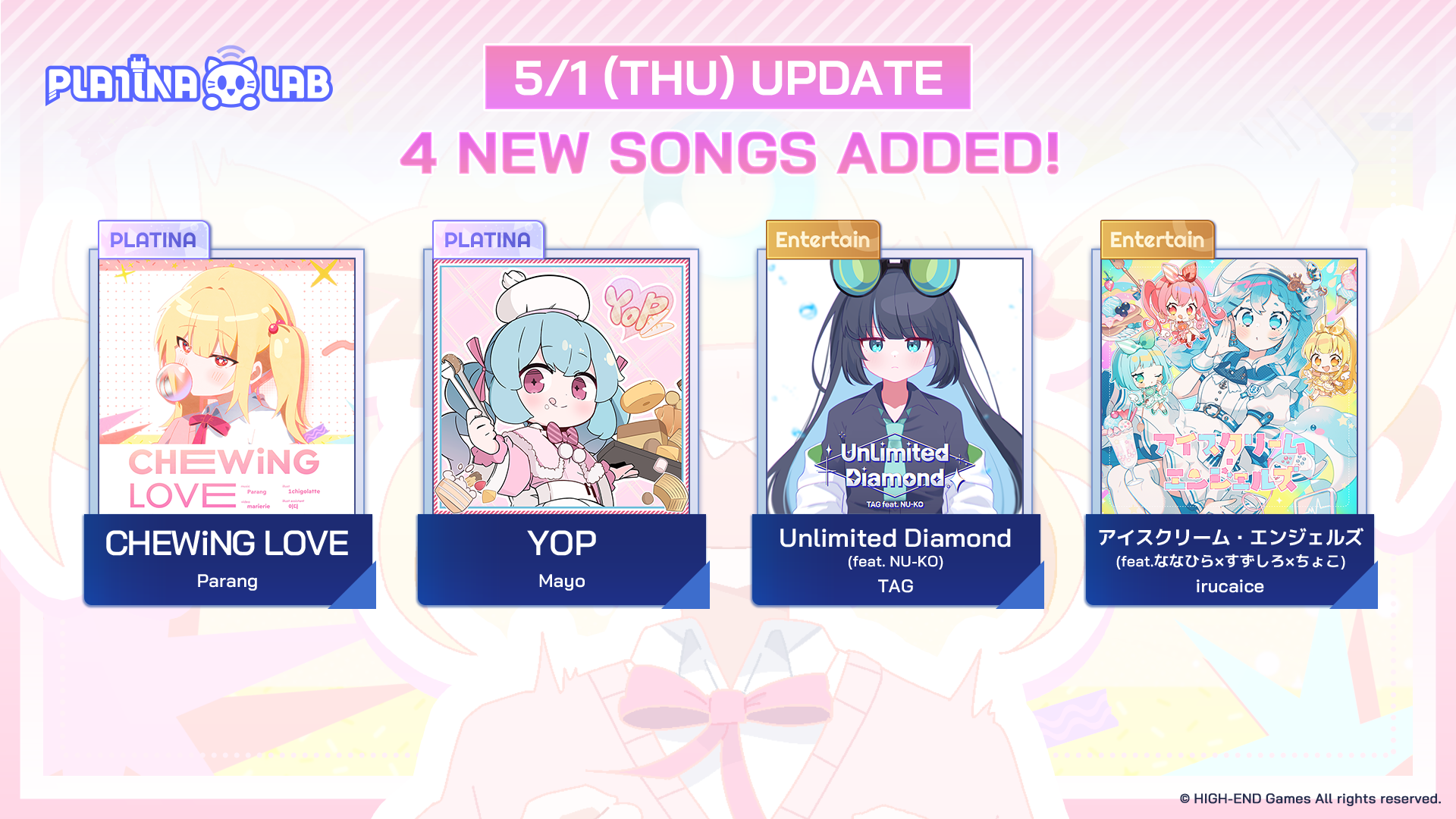
* The following new songs have been added:
<font color="#ff9900">新增樂曲如下:</font>
* Standard Songs
<font color="#ff9900">標準樂曲</font>
* 「CHEWiNG LOVE」 by Parang
* 「YOP」 by Mayo
* Unlockable Songs via “Research Notes”
<font color="#ff9900">透過「研究筆記」解鎖的樂曲</font>
* 「Unlimited Diamond」 by TAG
* 「アイスクリーム・エンジェルズ」 by irucaice
* The following new ‘Research Notes’ entry has been added:
<font color="#ff9900">新增研究筆記項目如下:</font>
* 「PLATiNA SELECTION 1」 : Includes two new unlockable songs.
<font color="#ff9900">內含兩首可解鎖樂曲。</font>
## Improvements 功能改善
* (Single Play) You can now press the [F5] key on the result screen to quickly restart the track.
<font color="#ff9900">【單人遊玩】現在可在結算畫面按下 [F5] 鍵快速重新開始曲目。</font>
* (Single Play) The design of the “NEW RECORD” banner displayed on the result screen has been improved.
<font color="#ff9900">【單人遊玩】結算畫面中「NEW RECORD」橫幅的設計已改善。</font>
* (Single Play) The timing at which you can skip result screen animations has been adjusted to occur earlier.
<font color="#ff9900">【單人遊玩】可略過結算動畫的時間點已提前,操作更便利。</font>
* (Single Play) Sound effect settings (BASS BOOST, TREBLE BOOST, LIVE MODE) will now persist even after exiting the game.
<font color="#ff9900">【單人遊玩】音效設定(低音加強、高音加強、現場模式)將在退出遊戲後保持不變。</font>
* (Single Play) Improvements have been made to overall game loading times.
<font color="#ff9900">【單人遊玩】整體遊戲載入時間已優化。</font>
* (Single Play) Certain text displayed on the song selection screen in the English language setting has been revised.
<font color="#ff9900">【單人遊玩】英語語言設定下,曲目選擇畫面中的部分文字已修正。</font>
* Fixed an issue where some keystrokes would work even when the game window was disabled.
<font color="#ff9900">修正了即使遊戲視窗非啟用狀態下某些按鍵仍會觸發的問題。</font>
## Bug Fixes 錯誤修正
* (Single Play) Fixed an issue where function keys such as [F8], [Page Up], and [Page Down] would still respond while the “Settings” popup (opened via [F10]) was active on the song selection screen.
<font color="#ff9900">【單人遊玩】修正了當「設定」視窗(使用 [F10] 開啟)在曲目選擇畫面開啟時,[F8]、[Page Up]、[Page Down] 等功能鍵仍會有反應的問題。</font>
* (Single Play) Fixed an issue where NumPad key inputs did not function correctly during gameplay when assigned in key settings and used in combination with the [Shift] key.
<font color="#ff9900">【單人遊玩】修正了將數字鍵盤與 [Shift] 組合使用時,無法正確操作的問題。</font>
* (Single Play) Fixed an issue where pressing the [F5] key for a quick restart at certain timings during gameplay would cause the game to start with one note already hit.
<font color="#ff9900">【單人遊玩】修正了在特定時機使用 [F5] 快速重啟時,曲目開頭會自動判定一個音符為已點擊的問題。</font>
* (Single Play) Fixed an issue where key inputs would not respond when switching the game window focus using [Alt]+[Tab], [Win] key, or similar actions.
<font color="#ff9900">【單人遊玩】修正了使用 [Alt]+[Tab]、[Win] 鍵等方式切換視窗焦點後,按鍵輸入會失效的問題。</font>
* (Single Play) Fixed an issue where some text would not display correctly during the “P.A.T.C.H. Rank Up” animation on the result screen.
<font color="#ff9900">【單人遊玩】修正了結算畫面中「P.A.T.C.H. Rank Up」動畫期間部分文字無法正確顯示的問題。</font>
* (Single Play) Fixed an issue where the BGM and the preview audio of the unlocked song would overlap when switching the game window focus before the “Song Unlock” animation on the result screen.
<font color="#ff9900">【單人遊玩】修正了在「歌曲解鎖」動畫開始前切換視窗焦點時,背景音樂與預覽音訊重疊播放的問題。</font>
* (Research Notes) Fixed an issue where pressing the [Space] Key while focusing on a completed entry would prompt a confirmation popup asking if the user wanted to proceed with that entry.
<font color="#ff9900">【研究筆記】修正了聚焦於已完成項目時按下 [Space] 鍵,會出現「是否要執行此項目」確認視窗的問題。</font>
* (Research Notes) Fixed an issue where the jacket image displayed would not change when focusing on the “PLUS” difficulty on the difficulty selection screen in Mission Track.
<font color="#ff9900">【研究筆記】修正了在任務曲目的難度選擇畫面中,聚焦於「PLUS」難度時,封面圖(Jacket Image)未正確切換的問題。</font>
* (Research Notes) Fixed an issue where the Mission Track’s preview audio would overlap with the original BGM when the track was stopped mid-play.
<font color="#ff9900">【研究筆記】修正了在任務曲目中途停止播放時,預覽音效與原本的背景音樂(BGM)會重疊播放的問題。</font>
* (P.A.T.C.H.) Fixed an issue where the scroll position of the list would remain unchanged when switching tabs (4LINES/6LINES) in the “Target Song Info” popup menu.
<font color="#ff9900">【P.A.T.C.H.】修正了在「目標樂曲資訊」彈出視窗切換頁籤(4LINES/6LINES)時,列表捲動位置未更新的問題。</font>
We sincerely appreciate your continued support for “PLATiNA :: LAB”.
<font color="#ff9900">誠摯感謝您持續支持《PLATiNA :: LAB》。</font>
------
 Sign in with Wallet
Connect another wallet
Sign in with Wallet
Connect another wallet