# HTTPS
[TOC]
## What is HTTPS
- **HTTP over TLS(Transport Layer Security)**
- **SSL(Secure Sockets Layer)**, and its successor **TLS** were designed to provide channel-oriented security.
- HTTPS uses the SSL/TLS protocol to encrypt communications so that attackers can't easily steal data.
- Connection Initiation
- The agent acting as the HTTP client should also act as the TLS client.
- Send the **TLS ClientHello** to begin the **TLS handshake**.
- All HTTP data MUST be sent as **TLS "application data"**.
:::warning
- [**RFC 2818 - TLS handshake**](https://datatracker.ietf.org/doc/html/rfc2246#section-7)
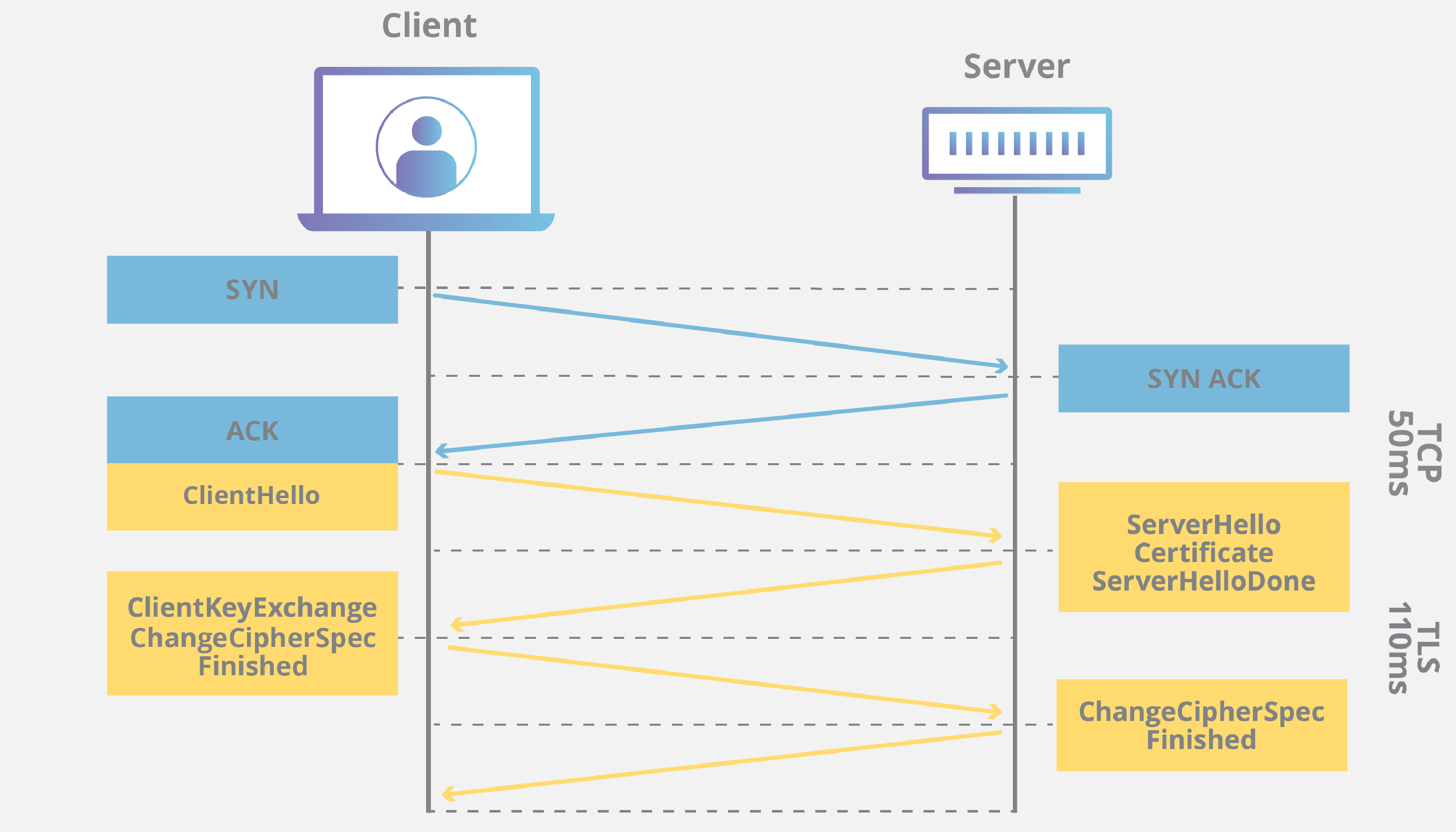
- TLS handshakes **occur after a TCP connection has been opened** via a TCP handshake.
- During a TLS handshake, the two communicating sides exchange messages to **acknowledge and verify** each other, **establish the encryption algorithms** they will use, and **agree on session keys**.
- All TLS handshakes make use of **asymmetric encryption** (the public and private key)
> But not all will use the private key in the process of generating session keys.
> See more in Article[2]
:::
- Connection Closure
- TLS implementations MUST **initiate an exchange of closure alerts** before closing a connection.
### Steps of TLS Connection
1. **client hello**
- The client initiates the handshake by sending a "hello" message to the server.
- The message will include
- **TLS version** the client supports
- The **cipher suites** supported
> A list for server to choose
- A string of random bytes known as the "**client random**"
:::info
- **Cipher Suite**
- A cipher suite is a set of encryption algorithms for use in establishing a secure communications connection.
:::
2. **server hello**
- In reply to the client hello message, the server sends a message to the client.
- The message will include
- The server's **SSL certificate**
- The server's **chosen cipher suite**
- The "**server random**" another random string of bytes that's generated by the server
3. **Authentication**
- **The client verifies the server's SSL certificate** with the certificate authority that issued it.
- This confirms that **the server is who it says it is**, and that the client is interacting with **the actual owner of the domain**.
4. **The premaster secret**
- The **client sends** one more random string of bytes, the "premaster secret".
- **The premaster secret is encrypted with the public key and can only be decrypted with the private key by the server.**
> The client gets the public key from the server's SSL certificate.
5. **Private key used**
- The server decrypts the premaster secret.
6. **Session keys created**
- Both client and server generate session keys from
- the client random
- the server random
- the premaster secret
> Both should arrive at the same results.
7. Client is ready
- The client sends a "**finished**" message that is **encrypted with a session key**.
8. Server is ready
- The server sends a "**finished**" message **encrypted with a session key**.
9. Secure symmetric encryption achieved
- The handshake is completed, and communication continues using the session keys.
## Why use HTTPS
- Nowadays, most of browsers mark all HTTP websites as "not secure".
- With HTTPS, data is encrypted in transit in both directions: going to and coming from the origin server.
> Sensitive data like usernames and passwords can't be stolen in transit when users enter them into a form.
- It represents external verification by a trustworthy third party that a web server is who it claims to be.
## Port 443
- Because the expected first data are different between HTTP and HTTPS, the separate port is needed.
- When HTTP/TLS is being run over a TCP/IP connection, the default port is 443.
### URI
- **Uniform Resource Identifier**
#### URL
- **Location** of resource in the host(domain) which client specified to visit.
- Usually the path of the file in that host.
```
file:///home/username/RomeoAndJuliet.pdf
```
#### URN
- **Name**
- The defined identity of that resource.
```
urn:ISBN 0-395-36341-1
```
## Reference
### Official
1. [Wikipedia - HTTPS](https://en.wikipedia.org/wiki/HTTPS)
2. [RFC 2818 - HTTP Over TLS](https://datatracker.ietf.org/doc/html/rfc2818)
3. [RFC 8555 - Automatic Certificate Management Environment (ACME)](https://datatracker.ietf.org/doc/html/rfc8555)
### Article
1. [Cloudflare - What is HTTPS?](https://www.cloudflare.com/learning/ssl/what-is-https/)
2. [Why use HTTPs](https://www.cloudflare.com/learning/ssl/why-use-https/)
3. [Cloudflare - What happens in a TLS handshake?](https://www.cloudflare.com/zh-tw/learning/ssl/what-happens-in-a-tls-handshake/)
4. [Let's Encrypt - How it eorks](https://letsencrypt.org/zh-tw/how-it-works/)
 Sign in with Wallet
Connect another wallet
Sign in with Wallet
Connect another wallet