README 작성 완료했습니다😆
팀원: idinaloq🐥, Mary🐿️
https://github.com/MaryJo-github/ios-box-office/blob/II-step2/README.md
# README.md
# 🎬 Box Office
## 🍀 소개
> `idinaloq`와 `Mary`가 만든 박스오피스 입니다.
영화진흥위원회 API를 활용하여 일일 박스오피스 조회 및 영화 개별 상세 조회를 진행합니다.
사용자에게 날짜를 입력받아 해당 날짜의 박스오피스를 보여주고, 클릭하면 영화의 상세 정보를 보여줍니다.
* 주요 개념: `JSON Decoder`, `URLComponents`, `URLSession`, `Fetching Website Data into Memory`, `escaping closure`, `completionHandler`, `UICollectionView`, `refreshControl`, `URLRequest`, `UICalendarView`, `Dynamic Type`, `delegate pattern`, `Navigation ToolBar`, `DateInterval`
<br>
## 📖 목차
[1. 팀원](#-팀원) <br>
[2. 시각화된 프로젝트 구조](#-시각화된-프로젝트-구조) <br>
[3. 실행 화면](#-실행-화면) <br>
[4. 고민했던 점](#-고민했던-점) <br>
[5. 트러블 슈팅](#-트러블-슈팅) <br>
[6. 타임라인](#-타임라인) <br>
[7. 참고 링크](#-참고-링크) <br>
<br>
## 👨💻 팀원
| **idinaloq** | **Mary** |
| :------: | :------: |
|<Img src = "https://user-images.githubusercontent.com/109963294/235301015-b81055d2-8618-433c-b680-58b6a38047d9.png" width = "200" height="200"/> | <img src="https://i.imgur.com/8mg0oKy.jpg" width="150"> |
|[<img src="https://hackmd.io/_uploads/SJEQuLsEh.png" width="20"/> **GitHub**](https://github.com/DasanKim) |[<img src="https://hackmd.io/_uploads/SJEQuLsEh.png" width="20"/> **GitHub**](https://github.com/MaryJo-github)
<br>
## 👀 시각화된 프로젝트 구조
### Class Diagram
<p>
<img width="700" src="https://hackmd.io/_uploads/rkJX-P3hn.jpg">
</p>
<br>
### File Tree
```
.
├── BoxOffice
│ ├── Model
│ │ ├── Dapi
│ │ │ └── KakaoAPI.swift
│ │ ├── DateManager.swift
│ │ ├── Kobis
│ │ │ ├── KobisOpenAPI.swift
│ │ │ └── KobisServiceType.swift
│ │ └── DataTransferObject
│ │ ├── DailyBoxOffice
│ │ │ ├── BoxOffice.swift
│ │ │ ├── BoxOfficeResult.swift
│ │ │ └── DailyBoxOffice.swift
│ │ ├── MovieInformation
│ │ │ ├── DetailInformation.swift
│ │ │ ├── MovieInformation.swift
│ │ │ └── MovieInformationResult.swift
│ │ └── ImageSearch
│ │ ├── Document.swift
│ │ └── ImageSearch.swift
│ ├── View
│ │ ├── Base.lproj
│ │ │ └── LaunchScreen.storyboard
│ │ ├── DailyBoxOfficeCollectionViewGridCell.swift
│ │ ├── DailyBoxOfficeCollectionViewListCell.swift
│ │ ├── LoadingView.swift
│ │ └── MovieInformationScrollView.swift
│ ├── Controller
│ │ ├── CalendarViewController.swift
│ │ ├── DailyBoxOfficeViewController.swift
│ │ └── MovieInformationViewController.swift
│ ├── Network
│ │ └── NetworkService.swift
│ └── protocol
│ │ ├── CalendarDelegate.swift
│ │ └── URLSessionProtocol.swift
│ ├── Error
│ │ ├── NetworkError.swift
│ │ ├── StringError.swift
│ │ └── URLError.swift
│ ├── Extension
│ │ ├── Array+.swift
│ │ ├── CALayer+.swift
│ │ ├── String+.swift
│ │ └── URLSession+.swift
│ ├── Application
│ │ ├── AppDelegate.swift
│ │ └── SceneDelegate.swift
│ ├── Resource
│ │ ├── Assets.xcassets
│ │ └── Info.plist
└── BoxOfficeTests
└── BoxOfficeTests.swift
```
<br>
## 💻 실행 화면
**추가 예정**
|실행 화면|
|:--:|
|<img src="https://s3.ap-northeast-2.amazonaws.com/media.yagom-academy.kr/resources/usr/63e1b1ad324ce85b6f356cee/20230818/64df031545e6bf50b2f4346d.gif" width="300">|
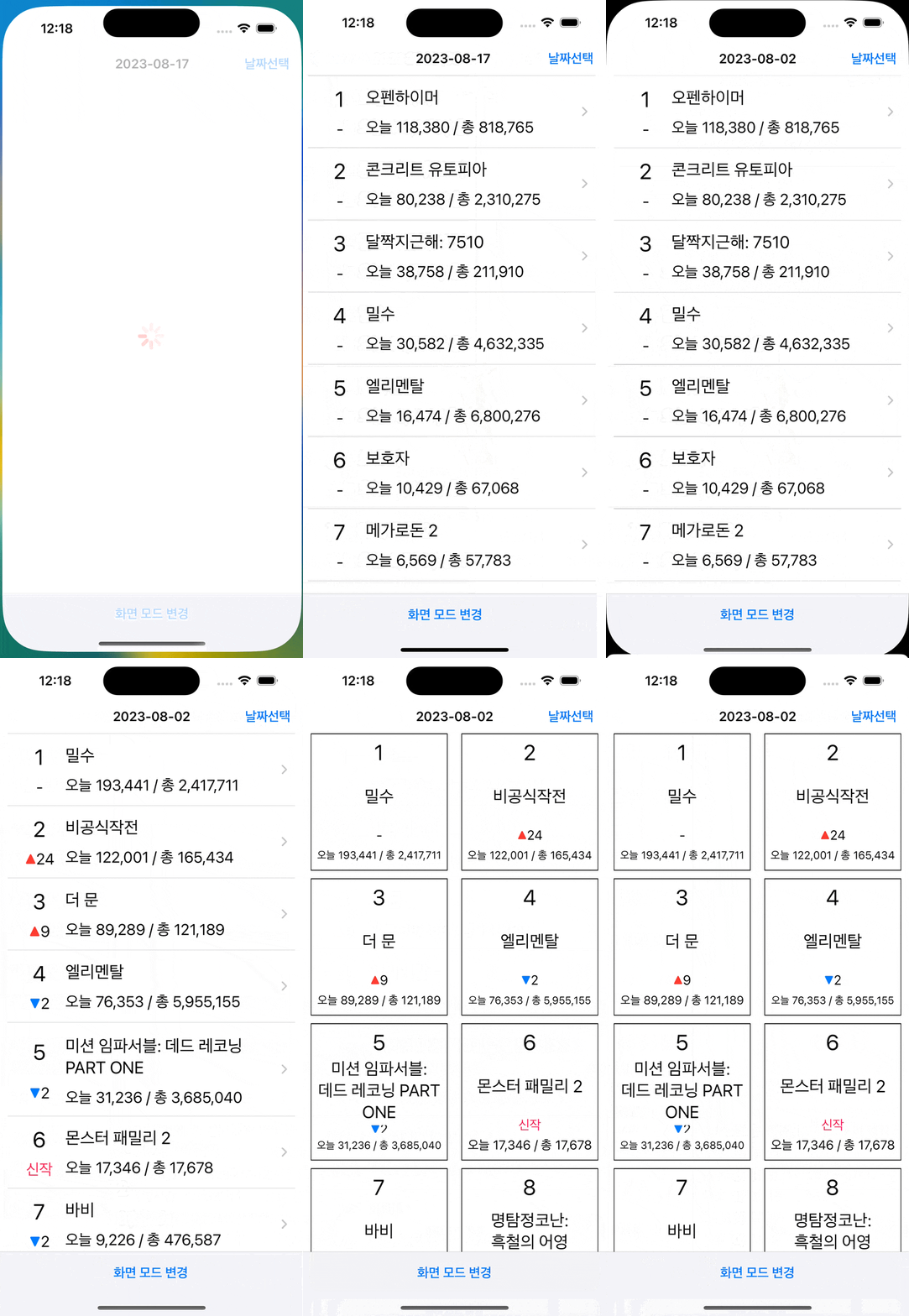
</br>
## 🧠 고민했던 점
### 1️⃣ Nested Data Parsing
- 영화진흥위원회 API 문서를 확인해보니 다음과 같이 데이터가 여러번 중첩되어있는 형태였습니다. 이와같이 복잡한 형태를 가진 데이터의 DTO는 어떻게 만들어야할지 고민하였습니다.
```json
{
"boxOfficeResult": {
"boxofficeType": "일별 박스오피스",
"showRange": "20220105~20220105",
"dailyBoxOfficeList": [
{
"rnum": "1",
"rank": "1",
...
},
{
"rnum": "1",
"rank": "1",
...
},
...
]
}
}
```
- [공식문서](https://developer.apple.com/documentation/foundation/archives_and_serialization/using_json_with_custom_types#3540681)를 참고하여 다음과 같이 여러개의 DTO타입을 만들어주어 해결하였습니다.
```swift
struct BoxOffice: Decodable {
let boxOfficeResult: DailyBoxOffice
}
struct DailyBoxOffice: Decodable {
let boxOfficeType: String
let showRange: String
let dailyBoxOfficeList: [MovieInformation]
...
}
struct MovieInformation: Decodable {
let rowNumber: String
let rank: String
let rankChangeValue: String
...
}
```
### 2️⃣ 실패하는 Test case
- 성공하는 테스트 케이스가 아닌, 실패하는 케이스에 대해서도 다음과 같이 작성을 했습니다.
- 실패하는 테스트케이스는 특정 기능이 제대로 작동하지 않는지를 확인하는 데 도움이 되기 때문이라고 생각했습니다.
```swift
func test_boxofficesample프로퍼티와_DailyBoxOffice프로퍼티가다르면_파싱에실패한다() {
let test = try? JSONDecoder().decode(BoxOffice.self, from: dataAsset)
...
//then
XCTAssertNil(test)
}
```
### 3️⃣ Completion Handler
- `fetchData(url: URL, completion: @escaping NetworkResult)`메서드에서 `dataTask()`메서드로 데이터를 비동기로 가져와도 반환할 때는 비동기적으로 데이터를 넘겨주지 않는것을 확인했습니다.
- `completion Handler`인 `escaping closure`를 사용해서 비동기로 데이터를 반환할 수 있었습니다.
### 4️⃣ Deployment target version
- `tableViewCell`을 사용할 때 `accessory`타입의 `.disclosureIndicator`를 활용해서 각각의 셀에 `>`모양을 표시했습니다. 하지만 `UICollectionViewCell`은 해당 기능이 없었고, 검색해 본 결과 `UICollectionViewListCell`이 있었습니다. 하지만 이는 **iOS14**부터 지원합니다.
- 사용자에게 날짜를 입력받을 때 `UICalendarView`를 활용하라는 요구사항이 있었고, 이는 **iOS16**부터 지원합니다.
- 처음에 만들어진 프로젝트의 버전은 **iOS13**이며, 위 두 기능은 기존 버전보다 높아서 사용할 수 없었습니다.
- 처음에는 기존 프로젝트 설정 그대로 가려고 했지만, 프로젝트에서 요구사항에는 `iOS`버전에 대한 이야기가 없었습니다. 찾아본 결과 공식페이지에 [iOS점유율](https://developer.apple.com/kr/support/app-store/)을 확인하는 곳이 있었고 아이폰의 81%가 **iOS16**을 사용하고 있다는 통계를 찾았고 이것이 저희가 버전을 수정하려는 이유가 될 수 있다고 생각했기 때문에 프로젝트 버전을 **iOS16**으로 변경하였습니다.
### 5️⃣ 여러개의 비동기 작업 끝나는 시점
- `MovieInformationViewController`클래스에서 `receiveImageData()`메서드와 `receiveBoxOfficeData()` 메서드에서 비동기로 데이터를 처리하고 있습니다.
- 뷰가 업데이트가 되는 시점(로딩뷰가 사라지는 시점)이 두 비동기 작업 처리가 끝날 때 이루어져야 하기 때문에 해당 시점을 어떻게 알 수 있을지 고민하였습니다.
- 결과적으로 프로퍼티 값의 변화를 관찰할 수 있는 `프로퍼티 옵저버`를 활용하였습니다.
- 완료된 task의 개수를 셀 `completionCount` 프로퍼티를 생성하여 각 task가 끝날 때 `completionCount` 값을 1 증가시킵니다.
- `completionCount` 값의 변화가 있을 때마다 완료된 task가 2개인지 확인합니다. 해당 조건이 true이면 로딩 뷰가 사라지도록 설정했습니다.
``` swift
private var completionCount: Int = 0 {
didSet {
if completionCount == 2 {
loadingView.hide()
}
}
}
private func receiveBoxOfficeData() {
guard let urlRequest = receiveBoxOfficeURLRequest() else { return }
networkService.fetchData(urlRequest: urlRequest) { result in
switch result {
case .success(let data):
self.decodeBoxOfficeData(data)
self.updateScrollView()
self.completionCount += 1
case .failure(let error):
print(error.localizedDescription)
}
}
}
```
### 6️⃣ ViewController 데이터 전달
- `CalendarViewController`에서 사용자가 선택한 날짜에 따라 BoxOffice를 업데이트하기위해 날짜를 전달해야했습니다.
`CalendarDelegate` 프로토콜을 활용하여 `CalendarViewController`에서 날짜가 변경되었을 때 `DailyBoxOfficeViewController`의 `updateBoxOffice(date: Date)`메서드를 호출하도록 구현하였습니다.
```swift
protocol CalendarDelegate: AnyObject {
func updateBoxOffice(date: Date)
}
final class DailyBoxOfficeViewController: UIViewController {
...
extension DailyBoxOfficeViewController: CalendarDelegate {
func updateBoxOffice(date: Date) {
targetDate = date
receiveData()
setNavigationTitle()
}
}
...
}
final class CalendarViewController: UIViewController {
weak var delegate: CalendarDelegate?
...
}
extension CalendarViewController: UICalendarSelectionSingleDateDelegate {
func dateSelection(_ selection: UICalendarSelectionSingleDate, didSelectDate dateComponents: DateComponents?) {
guard let date = dateComponents?.date else { return }
delegate?.updateBoxOffice(date: date)
dismiss(animated: true)
}
}
```
<br>
## 🧨 트러블 슈팅
### 1️⃣ testable한 코드
⚠️ **문제점** <br>
- 서버에 데이터를 요청할 때 여러 개의 URLSession객체를 만들 필요가 없다고 생각하여 URLSession.shared를 사용하였습니다.
- 하지만 아래와 같은 구조면 네트워크 무관 테스트를 진행하고싶을 때, Session을 주입받는 형태가 아니기 때문에 실제로 통신을 하지 않는 가짜 session으로 변경할 수 없어 테스트가 불가능하였습니다.
``` swift
enum NetworkManager {
typealias NetworkResult = (Result<Data, NetworkError>) -> Void
static func fetchData(url: URL, completion: @escaping NetworkResult) {
let task = URLSession.shared.dataTask(with: url) { data, response, error in
...
}
}
}
```
✅ **해결방법** <br>
- session을 주입받는 형태로 변경하면서 네트워크 무관 테스트가 가능해졌습니다.
- 기본값을 shared 싱글톤으로 설정하여 불필요한 URLSession 객체 생성을 방지했습니다.
``` swift
class NetworkManager {
typealias NetworkResult = (Result<Data, NetworkError>) -> Void
let session: URLSessionProtocol
init(session: URLSessionProtocol = URLSession.shared) {
self.session = session
}
func fetchData(url: URL, completion: @escaping NetworkResult) {
let task = session.dataTask(with: url) { data, response, error in
...
}
}
}
```
### 2️⃣ reusable, massive type
- 코드를 작성하면서 항상 고민했던 점은 코드의 재사용성과 관련된 부분 이였습니다. 기존에는 재사용성에만 중점을 두었기 때문에 결국 해당 타입을 가져다 쓰기 위해 관리하는 타입의 크기가 관리할 수 없을정도로 커질 가능성이 있었습니다.
⚠️ **문제점** <br>
**기존코드**
```swift
enum QueryItem {
static let targetDate: String = "targetDt"
static let itemPerPage: String = "itemPerPage"
static let multiMovie: String = "multiMovieYn"
static let nationCode: String = "repNationCd"
static let widewAreaCode: String = "wideAreaCd"
static let movieCode: String = "movieCd"
static let key: String = "key"
static let value: String = "c824c74a1ff9ed62089a9a0bcc0d3211"
}
```
- 기존 코드는 같은 API 타입을 재사용하기 위해 따로 관리를 하기위한 열거형이 있었습니다. 예를들어 `targetDt`는 `targetDate`를 나타내기 위함이였습니다. 하지만 API가 많아지고 그에따라 관리해야되는 쿼리도 많아지게 된다면 추후에 관리가 어려워 질 수 있는 문제가 있다고 생각했습니다.
✅ **해결방법** <br>
**현재코드**
```swift
struct KobisOpenAPI {
...
private enum APIKey {
static let key: String = "key"
static let value: String = "c824c74a1ff9ed62089a9a0bcc0d3211"
}
private enum Components {
static let scheme: String = "http"
static let host: String = "www.kobis.or.kr"
static let path: String = "/kobisopenapi/webservice/rest"
}
}
```
- 쿼리 값들 중 `value` 같은 값을 제외하고 나머지 값들은 리터럴하게 사용하도록 수정했고, 공통으로 사용할 API타입이 아닌 하나의 API타입을 만들고 그 안에에서 고정적인 값 들만 열거형으로 사용하도록 다음과 같이 수정을 했습니다.
- 이와 같은 방식으로 수정해서 공통적으로 사용되는 값을 여러번 쓸 필요 없게 되었고, 관리해야되는 코드의 양도 줄일 수 있게 되었습니다.
<br>
### 3️⃣ cell 재사용으로 인한 text 색상 문제
⚠️ **문제점** <br>
- 영화 순위 등락을 표시하는 `rankChangeValueLabel`은 등락에 따라 텍스트의 색상을 변경해주었습니다. 첫 실행화면은 정상적으로 보여지지만, 화면을 아래로 드래그하여 새로고침을 하거나, `collectionView`를 아래로 스크롤하면 다음과 같이 색상이 잘못 나타나는 현상이 발생하였습니다.
<img width="300" src="https://user-images.githubusercontent.com/42026766/258487087-fd4cf6dd-9219-4239-9770-590c08e8fa05.png">
✅ **해결방법** <br>
- 해당 문제는 셀을 재사용하기 전에 초기화를 해주지 않았기 때문에 발생한 문제였습니다. `UICollectionViewCell`의 `prepareForReuse`메서드를 오버라이딩하여 `Label`의 `text`와 `textColor`를 초기화 해줌으로써 문제를 해결하였습니다.
```swift
override func prepareForReuse() {
super.prepareForReuse()
rankLabel.text = nil
titleLabel.text = nil
visitorLabel.text = nil
rankChangeValueLabel.text = nil
rankChangeValueLabel.textColor = nil
}
```
<br>
## ⏰ 타임라인
|날짜|내용|
|:--:|--|
|2023.07.24.(월)|일별 박스오피스를 담을DailyBoxOffice타입 생성<br> BoxOfficeTest 추가|
|2023.07.25.(화)|STEP1 PR작성|
|2023.07.26.(수)|영화 상세정보를 담을 DetailInformation타입 생성<br>APIConstants타입 구현|
|2023.07.27.(목)|MovieService타입 생성<br> APIConstants타입 구조변경<br> MovieService테스트코드 작성|
|2023.07.28.(금)|전체적인 리팩토링<br> README작성|
|2023.07.31.(월)| completion handler 구현 및 오류 처리|
|2023.08.01.(화)|APIConstants+삭제<br>APIConstants타입 이름변경<br>Error 연관값 추가 및 네이밍 수정<br>의존성 주입을 위해 URLSessionProtocol 추가<br>KobisOpenAPI의 QueryKey 타입 삭제<br>URLError 타입 생성|
|2023.08.02.(수)|NetworkService타입에 final 키워드 추가|
|2023.08.03.(목)|StoryBoard 삭제 및 CollectionView 생성<br>커스텀 셀 DailyBoxOfficeCollectionViewCell 타입 추가<br>Cell 추가 및 autolayout 설정<br>Date+ 추가|
|2023.08.04.(금)|README작성|
|2023.08.07.(월)|폴더 구조 변경<br>리팩토링|
|2023.08.08.(화)|array subscript구현<br>동적cell구현<br>MovieInformation스크롤뷰, MovieInformation뷰컨트롤러 추가 및 데이터 다운로드 처리부 구현|
|2023.08.09.(수)|이미지 다운로드, 다운로드 된 이미지 뷰에 표시하도록 추가|
|2023.08.10.(목)|loadingView구현<br> 에러타입 추가<br> 컨벤션 수정|
|2023.08.11.(금)|README작성|
|2023.08.14.(월)|UICalendarView추가<br>ViewController 추가<br>날짜 변경 기능 구현<br>파일분할 및 코드 리팩토링|
|2023.08.16.(수)|화면모드 변경기능 추가<br>다이나믹타입 적용<br>컨벤션 리팩토링|
|2023.08.18(금)|README작성|
## 📚 참고 링크
- [🍎 Apple Docs: `JSONDecoder`](https://developer.apple.com/documentation/foundation/jsondecoder)
- [🍎 Apple Docs: `URLComponents`](https://developer.apple.com/documentation/foundation/urlcomponents)
- [🍎 Apple Docs: `URLSession`](https://developer.apple.com/documentation/foundation/urlsession)
- [🍎 Apple Docs: `Fetching Website Data into Memory`](https://developer.apple.com/documentation/foundation/url_loading_system/fetching_website_data_into_memory)
- [🍎 Apple Docs: `dataTask with completionHandler`](https://developer.apple.com/documentation/foundation/urlsession/1410330-datatask?changes=_8)
- [🍎 Apple Docs: `refreshControl`](https://developer.apple.com/documentation/uikit/uirefreshcontrol)
- [🍎 Apple Docs: `URLRequest`](https://developer.apple.com/documentation/foundation/urlrequest)
- [🍎 Apple Docs: `UICollectionView`](https://developer.apple.com/documentation/uikit/uicollectionview)
- [🍎 Apple Docs: `UICalendarView`](https://developer.apple.com/documentation/uikit/uicalendarview)
- [🍎 Apple Docs: `DateInterval`](https://developer.apple.com/documentation/foundation/dateinterval)
- [🍎 Apple Docs: `UIToolbar`](https://developer.apple.com/documentation/uikit/uitoolbar)
- [🌐 Blog: `escaping closure`](https://jusung.github.io/Escaping-Closure/)
- [🌐 Blog: `iOS 서버통신 연결하기`](https://vanillacreamdonut.tistory.com/254)
- [🌐 Blog: `subscript`](https://limjs-dev.tistory.com/104)
- [🌐 Blog: `Dynamic Type`](https://limjs-dev.tistory.com/103)
<br>
## 👥 팀 회고
### 칭찬할 부분
- 코드를 작성함에 있어서 왜 그렇게 하는것이 좋은지, 개선할 부분이 있을지에 대해 계속해서 토론, 토의한 점
- apple 공식문서를 많이 참고한 점
- 적용해야할 기술이 많아 프로젝트 방향성이 흐려졌을 때 외부에 도움을 구한 점
### 아쉬웠던 부분
- 프로젝트에 집중하여 개인공부 시간을 많이 갖지 못했던 점
### 서로에게 하고 싶은 말
- To. Mary
- 한 달 동안 고생 많으셨습니다. 이번에 코드 리뷰어 신청하셨던데 도움이 필요할 때 언제든지 연락 주시면 마음껏 참견하겠습니다 😄
- To. idinaloq
- 가장 어렵고 빡센(?) 프로젝트였던 것 같은데 이디나로크와 함께해서 잘 마무리했던 것 같습니다. 고생하셨습니다! (⬆️ 연락드리겠습니다😁)
---
 Sign in with Wallet
Connect another wallet
Sign in with Wallet
Connect another wallet