# Shape Component Proposal
## Use cases
- Developers should be able to apply `Shape` metrics to views.
- Metrics:
- `square`
- `borderRadiusSmall`
- `borderRadiusMedium`
- `borderRadiusLarge`
- We should provide a UIView extension to apply these `Shape` metrics
- (!) We should ask designers to change the `Shape` metric naming in the Cookbook documentation to be more generic (`borderRadius8` -> `borderRadiusSmall`)
- Developers should be able to build views with fully rounded corners and circular views.
- We should provide UIView subclasses as components to accomplish this. Using a subclass approach (as opposed to applying a metric) will make it easier to support views that resize or animate
- `FullyRoundedCornerView`
- `CircleView`
- We should support custom layout margins on these UIView subclasses. This will make it easier to layout content inside of the view.
- Circular views will always maintain a circular shape, regardless of the view's dimensions
- Developers should be able to apply `Shape` to specific corners of a view.
- Developers should be able to apply a corner radius curve on iOS 13 and above.
- `CALayer.cornerCurve`
- Objc will not be explicitly supported.
- (Nice to have) Developers should be able to instantiate `Shape` instances with JSON
- (Nice to have) Render images from `Shape` to support `UIImage`-only interfaces in UIKit
## States & Transitions
The `Shape` component has some simple state transitions and lifecycle events.
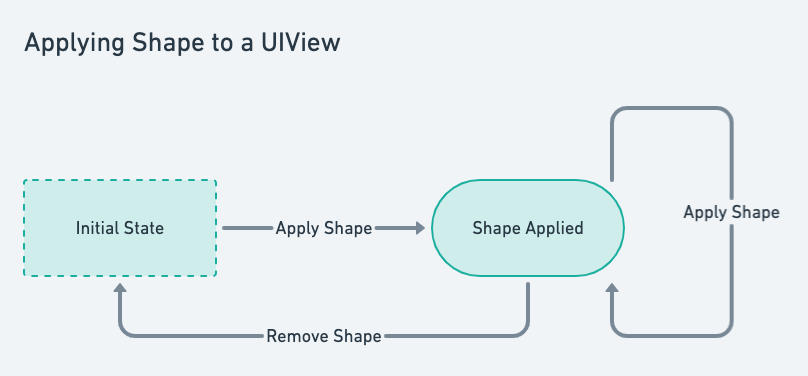
### Applying Metrics
view has no shape -> apply shape -> remove shape
### `FullyRoundedCornerView` States
- can be resized
- content can be constrainted to layout margins
### `CircleView` States
- can be resized, but doesn't change aspect ratio of circle
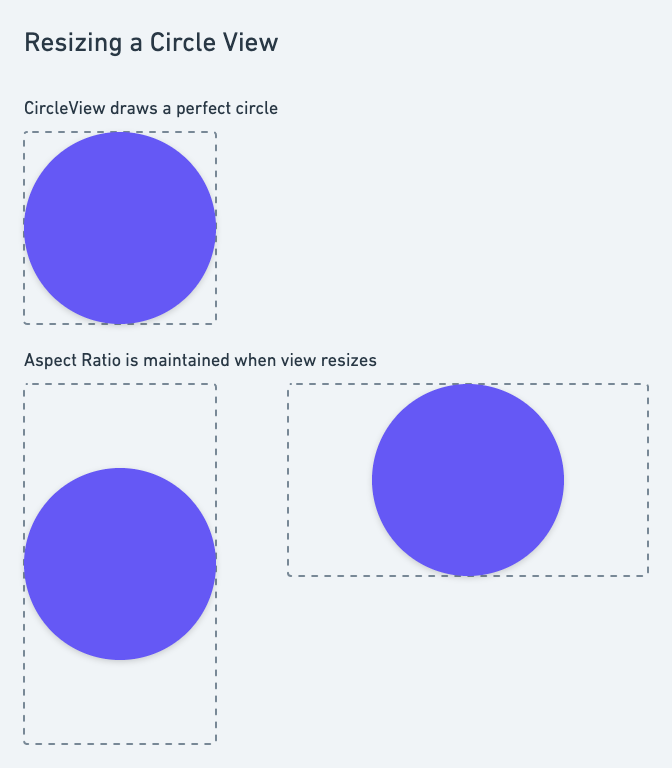
- content can be constrainted to layout margins
### `FullyRoundedCornerView` & `CircleView` Lifecycle
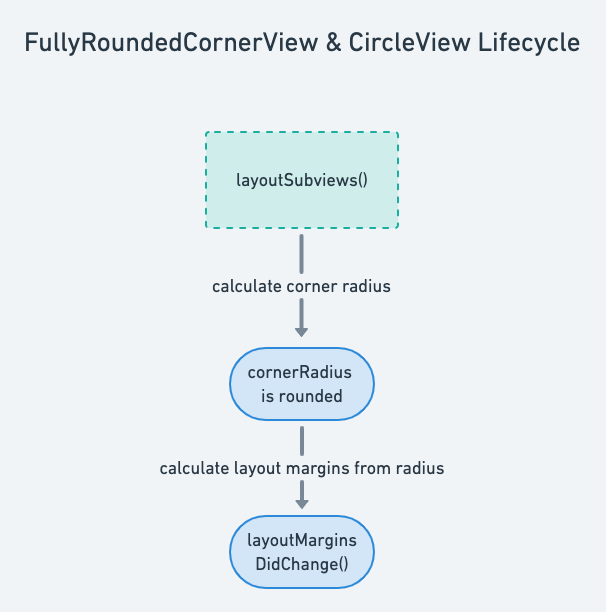
## Demonstration Plans
To demonstrate the `Shape` component, we will display all of the shape metrics that can be applied, and the `UIView` subclasses that will be provided.
iOS 13 Support
- For all of the examples, have a toggle to switch between corner curve types.
Metrics
- For each metric, show a view that has the metric applied
- For at least one metric, show a view that has the metric applied to specific corners
- For at least one pair of metrics, show that the metrics can be animated.
FullyRoundedCornerView
- Show a rounded corner view with some content pinned to its custom layout margins.
- Show an example of animating the bounds of the rounded corner view.
CircleView
- Show a circle view with some content pinned to its custom layout margins.
- Show an example of animating the bounds of the circle view.
- Emphasis on the fact that the circle does not change aspect ratio, even as its containing view does
## Accessibility
There are no substantial accessibility concerns for `Shape`.
## Architecture
The architecture for the `Shape` component will closely follow the use cases.
### Applying Metrics
- We will provide a `Shape` object to hold shape metric data.
(!) Talk to designers about why this is called borderRadius and not cornerRadius (confusing for iOS)
```swift
struct Shape {
let square: ShapeMetric
let borderRadiusSmall: ShapeMetric
let borderRadiusMedium: ShapeMetric
let borderRadiusLarge: ShapeMetric
}
struct ShapeMetric {
let cornerRadius: CGFloat
let cornerCurve: CALayerCornerCurve?
}
```
- `ShapeMetrics` can be copied with changes for specific use cases
```swift
extension ShapeMetric {
@available(iOS 13, *)
func metric(with cornerCurve: CALayerCornerCurve) -> ShapeMetric { }
}
```
- We will provide an extension for UIView/CALayer to apply metrics to specific corners of a view.
```swift
extension UIView {
func applyShape(_ metric: ShapeMetric, usingCorners corners: UIRectCorner) { ... }
}
extension CALayer {
func applyShape(...)
}
// example
someView.applyShape(shape.borderRadiusSmall, usingCorners: [.topLeft, .topRight])
```
- Users will be able to remove shape metrics by applying the `.square` metric to a view.
```swift
UIView.applyShape(shape.square)
```
- We will support the iOS 13 `CALayer.cornerCurve` property.
```swift
if #available(iOS 13.0, *) {
layer.cornerCurve = shape.cornerCurve
}
```
### FullyRoundedCornerView and CircleView
Developers will be able to use the `FullyRoundedCornerView` and `CircleView` to create custom user interfaces (either by subclasses or by including compositionally).
```swift
class FullyRoundedCornerView : UIView {
public var roundedCorners: UIRectCorner { ... }
override func layoutSubviews() {
// cornerRadius will be updated to maintain fully rounded corners
cornerRadius = ...
// layoutMargins will be updated to match corner radius
layoutMargins = ...
layoutMarginsDidChange()
}
}
// Developers will access instances of FullyRoundedCornerView
extension Shape {
func makeRoundedCornerView() -> FullyRoundedCornerView
}
// For iOS 13 support, cornerCurve is observed and applied by the view
let roundedCornerView = FullyRoundedCornerView()
roundedCornerView.layer.cornerCurve = .continuous
```
```swift
class CircularView : UIView {
override func layoutSubviews() {
// cornerRadius will be updated to maintain a perfect circle shape
cornerRadius = ...
// layoutMargins will be updated to match corner radius
layoutMargins = ...
layoutMarginsDidChange()
}
}
```
#### Layout Margins
Custom layout margins will be provided by `FullyRoundedCornerView` and `CircleView`, so that developers can constraint subviews to those margins using `UIView.layoutMargins` or `UIView.layoutMarginsGuide`.
Layout margins will be calculated such that content added to one of these views will not enter the "rounded" area near the corners.
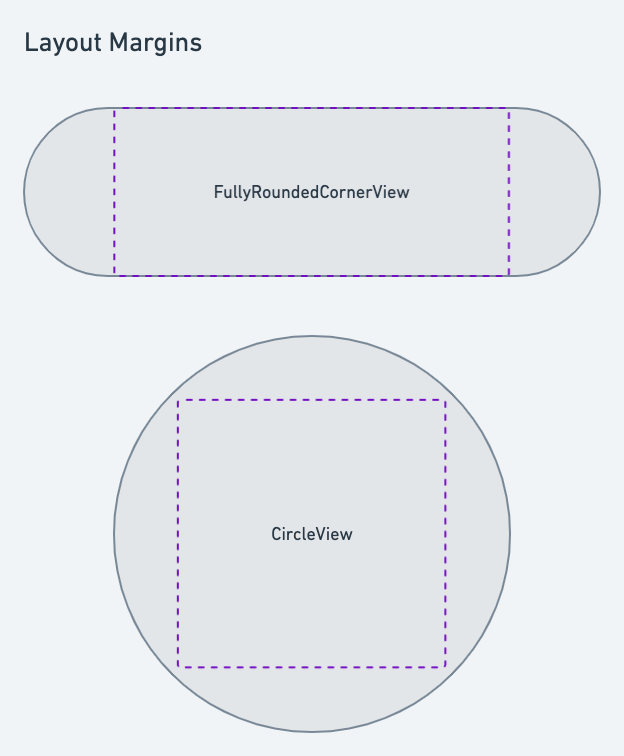
- (!) Need to investigate how `UIView.layoutMarginsDidChange` (and other methods) can be used to properly react to a change in the views size, and to integrate with other margin related methods.
 Sign in via Google
 Sign in via Facebook
 Sign in via X(Twitter)
 Sign in via GitHub
 Sign in via Dropbox
 Sign in with Wallet
Connect another wallet
Sign in with Wallet
Connect another wallet