---
type: slide
---
# Auth
in the Future
---
# 怎麼會想挑這題目
- [WWDC passkeys](https://youtu.be/PIXzFo3WfL4?t=102)
- build on WebAuthentication(WebAuth) and FIDO2
- works on multiple Device / browsers
- combine with keychain
- available to share keys
---
# 密碼為何爛
- 基於人腦的缺陷,人相對容易使用同一組密碼於各個地方
**然後一洩露就爆了**
- 所以設定多組密碼比較好
**然後你就會記錄在各個地方,增加你的洩露機率:)**
- 生物識別?相對較好
**但如果儲存生物資訊的資料庫被入侵,也一樣爆,畢竟你不能換臉或換指紋**
----
# 目前主流方法
- 2FA
- OTP
---
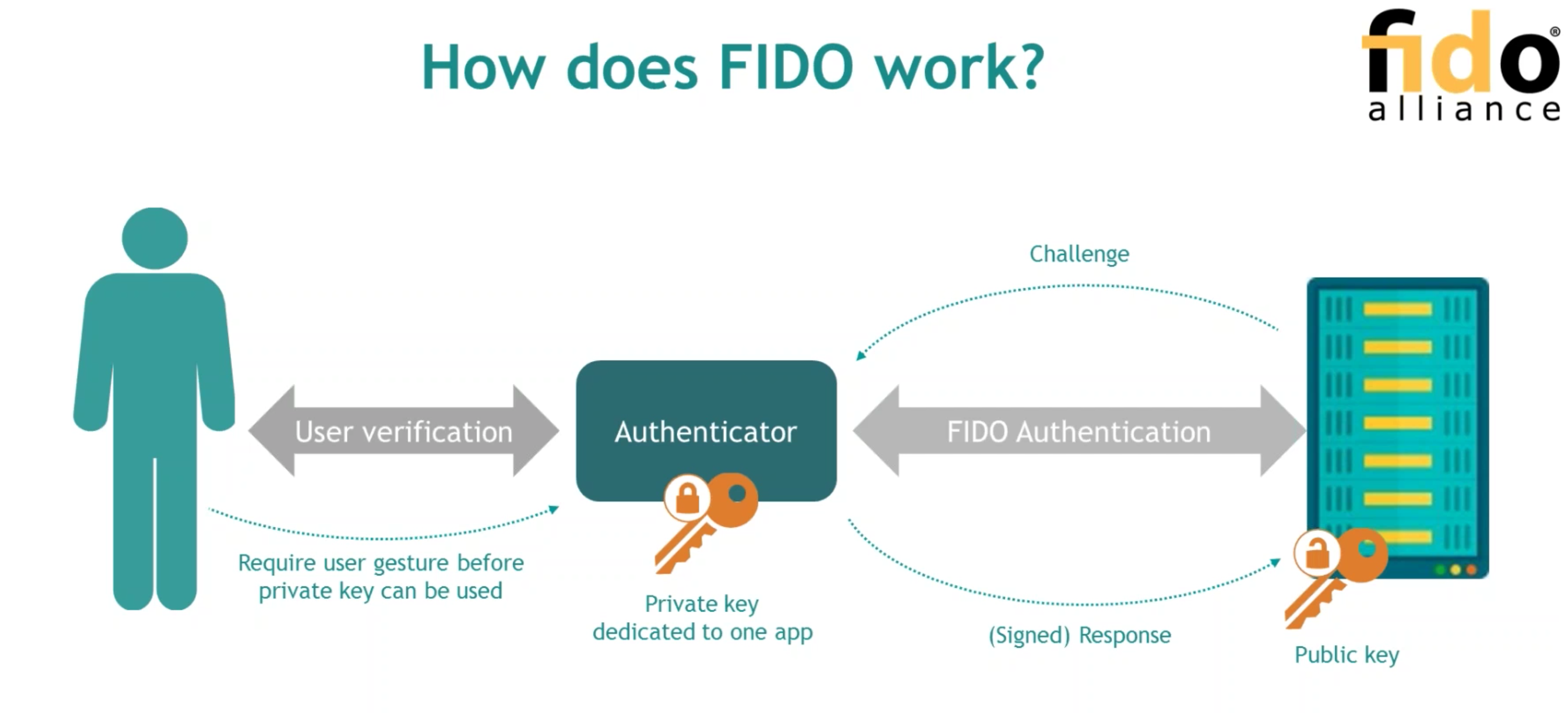
# FIDO
Fast IDentity Online (since 2007)
https://fidoalliance.org/
- found by Validity Sensors / Paypal / Lenovo...
- 非對稱加密+多重因素驗證(MFA)& 生物辨識
----
----
# 3 Specifications
- U2F (CTAP1)
- UAF
- FIDO2
----
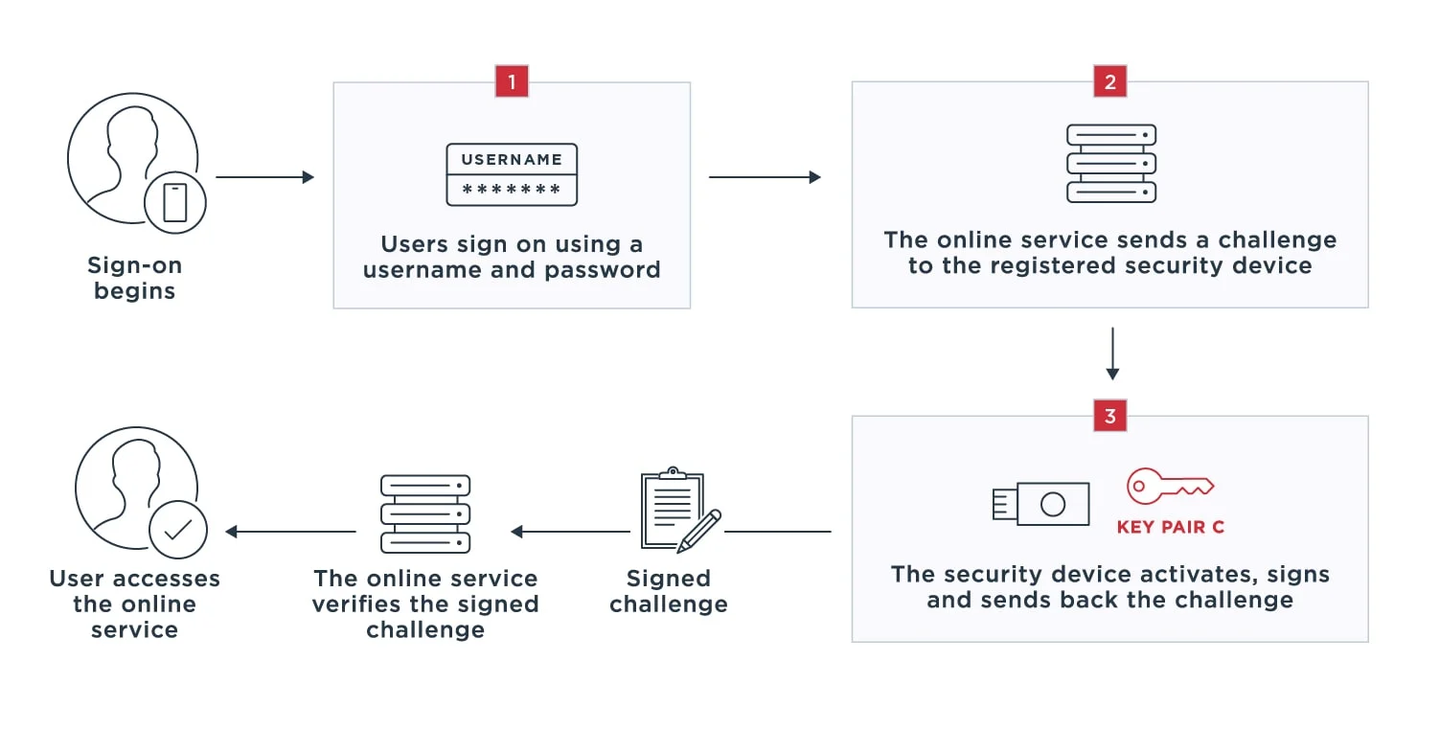
# U2F
**Universal Second Factor**
use additional factor to prove, enhance the security of login (like 2FA)
- NFC
- BLE(bluetooth Low Energy)
- USB device
----
# U2F
----
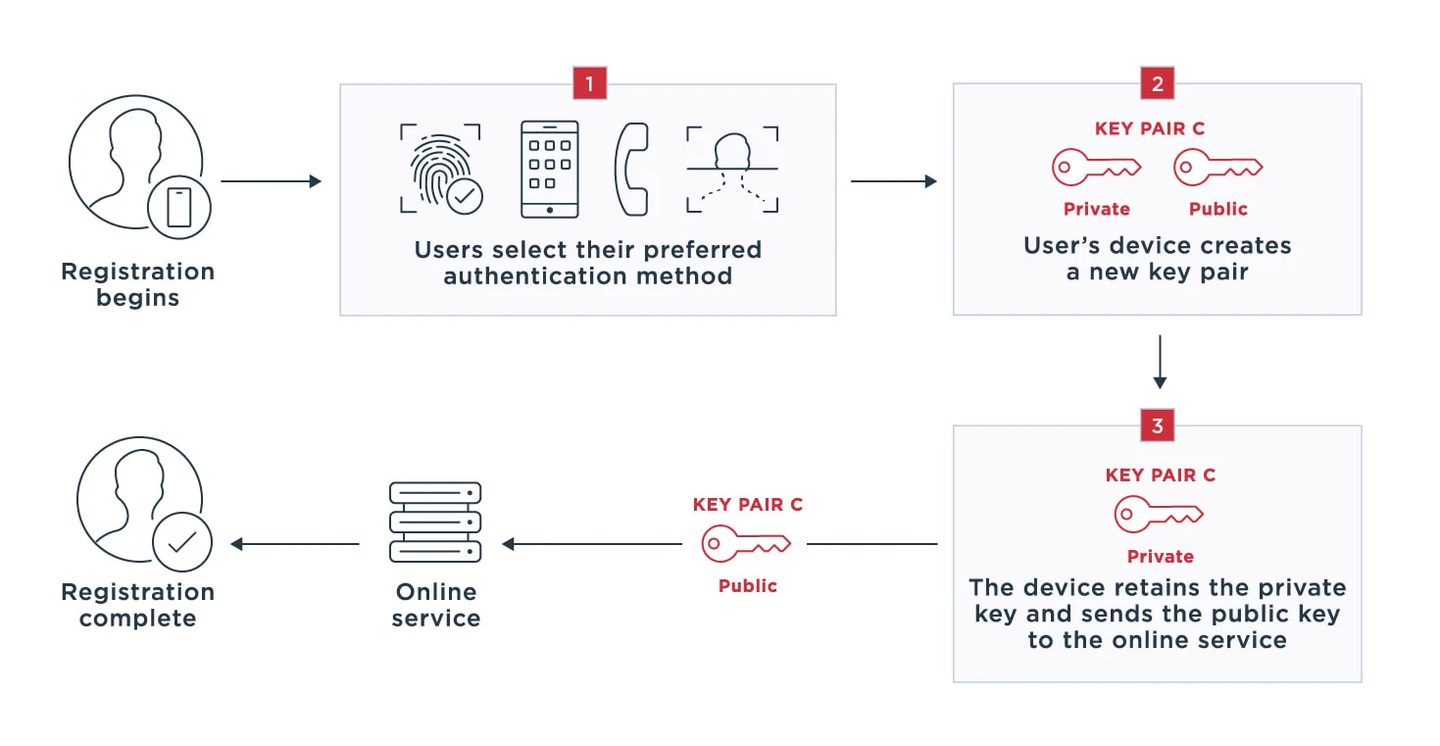
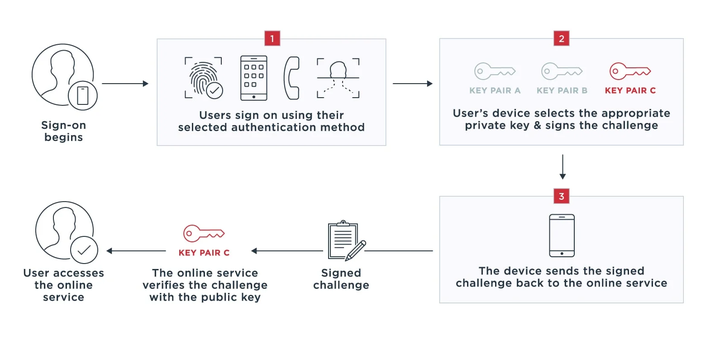
# UAF
**Universal Authentication Framework**
use a device with UAF stack installed
- finger recognition
- face recognition
- voice recognition
- enter pin
- ...
----
# UAF
register
----
# UAF
login
----
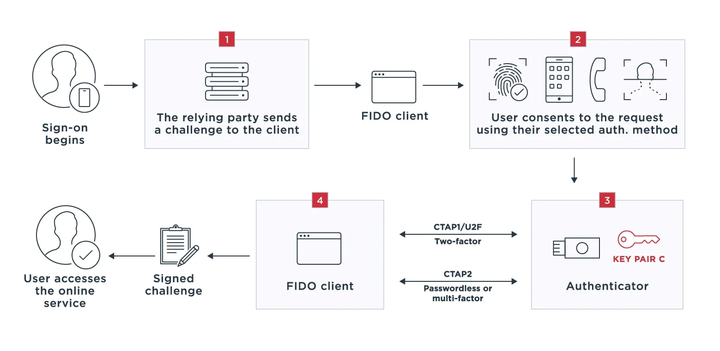
# FIDO2
- WebAuthn - web api
- CTAP - Client To Authenticator Protocols
- CTAP2
- CTAP1(U2F)
---
# Web Authentication

----
### 註冊流程
- server 發送 publicKeyCredentialCreationOptions 到 client,內容包含 challenge / user info / relying party info ...
- 透過 navigator.credentials.create 創建一個 credential
- api 回傳 credentail
----

----
server
```js
const challenge = new Uint8Array(32);
window.crypto.getRandomValues(challenge);
const userID = 'Kosv9fPtkDoh4Oz7Yq/pVgWHS8HhdlCto5cR0aBoVMw=';
const id = Uint8Array.from(window.atob(userID), c=>c.charCodeAt(0));
const publicKeyCredentialCreationOptions = {
challenge,
rp: {
name: "Tech Bridge",
// id: "techbridge.inc",
},
user: {
id,
name: "arvin@techbridge.cc",
displayName: "Arvin",
},
pubKeyCredParams: [{alg: -7, type: "public-key"}],
authenticatorSelection: {
// authenticatorAttachment: "platform",
},
timeout: 60000,
attestation: "direct"
};
```
----
client
```js
const credential = await navigator.credentials.create({
publicKey: publicKeyCredentialCreationOptions
});
// credentail return a Promise
PublicKeyCredential {
id: 'ADSUllKQmbqdGtpu4sjseh4cg2TxSvrbcHDTBsv4NSSX9...',
rawId: ArrayBuffer(59),
response: AuthenticatorAttestationResponse {
clientDataJSON: ArrayBuffer(121),
attestationObject: ArrayBuffer(306),
},
type: 'public-key'
}
```
----
### 登入流程
- server 發送 publicKeyCredentialCreationOptions 到 client,內容包含 challenge / user info / relying party info ...
- 透過 navigator.credentials.get 創建一個 credential
- api 回傳 credentail
----

----
server
```js
cconst challenge = new Uint8Array(32);
window.crypto.getRandomValues(challenge);
const publicKeyCredentialRequestOptions = {
challenge,
allowCredentials: [{
id: credentialId, // from registration
type: 'public-key',
transports: ['usb', 'ble', 'nfc'],
}],
timeout: 60000,
}
const assertion = await navigator.credentials.get({
publicKey: publicKeyCredentialRequestOptions
});
```
----
client
```js
const credential = await navigator.credentials.get({
publicKey: publicKeyCredentialRequestOptions
});
// credentail return a Promise
PublicKeyCredential {
id: 'ADSUllKQmbqdGtpu4sjseh4cg2TxSvrbcHDTBsv4NSSX9...',
rawId: ArrayBuffer(59),
response: AuthenticatorAssertionResponse {
authenticatorData: ArrayBuffer(191),
clientDataJSON: ArrayBuffer(118),
signature: ArrayBuffer(70),
userHandle: ArrayBuffer(10),
},
type: 'public-key'
}
```
---
# FIDO 優點
- 簡化登入體驗
- 簡化密碼設置成本
- 本地化安全性:認證方式留在用戶設備上,不會有機會被攔截
- 廣泛的使用性和支援性
----
# FIDO 缺點
- 設備轉移的難度
- 瀏覽器支援度
- 產品方的實作
---
其他資源
- https://webauthn.guide/
- https://zhuanlan.zhihu.com/p/515084831
- https://blog.techbridge.cc/2019/08/17/webauthn-intro/
 Sign in via Google
 Sign in via Facebook
 Sign in via X(Twitter)
 Sign in via GitHub
 Sign in via Dropbox
 Sign in with Wallet
Connect another wallet
Sign in with Wallet
Connect another wallet