# How to add a Russian keyboard to your computer
Some malware will not run on computers that have a Russian-language keyboard
Hoaxlines • Feb 12, 2022
:::spoiler
[toc]
:::
<br/>
At the request of friends and not-so-tech-savvy readers whom I appreciate, this tutorial has been created. It is not a comprehensive review of the issue and will not be particularly enlightening to a tech doyen or doyenne.
If you’re not looking for the back story or any further information about the why and want the tutorial only, scroll down to the section “How to add a Russian-language keyboard.”
### Why install a Russian-language keyboard?
The addition of a Russian keyboard is not a replacement for quality security software and is merely a measure that can further protect a device from malware that specifically scans for a Russian-language keyboard.
[](https://substackcdn.com/image/fetch/f_auto,q_auto:good,fl_progressive:steep/https%3A%2F%2Fbucketeer-e05bbc84-baa3-437e-9518-adb32be77984.s3.amazonaws.com%2Fpublic%2Fimages%2Ffba37737-9bd3-41d6-88d8-18c20f3b804f_800x480.png)
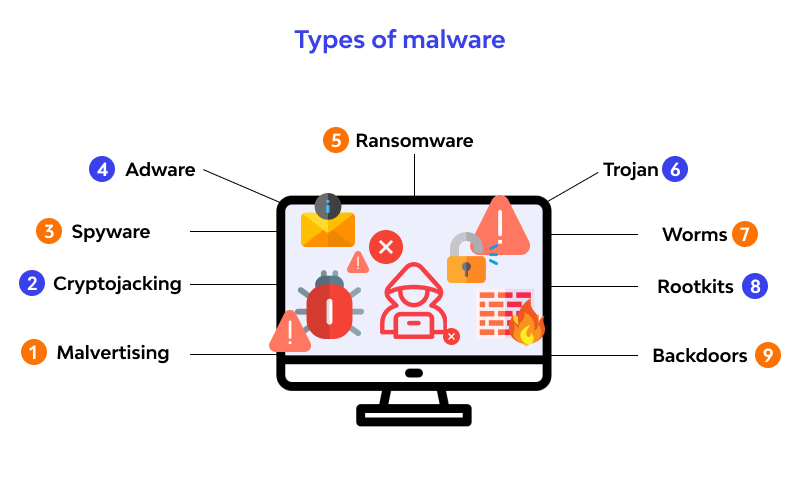
Read more: [What is malware for the beginner](https://microage.ca/chilliwack/all-you-need-to-know-about-malware-a-beginners-guide/#:~:text=Malware%20is%20short%20for%20%E2%80%9Cmalicious,harmful%20cyber%20threats%20out%20there.)
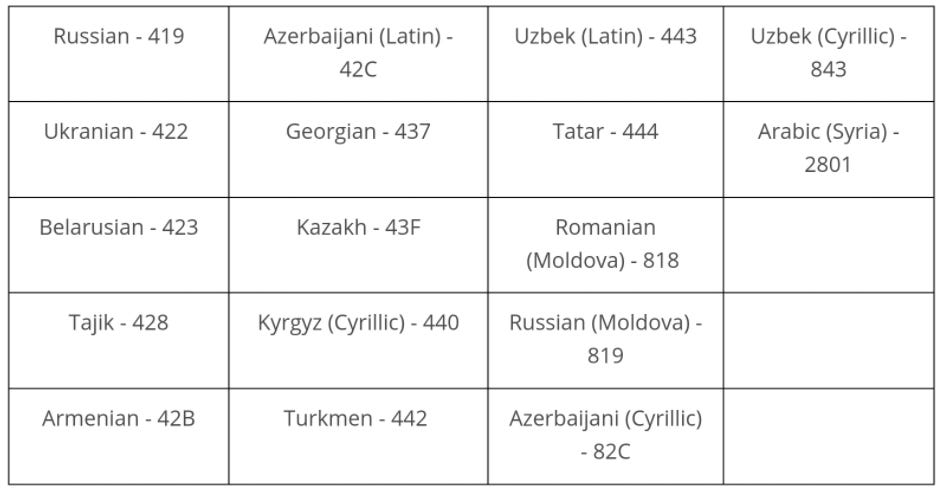
Some malware will not run on computers that have the Russian language as a means of ensuring that the makers of the malware do not infect their or their country’s computers.
In a blog from Brian Krebs, the noted cybersecurity investigative reporter and author of Spam Nation, Krebs discusses malware that will not run on computers that have certain languages installed.
> Digital extortion gangs like DarkSide take great care to make their entire platforms geopolitical, because their malware is engineered to work only in certain parts of the world.
>
> DarkSide, like a great many other malware strains, has a hard-coded do-not-install list of countries which are the principal members of the Commonwealth of Independent States (CIS) — former Soviet satellites that mostly have favorable relations with the Kremlin. The full exclusion list in DarkSide (published by **Cybereason**) is below:
>
> [](https://substackcdn.com/image/fetch/f_auto,q_auto:good,fl_progressive:steep/https%3A%2F%2Fbucketeer-e05bbc84-baa3-437e-9518-adb32be77984.s3.amazonaws.com%2Fpublic%2Fimages%2F59f4e600-d66f-4253-b030-6fc6af238832_946x494.png)
>
> Cybereason
Krebs spoke with [Allison Nixon](https://twitter.com/nixonnixoff), a chief researcher at [Unit221B](https://www.unit221b.com/), a cyber investigations firm.
> Nixon said because of Russia’s unique legal culture, criminal hackers in that country employ these checks to ensure they are only attacking victims outside of the country.
>
> “This is for their legal protection,” Nixon said. “Installing a Cyrillic keyboard, or changing a specific registry entry to say ‘RU’, and so forth, might be enough to convince malware that you are Russian and off-limits. This can technically be used as a ‘vaccine’ against Russian malware.”
### How to add a Russian-language keyboard
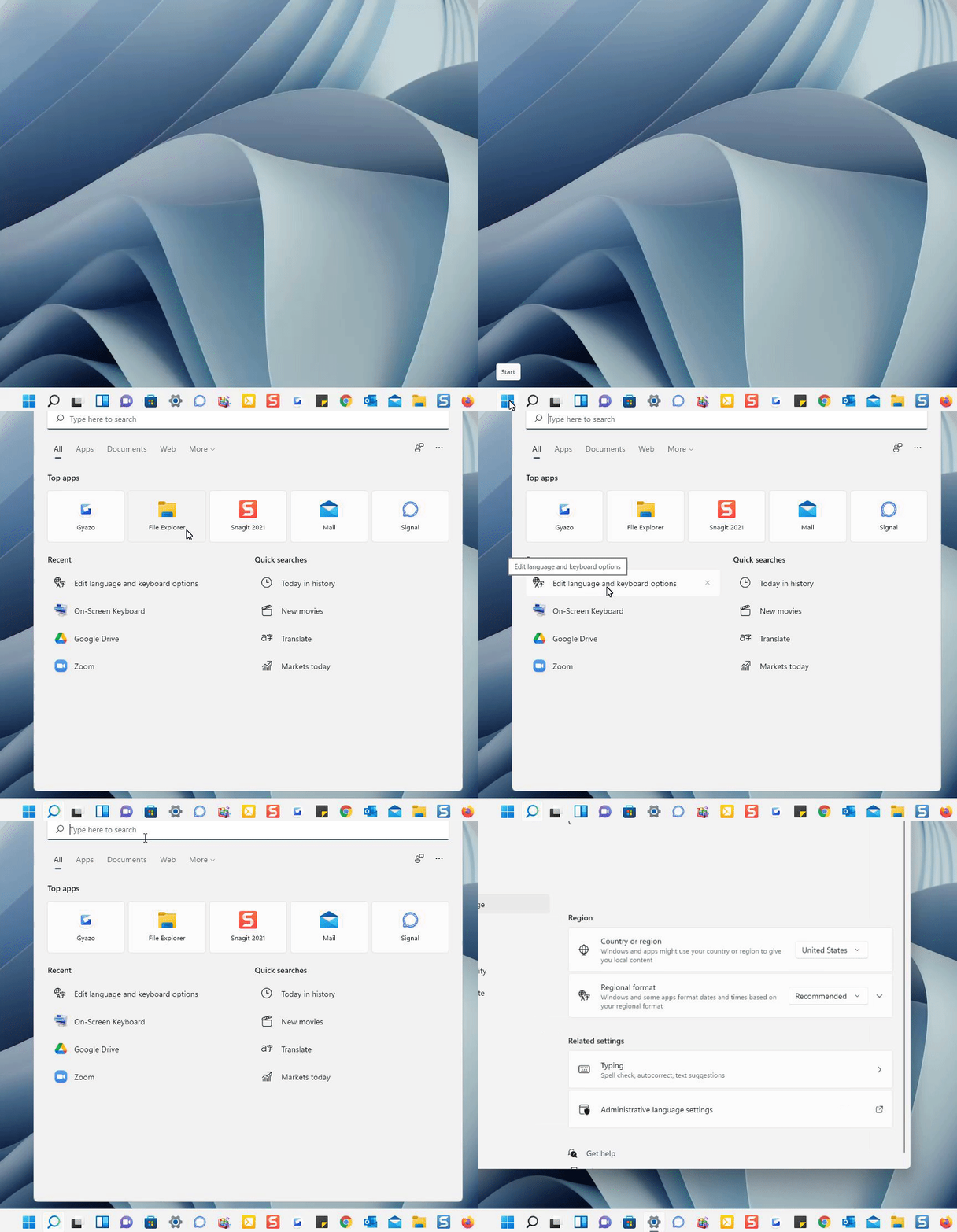
**Step one:** Type "`edit language and keyboard options`" in the search bar of your computer and click the option or hit enter.
[](https://substackcdn.com/image/fetch/f_auto,q_auto:good,fl_progressive:steep/https%3A%2F%2Fbucketeer-e05bbc84-baa3-437e-9518-adb32be77984.s3.amazonaws.com%2Fpublic%2Fimages%2Fc01adba1-e2ba-40a2-81f8-1ebe4ebb9191_864x742.gif)
**Step two:** A page similar to this will pop up and show:
- `Window display language`
- `Preferred languages`
Below the preferred languages, you can see the languages on your computer.
[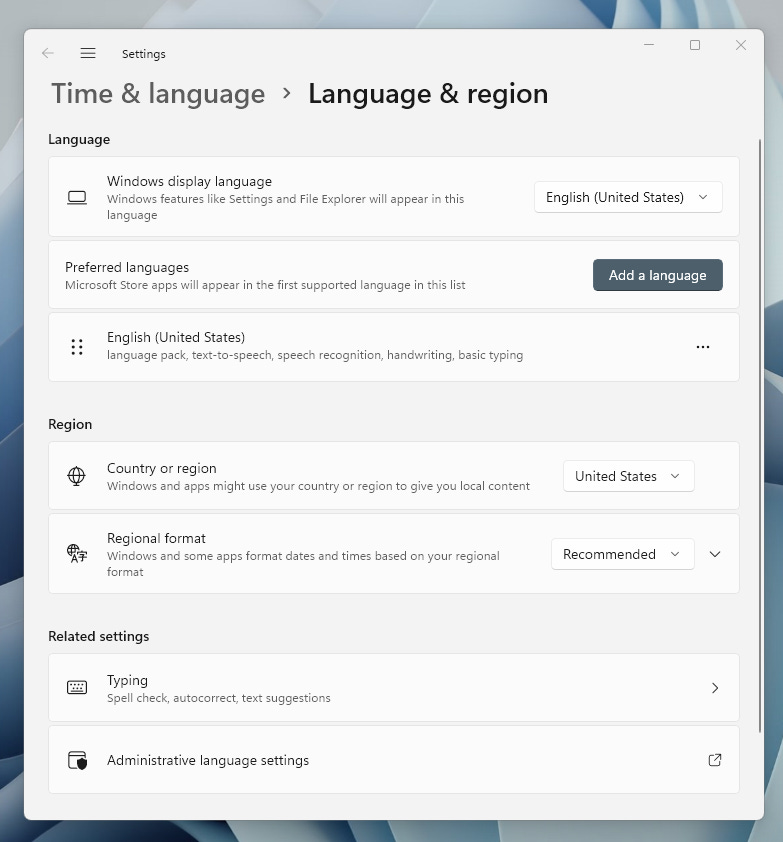](https://substackcdn.com/image/fetch/f_auto,q_auto:good,fl_progressive:steep/https%3A%2F%2Fbucketeer-e05bbc84-baa3-437e-9518-adb32be77984.s3.amazonaws.com%2Fpublic%2Fimages%2F3f1520a9-d7f7-48f1-aeb2-f6b97f464296_783x842.png)
Yours will likely have English on it if you are reading this tutorial.
**Step three:** Click “**`Add a language.`**” Type Russian into the search bar of “**`Choose a language to install.”`** Then, click `“`**`next.`**`”`
[](https://substackcdn.com/image/fetch/f_auto,q_auto:good,fl_progressive:steep/https%3A%2F%2Fbucketeer-e05bbc84-baa3-437e-9518-adb32be77984.s3.amazonaws.com%2Fpublic%2Fimages%2F9c85e2ec-5e66-49d0-9679-7291d2763f4f_880x806.gif)
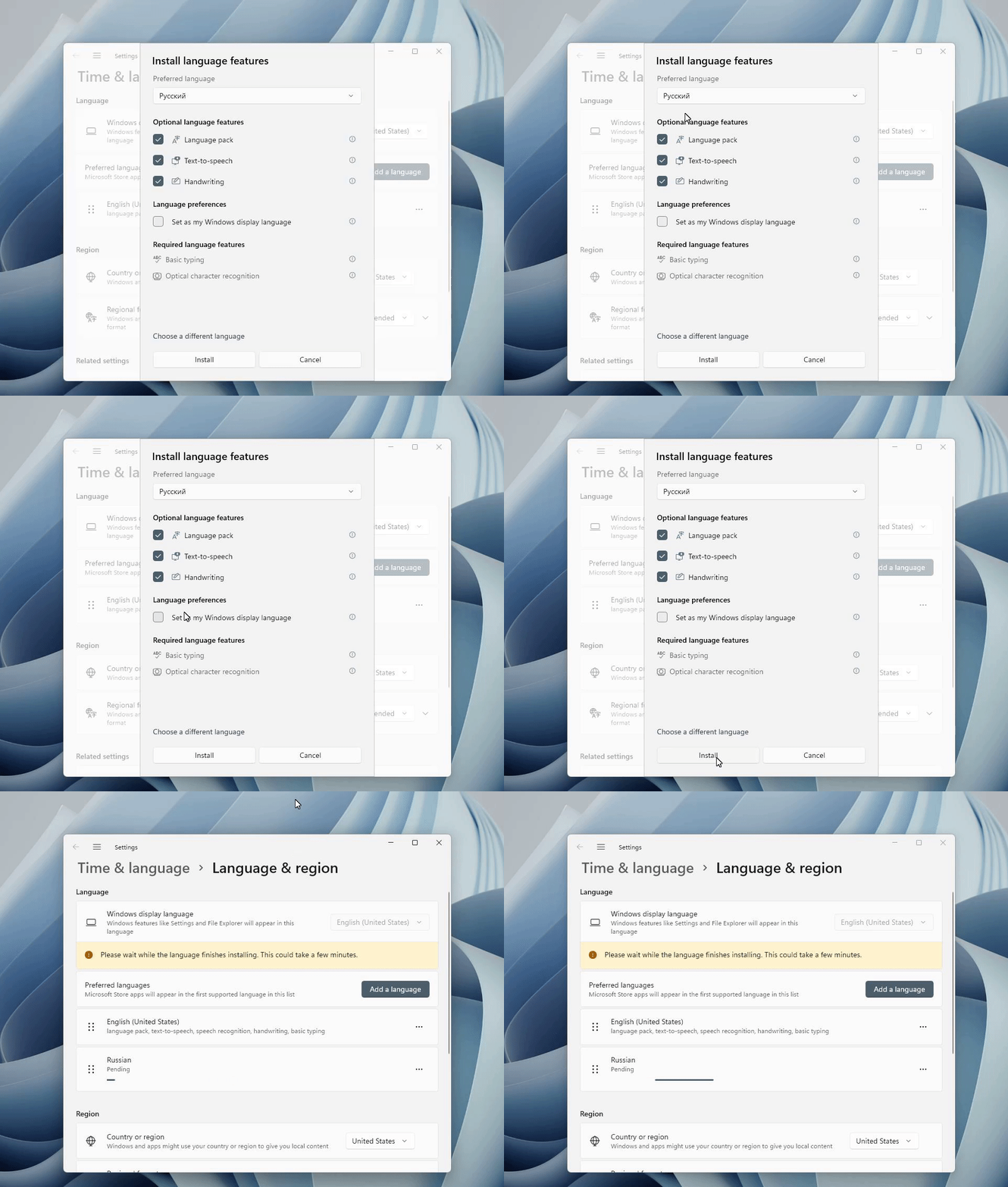
**Step four:** The next screen will show checkboxes for “`speech recognition`,” “`speech-to-text`",” and “`handwriting`.” Those boxes should be checked.
[](https://substackcdn.com/image/fetch/f_auto,q_auto:good,fl_progressive:steep/https%3A%2F%2Fbucketeer-e05bbc84-baa3-437e-9518-adb32be77984.s3.amazonaws.com%2Fpublic%2Fimages%2Fd3d9c9e9-bedc-4b40-a4e7-9c4a03e11433_962x756.gif)
- Do **not** check the box that says “`display language`” unless you speak Russian and want it to be your display language.
**Step five:** Click “`install.`” The download will begin and you will see a pending download in your window.
[](https://substackcdn.com/image/fetch/f_auto,q_auto:good,fl_progressive:steep/https%3A%2F%2Fbucketeer-e05bbc84-baa3-437e-9518-adb32be77984.s3.amazonaws.com%2Fpublic%2Fimages%2Fac3e7b2a-b917-4a73-98f5-4c4fdb3618e9_619x431.png)
You do not need to take any further action.
- The keyboard is now on your computer and will appear if malware scans your computer for a Russian-language keyboard.
### Switching back and forth between languages
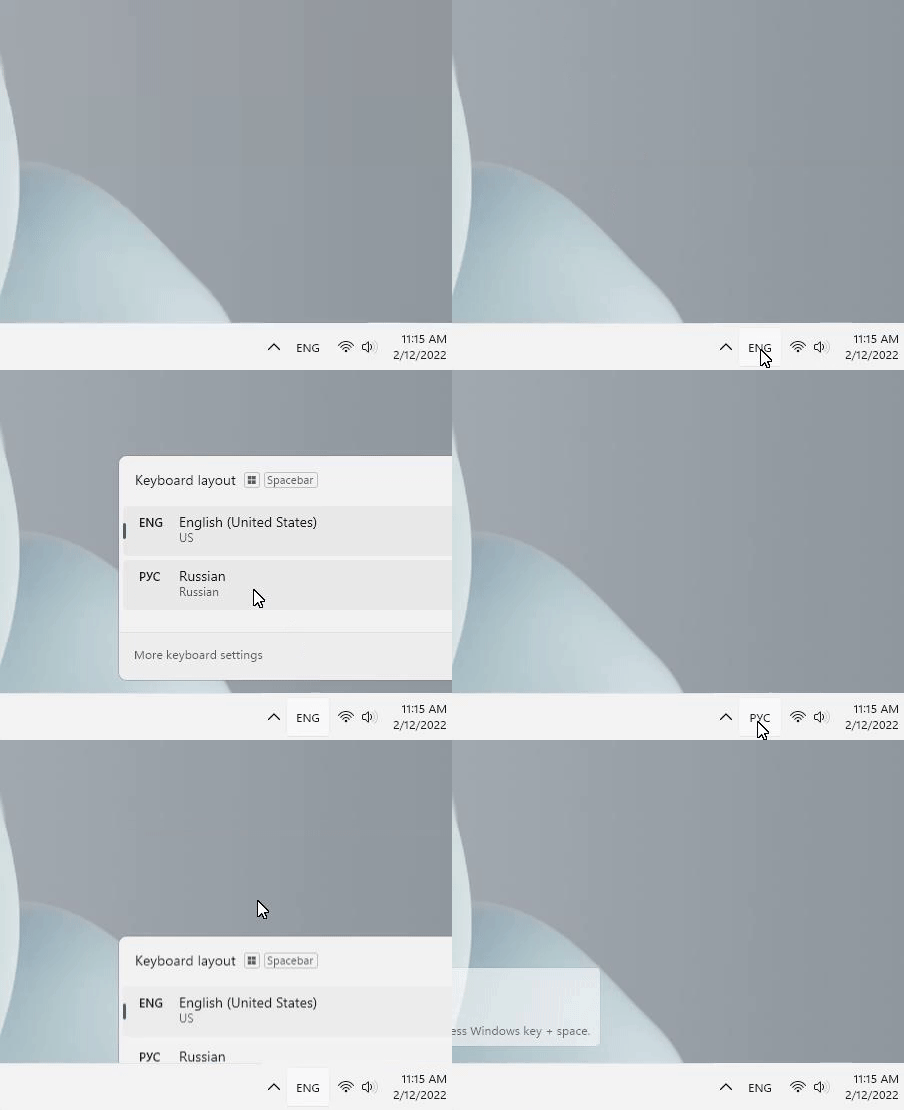
If you should accidentally switch to the Russian keyboard, here is where you can switch back. If your computer is different you will need to search how to switch languages for your device.
[](https://substackcdn.com/image/fetch/f_auto,q_auto:good,fl_progressive:steep/https%3A%2F%2Fbucketeer-e05bbc84-baa3-437e-9518-adb32be77984.s3.amazonaws.com%2Fpublic%2Fimages%2F62931edb-1915-4a71-bac7-a171264456c0_452x370.gif)
<br/>
<br/>
:::warning
Hoaxlines.org • [Newsletter](https://novelscience.substack.com) • [Ukraine information dashboard](https://hoaxlines.org/ukraine-dashboard) • [Contact us](mailto:research@hoaxlines.org)
:::
###### tags: `Hoaxlines` `Ukraine` `Book` `Templates`
 Sign in with Wallet
Connect another wallet
Sign in with Wallet
Connect another wallet