# Lesson 7
### 作業review & 資料整理
---
### Rundown
- 作業Review-切版作業
- 作業Review-JS作業
- 物件導向
- 環境
- 資料整理+hooks一點點介紹
- 為api做準備
- 作業
---
# 切版作業 - Rojo/ Doris /David
---
<div style="text-align:left ; font-size:32px">
### Rojo:
優:作業完整、使用js method
待討論:m版圖片scroll太長,user可能沒耐心拉完
### Doris:
優: 切版變活潑、有避免無法用的字、下拉選單連動價格、嘗試新東西
待討論: 圖片展開缺container導致RWD怪怪的
### David:
優:版面整體性出來了、切分component、用github繳交、map混用解構
待討論: 實踐和弦及錄音的方法
</div>
---

===
===
---
# JS作業 - class
---
### 什麼是物件導向(OOP)
Procedural programming
V.S
Object-oriented programming (OOP)

---
## 複習:為了封裝: get set

---
### 物件導向三大特性:封裝、繼承、多型
<div style="text-align:left ; font-size:32px">
### 封裝(Encapsulation)
將資料分成私用(Private)、保護(Protected)、公用(Public)等,實踐 Information hiding 概念,避免干擾。
### 繼承(Inheritance)
ex.載具與車子
每一種不同類型的載具一次又一次地重定義“載人能力” ?
次子類別的次子類別也可以繼承使用,最後即能達到資料重覆使用的目的。
### 多型(Polymorphism)
父類的method可以被子類覆蓋,繼承後客製化。
</div>
---

---
## 想像class是模具

---
### class & new
```
class Dog {
constructor(name) {
this._name = name;
this._behavior = 0;
}
get name() {
return this._name;
}
}
const halley = new Dog('Halley');
```
---
### 複習this
```
class Dog {
constructor(name) {
this._name = name;
this._behavior = 0;
}
get name() {
return this._name;
}
}
```
```
const halley = new Dog('Halley');
console.log(halley.name); // Halley
```
```
const mydog = new Dog('mydog');
console.log(mydog.name); // mydog
```
---
## 關鍵字複習
<div style="text-align:left ; font-size:32px">
### Instance 實例
### Constructor 建構式
### method 方法
### call => obj.
### Inheritance 繼承
</div>
---
###
- extend
<div style="display:flex; justify-content:center;">
<div>
<img src='https://i.imgur.com/AIbQigu.png' style="width:400px;"/>
</div>
<div>
<img src='https://i.imgur.com/sodASpT.png' style="width:400px;" />
</div>
</div>
- super: The super keyword calls the constructor of the parent class.
---
## static method
#### Date是js裡的一個class
#### Date.now() : 直接call class. 不用實例
=> 稱為 ==static method==
```
Date.now()
const d = new Date
Date.now() // X
```
---
# JS作業 - ES5 vs ES6
---
### ES5
- old JavaScript
- all modern web browsers.
---
### ES6
- The new(er) JavaScript version
- Not supported by all modern web browsers.
- ex class
---
## 關鍵字複習
<div style="text-align:left ; font-size:22px">
### babel
- A JavaScript package that transpiles JavaScript ES6+ code to ES5.
### package.json
- A file that contains information about a JavaScript project.
### "build" script
- A package.json script that you use to tranpsile ES6+ code to ES5.
=> create-react-app 都幫你包好惹~~
</div>
---
### L3 提到的門檻
HTML+CSS切版 -> 基礎JS ->
-> 資料填入 -> 資料改寫 ->
-> 模組溝通 -> API介接 ->
-> 多模組溝通 -> **環境建置** -> 創新專案模式
---
# 資料處理+hooks
---
### 你得到的資料
```
[
{ "orderid": "31076582227611",
"shopid": "S001",
"userid": "123",
"event_time": "2019-12-27 00:23:03"
},
{ "orderid": "31118059853484",
"shopid": "S001",
"userid": "46057927",
"event_time": "2019-12-27 11:54:20"
},
{ "orderid": "31123355095755",
"shopid": "S002",
"userid": "67341739",
"event_time": "2019-12-27 13:22:35"
},
...
]
```
---
### 可能想整理成的資料
---
```
{ S001:[{orderid: "31076582227611",
...},{
orderid: "31076582227611",
...}
],
S002:[{orderid: "31076582227611",
...},{
orderid: "31076582227611",
...}
],
}
```
---
# HOOKS
---
## class component vs functional component
1. 不用render 直接return
2. 不用建構式,不用this
3. useState, useEffect..等系列hooks可用
---
## props&state
```
constructor(props) {
super(props);
this.state = { seconds: 0 };
}
```
### =>in hooks
```
const { videoId, imgUrl, title } = props.data
const [shopData, setShopData] = React.useState({})
```
---
## 生命週期
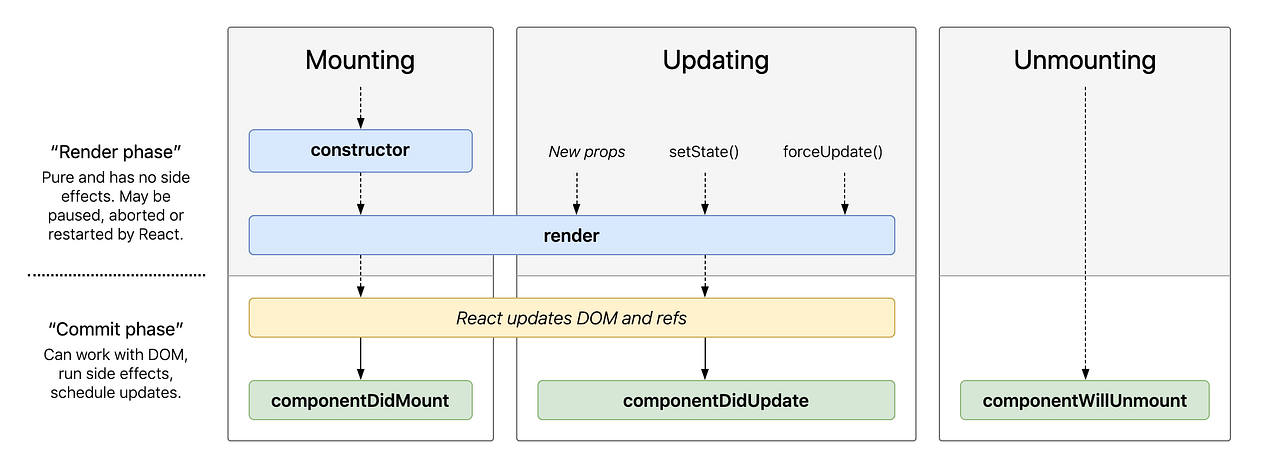
---
### didMount & didUpdate
```
componentDidMount() {
this.interval = setInterval(() => this.tick(), 1000);
}
componentWillUnmount() {
clearInterval(this.interval);
}
```
```
React.useEffect(() => {
reorganizeByShop()
}, []) // didMount
React.useEffect(() => {
imDoing()
}, [isShow]) // didUpdate
```
---
### VS CODE Demo
---
## HW
- [作業網址](https://github.com/liontechirisho/datafilterHW)
- 下週停課一週(故本週作業較難)
- ==強迫中獎==從今開始:請使用github上傳作業
> fork到自己的github
> 下載到本機製作
> 完成後push到github
> 把你的github連結貼給我
---
### Q&A
---
### Thank You
{"metaMigratedAt":"2023-06-15T09:42:18.251Z","metaMigratedFrom":"YAML","title":"Lesson 7","breaks":true,"slideOptions":"{\"theme\":\"white\"}","contributors":"[{\"id\":\"75570e91-2c90-4c97-8261-0a2434a026a2\",\"add\":11320,\"del\":6373}]"}