---
title: Lesson 6 # 簡報的名稱
tags: L6 # 簡報的標籤
slideOptions:
theme: white
---
# Lesson 6
### 抄板實戰(2)&React基礎概念
---
### Rundown
- 作業Review
- JS作業
- 抄版實戰(2)
- React前導與基礎
---
# JS作業 - Leetcode
---
# Leetcode
https://leetcode.com/problems/remove-element/
```
var removeElement = function(nums, val) {
for(i=0; i<nums.length; i++){
if(nums[i] == val) {
nums.splice(i,1);
i--; // 為了重新跑同個迴圈
}
}
};
```
---
# JS作業 - Object
---
# Object 是 key-value pairs

---
# Object v.s Array
<div style="text-align:left ; font-size:32px">
### Array 有 index
```
const arr = ["apple","pen"]
```
### Object 有 key
```
const obj = {
key1: "apple",
key2: "pen"
}
```
</div>
---
<div style="text-align:left ; font-size:32px">
### 操作Object的兩種方式
```
const obj = {
key1: "apple",
key2: "pen"
}
```
</div>
### 取值
```
console.log(obj.key1)
console.log(obj["key1"]) v.s arr[0]
```
### 附值
```
obj.key1 = "blueApple"
obj[key1] = "blueApple" v.s arr[0] = "apple"
```
---
<div style="text-align:left ; font-size:32px">
## 實務上Object v.s Array
### Object用在存資料
` key值:分類資料夾`
### Array 處理資料
`map, forEach等`
</div>
---
# 遍歷Object
```
for (let crewMember in spaceship.crew) {
console.log(`${crewMember}:
${spaceship.crew[crewMember].name}`)
};
```
---
## 進階Object-"This"

```
The this keyword references
the calling object
which provides access to
the calling object’s properties.
```
---
### 用arrow fn this 會自動綁到最外層

---
## 為了封裝: get set

---
## 相同變數可省略

---
## 切版實戰(2)
---
# React
---
## DOM節點
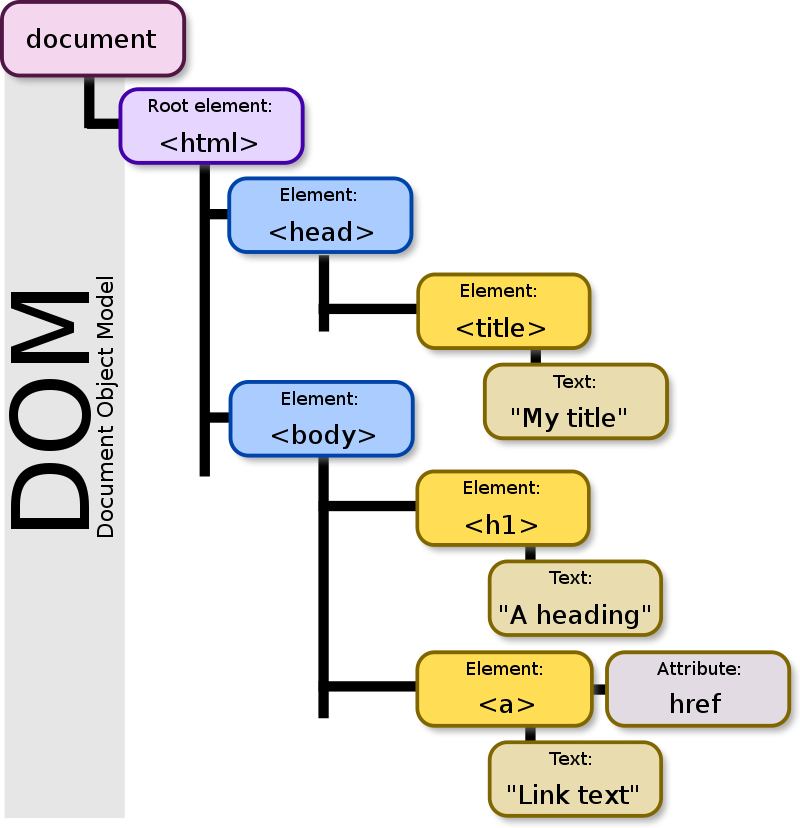
[從-dom-節點看原型鏈-為什麼元素有各種不同的方法](https://medium.com/@realdennis/%E5%BE%9E-dom-%E7%AF%80%E9%BB%9E%E7%9C%8B%E5%8E%9F%E5%9E%8B%E9%8F%88-%E7%82%BA%E4%BB%80%E9%BA%BC%E5%85%83%E7%B4%A0%E6%9C%89%E5%90%84%E7%A8%AE%E4%B8%8D%E5%90%8C%E7%9A%84%E6%96%B9%E6%B3%95-9a2bfefafbac)
---
### JQuery功能
Query is a fast, small, and feature-rich JavaScript library.
* 抓取dom節點,修改html內容
` $( "button.continue" ).html( "Next Step..." )`
* Event Handling
```
var hiddenBox = $( "#banner-message" );
$( "#button-container button" ).on( "click", function( event ) {
hiddenBox.show();
});
```
---
* Ajax
```
$.ajax({
url: "/api/getWeather",
data: {
zipcode: 97201
},
success: function( result ) {
$( "#weather-temp" ).html( "<strong>" + result + "</strong> degrees" );
}
});
```
---
### React 基本概念
* 以component為單位
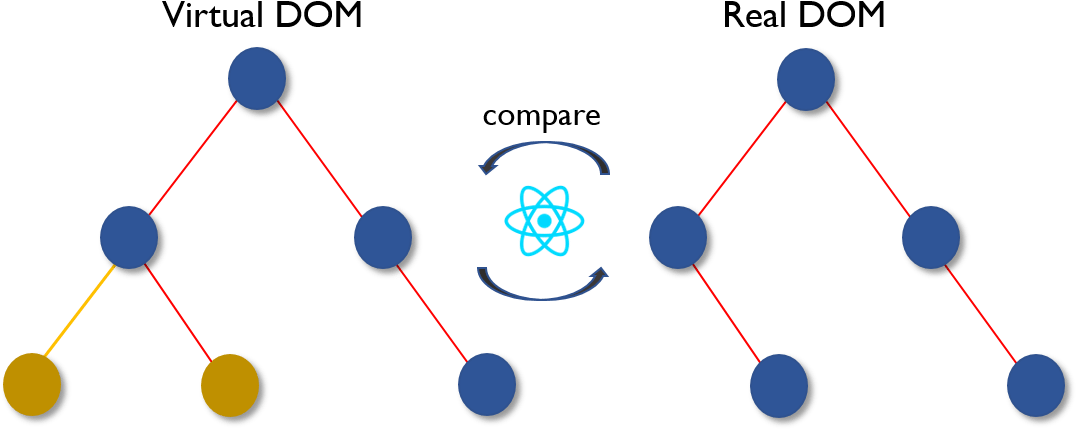
* 虛擬DOM
---
* render()
* props & state
```
class HelloMessage extends React.Component {
render() {
return (
<div>
Hello {this.props.name}
</div>
);
}
}
ReactDOM.render(
<HelloMessage name="Taylor" />,
document.getElementById('hello-example')
);
```
==取得DOM==: ref
---
### React 直接嵌入網頁
[官網](https://reactjs.org/docs/add-react-to-a-website.html#step-1-add-a-dom-container-to-the-html)
```
<!-- ... existing HTML ... -->
<div id="like_button_container"></div>
<!-- ... existing HTML ... -->
```
```
<!-- ... other HTML ... -->
<!-- Load React. -->
<!-- Note: when deploying, replace "development.js" with "production.min.js". -->
<script src="https://unpkg.com/react@16/umd/react.development.js" crossorigin></script>
<script src="https://unpkg.com/react-dom@16/umd/react-dom.development.js" crossorigin></script>
<!-- Load our React component. -->
<script src="like_button.js"></script>
</body>
```
```
const domContainer = document.querySelector('#like_button_container');
ReactDOM.render(e(LikeButton), domContainer);
```
---
## React component
```
class HelloMessage extends React.Component {
render() {
return (
<div>
Hello {this.props.name}
</div>
);
}
}
ReactDOM.render(
<HelloMessage name="Taylor" />,
document.getElementById('hello-example')
);
```
---
## constructor & props&state
* state更新決定是否重新渲染
```
constructor(props) {
super(props);
this.state = { seconds: 0 };
}
```
https://reactjs.org/
---
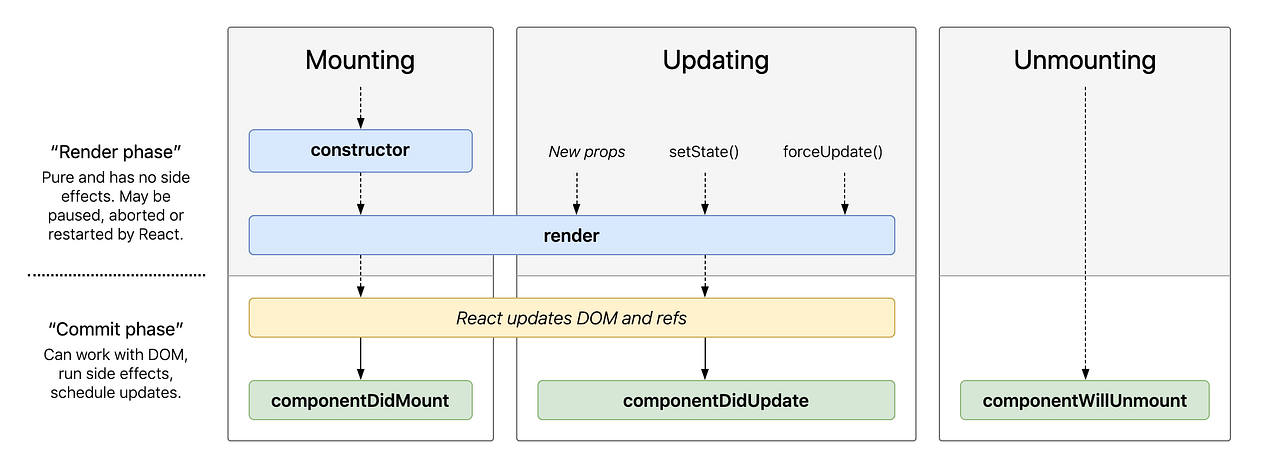
## 生命週期
---
### STATE & PROPS
```
class Timer extends React.Component {
constructor(props) {
super(props);
this.state = { seconds: 0 };
}
tick() {
this.setState(state => ({
seconds: state.seconds + 1
}));
}
componentDidMount() {
this.interval = setInterval(() => this.tick(), 1000);
}
componentWillUnmount() {
clearInterval(this.interval);
}
render() {
return (
<div>
Seconds: {this.state.seconds}
</div>
);
}
}
ReactDOM.render(
<Timer />,
document.getElementById('timer-example')
);
```
---
# 作業
```
npx create-react-app my-app
# or
yarn create react-app my-app
```

---

```
cd my-app
# 進入這個資料夾 or 從資料夾重開
yarn start
```
---
# 認識檔案結構

 Sign in with Wallet
Connect another wallet
Sign in with Wallet
Connect another wallet