# JavaScript Async
###### tags: `WeHelp`

**Event Loop, Callback, Promise, and Async / Await**
## Sync & Async
### Synchronous programming
Consider the following code:
```javascript=
const name = 'Miriam';
const greeting = `Hello, my name is ${name}!`;
console.log(greeting);
// "Hello, my name is Miriam!"
```
We should note here that the browser effectively steps through the program one line at a time, in the order we wrote it. At each point, the browser waits for the line to finish its work before going on to the next line. It has to do this because each line depends on the work done in the preceding lines. That makes this a **synchronous program**.
#### Synchronous function
It would still be synchronous even if we called a separate function, like this:
```javascript=
function makeGreeting(name) {
return `Hello, my name is ${name}!`;
}
const name = 'Miriam';
const greeting = makeGreeting(name);
console.log(greeting);
// "Hello, my name is Miriam!"
```
Here, `makeGreeting()` is a **synchronous function** because the caller has to wait for the function to finish its work and return a value before the caller can continue.
❓ What the problem can synchronous programming cause?
👉 Insert this code in your any JavaScript code, reload web page, see what will happen.
```javascript=
for (let i = 0; i < 10000000000; i++) {
continue;
}
```
### JavaScript is single-threaded
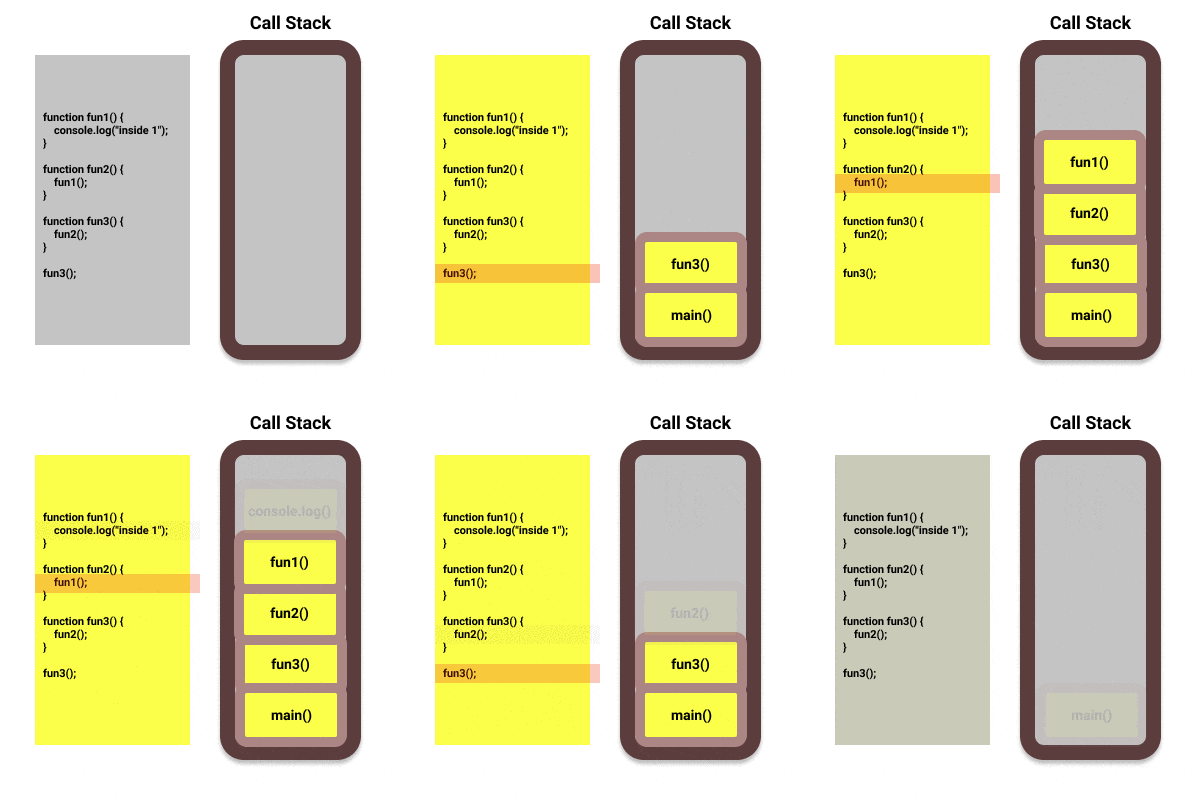
**JavaScript can do one single thing at a time** because it has only one call stack.

#### How call stack work?
The call stack is a mechanism that helps the JavaScript interpreter to **keep track of the functions that a script calls**.
> Stack: an **last in, first out** data structure.
```javascript=
function fun1() {
console.log("inside 1");
}
function fun2() {
fun1();
}
function fun3() {
fun2();
}
fun3();
```
## Event loop
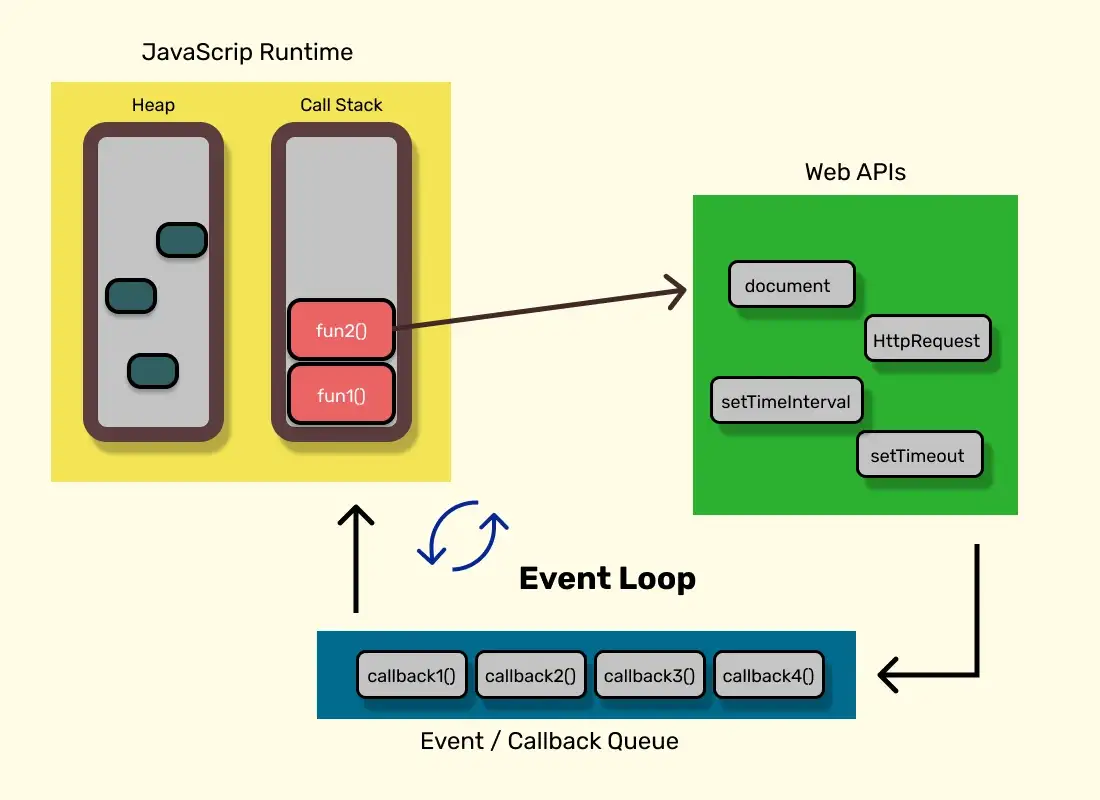
Since JavaScript can only handle one thing at a time, there must be some other mechanism that used to handle multi tasks (asynchronous tasks) at the same time.
### Web APIs
Web browsers give us some APIs to deal with the asynchronous tasks. We can call these APIs in our JavaScript code and they can be executed asynchronouly, meaning that the execution is handled **by the platform (browsers, node.js environment) itself**, which is why **it won't block the call stack**.
The Web APIs provided by the browser which have asynchronous behaviors including some DOM APIs, Timer (setTimeout and setInterval), Fetch API, etc.
See [Web APIs](https://developer.mozilla.org/en-US/docs/Web/API) .
### Task (Event / Callback) queue
> Queue: an **first in, first out** data structure.
❓ What happens if we want our JavaScript code to react to the result of a Web API, like an timer callback, for instance?
Take `setTimeout` as the example, the callback we passed to `setTimeout` **is written to be run by JavaScript**. This means that it needs to use the *call stack* and the callback have to **wait inside the task queue until the call stack is empty** in order to be executed.
The results or callbacks (tasks) done by the Web APIs will be moved to the task queue.
### How event loop work?
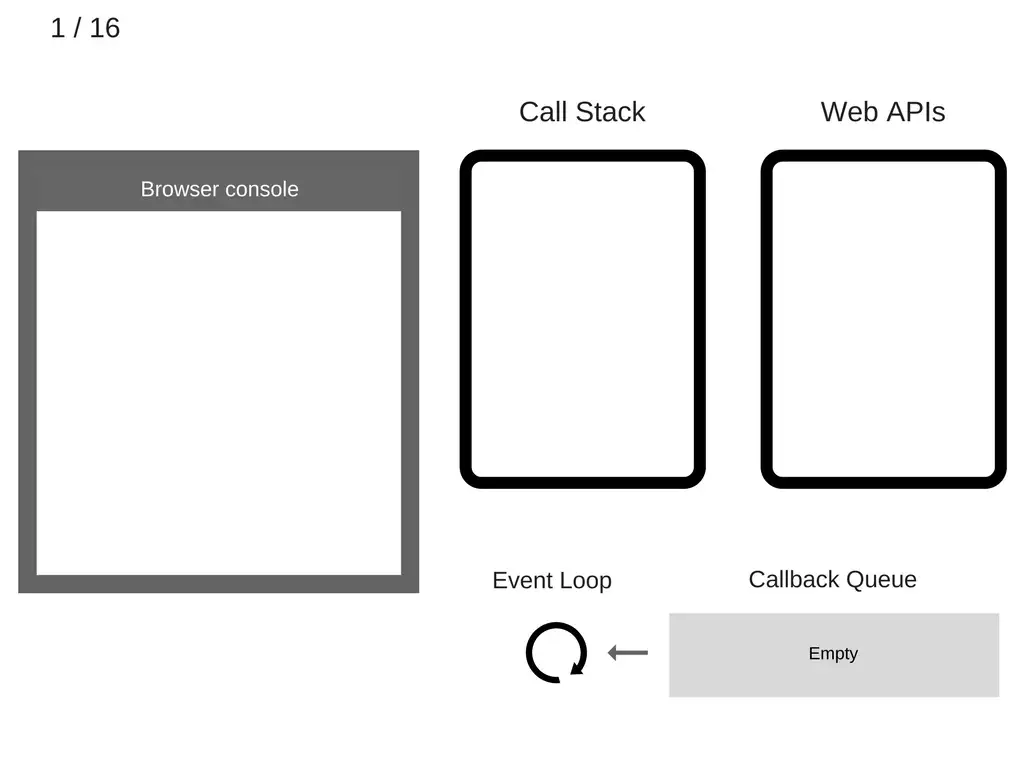
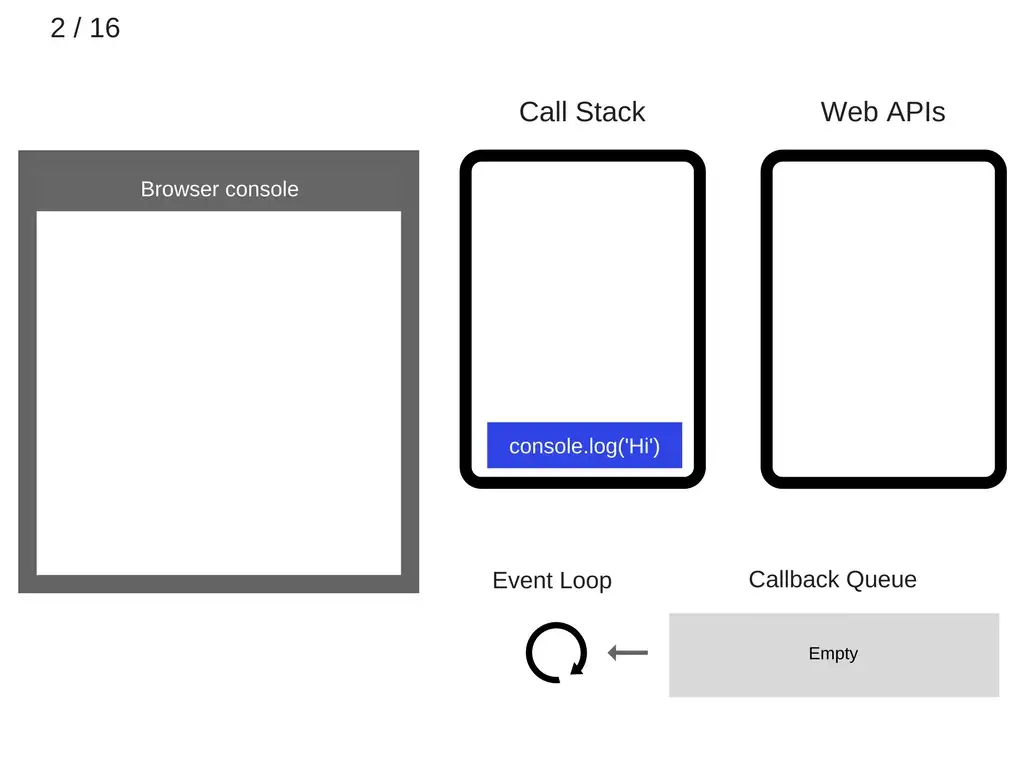
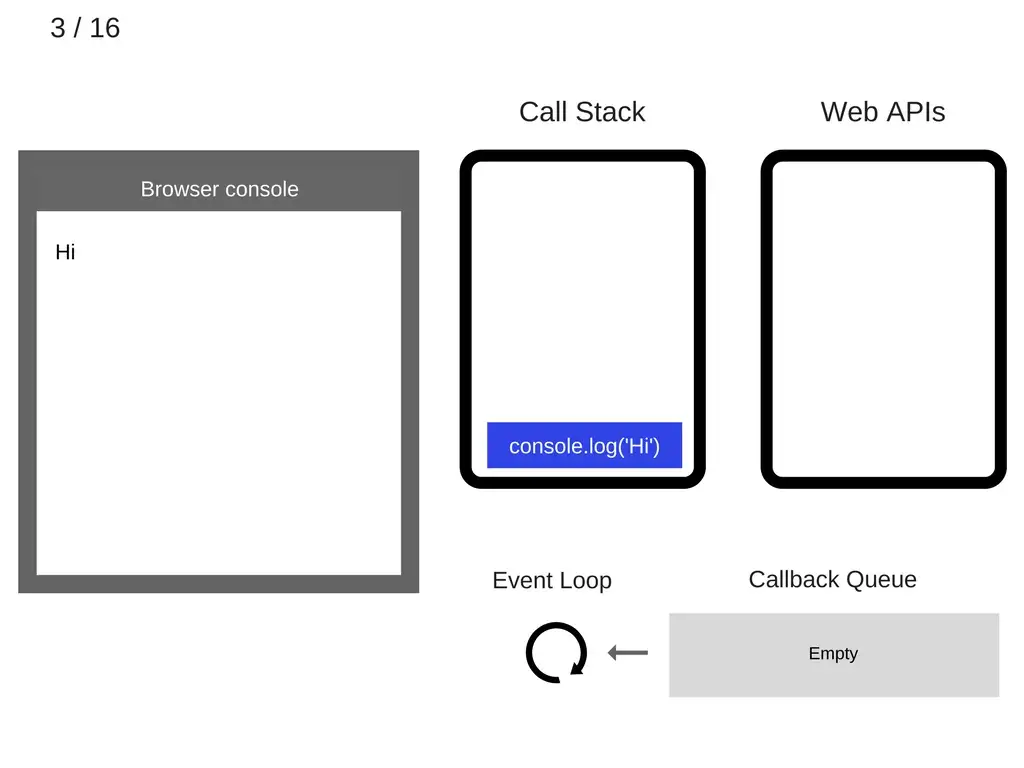
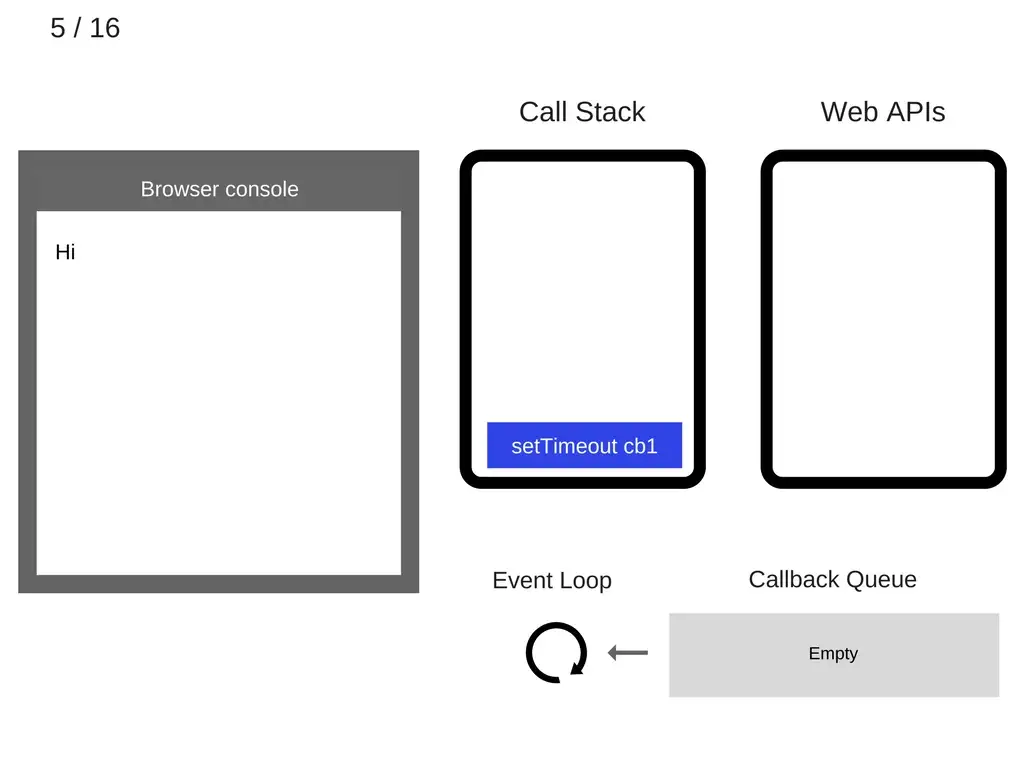
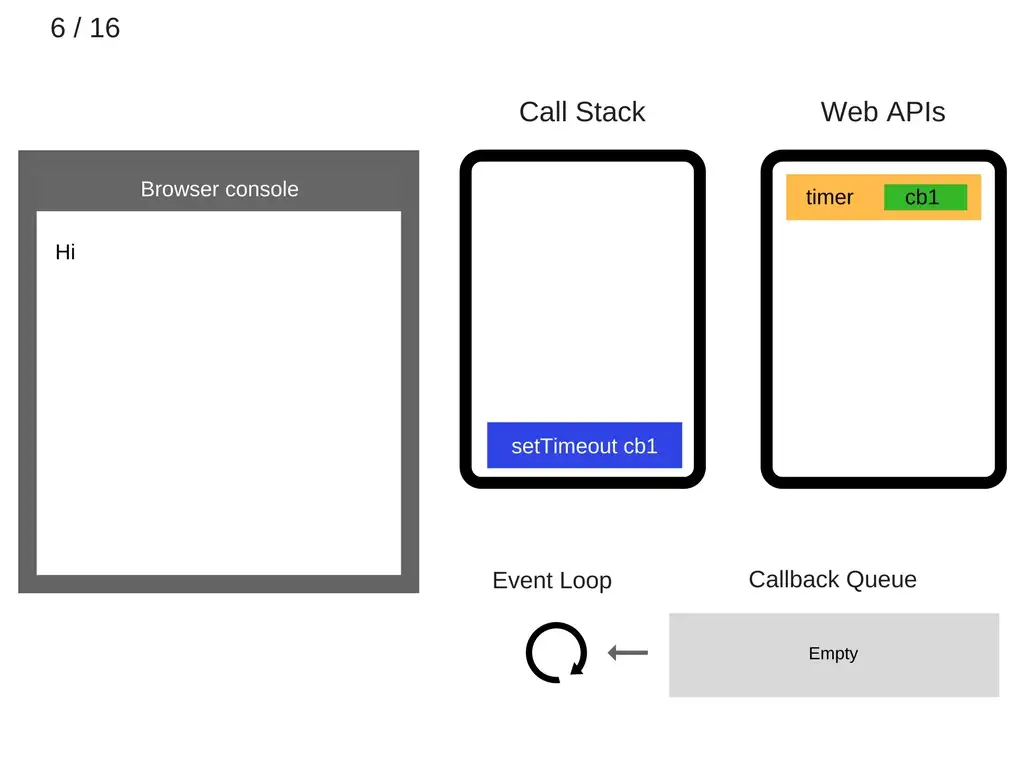
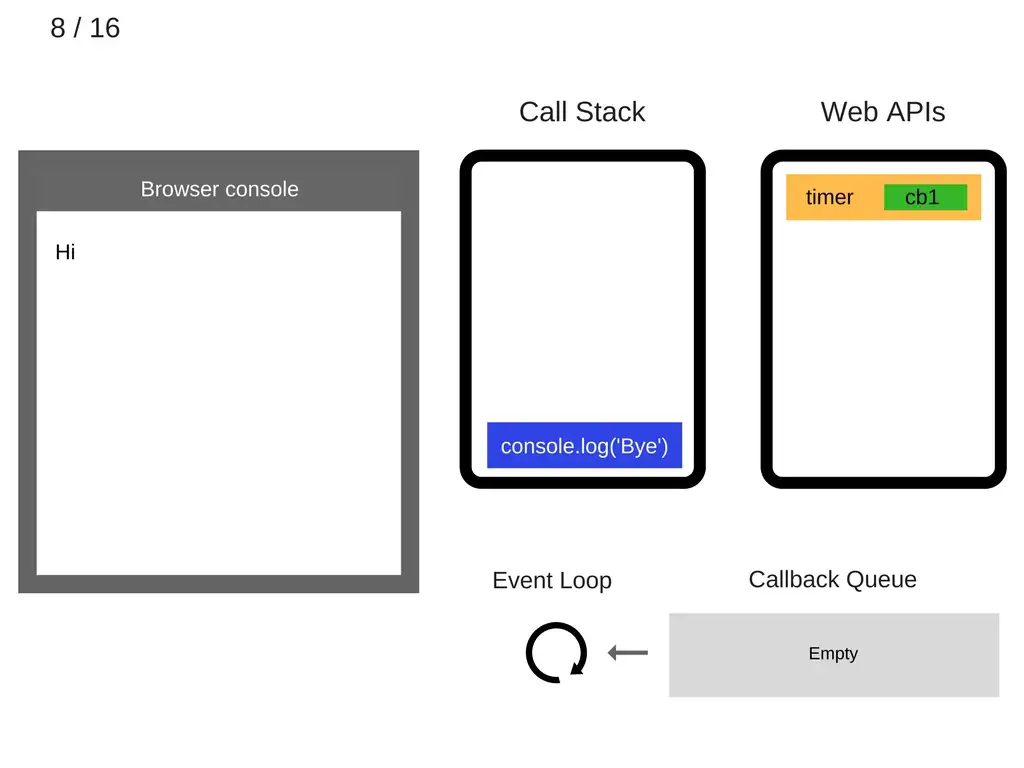
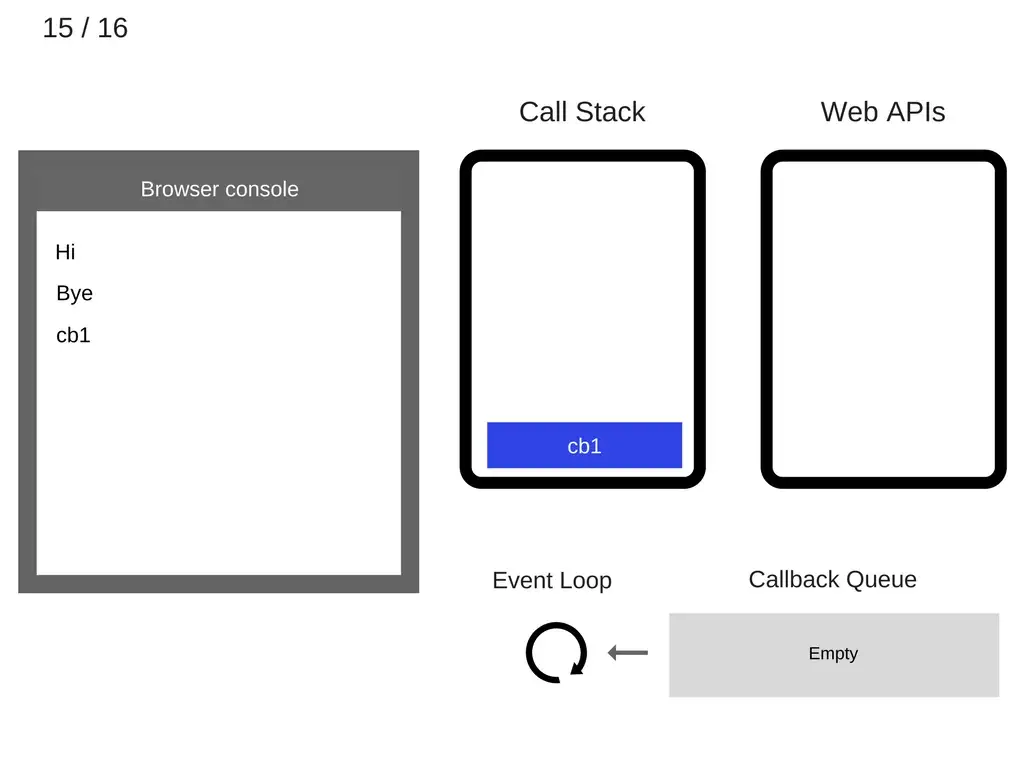
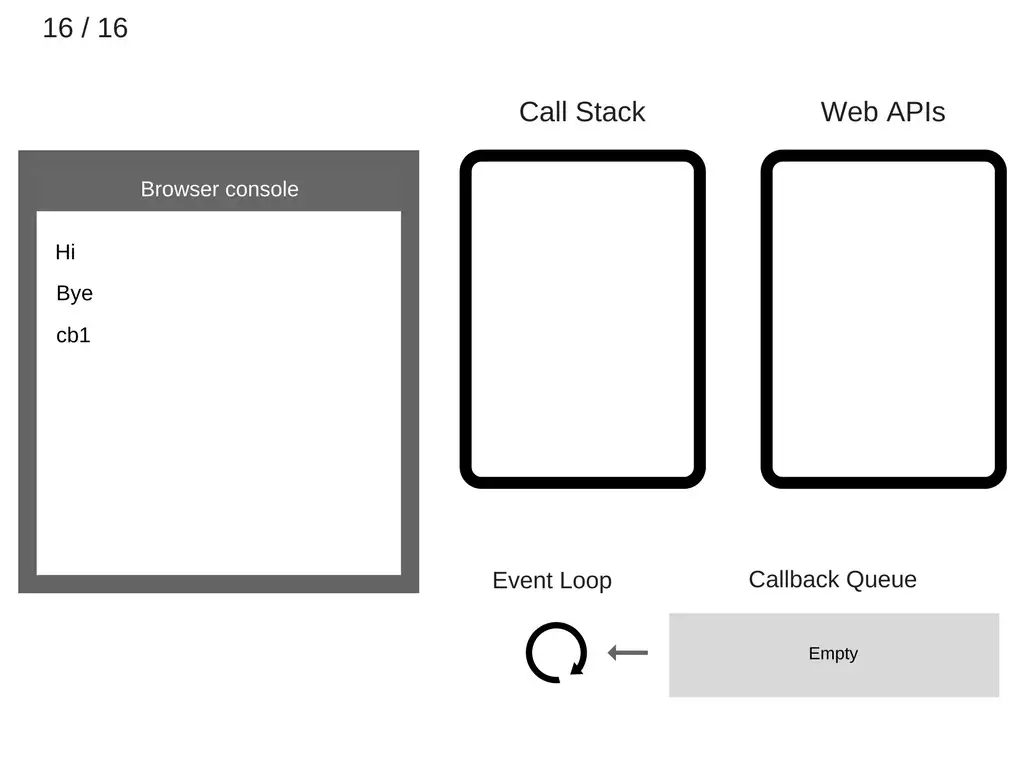
Take following example:
```javascript=
console.log('Hi');
setTimeout(function cb1() {
console.log('cb1');
}, 5000);
console.log('Bye');
```


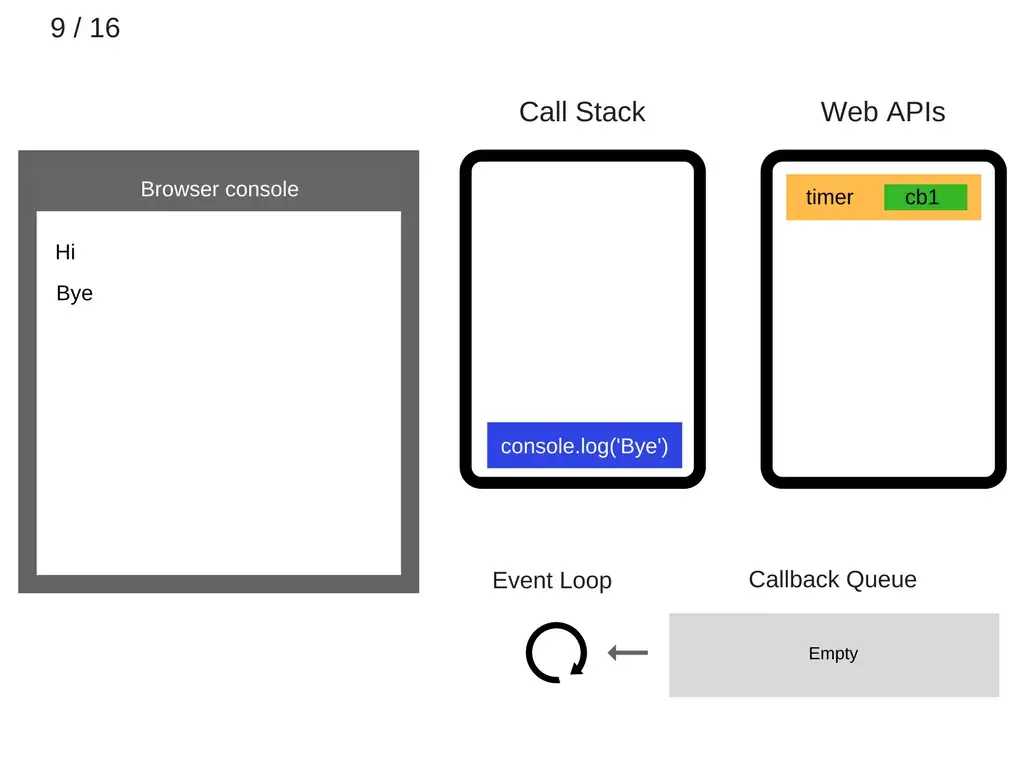
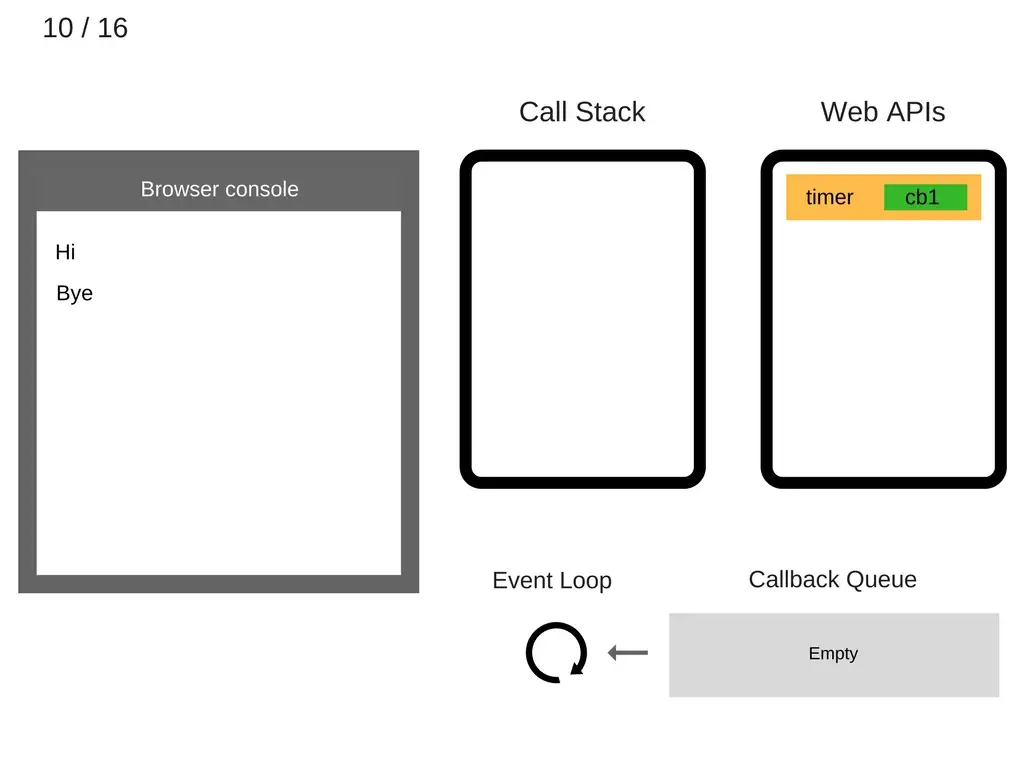

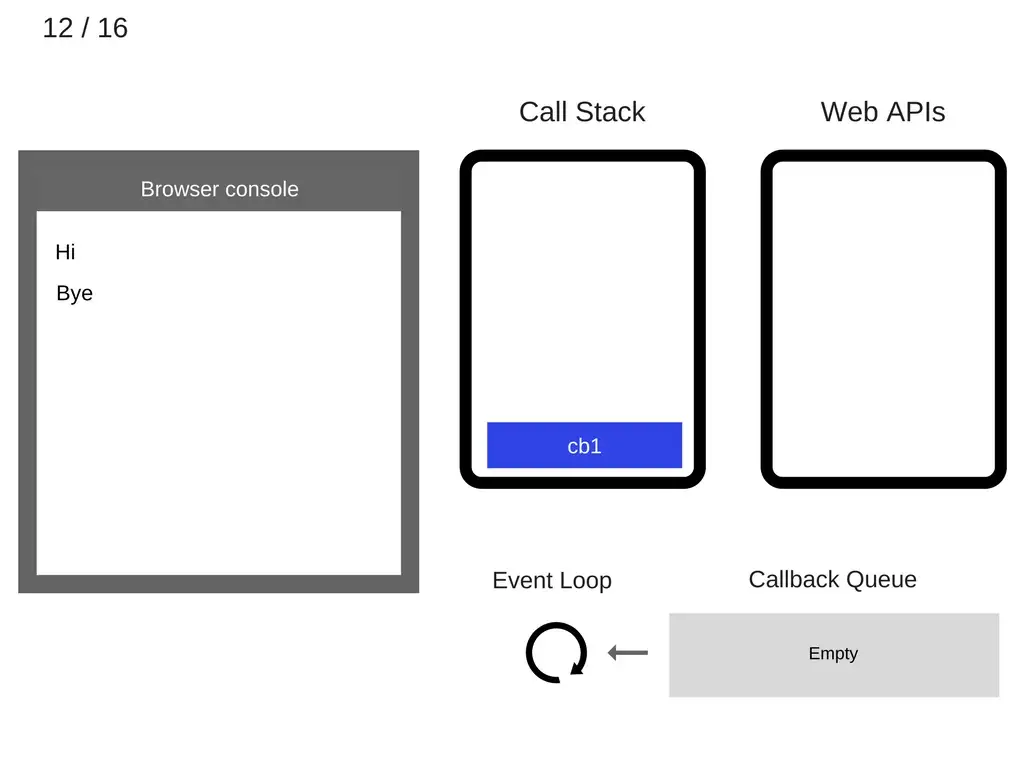

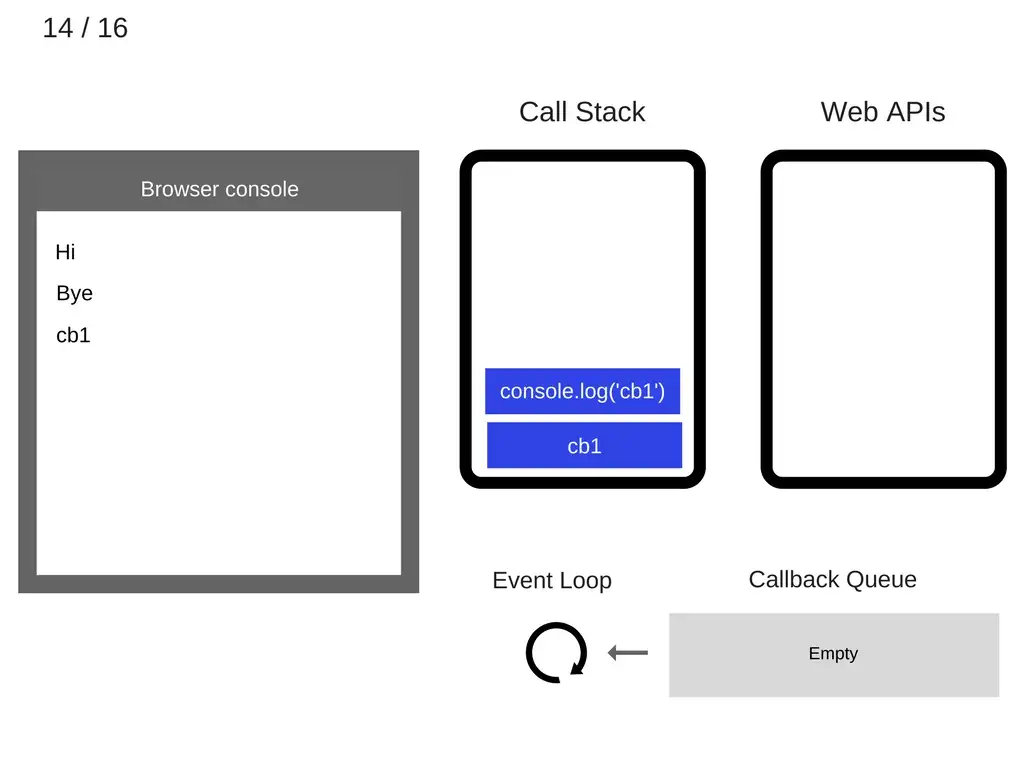
Recap:
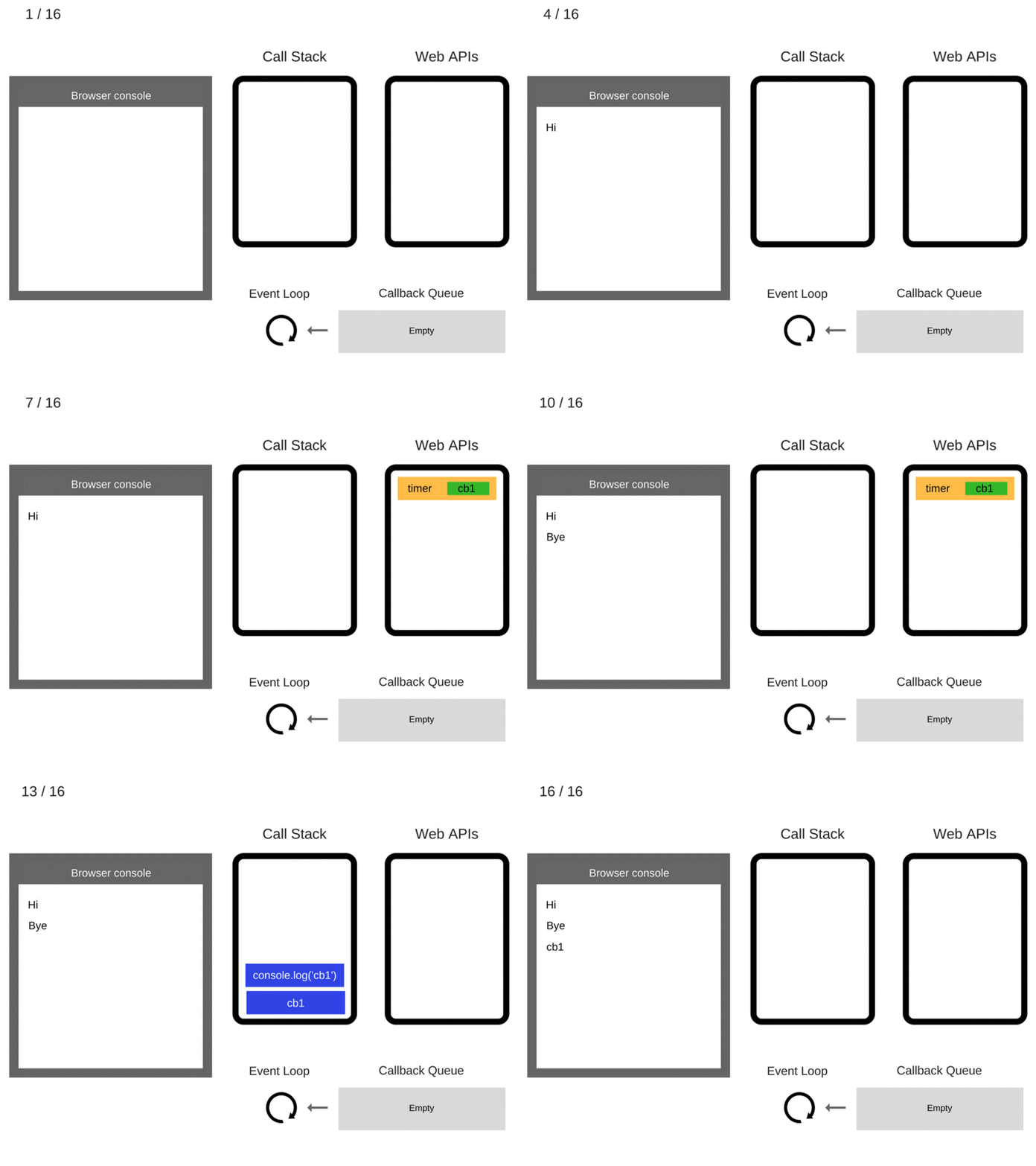
👉 The event loop's job is to look at the call stack and look at the task queue. **If the call stack is empty, it will take the first thing on the task queue and pushes it on to the call stack which effectively run it.**
❓ Will you see the output exactly 1 sec later?
```javascript=
setTimeout(() => console.log('Timer end'), 1000);
```
[What the heck is the event loop anyway? | Philip Roberts | JSConf EU](https://www.youtube.com/watch?v=8aGhZQkoFbQ)
[Event loop demo](http://latentflip.com/loupe/)
## Callback & Promise
### [Callback](https://developer.mozilla.org/en-US/docs/Glossary/Callback_function)
A callback function is a function passed into another function as an argument, which is then invoked inside the outer function to complete some kind of routine or action.
```javascript=
function greeting(name) {
alert(`Hello, ${name}`);
}
function processUserInput(callback) {
const name = prompt("Please enter your name.");
callback(name);
}
processUserInput(greeting);
```
The above example is a *synchronous* callback, as it is executed immediately.
How about asynchronous callbacks?
#### `SetTimeout`
```javascript=
setTimeout(() => {
console.log('This is setTimeout callback');
}, 1000)
```
#### `AddEventListener`
```javascript=
document.querySelector('#event-test').addEventListener('click', (e) => {
console.log('This is click event');
})
```
#### AJAX and `XMLHttpRequest`
**Asynchronous JavaScript and XML**, or **Ajax**, is not a technology in itself, but rather an approach to using a number of existing technologies together, including HTML or XHTML, CSS, JavaScript, DOM, XML, XSLT, and most importantly the `XMLHttpRequest` object.
##### `XMLHttpRequest`
The core of AJAX is the use of the `XMLHttpRequest` object to communicate with servers. It can send and receive information in various formats, including JSON, XML, HTML, and text files. AJAX's most appealing characteristic is its "asynchronous" nature, which means it can communicate with the server, exchange data, and update the page without having to refresh the page.
```javascript=
const apiHost = 'https://padax.github.io';
const xhr = new XMLHttpRequest();
xhr.onreadystatechange = () => {
if (xhr.readyState === XMLHttpRequest.DONE) {
// Everything is good, the response was received.
if (xhr.status === 200) {
console.log(JSON.parse(xhr.responseText));
} else {
console.error("There was a problem with the request.");
}
} else {
// Not ready yet.
console.log(`ready state is ${xhr.readyState}`);
}
};
xhr.open(
'GET',
`${apiHost}/taipei-day-trip-resources/taipei-attractions-assignment.json`
);
xhr.send();
```
### [Promise]((https://developer.mozilla.org/en-US/docs/Web/JavaScript/Reference/Global_Objects/Promise))
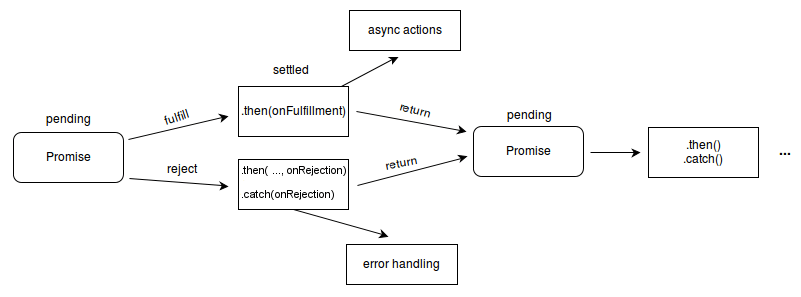
The **`Promise`** object represents the eventual completion (or failure) of an asynchronous operation and its resulting value.
A `Promise` is in one of these states:
- *pending*: initial state, neither fulfilled nor rejected.
- *fulfilled*: meaning that the operation was completed successfully.
- *rejected*: meaning that the operation failed.
#### How to use promise?
```javascript=
const apiHost = "https://padax.github.io";
fetch(
`${apiHost}/taipei-day-trip-resources/taipei-attractions-assignmens.json`
)
.then((response) => {
console.log("The fetch promise is resolved!");
return response.json();
})
.then((result) => {
console.log(result);
})
.catch((err) => {
console.error('Something went wrong when the fetch function is executed');
console.error(err);
})
.finally(() =>
console.log("The code in finally block will always be executed!")
);
```
👉 What will you get in the following code snippet?
```javascript=
const response = fetch(
`${apiHost}/taipei-day-trip-resources/taipei-attractions-assignmens.json`
)
console.log(response); // Promise
```
#### How to create promise?
👉 Use [`Promise()`](https://developer.mozilla.org/en-US/docs/Web/JavaScript/Reference/Global_Objects/Promise/Promise) constructor
```javascript=
const p = new Promise((resolveFn, rejectFn) => {
if (Math.random() >= 0.5) {
resolveFn("The promise is fulfilled!");
} else {
rejectFn("The promise is rejected!");
}
});
```
`Promise` constructor takes an executer function as parameter. The `executer` function receives two functions as parameters: `resolveFn` and `rejectFn`. The `resolveFn` or `rejectFn` should be called inside the `executer` function to cause the promise to be "resolved".
> Usually "resolved" means the promise is "settled" (fulfilled or rejected). But it can be also in the case that the promise is "locked-in" to match the eventual state of another promise, and further resolving or rejecting it has no effect.
Once the promise "settles", it (asynchronously) invokes any further handlers associated through `then()`, `catch()`, or `finally()`.
```javascript=
p.then((result) => console.log(result)).catch((err) => console.log(err));
```
❗️ The `executor` is called synchronously (as soon as the `Promise` is constructed) with the `resolveFn` and `rejectFn` functions as arguments.
```javascript=
console.log('Begin!');
const p = new Promise((resolveFn, rejectFn) => {
console.log('Run promise executor!')
if (Math.random() >= 0.5) {
resolveFn("The promise is fulfilled!");
} else {
rejectFn("The promise is rejected!");
}
});
p.then((result) => console.log(result)).catch((err) => console.log(err));
console.log('End!');
```
> In this case, the promise is actually settled (fulfilled or rejected) immediately, but it callback `.then` (or `catch`) is executed until the main programming is finish. Does it go through the asynchronous process (Web API, event loop) we mentioned before?
`executor` typically wraps some asynchronous operation which provides a *callback-based API*. The callback (the one passed to the original callback-based API) is defined within the executor code, so it has access to the `resolve` and `reject`.
❓ How about convert `setTimeout` callback API to an promise?
```javascript=
// Convert
// setTimeout(callback, timeInMilliSecond)
// To
// setTimeoutPromise(timeInMilliSecond)
// .then(() => {
// callback();
// })
// Callback-based API
setTimeout(() => {
console.log('doSomething');
}, 5000);
// Promise-based API
setTimeoutPromise(5000)
.then(() => {
console.log('doSomething');
});
```
👉 `setTimeout` can be converted to as promise-based form:
```javascript=
const setTimeoutPromise = (waitTime) =>
new Promise(
(resolve, reject) => {
setTimeout(() => { resolve(); }, waitTime);
});
```
💡 Try convert callback API `TPDirect.card.getPrime(callback)` in TapPay SDK to promise-based form.
#### [`Promise.resolve()`](https://developer.mozilla.org/en-US/docs/Web/JavaScript/Reference/Global_Objects/Promise/resolve), [`Promise.reject()`](https://developer.mozilla.org/en-US/docs/Web/JavaScript/Reference/Global_Objects/Promise/reject)
##### `Promise.resolve(value)`
The `Promise.resolve()` static method "resolves" a given value to a `Promise`.
```javascript=
const resolveP = Promise.resolve('success');
console.log(resolveP); // Promise
resolveP.then((result) => console.log(result)); // 'success'
```
`Promise.resolve()` reuses existing `Promise` instances. If it's resolving a native promise, it returns the same promise instance without creating a wrapper.
```javascript=
const original = Promise.resolve('original');
const cast = Promise.resolve(original);
cast.then((value) => {
console.log(`value: ${value}`);
});
console.log(`original === cast ? ${original === cast}`);
// Logs, in order:
// original === cast ? true
// value: original
```
##### `Promise.reject(reason)`
```javascript=
const rejectP = Promise.reject('fail');
console.log(rejectP);
rejectP.catch((err) => console.log(err));
```
Unlike `Promise.resolve()`, `Promise.reject()` always wraps `reason` in a new `Promise` object, even when `reason` is already a `Promise`.
#### [Promise Chaining](https://developer.mozilla.org/en-US/docs/Web/JavaScript/Reference/Global_Objects/Promise#chained_promises)
The methods `.then()`, `.catch()`, and `.finally()` are used to associate further action with a promise that becomes settled. As these methods return promises, they can be *chained*.
👇 What the results of the following code examples?
```javascript=
// Case 1
setTimeoutPromise(5000)
.then(() => {
console.log("first then()");
return Promise.resolve("next then() with promise value");
})
.then((result) => {
console.log(result);
});
// Case 2
setTimeoutPromise(5000)
.then(() => {
console.log("first then()");
return "next then() with normal value";
})
.then((result) => {
console.log(result);
});
// Case 3
setTimeoutPromise(5000)
.then(() => {
console.log("first then()");
})
.then((result) => {
console.log(result);
});
```
Which one is better?
```javascript=
const apiHost = "https://tdx.transportdata.tw";
// Case 1
fetch(`${apiHost}/api/basic/v2/Bus/Route/City/Taipei/307`)
.then((response) => {
return response.json();
})
.then((result) => console.log(result));
// Case 2
fetch(`${apiHost}/api/basic/v2/Bus/Route/City/Taipei/307`)
.then((response) => {
response.json()
.then((result) => console.log(result));
});
```
#### Other concepts you need to know about promise
- [Promise Concurrency](https://developer.mozilla.org/en-US/docs/Web/JavaScript/Reference/Global_Objects/Promise#promise_concurrency)
- [`Promise.prototype.then`](https://developer.mozilla.org/en-US/docs/Web/JavaScript/Reference/Global_Objects/Promise/then), [`Promise.prototype.catch`](https://developer.mozilla.org/en-US/docs/Web/JavaScript/Reference/Global_Objects/Promise/catch)
## Async / Await
Remember our previous `fetch` example:
```javascript=
const apiHost = "https://tdx.transportdata.tw";
fetch(
`${apiHost}/api/basic/v2/Bus/Route/City/Taipei/307`
)
.then((response) => {
console.log("The fetch promise is resolved!");
return response.json();
})
.then((result) => {
console.log(result);
})
.catch((err) => console.error(err))
.finally(() =>
console.log("The code in finally block will always be executed!")
);
```
❓ How to write a promise-based API in `async` / `await` form?
First, we rewrite our previous example as `async` function where `await` syntax is used with each asynchronous part:
```javascript=
const apiHost = "https://tdx.transportdata.tw";
async function fetchData() {
const response = await fetch(
`${apiHost}/api/basic/v2/Bus/Route/City/Taipei/307`
);
const result = await response.json();
console.log(result);
}
fetchData();
```
❓ But how to implement `catch` part in the example with `async` / `await`?
👉 Using `try` / `catch`
```javascript=
const apiHost = "https://tdx.transportdata.tww";
async function fetchData() {
try {
const response = await fetch(
`${apiHost}/api/basic/v2/Bus/Route/City/Taipei/307`
);
const result = await response.json();
console.log(result);
} catch (err) {
console.log("Something went wrong");
console.log(err);
}
}
fetchData();
```
Async function details:
- The return value of an async function is a promise.
- Async functions always return a promise. If the return value of an async function is not explicitly a promise, it will be implicitly wrapped in a promise.
- The body of an async function can be thought of as being split by zero or more await expressions. Top-level code, up to and including the first `await` expression (if there is one), is run *synchronously*.
You can actually do this:
```javascript=
fetchDate()
.then(() => {
console.log('The return value of an async function is a promise.');
})
```
These two code snippet are equivalent:
```javascript=
async function asyncReturnPromise() {
return Promise.resolve('async')
}
console.log(asyncReturnPromise()); // Promise
```
```javascript=
async function asyncReturnNormal() {
return 'async';
}
console.log(asyncReturnNormal()); // Promise
```
👇 What the result of the following code you expect to be?
```javascript=
async function asyncOrNot() {
console.log('Async Begin!');
await Promise.resolve('await');
console.log('Async End');
}
console.log('Begin!');
asyncOrNot();
console.log('End!');
```
`await` details:
```javascript
await expression
```
- Using `await` pauses the execution of its surrounding `async` function until the promise is *settled* (that is, *fulfilled* or *rejected*).
- The `expression` is resolved in the same way as `Promise.resolve()`. It's always converted to a native `Promise` and then awaited. The `expression` can be a `Promise`, a thenable object, or *any value* to wait for.
- If the promise is rejected, the `await` expression *throws* the rejected value. (That why we have to use `try` / `catch` clause to catch it)
👇 What is the output of the following example?
```javascript=
async function nonPromiseExpression() {
const y = await 20;
console.log(y);
const obj = {};
console.log((await obj) === obj);
}
nonPromiseExpression();
```
You can "chain" the `await` statement.
```javascript=
const apiHost = "https://tdx.transportdata.tw";
async function fetchData() {
const result = await (
await fetch(`${apiHost}/api/basic/v2/Bus/Route/City/Taipei/307`)
).json();
console.log(result);
}
fetchData();
```
👇 What will you expect the result to be?
```javascript=
async function foo(name) {
console.log(name, "start");
await console.log(name, "middle");
console.log(name, "end");
}
foo("First");
foo("Second");
```
> This actually makes the async function become unpredictable. Therefore, using `await` only to unwrap promises into their values might be the better practice.
### Separating your `async` / `await` code in a logical way
Assume the API spec is:
URL: `/api/data`
Response:
`200 OK`
```json
{
"data": {
...
}
}
```
`400 Bad Request`
```json
{
"error": true,
"message": "Request information is not correct"
}
```
`500 Internal Server Error`
```json
{
"error": true,
"message": "Internal server error"
}
```
We can create an async function to consume this API endpoint:
```javascript=
async function getDataAndDoSomething() {
try {
const apiUrl = `/api/data`;
const response = await fetch(`${apiUrl}`);
const result = await response.json();
if (response.ok) {
const { data } = result;
// Do somthing with the data
} else {
const { error, message } = result;
// handle the error and the message
}
} catch (err) {
if (err) {
console.error(err);
} else {
console.error('Something went wrong!')
}
}
}
```
If you need to get data from the API multiple time, doing this "fetch" thing would become tedious.
> The code should be **DRY**: Don't repeat yourself.
👉 How about seperating the behavior for getting data from API and the one for using the data fetched?
```javascript=
async function getData() {
try {
const apiUrl = `/api/data`;
const response = await fetch(`${apiUrl}`);
const result = await response.json();
return result;
} catch (err) {
if (err) {
console.error(err);
} else {
console.error('Something went wrong!')
}
}
}
// Using getData()
async function useData() {
const result = (await getData());
if (result) {
const { data, error, message } = result;
if (data) {
// Do somthing with the data
} else if (error) {
// handle the error and the message
}
}
}
```
It important to note that which "degree" of the data and the error you consider to handle.
❓ What the difference between the following examples and the previous example?
Example 1:
```javascript=
async function getData() {
try {
const apiUrl = `/api/data`;
const response = await fetch(`${apiUrl}`);
const result = await response.json();
if (response.ok) {
const { data } = result;
return data;
} else {
const { error, message } = result;
if (error) {
throw new Error('message')
}
}
} catch (err) {
if (err) {
console.error(err);
} else {
console.error('Something went wrong!')
}
}
}
// Using getData()
async function useData() {
try {
const data = await getData();
if (data) {
// Do somthing with the data
}
} catch (error) {
if (error) {
// handle the error and the message
}
}
}
```
Example 2:
```javascript=
async function getData() {
try {
const apiUrl = `/api/data`;
const response = await fetch(`${apiUrl}`);
const result = await response.json();
if (response.ok) {
const { data } = result;
return data;
} else {
const { error, message } = result;
if (error) {
console.error('message')
}
}
} catch (err) {
if (err) {
console.error(err);
} else {
console.error('Something went wrong!')
}
}
}
// Using getData()
async function useData() {
const data = await getData();
if (data) {
// Do somthing with the data
}
}
```
## Revisit event loop
❓ What the output of the following code snippet will be?
```javascript=
console.log('Start!');
setTimeout(() => {
console.log('Timeout!');
}, 0);
Promise.resolve('Promise!')
.then(res => console.log(res));
console.log('End!');
```
```bash
Start!
End!
Promise!
Timeout!
```
Event loop actually contains two type of task:
- **Macrotasks(tasks)**: represents one discrete, self-contained unit of work, such as:
- Creating the main document object
- Parsing HTML
- Executing mainline (or global) JavaScript code
- Changing the current URL
- Various events: page loading, input, network events, and timer event
- **Microtasks**: smaller tasks that update the application state and should be executed before the browser continues with other assignments such as re-rendering the UI. Examples include:
- Promise callbacks
- DOM mutation changes
> Be careful that macrotask queue is also called as task queue.
❓ So how the event loop handle macrotasks and microtasks?
- *Should* use at least one queue for macrotasks and at least one queue for microtasks.
- The event loop is based on two fundamental principles:
- Tasks are handled one at a time.
- A task runs to completion and can’t be interrupted by another task.

Details about event loop:
- **Both task queues are placed outside the event loop**
- **Both types of tasks are executed one at a time**, because JavaScript is based on a single-threaded execution model.
- **All microtasks should be executed before the next rendering**, because their goal is to update the application state before rendering occurs.
- **The browser usually tries to render the page 60 times per second**, to achieve 60 frames per second (60 fps), meaning that the browser tries to render a frame every 16ms. This means that: if we want to achieve smooth-running applications, **a single task and all microtasks generated by that task should ideally complete within 16 ms**.
> 👇 When the following code is executed, how the browser illustrates the result?
>
> ```htmlembedded=
> <body>
> <div id="app"></div>
> <script>
> for (let i = 0; i < 100000; i++) {
> document.getElementById("app").textContent = i;
> }
> </script>
> </body>
> ```
>
> Note that DOM manipulation is synchronous, however, the browser's re-rendering of the page in response to a DOM update is asynchronous.
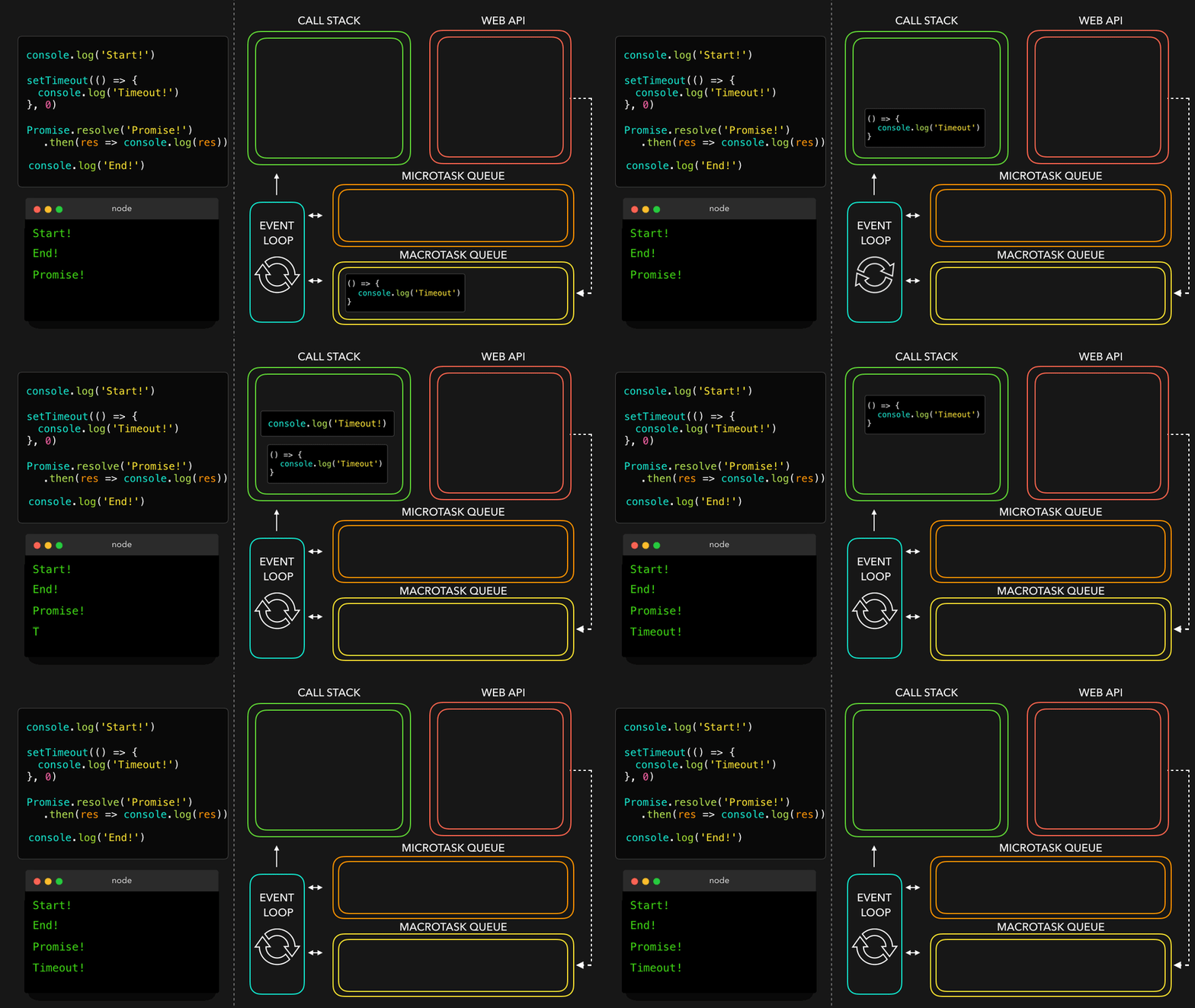
We can combine two different view of the event loop, see how event loop work.
Take the following code snippet as example:
```javascript=
console.log('Start!');
setTimeout(() => {
console.log('Timeout!');
}, 0);
Promise.resolve('Promise!')
.then(res => console.log(res));
console.log('End!');
```
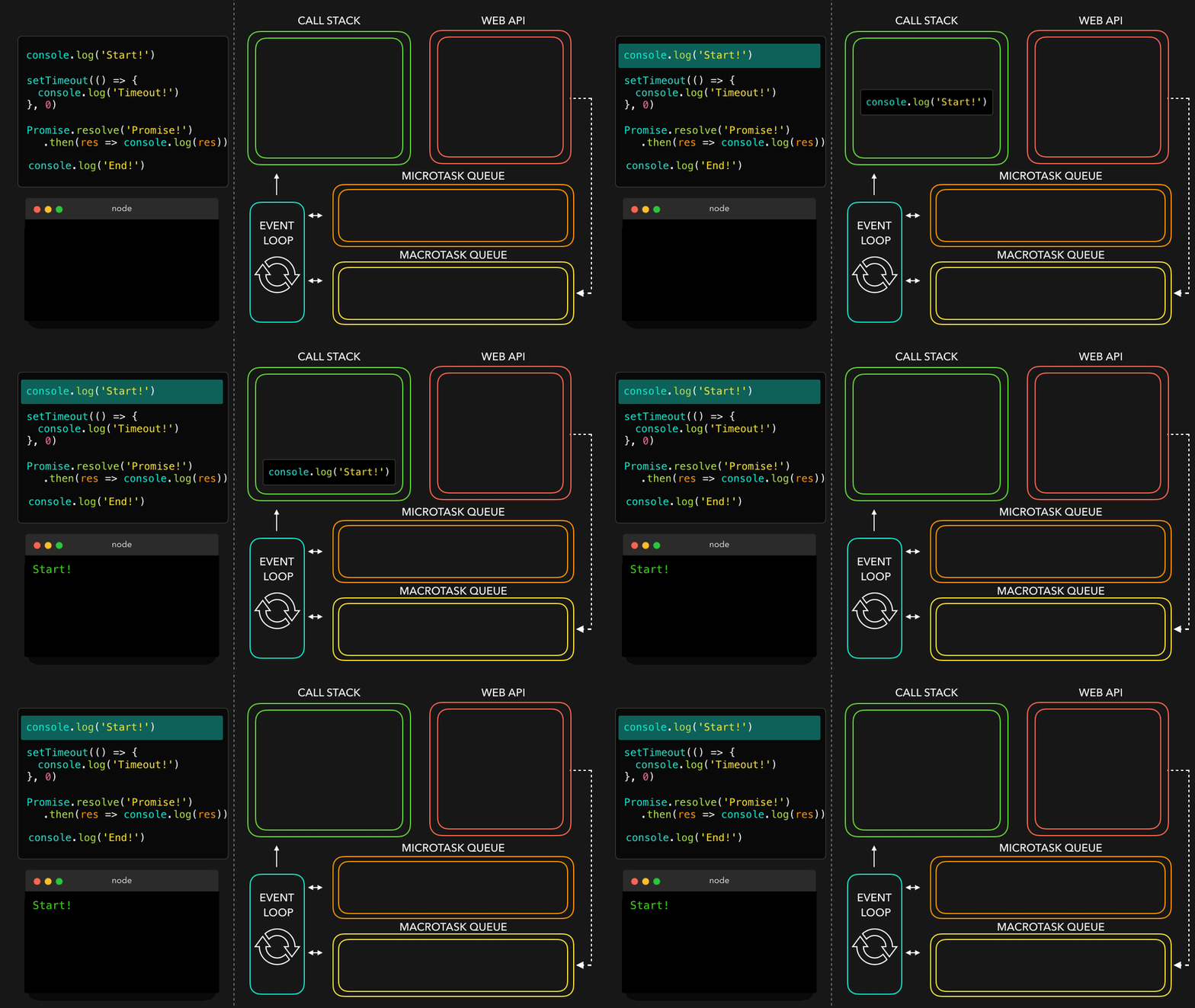
See what happening step by step:
```javascript
console.log('Start!');
```
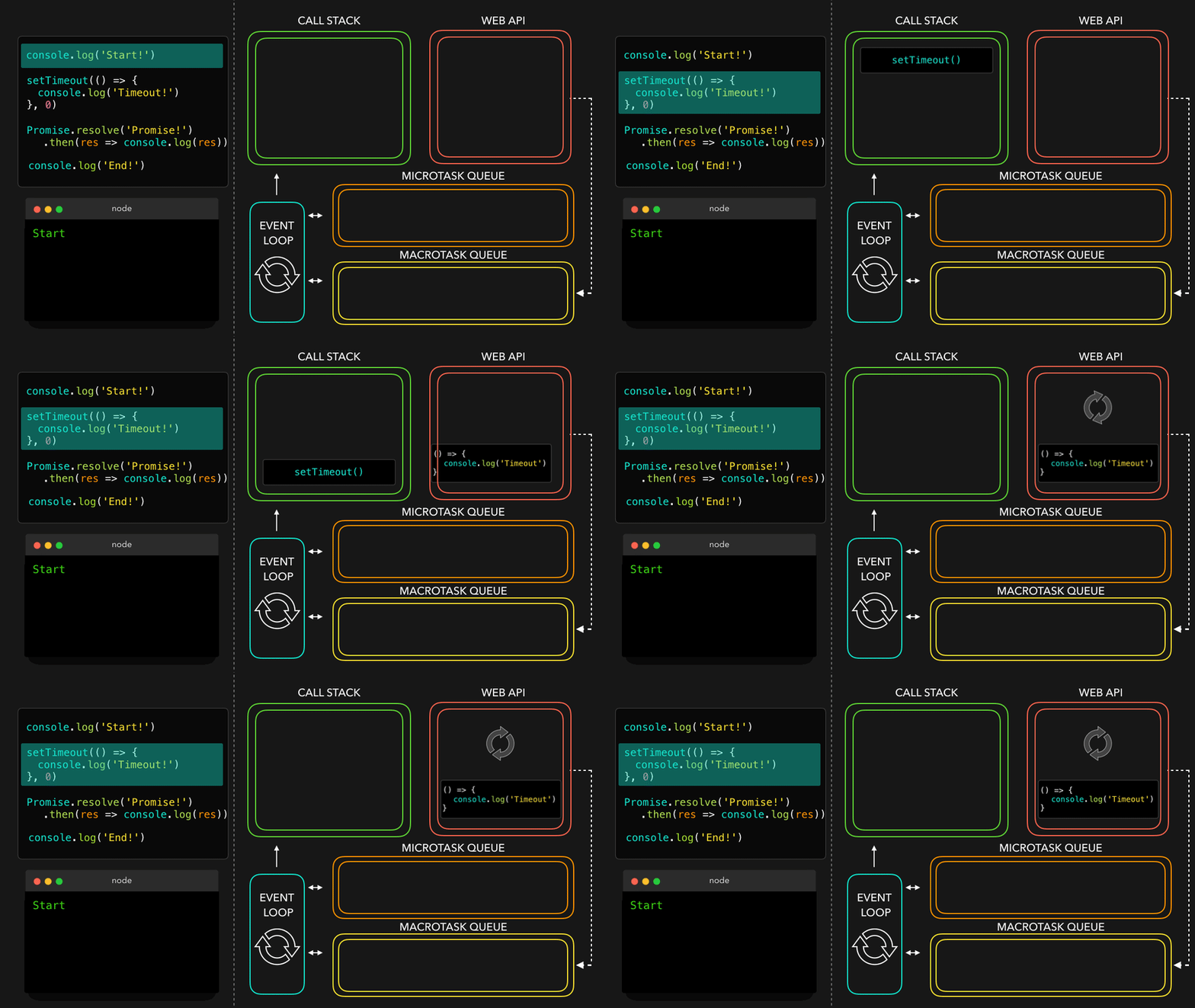
```javascript
setTimeout(...);
```
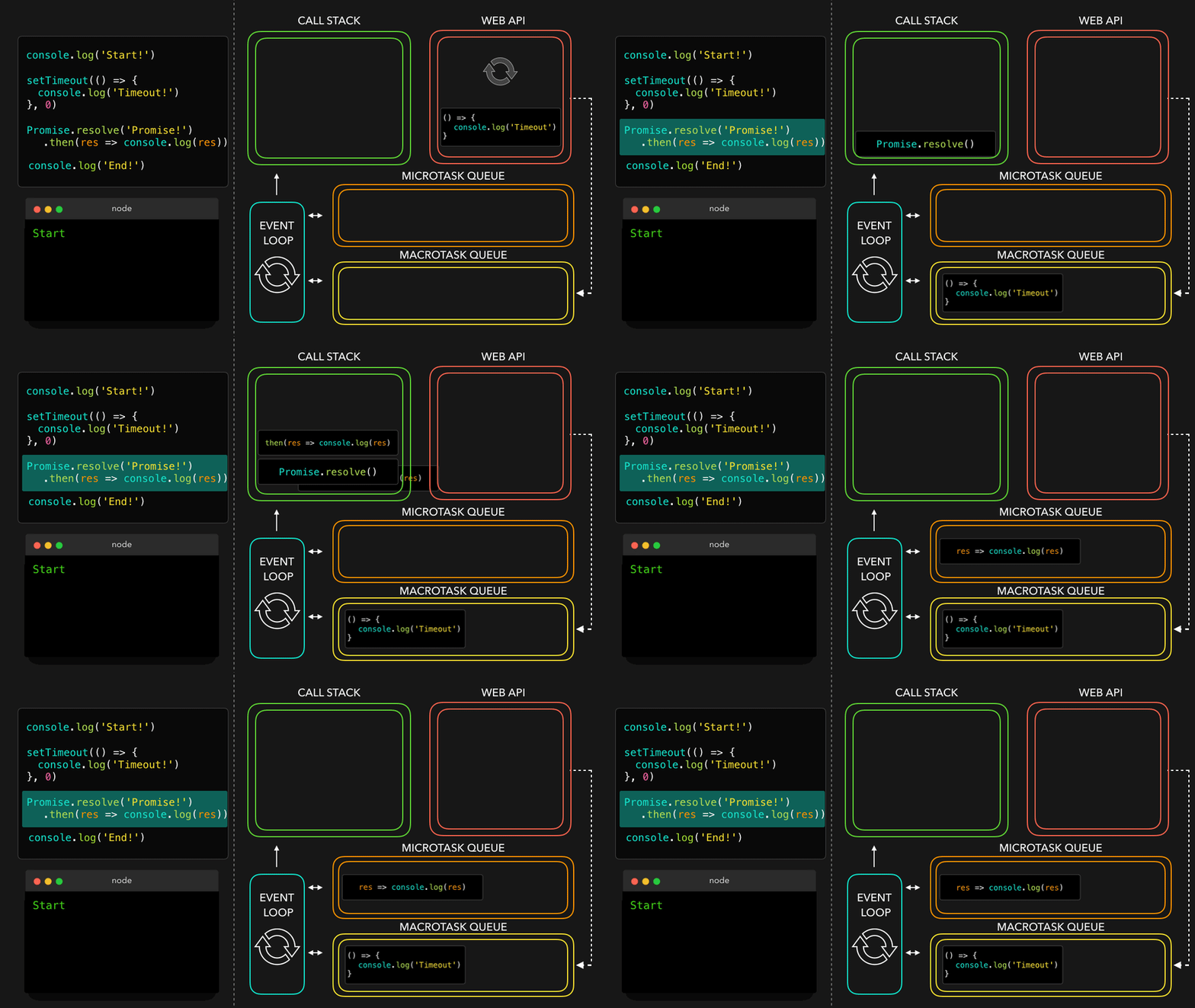
```javascript
Promise.resolve('Promise').then(...);
```
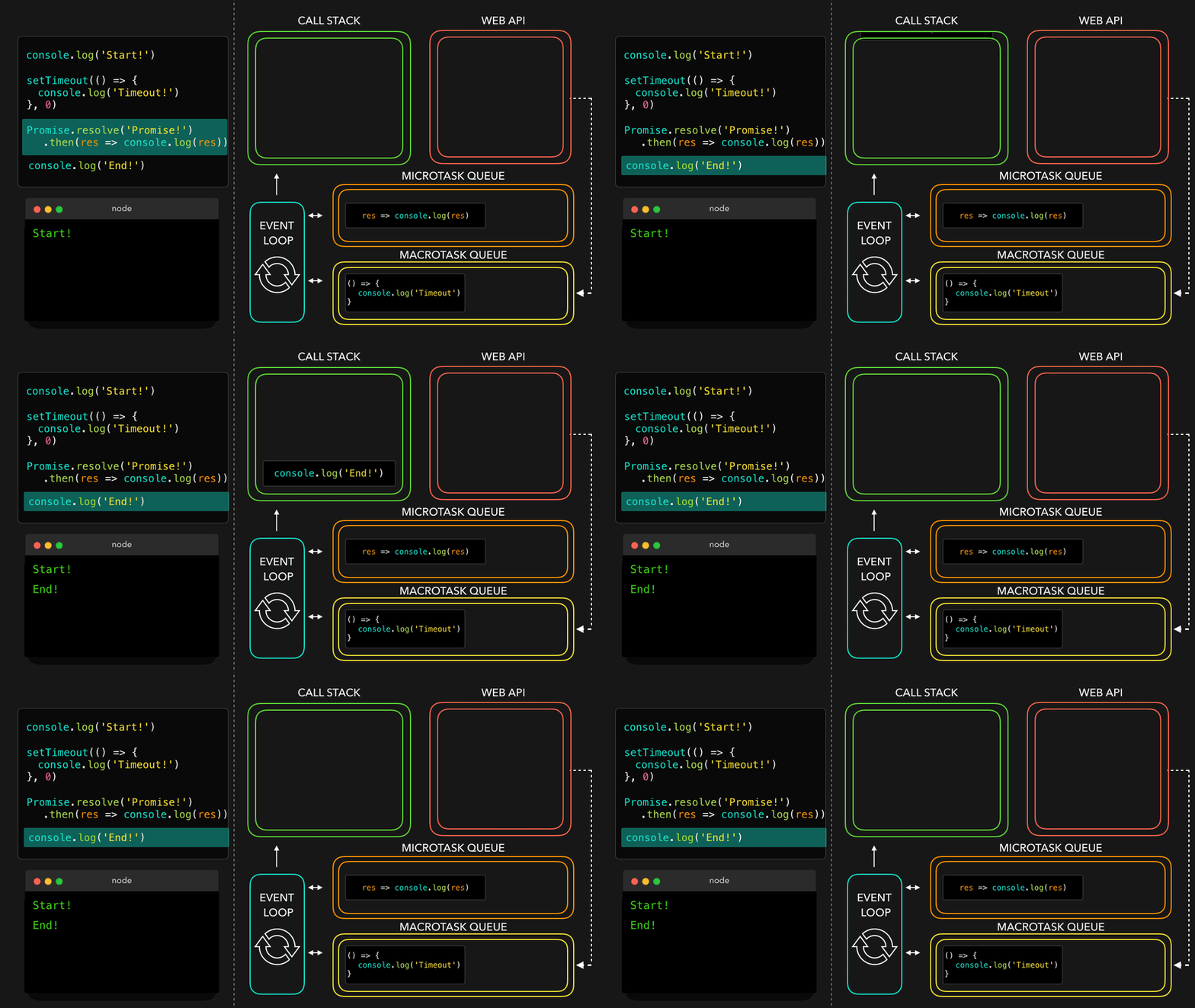
```javascript
console.log('End!');
```
```javascript
res => console.log(res);
```

```javascript
() => console.log('Timeout!');
```
## Reference
[Introducing asynchronous JavaScript](https://developer.mozilla.org/en-US/docs/Learn/JavaScript/Asynchronous/Introducing)
[How JavaScript works: Event loop and the rise of Async programming + 5 ways to better coding with async/await](https://blog.sessionstack.com/how-javascript-works-event-loop-and-the-rise-of-async-programming-5-ways-to-better-coding-with-2f077c4438b5)
[Everything That You Need To Know About Event Loop in JavaScript — Asynchronous Programming in JS.](https://medium.com/@aditya.shukla278/everything-you-need-to-know-about-event-loop-in-javascript-1f14f94e5ab6)
[JavaScript Visualized: Promises & Async/Await](https://dev.to/lydiahallie/javascript-visualized-promises-async-await-5gke)
[Using Promise](https://developer.mozilla.org/en-US/docs/Web/JavaScript/Guide/Using_promises)
[Promise - MDN](https://developer.mozilla.org/en-US/docs/Web/JavaScript/Reference/Global_Objects/Promise)
[`await`](https://developer.mozilla.org/en-US/docs/Web/JavaScript/Reference/Operators/await)
[JS 原力覺醒 Day15 - Macrotask 與 MicroTask](https://ithelp.ithome.com.tw/articles/10222737)
 Sign in with Wallet
Connect another wallet
Sign in with Wallet
Connect another wallet