<style>
.reveal, .reveal h1, .reveal h2, .reveal h3, .reveal h4, .reveal h5, .reveal h6 {
font-family: "Source Sans Pro", "Helvetica Neue", Helvetica, Arial, "Microsoft JhengHei", Meiryo, "MS ゴシック", "MS Gothic", sans-serif;
}
h1, h2, h3, h4, h5, h6 {
text-transform: none !important;
}
</style>
# 都市之眼
# 到
# 庫伯納斯
Kevin(5f)
A40503
0X000, ITRI ICL
---
# Cityeyes
# to
# k8s #2
Kevin(5f)
A40503
0X000, ITRI ICL
---
## <font color="black">Kubeadm</font>
<!-- .slide: data-background="https://cdn-images-1.medium.com/max/1200/1*9NG_meMVwlOwq30TWp5f_w.jpeg" -->
----
<!-- .slide: data-transition="fade-in convex-out" data-background="#FFF" -->

<font size=2>Ref: [What is kubeadm and why should I care?](https://docs.google.com/presentation/d/1Gp-2blk5WExI_QR59EUZdwfO2BWLJqa626mK2ej-huo/edit#slide=id.g1f7b516d09_0_1311)</font>
----
### Kubeadm Is Now GA and Stable
----
General Availability means different things for different projects.
<font size=2>Ref: [Production-Ready Kubernetes Cluster Creation with kubeadm](https://kubernetes.io/blog/2018/12/04/production-ready-kubernetes-cluster-creation-with-kubeadm/)</font>
----
<!-- .slide: data-transition="fade-in convex-out" data-background="#FFF" -->

<font size=2>Ref: [What does `kubeadm init` really do -- part 1?](https://docs.google.com/presentation/d/1Gp-2blk5WExI_QR59EUZdwfO2BWLJqa626mK2ej-huo/edit#slide=id.g29bde74989_2_6)</font>
----
<!-- .slide: data-transition="fade-in convex-out" data-background="#FFF" -->

<font size=2>Ref: [What does `kubeadm init` really do -- part 2?](https://docs.google.com/presentation/d/1Gp-2blk5WExI_QR59EUZdwfO2BWLJqa626mK2ej-huo/edit#slide=id.g296708995f_0_1)</font>
----
<!-- .slide: data-transition="fade-in convex-out" data-background="#FFF" -->

<font size=2>Ref: [What does `kubeadm init` really do -- part 3?](https://docs.google.com/presentation/d/1Gp-2blk5WExI_QR59EUZdwfO2BWLJqa626mK2ej-huo/edit#slide=id.g296708995f_0_43)</font>
----
```shell
[init] Using Kubernetes version: vX.Y.Z
[preflight] Running pre-flight checks
[kubeadm] WARNING: starting in 1.8, tokens expire after 24 hours by default (if you require a non-expiring token use --token-ttl 0)
[certificates] Generated ca certificate and key.
[certificates] Generated apiserver certificate and key.
[certificates] apiserver serving cert is signed for DNS names [kubeadm-master kubernetes kubernetes.default kubernetes.default.svc kubernetes.default.svc.cluster.local] and IPs [10.96.0.1 10.138.0.4]
[certificates] Generated apiserver-kubelet-client certificate and key.
[certificates] Generated sa key and public key.
[certificates] Generated front-proxy-ca certificate and key.
[certificates] Generated front-proxy-client certificate and key.
[certificates] Valid certificates and keys now exist in "/etc/kubernetes/pki"
[kubeconfig] Wrote KubeConfig file to disk: "admin.conf"
[kubeconfig] Wrote KubeConfig file to disk: "kubelet.conf"
[kubeconfig] Wrote KubeConfig file to disk: "controller-manager.conf"
[kubeconfig] Wrote KubeConfig file to disk: "scheduler.conf"
[controlplane] Wrote Static Pod manifest for component kube-apiserver to "/etc/kubernetes/manifests/kube-apiserver.yaml"
[controlplane] Wrote Static Pod manifest for component kube-controller-manager to "/etc/kubernetes/manifests/kube-controller-manager.yaml"
[controlplane] Wrote Static Pod manifest for component kube-scheduler to "/etc/kubernetes/manifests/kube-scheduler.yaml"
[etcd] Wrote Static Pod manifest for a local etcd instance to "/etc/kubernetes/manifests/etcd.yaml"
[init] Waiting for the kubelet to boot up the control plane as Static Pods from directory "/etc/kubernetes/manifests"
[init] This often takes around a minute; or longer if the control plane images have to be pulled.
[apiclient] All control plane components are healthy after 39.511972 seconds
[uploadconfig] Storing the configuration used in ConfigMap "kubeadm-config" in the "kube-system" Namespace
[markmaster] Will mark node master as master by adding a label and a taint
[markmaster] Master master tainted and labelled with key/value: node-role.kubernetes.io/master=""
[bootstraptoken] Using token: <token>
[bootstraptoken] Configured RBAC rules to allow Node Bootstrap tokens to post CSRs in order for nodes to get long term certificate credentials
[bootstraptoken] Configured RBAC rules to allow the csrapprover controller automatically approve CSRs from a Node Bootstrap Token
[bootstraptoken] Creating the "cluster-info" ConfigMap in the "kube-public" namespace
[addons] Applied essential addon: CoreDNS
[addons] Applied essential addon: kube-proxy
Your Kubernetes master has initialized successfully!
To start using your cluster, you need to run (as a regular user):
mkdir -p $HOME/.kube
sudo cp -i /etc/kubernetes/admin.conf $HOME/.kube/config
sudo chown $(id -u):$(id -g) $HOME/.kube/config
You should now deploy a pod network to the cluster.
Run "kubectl apply -f [podnetwork].yaml" with one of the addon options listed at:
http://kubernetes.io/docs/admin/addons/
You can now join any number of machines by running the following on each node
as root:
kubeadm join --token <token> <master-ip>:<master-port> --discovery-token-ca-cert-hash sha256:<hash>
```
<font size=2>Ref: [Creating a single master cluster with kubeadm](https://kubernetes.io/docs/setup/independent/create-cluster-kubeadm/)</font>
----
**Recommend**
[kubeadm Cluster Creation Internals
From Self-Hosting to Upgradability and HA
](https://docs.google.com/presentation/d/1Gp-2blk5WExI_QR59EUZdwfO2BWLJqa626mK2ej-huo/edit#slide=id.p)
----
[Kubernetes The Hard Way](https://github.com/kelseyhightower/kubernetes-the-hard-way)
----

---
## Deploy Docker Registry
----
```shell
$ kubectl create -f docker-registry.yaml
$ kubectl create -f ./UI/registry-UI.yaml
```
----
```yaml=
apiVersion: apps/v1
kind: Deployment
metadata:
name: registry
labels:
app: registry
spec:
replicas: 1
selector:
matchLabels:
app: registry
template:
metadata:
labels:
app: registry
spec:
nodeSelector:
machine: storage
containers:
- name: registry
image: registry:2.6.2
ports:
- containerPort: 5000
volumeMounts:
- name: registry-local
mountPath: /var/lib/registry
volumes:
- name: registry-local
persistentVolumeClaim:
claimName: pvc-registry
---
apiVersion: v1
kind: Service
metadata:
name: registry
labels:
app: registry
spec:
type: NodePort
ports:
- port: 5000
nodePort: 31115
selector:
app: registry
```
----
### Enable Insecure registry
----
In <font color="#11BBF1" >/etc/docker/daemon.json </font>
add insecure registries.
```json=
{
"insecure-registries" : ["140.96.29.86:31115"]
}
```
---
<!-- .slide: data-background="http://mssamsgrade8.weebly.com/uploads/9/1/9/6/91965484/720945899_orig.jpg" -->
## <font color="black" >Volume #2</font>
----
### PV & PVC & StorageClass
----
<!-- .slide: data-transition="fade-in convex-out" data-background="#FFF" -->
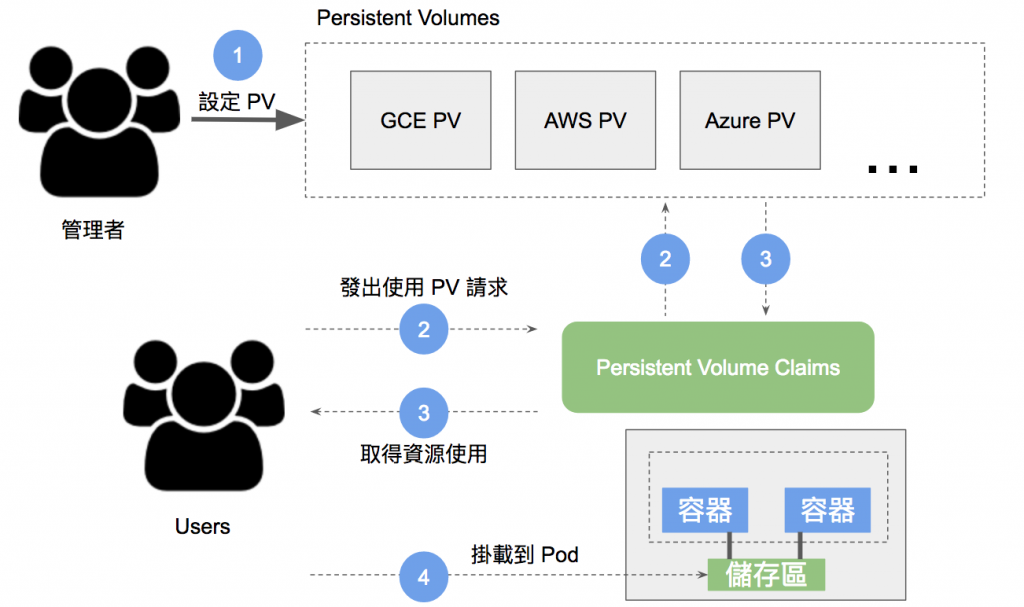
<font size=2>Ref: [Volume (2)](https://ithelp.ithome.com.tw/articles/10193550)</font>
----
<!-- .slide: data-transition="fade-in convex-out" data-background="#FFF" -->
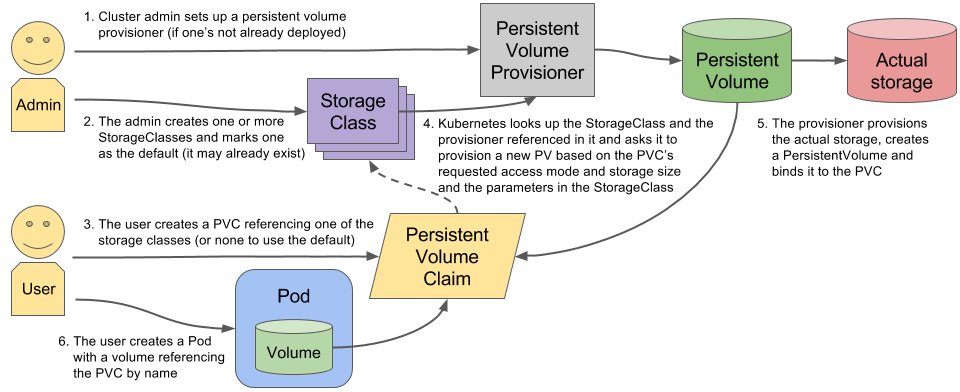
<font size=2>Ref: [markoluksa twitter](https://twitter.com/markoluksa/status/864544834408914944)</font>
----
<!-- .slide: data-transition="fade-in convex-out" data-background="#FFF" -->

<font size=2>Ref: [Kubernetes PV/PVC/StorageClass](https://www.9cyh.net/15343425447853.html)</font>
----
<!-- .slide: data-transition="fade-in convex-out" data-background="#FFF" -->

<font size=2>Ref: [Kubernetes PV/PVC/StorageClass](https://www.9cyh.net/15343425447853.html)</font>
----

---
# Future work
----
## Engine Containerizing
- SR engine
- Windows engine (Need Windows server)
- ...
<font size=2>Ref : [getting-started-kubernetes-windows](https://docs.microsoft.com/zh-tw/virtualization/windowscontainers/kubernetes/getting-started-kubernetes-windows)</font>
----
## Images maintains
|||
|-|-|
|||
----
## Packages maintains
- images (master, worker)
- deb ...
- docker registry
- nvidia driver
- ...

----
## Moniter customer & Alert

----
{"metaMigratedAt":"2023-06-14T19:19:48.830Z","metaMigratedFrom":"Content","title":"都市之眼","breaks":true,"contributors":"[{\"id\":\"1243785e-0704-4596-839d-0e4e3f26a70a\",\"add\":10039,\"del\":1000}]"}