# 02.3-WebServic and APIs-Lesson3: GraphQL APIs
###### tags: `Udacity`
# 01 Introduction
{%youtube gQnVdnCWBeU%}
# 02 Overview
{%youtube HTTnP0Kgcrg%}
[GraphQL](https://graphql.org/) is a query language for APIs or a syntax that describes how to ask for data and is generally used to load data from a server to a client. GraphQL offers maximum efficiency and flexibility because it allows the calling client to specify exactly what data it needs.
To include GraphQL in your project, a couple of dependencies are needed:
* **graphql-spring-boot-starter** - This starter is very helpful because it will add and automatically configure a GraphQL Servlet that you can access at /graphql . This starter will also use a GraphQL schema library to parse all schema files found on the classpath. The starter will also set up an endpoint that can access POST requests.
* **graphql-java-tools** - A helper library to parse the GraphQL schema.
==ShannonNote==
>GraphQL是一種query可以描述如何請求data,常被使用load data給client. 因為他允許讓client去決定他們想要什麼樣的data,而不是server
>
>* `graphql-spring-boot-starter`會自動設定GraphQL Servlet讓你可以瀏覽`/graphql`
# 03 Schemas
{%youtube C-TtBoSBOMM%}
The GraphQL schema defines the data points offered via an API. The schema contains the data types and relationships between them and the set of operations available, things like queries for retrieving data and mutations for creating, updating, and deleting data.
The schema from the Case Study is shown below.
```json
type Location {
id: ID!
name: String!
address: String!
}
type Query {
findAllLocations: [Location]!
}
type Mutation {
newLocation(name: String!, address: String) : Location!
deleteLocation(id:ID!) : Boolean
updateLocationName(newName: String!, id:ID!) : Location!
}
```
# 04 Operations
{%youtube iAQOimeLzfg%}
GraphQL offers operations on data like queries and mutations.
**Queries**
A query allows for the retrieving of data. Each query will have a specific object that it returns and based on the object returned, you can add or remove fields to match the exact data you need to fit your specific use case.
**Mutations**
GraphQL has the ability to update the data stored on the server, by means of mutations. Mutations, such as, create, update, or delete will change the data, unlike a query.
# 05 GraphiQL
{%youtube %}
A tool called GraphiQL is a simple web app that is able to communicate with any GraphQL Server and execute queries and mutations against it. We'll go much more in-depth on how to use GraphiQL in the Case Study later in this lesson.
* Identify TWO ways to test a GraphQL API
* Postman
* GraphiQL
# 06 Case Study: Steps
{%youtube 5oJZRnbJpe8%}
The case study is a GraphQL API that retrieves a list of locations from a database. The code can be cloned from [GitLab](https://gitlab.com/videolearning/udacity-java/tree/master/Lesson3-graphql).
The REST API has the following components:
* **Controller** - LocationController.java
* **Service** - LocationService.java and LocationServiceImpl.java
* **CRUD Repository** - LocationRepository.java
* **Domain Entity/Model** - Location.java
* **Schema** - location.graphqls and via the [GraphiQL console](http://localhost:8080/graphql/schema.json) at http://localhost:8080/graphql/schema.json.
* **Mutator** - Mutation.java
* **Query** - Query.java
* **H2 Databas**e accessible via http://localhost:8080/h2/
* **Tomcat Server** accessible via http://localhost:8080
* **GraphiQL console** accessible via http://localhost:8080/graphiql
* **Sample Queries**/Mutations
Sample Queries/Mutations
```json
{
findAllApplications{
id
owner
address
}
}
```
```json
mutation{
newLocation(
name: "JBM Airport",
address: "Montego Bay, Jamica airport location"){
id
name
address
}
)
}
```
```json
mutation{
deleteLocation(id:1)
}
```
# 07 Case Study: Bootsrap & Configura
{%youtube UOWLDm2FjdA%}The case study is a GraphQL API that retrieves a list of locations from a database. The code can be cloned from [GitLab](https://gitlab.com/videolearning/udacity-java/tree/master/Lesson3-graphql).
# 08 Lab I: Build a Dog GraphQL API
**Lab I: Build a Dog GraphQL API**
Similarly to last lesson, but this time with GraphQL, you will work to create a GraphQL API that returns a list of dogs from an embedded H2 in memory database. You'll be able to re-use certain parts of your code from before, although note that you will want to work in a separate project for this lab. As before, you will build on this code throughout each of the lesson's labs, so while it starts with just a small piece, it will get bigger as we go.
**Set Up**
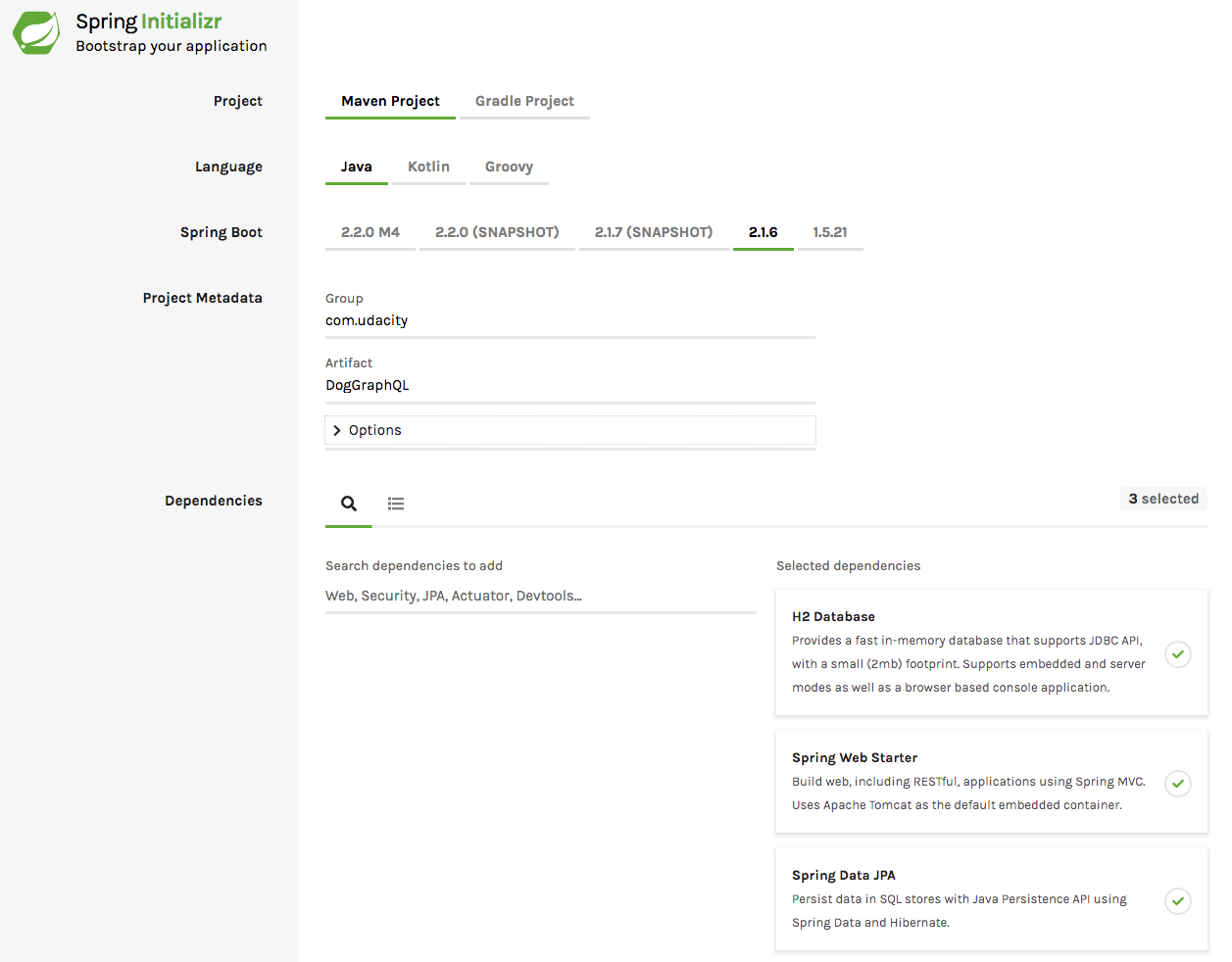
* Step 1: Use Spring Initializr to bootstrap a simple project.
* Add the H2 Database, Spring Web Starter, and the Spring Data JPA dependencies before generating the project.
* Step 2: Add the necessary GraphQL dependencies manually in your Maven POM file.
* Go ahead and set up the necessary H2 and GraphQL properties to application.properties at this time as well.
# 09 Lab I: Solution
**Solution: Build a Dog GraphQL API - Set Up**
Below, we'll walk through each step of the lab and look at one potential way to implement the lab. Even if you get stuck, you should always first try to work through the lab without the solution before coming here, so that you can best learn the related skills and be ready for the project at the end of the course.
**Step 1: Use [Spring Initializr](https://start.spring.io/) to bootstrap a simple project.**
Add the H2 Database, Spring Web Starter, and the Spring Data JPA dependencies before generating the project.
**Step 2: Add the necessary GraphQL dependencies.**
* You will need to manually enter these in your Maven POM file.
* Set up the necessary H2 and GraphQL properties to application.properties at this time as well.
First, add the following dependencies in the `pom.xml` file:
```xml
<dependency>
<groupId>com.graphql-java</groupId>
<artifactId>graphql-spring-boot-starter</artifactId>
<version>5.0.2</version>
</dependency>
<dependency>
<groupId>com.graphql-java</groupId>
<artifactId>graphql-java-tools</artifactId>
<version>5.2.4</version>
</dependency>
<dependency>
<groupId>com.graphql-java</groupId>
<artifactId>graphiql-spring-boot-starter</artifactId>
<version>5.0.2</version>
</dependency>
```
Then, head over to your `application.properties` and add the following:
```java
spring.h2.console.enabled=true
spring.h2.console.path=/h2
spring.datasource.url=jdbc:h2:mem:dogdata
graphql.servlet.mapping=/graphql
graphql.servlet.enabled=true
graphql.servlet.corsEnabled=true
graphiql.enabled=true
graphiql.endpoint=/graphql
graphiql.mapping=graphiql
```
Note that you don't necessarily have to use the exact same `spring.datasource.url`, `graphql.servlet.mapping`, `graphiql.endpoint`, or `graphiql.mapping`, but that will affect where you go down the road. However, `graphql.servlet.mapping` and `graphiql.endpoint` do need to match, as that is how GraphQL and GraphiQL will interact.
# 10 Case Study: Schema Creation
{%youtube https://youtu.be/1lySj-AOyVg%}
The case study is a GraphQL API that retrieves a list of locations from a database. The code can be cloned from [GitLab](https://gitlab.com/videolearning/udacity-java/tree/master/Lesson3-graphql).
# 11 Lab II: Build a Dog GraphQL API(Schema)
**Lab II: Build a Dog GraphQL API**
Let's build more onto our Dog GraphQL API we set up earlier, by adding an entity, GraphQL schema, basic CRUD repository, web service and controller.
**Schema**
Note that you can re-use your code from the REST API you built before for Step 1, as well as most of Step 3 depending on your implementation - just make sure you resolve the naming of packages and imports for your new project.
* Step 1: Create an entity called Dog. The dog should have three attributes:
* Name
* Breed
* Origin
* Step 2: Create a GraphQL schema that matches the fields found in the Dog entity.
* Add the following query operations:
* findDogBreeds
* findDogBreedById
* findAllDogNames
* Add the following mutators:
* deleteDogBreed
* updateDogName
Make sure to really think the query operations through here - would a user be able to use an otherwise broader query along with the specific fields they want to accomplish the same thing as some of these?
* Step 3: Create a repository that extends CrudRepository for creating, reading, updating, and deleting Dog objects.
# 12 Lab II: Solution
**Solution: Build a Dog GraphQL API - Schema**
Below, we'll walk through each step of the lab and look at one potential way to implement the lab. Even if you get stuck, you should always first try to work through the lab without the solution before coming here, so that you can best learn the related skills and be ready for the project at the end of the course.
**Step 1: Create an entity called Dog.**
* The dog should have three attributes:
* Name
* Breed
* Origin
You can re-use your code from the REST API for the `Dog` entity, just make sure to update the package name accordingly!
**Step 2: Create a GraphQL schema.**
* The schema should match the fields found in the Dog entity.
* Add the following query operations:
* findDogBreeds
* findDogBreedById
* findAllDogNames
* Add the following mutators:
* deleteDogBreed
* updateDogName
Following the video, create a `graphql` package within the resources directory of the project. Within that package, add a `dog.graphqls` file (you can add as a text file in IntelliJ if you do not have the GraphQL plug-in yet).
```json
type Dog {
id: ID!
name: String!
breed: String!
origin: String!
}
type Query {
findAllDogs: [Dog]!
findDogById(id:ID!): Dog!
}
type Mutation {
deleteDogBreed(breed:String!) : Boolean
updateDogName(newName: String!, id:ID!) : Dog!
}
```
Now, you may be thinking I did not actually implement the query operations that were requested. But wait - using GraphQL, the user will be able to specify which fields they want from a query. So, simply by adding the queries for find all dogs (where they can request only breed, or only names), and finding a dog by id (where they can request just the breed), these operations actually exist.
**Step 3: Create a repository that extends CrudRepository.**
* This repository is for creating, reading, updating, and deleting Dog objects.
Depending on how you implemented your `DogRepository` for the REST API, you may be able to completely re-use your code here. I actually chose to completely remove any queries from within the `DogRepository`, as there are already built-in methods for a `CrudRepository` that `findAll` and `findById`.
**What about the service and controller?**
We don't need these to implement a GraphQL API. If you still want to have a REST API available, you can add those files to the application as well, and the same endpoints as before will be available.
# 13 Case Study: Queries & Mutations
{%youtube HK1eis29n-I%}
The case study is a GraphQL API that retrieves a list of locations from a database. The code can be cloned from [GitLab](https://gitlab.com/videolearning/udacity-java/tree/master/Lesson3-graphql).
# 14 Case Study: Exception Handling
{%youtube 6RiCb4vMAm8%}
The case study is a GraphQL API that retrieves a list of locations from a database. The code can be cloned from [GitLab](https://gitlab.com/videolearning/udacity-java/tree/master/Lesson3-graphql).
# 15 Lab III: Build a DogGraphQL API(Queries & Exception)
**Lab III: Build a Dog GraphQL API**
Let's go further with your Dog GraphQL API (and further distinguish it from the earlier REST API) by adding the functionality for queries, mutations and exception handling.
**Queries & Exceptions**
* Step 1: Create resolvers that implement GraphQLQueryResolver matching the operations in the GraphQL schema.
* Query
* findDogBreeds
* findDogBreedById
* findAllDogNames
* Mutation
* deleteDogBreed
* updateDogName
* Step 2: Make sure errors are handled appropriately.
* If an id is requested that doesn’t exist, appropriately handle the error
# 16 Lab III:Solution
**Solution: Build a Dog GraphQL API - Queries & Exceptions**
Below, we'll walk through each step of the lab and look at one potential way to implement the lab. Even if you get stuck, you should always first try to work through the lab without the solution before coming here, so that you can best learn the related skills and be ready for the project at the end of the course.
**Step 1: Create resolvers that implement `GraphQLQueryResolver`.**
* The query resolver should match the operations in the GraphQL schema.
* Query
* findDogBreeds
* findDogBreedById
* findAllDogNames
* Mutation
* deleteDogBreed
* updateDogName
First, create a `resolver` package and then add a new class `Query` that implements `GraphQLQueryResolver`. We just need to add the queries we put in `dog.graphqls` earlier.
I already added some of the necessary error handling in `findDogById` for Step 2 here, but it's essentially the same for this file as what you saw for the REST API.
```java
package com.udacity.DogGraphQL.resolver;
import com.coxautodev.graphql.tools.GraphQLQueryResolver;
import com.udacity.DogGraphQL.entity.Dog;
import com.udacity.DogGraphQL.exception.DogNotFoundException;
import com.udacity.DogGraphQL.repository.DogRepository;
import org.springframework.stereotype.Component;
import java.util.Optional;
@Component
public class Query implements GraphQLQueryResolver {
private DogRepository dogRepository;
public Query(DogRepository dogRepository) {
this.dogRepository = dogRepository;
}
public Iterable<Dog> findAllDogs() {
return dogRepository.findAll();
}
public Dog findDogById(Long id) {
Optional<Dog> optionalDog = dogRepository.findById(id);
if (optionalDog.isPresent()) {
return optionalDog.get();
} else {
throw new DogNotFoundException("Dog Not Found", id);
}
}
}
```
Next up are the mutators. Create a `mutator` package and then add a new class Mutation that implements `GraphQLMutationResolver`.
In these mutations, I am first using the `findAll()` query from the `DogRepository`, then processing to get the relevant entry (if available), and perform the requested operation. There are lots of ways to do this - you could instead add some additional queries to `DogRepository` to help, querying for just a single `Dog` by ID, for instance.
As with the queries, I've gone ahead and added the exception handling for Step 2 already for simplicity. The one for `deleteDogBreed` is not required in this exercise, but probably helpful for a user.
```java
package com.udacity.DogGraphQL.mutator;
import com.coxautodev.graphql.tools.GraphQLMutationResolver;
import com.udacity.DogGraphQL.entity.Dog;
import com.udacity.DogGraphQL.exception.BreedNotFoundException;
import com.udacity.DogGraphQL.exception.DogNotFoundException;
import com.udacity.DogGraphQL.repository.DogRepository;
import org.springframework.stereotype.Component;
import java.util.Optional;
@Component
public class Mutation implements GraphQLMutationResolver {
private DogRepository dogRepository;
public Mutation(DogRepository dogRepository) {
this.dogRepository = dogRepository;
}
public boolean deleteDogBreed(String breed) {
boolean deleted = false;
Iterable<Dog> allDogs = dogRepository.findAll();
// Loop through all dogs to check their breed
for (Dog d:allDogs) {
if (d.getBreed().equals(breed)) {
// Delete if the breed is found
dogRepository.delete(d);
deleted = true;
}
}
// Throw an exception if the breed doesn't exist
if (!deleted) {
throw new BreedNotFoundException("Breed Not Found", breed);
}
return deleted;
}
public Dog updateDogName(String newName, Long id) {
Optional<Dog> optionalDog = dogRepository.findById(id);
if (optionalDog.isPresent()) {
Dog dog = optionalDog.get();
// Set the new name and save the updated dog
dog.setName(newName);
dogRepository.save(dog);
return dog;
} else {
throw new DogNotFoundException("Dog Not Found", id);
}
}
}
```
**Step 2: Make sure errors are handled appropriately.**
* If an id is requested that doesn’t exist, appropriately handle the error
Some of this has been handled in the above for the `Query` and `Mutation`. You might be tempted to fully re-use your code for `DogNotFoundException` from earlier, but we need a few changes for it to work properly with GraphQL (note that if you were also adding on a separate REST API using a service and controller, you may want to use separate exception handling for it). This time, you'll want to have it implement a `GraphQLError`, and no longer use the `@ResponseStatus` annotation we used with the REST API.
```java
package com.udacity.DogGraphQL.exception;
import graphql.ErrorType;
import graphql.GraphQLError;
import graphql.language.SourceLocation;
import java.util.HashMap;
import java.util.List;
import java.util.Map;
public class DogNotFoundException extends RuntimeException implements GraphQLError {
private Map<String, Object> extensions = new HashMap<>();
public DogNotFoundException(String message, Long invalidDogId) {
super(message);
extensions.put("invalidDogId", invalidDogId);
}
@Override
public List<SourceLocation> getLocations() {
return null;
}
@Override
public Map<String, Object> getExtensions() {
return extensions;
}
@Override
public ErrorType getErrorType() {
return ErrorType.DataFetchingException;
}
}
```
If you are also wanting to implement the `BreedNotFoundException`, you can essentially just slightly alter the `DogNotFoundException` to do so. You could of course also potentially combine these into one exception file if you get a little more creative with the `Exception` itself.
```java
package com.udacity.DogGraphQL.exception;
import graphql.ErrorType;
import graphql.GraphQLError;
import graphql.language.SourceLocation;
import java.util.HashMap;
import java.util.List;
import java.util.Map;
public class BreedNotFoundException extends RuntimeException implements GraphQLError {
private Map<String, Object> extensions = new HashMap<>();
public BreedNotFoundException(String message, String invalidBreed) {
super(message);
extensions.put("invalidBreedId", invalidBreed);
}
@Override
public List<SourceLocation> getLocations() {
return null;
}
@Override
public Map<String, Object> getExtensions() {
return extensions;
}
@Override
public ErrorType getErrorType() {
return ErrorType.DataFetchingException;
}
}
```
# 17 Case Study: Testing
{%youtube NQsnZAGRJ2Q%}
The case study is a GraphQL API that retrieves a list of locations from a database. The code can be cloned from [GitLab](https://gitlab.com/videolearning/udacity-java/tree/master/Lesson3-graphql).
==ShannonNote==
> 你可以在網址輸入`http://localhost:8080/graphql/schema.json`這樣就可以看到所有schema內容
> * 或是透過Postman去查看你想看的內容(步驟)
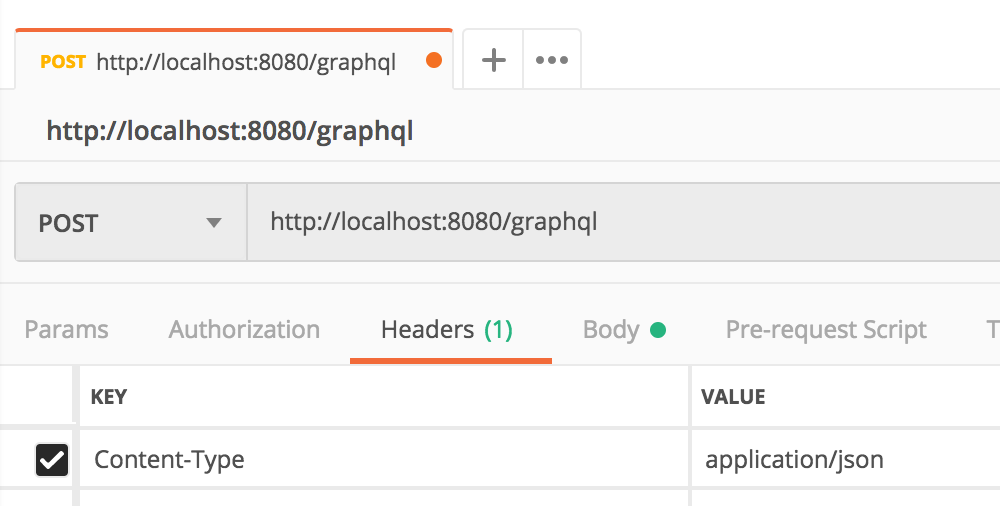
> * 選擇Post 並且輸入`http://localhost:8080/graphql`
> * Header: key選擇`content-type`, value寫`application/json`

> * Body: 選擇row選項,並輸入你想查詢的query

# 18 Case Study: GraphiQL
{%youtube ZEJOP4OeIBs%}
The case study is a GraphQL API that retrieves a list of locations from a database. The code can be cloned from [GitLab](https://gitlab.com/videolearning/udacity-java/tree/master/Lesson3-graphql).
==ShannonNote==
> * 步驟
* 先輸入網址進入graphiql: `http://localhost:8080/graphiql`
> * 如果想要進行query動作 可以輸入

> * 如果想要進行mutation動作 必須先把Data.sql給關掉,看你要改名還是刪掉都可以,否則無法`newLocation`

# 19 Lab IV: Build a Dog GraphQL API
**Lab: Build a Dog GraphQL API**
Here, we'll finish off this lesson's lab, creating a GraphQL API that returns a list of dogs from an embedded H2 in memory database. This time, you'll create a `.sql` file for some example dog data, and then test that everything with the API is working correctly.
**Testing**
You can re-use your previous `data.sql` file from the last lesson for Step 1, or you can create a new one.
* Step 1: Create a `data.sql` file to create sample dog data in the database.
* Step 2: Check that you are able to access your API, and that GraphQL queries work appropriately.
* If you have been following the solutions so far, note that `@SpringBootTest` might not play well with your application by default, but that the application should be able to boot on its own still.
# 20 Lab IV:Solution
**Solution: Build a Dog GraphQL API - Testing**
Below, we'll walk through each step of the lab and look at one potential way to implement the lab. Even if you get stuck, you should always first try to work through the lab without the solution before coming here, so that you can best learn the related skills and be ready for the project at the end of the course.
**Step 1: Create a data.sql file.**
* The file should create sample dog data in the database.
You can re-use your previous `data.sql` file or make a new one.
**Step 2: Check that the GraphQL API works appropriately.**
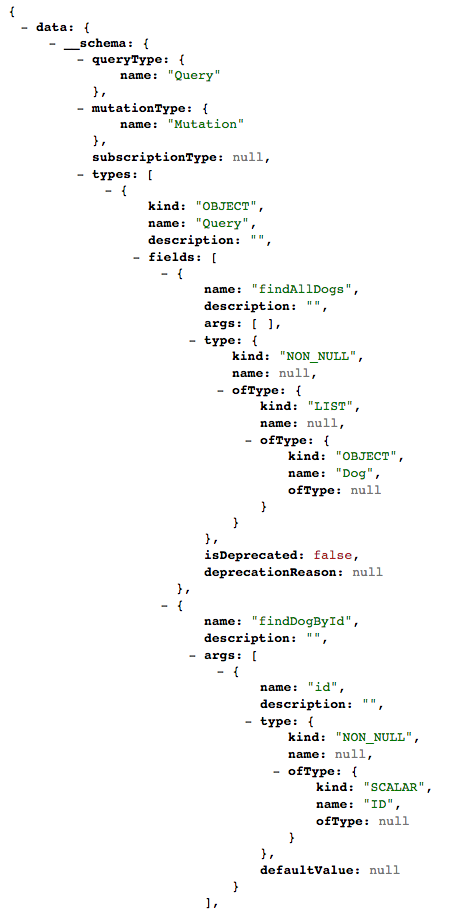
First, check that your schema shows appropriately at http://localhost:8080/graphql/schema.json. You might consider getting a browser extension or another tool to show formatted json as well, otherwise this will look like a large wall of text.
> Example JSON from a schema
Now, let's go to [Postman](https://www.getpostman.com/downloads/) to test out whether the queries and mutators we want actually work.
First, make sure you are using a `POST` request, then add our graphQL URL http://localhost:8080/graphql to the app. Then, Make sure to add a Header with `Content-Type` as `application/json`.
Now, we can test out our queries. Let's look at an example for how a user would accomplish their needs based on the lab query operations. I also added `id` below to know which belongs to each dog, but they could just as easily skip that and only return the specific data they want (you need at least one item selected with GraphQL, and can do multiple at once - but you cannot grab all data without specifying each individual field).
For each of these below, enter them into "Body" in Postman and then "Send" the request.
> findDogBreeds
```json
{
"query":"{findAllDogs { id breed } }"
}
```
> which return
```json
{
"data": {
"findAllDogs": [
{
"id": "1",
"breed": "Pomeranian"
},
{
"id": "2",
"breed": "Pit Bull"
},
{
"id": "3",
"breed": "Cocker Spaniel"
},
{
"id": "4",
"breed": "Direwolf"
},
{
"id": "5",
"breed": "Husky"
}
]
}
}
```
> findDogBreedById
```json
{
"query":"{findAllDogs { id breed } }"
}
```
> which returns:
```json
{
"data": {
"findDogById": {
"id": "1",
"breed": "Pomeranian"
}
}
}
```
You should also try out an invalid ID with this to check your error handling. As part of the returned JSON, I got Exception while fetching data (/findDogById) : Dog Not Found.
> findAllDogNames
```json
{
"query":"{findDogById(id:1) { id breed } }"
}
```
> which returns
```json
{
"data": {
"findAllDogs": [
{
"id": "1",
"name": "Fluffy"
},
{
"id": "2",
"name": "Spot"
},
{
"id": "3",
"name": "Ginger"
},
{
"id": "4",
"name": "Lady"
},
{
"id": "5",
"name": "Sasha"
}
]
}
}
```
**Mutations**
Let's say we want to change the name of dog four to "Ghost". There's a slightly different syntax, that needs `mutation` included in the query as well. Also, make sure to use the escape character \ to include quotation marks for strings.
updateDogName
```json
{
"query":"mutation {updateDogName(newName:\"Ghost\", id:4) { id name breed } }"
}
```
which returns:
```json
{
"data": {
"updateDogName": {
"id": "4",
"name": "Ghost",
"breed": "Direwolf"
}
}
}
```
Make sure to test out an invalid ID here too!
**deleteDogBreed**
For this, you do not need to add the field specifications afterward.
```json
{
"query":"mutation {deleteDogBreed(breed:\"Pomeranian\")}"
}
```
which returns:
```json
{
"data": {
"deleteDogBreed": true
}
}
```
If you added an `Exception` for a missing breed, make sure to test that here too!
**Full Solution**
If you'd like the full solution code all in one place, you can download it through the link below.
Supporting Materials
[DogGraphQLSolution](https://video.udacity-data.com/topher/2019/August/5d4374af_doggraphql/doggraphql.zip)
# 21 Recap
{%youtube zk6uPym8eXc%}
 Sign in with Wallet
Connect another wallet
Sign in with Wallet
Connect another wallet