# [debug] \(中/En) failed "pip install ______ " on Windows
:::warning
*This article has both English / Mandarin
*這篇文章用中英文撰寫
</br>
This article is "fixing the error of installing python package using command line on Windows"
這篇文章是關於在Windows上使用cmd(命令提示字元)安裝python套件失敗的處理方法。
:::
</br>
## How errors looks like 遇到的問題
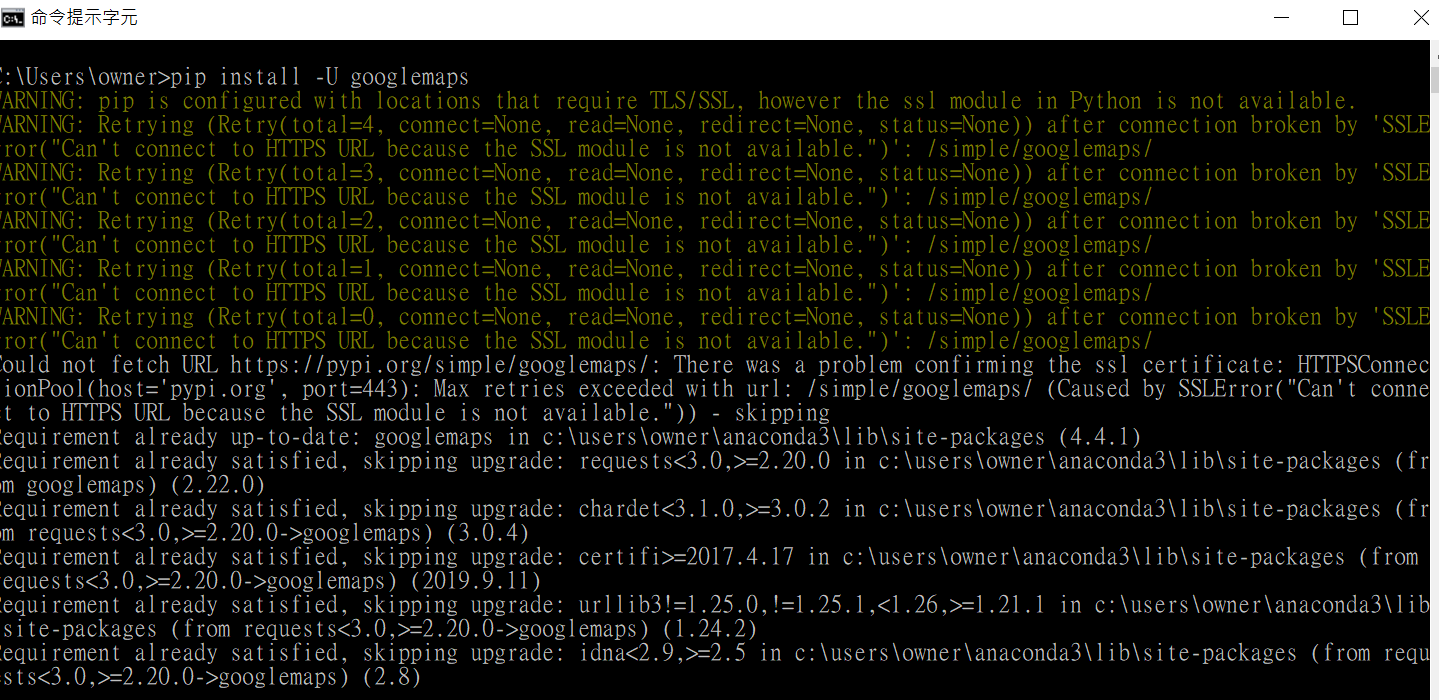
It shows warnings and error messages after entering "pip install ____". The problem seems related to SSL certificate.
輸入pip install _____後出現錯誤訊息,大致是在講SSL憑證有問題
<br/>
the messages looks like:
錯誤訊息看起來就像下面這樣:
:::danger
* "WARNING: pip is configured with locations that require TLS/SSL, however the ssl module in Python is not available."
* "Could not fetch URL https://pypi.org/simple/googlemaps/: There was a problem confirming the ssl certificate: HTTPSConnectionPool(host='pypi.org', port=443): Max retries exceeded with url: /simple/googlemaps/ (Caused by SSLError("Can't connect to HTTPS URL because the SSL module is not available.")) - skipping"*
:::
## How to fix it 解決的方法
In sum, the solution is adding the addresses of
1. the Anaconda folder
2. the pip.exe,
3. Library\bin
to the enviroment varieble of the OS.
<br/>
總結來說,只要把三個東西的位址加到作業系統的環境變數中就可以了。分別是:
1. Anaconda資料夾的位址
2. pip.exe的位址
3. (你的Anaconda資料夾位址)\Library\bin的位址
<br/>
### Solve it step by step 詳細步驟說明
#### **1. Find the 3 locations mentioned above 找出上述的三個地址**

The default setting should be within the C: drives. However, It varies for each computer. You have to find your own on your computer. Here are mine:
C:\Users\owner\Anaconda3
C:\Users\owner\Anaconda3\Scripts
C:\Users\owner\Anaconda3\Library\bin
<br/>
通常下載下來預設應該會在C槽。請注意每台電腦存放位置不同,需要找一下。例如我的分別是:
C:\Users\owner\Anaconda3
C:\Users\owner\Anaconda3\Scripts
C:\Users\owner\Anaconda3\Library\bin
<br/>
#### **2. Setting the environment variables 設定環境變數**
First, open the "Control Panel" -> "System & Security" -> "System" -> "Adavanced System Setting"
首先,開啟「控制台」->「系統與安全性」->「系統」->「進階系統設定」

<br/><br/>
Then, click on "environment variables"->For the down part select "Path" and click on "Edit"->"Add". Add the 3 address into the list.
接下來,點選「環境變數」->在下半部的系統變數選取「PATH」並按下「編輯」->「新增」,把前述找到的三個位址都加入

<br/>
#### **3. View the result 確認效果**
Run the cmd to check. (if it doesn't work, restart you computer and try again)
回到cmd重新輸入看成果。(如果還是不行,重新啟動電腦試試看)

<br/>
## Explaination 說明原因
If you just Google the warning message, mostly the discussion are around Linux. While on Linux, the problem is probably related to SSL certificate, Windows usually has everything finely whatever a set you download. Thus, the problem happens more likely because the program don't know where is the location you save it.
What we do above, is telling the computer "Hej, it's here!"
<br/>
直接拿錯誤訊息去google搜尋到的大多是Linux的解法,對Linux來說可能問題真的出在SSL憑證,但Windows通常會是大禮包一次下載好,因此問題比較可能是出在電腦找不到東西存在哪邊。
上面步驟做的就是把存放東西的位址跟電腦說,告訴電腦應該去哪邊找。
<br/>
## Reference 參考
+ [ssl module in python is not available Windows 7 - Stack Overflow](https://stackoverflow.com/questions/53137700/ssl-module-in-python-is-not-available-windows-7)
+ [使用Anaconda中的pip命令报错:pip is configured with locations that require TLS/SSL_Blues Feng的博客-CSDN博客_pip is configured with](https://blog.csdn.net/JerkSpan/article/details/86599690)
<!--
## Note 後記
Installing anaconda a while ago, I had a problem when I tried to install a package today. Hence I record the solution here for someone facing the same difficulty.
之前安裝anaconda後好一陣子沒用,最近想用但首先在更新就遇到問題。因為在網路上花了些時間才找到(菜鳥如我不會下關鍵字...),所以來寫篇文章幫助以後遇到同樣問題的人
-->
 Sign in via Facebook
 Sign in via X(Twitter)
 Sign in via GitHub
 Sign in via Dropbox
 Sign in with Wallet
Connect another wallet
Sign in with Wallet
Connect another wallet