# Pygame遊戲實作 : 踩地雷
最後一堂社課了,除了代表即將準備考試外,也代表Pygame的基礎操作也差不多熟悉了
接下來展示的程式,有一些bug,就由大家來找出並且解決,可以當作是你們的side project。
(此程式完全是由我自行撰寫,因此只要修改了就可以當作自己的作品)
## 遊戲想法
基本 : 踩到地雷即輸,沒踩到則加分
數字 : 周圍有多少地雷
Flag : 防止誤觸,通常會在有地雷的地方加上
當採到周圍沒有地雷的區域 : 開始遍歷,一直到找到周圍有地雷的格子
## 做法
為了達到此目的,需要有一個container,存放flags、mines以及被踩中的格子,姑且叫做coords
然後需要有一套公式,計算出周圍有多少地雷
有關遍歷的部分,首先會想到的是BFS
### 有關BFS
BFS是從根節點開始,沿著樹的寬度遍歷樹的節點。如果所有節點均被存取,則演算法中止。
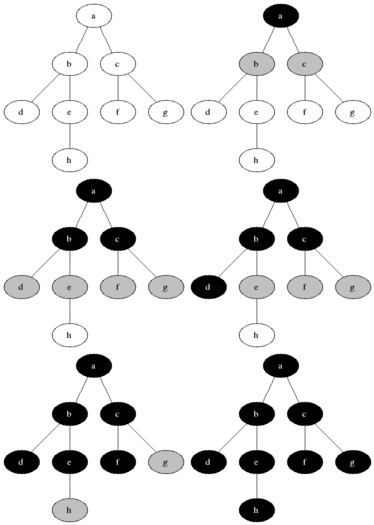
使用此演算法,踩中0的點後,可以依序從周圍開始找,若周圍也是0,就繼續尋找,直到找到全部都非0。
## 初始化
```python=
import pygame
from pygame.locals import *
import numpy as np
import sys
import random
from queue import Queue
WINDOWWIDTH = 400
WINDOWHEIGHT = 400
CELLSIZE = 20
WHITE = (255, 255, 255)
BLACK = ( 0, 0, 0)
RED = (255, 0, 0)
GREEN = ( 0, 255, 0)
DARKGREEN = ( 0, 155, 0)
DARKGRAY = ( 40, 40, 40)
BLUE = (0, 0, 255)
BGCOLOR = DARKGREEN
FPS = 30
FPSCLOCK = pygame.time.Clock()
```
### 產生50個地雷
```python=
def generateMines():
mines = set() # Why Set?? 請各位想想
while len(mines) < 50:
x = random.randint(0, (WINDOWWIDTH)//20 - 1)
y = random.randint(0, (WINDOWHEIGHT)//20 - 1)
mines.add((x * 20, y * 20))
return mines
```
### 畫出地雷
```python=
def drawMines(mines):
for mine in mines:
x = mine[0]
y = mine[1]
rect = pygame.Rect(x + 1,y + 1,CELLSIZE - 1,CELLSIZE - 1)
pygame.draw.rect(DISPLAYSURF,RED,rect)
```
### 畫出格子 包括「被踩中的地區」以及flag
```python=
def drawBlocks(coords,mines):
font = pygame.font.Font('freesansbold.ttf',18)
# draw flags
for flag in flags:
x = flag[0]
y = flag[1]
rect = pygame.Rect(x+1 , y +1,CELLSIZE - 1 ,CELLSIZE - 1)
pygame.draw.rect(DISPLAYSURF,BLUE,rect)
#drawMines(mines)
# draw coords
for coord in coords:
x = coord[0]
y = coord[1]
rect = pygame.Rect(x+1 , y +1,CELLSIZE - 1 ,CELLSIZE - 1)
num = 0
for i in [-1,0,1]:
for j in [-1,0,1]:
if ((x+(i*20),y+(j*20))) in mines:
num+=1
text = font.render(str(num),True,BLACK)
text_rect = text.get_rect()
text_rect.topleft = (x,y)
pygame.draw.rect(DISPLAYSURF,WHITE,rect)
DISPLAYSURF.blit(text,text_rect)
```
### 畫出線
```python=
def drawGrid():
for x in range(0, WINDOWWIDTH, CELLSIZE): # draw vertical lines
pygame.draw.line(DISPLAYSURF, WHITE, (x, 0), (x, WINDOWHEIGHT))
for y in range(0, WINDOWHEIGHT, CELLSIZE): # draw horizontal lines
pygame.draw.line(DISPLAYSURF, WHITE, (0, y), (WINDOWWIDTH, y))
```
### 終止程式
```python=
def terminate():
pygame.quit()
sys.exit()
```
### 挖掘(按下左鍵)
```python=
def dig(x,y,mines,coords):
x //= 20
x *= 20
y //= 20
y *= 20
if (x,y) not in mines and (x,y) not in flags:
coords.add((x,y))
coords = traverse(x,y,mines,coords)
# print(coords)
return coords, True
elif (x,y) in mines and (x,y) not in flags:
drawMines(mines)
return coords, False
else: return coords,True
```
### 遍歷方塊
```python=
def traverse(x,y,mines,coords):
coords.add((x,y))
q = Queue()
q.put((x,y))
while not q.empty():
temp = q.get(0)
x = temp[0]
y = temp[1]
flag = 0
# if there is any numbers in the block
for i in [-1,0,1]:
for j in [-1,0,1]:
if ((x+(i*20),y+(j*20))) in mines:
flag = 1
if (flag): continue
for i in [-1,0,1]:
for j in [-1,0,1]:
if ((x+(i*20),y+(j*20)) not in coords and x+(i*20) >= 0 and x+(i*20) < 400 and y+(j*20) >= 0 and y+(j*20) < 400):
q.put((x+(i*20),y+(j*20)))
coords.add((x+(i*20),y+(j*20)))
return coords
```
### 設定Flag (按下右鍵)
```python=
def setFlags(x,y):
x //= 20
x *= 20
y //= 20
y *= 20
if (x,y) in flags:
flags.remove((x,y))
elif (x,y) not in coords:
flags.add((x,y))
```
### 看看是否按下按鍵 (上次社課內容)
```python=
def checkForKeyPress():
if len(pygame.event.get(QUIT)) > 0:
terminate()
keyUpEvents = pygame.event.get()
if len(keyUpEvents) == 0:
return None
if keyUpEvents[0].type== KEYDOWN and keyUpEvents[0].key == K_ESCAPE:
terminate()
return keyUpEvents[0]
```
### 畫出分數
```python=
def drawScore(score):
scoreSurf = BASICFONT.render('Score: %s' % (score), True, BLACK)
scoreRect = scoreSurf.get_rect()
scoreRect.topleft = (WINDOWWIDTH - 120, 10)
DISPLAYSURF.blit(scoreSurf, scoreRect)
```
### 遊戲結束畫面
```python=
def showGameOverScreen(str1,str2):
drawMines(mines)
gameOverFont = pygame.font.Font('freesansbold.ttf', 100)
gameSurf = gameOverFont.render(str1, True, BLACK)
overSurf = gameOverFont.render(str2, True, BLACK)
gameRect = gameSurf.get_rect()
overRect = overSurf.get_rect()
gameRect.midtop = (WINDOWWIDTH / 2, 10)
overRect.midtop = (WINDOWWIDTH / 2, gameRect.height + 10 + 25)
DISPLAYSURF.blit(gameSurf, gameRect)
DISPLAYSURF.blit(overSurf, overRect)
pygame.display.update()
pygame.time.wait(1000)
checkForKeyPress() # clear out any key presses in the event queue
while True:
if checkForKeyPress():
pygame.event.get() # clear event queue
return
```
## 程式執行
```python=
def run():
global mines,flags,coords
mines = generateMines()
coords = set()
flags = set()
flag = True
while True:
for event in pygame.event.get():
if event.type == QUIT:
terminate()
elif event.type == KEYDOWN:
if event.key == K_ESCAPE:
terminate()
elif event.type == MOUSEBUTTONUP and event.button == 1: # 按下滑鼠左鍵
x, y= pygame.mouse.get_pos()
coords, flag = dig(x,y,mines,coords)
elif event.type == MOUSEBUTTONUP and event.button == 3: # 按下滑鼠右鍵
x, y= pygame.mouse.get_pos()
setFlags(x,y)
# if lose
if (flag == False): return False
DISPLAYSURF.fill(BGCOLOR)
drawGrid()
#drawMines(mines)
drawBlocks(coords,mines)
drawScore(len(coords))
pygame.display.update()
# if win
if (400 - len(coords) == len(mines)): return True
FPSCLOCK.tick(FPS)
```
## main method
```python=
def main():
global FPSCLOCK,DISPLAYSURF,BASICFONT
pygame.init()
FPSCLOCK = pygame.time.Clock()
DISPLAYSURF = pygame.display.set_mode((WINDOWWIDTH,WINDOWHEIGHT))
BASICFONT = pygame.font.Font('freesansbold.ttf',18)
pygame.display.set_caption("踩地雷")
while True:
if (run()==False):showGameOverScreen('You','Lose')
else : showGameOverScreen('You','Win')
```
 Sign in with Wallet
Connect another wallet
Sign in with Wallet
Connect another wallet