| implemented |
|-------------|
| true |
__implementation PR(s)__
* https://github.com/eWibe/ewibe-ui/pull/226
* https://github.com/eWibe/ewibe-ui/pull/234
* https://github.com/eWibe/ewibe-backend/pull/159
# **GA4 - GTM implementation**
## **Intro**
eWibe needs to be able to measure and monitor specific user workflows in order to understand the overall product performance and keep improving based on concrete feedback from well organized data.
## **Problem to be solved / User story**
The marketing team needs to be able to analyze how the traffic flows on ewibe.com and monitor specific user workflows that we consider Key Performance Indicators (KPIs).
## **Define your User/Customer/Consumer**
The user/customer of this feature is the eWibe marketing/sales team.
## **How is it currently solved?**
There is no current solution in place.
## **The New Solution**
The plan is to implement Google Tag Manager with Google Analytics 4 following the best practices according to these technology providers.
This will allow the marketing/sales team to not only consume these datasets on their own without relying on the tech team, but also allow them to easily architect new tracking workflows easily and in a form that can be implemented quickly and without friction from the development team.
### Premise
- GA4, GTM, dataLayer and Server Side Tagging
### Phase 1 - One-Time Configuration
- GA4 configuration
- GTM configuration, link to GA4, server-side
- Prerequisites
- Configuration tags
- GA4 connection shared tag
- Cookie Consent tag
- Server Side Container
- code-side: library _angular-google-tag-manager_
- connection with GTM
- a smart solution to manage custom events
### Phase 2 - Temporarys setup
- How to set up events
- dev
- GTM
- GA4
### Phase 3 - Enjoy GTM Benefits
# **Implementation**
# Premise
```mermaid
graph TD;
eWibeBE-->GoogleTagManagerSS
DataLayer-->GoogleTagManager
events/trigger-->GoogleTagManager
GoogleTagManager-->GoogleTagManagerSS
eWibeUI-->angular-google-tag-manager
angular-google-tag-manager-->DataLayer
angular-google-tag-manager-->events/trigger
GoogleTagManagerSS-->GoogleAnalytics4
GoogleTagManagerSS-->Pixel-Hubspot-other
```
- **eWibeBE** eWibe back end, we can trigger custom events on gtm server side by POST [https://developers.google.com/tag-platform/tag-manager/server-side/intro]
- **eWibeUI** eWibe front end, we can trigger custom events and push custom variables to data layer
- **angular-google-tag-manager** library used for GTM implementation
- **DataLayer** a JS array that temporarily stores the information you need and custom variables pushed by eWibeUI
- **events/trigger** a JS snippet that push a custom event on GTM
- **GoogleTagManager** uses data layer in tag/triggers/variables (later that data can be transferred to other tools, like Google Analytics).
- **GoogleAnalytics4** here we collect datas, create and manage reports based on data received from GTM
- **GoogleTagManagerSS** a server-side router for our hits. here we can manage sent datas and redirect to GA4 or any other collector.
# Phase 1 - One-Time Configuration
Its needed to configure and integrate eWibeUI, eWibeBE, GTM, GA4 and server container on GTM
## a little premise
what below describes implementations on [TEST] containers in eWibe - dev environment.
we treat PROD deployments at the end of this document.
any name / IDs will change in PROD implementation
---
## **GA4 configuration**
- create new account: eWibe web GA4 TEST
- on new account define new property: www.ewibe-dev.netlify.app
- generated Measurement ID _G-FSKX2YSRVL_ visible in Stream details will be the link between GA4 to GTM
- In Administration menu', define new Data Stream named ewibedev - netlifyusing https://ewibedev.netlify.app/ as website
- Under _Property -> Data Settings -> Data Retention_ select preferred _Event data retention_ period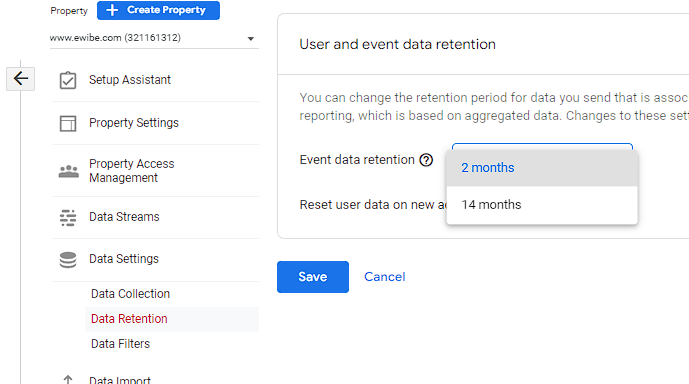
---
## **GTM configuration**
### Prerequisites
- on Google Chrome, install [Tag Assistant Legacy (by Google)](https://chrome.google.com/webstore/detail/tag-assistant-legacy-by-g/kejbdjndbnbjgmefkgdddjlbokphdefk?hl=it)
Tag Assistant helps to troubleshoot installation of various Google tags including Google Analytics and Google Tag Manager
- configure new server following this [guide](https://developers.google.com/tag-platform/tag-manager/server-side/manual-setup-guide)
- hosted on https://tagmanager-dev.ewibe.com
- create new account: eWibe web GA4 TEST
- on new account, create:
- new Costant variable _Server-side container URL_ evaluated as "https://tagmanager-dev.ewibe.com"
- new container setting _Web_ as Target platform
- new container setting _Server_ as Target platform and _https://tagmanager-dev.ewibe.com_ as Server container URLs
- code-side, use GTM ID _GTM-WKT9GLC_ to link GTM to eWibeUI
## **GTM WEB**
## Configuration tag
This is the 'Configuration Tag' for eWibe. It links each tags on which its configured to GA4.
### **GA4 connection shared tag**
On new container create new tag
- Tag Type: **Google Analytics: GA4 Configuration**
- Tag Name: **GA4 Configuration - G-FSKX2YSRVL**
- Measurement ID: **G-FSKX2YSRVL**
- Send to server container: **TRUE**
- Server container URL: **{{ Server-side container URL }}**
- this option redirects all hits to server-side container instead of GA4
- Triggering: **All Pages** _this trigger track **page_view** event_
### **Cookie Consent tag**
### Premise
- the owner of the activity has to reproduce steps below to configure selected CMP (Consent Management Platform)
- is higly recomended to use one of the CMPs listed in [Google docs](https://support.google.com/tagmanager/answer/10718549hl=en)
- currently configured with a dev user on Cookiebot (tagmanger featured CMP) following [Cookiebot docs](https://supportcookiebot.com/hc/en-us)
- this step-by-step guide use Cookiebot as example _*if chosen CMP is different from Cookiebot, steps may not correspond_
### GTM configuration
under Admin section -> Container Settings -> Check Enable consent overview and Save
this will add consent managment icon in tab Tag, accessing which its possible to manage Consent Configurationof all tags
under _**eWibe web GA4 container TEST**_ container, create new tag
- Tag Type: **Featured Community CMP Templates** -> **Cookiebot CMP**
- Tag Name: **Cookie Consent**
- Cookiebot ID: **d99b3281-0824-4711-85ba-2875036c16cf** -> ONLY FOR TEST
- Triggering: **Consent Initialization**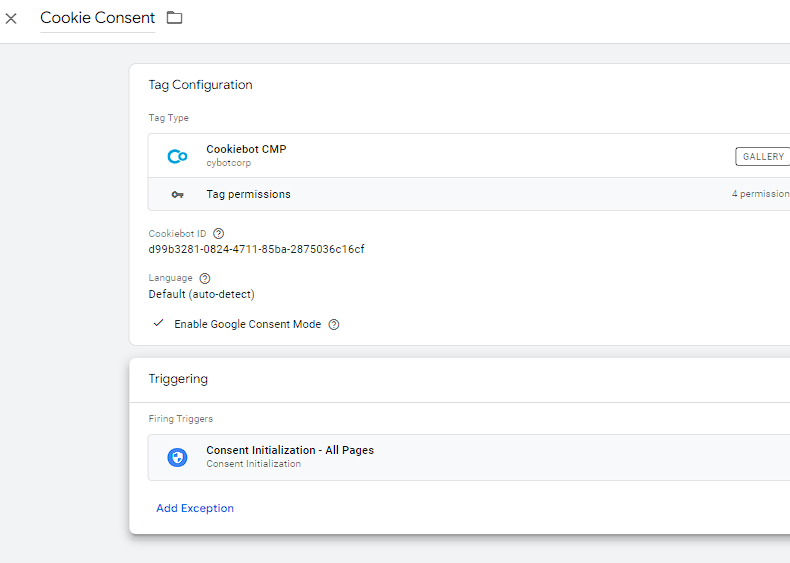
### Cookiebot configuration
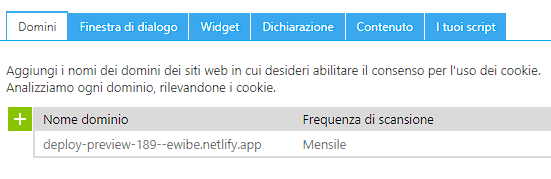
- access to [Cookiebot Console](https://manage.cookiebot.com/it/manage)
- under tab 'Domini' set https://ewibedev.netlify.app/ as domain and Save
- use other tabs to set preferences. refer to [Cookiebot docs](https://support.cookiebot.com/hc/en-us)
## **GTM SERVER**
- we use auto generated GA4 client to automatically forward any event received from WEB container to GA4 -> edit name to _GA4 Stream - G-FSKX2YSRVL_
- create new Measurement Protocol (GA4) client setting _/ewibe-measure_ as activation path.
- we use this endpoint to post requests from BE
- trigger and tag creation workflow is similar to WEB one
---
## **[FE] code-side: library _angular-google-tag-manager_**
#### ***connection with GTM***
implement angular library: [angular-google-tag-manager](https://github.com/mzuccaroli/angular-google-tag-manager) following this [guide](https://itnext.io/how-to-add-google-tag-manager-to-an-angular-application-fc68624386e2)
_recommend to read for additional tech details_.
- add property googleTagManagerId to store GTM id in ‘src/app.module.ts’
```
{ provide: 'googleTagManagerId', useValue: environment.gtmId },
```
```environment.gtmId``` value depends on environment file
```
gtmId: "GTM-WKT9GLC",
```
this allows eWibeUI to push call to GTM and GA4 as well as it allows GTM to meet most of needs in a dev-less way
- add this code snippet in _app.components.ts_ to track page view event
```
this.router.events.forEach(item => {
let hideData = '#access_token=';
if (item instanceof NavigationEnd) {
const gtmTag = {
event: 'page',
pageName: item.url.indexOf(hideData) > - 1 ?
item.url.substring(0, item.url.indexOf(hideData)+hideData.length+1) :
item.url
};
try {
this.gtmService.pushTag(gtmTag);
} catch (error) {
console.error(error);
}
console.log('[GTM] page_view', gtmTag);
}
});qq
```
in _app.components.ts_ to track page view event
this library allow us to add short snippet of formatted code like follow:
```
const gtmTag = {
event: 'custom_event',
custom_param: 'custom_param'
};
try {
this.gtmService.pushTag(gtmTag);
} catch (error) {
console.error(error);
}
```
this solution push a custom events to GTM and add to dataLayer given _custom_param_.
any time anm event is pushed, we autoimatically store new parameter in dataLayer keeping them available in GTM
> N.B. till eWibeUI refactor is done we can't use gtm framework at full potential --> phase 3
# Phase 2 - Temporary setup
Due to a _not-GTM-oriented-code_ and the projection of a FE refactoring, we decide to face GTM topic with 2 different approaches:
_Phase 2_ before refactoring
_Phase 3_ after refactoring
The marketing/sales team needs to provide all the necessary information about workflows they desire to track. In order to streamline this process, we will adopt the following standard __to be used for each specific event we want to implement tracking for__:
lets use _login_ event as test case
## NEEDS
### **Event info**
The table above describes the structure and content of _login_ event payload
| **GA4 variable** | **meaning** | **location**/**value** | **FE mapping** |
| ------------- | ------------- | ------------- | ------------- |
| event | event name | 'login' | none |
| user_id | unique user ID | refer to above paragraph Event Info -> Location | user.username |
| login_method | access method (use user_id first chars to detect) | 'mail' / 'facebook' / 'google' | user.sub.indexOf($value) |
| subscription_type | user subscription type | 'base' / 'premium' | user?.anote.preferences.account_version |
| device | user agent | - | navigator.userAgent |
| gender | user gender | 'M' / 'F' / 'ND' | instance.apiService.userInfo.gender |
_where:_
* **GA4 variable** the name of the parameter in
* **meaning** a brief explanation
* **location**/**value** where to find parameter / value of parameter (-> Location (*))
* **FE mapping** field name in eWibeUI
if not present
- reverse-search on code using web browser [dev Tools](https://developer.chrome.com/docs/devtools/) -> _marketing-team/dev-team_
- validate field -> _marketing-team_
- store data -> _dev-team_
### Location (*)
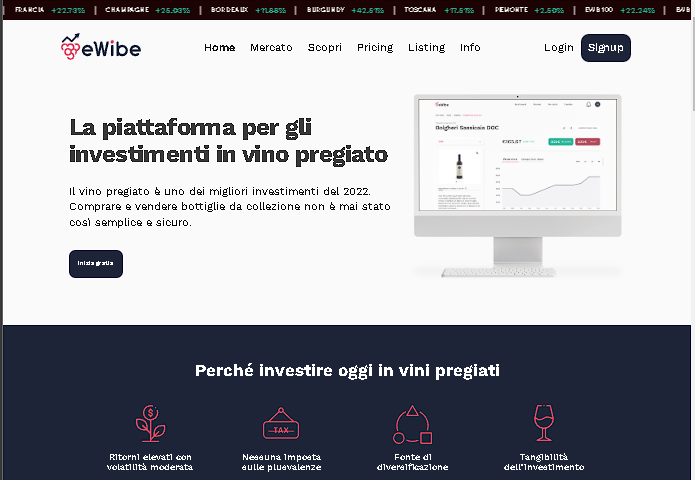
Page(s) where the event is triggered and the path to that page / button / call to action event. _screenshots are higly encouraged_
```
Platform -> Login page -> 'Accedi' button
```

accessible via
```
Platform -> Home -> 'Login' button top right page
```
---
## dev implementation
In order to track login occurencies we can use method `pushTag(gtmTag)` exposed by [angular-google-tag-manager](https://github.com/mzuccaroli/angular-google-tag-manager) library.
in _login.service.ts_ add this snippet and related import and declarations
```
import { GoogleTagManagerService } from 'angular-google-tag-manager';
```
```
private gtmService: GoogleTagManagerService
```
```
const gtmTag = {
'event': gtmData.gtmEvent,
'user_id': user?.sub,
'gender': user?.gender,
'login_method': this.method,
'status': 'S',
'subscription_type': user?.anote.preferences.account_version,
'kyc_status': user?.anote.preferences.kyc,
'device': navigator.userAgent,
};
try {
this.gtmService.pushTag(gtmTag);
} catch (error) {
console.error(error);
}
```
where
```
this.method = user.sub.indexOf('facebook_') > -1 ? 'facebook'
: user.sub.indexOf('google_') > -1 ? 'google'
: user.sub.indexOf('apple_') > -1 ? 'apple' // ?? to be checked
: 'mail';
```
this code push all parameters to dataLayer and also push a custom event to tag manager. This event will be managed on GTM by a deidicated trigger.
## **[BE] code-side**
#### ***connection with sGTM***
implement POST call to custom server-container to enrich UI hits or to trigger events we cannot trigger on UI.
```
const gtmBody: string =
JSON.stringify({
client_id: 'eWibe-BE',
events: [{
name: 'purchase',
params: {
user_id: gtmUser.Username,
gender: gtmUser.UserAttributes.find(a => a.Name === 'gender').Value,
address: gtmUser.UserAttributes.find(a => a.Name === 'address').Value,
age: getAge(gtmUser.UserAttributes.find(a => a.Name === 'birthdate').Value),
po_req_duration: po_req_duration,
item_id: buyItemId,
amount: payload.body.unit_price,
order_type: payload.subtype === SQSMessageSubtype.PLACE_BUY ? 'placeBuyDo' : 'placeSellDo',
}
}]
});
var options = {
method: 'POST',
'url': config.gtmServerUrl,
'headers': {
'Content-Type': 'application/json',
},
body: gtmBody
};
if (payload.subtype === SQSMessageSubtype.PLACE_BUY) {
request(options, function (error: string, response: { body: any; }) {
if (error) console.error(error);
console.log(response.body);
});
}
```
---
## GTM
### Trigger
- eWibe web GA4 container TEST -> Triggers -> New -> Custom Event (example on _login_ trigger)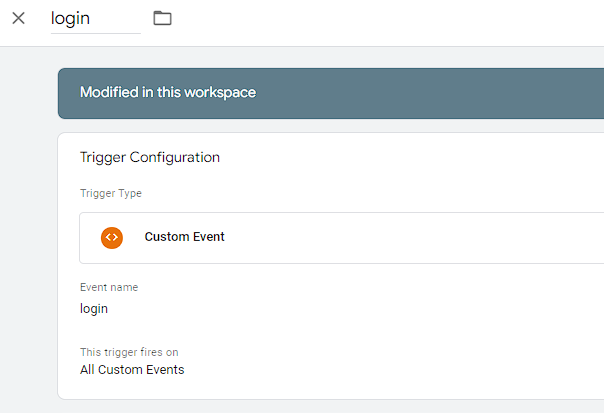
### Variables
for each variable needed (except for 'event') do:
- eWibe web GA4 container TEST -> Variables -> New -> Data Layer variable (example on _login_method_)
naming each variable with same data layer variabe name
### Tag
- eWibe web GA4 container TEST -> Tags -> New
- Tag Configuration
- use _GA4 Configuration - G-FSKX2YSRVL_ as configuratrion tag
- list all needed event parameters (in example below additional parameter as _reason_ and _user_mail_ are declared to manage failure case)
- add `security_storage` as additional consent setting --> to be checked
- Triggering
- _login_ trigger just created
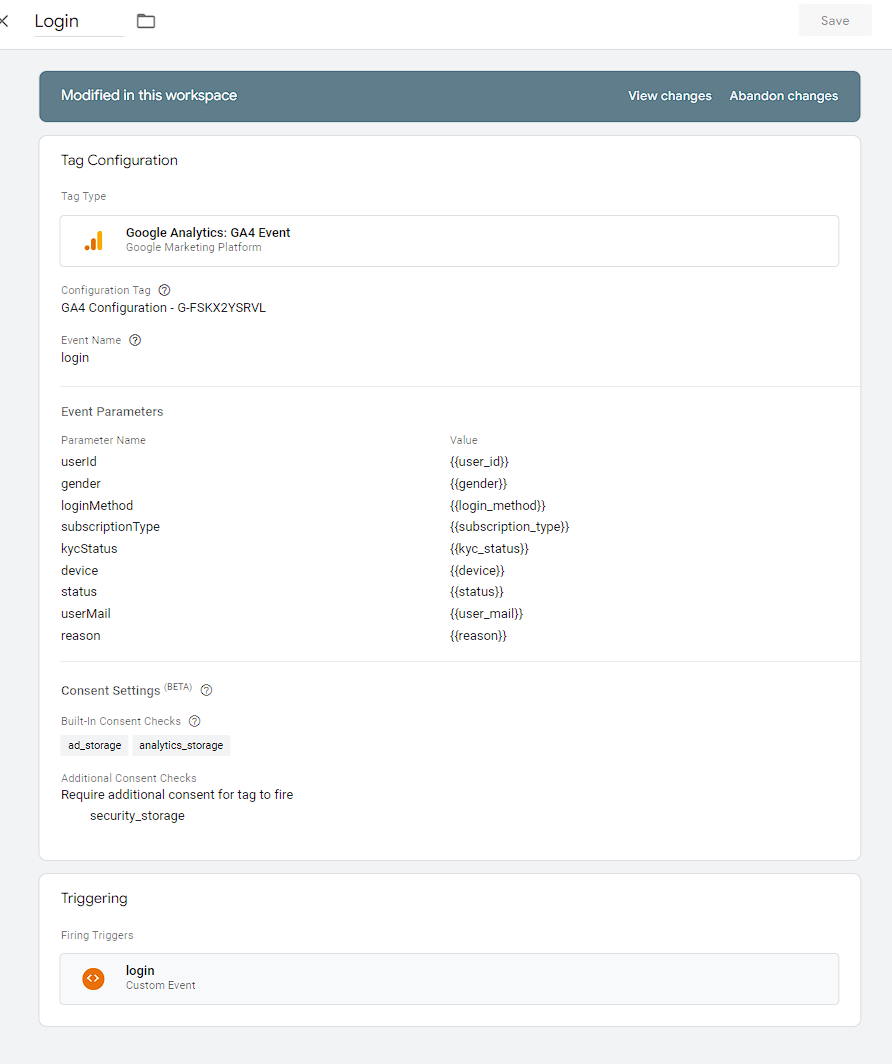
start Preview and test results on GA4 in DebugView.
- Preview -> paste https://ewibedev.netlify.app/ in URL box -> Connect -> this open eWibeUI in a new debug page
- GA4 -> Configure -> DebugView are shown activities fired in eWibeUI debug page
to _officially_ start reporting our new datas, we got to first submit new version on GTM
- clicking on Submit button -> name version (ex. _login_) -> adding a brief description (ex. _add login tracking ..._) -> Publish
---
## GA4
GA4 automatically collect different events (see [Google supp](https://support.google.com/analytics/answer/9234069) for additional details)
- those events are ready-to-use in GA4 after completion of initial configuration
- explore GA4, it starts collecting login events
---
## Conclusion
marketing/sales team has new request:
- is it possible to manage it on GTM?
- YES -> see [gtm docs](https://developers.google.com/tag-platform/tag-manager)
or [sGtm docs](https://developers.google.com/tag-platform/tag-manager/server-side/how-to-build-a-server-tag) as ref
- not BE-managed event
- not FE 3rd part integrated event
- all parameters already on GTM or dataLayer
- .. _add other exception_
- NO
- create a custom event as in _login_ example [call devs]
### Current Data Layer
The table above shows current dataLayer (inspectable in GTM debug mode). variables are grouped by event -> _will be updated_
| dataLayer variable | eWibeUI mapping | eWibe BE mapping | linked events | meaning |
| --------- | --------- | --------- | --------- | --------- |
| event | 'login', 'add_to_wishlist', .. | 'purchase', 'topup_money', .. | * | currents event name |
| device | navigator.userAgent | navigator.userAgent | * | user agent |
| address | instance.apiService.userInfo.address | x | add_to_wishlist | user address |
| age | instance.apiService.userInfo.birthdate | x | add_to_wishlist | user age |
| gender | instance.apiService.userInfo.gender | x | add_to_wishlist | user gender |
| item_id | instance.contract?.id | x | add_to_wishlist | unique item ID |
| item_name | instance.contract?.name | x | add_to_wishlist | item name |
| item_position | TBD | x | add_to_wishlist | item name |
| item_type | instance.contract?.contractType | x | add_to_wishlist | item name |
| user_id | user.username | x | add_to_wishlist | unique user ID |
| kyc_status | user.userConfirmed | x | login | user confirmation status |
| user_id | user.username | x | login | unique user ID |
| login_method | 'mail' / 'facebook' / 'google' | x | login | access method |
| reason | err.message | x | login | registration method |
| status | 'S' / 'E' | x | login | result of action. S for Success, E for Error |
| subscription_type | user?.anote.preferences.account_version | x | login | user subscription type [ 'base' / 'premium' / ... ] |
| user_mail | username.toLowerCase() | x | login | user mail failure login |
| address | x | TBD | purchase | user address |
| age | x | TBD | purchase | user age |
| amount | x | TBD | purchase | purchased item price |
| gender | x | TBD | purchase | user gender |
| format_bottle | x | TBD | purchase | bottle size / format purchased |
| item_id | x | TBD | purchase | unique item ID |
| item_name | x | TBD | purchase | unique item ID |
| item_position | x | TBD | purchase | item page position |
| item_type | x | TBD | purchase | item type |
| order_type | TBD | x | purchase | purchased order type |
| po_req_duration | TBD | x | purchase | purchase request period of time |
| status | x | 'S' / 'E' | purchase | result of action. S for Success, E for Error |
| trx_id | x | TBD | purchase | ID della transazione |
| kyc_status | user.userConfirmed | x | signup | user confirmation status |
| subscription_type | TBD | x | signup | user confirmation status |
| signup_method | 'mail' | x | signup | registration method |
| user_id | user.userSub | x | signup | unique user ID |
| user_id | x | TBD | purchase | unique user ID |
| address | x | TBD | topup_money | user address |
| amount | x | TBD | topup_money | purchased item price after mangopay confirmation |
| gender | x | TBD | topup_money | user gender |
| item_id | x | TBD | topup_money | unique item ID |
| item_name | x | TBD | topup_money | item name |
| item_position | x | TBD | topup_money | item page position |
| item_type | x | TBD | topup_money | item type |
| payment_method | TBD | x | topup_money | payment method used for purchase |
| age | x | TBD | topup_money | user age |
| status | x | 'S' / 'E' | topup_money | result of action. S for Success, E for Error |
| user_id | x | TBD | topup_money | unique user ID |
| address | this.apiService.userInfo.address | x | view_item | user address |
| age | this.apiService.userInfo.birthdate | x | view_item | user age |
| format_bottle | instance.contract?.formatBottle | x | view_item | bottle size / format watched |
| gender | instance.apiService.userInfo.gender | x | view_item | user gender |
| item_id | this.contract.id | x | view_item | unique item ID |
| item_name | this.contract.name | x | view_item | item name |
| item_position | TBD | x | view_item | item name |
| item_type | this.contract?.contractType | x | view_item | item name |
| user_id | user.username | x | view_item | unique user ID |
# Phase 3 - Enjoy GTM Benefits [WIP]
with a new FE code prepared to easly communicate with GTM, we can setup a workflow that makes GTM user almost completely independent.
in this phase, we reach GTMs goal to limit devs intervention only to a part of custom events.
We treat deeply this topic as a new issue on this repo
## **Metrics**
It will be pretty easy to evaluate the effectiveness of this implementation, since we come from a blank situation. In general, the marketing/sales team need to validate that the workflow tracking works as intended and that the data that comes out of it is as useful as initially estimated
## **Release Plan**
## 1. Data modelling
The marketing/sales team needs to provide a complete data model for each event they want to track
## 2. Configuration of Google Tag Manager
Once the Data Modelling is complete, we can move on and configure the eWibe GTM environment accordingly. This task is executed by the developer that is leading the project
## 3. Implementation of the triggers in ewibe-ui
every tag that has already a **Tag data modelling** and a **Tag configuration** can receive its [frontend integration](https://github.com/eWibe/ewibe-ui) in the form of a trigger. Each trigger needs to be added with its own PR that needs to point to an open issue tagged with [analytics]
# **Milestones**
## 1. Tag configuration
- Make marketing team independent creating and configuring Tag on Google Tag Manager.
[x] general setup GTM-GA4 side and code side
[x] tags:
[x] login
[x] signup
[x] newsletter
[x] add_to_wishlist
[x] view_item
[x] page
[x] purchase
[x] topup_money
[x] kyc_confirmation
## 2. Tag implementation
- new tag / edit existing tag should follow [TEST] to [PROD] workflow follo
- we use [TEST] containers to better map any possible errror and to allow editors to work in a safe environment with less chance to create issues on [PROD] ones
## 3. Triage (testing)
- any new behaviour developed on [TEST] container should be tested on https://ewibedev.netflify.app
## 4. Deploy
- using export-import native functionality of GTM, once needed, we export [TEST] containers and import them into [PROD] ones merging all contents excluding env-variables (example measurement id)
## 5. Nice to have
- FB Pixel setup / implementation
## 6. Nice to have
- we can optimize deploy process using GTM "_environments_"
## **Links & References**
Reference info and best _get started_ practice to
- [Current Specs file](https://docs.google.com/spreadsheets/d/1Fn5TY75LZlJNI4OTQA1okTkxuf1EWxLyDo-oUfvOBNs/)
- Get Started
- [Google Tag Manager Tutorial for Beginners (2022)](https://www.youtube.com/watch?v=u_x5lVJMKZ0)
- [Google Analytics 4 Tutorial for Beginners (2022)](https://www.youtube.com/watch?v=cN1Jcfxi4qs)
- Dependencies
- [Angular Google Tag Manager Service](https://github.com/mzuccaroli/angular-google-tag-manager)
- [How to add Google Tag Manager to an Angular application](https://itnext.io/how-to-add-google-tag-manager-to-an-angular-application-fc68624386e2#gid=286342509)
- Browser Dev Tools
- [Chrome](https://developer.chrome.com/docs/devtools/)
- Techs Documenation
- [Google Analytics](https://developers.google.com/analytics/devguides/collection/ga4/)
- [Google Tag Manager](https://developers.google.com/tag-platform/tag-manager)
- [Cookiebot docs](https://support.cookiebot.com/hc/en-us/articles/360003793854-Google-Tag-Manager-deployment)
 Sign in via Facebook
 Sign in via X(Twitter)
 Sign in via GitHub
 Sign in via Dropbox
 Sign in with Wallet
Connect another wallet
Sign in with Wallet
Connect another wallet