# Redux, менеджмент состояний
## Зачем нужен Redux Toolkit?
- Упрощает подключение redux к React
- Снижает количество дублированного кода
## Обзор redux, react-redux, redux toolkit - что и зачем
- redux - библиотека для управления состоянием приложения
- react-redux - библиотека для подключения redux к react
- redux-toolkit - набор инструментов для сокращения дублей кода и упрощения файловой структуры проекта
## Отличия и основы пакетов
### redux
- createStore - создаёт хранилище
- store.dispatch - отправляет действие в диспетчер
### react-redux
- Provider - провайдер хранилища. Компонент React. Делает хранилище доступным для других компонентов
- useSelector - позволяет по переданной функции получить значение из хранилища
- useDispatch - позволяет обратиться к методу dispatch хранилища
Провайдер подключается обёрткой над приложением:
```jsx
import { Provider } from 'react-redux';
import { store } from './app/store';
// ...
root.render(
<React.StrictMode>
<Provider store={store}>
<App />
</Provider>
</React.StrictMode>
);
```
Далее в компонентах:
```jsx
const dispatch = useDispatch();
return (
<div>
<div className={styles.row}>
<button
className={styles.button}
aria-label="Decrement value"
onClick={() => dispatch(decrement())}
>
```
### redux toolkit
- configureStore() - позволяет создать экземпляр хранилища через объект настроек
- createReducer() - создаёт редуктор
- createAction() - Создаёт Action Creator,
- createSlice() - создаёт объект, объединяющий по смыслу редуктор и действия для последующего импорта
- createAsyncThunk() - создаёт асинхронное действие (использует пакет redux-thunk)
## Обзор React Toolkit
Данный набор инструментов есть в составе стандартного create-react-app приложения с использованием шаблона redux
Установить его можно так:
```sh
npx create-react-app my-app --template redux
```
Или отдельно через npm:
```sh
npm install @reduxjs/toolkit
```
yarn:
```sh
yarn add @reduxjs/toolkit
```
## Подключение хранилища
С помощью configureStore возможно создать хранилище через единый объект
```javascript
import { configureStore } from '@reduxjs/toolkit';
import counterReducer from '../features/counter/counterSlice';
export const store = configureStore({
reducer: {
counter: counterReducer,
},
});
```
## createSlice
```jsx
import { createSlice } from "@reduxjs/toolkit";
const initialState = {
value: 0,
from: null,
to: null,
amount: 100,
}
const getValue = state => {
const { amount, from, to, value } = state;
if (!from || !to || !amount) {
return value;
}
const rate = from.rate / to.rate;
return amount / rate;
}
const converterSlice = createSlice({
name: 'converter',
initialState,
reducers: {
setFromCurrency(state, action) {
state.from = action.payload;
state.value = getValue(state);
},
setToCurrency(state, action) {
state.to = action.payload;
state.value = getValue(state);
},
setAmount(state, action) {
state.amount = action.payload;
state.value = getValue(state);
}
}
})
export const { setAmount, setFromCurrency, setToCurrency } = converterSlice.actions;
export default converterSlice.reducer;
```
Впоследствие converterSlice.reducer можно использовать как обычный редуктор и подключить к хранилищу
Использование в компоненте:
```jsx
import { CurrencySelect } from '../../';
import { Input } from 'antd';
import { useEffect, useState } from 'react';
import { CURRENCY_FROM, CURRENCY_TO } from '../../../constants';
import styled from 'styled-components';
const Container = styled.div`
max-width: 400px;
`;
export const Converter = ({ currencies = [], ...restProps}) => {
const currency = currencies[0]?.currency;
console.log(currency);
const [fromCurrency, setFromCurrency] = useState(currency);
const [toCurrency, setToCurrency] = useState(currency);
const [amount, setAmount] = useState(100);
const [result, setResult] = useState(0);
useEffect(() => {
console.log({
amount, fromCurrency, toCurrency,
});
if (!amount || !fromCurrency || !toCurrency) {
return;
}
const { rate: fromRate } = currencies.find(({ currency }) => currency === fromCurrency);
const { rate: toRate } = currencies.find(({ currency }) => currency === toCurrency);
const rate = fromRate / toRate;
setResult(amount / rate);
}, [amount, fromCurrency, toCurrency]);
const setCurrency = (type, value) => {
// console.log(value)
if (type === CURRENCY_FROM) {
setFromCurrency(value);
}
if (type === CURRENCY_TO) {
setToCurrency(value);
}
};
const onAmountChange = e => {
const value = +e.target.value;
setAmount(value);
}
return (
<Container {...restProps}>
<div>
<CurrencySelect
data={currencies}
label="Из"
defaultValue={fromCurrency}
onSelect={value => setCurrency(CURRENCY_FROM, value)}/>
</div>
<div>
<CurrencySelect
data={currencies}
label="В"
defaultValue={toCurrency}
onSelect={value => setCurrency(CURRENCY_TO, value)}/>
</div>
<div>
<Input type="number" placeholder="Сколько обменять" onInput={onAmountChange} defaultValue={amount}/>
</div>
<div>
<Input readOnly={true} type="number" placeholder="Сколько вы получите" value={result}/>
</div>
</Container>
);
};
```
## Вспоминаем шаблон наблюдатель
Шаблон проектирования состоит из 2 частей:
1. Издатель (publisher) - источник информации
2. Подписчик/наблюдатель (subscriber) - подписывается на изменения источника
Задача источника - оповестить каждого подписчика в случае, когда появятся обновления
```js
class Channel {
constructor() {
this.subscribers = [];
}
dispatch(message) {
this.subscribers.forEach(subscriber => subscriber.onMessage(message));
}
subscribe(subscriber) {
this.subscribers.push(subscriber);
}
}
class Subscriber {
constructor(name) {
this.name = name;
}
onMessage(message) {
console.log(`Пользователь ${this.name} получил сообщение: ${message}`)
}
}
const oleg = new Subscriber('Олег');
const ivan = new Subscriber('Степан');
const channel = new Channel;
channel.subscribe(oleg);
channel.subscribe(ivan);
channel.dispatch('Новое видео уже на канале!')
```
## Геттеры и сеттеры
Геттеры и сеттеры имитируют присвоение и получение значений из свойств объекта
```js
class User {
constructor(birthday) {
this.birthday = birthday;
}
get age() {
if (this._age) {
return this._age;
}
const now = new Date;
const diff = now.getTime() - this.birthday.getTime();
const YEAR = 365 * 24 * 60 * 60 * 1000;
const age = Math.floor(diff / YEAR);
this._age = age;
return this._age;
}
}
const birthday = new Date(1980, 03, 04);
const user = new User(birthday);
console.log(user.age);
console.log(user.age);
console.log(user.age);
console.log(user.age);
```
## Что такое MobX
Иной подход к централизованному управлению за состоянием
## MobX: терминология
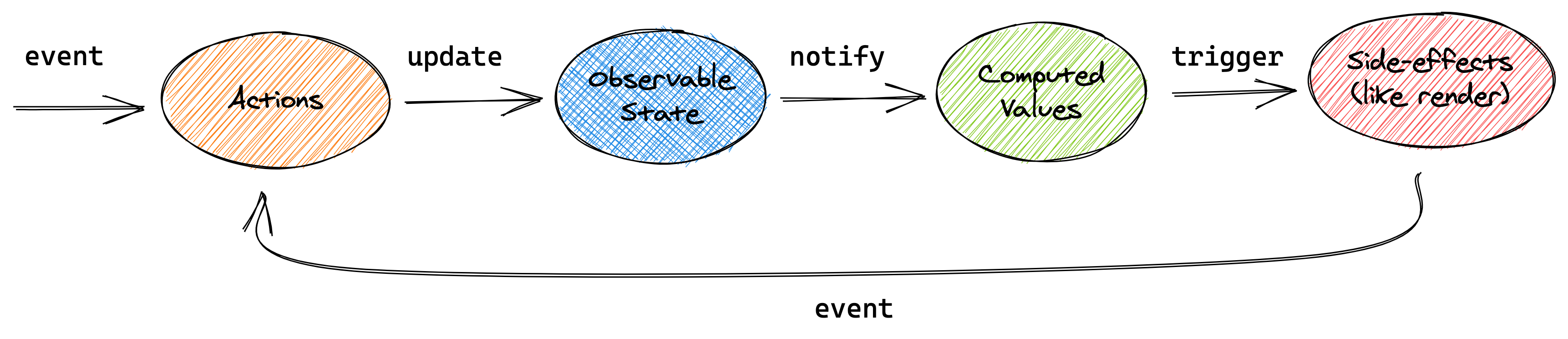
1. Observable - объект, изменения которого отслеживаются. Обычно эту роль выполняет объект хранилища
2. Actions. Изменение значений в свойствах хранилища, а также вызов методов
3. Computeds - постоянно вычисляемые свойства, аналог геттеров в классе
4. Reactions - действия, выполняемые при изменении хранилища, в тч перерисовка представления
## Установка
```sh
npm i -S mobx
```
```sh
yarn add mobx
```
## Этапы
### Создать класс хранилища
Это обычный класс с методами и свойствами
```js
class TodoStore {
todos = [];
get completedTodosCount() {
return this.todos.filter(
todo => todo.completed === true
).length;
}
report() {
if (this.todos.length === 0)
return "<none>";
const nextTodo = this.todos.find(todo => todo.completed === false);
return `Next todo: "${nextTodo ? nextTodo.task : "<none>"}". ` +
`Progress: ${this.completedTodosCount}/${this.todos.length}`;
}
addTodo(task) {
this.todos.push({
task: task,
completed: false,
assignee: null
});
}
}
const todoStore = new TodoStore();
```
Для разделения по логике всего хранилища, можно создать несколько классов и экспортировать связь между ними:
```js
import { ConverterStore } from "./ConverterStore";
import { CurrenciesStore } from "./CurrenciesStore";
const { makeAutoObservable, makeObservable, observable } = require("mobx");
class RootStore {
converterStore;
currenciesStore;
constructor() {
this.converterStore = new ConverterStore(this);
this.currenciesStore = new CurrenciesStore(this);
}
}
class Store {
constructor() {
makeAutoObservable(this, {
rootStore: false
})
this.rootStore = new RootStore();
}
}
const store = new Store();
export default store.rootStore;
```
```js
import { makeAutoObservable } from "mobx";
export class ConverterStore {
from = null;
to = null;
amount = 100;
constructor(rootStore) {
makeAutoObservable(this);
this.rootStore = rootStore;
}
get value() {
const { amount } = this;
if (!this.from || !this.to || !amount) {
return 0;
}
const { currenciesStore } = this.rootStore;
const currencies = currenciesStore.value;
const from = currencies.find(({ currency}) => currency === this.from);
const to = currencies.find(({ currency}) => currency === this.to);
const rate = from.rate / to.rate;
return amount / rate;
}
}
```
```js
import { makeAutoObservable } from "mobx";
export const STATUS_INIT = 'STATUS_INIT';
export const STATUS_LOADING = 'STATUS_LOADING';
export const STATUS_DONE = 'STATUS_DONE';
export const STATUS_ERROR = 'STATUS_ERROR';
export class CurrenciesStore {
status = STATUS_INIT;
value = [];
constructor() {
makeAutoObservable(this);
}
addValues(values) {
this.value.push(...values);
}
}
```
### Включить отслеживание за объектами
Далее требуется в конструкторе класса хранилища включить отслеживание с помощью функций makeObservable или makeAutoObservable (пример выше):
```js
import { makeObservable } from "mobx";
class ObservableTodoStore {
todos = [];
pendingRequests = 0;
constructor() {
makeObservable(this, {
todos: observable,
pendingRequests: observable,
completedTodosCount: computed,
report: computed,
addTodo: action,
});
autorun(() => console.log(this.report));
}
get completedTodosCount() {
return this.todos.filter(
todo => todo.completed === true
).length;
}
get report() {
if (this.todos.length === 0)
return "<none>";
const nextTodo = this.todos.find(todo => todo.completed === false);
return `Next todo: "${nextTodo ? nextTodo.task : "<none>"}". ` +
`Progress: ${this.completedTodosCount}/${this.todos.length}`;
}
addTodo(task) {
this.todos.push({
task: task,
completed: false,
assignee: null
});
}
}
const observableTodoStore = new ObservableTodoStore();
```
## Подключение к React
mobx не использует какого-либо провайдера, поэтому реализация prop и хуков лежит на стороне разработчика
```jsx
import store from './store';
root.render(
<React.StrictMode>
<App store={store}/>
</React.StrictMode>
);
```
Для использование в компоненте используется пакет mobx-react
```jsx
import { CurrencySelect } from '../../';
import { Input } from 'antd';
import { runInAction } from 'mobx';
import { useEffect } from 'react';
import { CURRENCY_FROM, CURRENCY_TO } from '../../../constants';
import styled from 'styled-components';
import { observer } from 'mobx-react';
const Container = styled.div`
max-width: 400px;
`;
export const Converter = observer(({ currencies = [], store, ...restProps}) => {
const [firstCurrency] = currencies;
const fromCurrency = store.converterStore.from;
const toCurrency = store.converterStore.to;
const amount = store.converterStore.amount;
const result = store.converterStore.value;
useEffect(() => {
if (firstCurrency && (!fromCurrency && !toCurrency)) {
runInAction(() => {
store.converterStore.from = firstCurrency.currency;
store.converterStore.to = firstCurrency.currency;
})
}
}, [amount, fromCurrency, toCurrency, currencies, firstCurrency, store.converterStore]);
const setCurrency = (type, value) => {
// console.log(value)
if (type === CURRENCY_FROM) {
runInAction(() => {
store.converterStore.from = value;
})
}
if (type === CURRENCY_TO) {
runInAction(() => {
store.converterStore.to = value;
})
}
};
const onAmountChange = e => {
const value = +e.target.value;
runInAction(() => {
store.converterStore.amount = value;
});
}
return (
<Container {...restProps}>
<div>
<CurrencySelect
data={currencies}
label="Из"
defaultValue={fromCurrency}
onSelect={value => setCurrency(CURRENCY_FROM, value)}/>
</div>
<div>
<CurrencySelect
data={currencies}
label="В"
defaultValue={toCurrency}
onSelect={value => setCurrency(CURRENCY_TO, value)}/>
</div>
<div>
<Input type="number" placeholder="Сколько обменять" onInput={onAmountChange} defaultValue={amount}/>
</div>
<div>
<Input readOnly={true} type="number" placeholder="Сколько вы получите" value={result}/>
</div>
</Container>
);
});
```
 Sign in with Wallet
Connect another wallet
Sign in with Wallet
Connect another wallet