- Purposes of new brand & website
- Ultimately - to help us look more polished & professional.
- More specifically to 1. Raise Money, 2. Attract employees, 3. Close early sales (Look professional)
- Things I like
- **Logo**:
- Simple icon with a simple serif logo text. Ideally the icon somehow signifies either **easy** **editing** **fast**
- It should be simple and identifiable. It shouldn’t rely on shading - it should stand alone as a brand mark.
- I think the circle as a basis works well for this. Two of my favourite ever logos are Tide Banking and Oculus.
- 
- 
- I worked with [Jord Riekwel](https://dribbble.com/Larkef) before and like his style with his simpler logos. Some logos of his I like:
- [Charged (blue version)](https://dribbble.com/shots/7166844-Charged-New-Logo)
- [Combell](https://dribbble.com/shots/6178187-Combell-Logo)
- [App Radar](https://dribbble.com/shots/2335488-App-Radar)
- **Colors**: I’m a big fan of blue as the core color, on a white background. I would like to see some mocks with maybe one or two additional vibrant colors (purples or pinks) to give it some personality. But not sure that would work for this brand.
- **Fonts: **
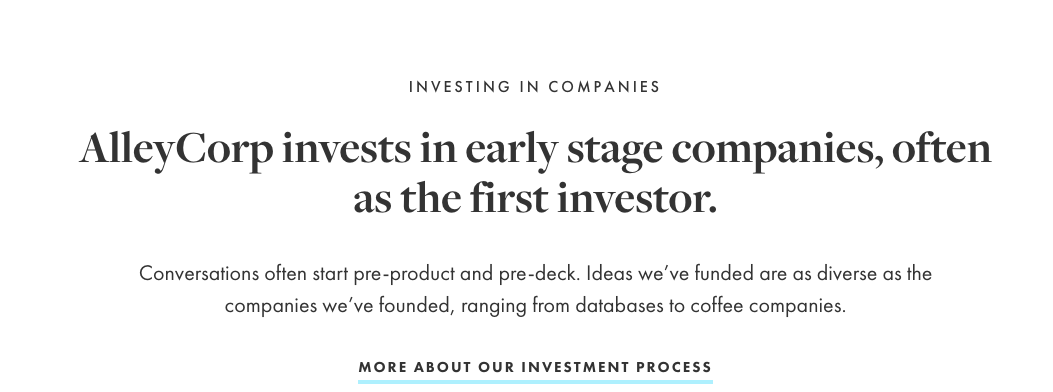
- Some favourites: **Sans**: Gilroy, Averta, Proxima Nova. **Serif**: Not Sure
- I really like brands with a good combination of serif (headline) & sans serif font for their copy. See Alleycorp’s [website](https://alleycorp.com/companies/#launching)
- 
- I also like when the font is big enough to be readable, but still not too in your face. I think Netlify does this well.
- **Backgrounds & Patterns**:
- Background Color: Light (white or grey) with some color/patterns ([Example 1](https://dribbble.com/shots/10994368-Amal-AI-bot-homepage/attachments/2593026?mode=media))
- I also really like the pattern on Netlify with the top of the page in a dark color, then cutting to white with a rough edge. I like that this continues within the main site too
- 
- Tailwind does something similar but with a light top section https://tailwindcss.com/
- Brands/sites I like in our space
- https://www.twilio.com/
- Not keen on the headline font. Like the subtle motion/animations as you scroll the page
- Netlify: As mentioned above (font size & background patterns)
- [Tailwind CSS](https://tailwindcss.com/) - clean feel. Typography (sizes and colors) really nicely finished. Also love the Stripe-esque icons on the left menu. Simple, easily identifiable logo
- Website (Homepage) Content
- Top Menu
- Home
- About Us
- Docs
- Right Side: Get started
- Hero Section
- Heading: **The **__Right__** way to do content**
- Sub-heading: Editmode takes the pain out of managing content in your web site or web app, allowing you and your team to focus on what’s important.
- Call to action: email form with “request early access” action button
- Section: **For Marketing sites**
- Sub Section: **Just enough CMS**
- Sub Heading: **You probably don’t need Wordpress**
- Similar to current “Just Enough CMS” section, including main gif and list to the side.
- (Would like to re-skin the current screen cap gif so it looks nicer)
- Sub Section: **Edit your content __where it appears__**
- Sub Heading: **Point, click, edit. It’s that simple. **
- Include gif of editing experience
- Call to action: Try It Out
- (This section is similar to the current “Crazy Simple” section on the website)
- Side Section: **Where Editmode Shines:**
- Your site is custom designed (not a theme)
- You want control over your language
- (This is just an idea - can be left out for now if easier)
- Section: **For Applications**
- Skip the engineering backlog
- Change labels, copy, dropdown items without needing engineering involvement.
- (Screencap of creating a dropdown type in )
- Deploy automatically. Or Don’t
- Use webhooks to trigger re-deploys where necessary.
- In-built caching means deploys are often not needed.
- Call to action - Get started
- Section: **For Agencies**
- Sub Section: **Everything in one place **
- No need to manage **all** those Wordpress installs
- Screenshot showing project side menu
- Sub Section:** Let’s be honest. You probably don’t need Wordpress. **
- Text Section: Wordpress is a swiss army knife. But sometimes you just need a scissors.
- Sub Section: **Never waste time finding the content you need **
- Just go direct to source.
- Section: **Don’t take our word for it** (Testimonials)
- Quote 1 - Symph
- Quote 2 - iRevise
- Bottom Section
- Home
- Pricing
- About Us
- Jobs
- Request Access
 Sign in with Wallet
Connect another wallet
Sign in with Wallet
Connect another wallet