---
title: 'IPC'
disqus: babysean_
---
**聽說把資料寫下來就會記得的比較久 那麼就...開始吧 :]**

[TOC]

# Linux Interprocess Communications
- [x] 進程間通信(IPC)功能 提供了一種 使多個進程相互通信的方法。
- [x] 這些功能在得到有效使用時,可為任何UNIX系統(包括Linux)上的客戶端/服務器開發提供可靠的框架。
# 无名管道 (Half-duplex UNIX pipes)
## 概念
簡而言之,管道是一種將一個標準輸出連接到另一個標準輸入的方過程。管道是IPC工具中最老的,從UNIX操作系統的最早版本問世以來一直存在。它們提供了一種在進程之間進行**單向通信的方法**(因此稱為半雙工)。
**ls | sort | lp**
上面的方法建立了一個流水線,將ls的輸出作為sort的輸入,而sort的輸出作為lp的輸入。數據通過半雙工管道運行,(從視覺上)可視為從管道從的左 到 右傳播。
儘管我們大多數人在外殼程序腳本編程中非常虔誠地使用管道,但是我們經常這樣做時卻不去考慮內核級別發生的情況。
當進程創建管道時,內核會設置兩個文件描述符以供管道使用。一個描述符用於允許輸入管道的路徑(寫),而另一個描述符用於從管道獲取數據(讀)。
此時,管道幾乎沒有實際用途,因為創建過程只能使用管道與其自身進行通信。創建管道後,請考慮以下過程和內核的表示形式:

從上面的圖中,很容易看出描述符是如何連接在一起的。如果進程通過管道(fd0)發送數據,則它具有從fd1獲取(讀取)該信息的能力。但是,上面的簡單草圖有一個更大的目標。
當管道最初將進程與其自身連接時,通過管道傳輸的數據將通過內核。特別是在Linux下,管道實際上是在內部用有效的inode表示的。當然,此索引節點位於內核本身內,而不位於任何物理文件系統的範圍內。這一點將為我們打開一些非常方便的I / O門,稍後我們將看到。
在這一點上,管道是相當無用的。畢竟,如果我們只是自己和自己講話,為什麼還要辣麼麻煩創建一個管道呢?
由於子進程將繼承父進程的所有打開文件描述符,因此我們現在有了多進程通信(父進程和子進程之間)的基礎。考慮以下簡單草圖的更新版本:

在上面,我們看到兩個進程現在都可以訪問構成管道的文件描述符。在這個階段,必須做出一個關鍵的決定。我們希望數據往哪個方向傳輸?子進程是否將信息發送給父進程,反之亦然?
這兩個過程在這個問題上相互達成共識,並著手"關閉"他們不關心的管道末端。
出於討論目的,假設子級執行一些處理,然後通過管道將信息發送回父級。我們新修訂的草圖將如下所示:

管道建設現已完成!剩下要做的唯一一件事就是利用管道。要直接訪問管道,可以使用用於低級文件I / O的相同系統調用(請注意,管道實際上在內部表示為有效的inode)。
要將數據發送到管道,我們使用write()系統調用,而從管道中檢索數據,我們使用read()系統調用。請記住,低級文件I / O系統調用可與文件描述符一起使用!
但是,請記住,某些系統調用(例如lseek())不適用於管道的描述符。
---
## Create a pipe in C
為了使用C創建一個簡單的管道,我們利用pipe()系統調用。 它使用一個參數,該參數是兩個整數的數組,如果成功,該數組將包含兩個用於管道的新文件描述符。 創建管道之後,該進程通常會產生一個新進程(請記住子進程繼承了打開的文件描述符)。
~~~
SYSTEM CALL: pipe();
PROTOTYPE: int pipe( int fd[2] );
RETURNS: 0 on success
-1 on error: errno = EMFILE (no free descriptors)
EMFILE (system file table is full)
EFAULT (fd array is not valid)
NOTES: fd[0] is set up for reading, fd[1] is set up for writing
(我們可以使用命令: df -i 查看硬盤上的inode使用情況)
~~~
設置並打開數組中的第一個整數(元素0)以供讀取,而設置和打開第二個整數(元素1)以供寫入。 從視覺上講,fd1的輸出成為fd0的輸入。再一次,所有通過管道傳輸的數據都將通過內核。
``` =
#include <stdio.h>
#include <unistd.h>
#include <sys/types.h>
main()
{
int fd[2];
pipe(fd);
.
.
}
```
請記住,C語言中的數組名稱會變成指向其第一個成員的指針。上面的fd等效於&fd [0]。一旦建立了管道,就可以派生新的子進程:
``` =
#include <stdio.h>
#include <unistd.h>
#include <sys/types.h>
main()
{
int fd[2];
pid_t childpid;
pipe(fd);
if((childpid = fork()) == -1)
{
perror("fork");
exit(1);
}
.
.
}
```
如果父母希望從孩子那裡接收數據,則應該關閉fd1,然後孩子應該關閉fd0。如果父母希望將數據發送給孩子,則應關閉fd0,然後孩子應關閉fd1。
由於描述符是在父級和子級之間共享的,因此我們始終應確保關閉無關的管道末端。從技術上講,如果未顯式關閉管道不必要的末端,則EOF將永遠不會返回。
~~~ =
#include <stdio.h>
#include <unistd.h>
#include <sys/types.h>
main()
{
int fd[2];
pid_t childpid;
pipe(fd);
if((childpid = fork()) == -1)
{
perror("fork");
exit(1);
}
if(childpid == 0)
{
/* Child process closes up input side of pipe */
close(fd[0]);
}
else
{
/* Parent process closes up output side of pipe */
close(fd[1]);
}
.
.
}
~~~
如前所述,一旦建立了流水線,就可以將文件描述符視為普通文件的描述符。
~~~ =
/*****************************************************************************
Excerpt from "Linux Programmer's Guide - Chapter 6"
(C)opyright 1994-1995, Scott Burkett
*****************************************************************************
MODULE: pipe.c
*****************************************************************************/
#include <stdio.h>
#include <unistd.h>
#include <sys/types.h>
int main(void)
{
int fd[2], nbytes;
pid_t childpid;
char string[] = "Hello, world!\n";
char readbuffer[80];
pipe(fd);
if((childpid = fork()) == -1)
{
perror("fork");
exit(1);
}
if(childpid == 0)
{
/* Child process closes up input side of pipe */
close(fd[0]);
/* Send "string" through the output side of pipe */
write(fd[1], string, (strlen(string)+1));
exit(0);
}
else
{
/* Parent process closes up output side of pipe */
close(fd[1]);
/* Read in a string from the pipe */
nbytes = read(fd[0], readbuffer, sizeof(readbuffer));
printf("Received string: %s", readbuffer);
}
return(0);
}
~~~
通常,子級中的描述符會復製到標準輸入或輸出中。然後,孩子可以執行exec()另一個程序,該程序繼承標準流。讓我們看一下dup()系統調用:
~~~ =
Consider:
.
.
childpid = fork();
if(childpid == 0)
{
/* Close up standard input of the child */
close(0);
/* Duplicate the input side of pipe to stdin */
dup(fd[0]);
execlp("sort", "sort", NULL);
.
}
~~~
由於文件描述符0(stdin)已關閉,因此對dup()的調用將管道(fd0)的輸入描述符複製到其標準輸入上。然後,我們調用execlp(),以將孩子的文本段(代碼)覆蓋在排序程序的文本段(代碼)上。
由於新執行的程序從其派生工具繼承標準流,因此它實際上繼承了管道的輸入端作為其標準輸入!現在,原始父進程發送到管道的所有內容都將進入排序工具。
還有另一個系統調用dup2(),也可以使用它。此特定調用起源於UNIX版本7,並通過BSD發行版進行,現在是POSIX標準所必需的
~~~=
SYSTEM CALL: dup2();
PROTOTYPE: int dup2( int oldfd, int newfd );
RETURNS: new descriptor on success
-1 on error: errno = EBADF (oldfd is not a valid descriptor)
EBADF (newfd is out of range)
EMFILE (too many descriptors for the process)
NOTES: the old descriptor is closed with dup2()!
~~~
通過這個特定的調用,我們可以執行一個系統調用,完成關閉操作和實際的描述符重複。另外,保證它是原子的操作,這實際上意味著它將永遠不會被到達的信號所打斷。在將控制權交還給內核進行信號調度之前,整個過程將蒸蒸日上。
使用原始的dup()系統調用,程序員必須在調用它之前執行close()操作。這導致了兩次系統調用,兩次調用之間經過的短暫時間中的漏洞程度很小。如果在該短暫實例中有信號到達,則描述符複製將失敗。當然,dup2()為我們解決了這個問題。
~~~=
Consider:
.
.
childpid = fork();
if(childpid == 0)
{
/* Close stdin, duplicate the input side of pipe to stdin */
dup2(0, fd[0]);
execlp("sort", "sort", NULL);
.
.
}
~~~
通過這個特定的調用,我們可以執行一個系統調用,完成關閉操作和實際的描述符重複。此外,它保證是原子的,這實際上意味著它永遠不會被到達的信號所打斷。在將控制權交還給內核進行信號調度之前,整個過程將蒸蒸日上。使用原始的dup()系統調用,程序員必須在調用它之前執行close()操作。這導致了兩次系統調用,兩次調用之間經過的短暫時間中的漏洞程度很小。如果在該短暫實例中有信號到達,則描述符複製將失敗。當然,dup2()為我們解決了這個問題。
Consider:
.
.
childpid = fork();
if(childpid == 0)
{
/* Close stdin, duplicate the input side of pipe to stdin */
dup2(0, fd[0]);
execlp("sort", "sort", NULL);
.
.
}
```
## Pipes the Easy Way!
如果上述所有雜亂無章似乎都是創建和利用管道的一種非常round回的方式,那麼還有另一種選擇。
```c=
LIBRARY FUNCTION: popen();
PROTOTYPE: FILE *popen ( char *command, char *type);
RETURNS: new file stream on success
NULL on unsuccessful fork() or pipe() call
NOTES: creates a pipe, and performs fork/exec operations using "command"
```
這個標準庫函數通過內部調用pipe()創建半雙工管道。然後,它派生一個子進程,執行Bourne shell,並在該shell中執行“ command”參數。數據流的方向由第二個參數確定,並在外殼程序中執行“命令”參數。數據流的方向由第二個參數“類型”確定。對於“讀”或“寫”,它可以是“ r”或“ w”。
不能兩者兼有!在Linux下,管道將以“ type”參數的第一個字符所指定的模式打開。因此,如果您嘗試傳遞“ rw”,它將僅以“讀取”模式將其打開。
儘管此庫函數為您執行了很多繁瑣的工作,但仍存在很大的折衷。通過使用pipe()系統調用並自己處理fork / exec,您將失去曾經的精細控制。但是,由於直接使用Bourne shell,因此在“ command”自變量中允許殼元字符擴展(包括通配符)。
用popen()創建的管道必須用pclose()關閉。到目前為止,您可能已經意識到popen / pclose與標准文件流I / O函數fopen()和fclose()具有驚人的相似之處。
```c=
LIBRARY FUNCTION: pclose();
PROTOTYPE: int pclose( FILE *stream );
RETURNS: exit status of wait4() call
-1 if "stream" is not valid, or if wait4() fails
NOTES: waits on the pipe process to terminate, then closes the stream.
```
pclose()函數對由popen()分叉的進程執行wait4()。返回時,它將銷毀管道和文件流。再次,它與基於常規基於流的文件I / O的fclose()函數同義。
```c=
/*****************************************************************************
Excerpt from "Linux Programmer's Guide - Chapter 6"
(C)opyright 1994-1995, Scott Burkett
*****************************************************************************
MODULE: popen1.c
*****************************************************************************/
#include <stdio.h>
#define MAXSTRS 5
int main(void)
{
int cntr;
FILE *pipe_fp;
char *strings[MAXSTRS] = { "echo", "bravo", "alpha",
"charlie", "delta"};
/* Create one way pipe line with call to popen() */
if (( pipe_fp = popen("sort", "w")) == NULL)
{
perror("popen");
exit(1);
}
/* Processing loop */
for(cntr=0; cntr<MAXSTRS; cntr++) {
fputs(strings[cntr], pipe_fp);
fputc('\n', pipe_fp);
}
/* Close the pipe */
pclose(pipe_fp);
return(0);
}
```
由於popen()使用shell進行投標,因此可以使用所有shell擴展字符和元字符!另外,popen()可以使用更高級的技術,例如重定向,甚至輸出管道。 考慮以下示例調用:
```c=
popen("ls ~scottb", "r");
popen("sort > /tmp/foo", "w");
popen("sort | uniq | more", "w");
```
作為popen()的另一個示例,請考慮以下小程序,它打開了兩個管道(一個管道進入ls命令,另一個管道進行排序):
```c=
/*****************************************************************************
Excerpt from "Linux Programmer's Guide - Chapter 6"
(C)opyright 1994-1995, Scott Burkett
*****************************************************************************
MODULE: popen2.c
*****************************************************************************/
#include <stdio.h>
int main(void)
{
FILE *pipein_fp, *pipeout_fp;
char readbuf[80];
/* Create one way pipe line with call to popen() */
if (( pipein_fp = popen("ls", "r")) == NULL)
{
perror("popen");
exit(1);
}
/* Create one way pipe line with call to popen() */
if (( pipeout_fp = popen("sort", "w")) == NULL)
{
perror("popen");
exit(1);
}
/* Processing loop */
while(fgets(readbuf, 80, pipein_fp))
fputs(readbuf, pipeout_fp);
/* Close the pipes */
pclose(pipein_fp);
pclose(pipeout_fp);
return(0);
}
```
為了最後展示popen(),讓我們創建一個通用程序,該通用程序打開傳遞的命令和文件名之間的管道:
```c=
/*****************************************************************************
Excerpt from "Linux Programmer's Guide - Chapter 6"
(C)opyright 1994-1995, Scott Burkett
*****************************************************************************
MODULE: popen3.c
*****************************************************************************/
#include <stdio.h>
int main(int argc, char *argv[])
{
FILE *pipe_fp, *infile;
char readbuf[80];
if( argc != 3) {
fprintf(stderr, "USAGE: popen3 [command] [filename]\n");
exit(1);
}
/* Open up input file */
if (( infile = fopen(argv[2], "rt")) == NULL)
{
perror("fopen");
exit(1);
}
/* Create one way pipe line with call to popen() */
if (( pipe_fp = popen(argv[1], "w")) == NULL)
{
perror("popen");
exit(1);
}
/* Processing loop */
do {
fgets(readbuf, 80, infile);
if(feof(infile)) break;
fputs(readbuf, pipe_fp);
} while(!feof(infile));
fclose(infile);
pclose(pipe_fp);
return(0);
}
```
通過以下調用嘗試該程序:
```c=
popen3 sort popen3.c
popen3 cat popen3.c
popen3 more popen3.c
popen3 cat popen3.c | grep main
```
## Atomic Operations with Pipes
為了使某項操作被視為``原子''操作,絕不能因為任何原因而中斷該操作。整個操作一次完成。POSIX標准在/usr/include/posix1_lim.h中指示管道上原子操作的最大緩衝區大小為:
```c=
#define _POSIX_PIPE_BUF 512
```
原子最多可以從管道中寫入或檢索多達512個字節。超過此閾值的所有內容都會被拆分,而不是原子化的。但是,在Linux下,原子操作限制在``linux / limits.h''中定義為:
```c=
#define PIPE_BUF 4096
```
如您所見,Linux容納了POSIX所需的最小字節數,我可能會補充說。當涉及多個過程(FIFOS)時,管道操作的原子性變得很重要。
例如,如果寫入管道的字節數超過單個操作的原子限制,並且有多個進程正在寫入管道,則數據將被``交織''或``分塊''。換句話說,一個進程可以將數據插入到另一進程的寫入之間的流水線中。
## Notes on half-duplex pipes
* 通過打開兩個管道並在子進程中正確地重新分配文件描述符,可以創建兩個管道。
* 必須在調用fork()之前進行pipe()調用,否則子代將不會繼承描述符! (與popen()相同)。
* 對於半雙工管道,任何連接的進程都必須共享相關的祖先。由於管道位於內核範圍內,因此管道創建者不在祖先的任何進程都無法解決該問題。命名管道(FIFOS)並非如此。
---
---
# 命名管道 FIFOs (named pipes)
## Basic Concepts
命名管道的工作方式與常規管道非常相似,但是確實有一些明顯的區別。
* 命名管道在文件系統中作為設備專用文件存在。
* 不同祖先的進程可以通過命名管道共享數據。
* 當所有I / O通過共享進程完成後,命名管道將保留在文件系統中以備後用。
## Creating a FIFO
有幾種創建命名管道的方法。前兩個可以直接從外殼完成。
```c=
mknod MYFIFO p
mkfifo a=rw MYFIFO
```
以上兩個命令執行相同的操作,但有一個例外。 mkfifo命令提供了一個鉤子,用於在創建後直接更改FIFO文件的權限。
使用mknod,將需要快速調用chmod命令。
可以通過長目錄列表中的``p''指示符在物理文件系統中快速識別FIFO文件:
```c=
$ ls -l MYFIFO
prw-r--r-- 1 root root 0 Dec 14 22:15 MYFIFO|
```
>有沒有注意文件名之後的豎線(``豎線符號``)。 用Linux香不香,你說對不對?
要在C語言中創建FIFO,我們可以使用mknod()系統調用:
```c=
LIBRARY FUNCTION: mknod();
PROTOTYPE: int mknod( char *pathname, mode_t mode, dev_t dev);
RETURNS: 0 on success,
-1 on error: errno = EFAULT (pathname invalid)
EACCES (permission denied)
ENAMETOOLONG (pathname too long)
ENOENT (invalid pathname)
ENOTDIR (invalid pathname)
(see man page for mknod for others)
NOTES: Creates a filesystem node (file, device file, or FIFO)
```
我將在手冊頁上對mknod()進行更詳細的討論,但讓我們考慮一個用C創建FIFO的簡單示例:
```c=
mknod("/tmp/MYFIFO", S_IFIFO|0666, 0);
```
在這種情況下,文件``/ tmp / MYFIFO''被創建為FIFO文件。 所請求的權限為``0666'',儘管它們受umask設置的影響如下:
```c=
final_umask = requested_permissions & ~original_umask
```
一個常見的技巧是使用umask()系統調用來臨時改變umask值:
```c=
umask(0);
mknod("/tmp/MYFIFO", S_IFIFO|0666, 0);
```
另外,除非創建設備文件,否則將忽略mknod()的第三個參數。 在這種情況下,應指定設備文件的主要和次要編號。
## FIFO Operations
FIFO上的I / O操作與普通管道基本相同,但有一個主要例外。 應該使用''打開''系統調用或庫函數來物理打開通向管道的通道。 對於半雙工管道,這是不必要的,因為管道位於內核中,而不位於物理文件系統上。 在我們的示例中,我們將管道視為流,使用fopen()將其打開,然後使用fclose()將其關閉。
考慮一個簡單的服務器過程:
```c=
/*****************************************************************************
Excerpt from "Linux Programmer's Guide - Chapter 6"
(C)opyright 1994-1995, Scott Burkett
*****************************************************************************
MODULE: fifoserver.c
*****************************************************************************/
#include <stdio.h>
#include <stdlib.h>
#include <sys/stat.h>
#include <unistd.h>
#include <linux/stat.h>
#define FIFO_FILE "MYFIFO"
int main(void)
{
FILE *fp;
char readbuf[80];
/* Create the FIFO if it does not exist */
umask(0);
mknod(FIFO_FILE, S_IFIFO|0666, 0);
while(1)
{
fp = fopen(FIFO_FILE, "r");
fgets(readbuf, 80, fp);
printf("Received string: %s\n", readbuf);
fclose(fp);
}
return(0);
}
```
由於FIFO默認情況下處於阻塞狀態,因此在編譯服務器後在後台運行服務器:
$ fifoserver&
我們將在稍後討論FIFO的阻塞動作。 首先,請考慮以下簡單客戶端到我們服務器的前端:
```c=
/*****************************************************************************
Excerpt from "Linux Programmer's Guide - Chapter 6"
(C)opyright 1994-1995, Scott Burkett
*****************************************************************************
MODULE: fifoclient.c
*****************************************************************************/
#include <stdio.h>
#include <stdlib.h>
#define FIFO_FILE "MYFIFO"
int main(int argc, char *argv[])
{
FILE *fp;
if ( argc != 2 ) {
printf("USAGE: fifoclient [string]\n");
exit(1);
}
if((fp = fopen(FIFO_FILE, "w")) == NULL) {
perror("fopen");
exit(1);
}
fputs(argv[1], fp);
fclose(fp);
return(0);
}
```
## Blocking Actions on a FIFO
通常,阻塞發生在FIFO上。 換句話說,如果打開FIFO進行讀取,則該過程將“阻塞”,直到某個其他進程將其打開以進行寫入。 反之亦然。 如果不希望出現這種情況,則可以在open()調用中使用O_NONBLOCK標誌來禁用默認的阻止操作。
對於簡單的服務器,我們只是將其推入後台,然後在後台進行阻塞。 另一種選擇是跳到另一個虛擬控制台並運行客戶端,來回切換以查看生成的操作。
## The Infamous SIGPIPE Signal
最後一點,管道必須具有讀取器和寫入器。 如果某個進程嘗試寫入沒有讀取器的管道,則會從內核發送SIGPIPE信號。 當管道中涉及兩個以上的流程時,這勢在必行。
---
---
# System V IPC
# Fundamental Concepts
通過系統 V,AT&T 引入了三種新客戶端和服務器進程必須共同商定密鑰。的 IPC 設施形式(消息佇列、信號燈和共用記憶體)。雖然POSIX委員會尚未完成對這些設施的標準化,但大多數實施確實支援這些設施。此外,伯克利 (BSD) 使用插座作為 IPC 的主要形式,而不是系統 V 元素。Linux 能夠同時使用 IPC (BSD 和系統 V) 的兩種形式,但直到下一章我們才會討論插座。
《第五系統IPC》的Linux實施由克里希納·巴拉蘇布拉馬尼安於balasub@cis.ohio-state.edu年撰寫。
## IPC Identifiers (IPC標識符)
每個 IPC物件都有與它關聯的獨特 IPC 識別碼。當我們說"IPC 物件"時,我們談論的是單個消息佇列、信號燈集或共用記憶體段。此標識碼在內核中用於唯一識別 IPC 物件。例如,要造訪特定共用記憶體段,您唯一需要的專案是分配給該段的唯一 ID 值。
標識符的獨特性與有關對象的類型相關。為了說明這一點,假設一個數字標識符"12345"。雖然不可能有兩個具有同一標識符的消息佇列,但存在消息佇列的明顯可能性,比如共用記憶體段,該段具有相同的數字標識符。
## IPC Keys
要取得唯一的ID,必須使用金鑰。客戶端和服務器進程必須共同商定密鑰。這作為構建客戶/伺服器應用程式框架的第一步。當你用電話給某人打電話時,你必須知道他們的電話號碼。此外,電話公司必須知道如何將您的撥出的電話轉接到最終目的地。一旦對方通過接聽電話來回應,就建立了連接。在System V IPC 設施中,「電話」與正在使用的物件類型是相關聯的。"電話公司"或路由方法可直接透過IPC密鑰關聯。密鑰每次都可以是相同的值,可通過將密鑰值直接寫死(硬編碼)到應用程式中。這密鑰可能會有已被使用的缺點,通常來說 ftok()函數的功能是給用戶端和伺服器生成密鑰值的。
```c=
LIBRARY FUNCTION: ftok();
PROTOTYPE: key_t ftok ( char *pathname, char proj );
RETURNS: new IPC key value if successful
-1 if unsuccessful, errno set to return of stat() call
```
ftok()返回的鍵值是通過將 第一個參數文件中的(索引節點號)和(次設備號) 與 第二個參數(一個字符) 組合在一起而生成的。這不能保證唯一性,但是應用程序可以檢查衝突並重試密鑰生成。
```c=
key_t mykey;
mykey = ftok("/tmp/myapp", 'a');
```
在以上代碼段中,目錄/ tmp / myapp與一個字母標識符“ a”組合在一起。另一個常見的示例是使用當前目錄:
```c=
key_t mykey;
mykey = ftok(".", 'a');
```
所使用的密鑰生成算法完全由應用程序程序員決定。只要採取措施防止比賽條件,僵局等,任何方法都是可行的。 出於演示目的,我們將使用ftok()方法。如果我們假設每個客戶端進程都將從一個唯一的主目錄運行,則生成的密鑰應足以滿足我們的需求。
無論如何獲得密鑰值,都將在隨後的IPC系統調用中使用該密鑰值來創建或獲得對IPC對象的訪問權限。``
## The ipcs Command: (ipc show)
``ipcs命令可用於獲取所有System V IPC對象的狀態。該工具的Linux版本也由Krishna Balasubramanian創作。``
```c=
ipcs -q: Show only message queues
ipcs -s: Show only semaphores
ipcs -m: Show only shared memory
ipcs --help: Additional arguments
```
默認情況下,顯示所有三個類別的對象。考慮以下ipcs的示例輸出:
```c=
------ Shared Memory Segments --------
shmid owner perms bytes nattch status
------ Semaphore Arrays --------
semid owner perms nsems status
------ Message Queues --------
msqid owner perms used-bytes messages
0 root 660 5 1
```
在這裡我們看到單個消息隊列,其標識符為''0''。 它由用戶root擁有,並且具有八進制權限660或-rw-rw--。隊列中只有一條消息,該消息的總大小為5個字節。ipcs命令是一個非常強大的工具,它可以窺視IPC對象的內核存儲機制。學習,使用,崇拜。
## The ipcrm Command: (ipc rm)
ipcrm命令可用於從內核中刪除IPC對象。雖然可以通過用戶代碼中的系統調用來刪除IPC對象(稍後我們將介紹如何),經常需要手動刪除IPC對象,尤其是在開發環境下。它的用法很簡單:
```c=
ipcrm <msg | sem | shm> <IPC ID>
```
只需指定要刪除的對像是消息隊列(msg),信號量集(sem)還是共享內存段(shm)。
IPC ID可以通過ipcs命令獲得。
必須指定對象的類型,因為標識符在同一類型中是唯一的(請回想一下我們之前的討論)。
# Message queues - Basic concepts
消息隊列最好描述為內核尋址空間內的內部鏈接列表。消息按順序發送到隊列中,也可以按多種不同的方式從隊列中取出。每個消息隊列都以IPC標識符來區分並都是唯一的。
想要了解System V IPC等複雜主題的關鍵就是要 充分理解和熟悉 內核本身範圍內的 各種內部數據結構。(就是 要懂內核中的各種內部數據結構啦) 即使是最原始的操作,也必須要直接訪問其中一些結構,而其他結構則處於較低的級別。
## Internal and User Data Structures
> 主要類型:
> * Message buffer
> * msg structure
> * msqid_ds structure
> * ipc_perm structure
> 函数:
> * msgget()
> * msgsnd()
> * msgctl()
___
完全可以把它想像成 在內核中的一個鍊表, 他的鍊表頭就是msqid_ds這個結構鞥鞥msqid_ds(message queue id data structure) 這容懂了吧 😂

:::info
* [picture source](https://www.programmersought.com/article/85901479490/)
:::
___
### struct buffer
我們將要訪問的第一個結構是msgbuf結構。 可以將這種特定的數據結構視為消息數據的模板。雖說是程序員來定義這種類型的結構,您必須了解實際上存在msgbuf類型的結構。
它在linux/msg.h中聲明如下:
```c=
/* message buffer for msgsnd and msgrcv calls > */
struct msgbuf {
long mtype; /* type of message */
char mtext[1]; /* message text */
};
```
There are two members in the msgbuf structure:
|||
|-|-|
|mtype|The message type, represented in a positive number. This must be a positive number!|
|mtext|The message data itself.|
分配給定消息類型的能力實質上使您能夠在單個隊列上多路復用消息。 例如,可以為客戶端進程分配一個幻數,該幻數可用作服務器進程發送的消息的消息類型。 服務器本身可以使用其他號碼,客戶端可以使用該號碼向其發送消息。 在另一種情況下,應用程序可以將錯誤消息標記為消息類型為1,請求消息可以為類型2,等等。可能性是無限的。
另一方面,不要被分配給消息數據元素(mtext)的幾乎過於描述性的名稱所迷惑。該字段不限於僅保存字符數組,而是保存任何形式的數據。字段本身實際上是完全任意的,因為此結構由應用程序程序員重新定義。考慮以下重新定義:
```c=
struct my_msgbuf {
long mtype; /* Message type */
long request_id; /* Request identifier */
struct client info; /* Client information structure */
};
```
在這裡,我們可以像以前一樣看到消息類型,但是該結構的其餘部分已被其他兩個元素替換,其中一個是另一個結構! 這就是消息隊列的美。 內核不進行任何數據轉換。 可以發送任何信息。
但是,確實存在一個給定消息的最大大小的內部限制。 在Linux中,這在linux/msg.h中定義如下:
```c=
#define MSGMAX 4056 /* <= 4056 */ /* max size of message (bytes) */
```
消息的總大小不能超過4,056個字節,包括長度為4個字節(長)的mtype成員。
___
### struct msg
內核將每個消息存儲在msg結構框架內的隊列中。它在linux / msg.h中為我們定義如下:
```c=
/* one msg structure for each message */
struct msg {
struct msg *msg_next; /* next message on queue */
long msg_type; /* assigned msg_buf */
char *msg_spot; /* message text address */
short msg_ts; /* message text size */
};
```
|||
|-|-|
|msg_next|This is a pointer to the next message in the queue. They are stored as a singly linked list within kernel addressing space.|
|msg_type|This is the message type, as assigned in the user structure msgbuf.|
|msg_spot|A pointer to the beginning of the message body.|
|msg_ts|The length of the message text, or body.|
___
### struct msqid_ds
三種類型的IPC中 每一種都有一個內部數據結構,該結構由內核維護。 對於消息隊列,這是msqid_ds結構。 系統上每個消息隊列的實例結構 都是由內核來創建,存儲和維護。它在linux/msg.h中定義如下:
```c=
/* one msqid structure for each queue on the system */
struct msqid_ds {
struct ipc_perm msg_perm;
struct msg *msg_first; /* first message on queue */
struct msg *msg_last; /* last message in queue */
time_t msg_stime; /* last msgsnd time */
time_t msg_rtime; /* last msgrcv time */
time_t msg_ctime; /* last change time */
struct wait_queue *wwait;
struct wait_queue *rwait;
ushort msg_cbytes;
ushort msg_qnum; /* current number of msg in the queue */
ushort msg_qbytes; /* max number of bytes on queue */
ushort msg_lspid; /* pid of last msgsnd */
ushort msg_lrpid; /* last receive pid */
};
```
請對每個結構成員進行簡單基本的了解,以後可能會用的到的那種:
|||
|-|-|
|msg_perm | An instance of the ipc_perm structure, which is defined for us in linux/ipc.h. This holds the permission information for the message queue, including the access permissions, and information about the creator of the queue (uid, etc). |
|msg_first| Link to the first message in the queue (the head of the list).|
|msg_last | Link to the last message in the queue (the tail of the list).|
|msg_stime| Timestamp (time_t) of the last message that was sent to the queue.|
|msg_rtime| Timestamp of the last message retrieved from the queue.|
|msg_ctime| Timestamp of the last ''change'' made to the queue (more on this later).|
|wwait| and|
|rwait| Pointers into the kernel's wait queue. They are used when an operation on a message queue deems the process go into a sleep state (i.e. queue is full and the process is waiting for an opening).|
|msg_cbytes| Total number of bytes residing on the queue (sum of the sizes of all messages).|
|msg_qnum| Number of messages currently in the queue.|
|msg_qbytes| Maximum number of bytes on the queue.|
|msg_lspid| The PID of the process who sent the last message.|
| msg_lrpid|The PID of the process who retrieved the last message.|
___
### struct ipc_perm
系統為每個一個IPC對象保存一個ipc_perm結構體,該結構說明了IPC對象的權限和所有者,每一個版本的內核各有不用的ipc_perm結構成員。 linux/ipc.h。
```c=
struct ipc_perm
{
key_t key;
ushort cuid; /* 創建者 uid */
ushort cgid; /* 創建者 gid */
ushort uid; /* 所有者 uid */
ushort gid; /* 所有者 gid */
ushort mode; /* 讀/寫權限 */
ushort seq; /* slot usage sequence number */
};
```
seq每次通過系統調用(銷毀)關閉IPC對象時,該值將增加可以駐留在系統中的IPC對象的最大數量。 您是否需要擔心這個價值? 不。
>注意:在Richard Stevens的UNIX Network Programming一書中,第125頁上對此主題進行了精彩的討論,並對其存在和行為的安全性進行了討論。
___
### msgget()
為了創建 新的消息隊列 或 訪問現有的隊列 我们使用 msgget()系統調用。
```c=
SYSTEM CALL: msgget();
PROTOTYPE:
int msgget ( key_t key, int msgflg );
RETURNS:
message queue identifier on success
-1 on error: errno = EACCESS (permission denied)
EEXIST (Queue exists, cannot create)
EIDRM (Queue is marked for deletion)
ENOENT (Queue does not exist)
ENOMEM (Not enough memory to create queue)
ENOSPC (Maximum queue limit exceeded)
NOTES:
```
|||
|--------|--------|
|IPC_CREAT|Create the queue if it doesn't already exist in the kernel.|
|IPC_EXCL|When used with IPC_CREAT, fail if queue already exists.|
如果單獨使用IPC_CREAT,則msgget()返回新創建的消息隊列的消息隊列標識符,或者返回存在具有相同鍵值的隊列的標識符。
如果將IPC_EXCL與IPC_CREAT一起使用,則將創建一個新隊列,或者如果該隊列存在,則調用將以-1失敗。
IPC_EXCL本身是沒有用的,但是當與IPC_CREAT結合使用時,它可以用作一種工具,以確保不會打開任何現有的隊列進行訪問。
可選的八進制模式可以在掩碼中進行“或”運算,因為每個IPC對像都具有與UNIX文件系統上的文件權限在功能上相似的權限!
讓我們創建一個用於打開或創建消息隊列的快速包裝函數:
```c=
int open_queue( key_t keyval )
{
int qid;
if((qid = msgget( keyval, IPC_CREAT | 0660 )) == -1)
{
return(-1);
}
return(qid);
}
```
请注意 我们这里用了 0660的权限, 这函数会返回一个int标示符 或者 返回-1;
___
### msgsnd()
一但有了隊列標識符,就可以開始對其執行操作。要將消息傳遞到隊列,請使用msgsnd系統調用:
```
int msgsnd ( int msqid, struct msgbuf *msgp, int msgsz, int msgflg );
RETURNS: 0 on success
-1 on error: errno =
EAGAIN (queue is full, and IPC_NOWAIT was asserted)
EACCES (permission denied, no write permission)
EFAULT (msgp address isn't accessable - invalid)
EIDRM (The message queue has been removed)
EINTR (Received a signal while waiting to write)
EINVAL (Invalid message queue identifier, nonpositive
message type, or invalid message size)
ENOMEM (Not enough memory to copy message buffer)
NOTES:
```
第一個參數 是我們的隊列標識符,由先前對msgget的調用返回。
第二個參數 msgp指向重msgbuf的指針。
第三個參數 msgsz參數包含消息的大小(以字節為單位),不包括消息類型的長度(4個字節長)
第三個參數(msgsz)表示消息緩衝區結構的大小,不包括mtype成員的長度。
可以很容易地將其計算為:
```c=
msgsz = sizeof(struct mymsgbuf) - sizeof(long);
```
第四個參數 msgflg參數可以設置為0(忽略)或:**IPC_NOWAIT**
如果消息隊列已滿,則消息不會寫入隊列,並且控制權返回到調用過程。
如果未指定,則調用過程將暫停(阻止),直到可以寫入消息為止。
讓我們創建另一個用於發送消息的包裝器函數:
```c=
int send_message( int qid, struct mymsgbuf *qbuf )
{
int result, length;
/* The length is essentially the size of the structure minus sizeof(mtype) */
length = sizeof(struct mymsgbuf) - sizeof(long);
if((result = msgsnd( qid, qbuf, length, 0)) == -1)
{
return(-1);
}
return(result);
}
```
這個小功能試圖將駐留在傳遞地址(qbuf)上的消息發送到傳遞隊列標識符(qid)指定的消息隊列。這是一個利用我們到目前為止開發的兩個包裝函數的示例代碼片段:
```c=
#include <stdio.h>
#include <stdlib.h>
#include <linux/ipc.h>
#include <linux/msg.h>
main()
{
int qid;
key_t msgkey;
struct mymsgbuf {
long mtype; /* Message type */
int request; /* Work request number */
double salary; /* Employee's salary */
} msg;
/* Generate our IPC key value */
msgkey = ftok(".", 'm');
/* Open/create the queue */
if(( qid = open_queue( msgkey)) == -1) {
perror("open_queue");
exit(1);
}
/* Load up the message with arbitrary test data */
msg.mtype = 1; /* Message type must be a positive number! */
msg.request = 1; /* Data element #1 */
msg.salary = 1000.00; /* Data element #2 (my yearly salary!) */
/* Bombs away! */
if((send_message( qid, &msg )) == -1) {
perror("send_message");
exit(1);
}
}
```
創建/打開消息隊列之後,我們繼續使用測試數據加載消息緩衝區(請注意,缺少字符數據來說明我們有關發送二進制信息的觀點)。 快速調用send_message可以將我們的消息分發到消息隊列中。
___
### msgrcv()
既然隊列中已有消息,請嘗試使用ipcs命令查看隊列狀態。現在,讓我們將討論變成實際上是從隊列中檢索消息。為此,您可以使用msgrcv()系統調用:
```c=
int msgrcv ( int msqid, struct msgbuf *msgp, int msgsz, long mtype, int msgflg );
RETURNS: Number of bytes copied into message buffer
-1 on error: errno = E2BIG (Message length is greater than msgsz, no MSG_NOERROR)
EACCES (No read permission)
EFAULT (Address pointed to by msgp is invalid)
EIDRM (Queue was removed during retrieval)
EINTR (Interrupted by arriving signal)
EINVAL (msgqid invalid, or msgsz less than 0)
ENOMSG (IPC_NOWAIT asserted, and no message exists
in the queue to satisfy the request)
NOTES:
```
顯然,第一個參數用於指定在消息檢索過程中使用的隊列(應該已由先前對msgget的調用返回了)。
第二個參數(msgp)表示消息緩衝區變量的地址,該消息緩衝區變量用於存儲檢索到的消息。
第三個參數(msgsz)表示消息緩衝區結構的大小,不包括mtype成員的長度。再一次,可以很容易地將其計算為:
```c=
msgsz = sizeof(struct mymsgbuf) - sizeof(long);
```
第四個參數(mtype)指定要從隊列中檢索的消息的類型。 內核將在隊列中搜索具有匹配類型的最舊消息,並在msgp參數指向的地址中返回它的副本。存在一種特殊情況。如果傳遞的mtype參數值為零,則無論類型如何,都將返回隊列中最舊的消息。
如果IPC_NOWAIT作為標誌傳遞,並且沒有可用消息,則調用將ENOMSG返回到調用過程。否則,調用過程將阻塞,直到消息到達滿足msgrcv()參數的隊列中為止。如果在客戶端等待消息時刪除隊列,則會返回EIDRM。如果在進程處於阻塞中間並等待消息到達時捕獲到信號,則返回EINTR。
讓我們研究一個快速包裝函數,用於從隊列中檢索消息:
```c=
int read_message( int qid, long type, struct mymsgbuf *qbuf )
{
int result, length;
/* The length is essentially the size of the structure minus sizeof(mtype) */
length = sizeof(struct mymsgbuf) - sizeof(long);
if((result = msgrcv( qid, qbuf, length, type, 0)) == -1)
{
return(-1);
}
return(result);
}
```
從隊列中成功檢索消息後,隊列中的消息條目將被銷毀。
msgflg參數中的MSG_NOERROR位提供了一些其他功能。 如果物理消息數據的大小大於msgsz,並且聲明了MSG_NOERROR,則消息將被截斷,並且僅返回msgsz字節。 通常,msgrcv()系統調用返回-1(E2BIG),並且該消息將保留在隊列中以供以後檢索。 此行為可用於創建另一個包裝函數,這將使我們能夠''窺視''隊列中的內容,以查看是否有滿足我們要求的消息到達:
```c=
int peek_message( int qid, long type )
{
int result, length;
if((result = msgrcv( qid, NULL, 0, type, IPC_NOWAIT)) == -1)
{
if(errno == E2BIG)
return(TRUE);
}
return(FALSE);
}
```
在上面,您會注意到缺少緩衝區地址和長度。在這種情況下,我們希望調用失敗。但是,我們檢查是否有E2BIG返回,這表明確實存在一條與我們請求的類型匹配的消息。包裝函數在成功時返回TRUE,否則返回FALSE。還請注意IPC_NOWAIT標誌的使用,這可以防止前面所述的阻塞行為。
___
### msgctl()
通過前面介紹的包裝器功能的開發,您現在有了一種簡單,稍微優雅的方法來在應用程序中創建和使用消息隊列。
現在,我們將討論轉向直接處理與給定消息隊列關聯的內部結構。
要對消息隊列執行控制操作,請使用msgctl()系統調用。
```c=
int msgctl ( int msgqid, int cmd, struct msqid_ds *buf );
RETURNS: 0 on success
-1 on error: errno = EACCES (No read permission and cmd is IPC_STAT)
EFAULT (Address pointed to by buf is invalid with IPC_SET and
IPC_STAT commands)
EIDRM (Queue was removed during retrieval)
EINVAL (msgqid invalid, or msgsz less than 0)
EPERM (IPC_SET or IPC_RMID command was issued, but
calling process does not have write (alter)
access to the queue)
```
現在,常識表明對內部內核數據結構的直接操作可能會帶來一些深夜的樂趣。不幸的是,如果您想破壞IPC子系統,那麼程序員的最終職責只能歸類為好玩。通過將msgctl()與一組選擇性的命令一起使用,您可以操縱那些不太可能引起悲傷的項目。讓我們看一下這些命令:
* IPC_STAT
* Retrieves the `msqid_ds` structure for a queue, and stores it in the address of the buf argument.
* IPC_SET
* Sets the value of the `ipc_perm` member of the msqid_ds structure for a queue. Takes the values from the buf argument.
* IPC_RMID
* Removes the queue from the kernel.
回想一下我們有關消息隊列的內部數據結構(msqid_ds)的討論。內核為系統中存在的每個隊列維護此結構的實例。通過使用IPC_STAT命令,我們可以檢索此結構的副本以進行檢查。讓我們看一個快速包裝函數,該函數將檢索內部結構並將其複製到傳遞的地址中:
```c=
int get_queue_ds( int qid, struct msgqid_ds *qbuf )
{
if( msgctl( qid, IPC_STAT, qbuf) == -1)
{
return(-1);
}
return(0);
}
```
如果我們無法複製內部緩衝區,則將-1返回給調用函數。如果一切順利,則返回值0(零),並且所傳遞的緩衝區應包含由所傳遞的隊列標識符(qid)表示的消息隊列的內部數據結構的副本。
現在,我們有了隊列的內部數據結構的副本,可以操縱哪些屬性,以及如何更改它們?數據結構中唯一可修改的項是ipc_perm成員。這包含隊列的權限以及有關所有者和創建者的信息。但是,ipc_perm結構中唯一可修改的成員是mode,uid和gid。您可以更改所有者的用戶ID,所有者的組ID和隊列的訪問權限。
讓我們創建一個包裝器函數,該函數旨在更改隊列的模式。該模式必須作為字符數組(即"660")傳入。 請注意: 別改錯把自己鎖了
```c=
int change_queue_mode( int qid, char *mode )
{
struct msqid_ds tmpbuf;
/* Retrieve a current copy of the internal data structure */
get_queue_ds( qid, &tmpbuf);
/* Change the permissions using an old trick */
sscanf(mode, "%ho", &tmpbuf.msg_perm.mode);
/* Update the internal data structure */
if( msgctl( qid, IPC_SET, &tmpbuf) == -1)
{
return(-1);
}
return(0);
}
```
```c=
int remove_queue( int qid )
{
if( msgctl( qid, IPC_RMID, 0) == -1)
{
return(-1);
}
return(0);
}
```
如果隊列已被無意外刪除,則該包裝函數將返回0,否則返回-1。隊列的刪除本質上是原子的,並且出於任何目的對隊列的任何後續訪問都將慘遭失敗。
___
### msgtool: An interactive message queue manipulator
以可好已在shell 上进行调试的msgtool, 注意它的ftok()参数是使用当前文件。
s: send
r: recieve
d: delete
msgtool s 1 test
msgtool s 5 test
msgtool s 1 "This is a test"
msgtool r 1
msgtool d
msgtool m 660
___
```c=
/*****************************************************************************
Excerpt from "Linux Programmer's Guide - Chapter 6"
(C)opyright 1994-1995, Scott Burkett
*****************************************************************************
MODULE: msgtool.c
*****************************************************************************
A command line tool for tinkering with SysV style Message Queues
*****************************************************************************/
#include <stdio.h>
#include <stdlib.h>
#include <ctype.h>
#include <sys/types.h>
#include <sys/ipc.h>
#include <sys/msg.h>
#define MAX_SEND_SIZE 80
struct mymsgbuf {
long mtype;
char mtext[MAX_SEND_SIZE];
};
void send_message(int qid, struct mymsgbuf *qbuf, long type, char *text);
void read_message(int qid, struct mymsgbuf *qbuf, long type);
void remove_queue(int qid);
void change_queue_mode(int qid, char *mode);
void usage(void);
int main(int argc, char *argv[])
{
key_t key;
int msgqueue_id;
struct mymsgbuf qbuf;
if(argc == 1)
usage();
/* Create unique key via call to ftok() */
key = ftok(".", 'm');
/* Open the queue - create if necessary */
if((msgqueue_id = msgget(key, IPC_CREAT|0660)) == -1) {
perror("msgget");
exit(1);
}
switch(tolower(argv[1][0]))
{
case 's': send_message(msgqueue_id, (struct mymsgbuf *)&qbuf,
atol(argv[2]), argv[3]);
break;
case 'r': read_message(msgqueue_id, &qbuf, atol(argv[2]));
break;
case 'd': remove_queue(msgqueue_id);
break;
case 'm': change_queue_mode(msgqueue_id, argv[2]);
break;
default: usage();
}
return(0);
}
void send_message(int qid, struct mymsgbuf *qbuf, long type, char *text)
{
/* Send a message to the queue */
printf("Sending a message ...\n");
qbuf->mtype = type;
strcpy(qbuf->mtext, text);
if((msgsnd(qid, (struct msgbuf *)qbuf,
strlen(qbuf->mtext)+1, 0)) ==-1)
{
perror("msgsnd");
exit(1);
}
}
void read_message(int qid, struct mymsgbuf *qbuf, long type)
{
/* Read a message from the queue */
printf("Reading a message ...\n");
qbuf->mtype = type;
msgrcv(qid, (struct msgbuf *)qbuf, MAX_SEND_SIZE, type, 0);
printf("Type: %ld Text: %s\n", qbuf->mtype, qbuf->mtext);
}
void remove_queue(int qid)
{
/* Remove the queue */
msgctl(qid, IPC_RMID, 0);
}
void change_queue_mode(int qid, char *mode)
{
struct msqid_ds myqueue_ds;
/* Get current info */
msgctl(qid, IPC_STAT, &myqueue_ds);
/* Convert and load the mode */
sscanf(mode, "%ho", &myqueue_ds.msg_perm.mode);
/* Update the mode */
msgctl(qid, IPC_SET, &myqueue_ds);
}
void usage(void)
{
fprintf(stderr, "msgtool - A utility for tinkering with msg queues\n");
fprintf(stderr, "\nUSAGE: msgtool (s)end <type> <messagetext>\n");
fprintf(stderr, " (r)ecv <type>\n");
fprintf(stderr, " (d)elete\n");
fprintf(stderr, " (m)ode <octal mode>\n");
exit(1);
}
```
---
### My Test Code
```c=
#include <stdio.h>
#include <sys/msg.h>
#include <stdlib.h>
struct msg {
long mtype; /* Message type. */
char mtext[32]; /* Message text. */
};
int main() {
key_t key;
if((key = ftok(".", 'a')) == -1 );
perror("IPC_PRIVATE"); exit(-1);
int msqid;
if((msqid = msgget(key, IPC_CREAT | 0660)) < 0)
perror("qid"); exit(-1);
struct msg msg;
#if 0 // send
msg.mtype = 1;
strcpy(msg.mtext, "hello3");
int msgsz = sizeof(msg.mtext);
int result = msgsnd(msqid, &msg, msgsz, 0);
#endif
#if 0 // receive
msgrcv(msqid, &msg, sizeof(msg.mtext), 1, 0);
printf("msg text = %s\n", msg.mtext);
#endif
#if 0 // change mode
struct msqid_ds msq_ds;
msgctl(msqid, IPC_STAT, &msq_ds);
printf("mode; %i \n", msq_ds.msg_perm.mode);
sscanf("0666", "%ho", &msq_ds.msg_perm.mode);
msgctl(msqid, IPC_SET, &msq_ds);
#endif
#if 1 // remove msg queue
int result;
if((result = msgctl(msqid, IPC_RMID, 0)) != 0)
perror("queue removed, failed");
#endif
return 0;
}
```
# Semaphore sets - Basic Concepts
> [Beej's Guide - 推薦看內容更加好理解](http://beej.us/guide/bgipc/html/multi/semaphores.html)
描述信號量最好的方式是 控制多進程 對共享資源訪問的 計數器(s)。它們最常用作鎖定機制,以防止進程在另一個進程對其執行操作時訪問特定資源。 信號量通常被稱為System V IPC三種類型的對像中最難掌握的。為了充分理解信號量,在使用任何系統調用和操作理論之前,我們將對其進行簡短的討論。
信號燈實際上是一個古老的鐵路術語,指的是十字路口"手臂",可以防止汽車在交叉路口越過鐵軌。可以說一個簡單的信號燈的集合。如果信號燈打開(手臂向上),則表示有資源可用(汽車就可以越過鐵軌)。 但是,如果信號燈關閉(手臂朝下),則資源不可用(汽車必須等待)。
儘管可以通過這個簡單的示例介紹該
,但重要的是要意識到,信號量實際上是作為集合而不是單個實體實現的。就像我們的鐵路示例一樣,給定的信號量集可能只有一個信號量。
信號量概念的另一種方法 也許是將它們視為資源計數器。 讓我們將此概念應用到另一個實際場景中。考慮一個能夠處理多台打印機的後台打印程序,每台打印機能處理多個打印請求。假設 程序管理器將使用信號量集來監視對每個打印機的訪問。
假設在我們的公司打印室中,我們有5台打印機在線。 我們的打印後台管理員分配一個帶有5個信號的信號量集, 每台打印機一個信號。由於每台打印機實際上只能一次打印一項任務。 在信號集合中的五個信號,每個信號都將初始化為1(一個)的值,表示他們都在線,並且接受請求。
John將打印請求發送到後台打印程序。 打印管理器查看信號量集,並找到值為1的第一個信號量。在將John的請求發送到物理設備之前,打印管理器將相應打印機的信號量遞減負一(-1)。現在,該信號量的值為零。 在System V信號量的世界中,值為零表示該信號量上的資源利用率為100%。在我們的例子中,在該請求不再等於0之前,無法將其他請求發送到該打印機。
當John的印刷工作完成後,打印管理器將增加與打印機相對應的信號量的值。現在,其值已恢復為一(1),這意味著它可以再次使用。自然地,如果所有5個信號量的值均為零,則表明它們都在忙於打印請求,並且沒有可用的打印機。
儘管這是一個簡單的例子,但是請不要與分配給集合中每個信號量的初始值一(1)給混淆。當將信號量視為資源計數器時,可以將其初始化為任何正整數值,並且不限於為零或一。如果我們的五台打印機中的每台打印機可以一次處理10個打印作業,則可以將每個信號量初始化為10,對每個新作業將其遞減一,並在完成打印作業時將其遞增一。您將在下一章中發現,信號量與共享內存段具有緊密的工作關係,充當看門狗的作用,以防止對同一內存段進行多次寫入。
在深入研究相關的系統調用之前,讓我們簡要瀏覽一下信號量操作期間使用的各種內部數據結構。
## Internal Data Structures
> 主要類型:
> * semid_ds
> * sem
> 函数:
> * semget()
> * semop()
> * semctl()
* [Fast review - Semaphores slides](https://slideplayer.com/slide/8531829/)

:::info
a picture from google image search
:::
___
### struct semid_ds
```c
/* One semid data structure for each set of semaphores in the system. */
struct semid_ds {
struct ipc_perm sem_perm; /* permissions .. see ipc.h */
time_t sem_otime; /* last semop time */
time_t sem_ctime; /* last change time */
struct sem *sem_base; /* ptr to first semaphore in array */
struct wait_queue *eventn;
struct wait_queue *eventz;
struct sem_undo *undo; /* undo requests on this array */
ushort sem_nsems; /* no. of semaphores in array */
};
```
與消息隊列一樣,對此結構的操作由特殊的系統調用執行,不應直接修改。以下是更相關字段的描述:
* sem_perm
This is an instance of the ipc_perm structure, which is defined for us in linux/ipc.h. This holds the permission information for the semaphore set, including the access permissions, and information about the creator of the set (uid, etc).
* sem_otime
Time of the last semop() operation (more on this in a moment)
* sem_ctime
Time of the last change to this structure (mode change, etc)
* sem_base
Pointer to the first semaphore in the array (see next structure)
* sem_undo
Number of undo requests in this array (more on this in a moment)
* sem_nsems
Number of semaphores in the semaphore set (the array)
### struct sem
在semid_ds結構中,存在一個指向信號量數組本身基礎的指針。每個數組成員都是sem結構類型。它也在linux / sem.h中定義:
```c=
/* One semaphore structure for each semaphore in the system. */
struct sem {
short sempid; /* pid of last operation */
ushort semval; /* current value */
ushort semncnt; /* num procs awaiting increase in semval */
ushort semzcnt; /* num procs awaiting semval = 0 */
};
```
* sem_pid
The PID (process ID) that performed the last operation
* sem_semval
The current value of the semaphore
* sem_semncnt
Number of processes waiting for resources to become available
* sem_semzcnt
Number of processes waiting for 100% resource utilization
### semget()
為了創建新的信號量集或訪問現有的信號量集,使用了semget()系統調用。
```c=
int semget ( key_t key, int nsems, int semflg );
RETURNS: semaphore set IPC identifier on success
-1 on error: errno = EACCESS (permission denied)
EEXIST (set exists, cannot create (IPC_EXCL))
EIDRM (set is marked for deletion)
ENOENT (set does not exist, no IPC_CREAT was used)
ENOMEM (Not enough memory to create new set)
ENOSPC (Maximum set limit exceeded)
NOTES:
```
The first argument to semget() is the key value (in our case returned by a call to ftok()). This key value is then compared to existing key values that exist within the kernel for other semaphore sets. At that point, the open or access operation is dependent upon the contents of the semflg argument.
* IPC_CREAT
Create the semaphore set if it doesn't already exist in the kernel.
* IPC_EXCL
When used with IPC_CREAT, fail if semaphore set already exists.
如果單獨使用IPC_CREAT,則semget()返回新創建的集合的信號量集合標識符,或者返回存在相同鍵值的集合的標識符。如果將IPC_EXCL與IPC_CREAT一起使用,則將創建一個新集合,或者如果該集合存在,呼叫以-1失敗。 IPC_EXCL本身是沒有用的,但是當與IPC_CREAT結合使用時,它可以用作一種保證沒有打開現有信號量集以供訪問的工具。
與其他形式的System V IPC一樣,可以將可選的八進制模式“或”到掩碼中以形成對信號量集的權限。
nsems參數 指定應在新集中創建的信號量的數量。這表示我們前面所述的`虛擬打印室中的打印機數量`。集合中的最大信號量在''linux/sem.h''中定義為:
```c=
#define SEMMSL 32 /* <=512 max num of semaphores per id */
```
請注意,如果要顯式打開現有集合,則將忽略nsems參數。
讓我們創建一個包裝函數,以打開或創建信號量集:
``` c=
int open_semaphore_set( key_t keyval, int numsems )
{
int sid;
if ( ! numsems )
return(-1);
if((sid = semget( mykey, numsems, IPC_CREAT | 0660 )) == -1)
{
return(-1);
}
return(sid);
}
```
請注意這裡使用了0660的顯式權限。 這個小函數要么返回一個信號集標識符(int),要么在錯誤時返回-1。創建新集合時 為其分配空間時必須要將 密鑰值以及信號量的數量傳遞給它。 在本節末尾提供的例子中,請注意使用IPC_EXCL標誌來確定信號量集是否存在。
### semop()
```=
SYSTEM CALL: semop();
PROTOTYPE: int semop ( int semid, struct sembuf *sops, unsigned nsops);
RETURNS: 0 on success (all operations performed)
-1 on error: errno = E2BIG (nsops greater than max number of ops allowed atomically)
EACCESS (permission denied)
EAGAIN (IPC_NOWAIT asserted, operation could not go through)
EFAULT (invalid address pointed to by sops argument)
EIDRM (semaphore set was removed)
EINTR (Signal received while sleeping)
EINVAL (set doesn't exist, or semid is invalid)
ENOMEM (SEM_UNDO asserted, not enough memory to create the
undo structure necessary)
ERANGE (semaphore value out of range)
NOTES:
```
第一個參數(semid) key值, 通過調用semget()返回。
第二個參數(sops)是指向要對信號量集執行的操作的數組的指針。
第三個參數(nsops)是該數組中的操作的數量。
sops參數指向一個sembuf類型的數組。此結構在linux / sem.h中聲明如下:
```c=
/* semop system call takes an array of these */
struct sembuf {
ushort sem_num; /* semaphore index in array */
short sem_op; /* semaphore operation */
short sem_flg; /* operation flags */
};
```
* sem_num
The number of the semaphore you wish to deal with
* sem_op 增减资源
The operation to perform (positive, negative, or zero)
* sem_flg
Operational flags
如果sem_op為負數,則從信號量中減去其值。 這與獲得信號量控製或監視其訪問的資源有關。如果未指定IPC_NOWAIT,則調用進程將休眠,直到請求的信號量中的資源可用為止(另一個進程已釋放了一部分資源)。
如果sem_op為正,則將其值添加到信號量中。這與將資源返回到應用程序的信號量集相關。當不再需要資源時,應始終將它們返回到信號量集!
最後,如果sem_op為零(0),則調用過程將進入sleep()直到信號量的值為0。這與等待信號量達到100%利用率相關。一個很好的例子就是使用超級用戶權限運行的守護程序,該守護程序可以在達到完全利用率的情況下動態調整信號集的大小。
為了解釋此次抽籤電話,讓我們重新審視我們的打印室場景。假設只有一台打印機,一次只能執行一項工作。我們創建一個僅包含一個信號量(僅一台打印機)的信號量集,並將該信號量初始化為一個值(一次僅一個作業)。
每次我們希望將作業發送到該打印機時,我們首先需要確保該資源可用。為此,我們嘗試從信號量中獲取一個單位。讓我們加載一個sembuf數組來執行以下操作:
```c=
struct sembuf sem_lock = { 0, -1, IPC_NOWAIT };
```
上述初始化結構的翻譯表明,將"-1"的值添加到信號量集中的信號量0中。 換句話說,將從我們集合中的唯一信號量(第0個成員)中獲得一個資源單元。指定了IPC_NOWAIT,因此該調用將立即進行,或者如果當前正在打印另一個打印作業,則該調用將失敗。這是在semop系統調用中使用此初始化的sembuf結構的示例:
```c=
if((semop(sid, &sem_lock, 1) == -1)
perror("semop");
```
第三個參數(nsops)表示我們僅執行一(1)個操作(在我們的操作數組中只有一個sembuf結構)。 sid參數是信號量集的IPC標識符。
當我們的打印作業完成時,我們必須將資源返回到信號量集,以便其他人可以使用打印機。
```c=
struct sembuf sem_unlock = { 0, 1, IPC_NOWAIT };
```
上述初始化結構的翻譯表明,將“ 1”的值添加到信號量集中的信號量0中。換句話說,一個資源單位將返回到集合中。
### semctl()
```c=
SYSTEM CALL: semctl();
PROTOTYPE: int semctl ( int semid, int semnum, int cmd, union semun arg );
RETURNS: positive integer on success
-1 on error: errno = EACCESS (permission denied)
EFAULT (invalid address pointed to by arg argument)
EIDRM (semaphore set was removed)
EINVAL (set doesn't exist, or semid is invalid)
EPERM (EUID has no privileges for cmd in arg)
ERANGE (semaphore value out of range)
NOTES: Performs control operations on a semaphore set
```
semctl系統調用用於對信號量集執行控制操作。此調用類似於msgctl系統調用。如果比較兩個系統調用的參數列表,您會注意到semctl的列表與msgctl的列表略有不同。回想一下,信號量實際上是作為集合而不是單個實體實現的。使用信號量操作,不僅需要傳遞`IPC密鑰`,還需要傳遞集合內的`目標信號量`。
兩個系統調用都使用cmd參數來指定要在IPC對像上執行的命令。其餘的區別在於兩個調用的最終參數。在msgctl中,最後一個參數表示內核使用的內部數據結構的副本。回想一下,我們使用此結構來檢索有關消息隊列的內部信息,以及設置或更改隊列的權限和所有權。使用信號量,可以支持其他操作命令,因此需要更複雜的數據類型作為最終參數。結合的使用信號燈在很大程度上 會使許多新手程序員感到困惑。我們將仔細剖析此結構,以防止造成任何混亂。
第一個參數是key值(在我們的情況下,是通過調用semget返回的)。
第二個參數(semun)是操作所針對的信號量編號。從本質上講,這可以被視為信號量集合的索引,集合中的第一個信號量(或只有一個)由零(0)值表示。
第三个cmd參數表示要針對集合執行的命令。如您所見,這裡提供了熟悉的IPC_STAT / IPC_SET命令,以及大量針對信號量集的其他命令:
* IPC_STAT
Retrieves the semid_ds structure for a set, and stores it in the address of the buf argument in the semun union.
* IPC_SET
Sets the value of the ipc_perm member of the semid_ds structure for a set. Takes the values from the buf argument of the semun union.
* IPC_RMID
Removes the set from the kernel.
* GETALL
Used to obtain the values of all semaphores in a set. The integer values are stored in an array of unsigned short integers pointed to by the array member of the union.
* GETNCNT
Returns the number of processes currently waiting for resources.
* GETPID
Returns the PID of the process which performed the last semop call.
* GETVAL
Returns the value of a single semaphore within the set.
* GETZCNT
Returns the number of processes currently waiting for 100% resource utilization.
* SETALL
Sets all semaphore values with a set to the matching values contained in the array member of the union.
* SETVAL
Sets the value of an individual semaphore within the set to the val member of the union.
第四个 arg參數表示semun類型的實例。此特定的聯合在linux/sem.h中聲明如下:
```c=
/* arg for semctl system calls. */
union semun {
int val; /* value for SETVAL */
struct semid_ds *buf; /* buffer for IPC_STAT & IPC_SET */
ushort *array; /* array for GETALL & SETALL */
struct seminfo *__buf; /* buffer for IPC_INFO */
void *__pad;
};
```
* val
Used when the SETVAL command is performed. Specifies the value to set the semaphore to.
* buf
Used in the IPC_STAT/IPC_SET commands. Represents a copy of the internal semaphore data structure used in the kernel.
* array
A pointer used in the GETALL/SETALL commands. Should point to an array of integer values to be used in setting or retrieving all semaphore values in a set.
其餘參數__buf和__pad在內核內部的信號燈代碼中內部使用,對應用程序開發人員幾乎沒有用處。實際上,這兩個參數特定於Linux操作系統,在其他UNIX實現中找不到。
由於這個特定的系統調用可以說是所有System V IPC調用中最難掌握的,因此我們將研究實際中的多個示例。
以下代碼段返回傳遞的信號量的值。使用GETVAL命令時,將忽略最後一個參數(the union(並集)):
```c=
union semun {
int val; /* used for SETVAL only */
struct semid_ds *buf; /* used for IPC_STAT and IPC_SET */
ushort *array; /* used for GETALL and SETALL */
};
```
>從Beej's guide上面的 很好懂
___
```c=
int get_sem_val( int sid, int semnum )
{
return( semctl(sid, semnum, GETVAL, 0));
}
```
再次來看一下打印機示例,假設所有五台打印機的狀態都是必需的:
```c=
#define MAX_PRINTERS 5
printer_usage()
{
int x;
for(x=0; x<MAX_PRINTERS; x++)
printf("Printer %d: %d\n\r", x, get_sem_val( sid, x ));
}
```
考慮以下函數,該函數可用於初始化新的信號量值:
```c=void
init_semaphore( int sid, int semnum, int initval)
{
union semun semopts;
semopts.val = initval;
semctl( sid, semnum, SETVAL, semopts);
}
```
請注意,semctl的最後一個參數是並集的副本,而不是指向它的指針。現在我們剛好有以並集為參數的主題,請允許我演示一個使用此系統調用時相當常見的錯誤。
回想一下我們在msgtool項目中,我們使用的IPC_STAT和IPC_SET命令來更改隊列的權限。 儘管信號實現中支持這些命令,但是它們的用法有些不同,因為內部數據結構是從並集的成員而不是作為單個實體索取回和復制的。 你可以找到這段代碼有問題的地方嗎?
```c=
/* Required permissions should be passed in as text (ex: "660") */
void changemode(int sid, char *mode)
{
int rc;
struct semid_ds mysemds;
/* Get current values for internal data structure */
if((rc = semctl(sid, 0, IPC_STAT, semopts)) == -1)
{
perror("semctl");
exit(1);
}
printf("Old permissions were %o\n", semopts.buf->sem_perm.mode);
/* Change the permissions on the semaphore */
sscanf(mode, "%o", &semopts.buf->sem_perm.mode);
/* Update the internal data structure */
semctl(sid, 0, IPC_SET, semopts);
printf("Updated...\n");
}
```
該代碼正在嘗試為該集創建內部數據結構的本地副本,修改權限,並將它們IPC_SET返回內核。但是,第一次調用semctl會立即返回EFAULT,即最後一個參數(聯合!)的錯誤地址。另外,如果我們沒有檢查該調用中的錯誤,那將導致內存故障。為什麼?
回想一下,IPC_SET / IPC_STAT命令使用聯合的buf成員,該成員是指向semid_ds類型的指針。指針就是指針指針就是指針! buf成員必須指向某個有效的存儲位置,才能使我們的功能正常工作。考慮以下修改後的版本:
The code is attempting to make a local copy of the internal data structure for the set, modify the permissions, and IPC_SET them back to the kernel. However, the first call to semctl promptly returns EFAULT, or bad address for the last argument (the union!). In addition, if we hadn't checked for errors from that call, we would have gotten a memory fault. Why?
Recall that the IPC_SET/IPC_STAT commands use the buf member of the union, which is a pointer to a type semid_ds. Pointers are pointers are pointers are pointers! The buf member must point to some valid storage location in order for our function to work properly. Consider this revamped version:
```c=
void changemode(int sid, char *mode)
{
int rc;
struct semid_ds mysemds;
/* Get current values for internal data structure */
/* Point to our local copy first! */
semopts.buf = &mysemds;
/* Let's try this again! */
if((rc = semctl(sid, 0, IPC_STAT, semopts)) == -1)
{
perror("semctl");
exit(1);
}
printf("Old permissions were %o\n", semopts.buf->sem_perm.mode);
/* Change the permissions on the semaphore */
sscanf(mode, "%o", &semopts.buf->sem_perm.mode);
/* Update the internal data structure */
semctl(sid, 0, IPC_SET, semopts);
printf("Updated...\n");
}
```
### semtool: An interactive semaphore manipulator
* commands
semtool c (number of semaphores in set)
semtool l (semaphore number to lock)
semtool u (semaphore number to unlock)
semtool m (mode)
semtool d
* eg.
semtool c 5
semtool l
semtool u
semtool m 660
semtool d
```c=
/*****************************************************************************
Excerpt from "Linux Programmer's Guide - Chapter 6"
(C)opyright 1994-1995, Scott Burkett
*****************************************************************************
MODULE: semtool.c
*****************************************************************************
A command line tool for tinkering with SysV style Semaphore Sets
*****************************************************************************/
#include <stdio.h>
#include <ctype.h>
#include <stdlib.h>
#include <sys/types.h>
#include <sys/ipc.h>
#include <sys/sem.h>
#define SEM_RESOURCE_MAX 1 /* Initial value of all semaphores */
void opensem(int *sid, key_t key);
void createsem(int *sid, key_t key, int members);
void locksem(int sid, int member);
void unlocksem(int sid, int member);
void removesem(int sid);
unsigned short get_member_count(int sid);
int getval(int sid, int member);
void dispval(int sid, int member);
void changemode(int sid, char *mode);
void usage(void);
int main(int argc, char *argv[])
{
key_t key;
int semset_id;
if(argc == 1)
usage();
/* Create unique key via call to ftok() */
key = ftok(".", 's');
switch(tolower(argv[1][0]))
{
case 'c': if(argc != 3)
usage();
createsem(&semset_id, key, atoi(argv[2]));
break;
case 'l': if(argc != 3)
usage();
opensem(&semset_id, key);
locksem(semset_id, atoi(argv[2]));
break;
case 'u': if(argc != 3)
usage();
opensem(&semset_id, key);
unlocksem(semset_id, atoi(argv[2]));
break;
case 'd': opensem(&semset_id, key);
removesem(semset_id);
break;
case 'm': opensem(&semset_id, key);
changemode(semset_id, argv[2]);
break;
default: usage();
}
return(0);
}
void opensem(int *sid, key_t key)
{
/* Open the semaphore set - do not create! */
if((*sid = semget(key, 0, 0666)) == -1)
{
printf("Semaphore set does not exist!\n
exit(1);
}
}
void createsem(int *sid, key_t key, int members)
{
int cntr;
union semun semopts;
if(members > SEMMSL) {
printf("Sorry, max number of semaphores in a set is %d\n",
SEMMSL);
exit(1);
}
printf("Attempting to create new semaphore set with %d members\n",
members);
if((*sid = semget(key, members, IPC_CREAT|IPC_EXCL|0666))
== -1)
{
fprintf(stderr, "Semaphore set already exists!\n");
exit(1);
}
semopts.val = SEM_RESOURCE_MAX;
/* Initialize all members (could be done with SETALL) */
for(cntr=0; cntr<members; cntr++)
semctl(*sid, cntr, SETVAL, semopts);
}
void locksem(int sid, int member)
{
struct sembuf sem_lock={ 0, -1, IPC_NOWAIT};
if( member<0 || member>(get_member_count(sid)-1))
{
fprintf(stderr, "semaphore member %d out of range\n", member);
return;
}
/* Attempt to lock the semaphore set */
if(!getval(sid, member))
{
fprintf(stderr, "Semaphore resources exhausted (no lock)!\n");
exit(1);
}
sem_lock.sem_num = member;
if((semop(sid, &sem_lock, 1)) == -1)
{
fprintf(stderr, "Lock failed\n");
exit(1);
}
else
printf("Semaphore resources decremented by one (locked)\n");
dispval(sid, member);
}
void unlocksem(int sid, int member)
{
struct sembuf sem_unlock={ member, 1, IPC_NOWAIT};
int semval;
if( member<0 || member>(get_member_count(sid)-1))
{
fprintf(stderr, "semaphore member %d out of range\n", member);
return;
}
/* Is the semaphore set locked? */
semval = getval(sid, member);
if(semval == SEM_RESOURCE_MAX) {
fprintf(stderr, "Semaphore not locked!\n");
exit(1);
}
sem_unlock.sem_num = member;
/* Attempt to lock the semaphore set */
if((semop(sid, &sem_unlock, 1)) == -1)
{
fprintf(stderr, "Unlock failed\n");
exit(1);
}
else
printf("Semaphore resources incremented by one (unlocked)\n");
dispval(sid, member);
}
void removesem(int sid)
{
semctl(sid, 0, IPC_RMID, 0);
printf("Semaphore removed\n");
}
unsigned short get_member_count(int sid)
{
union semun semopts;
struct semid_ds mysemds;
semopts.buf = &mysemds;
/* Return number of members in the semaphore set */
return(semopts.buf->sem_nsems);
}
int getval(int sid, int member)
{
int semval;
semval = semctl(sid, member, GETVAL, 0);
return(semval);
}
void changemode(int sid, char *mode)
{
int rc;
union semun semopts;
struct semid_ds mysemds;
/* Get current values for internal data structure */
semopts.buf = &mysemds;
rc = semctl(sid, 0, IPC_STAT, semopts);
if (rc == -1) {
perror("semctl");
exit(1);
}
printf("Old permissions were %o\n", semopts.buf->sem_perm.mode);
/* Change the permissions on the semaphore */
sscanf(mode, "%ho", &semopts.buf->sem_perm.mode);
/* Update the internal data structure */
semctl(sid, 0, IPC_SET, semopts);
printf("Updated...\n");
}
void dispval(int sid, int member)
{
int semval;
semval = semctl(sid, member, GETVAL, 0);
printf("semval for member %d is %d\n", member, semval);
}
void usage(void)
{
fprintf(stderr, "semtool - A utility for tinkering with semaphores\n");
fprintf(stderr, "\nUSAGE: semtool4 (c)reate <semcount>\n");
fprintf(stderr, " (l)ock <sem #>\n");
fprintf(stderr, " (u)nlock <sem #>\n");
fprintf(stderr, " (d)elete\n");
fprintf(stderr, " (m)ode <mode>\n");
exit(1);
}
```
配套程序
```c=
/*****************************************************************************
Excerpt from "Linux Programmer's Guide - Chapter 6"
(C)opyright 1994-1995, Scott Burkett
*****************************************************************************
MODULE: semstat.c
*****************************************************************************
A companion command line tool for the semtool package. semstat displays
the current value of all semaphores in the set created by semtool.
*****************************************************************************/
#include <stdio.h>
#include <stdlib.h>
#include <sys/types.h>
#include <sys/ipc.h>
#include <sys/sem.h>
int get_sem_count(int sid);
void show_sem_usage(int sid);
int get_sem_count(int sid);
void dispval(int sid);
int main(int argc, char *argv[])
{
key_t key;
int semset_id;
/* Create unique key via call to ftok() */
key = ftok(".", 's');
/* Open the semaphore set - do not create! */
if((semset_id = semget(key, 1, 0666)) == -1)
{
printf("Semaphore set does not exist\n");
exit(1);
}
show_sem_usage(semset_id);
return(0);
}
void show_sem_usage(int sid)
{
int cntr=0, maxsems, semval;
maxsems = get_sem_count(sid);
while(cntr < maxsems) {
semval = semctl(sid, cntr, GETVAL, 0);
printf("Semaphore #%d: --> %d\n", cntr, semval);
cntr++;
}
}
int get_sem_count(int sid)
{
int rc;
struct semid_ds mysemds;
union semun semopts;
/* Get current values for internal data structure */
semopts.buf = &mysemds;
if((rc = semctl(sid, 0, IPC_STAT, semopts)) == -1) {
perror("semctl");
exit(1);
}
/* return number of semaphores in set */
return(semopts.buf->sem_nsems);
}
void dispval(int sid)
{
int semval;
semval = semctl(sid, 0, GETVAL, 0);
printf("semval is %d\n", semval);
}
```
### my test code
```clike=
#include <stdio.h>
#include <sys/sem.h>
union semun {
int val;
struct semid_ds *buf;
unsigned short *array;
};
int main() {
key_t key = ftok(".", 'a');
int nSems = 1;
int semid;
if((semid = semget(key, nSems, IPC_CREAT | 0660)) == -1)
perror("semget");
#if 0 // set sem resource to 1
union semun arg = {.val=1};
semctl(semid, 0, SETVAL, arg);
perror("SETVAL");
#endif
#if 0 // allocated resource
struct sembuf allocateR = {0, -1, IPC_NOWAIT};
if((semop(semid, &allocateR, 1)) == -1)
perror("semop");
#endif
#if 0 // release resource
struct sembuf releaseR = {0, 1, IPC_NOWAIT};
if((semop(semid, &releaseR, 1)) == -1)
perror("semop");
#endif
#if 0 // retreive sem_nsem
struct semid_ds ds;
union semun arg = {.buf=&ds};
semctl(semid, 0, IPC_STAT, arg);
#endif
#if 1 // show resource
int result = semctl(semid, 0, GETVAL);
printf("number of resources: %d\n", result);
#endif
#if 0 // remove semid
if((semctl(semid, IPC_RMID, 0)) == -1)
perror("semop");
#endif
```
---
---
# shared memory segments
共享內存是一個內存的段的映射,是目前IPC模式中最快的,不需要中間件(例如管道,消息队列等)。可映射記憶體內容到進程空間中,然後由任意多個進程編寫和讀取。
## struct shmid_ds
```c=
/* One shmid data structure for each shared memory segment in the system. */
struct shmid_ds {
struct ipc_perm shm_perm; /* operation perms */
int shm_segsz; /* size of segment (bytes) */
time_t shm_atime; /* last attach time */
time_t shm_dtime; /* last detach time */
time_t shm_ctime; /* last change time */
unsigned short shm_cpid; /* pid of creator */
unsigned short shm_lpid; /* pid of last operator */
short shm_nattch; /* no. of current attaches */
/* the following are private */
unsigned short shm_npages; /* size of segment (pages) */
unsigned long *shm_pages; /* array of ptrs to frames -> SHMMAX */
struct vm_area_struct *attaches; /* descriptors for attaches */
};
````
>* shm_perm
This is an instance of the ipc_perm structure, which is defined for us in linux/ipc.h. This holds the permission information for the segment, including the access permissions, and information about the creator of the segment (uid, etc).
>* shm_segsz
Size of the segment (measured in bytes).
>* shm_atime
Time the last process attached the segment.
>* shm_dtime
Time the last process detached the segment.
>* shm_ctime
Time of the last change to this structure (mode change, etc).
>* shm_cpid
The PID of the creating process.
>* shm_lpid
The PID of the last process to operate on the segment.
>* shm_nattch
Number of processes currently attached to the segment.
## shmget()
```
int shmget ( key_t key, int size, int shmflg );
RETURNS: shared memory segment identifier on success, -1 otherwise
```
第一個: ftok()生成的密鑰,用來比較內核中的公想內存
第二個: 想要創建共享內存的大小,必須指定其size; 如果飲用已存在的共享內存則size為0。
第三個: IPC_CREAT 或加上IPC_EXCL和訪問權限
讀取已有的shm ```int *add = shmget(key, 0, 0);```
```c
int open_segment( key_t keyval, int segsize )
{
int shmid;
if((shmid = shmget( keyval, segsize, IPC_CREAT | 0660 )) == -1)
{
return(-1);
}
return(shmid);
}
```
## shmat()
```
int shmat ( int shmid, char *shmaddr, int shmflg);
RETURNS: address at which segment was attached to the process, or -1 on error:
```
第一個: shmget()的返回值
第二個: 參數為0,內核嘗試尋找未被映設的區域(建議使用)
第三個: 使用0為可讀寫, SHM_RDONLY只可讀。
```c=
char *attach_segment( int shmid )
{
return(shmat(shmid, 0, 0));
}
```
## shmctl()
```
int shmctl ( int shmqid, int cmd, struct shmid_ds *buf );
RETURNS: 0 on success, -1 on error
```
## shmctl()
這個用法可參考shmctl
IPC_RMID 使用後只會標記為刪除, 真正刪除會在該空間進程全部斷開連接`shmdt()`
## shmdt()
```c=
SYSTEM CALL: shmdt();
PROTOTYPE: int shmdt ( char *shmaddr );
RETURNS: -1 on error: errno = EINVAL (Invalid attach address passed)
```
當不用的時候就斷開這空間囉。 段開後shmid_ds中的shm_nattch會減1。
## shmtool: An interactive shared memory manipulator
shmtool w "text"
shmtool r
shmtool d
* Example
shmtool w test
shmtool w "This is a test"
shmtool r
shmtool d
shmtool m 660
```c=
#include <stdlib.h>
#include <stdio.h>
#include <sys/types.h>
#include <sys/ipc.h>
#include <sys/shm.h>
#include <ctype.h>
#include <string.h>
#define SEGSIZE 100
void usage();
void writeshm(int shmid, char *segptr, char *text);
void changemode(int shmid, char *mode);
void removeshm(int shmid);
void readshm(int shmid, char *segptr);
main(int argc, char *argv[])
{
key_t key;
int shmid, cntr;
char *segptr;
if(argc == 1)
usage();
/* Create unique key via call to ftok() */
key = ftok(".", 'S');
/* Open the shared memory segment - create if necessary */
if((shmid = shmget(key, SEGSIZE, IPC_CREAT|IPC_EXCL|0666)) == -1)
{
printf("Shared memory segment exists - opening as client\n");
/* Segment probably already exists - try as a client */
if((shmid = shmget(key, SEGSIZE, 0)) == -1)
{
perror("shmget");
exit(1);
}
}
else
{
printf("Creating new shared memory segment\n");
}
/* Attach (map) the shared memory segment into the current process */
if((segptr = (char *)shmat(shmid, 0, 0)) == (char *)-1)
{
perror("shmat");
exit(1);
}
switch(tolower(argv[1][0]))
{
case 'w': writeshm(shmid, segptr, argv[2]);
break;
case 'r': readshm(shmid, segptr);
break;
case 'd': removeshm(shmid);
break;
case 'm': changemode(shmid, argv[2]);
break;
default: usage();
}
}
writeshm(int shmid, char *segptr, char *text)
{
strcpy(segptr, text);
printf("Done...\n");
}
readshm(int shmid, char *segptr)
{
printf("segptr: %s\n", segptr);
}
removeshm(int shmid)
{
shmctl(shmid, IPC_RMID, 0);
printf("Shared memory segment marked for deletion\n");
}
changemode(int shmid, char *mode)
{
struct shmid_ds myshmds;
/* Get current values for internal data structure */
shmctl(shmid, IPC_STAT, &myshmds);
/* Display old permissions */
printf("Old permissions were: %o\n", myshmds.shm_perm.mode);
/* Convert and load the mode */
sscanf(mode, "%o", &myshmds.shm_perm.mode);
/* Update the mode */
shmctl(shmid, IPC_SET, &myshmds);
printf("New permissions are : %o\n", myshmds.shm_perm.mode);
}
usage()
{
fprintf(stderr, "shmtool - A utility for tinkering with shared memory\n");
fprintf(stderr, "\nUSAGE: shmtool (w)rite <text>\n");
fprintf(stderr, " (r)ead\n");
fprintf(stderr, " (d)elete\n");
fprintf(stderr, " (m)ode change <octal mode>\n");
exit(1);
}
```
## my test code
```c=
#include <stdio.h>
#include <stdlib.h>
#include <unistd.h>
#include <sys/shm.h>
#define SHM_SIZE 1024 // 1k memory for shm
int main() {
key_t key = ftok(".", 'a');
int shmid;
if((shmid = shmget(key, SHM_SIZE, IPC_CREAT | 0666)) == -1)
{ perror("shmget"); exit(-1); }
int *addr;
if((addr = shmat(shmid, 0, 0)) == (void *) -1)
perror("shmat");
char buf[32] = {'0'};
if(read(0, &buf, 32) == -1)
perror("read");
printf("input value: %s", buf);
shmdt(addr);
shmctl(shmid, IPC_RMID, 0);
}
```
___
---
# Shared memory and semaphore 的運用
```c=
#include <sys/types.h>
#include <sys/ipc.h>
#include <sys/sem.h>
#include <sys/shm.h>
#include <stdio.h>
#include <string.h>
#include <stdlib.h>
#include <unistd.h>
//int semget(key_t key, int nsems, int semflg);
//int semctl(int semid, int semnum, int cmd, ...);
// int semop(int semid, struct sembuf *sops, size_t nsops);
void pGetKey(int id)
{
struct sembuf set;
set.sem_num = 0; // which set of semaphores
set.sem_op = -1; // take away 1 key
set.sem_flg = SEM_UNDO; // auto undone when the precess terminate
semop(id, &set, 1);
printf("get_key; \t");
}
void vPutBackKey(int id)
{
struct sembuf set;
set.sem_num = 0; // which set of semaphores
set.sem_op = 1; // return 1 key
set.sem_flg = SEM_UNDO;
semop(id, &set, 1);
printf("return_back; \n");
}
union semun {
int val; /* Value for SETVAL */
struct semid_ds *buf; /* Buffer for IPC_STAT, IPC_$ */
unsigned short *array; /* Array for GETALL, SETALL $*/
struct seminfo *__buf; /* Buffer for IPC_INFO
(Linux-specific) */
};
int main()
{
// ----------init semaphore--------------
key_t key = ftok(".",'z'); // use inode and a char for gen a key
int semid = semget(key, 1, IPC_CREAT|0777); // grain a 1 set of semaphore
if(semid != -1) printf("semget seccess\n");
union semun initsem;
initsem.val = 1;
semctl(semid, 0, SETVAL, initsem);
perror("semctl");
// ----------init share memory----------
// create share memory
int shmId;
// delete a shared memory
shmctl(shmget(key, 0, 0), IPC_RMID, 0);
// renew a sham
shmId = shmget(key, 1024 * 4, IPC_CREAT|0666);
pid_t pid = fork();
if(pid > 0)
{
while(1)
{
// sem - get key(resource)
pGetKey(semid);
key_t key = ftok(".", 'z');
int shmId = shmget(key,0,0);
// obtain share memory segment
char *shmAddr;
shmAddr = shmat(shmId, NULL, 0);
// write data
strcat(shmAddr, "A");
// show data
printf("father: %s\t",shmAddr);
// close memory segment
shmdt(shmAddr);
usleep(100000); // 100ms
// sem - put key back
vPutBackKey(semid);
}
}
else if(pid == 0) // child
{
while(1)
{
// sem - get key(resource)
pGetKey(semid);
key_t key = ftok(".", 'z');
int shmId = shmget(key,0,0);
// obtain memory segment
char *shmAddr;
shmAddr = shmat(shmId, NULL, 0);
// write data
strcat(shmAddr, "B");
// show data
printf("child: %s\t", shmAddr);
// close memory segment
shmdt(shmAddr);
// sem - put key back
vPutBackKey(semid);
usleep(100000); // 100ms
}
}
perror("ERROR");
exit(-1);
return 0;
}
```
* OUTPUT:
```shell
[ducky@Arch linux]$ gcc shm_sem_sync.c
[ducky@Arch linux]$ ./a.out
semget seccess
semctl: Success
get_key; father: A return_back;
get_key; child: AB return_back;
get_key; father: ABA return_back;
get_key; child: ABAB return_back;
get_key; father: ABABA return_back;
get_key; child: ABABAB return_back;
get_key; father: ABABABA return_back;
get_key; child: ABABABAB return_back;
get_key; father: ABABABABA return_back;
get_key; child: ABABABABAB return_back;
get_key; father: ABABABABABA return_back;
get_key; child: ABABABABABAB return_back;
get_key; father: ABABABABABABA return_back;
get_key; child: ABABABABABABAB return_back;
get_key; father: ABABABABABABABA return_back;
get_key; child: ABABABABABABABAB return_back;
get_key; father: ABABABABABABABABA return_back;
get_key; child: ABABABABABABABABAB return_back;
get_key; father: ABABABABABABABABABA return_back;
get_key; child: ABABABABABABABABABAB return_back;
get_key; father: ABABABABABABABABABABA return_back;
get_key; child: ABABABABABABABABABABAB return_back;
get_key; father: ABABABABABABABABABABABA return_back;
^C
[ducky@Arch linux]$
```
___
---
# Unix Domain Sockets😊
這裡只講簡單的ipv4用法, ipv6的話可以看看 Beej's指南喔
:::info
Beej's 指南 有比較新的函示式用法 看快去看看吧
[更多Beej's Guide to Network Programming](http://beej.us/guide/bgnet/html/)
:::
---
## 字節續
Big-Endian和Little-Endian的定義如下:
1) Little-Endian:就是低位位元組排放在記憶體的低地址端,高位位元組排放在記憶體的高地址端。
2) Big-Endian:就是高位位元組排放在記憶體的低地址端,低位位元組排放在記憶體的高地址端。
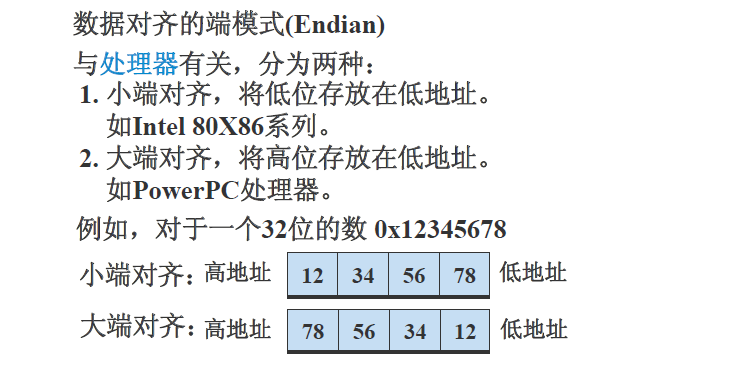
:::info
圖源: [如何判斷CPU是大端還是小端模式](如何判斷CPU是大端還是小端模式)
:::
## 主要可以分別為5個步驟:
1. init socket
2. bind socket
3. listen
4. accept
5. read/write
### 主要結構
```c
// 系統使用的類型
struct sockaddr {
unsigned short sa_family; // address family, AF_xxx
char sa_data[14]; // 14 bytes of protocol address
};
// 工程師為方便而定義的類型
// IPv4 AF_INET sockets:
struct sockaddr_in {
short sin_family; // 2 bytes e.g. AF_INET, AF_INET6
unsigned short sin_port; // 2 bytes e.g. htons(3490)
struct in_addr {
unsigned long s_addr; // 4 bytes e.g. htonl(127.0.0.1)
};
char sin_zero[8]; // 8 bytes zero this if you want to
};
```
* int socket(int socket_family, int socket_type, int protocol);
```c
//使用協議族
socket_family: AF_INET, AF_INET6, AF_UNIX, AF_ROUTE, AF_KEY, AF_UNSPEC
socket_type: SOCK_STREAM, SOCK_DGRAM, SOCK_RAW
protocol: 一般為0, type類型默認協議
```
### 主要函數
* int bind(int sockfd, const struct sockaddr *addr, socklen_t addrlen);
* 第二參數需要強轉成(struct sockaddr *addr)
* int listen(int sockfd, int backlog);
* backlog: 請求對列最大值
* int accept(int sockfd, struct sockaddr *addr, socklen_t *addrlen);
* sockfd - servfd
* *addr - struct for store client info
* *addrlen - size of the struct
### 函數 讀寫TCP/UDP
```c
> TCP 讀寫 函數
ssize_t write(int fd, const void *buf, size_t count);
ssize_t read(int fd, void *buf, size_t count);
ssize_t send(int socket, const void *buffer, size_t length, int flags);
ssize_t recv(int sockfd, void *buf, size_t len, int flags);
flag:
0: normal read
MSG_PEEK: 系統緩衝區資料複製到提供的接收緩衝區,但是系統緩衝區內容並沒有刪除。
(3)MSG_OOB:表示處理帶外資料
> UDP 讀寫 函數
ssize_t sendto(int sockfd, const void *buf, size_t len, int flags,
const struct sockaddr *dest_addr, socklen_t addrlen);
ssize_t recvfrom(int sockfd, void *buf, size_t len, int flags,
struct sockaddr *src_addr, sockl en_t *addrlen);
```
[參數參考](https://www.itread01.com/content/1549576655.html)
### 函數 轉換大小端:
```c
uint32_t htonl(uint32_t hostlong);
uint16_t htons(uint16_t hostshort);
uint32_t ntohl(uint32_t netlong);
uint16_t ntohs(uint16_t netshort);
int inet_aton(const char* straddr, struct in_addr* addrp);
char* inet_ntoa(struct in_addr inaddr);
```
## TCP - my test code
```c=
#include <sys/types.h>
#include <sys/socket.h>
#include <stdlib.h>
#include <stdio.h>
#include <errno.h>
#include <arpa/inet.h>
#include <netinet/in.h>
#include <string.h>
#include <unistd.h>
#include <signal.h>
#include <sys/wait.h>
#define handle_error(msg) \
do { perror(msg); exit(EXIT_FAILURE); } while(0);
void handler(int sig, siginfo_t *info, void *context)
{
while( waitpid(-1, NULL, WNOHANG) > 0);
}
int main(int argc, char **argv)
{
int s_fd;
int c_fd;
struct sockaddr_in s_addr;
struct sockaddr_in c_addr;
// 1. init socket
// int socket(int domiain, int type, int protocol);
s_fd = socket(AF_INET, SOCK_STREAM, 0);
if(s_fd == -1)
handle_error("socket");
// 2. blind socket
// int bind(int sockfd, const struct sockaddr &addr, socklen_t addrlen)
s_addr.sin_family = AF_INET;
s_addr.sin_port = htons(atoi(argv[1]));
s_addr.sin_addr.s_addr = htonl(INADDR_ANY);
//inet_aton("127.0.0.1", &s_addr.sin_addr);
int isBind = bind(s_fd, (struct sockaddr *) &s_addr, sizeof(s_addr));
// 3. listen
listen(s_fd, 10);
// 4. accept
unsigned int clen = sizeof(struct sockaddr_in);
char *readBuf = (char *)malloc(128);
char *msg = (char *) malloc(128);
int n_read;
while(1)
{
printf("wait for new connection: \n");
c_fd = accept(s_fd, (struct sockaddr *)&c_addr, &clen);
if(c_fd == -1)
handle_error("accept");
printf("Accept connection: %s\n", inet_ntoa(c_addr.sin_addr));
struct sigaction act = { .sa_flags=SA_SIGINFO, .sa_sigaction=handler };
sigaction(SIGCHLD, &act, NULL); // catch zombie processes
if(fork()==0)
{
// 5. read
while(1)
{
memset(readBuf, '\0', 128);
n_read = read(c_fd, readBuf, 128);
if(n_read == 0)
{
close(c_fd);
break;
}
if(n_read == -1) {
handle_error("read");
}else {
printf("ReadBuf: %s\n", readBuf);
}
}
}
printf("Connection complete.\n");
}
close(s_fd);
close(c_fd);
return 0;
}
```
## UDP - my test code
* 使用UDP是不用 listen()和accept()的喔
```c=
#include <sys/socket.h>
#include <sys/types.h>
#include <sys/wait.h>
#include <arpa/inet.h>
#include <unistd.h>
#include <string.h>
#include <stdio.h>
#include <stdlib.h>
#define handle_error(msg) \
do { perror(msg); exit(EXIT_FAILURE); } while(0);
void handler(int sig, siginfo_t *info, void *context)
{
while( waitpid(-1, NULL, WNOHANG) > 0);
}
int main(int argc, char **argv)
{
int s_fd;
int c_fd;
struct sockaddr_in s_addr;
struct sockaddr_in c_addr;
// 1. init socket
// int socket(int domiain, int type, int protocol);
s_fd = socket(AF_INET, SOCK_DGRAM, 0);
if(s_fd == -1)
handle_error("socket");
// 2. blind socket
// int bind(int sockfd, const struct sockaddr &addr, socklen_t addrlen)
s_addr.sin_family = AF_INET;
s_addr.sin_port = htons(atoi(argv[1]));
//s_addr.sin_addr.s_addr = htonl(INADDR_ANY);
inet_aton("127.0.0.1", &s_addr.sin_addr);
if((bind(s_fd, (struct sockaddr *) &s_addr, sizeof(s_addr))) == -1)
perror("bind");
char *readBuf = (char *)malloc(128);
int n_read;
if(!fork()) {
memset(readBuf, '\0', 128);
unsigned int clen = sizeof(struct sockaddr_in);
if((n_read = recvfrom(s_fd, readBuf, 128-1, 0, (struct sockaddr *)&c_addr, &clen)) == -1)
perror("recvfrom");
readBuf[128] = '\0';
fprintf(stdout, "packet nByte:%d, ReadBuf: %s\n", n_read, readBuf);
}
while(1)
sleep(5);
// never actually reach
close(s_fd);
close(c_fd);
return 0;
}
```
## Blocking
簡單來說 blocking在術語終究只是sleep的意思,很多函數都有blocking像是accpet, listen都是等待直到有數據再做反應。 通常當你創建socket時,內核都會設置blocking為預設值,如果不想blocking就需要用fcntl()函數。 如果你嘗試read()一個non-blocking的socket, 而socket裡沒有數據 -1會被返回 且errno設置為`EAGAIN` 或 `EWOULDBLOCK`。 一般其況來說 你不會想要這麼做 因為cpu會一直檢查socket裡面還有沒有資料 而占用很高的cpu資源,使用poll()會是更佳的選擇。
```c
sockfd = socket(PF_INET, SOCK_STREAM, 0);
fcntl(sockfd, F_SETFL, O_NONBLOCK);
```
:::info
poll()在面對巨大的連接時會非常的慢 請參考: [livevent](https://libevent.org/)更優解。
:::
### poll()
設置好fd結構後 全部放到同一個數組 在做監聽。(內核會幫你block 和 通知你是該event或是timeout)
```c
#include <poll.h>
int poll(struct pollfd fds[], nfds_t nfds, int timeout);
(fd數組, fd數目, 超時長度(聲明負數為"永久等待"))
returns the number of elements in the array that
have had an event occur.
```
pollfd的結構體
```c=
struct pollfd{
int fd; // the socket descriptor
short events; // bitmap of events we're interested in
short revents; // when poll() returns, bitmap of events that occurred
};
The events field is the bitwise-OR of the following:
POLLIN Alert me when data is ready to recv() on this socket.
POLLOUT Alert me when I can send() data to this socket without blocking.
```
>poll()返回了 多少個準備好的但沒說是哪一個,但告訴我們revents中有多少個非0的數值。
>如何增加,在已有的poll裡的增加fd:
如果fd array空間夠的話 可以直接加。 不夠的話就 realloc 開闢新的空間(這是廢話嗎 o_O?)
>如何刪除,已經在poll裡的fd:
方法一: 以最後元素 覆蓋 想刪除的元素後, 調用poll參數時時把nfds-1。
方法二: 直接把要刪掉的元素fd設置為-1,poll()自然會忽略。
:::spoiler 參考一下beej寫的poll例子 :D
```c=
#include <stdio.h>
#include <poll.h>
int main(void)
{
struct pollfd pfds[1]; // More if you want to monitor more
pfds[0].fd = 0; // Standard input
pfds[0].events = POLLIN; // Tell me when ready to read
// If you needed to monitor other things, as well:
//pfds[1].fd = some_socket; // Some socket descriptor
//pfds[1].events = POLLIN; // Tell me when ready to read
printf("Hit RETURN or wait 2.5 seconds for timeout\n");
int num_events = poll(pfds, 1, 2500); // 2.5 second timeout
if (num_events == 0) {
printf("Poll timed out!\n");
} else {
int pollin_happened = pfds[0].revents & POLLIN;
if (pollin_happened) {
printf("File descriptor %d is ready to read\n", pfds[0].fd);
} else {
printf("Unexpected event occurred: %d\n", pfds[0].revents);
}
}
return 0;
}
```
:::
[看看Beej寫的pollServer](https://beej.us/guide/bgnet/examples/pollserver.c)
### poll - my test code
```c=
#include <sys/types.h>
#include <sys/socket.h>
#include <stdlib.h>
#include <stdio.h>
#include <errno.h>
#include <arpa/inet.h>
#include <netinet/in.h>
#include <string.h>
#include <unistd.h>
#include <signal.h>
#include <sys/wait.h>
#include <poll.h>
#define handle_error(msg) \
do { perror(msg); exit(EXIT_FAILURE); } while(0);
void handler(int sig, siginfo_t *info, void *context)
{
while( waitpid(-1, NULL, WNOHANG) > 0);
}
int main(int argc, char **argv)
{
int s_fd;
int c_fd;
int isBind;
struct sockaddr_in s_addr;
struct sockaddr_in c_addr;
if(argc != 2)
handle_error("parameter invalid");
// set up server socket
if((s_fd = socket(AF_INET, SOCK_STREAM, 0)) == -1)
handle_error("socket");
s_addr.sin_family = AF_INET;
s_addr.sin_port = htons(atoi(argv[1]));
s_addr.sin_addr.s_addr = htonl(INADDR_ANY);
if((isBind = bind(s_fd, (struct sockaddr *) &s_addr, sizeof(s_addr))) == -1)
handle_error("bind");
listen(s_fd, 10);
int yes = 1;
// get rid of "address already in use" error message
setsockopt(s_fd, SOL_SOCKET, SO_REUSEADDR, &yes, sizeof(int));
// setup for server accept
unsigned int clen = sizeof(struct sockaddr_in);
char *readBuf = (char *)malloc(128);
char *msg = (char *) malloc(128);
int n_read;
// set up poll
int POLL_SIZE = 5;
int poll_count;
struct pollfd pfd[POLL_SIZE];
bzero( pfd, sizeof(pfd));
pfd[0].fd = s_fd;
pfd[0].events = POLL_IN;
poll_count = 1; // for server_fd
while(1)
{
int nfds;
if((nfds = poll(pfd, poll_count, -1)) == -1)
handle_error("poll");
for(int i=0; i < poll_count; i++)
{
if(pfd[i].revents & POLL_IN)
{
if(pfd[i].fd == s_fd)
{
if((c_fd = accept(s_fd, (struct sockaddr *)&c_addr, &clen)) == -1)
handle_error("accept");
// add to poll
pfd[poll_count].fd = c_fd;
pfd[poll_count].events = POLL_IN;
poll_count++;
printf("Accept connection: %s\n", inet_ntoa(c_addr.sin_addr));
if(poll_count == POLL_SIZE) handle_error("pollcount full"); // Todo
} else {
// listen client
if((n_read = recv(pfd[i].fd, readBuf, sizeof(readBuf), 0)) <= 0)
{
if(n_read == -1) handle_error("read");
if(n_read == 0) printf("socket hang up");
// remove from poll
close(c_fd);
pfd[i] = pfd[poll_count-1];
poll_count--;
}
printf("recieve: %s\n", readBuf);
}
}
}
}
close(s_fd);
close(c_fd);
return 0;
}
```
### select
告訴內核等待多個事件,只要有一個或多個事件發生 後續才會執行。
會用到的函數:
```c
int select(int numfds, fd_set *readfds, fd_set *writefds,
fd_set *exceptfds, struct timeval *timeout);
```
numfds 參數為 描述符的最高值+1。
timeout 參數為NULL為永久等待。
```c
struct timeval {
int tv_sec; // seconds
int tv_usec; // microseconds
};
```
可能會用的macro:
|Function| Description|
|--|--|
|FD_SET(int fd, fd_set *set); |Add fd to the set.|
|FD_CLR(int fd, fd_set *set); |Remove fd from the set.|
|FD_ISSET(int fd, fd_set *set); |Return true if fd is in the set.|
|FD_ZERO(fd_set *set); |Clear all entries from the set.|
[參考Beej select範例](https://beej.us/guide/bgnet/examples/select.c)
[參考Beej 使用select的多人聊天](https://beej.us/guide/bgnet/examples/selectserver.c)
### select - my test code
```c=
#include <sys/select.h>
#include <stddef.h>
#include <unistd.h>
#include <sys/socket.h>
#include <strings.h>
#include <stdio.h>
#include <sys/stat.h>
#include <fcntl.h>
struct timespec {
time_t tv_sec; /* Seconds */
long tv_nsec; /* Nanoseconds */
};
int main()
{
int ret;
char buf;
fd_set readfd;
int keyboard = open("/dev/tty", O_RDONLY|O_NONBLOCK);
struct timeval tv = {.tv_sec=3, .tv_usec=500000}; // 3.5s
while(1)
{
FD_ZERO(&readfd);
FD_SET(keyboard, &readfd);
ret = select(keyboard+1, &readfd, NULL, NULL, &tv);
bzero(&buf, 1);
if(FD_ISSET(keyboard, &readfd))
{
read(keyboard, &buf, 1);
if(buf == '\n')
continue;
fprintf(stdout, "key: %c\n", buf);
}
if(ret==0)
fprintf(stdout, "...\n");
}
return 0;
}
```
### epoll函數
* epoll是Linux特有的I/O復用函數。它在實現和使用上與select、poll有很大的差異。
* 首先,epoll使用一組函數來完成任務,而不是單個函數。
* 其次,epoll把用戶關心的文件描述符上的事件放在內核里的一個事件表中,從而無須像select和poll那樣每次調用都要重複傳入文件描述符集或事件集。
* 但epoll需要使用一個額外的文件描述符,來唯一標識內核中的這個事件表
epoll文件描述符使用如下方式創建:
```c
#include<sys/epoll.h>
int epoll_create(int size);
```
* size參數完全不起作用,只是給內核一個提示,告訴它事件表需要多大。該函數返回的文件描述符將用作其他所有epoll系統調用的第一個參數,以指定要訪問的內核事件表。
下面的函數用來操作epoll的內核事件表:
```c
#include<sys/epoll.h>
int epoll_ctl(int epfd, int op, int fd, struct epoll_event *event);
返回:若成功返回0,失敗返回-1,並置errno
```
fd參數是要操作的文件描述符,op參數則指定操作類型。操作類型有以下三類:
```c
EPOLL_CTL_ADD, 往事件表中註冊fd上的事件
EPOLL_CTL_MOD, 修改fd上的註冊事件
EPOLL_CTL_DEL, 刪除fd上的註冊事件
```
event指定事件,它是epoll_event結構指針類型,epoll_event的定義如下:
```c
strcut epoll_event{
__uint32_t events; //epoll事件
epoll_data_t data; //用戶數據
};
```
* 其中,events成員描述事件類型。epoll支持的事件類型同poll基本相同。表示epoll事件類型的宏在poll對應的宏前加上"E",比如epoll的數據可讀事件是EPOLLIN。
* epoll有兩個額外的事件類型——EPOLLET和EPOLLONESHOT。它們對於epoll的高效運作非常關鍵。
* data成員用於存儲用戶數據,是一個聯合體:
```c
typedef union epoll_data{ void *ptr; int fd; uint32_t u32; uint64_t u64; }epoll_data_t;
```
其中4個成員用得最多的是fd,它指定事件所從屬的目標文件描述符。
* epoll系列系統調用的主要接口是epoll_wait函數,它在一段超時時間內等待一組文件描述符上的事件,其原型如下:
```c
#include<sys/epoll.h>
int epoll_wait(int epfd, struct epoll_event *events, int maxevents, int timeout);
返回:若成功返回就緒的文件描述符個數,失敗時返回-1,並置errnoo
```
* maxevents參數指定最多監聽多少個事件,它必須大於0
* event_wait函數如果檢測到事件,就將所有就緒事件從內核事件表(由epfd參數指定)中複製到它的第二個參數events指向的數組中。這個數組只用於輸出epoll_wait檢測到的就緒事件,而不像select和poll的數組參數那樣既用於傳入用戶註冊的事件,又用於輸出內核檢測到的就緒事件。這就極大地提高了應用程式索引就緒文件描述符的效率。
下面代碼給出 poll和epoll在使用上的差別:
```c
//如何索引poll返回的就緒文件描述符
int ret = poll(fds, MAX_EVENT_NUMBER, -1);
//必須遍歷所有已註冊文件描述符並找到其中的就緒者
for(int i = 0; i < MAX_EVENT_NUMBER; ++i)
{
//判斷第 i 個文件描述符是否就緒
if(fds[i].revents & POLLIN) {
//處理sockfd
int sockfd = fds[i].fd;
}
}
// 如何索引epoll返回的文件描述符
int ret = epoll_wait(epollfd, events, MAX_EVENT_NUMBER, -1);
for(int i = 0; i < ret; ++i){ // 僅遍歷就緒的ret個文件描述符
int sockfd = events[i].data.fd; // sockfd肯定就緒,直接處理
}
```
* LT和ET模式
* LT(Level Trigger,電平觸發)模式:是默認工作模式,在這種模式下的epoll相當於一個效率較高的poll。當epoll_wait檢測到其上有事件發生並將此事件通知應用程式後,應用程式可以不立即處理該事件。這樣,當應用程式下一次調用epoll_wait時,epoll_wait還會再次向應用程式通告此事件。
* ET(Edge Trigger,邊沿觸發)模式。對於ET工作模式下的文件描述符,當epoll_wait檢測到其上有事件發生並將此事件通知應用程式後,應用程式必須立即處理該事件,因為後續的epoll_wait調用將不再向應用程式通知這一事件。
* ET模式在很大程度上降低了同一個epoll事件被重複觸發的次數。因此效率要比LT模式高。
* 每個使用ET模式的文件描述符都應該是非阻塞的。如果文件描述符是阻塞的,那麼讀或寫操作將會因為沒有後續的時間而一直處於阻塞狀態(饑渴狀態)
* EPOLLONESHOT事件
* 即使使用ET模式,一個socket上的某個事件還是可能被觸發多次。這在並發程序中引起一個問題。比如一個線程(或進程)在讀取完某個socket上的數據後開始處理這些數據,而在數據的處理過程中該socket上又有新數據可讀(EPOLLIN再次被觸發),此時另外一個線程被喚醒來讀取這些新的數據。於是出現了兩個線程同時操作一個socket的場面。這當然不是我們期望的。我們期望的是一個socket連接在任一時刻都只被一個線程處理。
* 對於註冊了EPOLLONESHOT事件的文件描述符,作業系統最多觸發其上註冊的一個可讀、可寫或異常事件,且只觸發一次,除非我們使用epoll_ctl函數重置該文件描述符上的EPOLLONESHOT事件。這樣,當一個線程在處理某個socket時,其他線程時不可能有機會操作該socket的。但反過來思考,註冊了EPOLLONESHOT事件的socket一旦被某個線程處理完畢,該線程就應該立即重置這個socket上的EPOLLONESHOT事件,以確保這個socket下一次可讀時,其EPOLLIN事件能被觸發,進而讓其他工作線程有機會繼續處理這個socket.
:::info
原文網址:https://kknews.cc/code/eo96arz.html
:::
### 如何確保完整的傳送
從man手冊上可知write()是不保證傳送的完整性、但我們可以知道已完成傳送的數量單位。 以下是Beej's教程上的處理方式:
```c=
#include <sys/types.h>
#include <sys/socket.h>
int sendall(int s, char *buf, int *len)
{
int total = 0; // how many bytes we've sent
int bytesleft = *len; // how many we have left to send
int n;
while(total < *len) {
n = send(s, buf+total, bytesleft, 0);
if (n == -1) { break; }
total += n;
bytesleft -= n;
}
*len = total; // return number actually sent here
return n==-1?-1:0; // return -1 on failure, 0 on success
}
```
調用的片段:
```c=
char buf[10] = "Beej!";
int len;
len = strlen(buf);
if (sendall(s, buf, &len) == -1) {
perror("sendall");
printf("We only sent %d bytes because of the error!\n", len);
}
```
## 如何打包數據
這個還沒弄懂 先不寫...
先把資料放好 慢慢啃 :D :confounded:
[我好像還沒完全搞懂喔FP2C](https://courses.cs.washington.edu/courses/cse351/17wi/sections/03/)
[Serialization:如何封裝資料](https://beej-zhtw-gitbook.netdpi.net/jin_jie_ji_shu/serializationff1a_ru_he_feng_zhuang_zi_liao)
[如何封裝資料](https://beej-zhtw-gitbook.netdpi.net/jin_jie_ji_shu/zi_liao_feng_zhuang)
---
## 服务端如何判断客户端断开连接
[tcp 服务端如何判断客户端断开连接](https://blog.csdn.net/xpj8888/article/details/88592670)
---
---
# Memory Mapped Files
Its just a cool way to write files instead use open, write functions. This mmap is faster. :smile:
mmap()是一个简单且方便的函数,他帮你把要用的文件映射到记忆体上,然后可以用指针来操控数据。
**务必躲过的坑洞** 在open()开启文件时,文件大小不可以为0。否则你会得到"Bus Error (Core Dumped)"的错误
```c=
void *mmap(void *addr, size_t len, int prot,
int flags, int fildes, off_t off);
```
第一个: addr, 我们要映射到的地址。 (caddr_t)0 书上推荐,让系统为你决定。 如地址不为页数的倍数可能会报错。
第二个: len, 映射到内存的长度。 可以是你想要大小,如未满页数大小就会四舍五入得到一个页,多餘的字節將為0,並且您對其進行的任何更改都不會修改該文件。
第三个: prot, 选择你要的保护(protect)参数 PROT_READ, PROT_WRITE, PROT_EXEC。 该函数必须与open()中mode一致。
第四个: flags, MAP_SHARED, MAP_PRIVATE。 分别为**分享**和**私用**,私用是不会对原文件起到作用的。
第五个: fd, open()函数返回的描述符
第六个: off, 开始读取的偏移量。限制條件:must be multiple of virtual memory。 可以用getpagesize()得到。
## My test code
```c=
#include <stdio.h>
#include <unistd.h>
#include <sys/mman.h>
#include <sys/stat.h>
#include <fcntl.h>
#include <string.h>
int main() {
int pagesize = getpagesize();
int fd;
char *addr;
printf("page size: %d\n", pagesize);
if((fd= open("file", O_RDWR|O_CREAT, 0666)) == -1)
perror("fd");
// file size must be at least 1 byte, "Bus error (core dumped)" error otherwise
write(fd,"",1);
if((addr = mmap(NULL, 10, PROT_READ|PROT_WRITE, MAP_SHARED, fd, 0)) == MAP_FAILED)
perror("mmap");
close(fd);
int c ='a';
for(int i=0; i<10;i++)
{
*(addr+i) = '\0';
memcpy(addr+i, &c, 1);
//memcpy((*(addr+i)).name, &temp, 1);
//(*(addr+i)).age=i;
c++;
}
for(int j=0;j<10;j++)
{
printf("no:%d\n", *(addr+j));
}
if(munmap(addr, pagesize) == -1)
perror("munmap");
}
```
[Beej's Guide](http://beej.us/guide/bgipc/html/multi/mmap.html)
---
---
# References
:::info
**[The Linux Programmer's Guide](https://tldp.org/LDP/lpg/)
**[Beej's Guide](http://beej.us/guide/bgipc/html/multi/index.html)
:::
###### tags: `Linux`
 Sign in via Google
 Sign in via Facebook
 Sign in via X(Twitter)
 Sign in via GitHub
 Sign in via Dropbox
 Sign in with Wallet
Connect another wallet
Sign in with Wallet
Connect another wallet